Processing method:
start ResourceManager
command:
yarn --daemon start resourcemanager
If failed on connection exception: java.net.connectexception: connection timeout occurs
just turn off the firewall.
Processing method:
start ResourceManager
command:
yarn --daemon start resourcemanager
If failed on connection exception: java.net.connectexception: connection timeout occurs
just turn off the firewall.
Bitcake failed on the simplest recipe
1. Compilation error: error: execution of event handler ‘sstate’_ eventhandler2’ failed
Download the yocto code. When compiling, the following errors are reported:
$ bitbake core-image-minimal
Loading cache: 100% |##########################################################################################################| Time: 0:00:00
Loaded 1320 entries from dependency cache.
ERROR: Execution of event handler 'sstate_eventhandler2' failed
Traceback (most recent call last):
  File "/home/some-user/projects/melp/poky/meta/classes/sstate.bbclass", line 1015, in sstate_eventhandler2(e=<bb.event.ReachableStamps object at 0x7fbc17f2e0f0>):
                 for l in lines:
    >                (stamp, manifest, workdir) = l.split()
                     if stamp not in stamps:
ValueError: not enough values to unpack (expected 3, got 1)

ERROR: Command execution failed: Traceback (most recent call last):
  File "/home/some-user/projects/melp/poky/bitbake/lib/bb/command.py", line 101, in runAsyncCommand
    self.cooker.updateCache()
  File "/home/some-user/projects/melp/poky/bitbake/lib/bb/cooker.py", line 1658, in updateCache
    bb.event.fire(event, self.databuilder.mcdata[mc])
  File "/home/some-user/projects/melp/poky/bitbake/lib/bb/event.py", line 201, in fire
    fire_class_handlers(event, d)
  File "/home/some-user/projects/melp/poky/bitbake/lib/bb/event.py", line 124, in fire_class_handlers
    execute_handler(name, handler, event, d)
  File "/home/some-user/projects/melp/poky/bitbake/lib/bb/event.py", line 96, in execute_handler
    ret = handler(event)
  File "/home/some-user/projects/melp/poky/meta/classes/sstate.bbclass", line 1015, in sstate_eventhandler2
    (stamp, manifest, workdir) = l.split()
ValueError: not enough values to unpack (expected 3, got 1)
It looks like a python error. Who knows what the problem is? Am I using the wrong version?
The following is the output of Python — version
$ python --version
Python 2.7.12
2. How to solve it?
Delete the TMP and sstate cache directories, try again, and compile OK
When I started es on Linux today, it showed that I did not find the route of the host, and I reported similar errors before, because the port was not configured in Alibaba cloud security group configuration, and this problem was solved after configuration. Today, this problem arises again. I can’t help but let people think about it. Later, it was found that kenneng was caused by insufficient memory automatically allocated to the JVM when ES was started. Therefore, we need to modify the default memory parameters.
We go to jvm.options under config in the ES folder
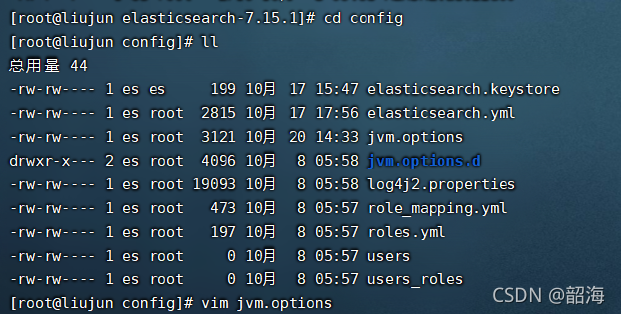
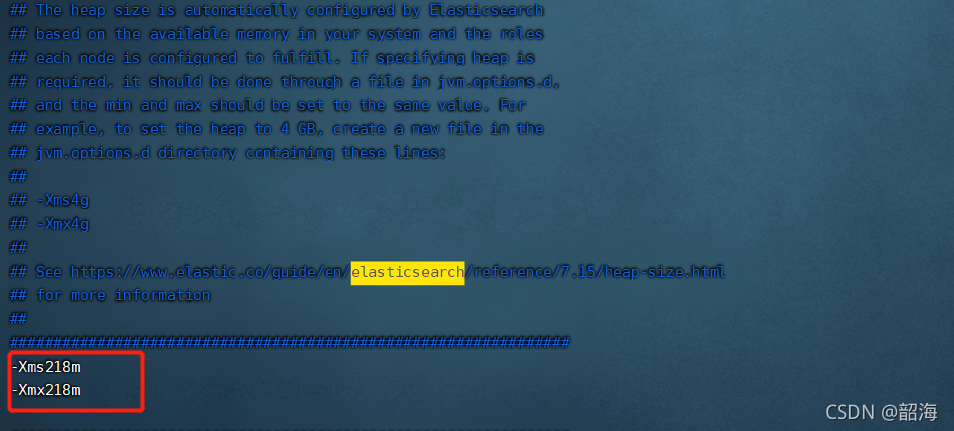
Since the memory of the server you bought is only 2G, 218m is allocated (Note: – XMS and no space between numbers)
It took a long time today to find out the real problem.
There are two situations most likely to cause the whole exception:
1. No permission is given;
a. Permission application is not added in androidmanifest.xml;
<uses-permission android:name="android.permission.INTERNET"/>b. The format of permission application is incorrect
<!-- Mistake -->
<uses-permission android:name="android.permission.INTERNET"></uses-permission>
c. The permission is manually shielded by the user;
2. Port less than 1024; Set a larger one, not more than the largest one;
Enter the project root directory and open the command line for execution
git config --unset credential.helper
git config credential.helper store
Then pull the code in the command line mode and re-enter the account and password
There is no problem in direct operation, but the architecture/IPA/upload Appstore reports the error “unsupported architecture. Your executable contains unsupported architecture ‘[x86_64, i386]
Solution:
remove the supporting simulators i386 and x86_64 architecture in Baidu’s aipbase.framework and aipocrsdk.framework
# Use lipo -info to see what architecture is included
lipo -info AipBase.framework/AipBase  # Architectures in the fat file: AipBase are: i386 x86_64 armv7 armv7s arm64
# remove x86_64, i386
lipo -remove x86_64 AipBase.framework/AipBase -o AipBase.framework/AipBase
lipo -remove i386 AipBase.framework/AipBase -o AipBase.framework/AipBase
lipo -remove x86_64 AipOcrSdk.framework/AipOcrSdk -o AipOcrSdk.framework/AipOcrSdk
lipo -remove i386 AipOcrSdk.framework/AipOcrSdk -o AipOcrSdk.framework/AipOcrSdk
# re-check
lipo -info AipBase.framework/AipBase # Architectures in the fat file: AipBase are: armv7 armv7s arm64
1. After installing hive, it can’t start and reports the following error
[ERROR] Terminal initialization failed; falling back to unsupported java.lang.IncompatibleClassChangeError: Found class jline
The reason is the presence of an old version of jline in the hadoop directory.
/hadoop-2.6.5/share/hadoop/yarn/lib:
-rw-r–r– 1 wkz wkz 87325 Mar 10 18:10 jline-0.9.94.jar
Solution:
Copy the JAR package of the new version of jline under hive to hadoop at.
cp /hive/lib/jline-2.12.jar ./
/hadoop-2.6.5/share/hadoop/yarn/lib:
-rw-r–r– 1 wkz wkz 87325 Mar 10 18:10 jline-0.9.94.jar
-rw-r–r– 1 wkz wkz 213854 Mar 11 22:22 jline-2.12.jar
Then delete the old jline-0.9.94.jar package, or rename it and start successfully.
————————————————
Problem description
execute the NPM install command to install all dependencies, and then run NPM run dev to report an error:
error  in ./node_modules/view-design/dist/styles/iview.css

Module build failed: Error: No PostCSS Config found in: /Users/lanweihong/Code/JS/hotel-pms/node_modules/view-design/dist/styles
    at config.search.then (/Users/lanweihong/Code/JS/hotel-pms/node_modules/postcss-load-config/src/index.js:91:15)
    at <anonymous>
Solution
create a new postcss.config.js file in the project root directory. Postcss.config.js is a special processing for webpack 3.0.
postcss.config.js
module.exports = {
    plugins: {
      'autoprefixer': {browsers: 'last 5 version'}
    }
}
Rerun NPM run dev.
In the Linux system, an error is reported through the service or systemctl command
Failed to allocate directory watch: Too many open files
The solution is as follows
vim /etc/sysctl.conf
	fs.inotify.max_user_instances=512
	fs.inotify.max_user_watches=262144
Add the above two lines
to execute
sysctl -p
Syactl – a view all current system parameters
When learning Redux, the code cloned from the official GitHub runs with errors
failed to load config “react app” to extend from.
referenced from: F:\web\react\Redux\examples\Redux master\redux.Eslintrc.JS
when checking the data, it is found that most of the problems are caused by the lack of eslint, However, for the official demo, the problem is that the version of eslint conflicts with the version you downloaded, and the method of configuring. Env also fails
the solution is to comment out the configuration content in.Eslintrc.js directly.
Android studio gives the following error after clicking “run app”
Installation did not succeed.
The application could not be installed: INSTALL_FAILED_USER_RESTRICTED

List of apks:
[0] 'E:\MyProject\xxx\app\build\outputs\apk\debug\xxxxx_.apk'
Installation via USB is disabled.
Troubleshooting steps:
1. It may be that the USB installation is not enabled in the developer option. Check whether it is enabled and try again
2. It is possible that the application tag of androidmanifest.xml has been added
android:appComponentFactory=""
tools:replace="android:appComponentFactory"
Delete this attribute and try again.