General reason: the configuration file was modified when the Nacos service was not closed
Solution: close Nacos and delete the data, logs and status directories under the Nacos installation folder Then restart
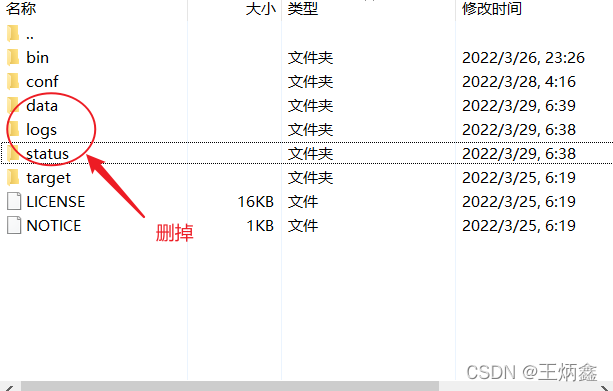
General reason: the configuration file was modified when the Nacos service was not closed
Solution: close Nacos and delete the data, logs and status directories under the Nacos installation folder Then restart
Problem Description:
Description:
Web server failed to start. Port 8080 was already in use.
Action:
Identify and stop the process that’s listening on port 8080 or configure this application to listen on another port.
Method 1: turn off the process occupying port 8080

3. Then enter tasklist|findstr “3516” and press enter to get the process occupying port 8080

4. Open the “task manager”, locate the change process, and then end the process. The occupation of port 8080 is cancelled
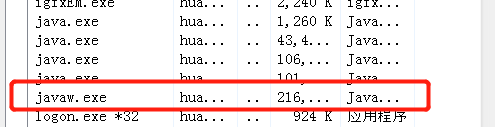
Or close with the command: taskkill -PID 3516 -F
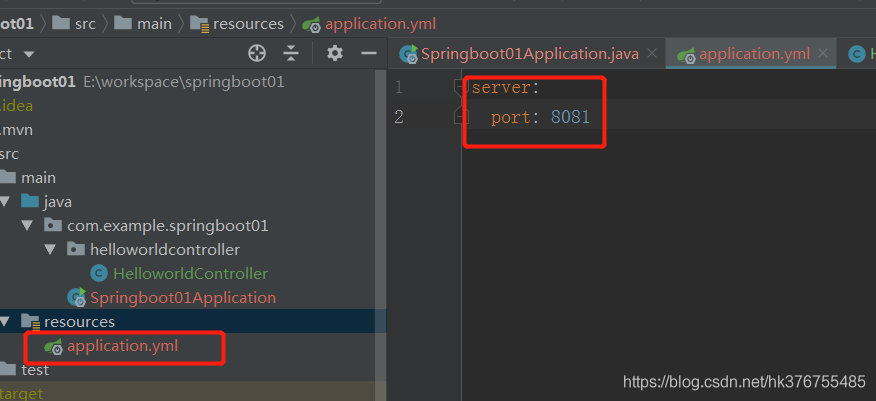
Method 2: modify the configuration file and use other available ports
We can modify the port number in application.yml configuration file, as shown below:
View port, process and end process on Linux system
  a,Check port occupancy
    netstat -nap|grep 8080
  b,View port occupied processes
     ps -aux |grep 27672
   c,End a process
    kill -9 pid
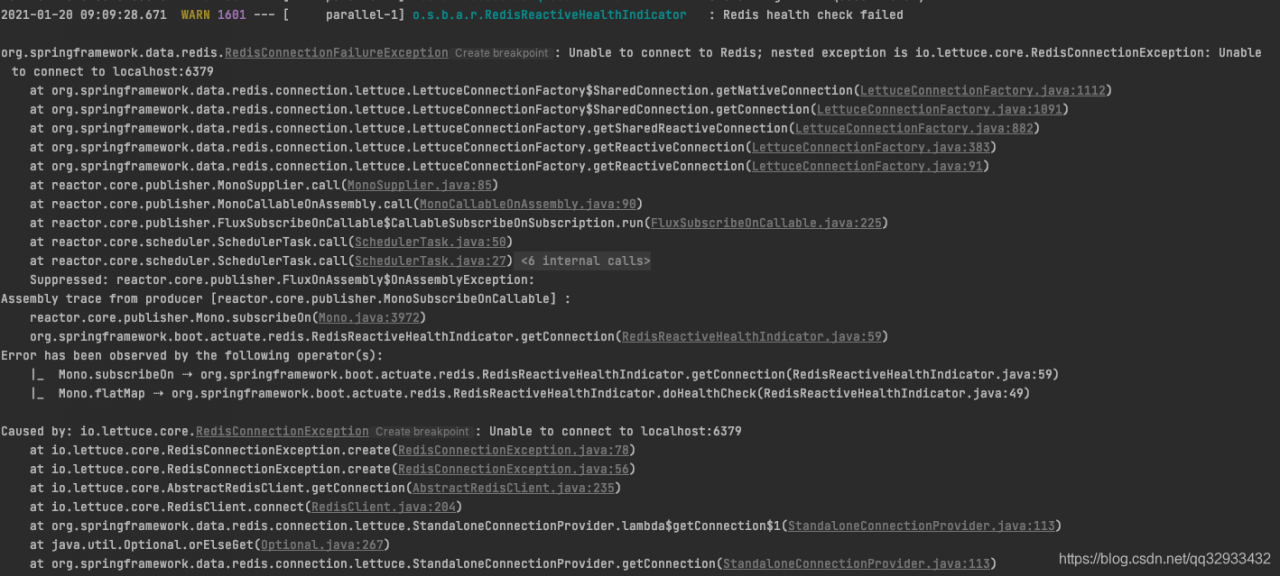
Error reporting details
Analysis and solution
There is no connection of redis in my project, so it’s strange to report an error. Combined with the sentence redis health check failed, guess which thing introduced redis, and then do the health check of redis.
The solution is as follows: configurate as the following in application.yml
# Disable Actuator monitoring of Redis connections
management:
  health:
    redis:
      enabled: false
Logon failed, use ctrl+c to cancel basic credential prompt.
Today, when updating something on gitHub, the password is correct, and you can’t log in more than push. According to the prompt, you find that the previous configuration doesn’t work. The updated configuration is as follows:



set it in the individual
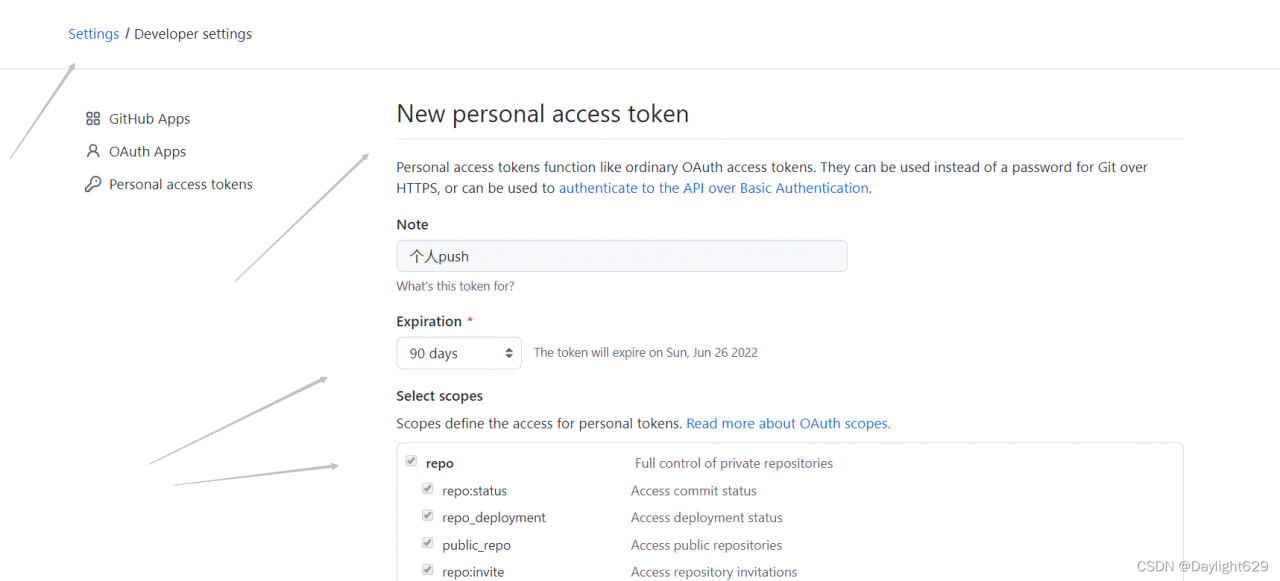
Check these
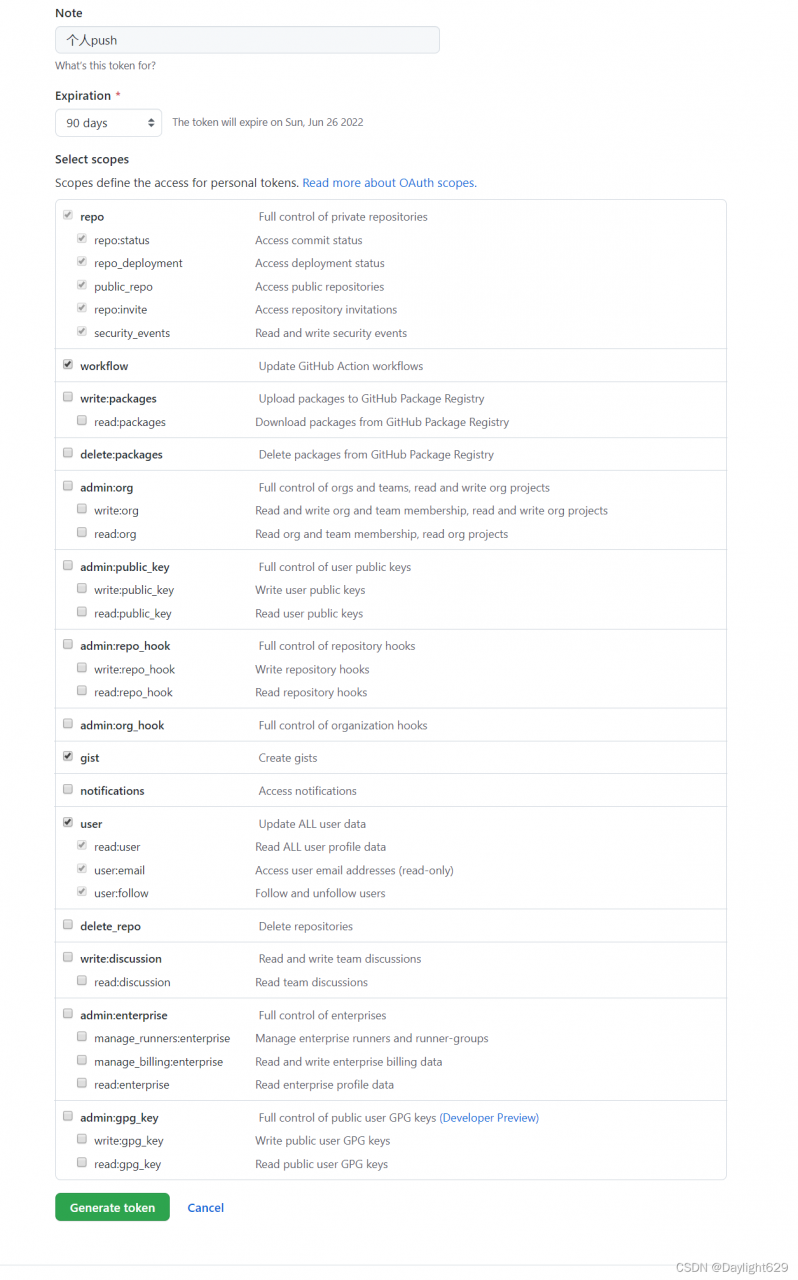
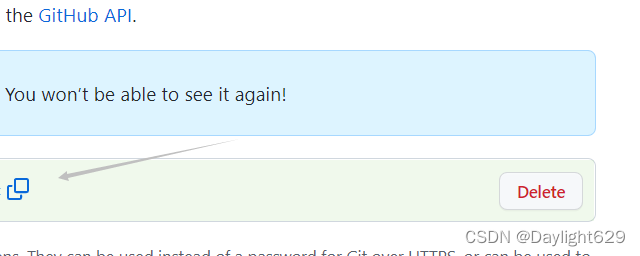
Generate a token and record it
Continue to push. Enter the password of the account when logging in for the first time, and enter the generated token for the second time

successfully push
Problems encountered
/home/optimizer-master/third_party/onnx_common/tensor.h:117: size_from_dim: Assertion dim >= 0 && (size_t)dim < sizes_.size() failed.
Problem description
When import onnx, I encountered the above problems
Solution:
If there is an op operation that cannot be exported during onnx export, this error will be reported
How to Solve:
find the operation that cannot be exported and add a judgment. If you export onnx, the op will not be used. An example is as follows
def forward(self, x):
    if torch.onnx.is_in_onnx_export():# if onnx
        return x * self.act(x)/6
    else: # normally
        return x * self.act(x + 3)/6
D:\docker_devops\ec>docker-compose up
[+] Building 0.6s (3/3) FINISHED
 => [internal] load build definition from php5-Dockerfile                                                          0.4s
 => => transferring dockerfile: 315B                                                                               0.0s
 => [internal] load .dockerignore                                                                                  0.4s
 => => transferring context: 2B                                                                                    0.0s
 => ERROR [internal] load metadata for docker.registry.xxxxx.com:5000/develop/php-with-supervisor:5.6.5              0.1s
------
 > [internal] load metadata for docker.registry.xxxxx.com:5000/develop/php-with-supervisor:5.6.5:
------
failed to solve: failed to solve with frontend dockerfile.v0: failed to create LLB definition: failed to do request: Head "https://docker.registry.xxxxx.com:5000/v2/develop/php-with-supervisor/manifests/5.6.5": http: server gave HTTP response to HTTPS client

D:\docker_devops\ec>
Error Messages:
failed to solve: failed to solve with frontend dockerfile.v0: failed to create LLB definition: failed to do request: Head "https://docker.registry.xxxx.com:5000/v2/develop/php-with-supervisor/manifests/5.6.5": http: server gave HTTP response to HTTPS client
Solution:
Add the following configuration in Engine of docker destorp Setting
“features”: {
“buildkit”: false
}
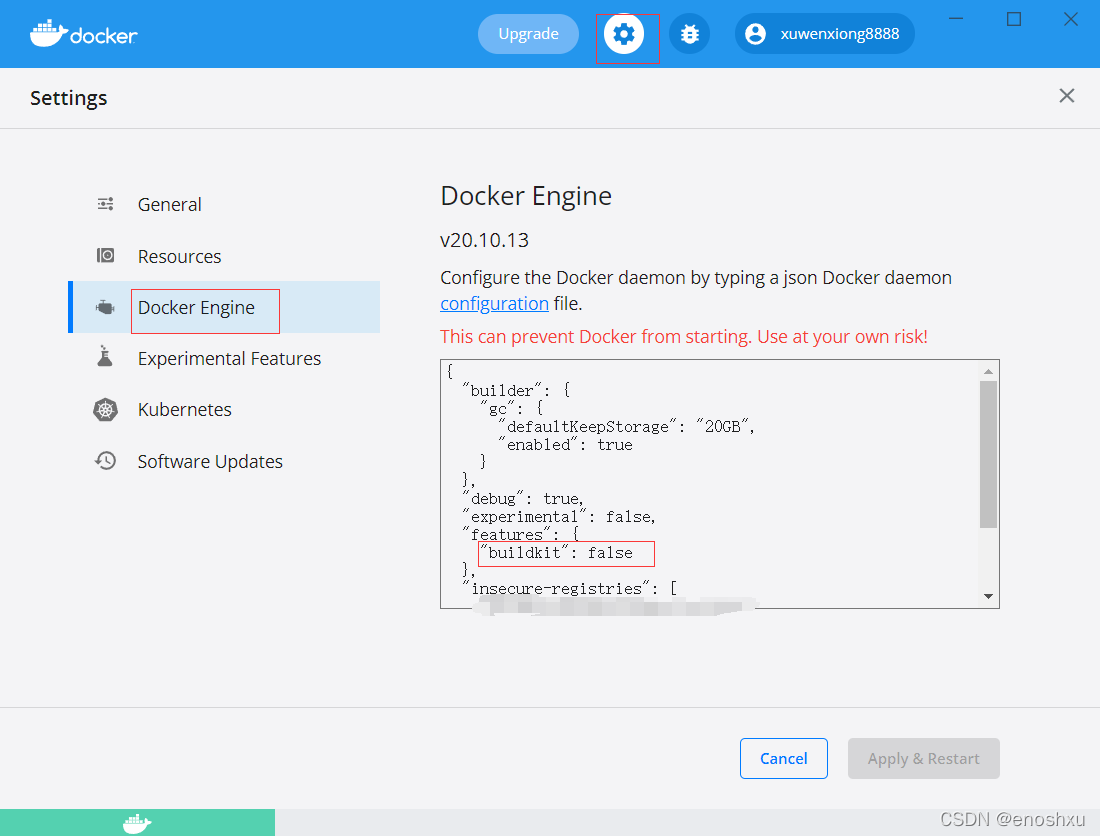
Original error report:
2020-11-30 18:39:08.019  WARN 17664 --- [-192.168.113.22] s.b.a.e.ElasticsearchRestHealthIndicator : Elasticsearch health check failed

java.net.ConnectException: Timeout connecting to [localhost/127.0.0.1:9200]
	at org.elasticsearch.client.RestClient$SyncResponseListener.get(RestClient.java:943) ~[elasticsearch-rest-client-6.4.3.jar:6.4.3]
	at org.elasticsearch.client.RestClient.performRequest(RestClient.java:227) ~[elasticsearch-rest-client-6.4.3.jar:6.4.3]
	at org.springframework.boot.actuate.elasticsearch.ElasticsearchRestHealthIndicator.doHealthCheck(ElasticsearchRestHealthIndicator.java:60) ~[spring-boot-actuator-2.1.7.RELEASE.jar:2.1.7.RELEASE]
	at org.springframework.boot.actuate.health.AbstractHealthIndicator.health(AbstractHealthIndicator.java:82) ~[spring-boot-actuator-2.1.7.RELEASE.jar:2.1.7.RELEASE]
	at org.springframework.boot.actuate.health.CompositeHealthIndicator.health(CompositeHealthIndicator.java:95) [spring-boot-actuator-2.1.7.RELEASE.jar:2.1.7.RELEASE]
	at org.springframework.boot.actuate.health.HealthEndpoint.health(HealthEndpoint.java:50) [spring-boot-actuator-2.1.7.RELEASE.jar:2.1.7.RELEASE]
	at sun.reflect.NativeMethodAccessorImpl.invoke0(Native Method) ~[na:1.8.0_161]
	at sun.reflect.NativeMethodAccessorImpl.invoke(NativeMethodAccessorImpl.java:62) ~[na:1.8.0_161]
	at sun.reflect.DelegatingMethodAccessorImpl.invoke(DelegatingMethodAccessorImpl.java:43) ~[na:1.8.0_161]
	at java.lang.reflect.Method.invoke(Method.java:498) ~[na:1.8.0_161]
	at org.springframework.util.ReflectionUtils.invokeMethod(ReflectionUtils.java:282) [spring-core-5.1.9.RELEASE.jar:5.1.9.RELEASE]
	at org.springframework.boot.actuate.endpoint.invoke.reflect.ReflectiveOperationInvoker.invoke(ReflectiveOperationInvoker.java:76) [spring-boot-actuator-2.1.7.RELEASE.jar:2.1.7.RELEASE]
	at org.springframework.boot.actuate.endpoint.annotation.AbstractDiscoveredOperation.invoke(AbstractDiscoveredOperation.java:60) [spring-boot-actuator-2.1.7.RELEASE.jar:2.1.7.RELEASE]
	at org.springframework.boot.actuate.endpoint.jmx.EndpointMBean.invoke(EndpointMBean.java:121) [spring-boot-actuator-2.1.7.RELEASE.jar:2.1.7.RELEASE]
	at org.springframework.boot.actuate.endpoint.jmx.EndpointMBean.invoke(EndpointMBean.java:96) [spring-boot-actuator-2.1.7.RELEASE.jar:2.1.7.RELEASE]
	at com.sun.jmx.interceptor.DefaultMBeanServerInterceptor.invoke(DefaultMBeanServerInterceptor.java:819) [na:1.8.0_161]
	at com.sun.jmx.mbeanserver.JmxMBeanServer.invoke(JmxMBeanServer.java:801) [na:1.8.0_161]
	at javax.management.remote.rmi.RMIConnectionImpl.doOperation(RMIConnectionImpl.java:1468) [na:1.8.0_161]
	at javax.management.remote.rmi.RMIConnectionImpl.access$300(RMIConnectionImpl.java:76) [na:1.8.0_161]
	at javax.management.remote.rmi.RMIConnectionImpl$PrivilegedOperation.run(RMIConnectionImpl.java:1309) [na:1.8.0_161]
	at javax.management.remote.rmi.RMIConnectionImpl.doPrivilegedOperation(RMIConnectionImpl.java:1401) [na:1.8.0_161]
	at javax.management.remote.rmi.RMIConnectionImpl.invoke(RMIConnectionImpl.java:829) [na:1.8.0_161]
	at sun.reflect.NativeMethodAccessorImpl.invoke0(Native Method) ~[na:1.8.0_161]
	at sun.reflect.NativeMethodAccessorImpl.invoke(NativeMethodAccessorImpl.java:62) ~[na:1.8.0_161]
	at sun.reflect.DelegatingMethodAccessorImpl.invoke(DelegatingMethodAccessorImpl.java:43) ~[na:1.8.0_161]
	at java.lang.reflect.Method.invoke(Method.java:498) ~[na:1.8.0_161]
	at sun.rmi.server.UnicastServerRef.dispatch(UnicastServerRef.java:361) [na:1.8.0_161]
	at sun.rmi.transport.Transport$1.run(Transport.java:200) [na:1.8.0_161]
	at sun.rmi.transport.Transport$1.run(Transport.java:197) [na:1.8.0_161]
	at java.security.AccessController.doPrivileged(Native Method) [na:1.8.0_161]
	at sun.rmi.transport.Transport.serviceCall(Transport.java:196) [na:1.8.0_161]
	at sun.rmi.transport.tcp.TCPTransport.handleMessages(TCPTransport.java:568) [na:1.8.0_161]
	at sun.rmi.transport.tcp.TCPTransport$ConnectionHandler.run0(TCPTransport.java:826) [na:1.8.0_161]
	at sun.rmi.transport.tcp.TCPTransport$ConnectionHandler.lambda$run$0(TCPTransport.java:683) [na:1.8.0_161]
	at java.security.AccessController.doPrivileged(Native Method) [na:1.8.0_161]
	at sun.rmi.transport.tcp.TCPTransport$ConnectionHandler.run(TCPTransport.java:682) [na:1.8.0_161]
	at java.util.concurrent.ThreadPoolExecutor.runWorker(ThreadPoolExecutor.java:1149) ~[na:1.8.0_161]
	at java.util.concurrent.ThreadPoolExecutor$Worker.run(ThreadPoolExecutor.java:624) ~[na:1.8.0_161]
	at java.lang.Thread.run(Thread.java:748) ~[na:1.8.0_161]
Caused by: java.net.ConnectException: Timeout connecting to [localhost/127.0.0.1:9200]
	at org.apache.http.nio.pool.RouteSpecificPool.timeout(RouteSpecificPool.java:169) ~[httpcore-nio-4.4.11.jar:4.4.11]
	at org.apache.http.nio.pool.AbstractNIOConnPool.requestTimeout(AbstractNIOConnPool.java:628) ~[httpcore-nio-4.4.11.jar:4.4.11]
	at org.apache.http.nio.pool.AbstractNIOConnPool$InternalSessionRequestCallback.timeout(AbstractNIOConnPool.java:894) ~[httpcore-nio-4.4.11.jar:4.4.11]
	at org.apache.http.impl.nio.reactor.SessionRequestImpl.timeout(SessionRequestImpl.java:183) ~[httpcore-nio-4.4.11.jar:4.4.11]
	at org.apache.http.impl.nio.reactor.DefaultConnectingIOReactor.processTimeouts(DefaultConnectingIOReactor.java:210) ~[httpcore-nio-4.4.11.jar:4.4.11]
	at org.apache.http.impl.nio.reactor.DefaultConnectingIOReactor.processEvents(DefaultConnectingIOReactor.java:155) ~[httpcore-nio-4.4.11.jar:4.4.11]
	at org.apache.http.impl.nio.reactor.AbstractMultiworkerIOReactor.execute(AbstractMultiworkerIOReactor.java:351) ~[httpcore-nio-4.4.11.jar:4.4.11]
	at org.apache.http.impl.nio.conn.PoolingNHttpClientConnectionManager.execute(PoolingNHttpClientConnectionManager.java:221) ~[httpasyncclient-4.1.4.jar:4.1.4]
	at org.apache.http.impl.nio.client.CloseableHttpAsyncClientBase$1.run(CloseableHttpAsyncClientBase.java:64) ~[httpasyncclient-4.1.4.jar:4.1.4]
	... 1 common frames omitted
Solution: add the following configuration to solve the problem successfully
  data:
    elasticsearch:
      repositories:
        enabled: true
      cluster-nodes: 192.168.136.137:9300
      cluster-name: docker-cluster
  #      Add the following configuration to pass the health check
  elasticsearch:
    rest:
      uris: ["http://192.168.136.137:9200"]
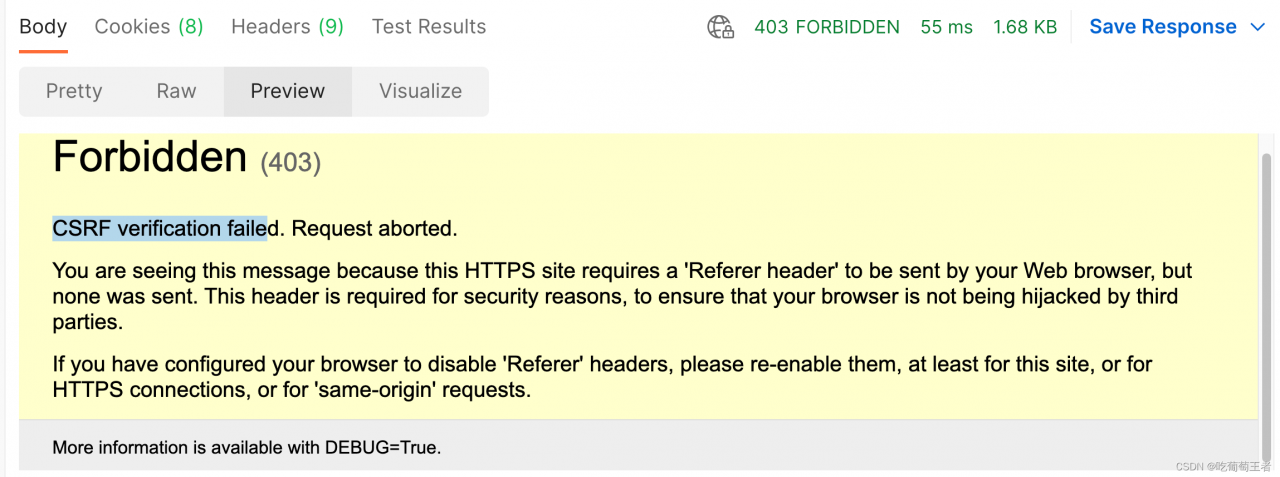
As shown in the picture, the CSRF authentication failed.
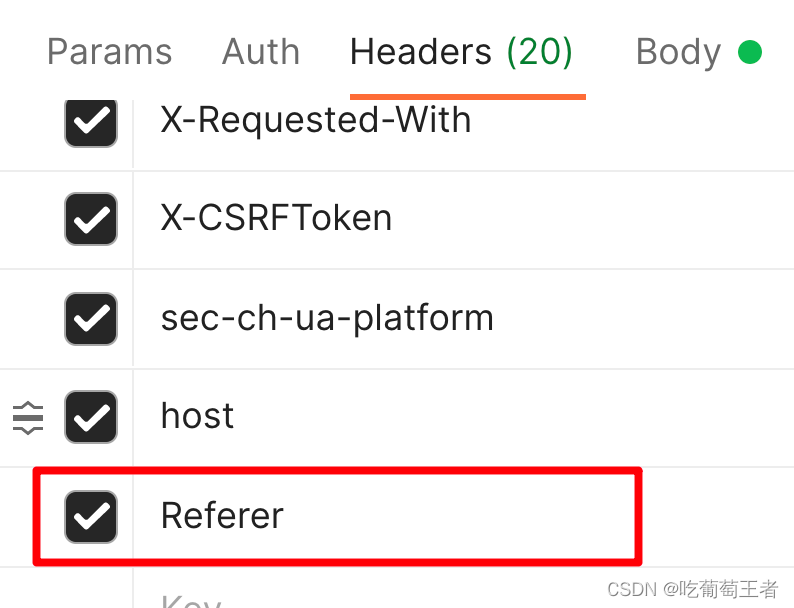
I grabbed the package from the browser, the browser runs normally, but postman will run inside the error, see the error is the lack of Referer header, after analysis and try, found that in fact the description of the interface call command header is missing a header called Referer, open F12 in the browser can be found in Request Headers, copy it to postman

When a SpringBoot high version project introduces swagger version 2.9.2, an error is reported when starting the project.
as a result of:
After springboot version 2.6.0, the default path matching policy of spring MVC was changed from antpathmatcher to pathpatternparser, resulting in an error! (the lower version of swagger is not compatible with the higher version of springboot)
The solution is to switch back to the original AntPathMatcher and configure it in the configuration file
spring.mvc.pathmatch.matching-strategy = ant_path_matcher
2022-04-01 10:59:37.480 ERROR 5252 --- [           main] o.s.boot.SpringApplication               : Application run failed

org.springframework.context.ApplicationContextException: Failed to start bean 'documentationPluginsBootstrapper'; nested exception is java.lang.NullPointerException
	at org.springframework.context.support.DefaultLifecycleProcessor.doStart(DefaultLifecycleProcessor.java:181) ~[spring-context-5.3.13.jar:5.3.13]
	at org.springframework.context.support.DefaultLifecycleProcessor.access$200(DefaultLifecycleProcessor.java:54) ~[spring-context-5.3.13.jar:5.3.13]
	at org.springframework.context.support.DefaultLifecycleProcessor$LifecycleGroup.start(DefaultLifecycleProcessor.java:356) ~[spring-context-5.3.13.jar:5.3.13]
	at java.lang.Iterable.forEach(Iterable.java:75) ~[na:1.8.0_271]
	at org.springframework.context.support.DefaultLifecycleProcessor.startBeans(DefaultLifecycleProcessor.java:155) ~[spring-context-5.3.13.jar:5.3.13]
	at org.springframework.context.support.DefaultLifecycleProcessor.onRefresh(DefaultLifecycleProcessor.java:123) ~[spring-context-5.3.13.jar:5.3.13]
	at org.springframework.context.support.AbstractApplicationContext.finishRefresh(AbstractApplicationContext.java:935) ~[spring-context-5.3.13.jar:5.3.13]
	at org.springframework.context.support.AbstractApplicationContext.refresh(AbstractApplicationContext.java:586) ~[spring-context-5.3.13.jar:5.3.13]
	at org.springframework.boot.web.servlet.context.ServletWebServerApplicationContext.refresh(ServletWebServerApplicationContext.java:145) ~[spring-boot-2.6.1.jar:2.6.1]
	at org.springframework.boot.SpringApplication.refresh(SpringApplication.java:730) [spring-boot-2.6.1.jar:2.6.1]
	at org.springframework.boot.SpringApplication.refreshContext(SpringApplication.java:412) [spring-boot-2.6.1.jar:2.6.1]
	at org.springframework.boot.SpringApplication.run(SpringApplication.java:302) [spring-boot-2.6.1.jar:2.6.1]
	at org.springframework.boot.SpringApplication.run(SpringApplication.java:1301) [spring-boot-2.6.1.jar:2.6.1]
	at org.springframework.boot.SpringApplication.run(SpringApplication.java:1290) [spring-boot-2.6.1.jar:2.6.1]
	at com.ji.Springboot09SwaggerApplication.main(Springboot09SwaggerApplication.java:10) [classes/:na]
Caused by: java.lang.NullPointerException: null
	at springfox.documentation.spring.web.WebMvcPatternsRequestConditionWrapper.getPatterns(WebMvcPatternsRequestConditionWrapper.java:56) ~[springfox-spring-webmvc-3.0.0.jar:3.0.0]
	at springfox.documentation.RequestHandler.sortedPaths(RequestHandler.java:113) ~[springfox-core-3.0.0.jar:3.0.0]
	at springfox.documentation.spi.service.contexts.Orderings.lambda$byPatternsCondition$3(Orderings.java:89) ~[springfox-spi-3.0.0.jar:3.0.0]
	at java.util.Comparator.lambda$comparing$77a9974f$1(Comparator.java:469) ~[na:1.8.0_271]
	at java.util.TimSort.countRunAndMakeAscending(TimSort.java:355) ~[na:1.8.0_271]
	at java.util.TimSort.sort(TimSort.java:220) ~[na:1.8.0_271]
	at java.util.Arrays.sort(Arrays.java:1512) ~[na:1.8.0_271]
	at java.util.ArrayList.sort(ArrayList.java:1464) ~[na:1.8.0_271]
	at java.util.stream.SortedOps$RefSortingSink.end(SortedOps.java:387) ~[na:1.8.0_271]
	at java.util.stream.Sink$ChainedReference.end(Sink.java:258) ~[na:1.8.0_271]
	at java.util.stream.Sink$ChainedReference.end(Sink.java:258) ~[na:1.8.0_271]
	at java.util.stream.Sink$ChainedReference.end(Sink.java:258) ~[na:1.8.0_271]
	at java.util.stream.Sink$ChainedReference.end(Sink.java:258) ~[na:1.8.0_271]
	at java.util.stream.AbstractPipeline.copyInto(AbstractPipeline.java:483) ~[na:1.8.0_271]
	at java.util.stream.AbstractPipeline.wrapAndCopyInto(AbstractPipeline.java:472) ~[na:1.8.0_271]
	at java.util.stream.ReduceOps$ReduceOp.evaluateSequential(ReduceOps.java:708) ~[na:1.8.0_271]
	at java.util.stream.AbstractPipeline.evaluate(AbstractPipeline.java:234) ~[na:1.8.0_271]
	at java.util.stream.ReferencePipeline.collect(ReferencePipeline.java:499) ~[na:1.8.0_271]
	at springfox.documentation.spring.web.plugins.WebMvcRequestHandlerProvider.requestHandlers(WebMvcRequestHandlerProvider.java:81) ~[springfox-spring-webmvc-3.0.0.jar:3.0.0]
	at java.util.stream.ReferencePipeline$3$1.accept(ReferencePipeline.java:193) ~[na:1.8.0_271]
	at java.util.ArrayList$ArrayListSpliterator.forEachRemaining(ArrayList.java:1384) ~[na:1.8.0_271]
	at java.util.stream.AbstractPipeline.copyInto(AbstractPipeline.java:482) ~[na:1.8.0_271]
	at java.util.stream.AbstractPipeline.wrapAndCopyInto(AbstractPipeline.java:472) ~[na:1.8.0_271]
	at java.util.stream.ReduceOps$ReduceOp.evaluateSequential(ReduceOps.java:708) ~[na:1.8.0_271]
	at java.util.stream.AbstractPipeline.evaluate(AbstractPipeline.java:234) ~[na:1.8.0_271]
	at java.util.stream.ReferencePipeline.collect(ReferencePipeline.java:499) ~[na:1.8.0_271]
	at springfox.documentation.spring.web.plugins.AbstractDocumentationPluginsBootstrapper.withDefaults(AbstractDocumentationPluginsBootstrapper.java:107) ~[springfox-spring-web-3.0.0.jar:3.0.0]
	at springfox.documentation.spring.web.plugins.AbstractDocumentationPluginsBootstrapper.buildContext(AbstractDocumentationPluginsBootstrapper.java:91) ~[springfox-spring-web-3.0.0.jar:3.0.0]
	at springfox.documentation.spring.web.plugins.AbstractDocumentationPluginsBootstrapper.bootstrapDocumentationPlugins(AbstractDocumentationPluginsBootstrapper.java:82) ~[springfox-spring-web-3.0.0.jar:3.0.0]
	at springfox.documentation.spring.web.plugins.DocumentationPluginsBootstrapper.start(DocumentationPluginsBootstrapper.java:100) ~[springfox-spring-web-3.0.0.jar:3.0.0]
	at org.springframework.context.support.DefaultLifecycleProcessor.doStart(DefaultLifecycleProcessor.java:178) ~[spring-context-5.3.13.jar:5.3.13]
... 14 common frames omittedA strange CPIO error was reported when installing the RPM package on the company server today. (most errors can be solved by reinstalling CPIO or downloading RPM package again)
unpacking of archive failed: cpio: lstat failed - Not a directory
Solution:
After learning CPIO, I found a solution:
Step 1: check the directory required by the RPM package
rpm2cpio XXXX.rpm | cpio -idmvStep 2: check the corresponding directory, and you will find that it really exists, and it is not a directory…
Step 3: delete this directory and reinstall successfully!!!!
Reference: https://access.redhat.com/solutions/6189481
[root@node3 hive-2.3.4]# schematool -dbType mysql -initSchema
SLF4J: Class path contains multiple SLF4J bindings.
SLF4J: Found binding in [jar:file:/opt/hive-2.3.4/lib/log4j-slf4j-impl-2.6.2.jar!/org/slf4j/impl/StaticLoggerBinder.class]
SLF4J: Found binding in [jar:file:/opt/hadoop-2.6.5/share/hadoop/common/lib/slf4j-log4j12-1.7.5.jar!/org/slf4j/impl/StaticLoggerBinder.class]
SLF4J: See http://www.slf4j.org/codes.html#multiple_bindings for an explanation.
SLF4J: Actual binding is of type [org.apache.logging.slf4j.Log4jLoggerFactory]
Metastore connection URL:     jdbc:mysql://node1:3306/hive?createDatabaseIfNotExist=true
Metastore Connection Driver :     com.mysql.jdbc.Driver
Metastore connection User:     root
Starting metastore schema initialization to 2.3.0
Initialization script hive-schema-2.3.0.mysql.sql
Error: Duplicate key name 'PCS_STATS_IDX' (state=42000,code=1061)
org.apache.hadoop.hive.metastore.HiveMetaException: Schema initialization FAILED! Metastore state would be inconsistent !!
Underlying cause: java.io.IOException : Schema script failed, errorcode 2
Use --verbose for detailed stacktrace.
*** schemaTool failed ***
Cause: hive failed to initialize the metadatabase
Solution: delete the metadatabase for the hive database in hive-site.xml

Then go to mysql: mysql -uroot -p your password
drop database hive
Exit mysql to reformat
schematool -initSchema -dbType mysql
For my personal situation, just add the following code
os.environ["CUDA_DEVICE_ORDER"] = "PCI_BUS_ID"
os.environ["CUDA_VISIBLE_DEVICES"] = "0"

gpus = tf.config.experimental.list_physical_devices("GPU")
if gpus:
    try:
        for gpu in gpus:
            tf.config.experimental.set_memory_growth(gpu, True)
    except RuntimeError as e:
        print(e)
        exit(-1)
Reference: