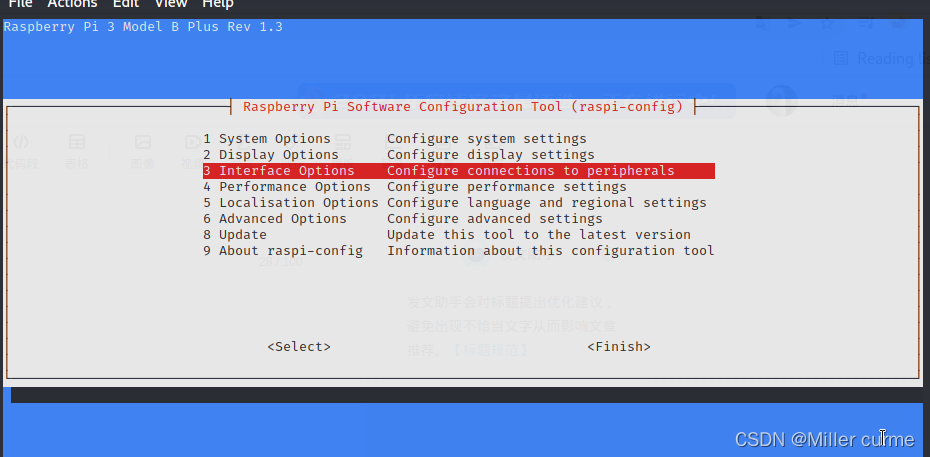
1. Turn on raspberry pie settings
sudo raspi-config
2. Select the third interface options
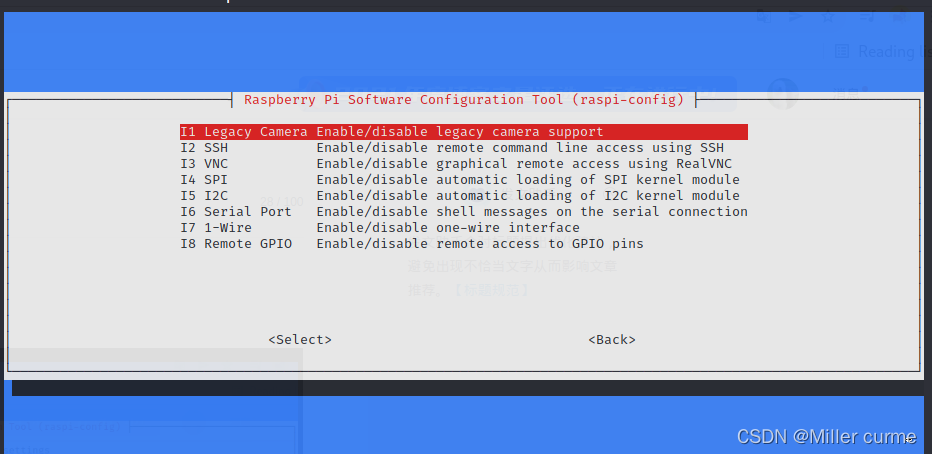
3. Turn all options on, and then restart raspberry pie
4.vcgencmd get_camera

The values change to 1, which can not only detect the input, but also identify the device
5. You can execute raspistill and run the python picamera program
For example: raspistill -o /home/pi/Desktop/first.jpg
Read More:
- How to Solve Python WARNING: Ignoring invalid distribution -ip (e:\python\python_dowmload\lib\site-packages)
- How to Solve Python3.9 Install pycrypto Error
- How to Solve Python Pandas Read or Import Files Error
- Python: How to Solve error While importing windpy
- How to Solve Python ImportError: cannot import name UnrewindableBodyError
- How to Solve Python Libsm. So. 6 error
- How to Solve Python AttributeError: ‘dict’ object has no attribute ‘item’
- How to Solve Python ShapeFile.writer Error for Beginners
- How to Solve Python Xlwt ValueError: More than 4094 XFs (styles)
- How to Solve Python Importerror: DLL load failed: unable to find the specified program using tensorflow
- How to Solve Python AttributeError: ‘module’ object has no attribute ‘xxx’
- Python: How to Solve mysqlclient Install Error in Mac
- Python: How to Solve multiprocessing module Error in Windows
- Python 2.7: How to Install PIP
- How to Solve paddleOCR recognition of curved text Error
- How to Solve Turtle_tf Error in ROS
- PyCharm: How to Solve Tensorflow_datasets Import Error
- Python: How to Auto Add Watermark to PDF
- Invalid python sd, Fatal Python error: init_fs_encoding: failed to get the Python cod [How to Solve]
- Python: How to Encode the File (including HTML, TXT, Doc, etc.)