This is a local developer tool. The service port is not open
Turn on security settings for settings
Open port
Rerun and compile
This is a local developer tool. The service port is not open
Turn on security settings for settings
Open port
Rerun and compile
Uncaught SyntaxError: Unexpected token N in JSON at position 0
JSON.parse(NaN)
JSON.parse('NaN')
Error Messages:
Uncaught SyntaxError: Unexpected token u in JSON at position 0
JSON.parse(undefind)
JSON.parse('undefind')
Error Messages:
Uncaught SyntaxError: Unexpected token o in JSON at position 1
JSON.parse({a:2})
Error Messages:
Uncaught SyntaxError: Unexpected token a in JSON at position 1
JSON.parse('{a:2}')
Error Messages:
Unexpected token ' in JSON at position 1
JSON.parse("{'a':11}")
Error Messages:
JSON.parse('{"a":11}'
**About json.parse
JSON.parseFor parsing JSON string, and returns the corresponding value, which parameters must conform to the format JSON string, otherwise an error.
JSON Is a syntax used to serialize objects, arrays, numbers, strings, Boolean values, and null.
JSON The attribute names of objects and arrays must be strings enclosed in double quotes, and there must be no comma after the last attribute.
JSON The string should also be enclosed in double quotes.
JSON values are forbidden to have leading zeros (JSON.stringify method automatically ignore leading zeros, and the JSON.parse method will report error); if there is a decimal point, then followed by at least one digit.
[Vue warn]: Unknown custom element: – did you register the component correctly? For recursive components, make sure to provide the “name” option.
The Vue project uses ant design. After introducing the spacing space, the name always reports an error. Adding name and modifying name are useless.
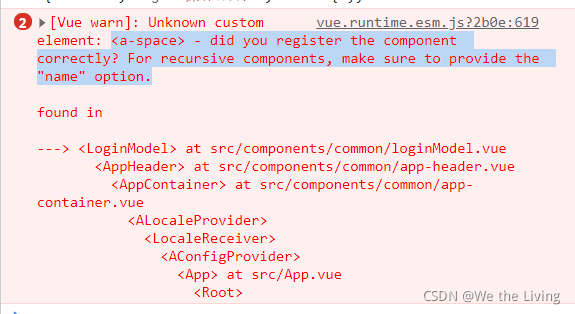
Duplicate component names or repeated import. Finally, after searching the configuration file, it is found that it is imported on-demand, and sapce of ant is not introduced. After the introduction, the error report can be solved.
const MyPlugin = {}
import bus from '@cg/bus'
import {
  Result,
  Button,
  Space,
} from 'ant-design-vue'

MyPlugin.install = function (Vue, options) {
  // To reduce the size of the dist, try to do on-demand loading
  Vue.use(Button)
  Vue.use(Form)
  Vue.use(Result)
  Vue.use(Space)
  Vue.use(FormModel)

export default MyPlugin
If there is anything wrong, please correct it and exchange technology together.
This error message is because MD5 encryption is used, but the MD5 encrypted data is not found to be undefined
curObj.creditCode ?curObj.creditCode : md5(curObj.registerNo)) If curobj.registerno here is undefined, an error will be reported.
When you see this error, print it on the console.
<img :src="image"/>
When we dynamically load pictures, an error will appear as shown in the following figure

1. The first possibility is that you write a relative path, and you need to write an absolute path
image:'../assets/image/top10-1.png'
You need to change to the specific path
image:'/src/assets/images/top10-1.png'
2. The second solution is to use require ()
<img :src="require(images)"/>
3. The third solution is to put the pictures under the public directory, but although this solves the problem, the files in this directory will not be packaged when using webpack
4. If you use ts, you cannot use require (). You can use import to import your picture path as a module
<template>
	<img :src="images"/>
</template>
<script>
	import image from '../assets/image/top10-1.png'
	export default{
		data(){
			return {
				images:image
			}
		}
	}
</script>
Scenario:
Today, I want to upload local notes to gitee, and then when I git add., I report an error
no solution was found on Baidu. I saw the idea on GitHub later
First try to
turn off the daemon
git config core.useBuiltinFSMonitor false
Error reporting is not reported, but it does not solve the problem
Then try to start the daemon manually
git fsmonitor--daemon start
Fail
Solution:
Check if your git path has Chinese
it’s probably better to change the Chinese on the path
I haven’t noticed before, because this is the first time I met this problem and successfully solved it
When using each method to traverse the array in JQ, the error $item is not defined is reported
Structure:
 <div class="right">
      <div class="img_bg rightOne" @click="clickLeft('Company Mission')">Company Mission</div>
      <div class="img_bg rightTwo" @click="clickLeft('Core Values')">Core Values</div>
      <div class="img_bg rightThree" @click="clickLeft('Corporate Spirit')">Corporate Spirit</div>
      <div class="img_bg rightFour" @click="clickLeft('Brand Slogan')">Brand Slogan</div>
    </div>
js:
 $('.right div').each(function(index,item){
        	// var $this = $(item);
          // $this.removeClass('is_active_right');
          item.removeClass('is_active_right');
        })
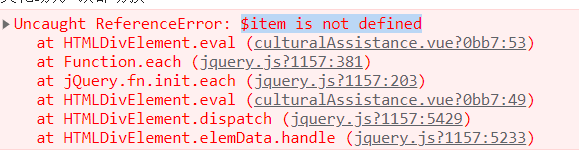
Solution:
 $('.right div').each(function(index,item){
          var $this = $(item);
          $this.removeClass('is_active_right');
        })
Error reporting background
At present, I am working on a single page project of Vue. I temporarily replaced the system disk because I started a new project, which is actually a very easy reason to think of. However, the error “pointing to a component can not be found” on the console page at that time. In my mind, I first thought that there was a problem with my own partial introduction. After checking many introduction methods, I found that it did not seem to be the problem, Later, the reaction may be that the original things were moved because the disk was changed, and the dependencies are not in the current project directory. Although the version number of eckards is registered in package.json, the things are not detected by moudule, so naturally they can’t be retrieved.
Solution:
There is no problem running my code in the original environment, so the solution is very simple. Just download the required ecarts package and run the following command
// echarts download code
cnpm install [email protected] --save
//the reaseon for limiting version number:default 5 dont conatin Map components
Of course, because I changed the disk, I didn’t even have NPM, not to mention cnpm, not even inode… Of course, if you encounter these problems, just download the corresponding version you need
after downloading the dependencies, you can first go to package.json or the dependency file corresponding to your own project to check whether it is registered correctly, and then check whether the module has a corresponding package to develop a good development habit
result
After NPM running again, the IDE screen is displayed normally and the web page is displayed normally, OK.
(the picture will not be displayed here, otherwise the information security will be leaked.)
Locate the main.js file and the start code is:
import { createApp } from 'vue'
import App from './App.vue'
import router from './router'
import ElementUI from 'element-ui';
import 'element-ui/lib/theme-chalk/index.css';


createApp(App).use(ElementUI);

createApp(App).use(router).mount('#app')
Error message:
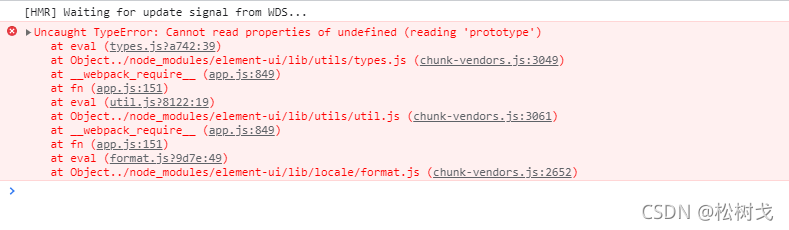
reason: vue3.0 no longer supports element UI, so element plus can be used to replace
NPM to install element plus
$ npm install element-plus --save
Refer to the official website of element plus and modify the main.js code to
import { createApp } from 'vue'
import App from './App.vue'
import router from './router'
import ElementPlus from 'element-plus'
import 'element-plus/dist/index.css'

const app = createApp(App)
app.use(ElementPlus)

app.use(router).mount('#app')
Error reporting solution:
Vue3 + vite installation element plus error resolution
1. The console reports an error when running the project

Solution:
1 delete the node_Modules folder and package-lock.json
2 modify package.json
3 modify Vue version number must be above 3.2.2
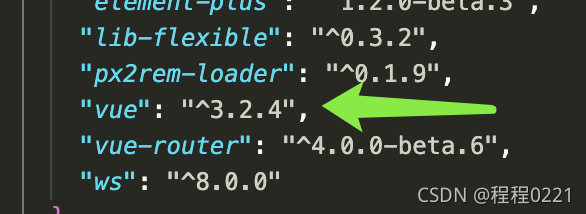
4 reinstall I, but add – force to force installation, otherwise an error will be reported
npm i --force
Element plus could not find the problem in index.css
In main.js
Solution:
The solution is also very simple. Now that you have installed the element plus dependency, you can’t find the file. The probability is that the path has changed. So I manually turned to node modules and found that the whole theme chat folder was moved

Error in import in router
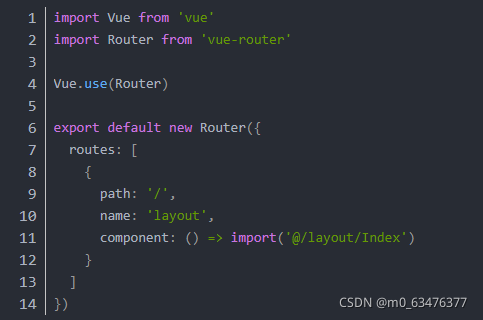
If the babel-plugin-syntax-dynamic-import plug-in is not installed and introduced into .Babelrc, an error will be reported. This is the setting of the webpack dynamic import module.
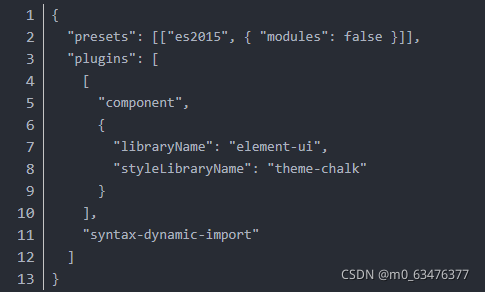
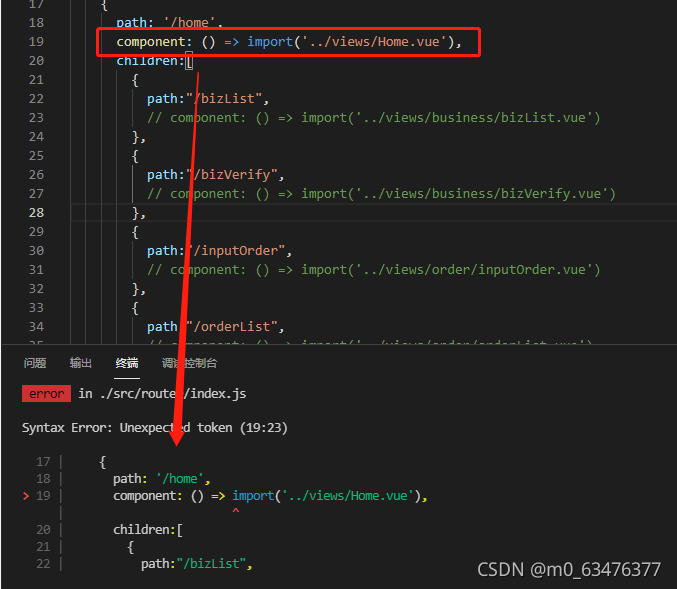
Import error, missing configuration file!!
Solution:
copy the missing new items into this new project again…
[error report solution] Vue element UI form validation error cannot read property ‘validate’ of undefined
Error reporting restore project background error reporting reason error reporting solution
Error reporting restore
[Vue warn]:
Error in v-on handler:
"TypeError: Cannot read properties of undefined (reading 'validate')"
Project background
Vue + element UI uses the official form with verification function of element UI
Error reporting reason
The default name of the form has been modified, but the name of ref = “ruleform” in the ‘El form’ label has not been changed. The registration name is inconsistent, which triggers the error.
Error reporting solution
If you want to customize the form name. Be sure to modify the form name in [ref = “ruleform”].