Category Archives: JavaScript

Cnpm install vuecli error [How to Solve]

cnpm install -g @vue/cli

Cnpm: the file D:\program files\nodejs\cnpm.ps1 cannot be loaded because running scripts is prohibited on this system. For more information, see about in HTTPS:/go.Microsoft
oft.COM/fwlink /?LINKID = 135170_Execution_Policies。
location line: 1 character: 1
+ cnpm install – G @ Vue/cli
+ ~ ~ ~
+ CategoryInfo          : SecurityError: (:) [],PSSecurityException
+ FullyQualifiedErrorId : UnauthorizedAccess

cmd: enter Start-Process powershell -Verb runAs

Continue to re execute set-ExecutionPolicy RemoteSigned. Select Y

Then re-execute cnpm install -g @vue/cli

[Solved] Vue package error: Syntax Error: Error: Cannot find module ‘mozjpeg’

Syntax Error: Error: Cannot find module 'mozjpeg'

The main reason is that some dependencies of image webpack loader are not installed successfully, which makes the processing of pictures report errors

Attempting to install dependencies:

npm install mozjpeg

report errors:

connect ECONNREFUSED 0.0.0.0:443
mozjpeg pre-build test failed

You can solve this problem by modifying hosts.

Modify hosts for MAC system

https://github.com/googlehosts/hosts
Go to this website to download files
open the terminal, enter open/etc
and paste the hosts into the etc folder to replace the original hosts file.

The reinstallation was successful and the packaging was successful.

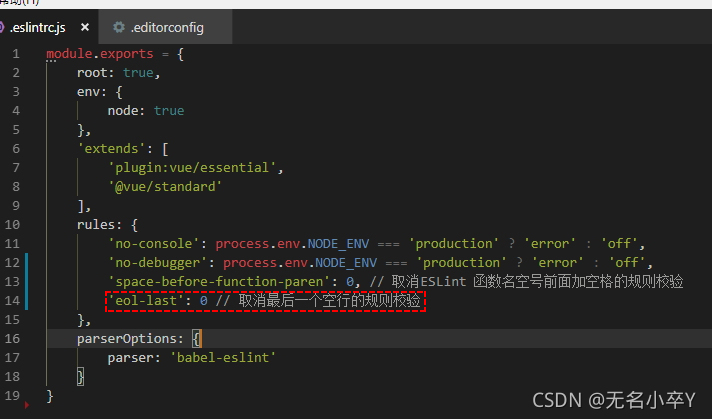
[Solved] ESLint error: Newline required at end of file but not found (eol-last)

When verifying Vue projects with eslint, the following warnings were found:

error: Newline required at end of file but not found (eol-last)

The results are as follows:

I found that the online solution is to insert a blank line after the warning code. I think this is very bad.

[solution]
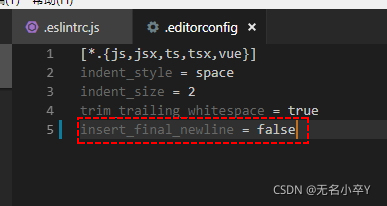
1. Insert a configuration file .Editorconfig , in the project_final_Newline = true is changed to false

2. Cancel the verification of the last rule in . Eslintrc. JS

recompile without warning.

[Solved] javax.mail.AuthenticationFailedException: 535 Error: authentication failed

163 mailbox server to send mail, confirm to start POP3/SMTP service, and set client authorization code
mail.username is not an alias. The following is an incorrect configuration:

spring.mail.username=Dispatch center

Mail.username must be the same as mail.from as the email address. Mail.password is not the email login password, but the authorization code set/generated when the POP3/SMTP service is enabled
correctly configured:

# All email addresses
[email protected]
[email protected]
# Authorization code
spring.mail.password=RKQXXTUNAHUXBWXO

[Solved] Vue Use gzip Package Error: Rule can only have one resource source

How to configure:

NPM I compression webpack plugin - d install the plug-in and add the following configuration in Vue.Config.JS (the compression plugin configuration options depend on your personal needs)

configureWebpack: {
	plugins: [
		new CompressionPlugin({
			test: /\.(js|css)?$/i, // Which files to compress
                        algorithm:'gzip', // Use gzip compression
		})
	]
}

Problems:
usegzip to unzip the Vue project report an error:Error: Rule can only have one resource source (provided resource and test + include + exclude).
Cause Analysis:
Webpack version conflict in package.json

Solution:
npm i [email protected] -D
npm i [email protected] [email protected] -D

[Solved] SyntaxError: Cannot use import statement outside a module

Solve the syntaxerror: cannot use import statement outside a module problem

Originally, I wanted to test blob and format in the node environment. After importing relevant JS files, an error cannot use import statement outside a module occurs. Here are the following references to solve the problem:

    1. use commonjs syntax to bypass import
let Blob = require('blob-polyfill/Blob');

It can solve the problem of failed file import at present, but it means that you can’t use import to import in the future. The fundamental problem has not been solved. Of course, this is not my style. Then go to consult the data. What the elder brother said is well summarized as follows:

The error is reported because the node environment does not support ES6 syntax. We can install Babel jest, @Babel/core, @Babel/preset env to solve the problem (these plug-ins can convert ES6 code into Es5 so that the node environment can be recognized. Here I choose @Babel/preset env for installation). After installation, create babel.config.js file in the root log of the project: see the name of this file, Babel is configured; (similar to webpack.Config.JS),

module.exports = {
    "presets": [
        ["@babel/preset-env",
            {
                "targets":
                    { "node": true }
            }
        ]
    ]
}

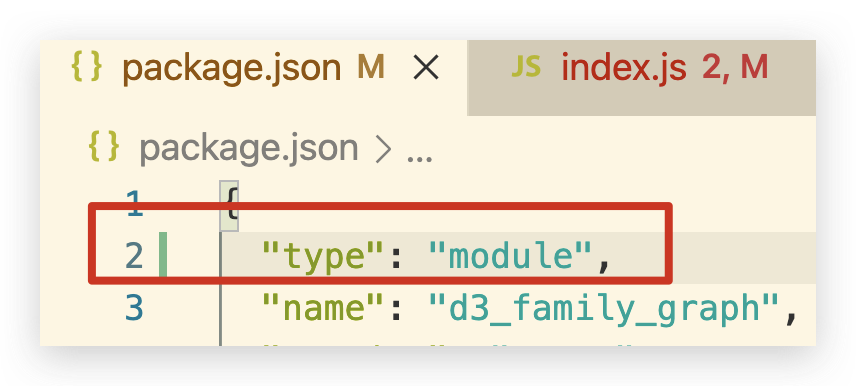
Generally speaking, package.json is not configured with type, and it is equipped with type: type: "module". The problem is solved here. Finally, I also remembered that when I first used sass, I had to configure it to compile sass into CSS and be recognized by the environment (Longyin).

[Vue warn]: Error in callback for watcher “value“ (How to Solve)

1. Full text description of error:

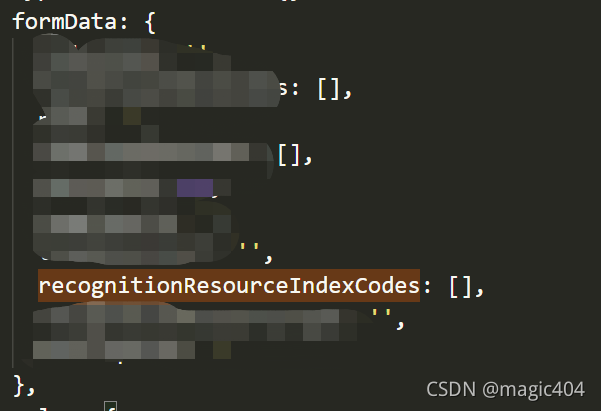
[Vue warn]: Error in callback for watcher “value”: “TypeError: Cannot read properties of undefined (reading ‘value’)

2. The problem point is the error reported when assigning a value to the secondary attribute of data

3. Reasons:

Assign a value directly to the method just opened on the page. The console will report the above error for the first time, but not for the second time. It is mainly to solve the problem of reporting an error for the first time

this.formData.recognitionResourceIndexCodes.push('Some value');

4. The solution is to use the omnipotent $nexttick

this.$nextTick(() => {
    this.formData.recognitionResourceIndexCodes.push('Some value');
});

[Solved] it only responds to error and does not enter success after AJAX is successfully processed

1. Problem description

Front end request code

$.ajax({
    url: 'getOne', 	
    data: {		
        name: 'zhangsan',
        pwd: '123'
    },
    type: 'get',		
    dataType: 'json',	
    success: function (res) { 
        alert("成功" + res)
    },
    error: function (xhr, errorMessage, e) { 
        alert("失败" + errorMessage);
    }
})

Backend servlet code

@WebServlet(name = "getOne", urlPatterns = "/getOne")
public class GetOne extends HttpServlet {
    protected void doPost(HttpServletRequest request, HttpServletResponse response) throws ServletException, IOException {
        this.doGet(request, response);
    }

    protected void doGet(HttpServletRequest request, HttpServletResponse response) throws ServletException, IOException {
      	// Set encoding
       response.setContentType("application/json;charset=utf-8");
       // Processing business logic
        
         // Responding to the request, there may be IO exceptions in the way of using the stream, so the exception is caught
        PrintWriter out = response.getWriter();
        try {
            out.write("ajax request successful");
            out.close
        } catch (Exception exception) {
            out.write(exception);
        }
        out.close();
    }
}

Then it is found that after each processing, it will only respond to the abnormal error function and cannot enter success


2. Problem solving

The code above looks OK at first glance. I thought so at first. However, after some analysis, it is found that the format of the return value type at the back end is incorrect

What do you mean?

I set the JSON format in the back-end response

response.setContentType("application/json;charset=utf-8");

However, I output the ordinary string with the stream when responding, not the JSON format string

out.write("ajax request successful");

How to solve it?

Method 1: change the string format to JSON format
back end output: out.Write ("{'data':'ajax request succeeded '}")
front end: alert ("success" + res.data) method 2: change the type of request and processing to text
back end: response.setcontenttype ("application/JSON; charset = UTF-8")
front end: datatype: 'text'

Node.js Error: “Error: EBUSY: resource busy or locked, stat“

abnormal

Error: EBUSY: resource busy or locked, stat 'C:\swapfile.sys'
    at Object.statSync (node:fs:1536:3)
    at D:\NodeJs\node-demo\demo\world.js:7:24
    at FSReqCallback.oncomplete (node:fs:188:23) {
  errno: -4082,
  syscall: 'stat',
  code: 'EBUSY',
  path: 'C:\\swapfile.sys'
}

Node.js v17.1.0

error code

var fs = require('fs');

var rootPath = 'C:\\';
fs.readdir(rootPath, function (err, files) {
    for (var i = 0; i < files.length; i++) {
        var p = rootPath + files[i];
        var stats = fs.statSync(p);
        console.log(rootPath + 'Is it a directory:' + stats.isDirectory())
    }
});

Reason

Prompt error: EBUSY: resource busy or locked, stat indicates that the resource file is busy or locked, that is, the C:\swapfile.Sys file. But there is no such file in the C disk directory, even in the hidden file. But it can be found by opening everything software
is a system file.

Solution:

I don’t know how to solve it. The online solution seems to be invalid, so I can only block the file.

Correct code

var fs = require('fs');

var rootPath = 'C:\\';
fs.readdir(rootPath, function (err, files) {
    for (var i = 0; i < files.length; i++) {
        var p = rootPath + files[i];
        // Skip when encountering swapfile.sys file or System Volume Information directory
        if (p.endsWith('swapfile.sys') || p.endsWith('System Volume Information')) {
            continue;
        }
        var stats = fs.statSync(p);
        console.log(rootPath + 'Is it a directory:' + stats.isDirectory())
    }
});