Category Archives: JAVA

[Solved] Npm -v Error: Cannot find module npm_cli

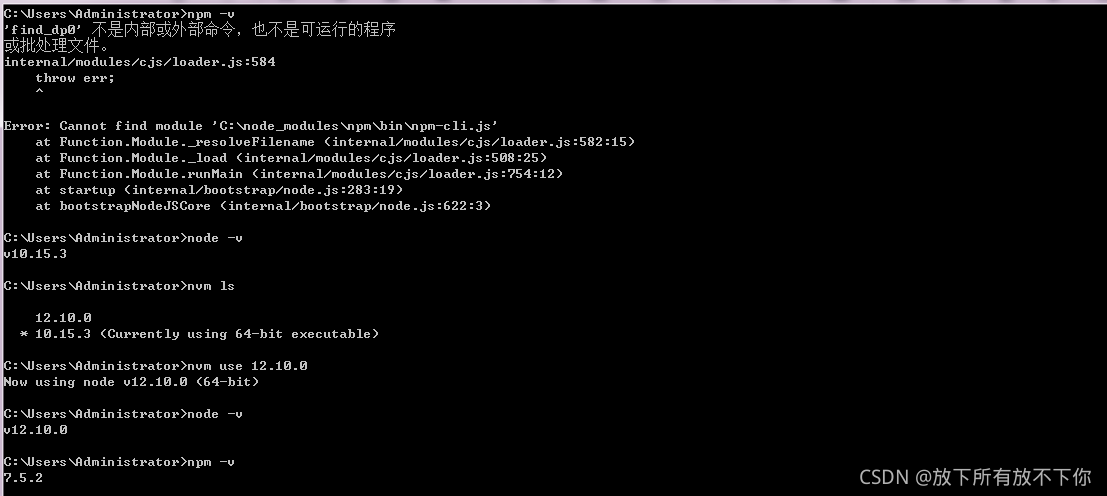
1. If you download the upgraded node version from the node official website, the package management NPM will be automatically installed

2. If you install the NVM and then upgrade or downgrade the node version, the NPM is not automatically installed at this time   As shown in the figure, my node 12.10.0 is downloaded from the official website and 10.15.3 is managed by NVM. After switching back, the NPM will not report an error

[Solved] Mapped Statements collection does not contain value for xxx

Background: newcomers are learning to use PageHelper plug-in to realize back-end paging. This problem occurs when calling.

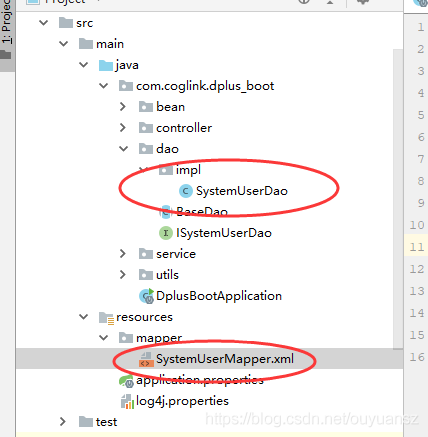
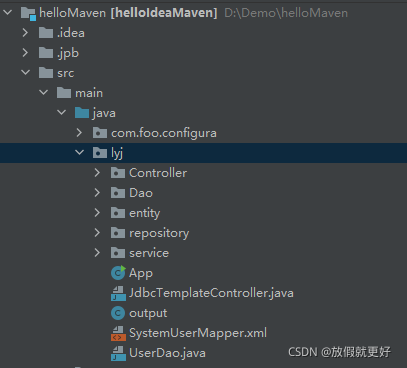
Solution: I searched many articles on the Internet and found that either the namespace setting in systemusermapper.xml file is wrong or the resulttype is wrong. It is still wrong to try these methods one by one. When viewing an article, I found that the project file directory on the left is different from mine. As shown below, the left is someone else’s and the right is mine:


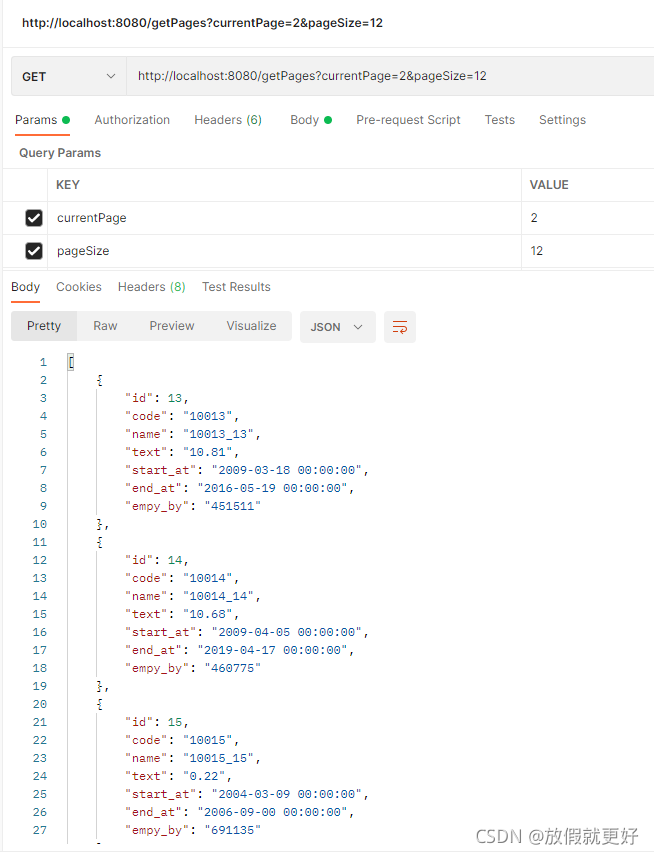
It can be clearly seen that my systemusermapper.xml is placed under lyj, which makes the method of writing this file unusable. As shown in the above figure on the left, systemusermapper.xml should be placed under the mapper package built by resource, so that no error will be reported. The postman test can accurately realize paging, as follows:

[Solved] Spring Boot Project Error: Failed to load property source from

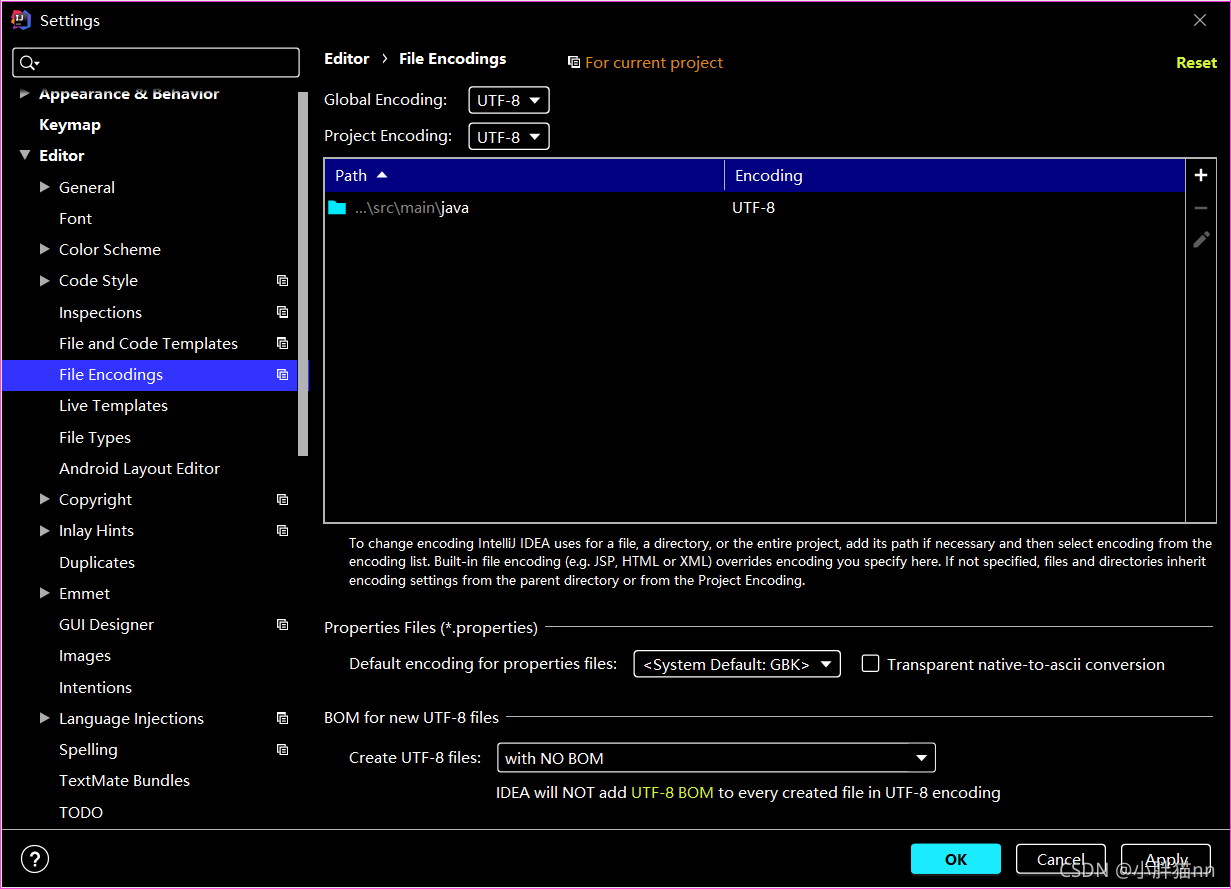
1. There may be a problem with the encoding format of yaml configuration file

All set to UTF-8.

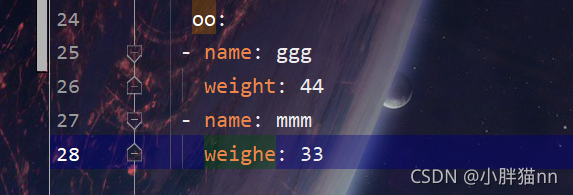
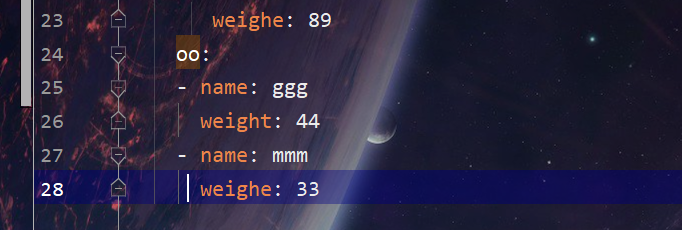
2. Or check whether the writing configured in the file is wrong. For example, the indentation of the next level is less than that of the previous level

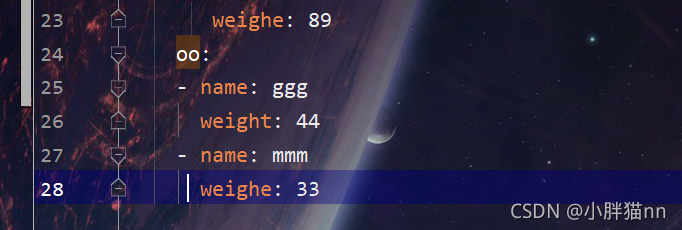
The name and weight in the above figure are more than one indentation than the OO in the above figure. Just change the indentation to normal, as shown below

[Solved] JAVA Python Error: Cannot create PyString with non-byte value

Error code
case 1.
interpreter.execfile (“your file path”)
reason for error reporting: your file was not found

Situation 2. New pystring (“your string”)
error reason: there is Chinese in the string
solution: replace new pystring (“your string”) with
pystring strjason = py.newstring (“your string”)
or pystring strjason = py.newstringorunicode (“your string”);

Error creating bean with name ‘servletEndpointRegistrar‘ defined in class path resource

The errors encountered in writing as service items today are shown below. I only know that the creation of error creating bean with name ‘servletendpointregistrar’ defined in class path resource failed. I also found some solutions on the Internet. The most common solutions are that there is a lack of JDBC dependency, or that the database configuration file is wrong. I also compared the database, There is no lack of JDBC dependency, which shows that my database and dependency are correct. I compared other service services and found that more configuration files were introduced into the configuration file

[${project.name}] 2021-09-10 23:21:44,213 ERROR [localhost-startStop-1][Jdk14Logger.java:87] - Error starting Tomcat context. Exception: org.springframework.beans.factory.UnsatisfiedDependencyException. Message: Error creating bean with name 'servletEndpointRegistrar' defined in class path resource [org/springframework/boot/actuate/autoconfigure/endpoint/web/ServletEndpointManagementContextConfiguration.class]: Unsatisfied dependency expressed through method 'servletEndpointRegistrar' parameter 0; nested exception is org.springframework.boot.context.properties.ConfigurationPropertiesBindException: Error creating bean with name 'management.endpoints.web-org.springframework.boot.actuate.autoconfigure.endpoint.web.WebEndpointProperties': Could not bind properties to 'WebEndpointProperties' : prefix=management.endpoints.web, ignoreInvalidFields=false, ignoreUnknownFields=true; nested exception is org.springframework.boot.context.properties.bind.BindException: Failed to bind properties under 'management.endpoints.web.exposure' to org.springframework.boot.actuate.autoconfigure.endpoint.web.WebEndpointProperties$Exposure
[${project.name}] 2021-09-10 23:21:44,240 WARN [main][Jdk14Logger.java:87] - Exception encountered during context initialization - cancelling refresh attempt: org.springframework.context.ApplicationContextException: Unable to start web server; nested exception is org.springframework.boot.web.server.WebServerException: Unable to start embedded Tomcat
[${project.name}] 2021-09-10 23:21:44,241 INFO [main][DubboGenericServiceFactory.java:159] - The Dubbo GenericService ReferenceBeans are destroying...
[${project.name}] 2021-09-10 23:21:44,245 INFO [main][Jdk14Logger.java:87] - class org.apache.dubbo.config.spring.beans.factory.annotation.ReferenceAnnotationBeanPostProcessor was destroying!

My Nacos profile is

#HTTP format configuration spring:
http:
  encoding:
    charset: UTF‐8
    force: true
    enabled: true
  messages:
    encoding: UTF‐8
#tomcat header information (user ip and access protocol) and access path configuration
server:
  tomcat:
    remote_ip_header: x‐forwarded‐for
    protocol_header: x‐forwarded‐proto
  servlet:
    context‐path: /lifly
  use‐forward‐headers: true

#Service monitoring and management configuration, operation and maintenance related
management:
  endpoints:
    web:
      exposure:
      include: refresh,health,info,env

This configuration file defines the user IP and access path, as well as some configuration files related to service monitoring, management and operation and maintenance. However, the remote call is not used in the service, but I introduced this configuration file. The reason for my error is this, so I recorded it
My bootstrap.yml configuration file is as follows:

server:
  port: 56050 
nacos:
  server:
    addr: 127.0.0.1:8848
spring:
  application:
    name: transaction-service
#  main:
#    allow-bean-definition-overriding: true # Spring Boot 2.1 
  cloud:
    nacos:
      discovery:
        server-addr: 127.0.0.1:8848
#        server-addr: ${nacos.server.addr}
        namespace: 339eea59-f7f4-44d0-a3fa-9f1f85bd5b4f
#        cluster-name: COMMON_GROUP
      config:
        server-addr: 127.0.0.1:8848
#        server-addr: ${nacos.server.addr} 
        file-extension: yaml
        namespace: 339eea59-f7f4-44d0-a3fa-9f1f85bd5b4f  
        group: DEFAULT_GROUP 
        ext-config:
          -
            refresh: true
            data-id: spring-boot-http.yaml # spring boot http
            group: COMMON_GROUP 
#          -
#            refresh: true
#            data-id: spring-boot-starter-druid.yaml # spring boot starter druid
#            group: COMMON_GROUP 
#          -
#            refresh: true
#            data-id: spring-boot-mybatis-plus.yaml # spring boot mybatisplus
#            group: COMMON_GROUP 
#          - refresh: true
#            data-id: spring-boot-redis.yaml 
#            group: COMMON_GROUP 
  datasource:
    driver-class-name: com.mysql.jdbc.Driver
    url: jdbc:mysql://localhost:3306/huiminpay_transaction?useUnicode=true&useSSL=false
    #  url: jdbc:mysql://localhost:3306/huiminpay_merchant_service?characterEncoding=utf8&useSSL=false&serverTimezone=Asia/Shanghai&rewriteBatchedStatements=true&useUnicode=true
    username: root
    password: 1234
mybatis-plus:
  type-aliases-package: com.huiminpay.transaction.entity
  mapper-locations: classpath:/mapper/*.xml

dubbo:
  scan:
    # dubbo 
    base-packages: com.huiminpay
  protocol:
    # dubbo 协议
    name: dubbo
    port: 20893
  registry:
    address: nacos://127.0.0.1:8848
  application:
    qos:
      port: 22250 # dubbo qos
  consumer:
    check: false
    timeout: 3000
    retries: -1

logging:
  config: classpath:log4j2.xml

I commented out the import file and the project started. Record it again, and I hope it will be helpful to you. Comment out the following import file

 ext-config:
          -
            refresh: true
            data-id: spring-boot-http.yaml # spring boot http set
            group: COMMON_GROUP 

Byte 1 of UTF-8 sequence of error creating document instance. And bytes is invalid

Records of mybatis related bugs

For mybatis learning, I encountered many inexplicable bugs from the beginning! After Baidu and barrage, they didn’t solve it. Later, they changed inexplicably, but they were right. First look at the bug:

"D:\SoftWare\Idea\IntelliJ IDEA 2020.3.2\jbr\bin\java.exe" -ea -Didea.test.cyclic.buffer.size=1048576 "-javaagent:D:\SoftWare\Idea\IntelliJ IDEA 2020.3.2\lib\idea_rt.jar=54216:D:\SoftWare\Idea\IntelliJ IDEA 2020.3.2\bin" -Dfile.encoding=UTF-8 -classpath "D:\SoftWare\Idea\IntelliJ IDEA 2020.3.2\lib\idea_rt.jar;D:\SoftWare\Idea\IntelliJ IDEA 2020.3.2\plugins\junit\lib\junit5-rt.jar;D:\SoftWare\Idea\IntelliJ IDEA 2020.3.2\plugins\junit\lib\junit-rt.jar;D:\Desktop\MyBatis02\mybatis-02\target\test-classes;D:\Desktop\MyBatis02\mybatis-02\target\classes;D:\Environment\apache-maven-3.8.1\maven-repo\mysql\mysql-connector-java\5.1.47\mysql-connector-java-5.1.47.jar;D:\Environment\apache-maven-3.8.1\maven-repo\org\mybatis\mybatis\3.5.2\mybatis-3.5.2.jar;D:\Environment\apache-maven-3.8.1\maven-repo\junit\junit\4.13.2\junit-4.13.2.jar;D:\Environment\apache-maven-3.8.1\maven-repo\org\hamcrest\hamcrest-core\1.3\hamcrest-core-1.3.jar" com.intellij.rt.junit.JUnitStarter -ideVersion5 -junit4 com.lxz.dao.UserDaoTest,getUserLike

java.lang.ExceptionInInitializerError
	at com.lxz.dao.UserDaoTest.getUserLike(UserDaoTest.java:14)
	at java.base/jdk.internal.reflect.NativeMethodAccessorImpl.invoke0(Native Method)
	at java.base/jdk.internal.reflect.NativeMethodAccessorImpl.invoke(NativeMethodAccessorImpl.java:62)
	at java.base/jdk.internal.reflect.DelegatingMethodAccessorImpl.invoke(DelegatingMethodAccessorImpl.java:43)
	at java.base/java.lang.reflect.Method.invoke(Method.java:566)
	at org.junit.runners.model.FrameworkMethod$1.runReflectiveCall(FrameworkMethod.java:59)
	at org.junit.internal.runners.model.ReflectiveCallable.run(ReflectiveCallable.java:12)
	at org.junit.runners.model.FrameworkMethod.invokeExplosively(FrameworkMethod.java:56)
	at org.junit.internal.runners.statements.InvokeMethod.evaluate(InvokeMethod.java:17)
	at org.junit.runners.ParentRunner$3.evaluate(ParentRunner.java:306)
	at org.junit.runners.BlockJUnit4ClassRunner$1.evaluate(BlockJUnit4ClassRunner.java:100)
	at org.junit.runners.ParentRunner.runLeaf(ParentRunner.java:366)
	at org.junit.runners.BlockJUnit4ClassRunner.runChild(BlockJUnit4ClassRunner.java:103)
	at org.junit.runners.BlockJUnit4ClassRunner.runChild(BlockJUnit4ClassRunner.java:63)
	at org.junit.runners.ParentRunner$4.run(ParentRunner.java:331)
	at org.junit.runners.ParentRunner$1.schedule(ParentRunner.java:79)
	at org.junit.runners.ParentRunner.runChildren(ParentRunner.java:329)
	at org.junit.runners.ParentRunner.access$100(ParentRunner.java:66)
	at org.junit.runners.ParentRunner$2.evaluate(ParentRunner.java:293)
	at org.junit.runners.ParentRunner$3.evaluate(ParentRunner.java:306)
	at org.junit.runners.ParentRunner.run(ParentRunner.java:413)
	at org.junit.runner.JUnitCore.run(JUnitCore.java:137)
	at com.intellij.junit4.JUnit4IdeaTestRunner.startRunnerWithArgs(JUnit4IdeaTestRunner.java:69)
	at com.intellij.rt.junit.IdeaTestRunner$Repeater.startRunnerWithArgs(IdeaTestRunner.java:33)
	at com.intellij.rt.junit.JUnitStarter.prepareStreamsAndStart(JUnitStarter.java:220)
	at com.intellij.rt.junit.JUnitStarter.main(JUnitStarter.java:53)
Caused by: org.apache.ibatis.exceptions.PersistenceException: 
### Error building SqlSession.
### Cause: org.apache.ibatis.builder.BuilderException: Error creating document instance.  Cause: org.xml.sax.SAXParseException; lineNumber: 11; columnNumber: 9; 1 字节的 UTF-8 序列的字节 1 无效。
	at org.apache.ibatis.exceptions.ExceptionFactory.wrapException(ExceptionFactory.java:30)
	at org.apache.ibatis.session.SqlSessionFactoryBuilder.build(SqlSessionFactoryBuilder.java:80)
	at org.apache.ibatis.session.SqlSessionFactoryBuilder.build(SqlSessionFactoryBuilder.java:64)
	at com.lxz.utils.MybatisUtils.<clinit>(MybatisUtils.java:21)
	... 26 more
Caused by: org.apache.ibatis.builder.BuilderException: Error creating document instance.  Cause: org.xml.sax.SAXParseException; lineNumber: 11; columnNumber: 9; 1 字节的 UTF-8 序列的字节 1 无效。
	at org.apache.ibatis.parsing.XPathParser.createDocument(XPathParser.java:260)
	at org.apache.ibatis.parsing.XPathParser.<init>(XPathParser.java:126)
	at org.apache.ibatis.builder.xml.XMLConfigBuilder.<init>(XMLConfigBuilder.java:81)
	at org.apache.ibatis.session.SqlSessionFactoryBuilder.build(SqlSessionFactoryBuilder.java:77)
	... 28 more
Caused by: org.xml.sax.SAXParseException; lineNumber: 11; columnNumber: 9; 1 字节的 UTF-8 序列的字节 1 无效。
	at java.xml/com.sun.org.apache.xerces.internal.util.ErrorHandlerWrapper.createSAXParseException(ErrorHandlerWrapper.java:204)
	at java.xml/com.sun.org.apache.xerces.internal.util.ErrorHandlerWrapper.fatalError(ErrorHandlerWrapper.java:178)
	at java.xml/com.sun.org.apache.xerces.internal.impl.XMLErrorReporter.reportError(XMLErrorReporter.java:400)
	at java.xml/com.sun.org.apache.xerces.internal.impl.XMLErrorReporter.reportError(XMLErrorReporter.java:306)
	at java.xml/com.sun.org.apache.xerces.internal.impl.XMLDocumentFragmentScannerImpl$FragmentContentDriver.next(XMLDocumentFragmentScannerImpl.java:3085)
	at java.xml/com.sun.org.apache.xerces.internal.impl.XMLDocumentScannerImpl.next(XMLDocumentScannerImpl.java:605)
	at java.xml/com.sun.org.apache.xerces.internal.impl.XMLDocumentFragmentScannerImpl.scanDocument(XMLDocumentFragmentScannerImpl.java:534)
	at java.xml/com.sun.org.apache.xerces.internal.parsers.XML11Configuration.parse(XML11Configuration.java:888)
	at java.xml/com.sun.org.apache.xerces.internal.parsers.XML11Configuration.parse(XML11Configuration.java:824)
	at java.xml/com.sun.org.apache.xerces.internal.parsers.XMLParser.parse(XMLParser.java:141)
	at java.xml/com.sun.org.apache.xerces.internal.parsers.DOMParser.parse(DOMParser.java:246)
	at java.xml/com.sun.org.apache.xerces.internal.jaxp.DocumentBuilderImpl.parse(DocumentBuilderImpl.java:339)
	at org.apache.ibatis.parsing.XPathParser.createDocument(XPathParser.java:258)
	... 31 more
Caused by: com.sun.org.apache.xerces.internal.impl.io.MalformedByteSequenceException: 1 字节的 UTF-8 序列的字节 1 无效。
	at java.xml/com.sun.org.apache.xerces.internal.impl.io.UTF8Reader.invalidByte(UTF8Reader.java:702)
	at java.xml/com.sun.org.apache.xerces.internal.impl.io.UTF8Reader.read(UTF8Reader.java:568)
	at java.xml/com.sun.org.apache.xerces.internal.impl.XMLEntityScanner.load(XMLEntityScanner.java:1904)
	at java.xml/com.sun.org.apache.xerces.internal.impl.XMLEntityScanner.scanData(XMLEntityScanner.java:1377)
	at java.xml/com.sun.org.apache.xerces.internal.impl.XMLScanner.scanComment(XMLScanner.java:800)
	at java.xml/com.sun.org.apache.xerces.internal.impl.XMLDocumentFragmentScannerImpl.scanComment(XMLDocumentFragmentScannerImpl.java:1069)
	at java.xml/com.sun.org.apache.xerces.internal.impl.XMLDocumentFragmentScannerImpl$FragmentContentDriver.next(XMLDocumentFragmentScannerImpl.java:2898)
	... 39 more


Process finished with exit code -1

First, for reading bugs. In idea, you should read backwards, from bottom to top. Just look at the line of cause by. For the above error reports, * * * * just remove the Chinese comments in the interface mapping file and configuration file of mybatis, or change the encoding method to utf8.

About priority of. Properties file (supplementary)

We knew before that the reference configuration file can be realized through the properties attribute: the reference configuration file code given in the official mybatis document is:

	<!--Introduction of external configuration files-->
    <properties resource="db.properties">
        <property name="username" value="root"/>
        <property name="pwd" value="123123"/>
    </properties>

We can also write the code to import the configuration file as:

<properties resource="db.properties"/>

The premise of this writing is that our resource file contains the name and PWD attributes! When we use the official method of importing the configuration file, but write the name and PWD attributes in the external configuration file, idea will automatically execute the code based on the external file as the standard.

[Solved] cannot call sendError() after the response has been committed

framework: springboot+IDEA+spring security oauth2
background: user login to get token, username or password authentication failure, the execution of onAuthenticationFailure method, has returned the normal error code and error message, but the console still throws an exception, the error message is as follows.

2021-09-12 07:16:25.490  WARN 964 — [nio-8090-exec-1] d.c.h.CustomAuthenticationFailureHandler : Authentication failed, the return message is: {“code”:1100, “info”: “User does not exist.”}
2021-09-12 07:16:25.500 ERROR 964 — [nio-8090-exec-1] o.a.c.c.C.[.[.[.[dispatcherServlet]      : Servlet.service() for servlet [dispatcherServlet] in context with path [/api/sso] threw exceptionjava.lang.IllegalStateException: Cannot call sendError() after the response has been committed
at org.apache.catalina.connector.ResponseFacade.sendError(ResponseFacade.java:456) ~[tomcat-embed-core-9.0.52.jar:9.0.52]
at javax.servlet.http.HttpServletResponseWrapper.sendError(HttpServletResponseWrapper.java:120) ~[tomcat-embed-core-9.0.52.jar:4.0.FR]
at org.springframework.security.web.util.OnCommittedResponseWrapper.sendError(OnCommittedResponseWrapper.java:126) ~[spring-security-web-5.5.2.jar:5.5.2]
at org.springframework.security.web.authentication.SimpleUrlAuthenticationFailureHandler.onAuthenticationFailure(SimpleUrlAuthenticationFailureHandler.java:86) ~[spring-security-web-5.5.2.jar:5.5.2]
at com.datong.liran.datongssoserver.config.handle.CustomAuthenticationFailureHandler.onAuthenticationFailure(CustomAuthenticationFailureHandler.java:39) ~[classes/:na]
at org.springframework.security.web.authentication.AbstractAuthenticationProcessingFilter.unsuccessfulAuthentication(AbstractAuthenticationProcessingFilter.java:342) ~[spring-security-web-5.5.2.jar:5.5.2]

The error code and error message have been returned normally, but the console still reports an error, not the result I want, so what should I do? The custom exception handling code looks like this.

@Component("CustomAuthenticationFailureHandler")
public class CustomAuthenticationFailureHandler extends SimpleUrlAuthenticationFailureHandler {

    @Override
    public void onAuthenticationFailure(HttpServletRequest request, HttpServletResponse response, AuthenticationException exception) throws IOException, ServletException {
        response.reset();
//        PrintWriter printWriter = httpServletResponse.getWriter();
        OutputStream out = response.getOutputStream();
        response.setContentType("application/json;charset=UTF-8");
        Result result = Result.error(1100,exception.getMessage(),null);
        String rspBodyStr = JSONObject.toJSONString(result);
        logger.warn("The authentication fails and the return message is:"+rspBodyStr);
        out.write(rspBodyStr.getBytes(StandardCharsets.UTF_8));
        out.close();
        super.onAuthenticationFailure(request,response,exception);
    }
}

Cannot call senderror() after the response has been committed.

Analysis: according to the error log, it is preliminarily judged that it should be repeated submission or repeated return, but only response is involved here, so you can only go to the parent class (onauthenticationfailure). Open it and have a look. The code is as follows.

public void onAuthenticationFailure(HttpServletRequest request, HttpServletResponse response, AuthenticationException exception) throws IOException, ServletException {
        if (this.defaultFailureUrl == null) {
            if (this.logger.isTraceEnabled()) {
                this.logger.trace("Sending 401 Unauthorized error since no failure URL is set");
            } else {
                this.logger.debug("Sending 401 Unauthorized error");
            }

            response.sendError(HttpStatus.UNAUTHORIZED.value(), HttpStatus.UNAUTHORIZED.getReasonPhrase());
        } else {
            this.saveException(request, exception);
            if (this.forwardToDestination) {
                this.logger.debug("Forwarding to " + this.defaultFailureUrl);
                request.getRequestDispatcher(this.defaultFailureUrl).forward(request, response);
            } else {
                this.redirectStrategy.sendRedirect(request, response, this.defaultFailureUrl);
            }

        }
    }

Obviously, when the defaultfailureurl is null, the senderror () method is executed, which should be the same as the previous setting, and this method also reports an error in the error log. Since the error code and error information I want have been returned, I simply do not call the parent method. After a try, sure enough, the console no longer reports an error and returns normally.

Solution: no longer call the parent class method, and annotate super.onauthenticationfailure (request, response, exception); sentence.

OK, get it done and start sharing the joy of success.
[Solved] Compilation failed: internal java compiler error

Error: java: Compilation failed: internal java compiler error
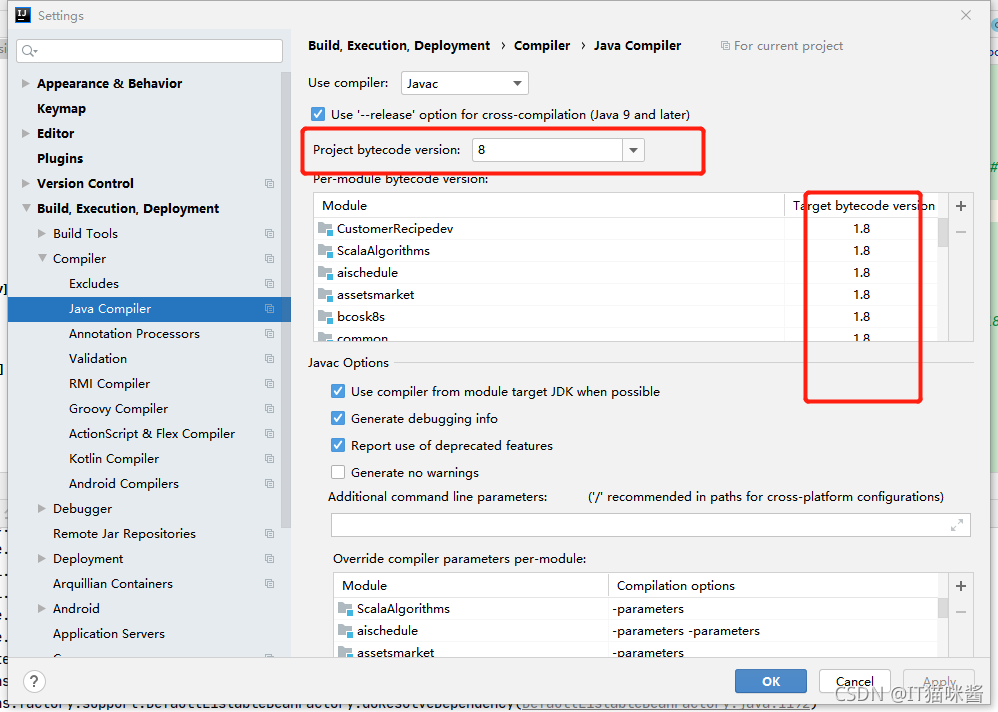
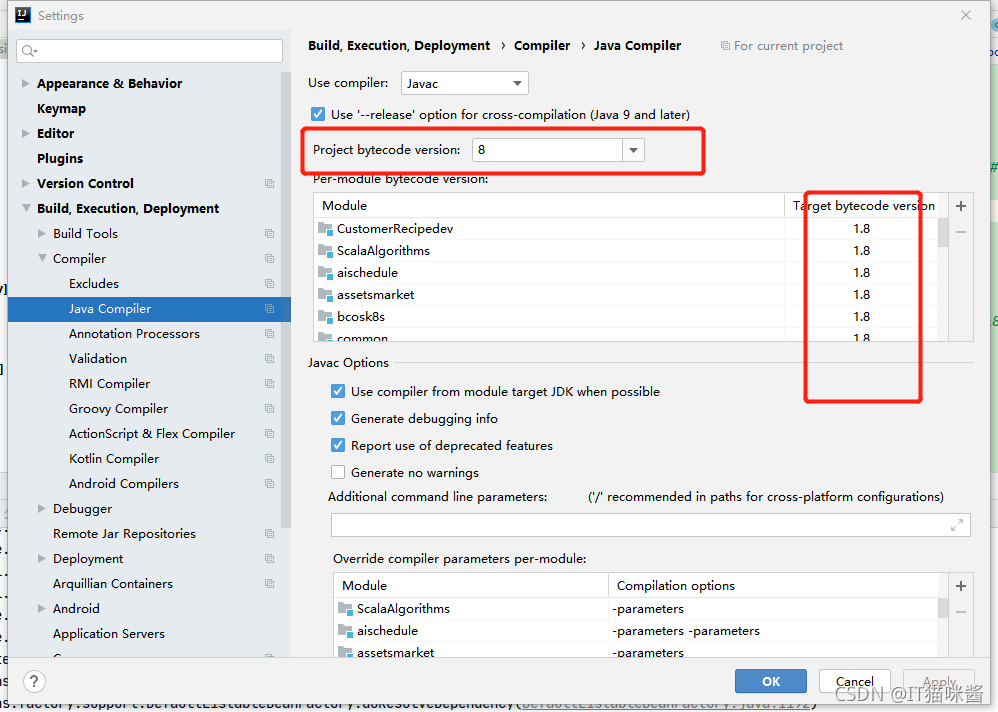
1. Open File –> Setting —> Build,Exception,Deployment –> Compiler –> Java Compiler  Set the value of Target bytecode version to jdk version in Module.

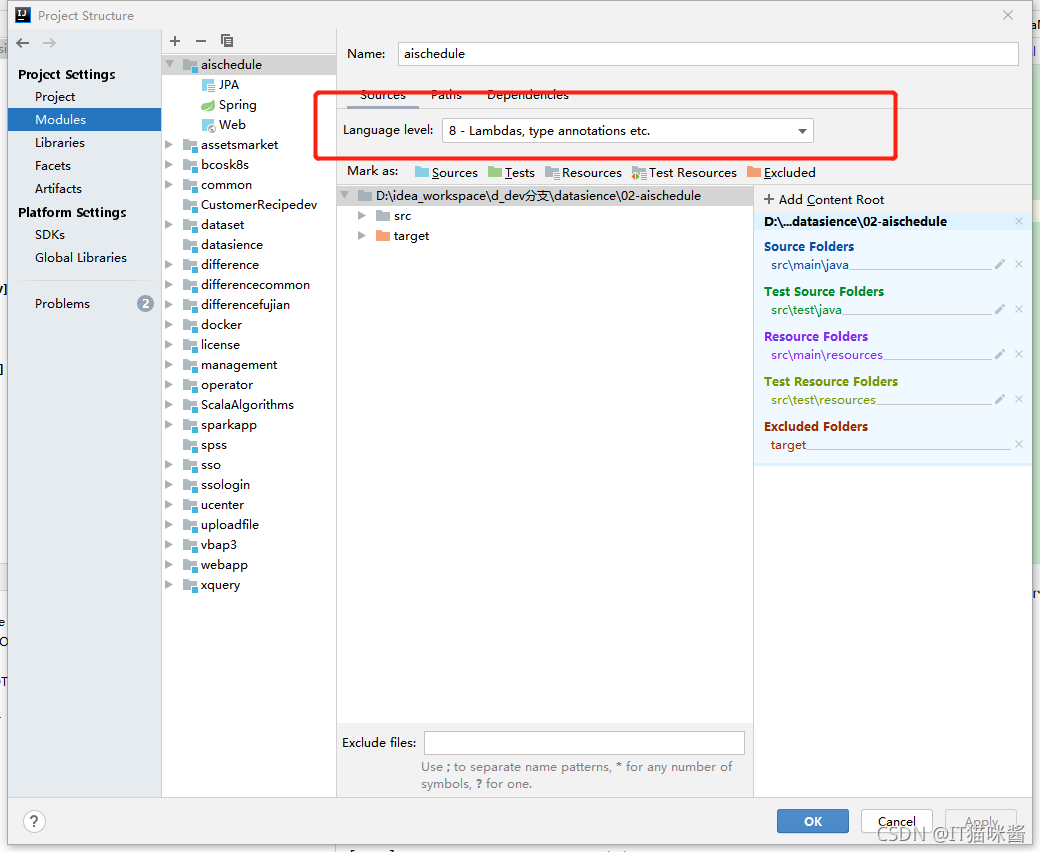
2. Project 2 jdk:File ->Project Structure->Project Settings ->Project

3. Project jdk: File ->Project Structure->Project Settings ->Modules

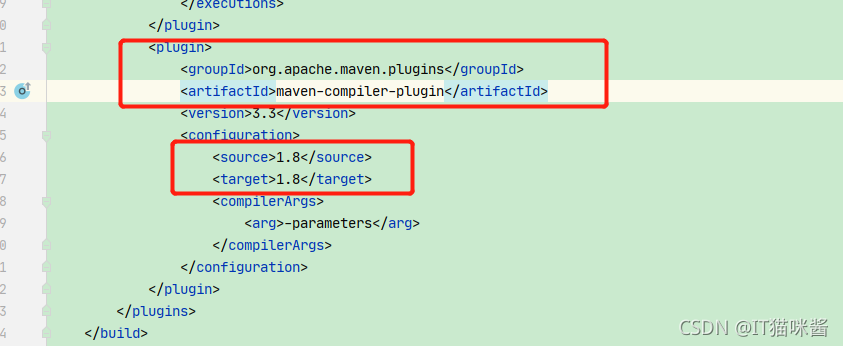
4. pom.xml file in jdk version check

[Solved] error: method does not override or implement a method from a supertype

Compilation error:

error: method does not override or implement a method from a supertype

@Override

error: TestDocumentClipper is not abstract and does not override abstract method copyFromClipboard(DocumentInfo,DocumentStack,Callback,Injector) in DocumentClipper

The above is the compilation error caused by increasing or decreasing the parameters in the method when overriding the method of the parent class in a subclass, or when implementing the interface and overriding the method of the interface in a class
the above error messages are translated as:

1. Method does not override or implement the method in the supertype
2. Testdocumentclipper is not abstract and does not override the abstract method copyfromclipboard (documentinfo, documentstack, callback, injector) in documentclipper

Analysis:
when the documentclipper class implements the methods of the documentclipper interface, it adds (reduces) one more parameter, but there is no corresponding method in the interface to match, so it leads to compilation errors.

Solution:
Add (reduce) the same parameter to the corresponding method in the interface (parent class).

For example, you override the copyfromclipboard() method of the documentclipper interface in the documentclipper class. Because of necessity or carelessness, you add the parameter injector of type injector. The code is as follows:

@Override
public void copyFromClipboard(
        DocumentInfo destination,
        DocumentStack docStack,
        FileOperations.Callback callback,Injector injector){……

At this time, you need to find the copyfromclipboard() method in the documentclipper interface and add the same type of parameters

void copyFromClipboard(
            DocumentInfo destination,
            DocumentStack docStack,
            FileOperations.Callback callback,Injector injector);

[Solved] Openfeign Error: error: Failed to parse Date value…

1 date conversion problem

1. Error reporting

error: Failed to parse Date value '2021-09-13 23:59:59': Cannot parse date "2021-09-13 23:59:59": while it seems to fit format 'yyyy-MM-dd'T'HH:mm:ss.SSSZ', parsing fails (leniency?null))

2. solution

Add the annotation of date format deserialization on the field attribute @ jsonformat (pattern = "yyyy MM DD HH: mm: SS")

	/**
     * the end of time
     */
    @JsonFormat(pattern="yyyy-MM-dd HH:mm:ss")
    private Date endDate;

MVN compile Error: [ERROR] Failed to execute goal org.apache.maven.plugins:maven-compiler-plugin…

[ERROR] Failed to execute goal org.apache.maven.plugins:maven-compiler-plugin:3.1:compile (default-compile) on project hello-world: Compilation failure: Compilation failure:
[ERROR] Source option 5 is no longer supported; use version 6 or higher.
[ERROR] Target option 1.5 is no longer supported. please use version 1.6 or higher.

Add the following attributes to pom.xml

	<properties>
		<project.build.sourceEncoding>UTF-8</project.build.sourceEncoding>
		<maven.compiler.encoding>UTF-8</maven.compiler.encoding>
 
 		<java.version>1.8</java.version>
		<maven.compiler.source>1.8</maven.compiler.source>
		<maven.compiler.target>1.8</maven.compiler.target>
	</properties>