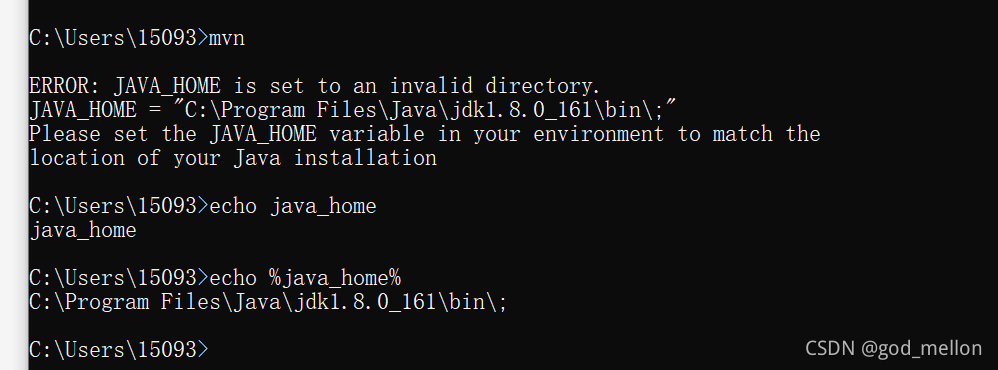
Error: JAVA_HOME is set to an invalid directory
Solution:
Change JAVA_HOME = "D:/Java/jdk1.6.0_12/bin" to JAVA_HOME = “D:/Java/jdk1.6.0_12”
Change %JAVA_HOME% in the path environment variable to %JAVA_HOME%/bin
Then restart cmd
Category Archives: JAVA
[Solved] Java 9 reflection error: java.lang.reflect.InaccessibleObjectException
Java 9 reflection error
Problem solving
Question
when writing JavaFX, perform the HTTP request database login operation, and convert the returned JSON string into a class object. The following code always reports an error.
// json string to class object
JavaType javaType;
ResponseBean<T> data = new ObjectMapper().readValue(json, javaType);
the following errors are reported:
java.lang.reflect.InaccessibleObjectException: Unable to make protected cc.nsurl.bean.ResponseBean() accessible: module cc.nsurl.controllers does not "opens cc.nsurl.bean" to module com.fasterxml.jackson.databind
if you can’t open the class, you can’t reflect.
Solution:
Add the file module-info.java to the JavaFX project. The overall project structure is as follows:
-- src
   -- main
       -- java
          -- module-info.java
Configure in this java file:
module cc.nsurl.controllers {
    // Classes that require reflection opens Self-written classes to third-party libraries
    opens cc.nsurl.controllers to javafx.fxml;
    opens cc.nsurl.bean to com.fasterxml.jackson.databind;
    exports cc.nsurl.controllers;
}
[Solved] Error:Cannot determine path to ‘tools.jar‘ library for 17
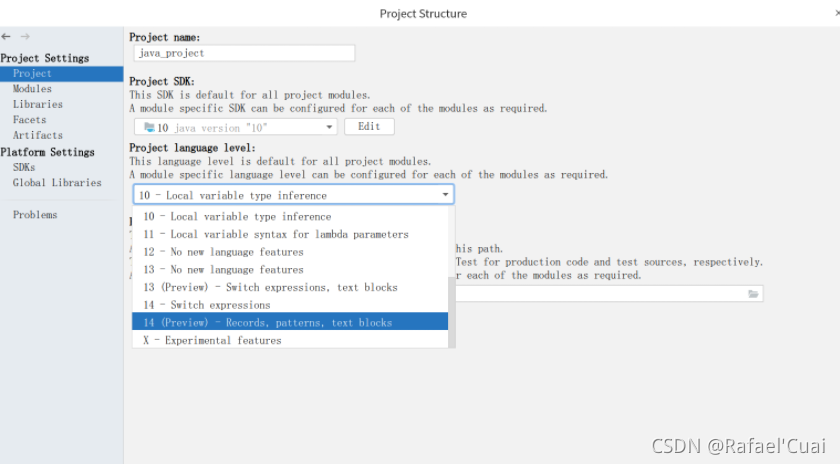
Error: cannot determine path to ‘tools. Jar’ library for 17 solution
The error shown above occurs when running a java project. The essence is that the current idea version does not support Java 17.
 Solution:
1. Download the JDK supported by the current idea version, such as 14
2. Uninstall the current version of idea and download the latest version of idea
I choose 2.
go to the official website of idea to download the latest version of idea
running the project again succeeds
CreateProcess error = 5, access denied. [How to Solve]
CreateProcess error = 5, access denied.
Bugs encountered using java runtime. Getruntime(). Exec()
Bugs encountered using java runtime. Getruntime(). Exec()
Today, when using a wkhtmltopdf tool, you need to use a Java method, * runtime. Getruntime() returns the runtime object of the current application, and the exec() method of the object instructs the Java virtual machine to create a child process, execute the specified executable program, and return the process object instance corresponding to the child process. Through process, you can control the execution of the sub process or obtain the information of the sub process* An introduction link to this function is attached: runtime. Getruntime(). Exec()
when an error code is reported, guess that the reason is that the folder cannot be accessed or the command cannot be called.
public class WKTest {
    public static void main(String[] args) {
        String cmd = "D:/programfiles/wkhtmltopdf/bin --quality 75 https://www.nowcoder.com D:\\work\\wk-images/3.png";

        try{
            Runtime.getRuntime().exec(cmd);
            System.out.println("ok");
        }catch(IOException e){
            e.printStackTrace();
        }
    }
}

java.io.IOException: Cannot run program "D:/programfiles/wkhtmltopdf/bin": CreateProcess error=5,Denied to access.
	at java.lang.ProcessBuilder.start(ProcessBuilder.java:1048)
	at java.lang.Runtime.exec(Runtime.java:620)
	at java.lang.Runtime.exec(Runtime.java:450)
	at java.lang.Runtime.exec(Runtime.java:347)
	at com.nowcoder.community.WKTest.main(WKTest.java:15)
Caused by: java.io.IOException: CreateProcess error=5, Denied to access.
In Java, runtime. Getruntime().Exec() implements calling the server command script to execute the required functions. In other words, this line of code cannot be operated on the folder. You must access the script in the folder. Here I mainly call an. EXE file, which is modified as follows:
public class WKTest {
    public static void main(String[] args) {
        String cmd = "D:/programfiles/wkhtmltopdf/bin/wkhtmltoimage.exe --quality 75 https://www.nowcoder.com D:\\work\\wk-images/3.png";

        try{
            Runtime.getRuntime().exec(cmd);
            System.out.println("ok");
        }catch(IOException e){
            e.printStackTrace();
        }
    }
}
Normal test:
ok

Process finished with exit code 0
SpringBoot Project Run Page Error: Whitelabel Error Page This application has no explicit mapping for /error
Record a super speechless error…
The error reported after running the project is as follows: 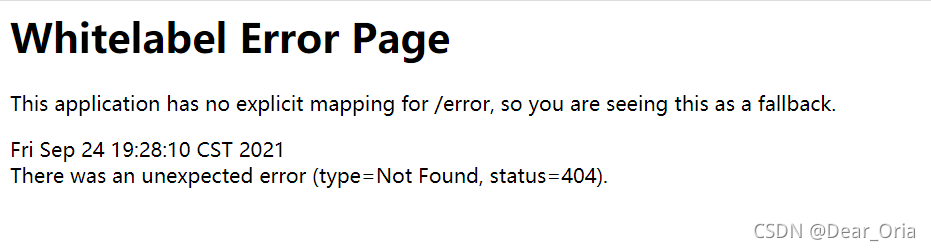
the reason is that the annotation in the controller class is written as @ controller
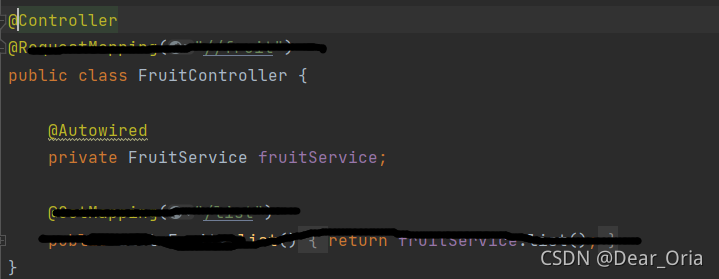
but this is automatically generated by mybatis plus for me…
The final solution is to change the @controller annotation to @restcontroller.
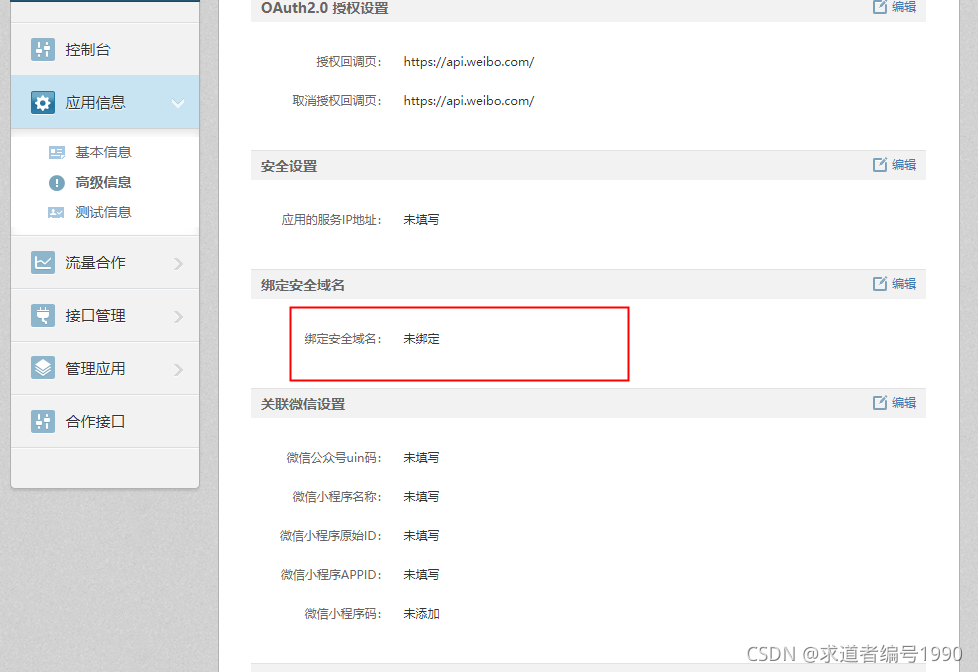
Weibo API api Called Error: error:appkey not bind domain! error_code:10017/2/statuses/share.json
Error message:
weibo4j.model.WeiboException: 400:The request was invalid.  An accompanying error message will explain why. This is the status code will be returned during rate limiting.
 error:appkey not bind domain! error_code:10017/2/statuses/share.json
	at weibo4j.http.HttpClient.httpRequest(HttpClient.java:404)
	at weibo4j.http.HttpClient.post(HttpClient.java:293)
	at weibo4j.http.HttpClient.post(HttpClient.java:279)
	at weibo4j.Timeline.updateStatus(Timeline.java:953)
	at weibo4j.examples.timeline.UpdateStatus.main(UpdateStatus.java:15)
Reason: the security domain name is not configured. The configured security domain name is attached to the status parameter
[Solved] Git Clone Error: “error: RPC failed; curl 56 GnuTLS recv error (-9): A TLS packet with unexpected length …
1. When git pull is used for several large projects recently, the following errors always appear: </ font>
error: RPC failed; curl 56 GnuTLS recv error (-9): A TLS packet with unexpected length was received.
fatal: The remote end hung up unexpectedly
fatal: early EOF
fatal: index-pack failed
2. According to the online method, there are still problems</ font>
// set proxy
git config --global http.proxy socks5://127.0.0.1:1081
git config --global https.proxy socks5://127.0.0.1:1081
// add cache
git config --global http.postBuffer 1048576000
3. Finally, add the following operations to solve the problem
//Change this value to a larger value, the perfect solution, the default is 1500.
ifconfig eth0 mtu 14000JAVA Connect Redis Error: stop-writes-on-bgsave-error option
(error) MISCONF Redis is configured to save RDB snapshots, but it is currently not able to persist on disk. Commands that may modify the data set are disabled, because this instance is configured to report errors during writes if RDB snapshotting fails (stop-writes-on-bgsave-error option). Please check the Redis logs for details about the RDB error.
Go to the redis installation directory and find src
./redis-cli -a redis password
Then execute
127.0.0.1:6379> config set stop-writes-on-bgsave-error no
That’s it
However, this method will fail after restarting
[Solved] BindingException: Type interface XXX is not known to the MapperRegistry
Problem description
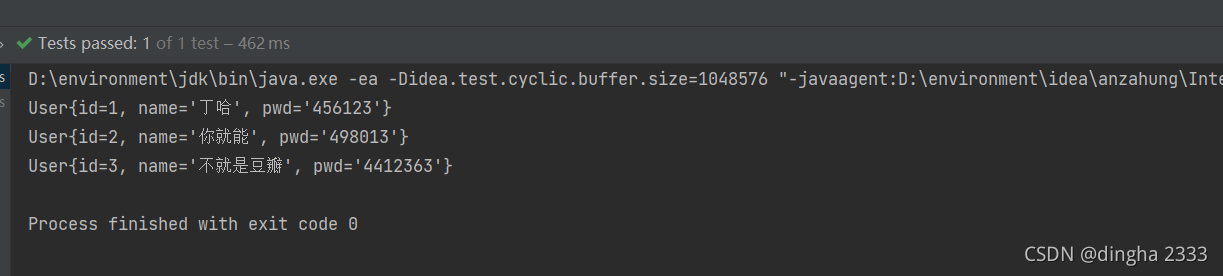
When testing the selection operation of mybatis, the idea reports an error,
org.apache.ibatis.binding.BindingException: Type interface xxx is not known to the MapperRegistry.
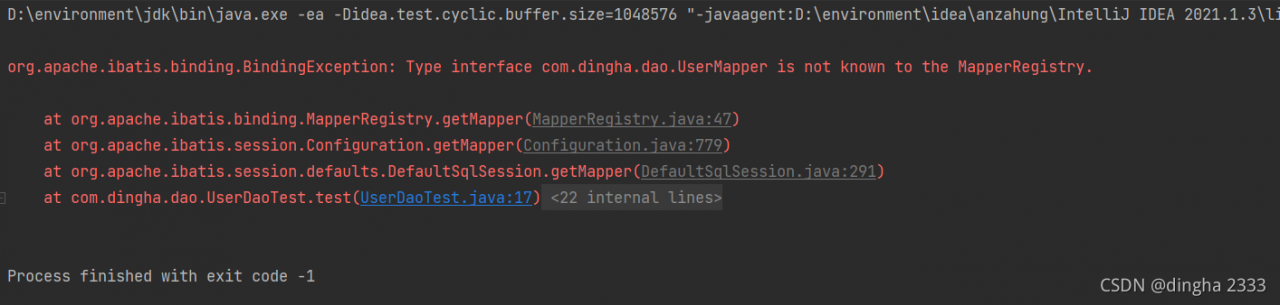
Solution:
Reason: each mapper.xml needs to be registered in the mybatis core configuration file
add the following code to mybatis-config.xml.
<mappers>
    <mapper resource="com/dingha/dao/UserMapper.xml"/>
</mappers>
Done!
How to Solve JDBC connection error in spring MVC integration
# Error Message:

### Error querying database.  Cause: org.springframework.jdbc.CannotGetJdbcConnectionException: Failed to obtain JDBC Connection; nested exception is java.sql.SQLException: Connections could not be acquired from the underlying database!
### The error may exist in com/dao/BookMapper.xml
### The error may involve com.dao.BookMapper.queryAllBook
### The error occurred while executing a query
### Cause: org.springframework.jdbc.CannotGetJdbcConnectionException: Failed to obtain JDBC Connection; nested exception is java.sql.SQLException: Connections could not be acquired from the underlying database!
	java.sql.SQLException: Access denied for user 'Charles'@'localhost' (using password: YES)
		at com.mysql.cj.jdbc.exceptions.SQLError.createSQLException(SQLError.java:129)
		at com.mysql.cj.jdbc.exceptions.SQLError.createSQLException(SQLError.java:97)
		at com.mysql.cj.jdbc.exceptions.SQLExceptionsMapping.translateException(SQLExceptionsMapping.java:122)
		at com.mysql.cj.jdbc.ConnectionImpl.createNewIO(ConnectionImpl.java:835)
		at com.mysql.cj.jdbc.ConnectionImpl.<init>(ConnectionImpl.java:455)
		at com.mysql.cj.jdbc.ConnectionImpl.getInstance(ConnectionImpl.java:240)
		at com.mysql.cj.jdbc.NonRegisteringDriver.connect(NonRegisteringDriver.java:207)
		at com.mchange.v2.c3p0.DriverManagerDataSource.getConnection(DriverManagerDataSource.java:175)
		at com.mchange.v2.c3p0.WrapperConnectionPoolDataSource.getPooledConnection(WrapperConnectionPoolDataSource.java:220)
		at com.mchange.v2.c3p0.WrapperConnectionPoolDataSource.getPooledConnection(WrapperConnectionPoolDataSource.java:206)
		at com.mchange.v2.c3p0.impl.C3P0PooledConnectionPool$1PooledConnectionResourcePoolManager.acquireResource(C3P0PooledConnectionPool.java:203)
		at com.mchange.v2.resourcepool.BasicResourcePool.doAcquire(BasicResourcePool.java:1138)
		at com.mchange.v2.resourcepool.BasicResourcePool.doAcquireAndDecrementPendingAcquiresWithinLockOnSuccess(BasicResourcePool.java:1125)
		at com.mchange.v2.resourcepool.BasicResourcePool.access$700(BasicResourcePool.java:44)
		at com.mchange.v2.resourcepool.BasicResourcePool$ScatteredAcquireTask.run(BasicResourcePool.java:1870)
		at com.mchange.v2.async.ThreadPoolAsynchronousRunner$PoolThread.run(ThreadPoolAsynchronousRunner.java:696)
Cause analysis:
-
- check the database.properties file, but there is no error </ OL>
driver = com.mysql.cj.jdbc.Driver
url = jdbc:mysql://localhost:3306/ssm?serverTimezone=UTC
username = root
password = admin
-
-
- the database used is mysql8.0, and the versions of database driver and database connection pool also match the database version </ OL>
-
<!-- https://mvnrepository.com/artifact/mysql/mysql-connector-java -->
        <dependency>
            <groupId>mysql</groupId>
            <artifactId>mysql-connector-java</artifactId>
            <version>8.0.13</version>
        </dependency>

        <!-- Database connection -->
        <dependency>
            <groupId>com.mchange</groupId>
            <artifactId>c3p0</artifactId>
            <version>0.9.5.2</version>
        </dependency>
-
-
-
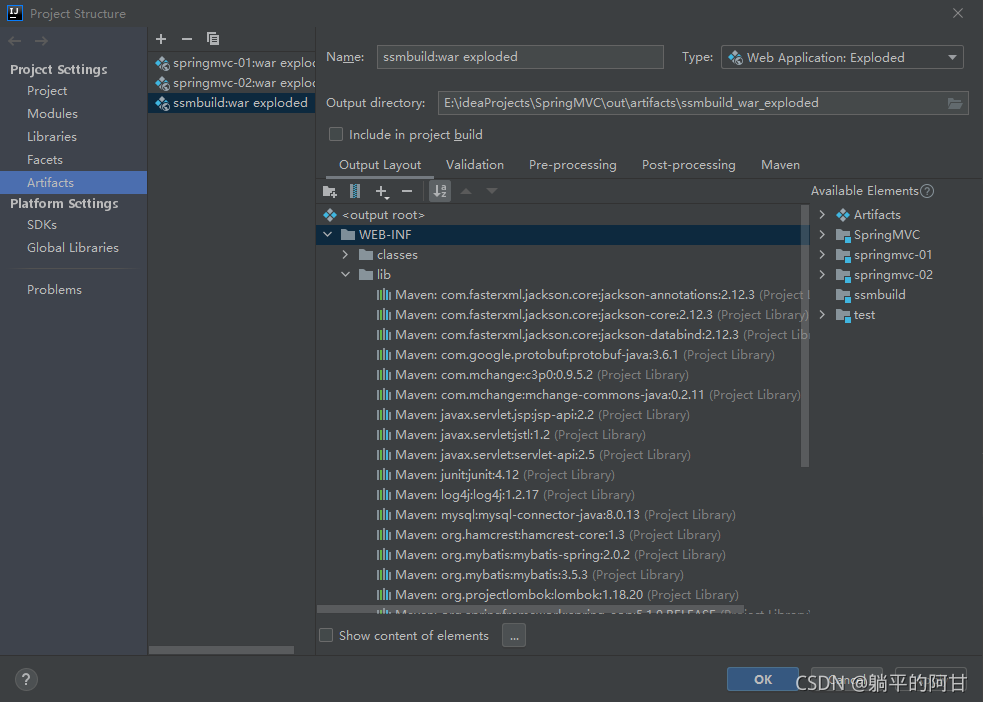
- related dependencies are also added to the artifacts in project structure
-
-
-
-
-
- . There is no mistake in the spring Dao configuration file. All reference paths are correct </ OL>
-
-
	<context:property-placeholder location="classpath:database.properties"/>

    <bean id="dataSource" class="com.mchange.v2.c3p0.ComboPooledDataSource">
        <property name="driverClass" value="${driver}"/>
        <property name="jdbcUrl" value="${url}"/>
        <property name="user" value="${username}"/>
        <property name="password" value="${password}"/>

        <property name="maxPoolSize" value="30"/>
        <property name="minPoolSize" value="10"/>

        <property name="autoCommitOnClose" value="false"/>
        <property name="checkoutTimeout" value="10000"/>
        <property name="acquireRetryAttempts" value="2"/>
    </bean>
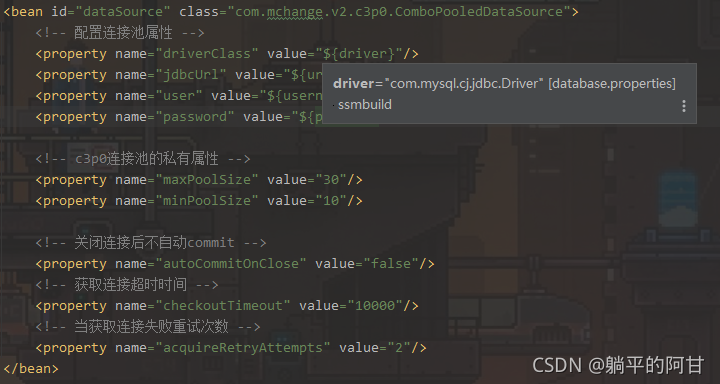
There is also a prompt when the cursor is placed on the value
online solutions have been tried and have not taken effect
Solution:
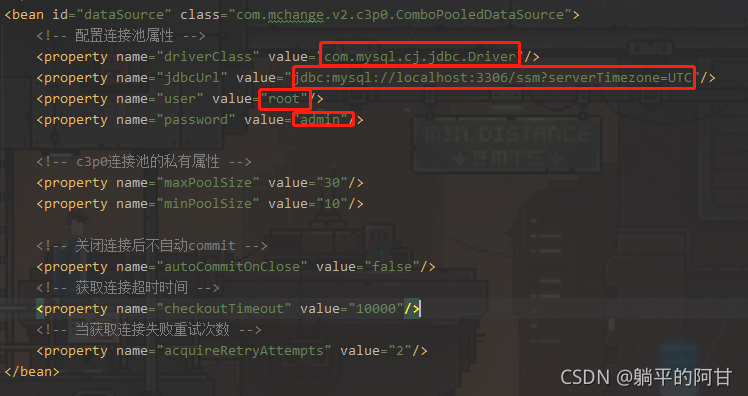
Finally, I accidentally tried to explicitly assign the attribute of the database connection pool, and the connection was successful
How to Solve classnotfoundexception error in spark without Hadoop runtime
Install spark-3.1.2-bin-without-hadoop.tgz
1.ClassNotFoundException: org.apache.log4j.spi.Filter
Launching a freshly downloaded spark reports the following error:
$ ./bin/spark-shell
Error: A JNI error has occurred, please check your installation and try again
Exception in thread "main" java.lang.NoClassDefFoundError: org/apache/log4j/spi/Filter
        at java.lang.Class.getDeclaredMethods0(Native Method)
        at java.lang.Class.privateGetDeclaredMethods(Class.java:2701)
        at java.lang.Class.privateGetMethodRecursive(Class.java:3048)
        at java.lang.Class.getMethod0(Class.java:3018)
        at java.lang.Class.getMethod(Class.java:1784)
        at sun.launcher.LauncherHelper.validateMainClass(LauncherHelper.java:544)
        at sun.launcher.LauncherHelper.checkAndLoadMain(LauncherHelper.java:526)
Caused by: java.lang.ClassNotFoundException: org.apache.log4j.spi.Filter
        at java.net.URLClassLoader.findClass(URLClassLoader.java:382)
        at java.lang.ClassLoader.loadClass(ClassLoader.java:424)
        at sun.misc.Launcher$AppClassLoader.loadClass(Launcher.java:349)
        at java.lang.ClassLoader.loadClass(ClassLoader.java:357)
        ... 7 more
Solution:
Place log4j-1.2.17.jar in the jars directory of the spark you just downloaded.
2.ClassNotFoundException: org.apache.hadoop.fs.FSDataInputStream
Missing hadoop-common-xxx.jar dependency
3.ClassNotFoundException: org.slf4j.Logger
Missing slf4j-api-1.7.25.jardependency
4.ClassNotFoundException: org.slf4j.impl.StaticLoggerBinder
Missing log4j-slf4j-impl-2.12.1.jardependency
5.ClassNotFoundException: org.apache.logging.log4j.spi.AbstractLoggerAdapter
Missing log4j-api-2.12.1.jardependency
[Solved] The war package Error: The reason why the XSD file could not be found
I:
(1) Error reporting: org.xml.sax.saxparseexception; lineNumber: 18; columnNumber: 70; schema_ reference.4: Failed to read schema document ‘ http://code.alibabatech.com/schema/dubbo/dubbo.xsd ‘
(2) Reason: Generally speaking, the XSD file is backed up in the dependent jar package, so even if the link of the XSD file fails, it can still run. If the link fails and the XSD is not found, the jar package is not imported successfully.
(3) Solution:
<!--Use the maven-war-plugin plugin to specify the third-party jar package directory at compile time and introduce-->
			<plugin>
				<artifactId>maven-war-plugin</artifactId>
				<version>3.2.0</version>
				<configuration>
					<webResources>
						<resource>
							<directory>your_project_path/lib</directory>
							<targetPath>WEB-INF/lib</targetPath>
							<includes>
								<include>**/*.jar</include>
							</includes>
						</resource>
					</webResources>
				</configuration>
			</plugin>