Category Archives: JAVA

[Solved] openstack4j Startup Error: java.net.UnknownHostException: controller

When calling OpenStack using openstack4j connection, an error is reported
Specific part of the error reported:

Exception in thread "main" ConnectionException{message=RESTEASY004655: Unable to invoke request, status=0}
    at org.openstack4j.connectors.resteasy.HttpExecutorServiceImpl.invoke(HttpExecutorServiceImpl.java:57)
    at org.openstack4j.connectors.resteasy.HttpExecutorServiceImpl.execute(HttpExecutorServiceImpl.java:31)
    at org.openstack4j.core.transport.internal.HttpExecutor.execute(HttpExecutor.java:51)
    at org.openstack4j.openstack.internal.BaseOpenStackService$Invocation.execute(BaseOpenStackService.java:213)
    at org.openstack4j.openstack.internal.BaseOpenStackService$Invocation.execute(BaseOpenStackService.java:207)
    at
.............................
Caused by: java.net.UnknownHostException: controller
    at java.net.Inet6AddressImpl.lookupAllHostAddr(Native Method)
    at java.net.InetAddress$2.lookupAllHostAddr(InetAddress.java:928)
    at java.net.InetAddress.getAddressesFromNameService(InetAddress.java:1323)
    at java.net.InetAddress.getAllByName0(InetAddress.java:1276)
    at java.net.InetAddress.getAllByName(InetAddress.java:1192)
    at java.net.InetAddress.getAllByName(InetAddress.java:1126)

OpenStack environment: Through the OpenStack environment built on two virtual machines, the hostnames of the two virtual machines are controller, compute. and here the error is reported as unknown host.

Solution:
(1) Open windws/system32/driver/etc/hosts under Windows and add the following content

        Virtual Machine IP controller
        Virtual Machine IP compute

(2) Linux server

       vi  /etc/hosts

Ali easyexcel error: org.apache.poi.ss.usermodel.font.setbold (z) V

public class TestEasyExcel {
	public static void main(String[] args) throws Exception {
		String filepath = "D:/LDT/测试easyExcel.xlsx";
		Sheet sheet = new Sheet(1, 0);
		sheet.setSheetName("xxxx");
		List<List<String>> header = new ArrayList<List<String>>();
		header.add(Lists.newArrayList("Number"));
		header.add(Lists.newArrayList("Name"));
		header.add(Lists.newArrayList("Age"));
		sheet.setHead(header);
		
		List<List<Object>> data = new ArrayList<List<Object>>();
		data.add(Lists.newArrayList("1001","Zhangsan",13));
		data.add(Lists.newArrayList("1002","Lisi",23));
		data.add(Lists.newArrayList("1003","Wangwu",33));
		
		OutputStream out = new FileOutputStream(new File(filepath));
		ExcelWriter writer = EasyExcelFactory.getWriter(out, ExcelTypeEnum.XLSX, true);
		System.out.println(writer);
		writer.write1(data, sheet);
		writer.finish();
	}
}

Error message: org.apache.poi.ss.usermodel.font.setbold (z) V

Cause: there is a conflict between Maven version and poi jar package. The following is Maven version. If POI version is 3.8 or 3.9, this exception message will appear.

        <dependency>
            <groupId>com.alibaba</groupId>
            <artifactId>easyexcel</artifactId>
            <version>1.1.2-beta4</version>
        </dependency>

Solution: this exception will not occur in version 3.17 and above.

        <dependency>
			<groupId>org.apache.poi</groupId>
			<artifactId>poi</artifactId>
			<version>4.1.1</version>
		</dependency>
		<dependency> 
		    <groupId>org.apache.poi</groupId>
		    <artifactId>poi-ooxml</artifactId>
		    <version>4.1.1</version>
		 </dependency>

Ruoyi-cloud Integrated mybatis-plus Error: Unknown column ‘search_value‘ in ‘field list‘

Project scenario:
ruoyi cloud converts mybatis into mybatis plus, executes the querywrapper method, and always reminds of the error. Cause: java.sql.sqlsyntax errorexception: unknown column ‘search_ Value ‘in’ field list ‘
but the corresponding entity class did not find this field. After some efforts, the answer was found in an article, and finally the problem was solved!


Problem Description:

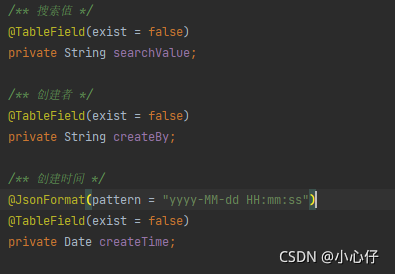
problem screenshot: 


Cause analysis:

because the database does not have this field, ruoyi cloud integrates baseentity, which contains this error field</ font>


Solution:

add annotation @tablefield (exist = false) to the corresponding entity class

How to Solve Springboot Upload Files Error: The field XXX exceeds its maximum permitted size of 1048576 bytes

When uploading a file using springboot, the following error is reported

 ERROR 11136 --- [nio-8080-exec-2] o.a.c.c.C.[.[.[/].[dispatcherServlet]    : Servlet.service() for servlet [dispatcherServlet] in context with path [] threw exception [Request processing failed; nested exception is org.springframework.web.multipart.MaxUploadSizeExceededException: Maximum upload size exceeded; nested exception is java.lang.IllegalStateException: org.apache.tomcat.util.http.fileupload.impl.FileSizeLimitExceededException: The field photos exceeds its maximum permitted size of 1048576 bytes.] with root cause

org.apache.tomcat.util.http.fileupload.impl.FileSizeLimitExceededException: The field photos exceeds its maximum permitted size of 1048576 bytes.
	at org.apache.tomcat.util.http.fileupload.impl.FileItemStreamImpl$1.raiseError(FileItemStreamImpl.java:114) ~[tomcat-embed-core-9.0.52.jar:9.0.52]
	at org.apache.tomcat.util.http.fileupload.util.LimitedInputStream.checkLimit(LimitedInputStream.java:76) ~[tomcat-embed-core-9.0.52.jar:9.0.52]
	at org.apache.tomcat.util.http.fileupload.util.LimitedInputStream.read(LimitedInputStream.java:135) ~[tomcat-embed-core-9.0.52.jar:9.0.52]
	at java.io.FilterInputStream.read(FilterInputStream.java:107) ~[na:1.8.0_221]
	at org.apache.tomcat.util.http.fileupload.util.Streams.copy(Streams.java:98) ~[tomcat-embed-core-9.0.52.jar:9.0.52]
	at org.apache.tomcat.util.http.fileupload.FileUploadBase.parseRequest(FileUploadBase.java:291) ~[tomcat-embed-core-9.0.52.jar:9.0.52]
	at org.apache.catalina.connector.Request.parseParts(Request.java:2922) ~[tomcat-embed-core-9.0.52.jar:9.0.52]
	at org.apache.catalina.connector.Request.getParts(Request.java:2824) ~[tomcat-embed-core-9.0.52.jar:9.0.52]
	at org.apache.catalina.connector.RequestFacade.getParts(RequestFacade.java:1098) ~[tomcat-embed-core-9.0.52.jar:9.0.52]
	at org.springframework.web.multipart.support.StandardMultipartHttpServletRequest.parseRequest(StandardMultipartHttpServletRequest.java:95) ~[spring-web-5.3.9.jar:5.3.9]
	at org.springframework.web.multipart.support.StandardMultipartHttpServletRequest.<init>(StandardMultipartHttpServletRequest.java:88) ~[spring-web-5.3.9.jar:5.3.9]
	at org.springframework.web.multipart.support.StandardServletMultipartResolver.resolveMultipart(StandardServletMultipartResolver.java:122) ~[spring-web-5.3.9.jar:5.3.9]
	at org.springframework.web.servlet.DispatcherServlet.checkMultipart(DispatcherServlet.java:1202) ~[spring-webmvc-5.3.9.jar:5.3.9]
	at org.springframework.web.servlet.DispatcherServlet.doDispatch(DispatcherServlet.java:1036) ~[spring-webmvc-5.3.9.jar:5.3.9]
	at org.springframework.web.servlet.DispatcherServlet.doService(DispatcherServlet.java:963) ~[spring-webmvc-5.3.9.jar:5.3.9]
	at org.springframework.web.servlet.FrameworkServlet.processRequest(FrameworkServlet.java:1006) ~[spring-webmvc-5.3.9.jar:5.3.9]
	at org.springframework.web.servlet.FrameworkServlet.doPost(FrameworkServlet.java:909) ~[spring-webmvc-5.3.9.jar:5.3.9]
	at javax.servlet.http.HttpServlet.service(HttpServlet.java:681) ~[tomcat-embed-core-9.0.52.jar:4.0.FR]
	at org.springframework.web.servlet.FrameworkServlet.service(FrameworkServlet.java:883) ~[spring-webmvc-5.3.9.jar:5.3.9]
	at javax.servlet.http.HttpServlet.service(HttpServlet.java:764) ~[tomcat-embed-core-9.0.52.jar:4.0.FR]
	at org.apache.catalina.core.ApplicationFilterChain.internalDoFilter(ApplicationFilterChain.java:227) ~[tomcat-embed-core-9.0.52.jar:9.0.52]
	at org.apache.catalina.core.ApplicationFilterChain.doFilter(ApplicationFilterChain.java:162) ~[tomcat-embed-core-9.0.52.jar:9.0.52]
	at org.apache.tomcat.websocket.server.WsFilter.doFilter(WsFilter.java:53) ~[tomcat-embed-websocket-9.0.52.jar:9.0.52]
	at org.apache.catalina.core.ApplicationFilterChain.internalDoFilter(ApplicationFilterChain.java:189) ~[tomcat-embed-core-9.0.52.jar:9.0.52]
	at org.apache.catalina.core.ApplicationFilterChain.doFilter(ApplicationFilterChain.java:162) ~[tomcat-embed-core-9.0.52.jar:9.0.52]
	at org.springframework.web.filter.RequestContextFilter.doFilterInternal(RequestContextFilter.java:100) ~[spring-web-5.3.9.jar:5.3.9]
	at org.springframework.web.filter.OncePerRequestFilter.doFilter(OncePerRequestFilter.java:119) ~[spring-web-5.3.9.jar:5.3.9]
	at org.apache.catalina.core.ApplicationFilterChain.internalDoFilter(ApplicationFilterChain.java:189) ~[tomcat-embed-core-9.0.52.jar:9.0.52]
	at org.apache.catalina.core.ApplicationFilterChain.doFilter(ApplicationFilterChain.java:162) ~[tomcat-embed-core-9.0.52.jar:9.0.52]
	at org.springframework.web.filter.FormContentFilter.doFilterInternal(FormContentFilter.java:93) ~[spring-web-5.3.9.jar:5.3.9]
	at org.springframework.web.filter.OncePerRequestFilter.doFilter(OncePerRequestFilter.java:119) ~[spring-web-5.3.9.jar:5.3.9]
	at org.apache.catalina.core.ApplicationFilterChain.internalDoFilter(ApplicationFilterChain.java:189) ~[tomcat-embed-core-9.0.52.jar:9.0.52]
	at org.apache.catalina.core.ApplicationFilterChain.doFilter(ApplicationFilterChain.java:162) ~[tomcat-embed-core-9.0.52.jar:9.0.52]
	at org.springframework.web.filter.CharacterEncodingFilter.doFilterInternal(CharacterEncodingFilter.java:201) ~[spring-web-5.3.9.jar:5.3.9]
	at org.springframework.web.filter.OncePerRequestFilter.doFilter(OncePerRequestFilter.java:119) ~[spring-web-5.3.9.jar:5.3.9]
	at org.apache.catalina.core.ApplicationFilterChain.internalDoFilter(ApplicationFilterChain.java:189) ~[tomcat-embed-core-9.0.52.jar:9.0.52]
	at org.apache.catalina.core.ApplicationFilterChain.doFilter(ApplicationFilterChain.java:162) ~[tomcat-embed-core-9.0.52.jar:9.0.52]
	at org.apache.catalina.core.StandardWrapperValve.invoke(StandardWrapperValve.java:197) ~[tomcat-embed-core-9.0.52.jar:9.0.52]
	at org.apache.catalina.core.StandardContextValve.invoke(StandardContextValve.java:97) [tomcat-embed-core-9.0.52.jar:9.0.52]
	at org.apache.catalina.authenticator.AuthenticatorBase.invoke(AuthenticatorBase.java:542) [tomcat-embed-core-9.0.52.jar:9.0.52]
	at org.apache.catalina.core.StandardHostValve.invoke(StandardHostValve.java:135) [tomcat-embed-core-9.0.52.jar:9.0.52]
	at org.apache.catalina.valves.ErrorReportValve.invoke(ErrorReportValve.java:92) [tomcat-embed-core-9.0.52.jar:9.0.52]
	at org.apache.catalina.core.StandardEngineValve.invoke(StandardEngineValve.java:78) [tomcat-embed-core-9.0.52.jar:9.0.52]
	at org.apache.catalina.connector.CoyoteAdapter.service(CoyoteAdapter.java:357) [tomcat-embed-core-9.0.52.jar:9.0.52]
	at org.apache.coyote.http11.Http11Processor.service(Http11Processor.java:382) [tomcat-embed-core-9.0.52.jar:9.0.52]
	at org.apache.coyote.AbstractProcessorLight.process(AbstractProcessorLight.java:65) [tomcat-embed-core-9.0.52.jar:9.0.52]
	at org.apache.coyote.AbstractProtocol$ConnectionHandler.process(AbstractProtocol.java:893) [tomcat-embed-core-9.0.52.jar:9.0.52]
	at org.apache.tomcat.util.net.NioEndpoint$SocketProcessor.doRun(NioEndpoint.java:1726) [tomcat-embed-core-9.0.52.jar:9.0.52]
	at org.apache.tomcat.util.net.SocketProcessorBase.run(SocketProcessorBase.java:49) [tomcat-embed-core-9.0.52.jar:9.0.52]
	at org.apache.tomcat.util.threads.ThreadPoolExecutor.runWorker(ThreadPoolExecutor.java:1191) [tomcat-embed-core-9.0.52.jar:9.0.52]
	at org.apache.tomcat.util.threads.ThreadPoolExecutor$Worker.run(ThreadPoolExecutor.java:659) [tomcat-embed-core-9.0.52.jar:9.0.52]
	at org.apache.tomcat.util.threads.TaskThread$WrappingRunnable.run(TaskThread.java:61) [tomcat-embed-core-9.0.52.jar:9.0.52]
	at java.lang.Thread.run(Thread.java:748) [na:1.8.0_221]

Error reporting reason:

The upload size of a single file cannot be more than 1MB

The upload size of multiple files cannot be more than 10MB

Simple analysis of the underlying source code of springboot

// I have intercepted parts of both of these classes, so those who are interested can see for themselves

// Configuration class for file upload
public class MultipartProperties {
    private boolean enabled = true;
    private String location;

    // Default individual file size is 1MB
    private DataSize maxFileSize = DataSize.ofMegabytes(1L);
    
    // Default multiple file size is 10MB
    private DataSize maxRequestSize = DataSize.ofMegabytes(10L);
    
    private DataSize fileSizeThreshold = DataSize.ofBytes(0L);
    private boolean resolveLazily = false;
}

// Set file size
public final class DataSize implements Comparable<DataSize>, Serializable {
	/**
	 * The pattern for parsing.
	 */
	private static final Pattern PATTERN = Pattern.compile("^([+\\-]?\\d+)([a-zA-Z]{0,2})$");

	/**
	 * Bytes per Kilobyte.
	 */
	private static final long BYTES_PER_KB = 1024;

	/**
	 * Bytes per Megabyte.
	 */
	private static final long BYTES_PER_MB = BYTES_PER_KB * 1024;

	/**
	 * Bytes per Gigabyte.
	 */
	private static final long BYTES_PER_GB = BYTES_PER_MB * 1024;

	/**
	 * Bytes per Terabyte.
	 */
	private static final long BYTES_PER_TB = BYTES_PER_GB * 1024;


	private final long bytes;


	/**
	 * Obtain a {@link DataSize} representing the specified number of megabytes.
	 * @param megabytes the number of megabytes, positive or negative
	 * @return a {@link DataSize}
	 */
	public static DataSize ofMegabytes(long megabytes) {
		return new DataSize(Math.multiplyExact(megabytes, BYTES_PER_MB));
	}
}

Solution: you can customize the configuration in the properties or yaml configuration file to modify the maximum upload limit of spring boot file. Here I configure it in yaml

spring:
  mvc: 
  servlet:
    multipart:
      max-file-size: 10MB  		# Set the maximum size of a single file to 10MB
      max-request-size: 100MB # Set multiple file size to 100MB

Error starting ApplicationContext. To display the conditions report re-run your application with ‘de

Error starting ApplicationContext. To display the conditions report re-run your application with ‘debug’ enabled. How to Solve
Error Message:

Error starting ApplicationContext. To display the conditions report re-run your application with 'debug' enabled.
2021-10-02 13:18:49.964 ERROR 7280 --- [  restartedMain] o.s.b.d.LoggingFailureAnalysisReporter   : 

***************************
APPLICATION FAILED TO START
***************************

Description:

Field navigationMapper in com.test.littleapp.controller.NavigationController required a bean of type 'com.test.littleapp.mapper.NavigationMapper' that could not be found.

The injection point has the following annotations:
	- @org.springframework.beans.factory.annotation.Autowired(required=true)


Action:

Consider defining a bean of type 'com.test.littleapp.mapper.NavigationMapper' in your configuration.

Solution:

Under the main file of spring boot application, add

@MapperScan("Your mapper name")

package com.test.littleapp;

import org.mybatis.spring.annotation.MapperScan;
import org.springframework.boot.SpringApplication;
import org.springframework.boot.autoconfigure.SpringBootApplication;

@SpringBootApplication
@MapperScan("com.test.littleapp.mapper")
public class LittleappApplication {
    public static void main(String[] args) {
        SpringApplication.run(LittleappApplication.class, args);
    }
}

springcloud alibaba Integrating nacos reports errors: create config service error!properties=NacosConfigPropertie

Solution:

First, check whether the YML file is configured

spring:    
    cloud:
        nacos:
          discovery:
            server-addr: 127.0.0.1:8848
      application:
        name: gulimall-member

If the configuration is completed, check whether the POM file references the configuration center

        <dependency>
            <groupId>com.alibaba.cloud</groupId>
            <artifactId>spring-cloud-starter-alibaba-nacos-config</artifactId>
        </dependency>

If so, just comment it out.

Problem reason: when Nacos config is used for unified configuration management, the bootstrap.properties configuration file is used to initialize the context when starting the springboot project.

When using the unified configuration of springcloudconfig, the loading order of spring boot configuration files is bootstrap.properties – & gt; bootstrap.yml -> application.properties -> Application.yml, where bootstrap.properties is configured as the highest priority.

Therefore, an error is reported if the properties file is not found during configuration.

If you need to use the Nacos configuration center, on the premise of referencing the above dependencies, you need to add the bootstrap.properties file in the resource directory, configure the service name, Nacos address and port number, and restart the service.

spring.application.name=gulimall-coupon
spring.cloud.nacos.config.server-addr=127.0.0.1:8848


Run hadoop fs -put Command Error: java.io.IOException: Got error, status message , ack with firstBadLink

After the Hadoop cluster is set up, the following port error occurs on one node when the Hadoop FS – put command is executed

location:org.apache.hadoop.hdfs.DFSOutputStream$DataStreamer.createBlockOutputStream(DFSOutputStream.java:1495)
throwable:java.io.IOException: Got error, status message , ack with firstBadLink as ip:port
at org.apache.hadoop.hdfs.protocol.datatransfer.DataTransferProtoUtil.checkBlockOpStatus(DataTransferProtoUtil.java:142)
at org.apache.hadoop.hdfs.DFSOutputStream$DataStreamer.createBlockOutputStream(DFSOutputStream.java:1482)
at org.apache.hadoop.hdfs.DFSOutputStream$DataStreamer.nextBlockOutputStream(DFSOutputStream.java:1385)
at org.apache.hadoop.hdfs.DFSOutputStream$DataStreamer.run(DFSOutputStream.java:554)

First, check whether the firewalls of the three nodes are closed

firewall-cmd --state

Turn off firewall command

systemctl stop firewalld.service

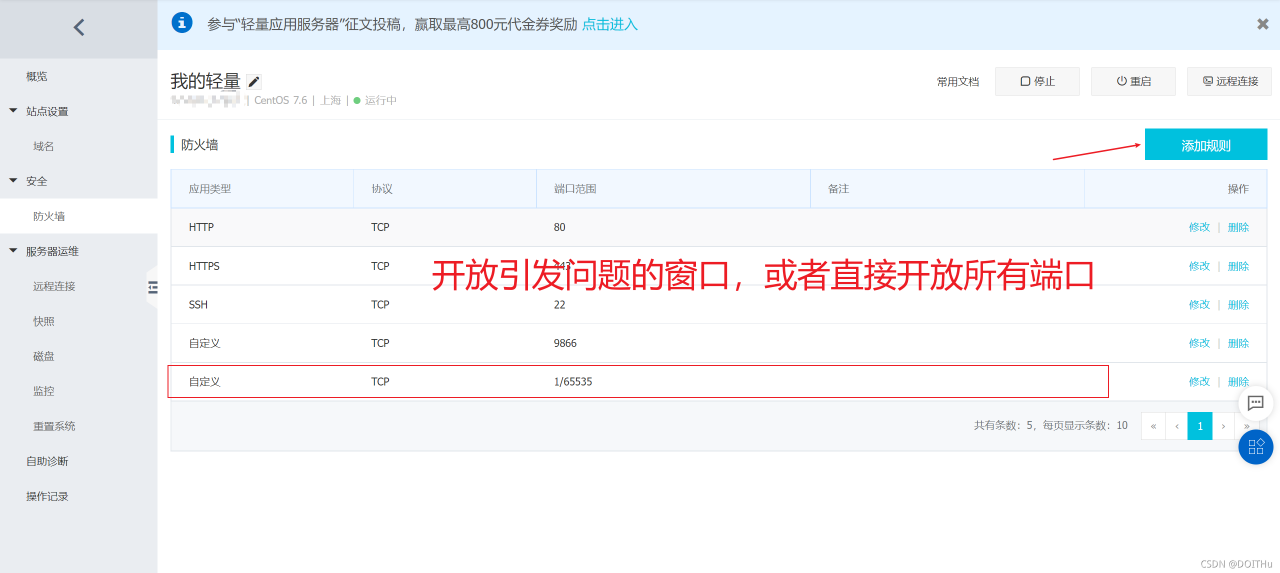
If this situation still occurs after the firewall is closed, it may be that the ports of ECs are not open to the public. Take Alibaba cloud server as an example (Tencent cloud opens all ports by default):

After setting, execute the command again to succeed.

[Solved] JAVA Error: Error occurred during initialization of boot layer java.lang.module.FindException

Create new project error:
Error occurred during initialization of boot layer
java.lang.module.FindException: Error reading module: /Users/chenyue/eclipse-workspace/FirstBlood/bin
Caused by: java.lang.module.InvalidModuleDescriptorException: operear_test.class found in top-level directory (unnamed package not allowed in module)

Solution:
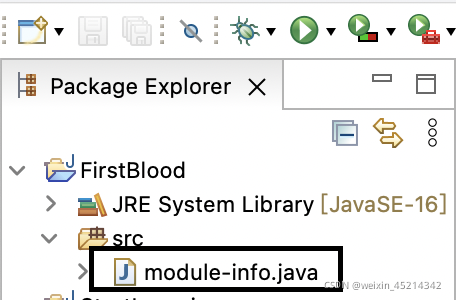
Delete the module-info.java in the directory bar

How to Solve JAR pack error: Error resolving template [/userInfo], template might not exist or might not be accessib

This error did not appear when I was running in idea, but it appeared after I typed the project into a jar package and executed the jar package. This error means that the template page cannot be found, but the template page actually exists in my project. The solution to this error is to skip the template page in the controller without starting with “/”.

Example

@Controller
public class userController {

    @Autowired
    private userServiceImpl userService;

    @RequestMapping("/userInfo/{nickname}")
    public Object showBlog(@PathVariable("nickname") String nickname,
                           Model model, HttpServletRequest request){

        User userInfo = userService.getUserInfo(nickname);
        model.addAttribute("userInfo",userInfo);
        return "userInfo";
    }
}

How to Solve error creating bean with name when springboot starts

1, there will be the following start error, at first do not know how to deal with, after a variety of Baidu, found that adding a note on the line
2. This error will also occur

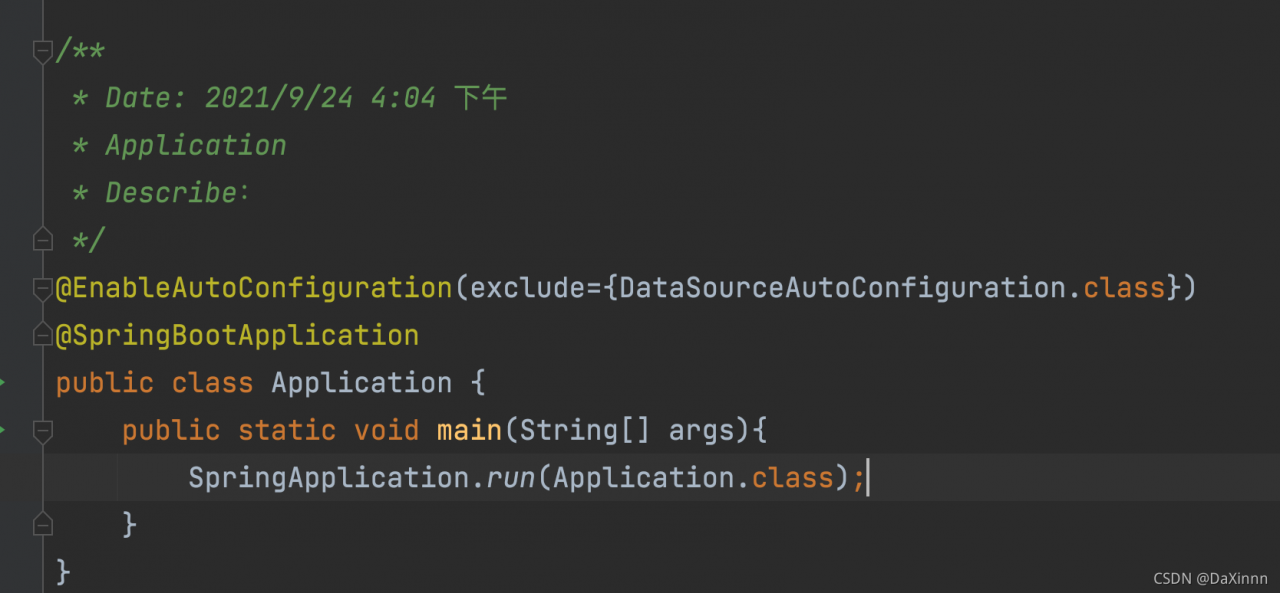
3. You need to add the following comments to run successfully

@EnableAutoConfiguration(exclude={DataSourceAutoConfiguration.class})

Then run again to run successfully

The most important one is autoconfigurationimportselector.class. With autoconfigurationimportselector, @ enableautoconfiguration can help springboot applications load all qualified @ configuration configurations into the IOC container created and used by the current springboot

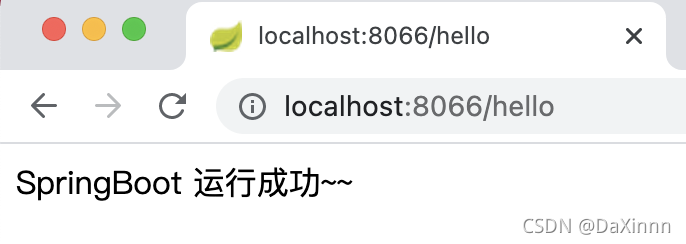
The operation results are as follows

How to Solve IntelliJ IDEA Error: Cannot determine path to ‘tools.jar‘ library for 17 (C:\Program Files\Java\jd…

this month, Java 17 was finally released. This is another lts version after Java 11. I decided to try Java 17. Sure enough, something unexpected happened: when I used java 17 to run a project that used to run normally, IntelliJ idea reported the following error:

Operating environment when the author reports an error:

IntelliJ IDEA 2020.1.2 (Ultimate Edition)

JDK 17

Error:Cannot determine path to 'tools.jar' library for 17 (C:\Program Files\Java\jdk-17)

then, as before. The author tried to run a very simple demo project, and sure enough, the same error occurred again. The environment in which the project used to operate normally is:

The environment in which the project previously operated normally:

IntelliJ IDEA 2020.1.2 (Ultimate Edition)

JDK 11

the author has repeatedly installed multiple versions of Java on different operating systems, and is very familiar with this error report. This error indicates that the current IntelliJ idea cannot parse this version of JDK, so it tries to parse tools. Jar from its built-in environment variable classpath , but it still fails, so it throws the above error message.

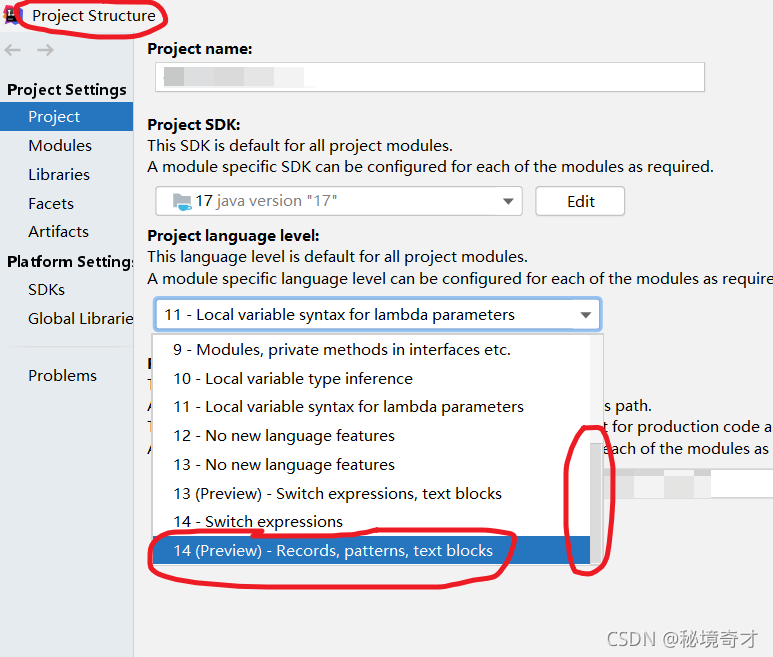
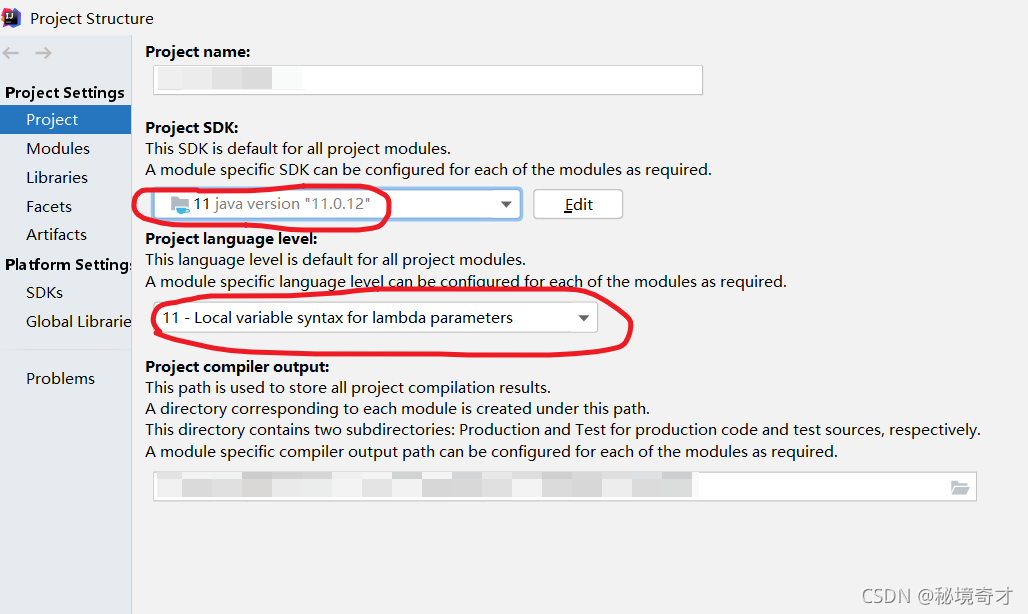
this can be confirmed. It can be clearly seen in the project structure in the figure below that the author’s IntelliJ idea 2020.1.2 (Ultimate Edition) supports parsing JDK 14 at most, so there is nothing to do with Java 17.

Method 1

it’s easy to do when you know the reason. One way is to reduce the JDK version so that the current IntelliJ idea can recognize it.

The environment in which the project previously operated normally:

IntelliJ IDEA 2020.1.2 (Ultimate Edition)

JDK 11

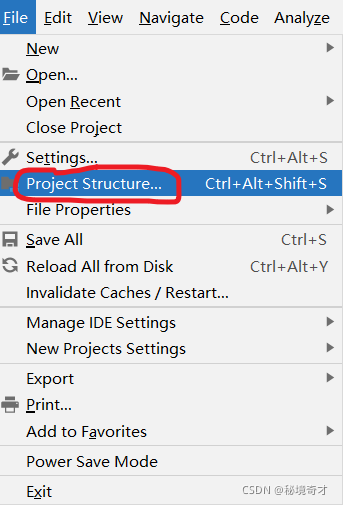
install the lower version of JDK first, and then set it in project structure in IntelliJ idea. See the figure below. But I usually don’t like it.

Method 2

another way is to improve the version of IntelliJ idea. Therefore, the author specially downloaded and installed the latest IntelliJ idea 2021.2.2 (Ultimate Edition) . Unexpectedly and reasonably, the author encountered many holes when installing the latest IntelliJ idea. I have always wanted to stand on the shoulders of giants, but in fact, they are always used as stepping stones by giants. For the problem that IntelliJ idea cannot be opened after installation, see another blog of the author:

solve the problem that the interface disappears after IntelliJ idea is installed, and the interface does not move after it is opened again.

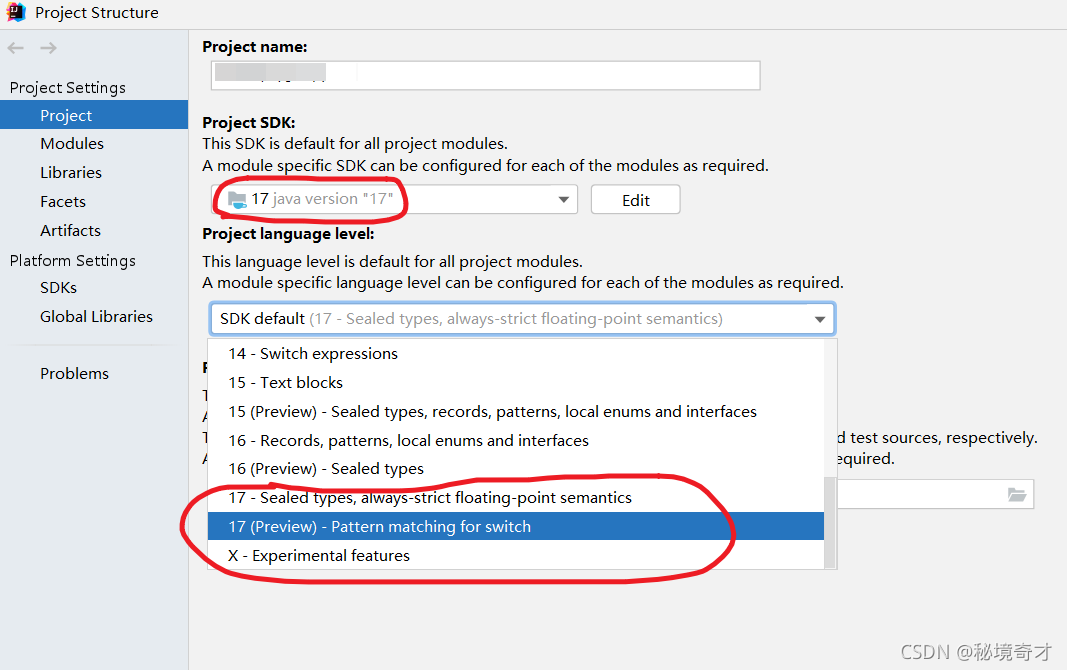
when I first downloaded it, I was worried that it could not parse Java 17, but now it seems that this worry is superfluous.

The environment in which the project operates normally:

IntelliJ IDEA 2021.2.2 (Ultimate Edition)

JDK 17

after upgrading IntelliJ idea, configure project structure as follows.