Category Archives: JAVA

[Solved] Java: compilation failed: internal java compiler error

Java: compilation failed: internal java compiler error when idea compiles the project
java: compilation failed: internal java compiler error

There are basically two root causes, one is the JDK version problem and the other is the stack shortage problem. This time, I am caused by the stack shortage;

1. JDK version problem

Check whether the JDK version is normal. Check both the idea configuration and the project configuration. If it does not meet the requirements, change to the JDK version of your own machine. My JDK is 1.8, so it is all changed to 1.8;

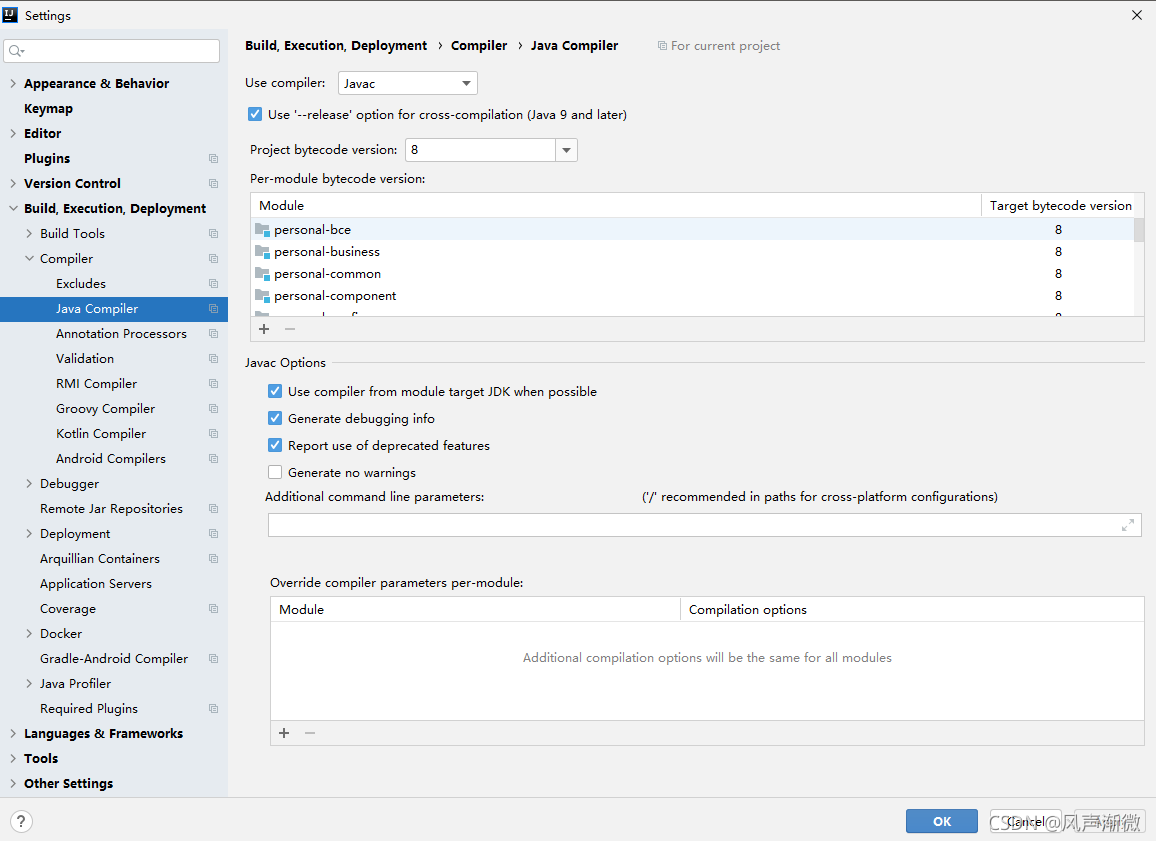
① JDK configuration in idea

File -> Setting -> Build,Execution,Deployment -> Compiler -> Java Compiler

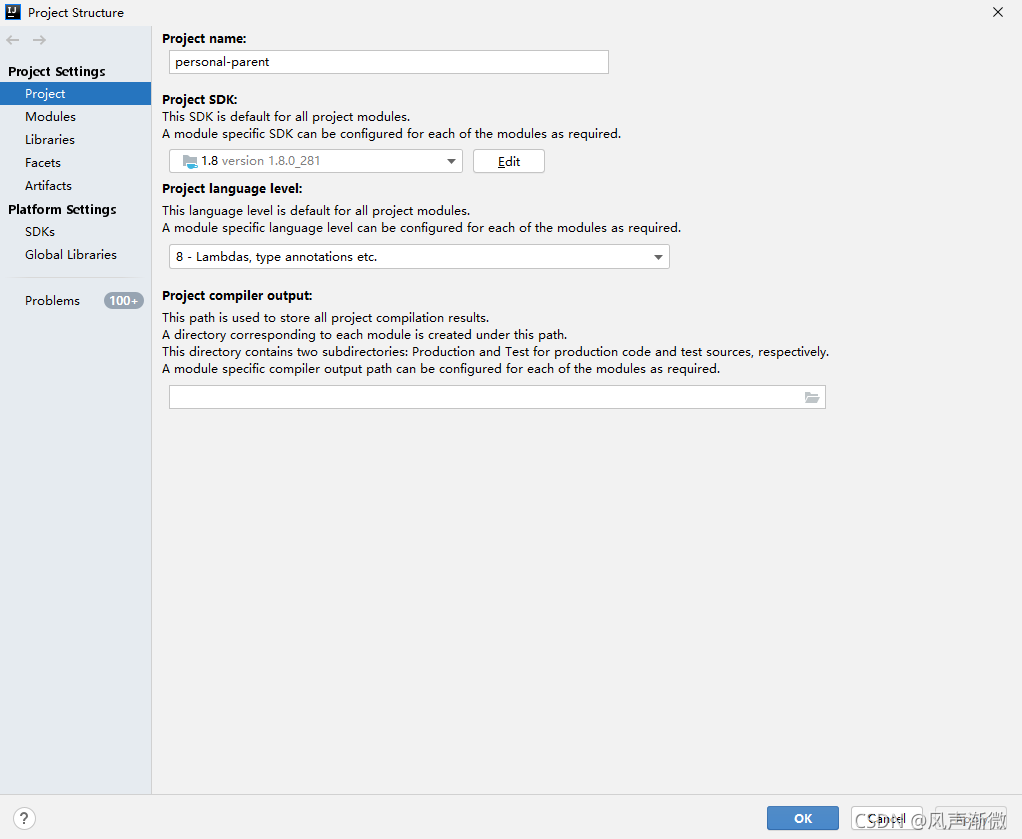
② JDK configuration for project

File -> Project Structure-> Project Settings -> Project

③ JDK configuration of project

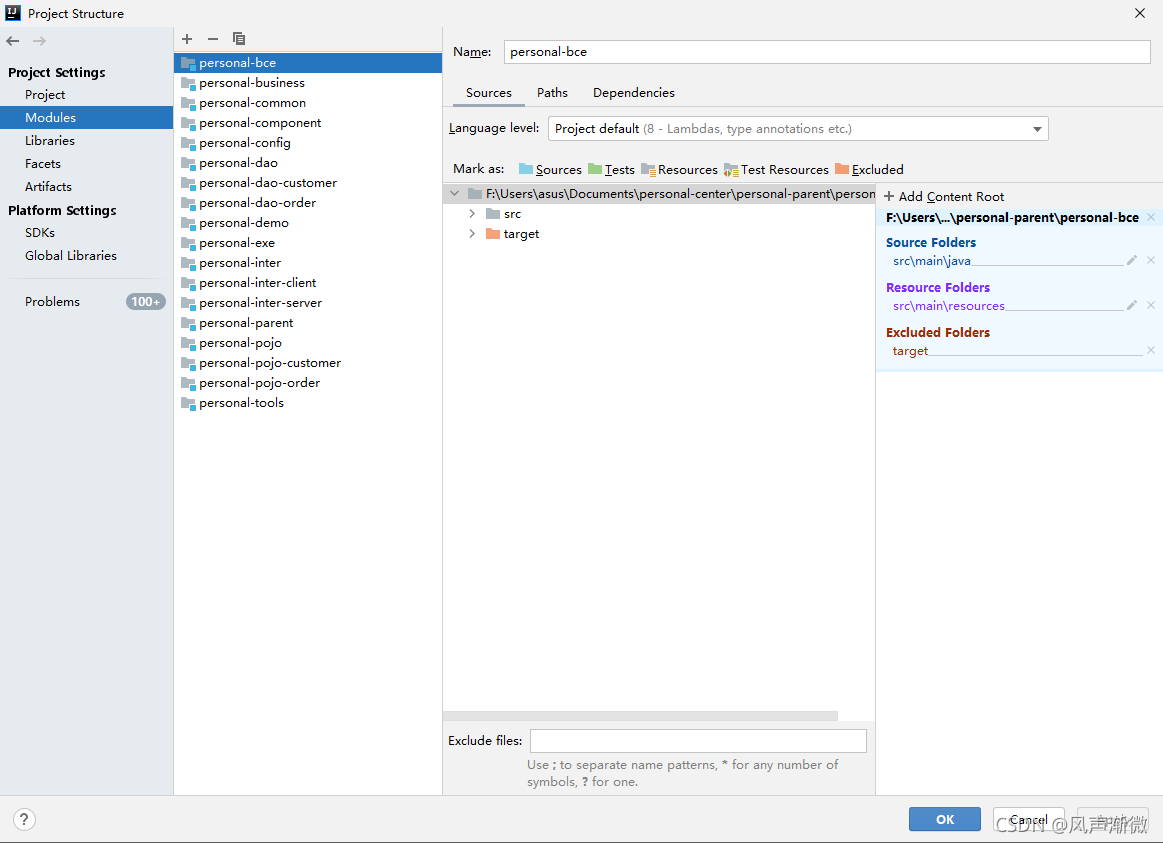
File -> Project Structure-> Project Settings -> Modules -> Project name
note that if there are multiple projects, each one should be changed

2. The project is too large, the build process heap is small, and the stack is insufficient during construction

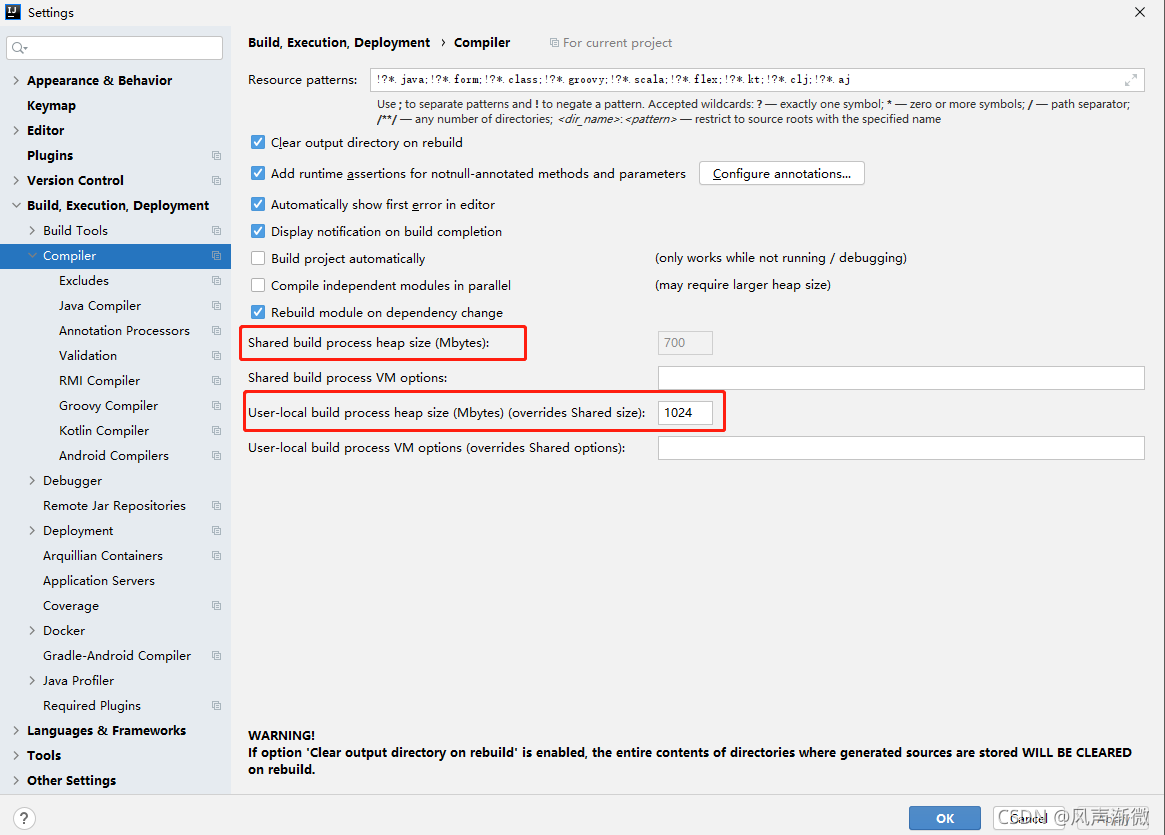
This requires changing the size of the generated process heap
setting–> Build,Execution,Deployment–> Compiler –> User local build process heap size (Mbytes)
here is user local build process heap size (Mbytes). Different versions may not be consistent, but they should be very different. The original default is 700, but it is generally changed to 1024, which is enough. You can’t add it again

Note:
after the JDK version is changed, it is recommended to clear the cache and restart
file – > Invalidate Caches/Restart

How to Solve JAVA Error: error: A JNI error has occureed

Java error reporting

Notebook eslip ide error

error: a JNI error has occurred
solution:

Cause: this problem is caused by the error that the Java class file compiled by the higher version of JDK attempts to run on the lower version of JVM
method 1:
ensure that the versions of JVM (Java command) and JDK (javac command) are consistent. If it is a Windows version, enter the Java – version and javac – version commands on the command line to check whether the versions are consistent
if the versions are the same: see method 2.

If the versions are inconsistent: modify the environment variable classpath,
and then delete and uninstall the unnecessary versions in the system
Restart, delete javac, and regenerate the generated *. Class (* represents the main class name)
method 2:
if they are consistent, but still can not solve the problem, you must not compile directly with javac on the command line, but with compilers such as eclipse and NetBeans. Because many compilers come with javac instead of the compiler in the operating system. If your compiler is eclipse, you need to set the JDK version in the project properties by

-->java compiler --> Enable project specific settings -->
compiler compliance level

Set the compiler compliance level to the same version as the JVM (the version shown in Java – version on the command line).

[Solved] Failed to introspect Class [org.springframework.cloud.netflix.hystrix.HystrixCircuitBreakerConfigura

Caused by: java.lang.IllegalStateException: Failed to introspect Class [org.springframework.cloud.netflix.hystrix.HystrixCircuitBreakerConfiguration] from ClassLoader [jdk.internal.loader.ClassLoaders$AppClassLoader@1f89ab83]

Solution: Introduce hystrix coordinates

<dependency>
    <groupId>org.springframework.cloud</groupId>
    <artifactId>spring-cloud-starter-netflix-hystrix</artifactId>
</dependency>

[Solved] Failed to execute goal org.apache.maven.plugins:maven-dependency-plugin:3.1.1:analyze-only

Question

An exception occurred when compiling an open source project (openlookeng), resulting in compilation failure.

Abnormal content

[ERROR] Failed to execute goal org.apache.maven.plugins:maven-dependency-plugin:3.1.1:analyze-only (default) on project presto-vv: Dependency problems found -> [Help 1]
org.apache.maven.lifecycle.LifecycleExecutionException: Failed to execute goal org.apache.maven.plugins:maven-dependency-plugin:3.1.1:analyze-only (default) on project presto-vv: Dependency problems found
    at org.apache.maven.lifecycle.internal.MojoExecutor.execute (MojoExecutor.java:215)
    at org.apache.maven.lifecycle.internal.MojoExecutor.execute (MojoExecutor.java:156)
    at org.apache.maven.lifecycle.internal.MojoExecutor.execute (MojoExecutor.java:148)
    at org.apache.maven.lifecycle.internal.LifecycleModuleBuilder.buildProject (LifecycleModuleBuilder.java:117)
    at org.apache.maven.lifecycle.internal.LifecycleModuleBuilder.buildProject (LifecycleModuleBuilder.java:81)
    at org.apache.maven.lifecycle.internal.builder.singlethreaded.SingleThreadedBuilder.build (SingleThreadedBuilder.java:56)
    at org.apache.maven.lifecycle.internal.LifecycleStarter.execute (LifecycleStarter.java:128)
    at org.apache.maven.DefaultMaven.doExecute (DefaultMaven.java:305)
    at org.apache.maven.DefaultMaven.doExecute (DefaultMaven.java:192)
    at org.apache.maven.DefaultMaven.execute (DefaultMaven.java:105)
    at org.apache.maven.cli.MavenCli.execute (MavenCli.java:957)
    at org.apache.maven.cli.MavenCli.doMain (MavenCli.java:289)
    at org.apache.maven.cli.MavenCli.main (MavenCli.java:193)
    at sun.reflect.NativeMethodAccessorImpl.invoke0 (Native Method)
    at sun.reflect.NativeMethodAccessorImpl.invoke (NativeMethodAccessorImpl.java:62)
    at sun.reflect.DelegatingMethodAccessorImpl.invoke (DelegatingMethodAccessorImpl.java:43)
    at java.lang.reflect.Method.invoke (Method.java:498)
    at org.codehaus.plexus.classworlds.launcher.Launcher.launchEnhanced (Launcher.java:282)
    at org.codehaus.plexus.classworlds.launcher.Launcher.launch (Launcher.java:225)
    at org.codehaus.plexus.classworlds.launcher.Launcher.mainWithExitCode (Launcher.java:406)
    at org.codehaus.plexus.classworlds.launcher.Launcher.main (Launcher.java:347)
Caused by: org.apache.maven.plugin.MojoExecutionException: Dependency problems found
    at org.apache.maven.plugins.dependency.analyze.AbstractAnalyzeMojo.execute (AbstractAnalyzeMojo.java:253)
    at org.apache.maven.plugin.DefaultBuildPluginManager.executeMojo (DefaultBuildPluginManager.java:137)
    at org.apache.maven.lifecycle.internal.MojoExecutor.execute (MojoExecutor.java:210)
    at org.apache.maven.lifecycle.internal.MojoExecutor.execute (MojoExecutor.java:156)
    at org.apache.maven.lifecycle.internal.MojoExecutor.execute (MojoExecutor.java:148)
    at org.apache.maven.lifecycle.internal.LifecycleModuleBuilder.buildProject (LifecycleModuleBuilder.java:117)
    at org.apache.maven.lifecycle.internal.LifecycleModuleBuilder.buildProject (LifecycleModuleBuilder.java:81)
    at org.apache.maven.lifecycle.internal.builder.singlethreaded.SingleThreadedBuilder.build (SingleThreadedBuilder.java:56)
    at org.apache.maven.lifecycle.internal.LifecycleStarter.execute (LifecycleStarter.java:128)
    at org.apache.maven.DefaultMaven.doExecute (DefaultMaven.java:305)
    at org.apache.maven.DefaultMaven.doExecute (DefaultMaven.java:192)
    at org.apache.maven.DefaultMaven.execute (DefaultMaven.java:105)
    at org.apache.maven.cli.MavenCli.execute (MavenCli.java:957)
    at org.apache.maven.cli.MavenCli.doMain (MavenCli.java:289)
    at org.apache.maven.cli.MavenCli.main (MavenCli.java:193)
    at sun.reflect.NativeMethodAccessorImpl.invoke0 (Native Method)
    at sun.reflect.NativeMethodAccessorImpl.invoke (NativeMethodAccessorImpl.java:62)
    at sun.reflect.DelegatingMethodAccessorImpl.invoke (DelegatingMethodAccessorImpl.java:43)
    at java.lang.reflect.Method.invoke (Method.java:498)
    at org.codehaus.plexus.classworlds.launcher.Launcher.launchEnhanced (Launcher.java:282)
    at org.codehaus.plexus.classworlds.launcher.Launcher.launch (Launcher.java:225)
    at org.codehaus.plexus.classworlds.launcher.Launcher.mainWithExitCode (Launcher.java:406)
    at org.codehaus.plexus.classworlds.launcher.Launcher.main (Launcher.java:347)
[ERROR]
[ERROR] Re-run Maven using the -X switch to enable full debug logging.
[ERROR]
[ERROR] For more information about the errors and possible solutions, please read the following articles:
[ERROR] [Help 1] http://cwiki.apache.org/confluence/display/MAVEN/MojoExecutionException

Causes and Solutions

This is because Maven’s dependency check plug-in is enabled. When checking the plug-in, it is found that some dependencies are not used or used but not defined. As follows:

[INFO] --- maven-dependency-plugin:3.1.1:analyze-only (default) @ presto-vv ---
[WARNING] Used undeclared dependencies found:
[WARNING]    org.apache.pulsar:pulsar-client-api:jar:2.8.0:compile
[WARNING]    org.apache.pulsar:pulsar-metadata:jar:2.8.0:compile
[WARNING]    commons-configuration:commons-configuration:jar:1.10:compile
[WARNING]    org.apache.bookkeeper:bookkeeper-common:jar:4.14.1:compile
[WARNING]    org.slf4j:slf4j-api:jar:1.7.29:compile
[WARNING]    javax.ws.rs:javax.ws.rs-api:jar:2.1:compile
[WARNING]    org.apache.commons:commons-lang3:jar:3.11:compile
[WARNING]    org.jctools:jctools-core:jar:2.1.2:compile
[WARNING]    org.apache.bookkeeper:bookkeeper-server:jar:4.14.1:compile
[WARNING]    org.apache.pulsar:pulsar-client-admin-api:jar:2.8.0:compile
[WARNING]    org.apache.pulsar:pulsar-common:jar:2.8.0:compile
[WARNING]    org.apache.avro:avro:jar:1.9.2:compile
[WARNING]    io.netty:netty-buffer:jar:4.1.63.Final:compile
[WARNING]    org.apache.bookkeeper.stats:bookkeeper-stats-api:jar:4.14.1:compile
[WARNING] Unused declared dependencies found:
[WARNING]    org.projectlombok:lombok:jar:RELEASE:compile

If you do not need to strictly check invalid dependencies, you can set parameters to not check. Please refer to
Maven dependency plugin -> analyze-only

The parameter to be added to skip this check: skip, which is explained as follows:
skip plugin execution complete.
default value is: false.
user property is: mdep.analyze.skip

BeanDefinitionStoreException: Failed to read candidate component class probably due to a new Java

While learning about annotations in the Spring Framework, I had this problem on my first test and couldn’t figure it out
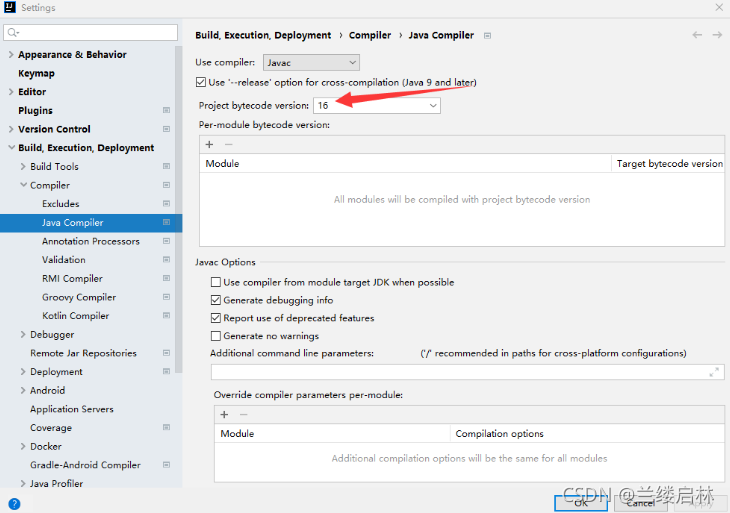
Finally I found out that there is a mismatch between JDK and Spring version, my Spring framework version is 5.2.6 and it only supports up to JDK15 and mine is JDK16, which causes the problem
Spring Framework 5.3.x: JDK 8-17 (expected)Spring Framework 5.2.x: JDK 8-15 (expected)Spring Framework 5.1.x: JDK 8-12Spring Framework 5.0.x: JDK 8-10Spring Framework 4.3.x: JDK 6-8
I was going to download another JDK8, but suddenly I found that in File-Setting-Build, Execution... - I was able to adjust Project bytecode version from 16 to 15 in the Java Compiler and the problem was solved.

Error: org.springframework.beans.factory.BeanDefinitionStoreException: Failed to read candidate component class: file [D:\java\spring5_demo3\out\production\spring5_demo3\com\spring5\service\UserService.class]; nested exception is org.springframework.core.NestedIOException: ASM ClassReader failed to parse class file – probably due to a new Java class file version that isn’t supported yet: file [D:\java\spring5_demo3\out\production\spring5_demo3\com\spring5\service\UserService.class]; nested exception is java.lang.IllegalArgumentException: Unsupported class file major version 60

[Solved] Upload Files Error: Request processing failed;nested exception is org.springframework.web.multipart.MultipartExcepti

During a project development, the front-end uploaded a file and reported a bug without permission

Problem description

Request processing failed; nested exception is org.springframework.web.multipart.MultipartException: Failed to parse multipart servlet request; Needed exception is org.apache.commons.fileupload.fileuploadbase $iofileuploadexception: processing of multipart/form data request failed

Error reporting reason

It should be because HTTP remote access does not have permission to access the temporary directory of Tomcat on the server

So we might as well directly set a temporary file upload path instead of using the default path of Tomcat

Solution:

Modify the uploaded temporary file path instead of the default temporary file path of Tomcat

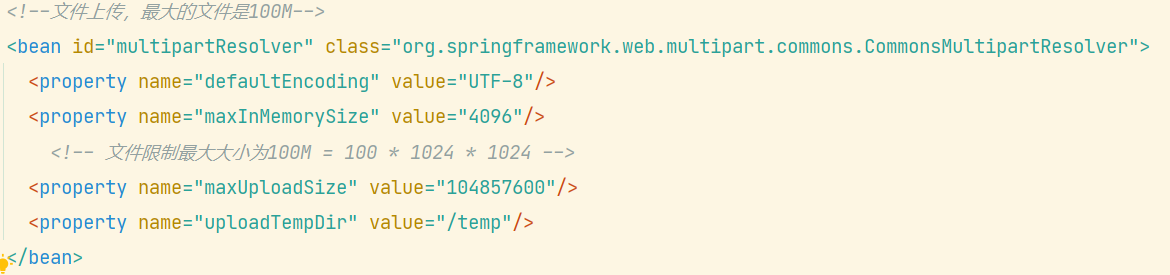
When uploading the configuration file in applicationcontext.xml of spring, add

<property name="uploadTempDir" value="/temp"/>

The content in value is the temporary file directory you want to set

[Solved] SpringBoot Pack Project: Failed to execute goal org.apache.maven.plugins:maven-resources-plugin:3.2.0:resources

Error prompt

Failed to execute goal org.apache.maven.plugins:maven-resources-plugin:3.2.0:resources (default-resources) on project store: Input length = 1 -> [Help 1]

Analysis: there are few corresponding dependencies Maven resources plugin

solution:
add a corresponding dependency:

<build>
    <plugins>
        <plugin>
            <groupId>org.apache.maven.plugins</groupId>
            <artifactId>maven-resources-plugin</artifactId>
            <version>3.1.0</version>
        </plugin>
        <plugin>
            <groupId>org.springframework.boot</groupId>
            <artifactId>spring-boot-maven-plugin</artifactId>
        </plugin>
    </plugins>
</build>

If the problem still exists, pay attention to the Maven resources plugin version. If there is a problem with version 3.2.0, change to version 3.1.0

How to Solve Flick operate Error: not serialized

An error is reported related to flick serialization

Problem solving run code error reporting content solution custom implementation serialization re-execute code

The problem goes deep into why the error is thrown, why the source of the error needs to be serialized, and why the closure needs to be cleaned up

Problem-solving

Run code

public class JavaSourceEx {

    public static void main(String[] args) throws Exception {

        StreamExecutionEnvironment env = StreamExecutionEnvironment.getExecutionEnvironment();

        // 1)use fromCollection(Collection) to read datas
        //ArrayList<String> list = new ArrayList<>();
        //list.add("hello");list.add("word");list.add("cctv");
        //DataStreamSource<String> stream01 = env.fromCollection(list);

        // 2)use fromCollection(Iterator, Class) to read datas
        Iterator<String> it = list.iterator();
        DataStreamSource<String> stream02 = env.fromCollection(it, TypeInformation.of(String.class));

        stream02.print().setParallelism(1);
        env.execute();
    }
}

Error content

Exception in thread "main" org.apache.flink.api.common.InvalidProgramException: java.util.ArrayList$Itr@a1cdc6d is not serializable. The implementation accesses fields of its enclosing class, which is a common reason for non-serializability. A common solution is to make the function a proper (non-inner) class, or a static inner class.
	at org.apache.flink.api.java.ClosureCleaner.clean(ClosureCleaner.java:164)
	at org.apache.flink.api.java.ClosureCleaner.clean(ClosureCleaner.java:132)
	at org.apache.flink.api.java.ClosureCleaner.clean(ClosureCleaner.java:69)
	at org.apache.flink.streaming.api.environment.StreamExecutionEnvironment.clean(StreamExecutionEnvironment.java:2053)
	at org.apache.flink.streaming.api.environment.StreamExecutionEnvironment.addSource(StreamExecutionEnvironment.java:1737)
	at org.apache.flink.streaming.api.environment.StreamExecutionEnvironment.fromCollection(StreamExecutionEnvironment.java:1147)
	at Examples.JavaSourceEx.main(JavaSourceEx.java:30)
Caused by: java.io.NotSerializableException: java.util.ArrayList$Itr
	at java.io.ObjectOutputStream.writeObject0(ObjectOutputStream.java:1184)
	at java.io.ObjectOutputStream.writeObject(ObjectOutputStream.java:348)
	at org.apache.flink.util.InstantiationUtil.serializeObject(InstantiationUtil.java:624)
	at org.apache.flink.api.java.ClosureCleaner.clean(ClosureCleaner.java:143)
	... 6 more

Process finished with exit code 1

Solution

If reading data from an internal container:
1) the official flick also provides the following methods: from collection (Collection) , you can replace the method of reading data from the iterator with this method
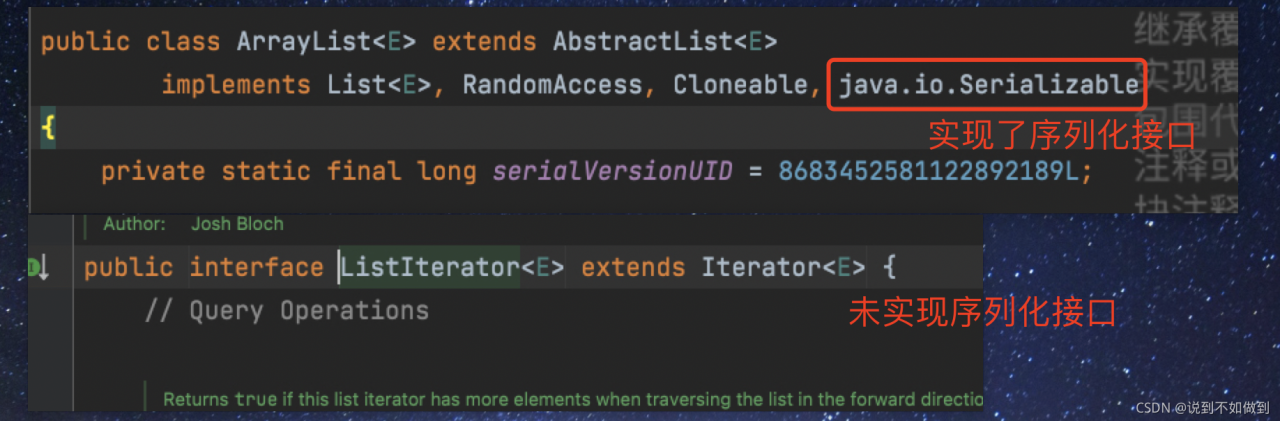
2) the reason for the error is that the iterator does not implement the serial machine interface. The container has implemented serialization, but the iterator has not been implemented. Therefore, if you want to use it, you need to customize the iterator and implement the serialization interface. This operation is redundant, so it is recommended to solve it according to the first method
Custom implementation serialization

package Examples.Utils;

import com.sun.org.apache.xpath.internal.functions.WrongNumberArgsException;
import com.sun.tools.jdi.EventSetImpl;

import java.io.Serializable;
import java.util.Arrays;
import java.util.Iterator;

public class MyListItr<T> implements Serializable{

    private static int default_capacity = 10;
    private int size = 0;
    private Object[] elements;

    public MyListItr(){
        this.elements = new Object[default_capacity];
    }
    public MyListItr(int capa){
        this.default_capacity = capa;
        this.elements = new Object[default_capacity];
    }

    public int size(){
        return this.size;
    }

    public T get(int index) throws MyException {
        if(index<0){
            throw new MyException("Index given cannot be less than 0");
        }
        if(index>=size){
            throw new MyException("Index given cannot be larger than or equal to the collection size");
        }
        return (T)elements[index];
    }

    public T add(T ele){
        if(size == default_capacity){
            elements = Arrays.copyOf(elements,default_capacity*2);
            default_capacity *=2;
            elements[size++] = ele;
        }else{
            elements[size++] = ele;
        }
        return (T)ele;
    }

    public Iterator iterator(){
        return new Itr();
    }

    private class Itr implements Iterator<T>, Serializable {

        int cursor;
        Itr(){}
        @Override
        public boolean hasNext() {
            return cursor!=size();
        }

        @Override
        public T next() {
            return (T)elements[cursor++];
        }


    }

    public static void main(String[] args) throws MyException {
        MyListItr<Integer> obj = new MyListItr<>();
        obj.add(1);
        obj.add(2);
        System.out.println(obj.get(0));
        obj.add(3);
        Iterator it = obj.iterator();
        while(it.hasNext()){
            System.out.println(it.next());
        }

    }

}


class MyException extends Exception implements Serializable{
    public MyException(String message) {
        super(message);
    }
}

Re execute the code

	MyListItr<Integer> myList = new MyListItr<>();
	myList.add(1);myList.add(2);myList.add(3);
	Iterator<Integer> it02 = myList.iterator();
	DataStreamSource<Integer> stream02 = env.fromCollection(it02, TypeInformation.of(Integer.class));
	stream02.print().setParallelism(1);
	env.execute();

Can run:

Problem depth

Why is this error thrown

To put it in-depth, Java needs to run on the JVM platform and be interpreted and run by the JVM in the form of bytecode. Because Flink is a distributed computing, the data in map and other operators will be distributed among various network nodes for computing. In addition, after the source code of Flink is compiled into a bytecode file, you can see from the bytecode file of the operator that the read object enters the operator, and all objects entering the operator must be serialized. If there is no serialization, an error is thrown.

Why serialization

In distributed computing, such as spark, MapReduce, Flink and other computing prerequisites, the serializability of computing objects needs to be realized. Serialization is to reduce the delay, loss and resource consumption caused by data transmission and exchange in network nodes. Objects that are not serialized will not be distributed in network nodes.

The error is thrown from the source

This error is caused by the error when Flink executes closure cleanup logic. The specific logic is in this class: org. Apache. Flink. API. Java. Closurecleaner .

Why clean up closures

Many times, anonymous classes or nested subclasses are used for convenience and quickness. When class a needs to be serialized for transmission, it also needs internal subclasses to be serialized. However, some unnecessary classes or unnecessary variable information may be referenced in general nested classes, so it is necessary to clean up Flink to save the cost of serialization.
[Solved] Hadoop Error: HADOOP_HOME and hadoop.home.dir are unset.

catalogue

Solutions to error messages 1. Download apache-hadoop-3.1.0-winutils-master 2. Unzip to the host 3. Add environment variables 4. Restart idea or eclipse

Error message

java.lang.RuntimeException: java.io.FileNotFoundException: java.io.FileNotFoundException: HADOOP_HOME and hadoop.home.dir are unset.

java.lang.RuntimeException: java.io.FileNotFoundException: java.io.FileNotFoundException: HADOOP_HOME and hadoop.home.dir are unset. -see https://wiki.apache.org/hadoop/WindowsProblems

	at org.apache.hadoop.util.Shell.getWinUtilsPath(Shell.java:737)
	at org.apache.hadoop.util.Shell.getSetPermissionCommand(Shell.java:272)
	at org.apache.hadoop.util.Shell.getSetPermissionCommand(Shell.java:288)
	at org.apache.hadoop.fs.RawLocalFileSystem.setPermission(RawLocalFileSystem.java:840)
	at org.apache.hadoop.fs.RawLocalFileSystem$LocalFSFileOutputStream.<init>(RawLocalFileSystem.java:239)
	at org.apache.hadoop.fs.RawLocalFileSystem$LocalFSFileOutputStream.<init>(RawLocalFileSystem.java:219)
	at org.apache.hadoop.fs.RawLocalFileSystem.createOutputStreamWithMode(RawLocalFileSystem.java:318)
	at org.apache.hadoop.fs.RawLocalFileSystem.create(RawLocalFileSystem.java:307)
	at org.apache.hadoop.fs.RawLocalFileSystem.create(RawLocalFileSystem.java:338)
	at org.apache.hadoop.fs.ChecksumFileSystem$ChecksumFSOutputSummer.<init>(ChecksumFileSystem.java:401)
	at org.apache.hadoop.fs.ChecksumFileSystem.create(ChecksumFileSystem.java:464)
	at org.apache.hadoop.fs.ChecksumFileSystem.create(ChecksumFileSystem.java:443)
	at org.apache.hadoop.fs.FileSystem.create(FileSystem.java:1118)
	at org.apache.hadoop.fs.FileSystem.create(FileSystem.java:1098)
	at org.apache.hadoop.fs.FileSystem.create(FileSystem.java:987)
	at org.apache.hadoop.fs.FileUtil.copy(FileUtil.java:414)
	at org.apache.hadoop.fs.FileUtil.copy(FileUtil.java:387)
	at org.apache.hadoop.fs.FileUtil.copy(FileUtil.java:337)
	at org.apache.hadoop.fs.FileSystem.copyToLocalFile(FileSystem.java:2434)
	at org.apache.hadoop.fs.FileSystem.copyToLocalFile(FileSystem.java:2403)
	at org.apache.hadoop.fs.FileSystem.copyToLocalFile(FileSystem.java:2379)
	at cn.itcast.hdfs.HDFSClientTest.getFile2Local(HDFSClientTest.java:71)
	at java.base/jdk.internal.reflect.NativeMethodAccessorImpl.invoke0(Native Method)
	at java.base/jdk.internal.reflect.NativeMethodAccessorImpl.invoke(NativeMethodAccessorImpl.java:62)
	at java.base/jdk.internal.reflect.DelegatingMethodAccessorImpl.invoke(DelegatingMethodAccessorImpl.java:43)
	at java.base/java.lang.reflect.Method.invoke(Method.java:564)
	at org.junit.runners.model.FrameworkMethod$1.runReflectiveCall(FrameworkMethod.java:59)
	at org.junit.internal.runners.model.ReflectiveCallable.run(ReflectiveCallable.java:12)
	at org.junit.runners.model.FrameworkMethod.invokeExplosively(FrameworkMethod.java:56)
	at org.junit.internal.runners.statements.InvokeMethod.evaluate(InvokeMethod.java:17)
	at org.junit.internal.runners.statements.RunBefores.evaluate(RunBefores.java:26)
	at org.junit.internal.runners.statements.RunAfters.evaluate(RunAfters.java:27)
	at org.junit.runners.ParentRunner$3.evaluate(ParentRunner.java:306)
	at org.junit.runners.BlockJUnit4ClassRunner$1.evaluate(BlockJUnit4ClassRunner.java:100)
	at org.junit.runners.ParentRunner.runLeaf(ParentRunner.java:366)
	at org.junit.runners.BlockJUnit4ClassRunner.runChild(BlockJUnit4ClassRunner.java:103)
	at org.junit.runners.BlockJUnit4ClassRunner.runChild(BlockJUnit4ClassRunner.java:63)
	at org.junit.runners.ParentRunner$4.run(ParentRunner.java:331)
	at org.junit.runners.ParentRunner$1.schedule(ParentRunner.java:79)
	at org.junit.runners.ParentRunner.runChildren(ParentRunner.java:329)
	at org.junit.runners.ParentRunner.access$100(ParentRunner.java:66)
	at org.junit.runners.ParentRunner$2.evaluate(ParentRunner.java:293)
	at org.junit.runners.ParentRunner$3.evaluate(ParentRunner.java:306)
	at org.junit.runners.ParentRunner.run(ParentRunner.java:413)
	at org.junit.runner.JUnitCore.run(JUnitCore.java:137)
	at com.intellij.junit4.JUnit4IdeaTestRunner.startRunnerWithArgs(JUnit4IdeaTestRunner.java:68)
	at com.intellij.rt.junit.IdeaTestRunner$Repeater.startRunnerWithArgs(IdeaTestRunner.java:33)
	at com.intellij.rt.junit.JUnitStarter.prepareStreamsAndStart(JUnitStarter.java:230)
	at com.intellij.rt.junit.JUnitStarter.main(JUnitStarter.java:58)
Caused by: java.io.FileNotFoundException: java.io.FileNotFoundException: HADOOP_HOME and hadoop.home.dir are unset. -see https://wiki.apache.org/hadoop/WindowsProblems
	at org.apache.hadoop.util.Shell.fileNotFoundException(Shell.java:549)
	at org.apache.hadoop.util.Shell.getHadoopHomeDir(Shell.java:570)
	at org.apache.hadoop.util.Shell.getQualifiedBin(Shell.java:593)
	at org.apache.hadoop.util.Shell.<clinit>(Shell.java:690)
	at org.apache.hadoop.util.StringUtils.<clinit>(StringUtils.java:78)
	at org.apache.hadoop.fs.FileSystem$Cache$Key.<init>(FileSystem.java:3482)
	at org.apache.hadoop.fs.FileSystem$Cache$Key.<init>(FileSystem.java:3477)
	at org.apache.hadoop.fs.FileSystem$Cache.get(FileSystem.java:3319)
	at org.apache.hadoop.fs.FileSystem.get(FileSystem.java:479)
	at org.apache.hadoop.fs.FileSystem.get(FileSystem.java:227)
	at cn.itcast.hdfs.HDFSClientTest.connect2HDFS(HDFSClientTest.java:31)
	at java.base/jdk.internal.reflect.NativeMethodAccessorImpl.invoke0(Native Method)
	at java.base/jdk.internal.reflect.NativeMethodAccessorImpl.invoke(NativeMethodAccessorImpl.java:62)
	at java.base/jdk.internal.reflect.DelegatingMethodAccessorImpl.invoke(DelegatingMethodAccessorImpl.java:43)
	at java.base/java.lang.reflect.Method.invoke(Method.java:564)
	at org.junit.runners.model.FrameworkMethod$1.runReflectiveCall(FrameworkMethod.java:59)
	at org.junit.internal.runners.model.ReflectiveCallable.run(ReflectiveCallable.java:12)
	at org.junit.runners.model.FrameworkMethod.invokeExplosively(FrameworkMethod.java:56)
	at org.junit.internal.runners.statements.RunBefores.invokeMethod(RunBefores.java:33)
	at org.junit.internal.runners.statements.RunBefores.evaluate(RunBefores.java:24)
	... 18 more
Caused by: java.io.FileNotFoundException: HADOOP_HOME and hadoop.home.dir are unset.
	at org.apache.hadoop.util.Shell.checkHadoopHomeInner(Shell.java:469)
	at org.apache.hadoop.util.Shell.checkHadoopHome(Shell.java:440)
	at org.apache.hadoop.util.Shell.<clinit>(Shell.java:517)
	... 34 more

Soltuion:

1. Download apache-hadoop-3.1.0-winutils-master

Apache-hadoop-3.1.0-winutils-master GitHub address.
other versions can also be found on GitHub. I use this version to solve the problem here.

2. Unzip to the host

I unzip it here to the local windows
unzip it. The apache-hadoop-3.1.0-winutils-master folder contains the bin file

3. Add environment variables

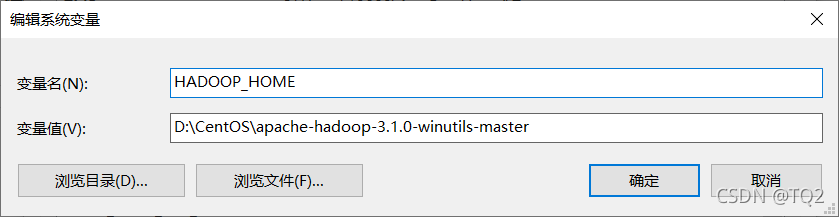
Add the path of the parent folder of the bin folder to the environment variable

4. Restart idea or eclipse

Problem solving.

Tomcat cross server upload error 403forbidden [How to Solve]

HTTP Status [500] – [Internal Server Error]
Type Exception Report

Message Request processing failed; nested exception is com.sun.jersey.api.client.UniformInterfaceException: PUT http://localhost:9090/loads/2441068f057c4c7fa87e406837bd08f9_ returned a response status of 403 Forbidden

Description The server encountered an unexpected condition that prevented it from fulfilling the request.

Exception

org.springframework.web.util.NestedServletException: Request processing failed; nested exception is com.sun.jersey.api.client.UniformInterfaceException: PUT http://localhost:9090/loads/2441068f057c4c7fa87e406837bd08f9_ returned a response status of 403 Forbidden
	org.springframework.web.servlet.FrameworkServlet.processRequest(FrameworkServlet.java:986)
	org.springframework.web.servlet.FrameworkServlet.doPost(FrameworkServlet.java:881)
	javax.servlet.http.HttpServlet.service(HttpServlet.java:661)
	org.springframework.web.servlet.FrameworkServlet.service(FrameworkServlet.java:855)
	javax.servlet.http.HttpServlet.service(HttpServlet.java:742)
	org.apache.tomcat.websocket.server.WsFilter.doFilter(WsFilter.java:53)
	org.springframework.web.filter.CharacterEncodingFilter.doFilterInternal(CharacterEncodingFilter.java:200)
	org.springframework.web.filter.OncePerRequestFilter.doFilter(OncePerRequestFilter.java:107)
Root Cause

com.sun.jersey.api.client.UniformInterfaceException: PUT http://localhost:9090/loads/2441068f057c4c7fa87e406837bd08f9_ returned a response status of 403 Forbidden

Reason: the default configuration readonly of Tomcat web.xml is true, which makes it impossible to read and write data to the server across servers

The solution is: configure in xeb.xml under config in the local folder of Tomcat

<servlet>
        <servlet-name>default</servlet-name>
        <servlet-class>org.apache.catalina.servlets.DefaultServlet</servlet-class>
        <init-param>
            <param-name>debug</param-name>
            <param-value>0</param-value>
        </init-param>
		
		 <!--New-->
        <init-param>
            <param-name>readonly</param-name>
            <param-value>false</param-value>
        </init-param>
		
        <init-param>
            <param-name>listings</param-name>
            <param-value>false</param-value>
        </init-param>
        <load-on-startup>1</load-on-startup>
    </servlet>