Category Archives: How to Fix

[CICD] Jenkins Role-based Authorization Strategy

There are many articles on role-based authorization strategy. Here are some special points.

1. Differences among global roles, item roles and node roles

Since it is role-based permission control, Jenkins naturally defines a variety of roles to control permissions from the perspective of roles. Among them,

Global roles: global roles, such as admin, job creator, anonymous, etc. set permissions for all, credentials, agents, tasks, runs, views, SCM, and lockable resources from a global perspective.

Item roles: create an item role, which allows you to grant job and run permissions from the perspective of the item.

Node roles: create a proxy role that allows you to set node related permissions.

The configuration in global roles acts on all items in Jenkins and overrides the configuration in items roles. If you assign the job read permission under global roles to a role, this role allows you to read all jobs, no matter how you set it in project roles.

2. Several points for attention

1) All non admin roles must be given global read permission in a global role.

2) Permission to create job item: the job create permission in global roles must be assigned to this role.

Selecting create item permission only in item roles does not work. Because creating an item is a global function, after creating an item, determine which role management role it belongs to according to the regular expression.

Otherwise, an error will be reported: Lakes permission to run on ‘Jenkins’
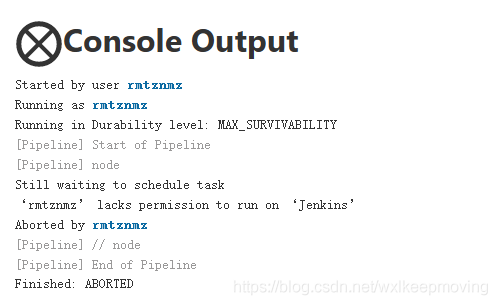
Error message

3) If run as user who triggered build is selected in the global security configuration, the agent build permission in the global roles must be assigned to the role.
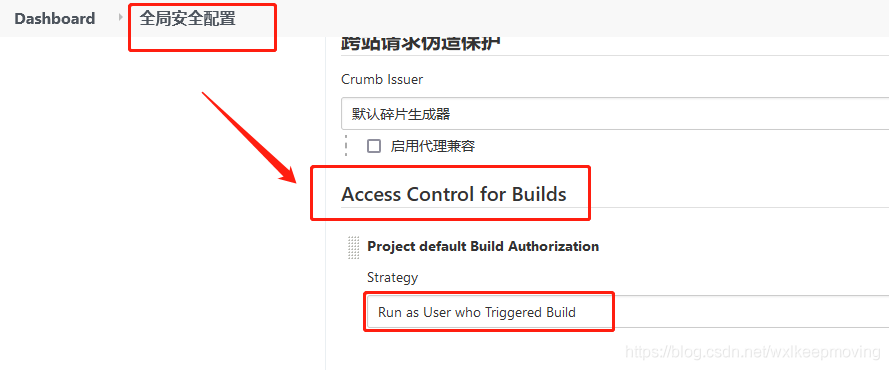
Access Control for Builds

Node roles have not been used yet, and will be added later.
How to Fix Error: JavaFX cannot find fxml

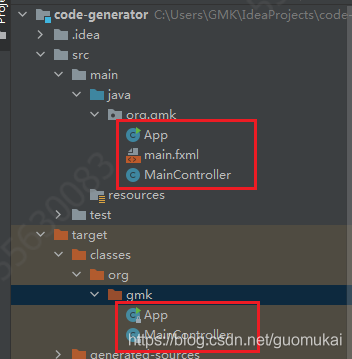
When using idea based on maven to write JavaFX demo, the fxml path is correct, but it keeps reporting error when running that the fxml file does not exist, tried multiple paths, still not working, then found that the files in the src directory, except the .java ones, will not compile.

Exception in Application start method
java.lang.reflect.InvocationTargetException
at sun.reflect.NativeMethodAccessorImpl.invoke0(Native Method)
at sun.reflect.NativeMethodAccessorImpl.invoke(NativeMethodAccessorImpl.java:62)
at sun.reflect.DelegatingMethodAccessorImpl.invoke(DelegatingMethodAccessorImpl.java:43)
at java.lang.reflect.Method.invoke(Method.java:498)
at com.sun.javafx.application.LauncherImpl.launchApplicationWithArgs(LauncherImpl.java:389)
at com.sun.javafx.application.LauncherImpl.launchApplication(LauncherImpl.java:328)
at sun.reflect.NativeMethodAccessorImpl.invoke0(Native Method)
at sun.reflect.NativeMethodAccessorImpl.invoke(NativeMethodAccessorImpl.java:62)
at sun.reflect.DelegatingMethodAccessorImpl.invoke(DelegatingMethodAccessorImpl.java:43)
at java.lang.reflect.Method.invoke(Method.java:498)
at sun.launcher.LauncherHelper$FXHelper.main(LauncherHelper.java:767)
Caused by: java.lang.RuntimeException: Exception in Application start method
at com.sun.javafx.application.LauncherImpl.launchApplication1(LauncherImpl.java:917)
at com.sun.javafx.application.LauncherImpl.lambda$launchApplication$154(LauncherImpl.java:182)
at java.lang.Thread.run(Thread.java:748)
Caused by: java.lang.NullPointerException: Location is required.
at javafx.fxml.FXMLLoader.loadImpl(FXMLLoader.java:3207)
at javafx.fxml.FXMLLoader.loadImpl(FXMLLoader.java:3175)
at javafx.fxml.FXMLLoader.loadImpl(FXMLLoader.java:3148)
at javafx.fxml.FXMLLoader.loadImpl(FXMLLoader.java:3124)
at javafx.fxml.FXMLLoader.loadImpl(FXMLLoader.java:3104)
at javafx.fxml.FXMLLoader.load(FXMLLoader.java:3097)
at org.gmk.App.start(App.java:22)
at com.sun.javafx.application.LauncherImpl.lambda$launchApplication1$161(LauncherImpl.java:863)
at com.sun.javafx.application.PlatformImpl.lambda$runAndWait$174(PlatformImpl.java:326)
at com.sun.javafx.application.PlatformImpl.lambda$null$172(PlatformImpl.java:295)
at java.security.AccessController.doPrivileged(Native Method)
at com.sun.javafx.application.PlatformImpl.lambda$runLater$173(PlatformImpl.java:294)
at com.sun.glass.ui.InvokeLaterDispatcher$Future.run(InvokeLaterDispatcher.java:95)
at com.sun.glass.ui.win.WinApplication._runLoop(Native Method)
at com.sun.glass.ui.win.WinApplication.lambda$null$147(WinApplication.java:177)
… 1 more

The written code and file directories are shown below.

public class App extends Application {
    public static void main( String[] args )
    {
        launch(args);
    }

    @Override
    public void start(Stage primaryStage) throws Exception {
        primaryStage.setTitle("Code Generator");
        Parent root = FXMLLoader.load(getClass().getResource("main.fxml"));
        Scene scene=new Scene(root,818.4,399);
        primaryStage.setScene(scene);
        primaryStage.show();
    }
}

In this case, you need to configure in Maven and declare the files to be compiled during compilation:

<build>
    <resources>
            <!--Add both resource nodes, if you have configuration files in both directories. If you add only one resource node, it will only compile the xml and properties files in the directory configured by this node-->
            <resource>
                <directory>src/main/resources</directory>
                <includes>
                    <include>**/*.fxml</include>
                    <include>**/*.properties</include>
                </includes>
            </resource>
            <resource>
                <directory>src/main/java</directory>
                <includes>
                    <include>**/*.fxml</include>
                    <include>**/*.properties</include>
                </includes>
            </resource>
    </resources>
</build>

Then refresh Maven and compile fxml when recompiling.

[Solved] PVE7.0“run_buffer: 316 Script exited with status 1”

1、 Error phenomenon

In pve7.0, after creating a container with unmanager by running the PCT create command, the container cannot be started.

root@pve:~# pct start 101
run_buffer: 316 Script exited with status 1
lxc_init: 816 Failed to run lxc.hook.pre-start for container "101"
__lxc_start: 2007 Failed to initialize container "101"
startup for container '101' failed

2、 Solution

Refer to the official forum and click here
to open the/usr/share/perl5/PVE/LxC/setup.pm file. Turn to the end and you can see

sub unified_cgroupv2_support {
    my ($self) = @_;
    $self->protected_call(sub {
    $self->{plugin}->unified_cgroupv2_support();
    });
}

Change to

sub unified_cgroupv2_support {
    my ($self) = @_;
    return if !$self->{plugin}; # unmanaged
    $self->protected_call(sub {
    $self->{plugin}->unified_cgroupv2_support();
    });
}

3、 CGroup version warning

Pve7.0 uses cgroupv2 by default. For older systems, there will be the following errors.

WARN: old systemd (< v232) detected, container won't run in a pure cgroupv2 environment! Please see documentation -> container -> cgroup version.
Task finished with 1 warning(s)!

Click here for relevant instructions and handling methods

[Solved] Xcode Reportduplicate symbols for architecture x86_64

phenomenon

// error
// a.h
template<typename T>
struct A {
public:
    A(int a):a_(a){std::cout << "A";}
private:
    int a_;
};


template<>
A<std::string>::A(int a):a_(a){std::cout << "string A";}
template<>
A<std::vector<int>>::A(int a):a_(a){std::cout << "vector A";}

// aa.h
void func_aa();

// aa.cpp
#include "a.h"
#include "aa.h"
void func_aa() {
    auto aa = A<std::string>(1);
}

// ab.h
void func_ab();

// ab.cpp
#include "a.h"
#include "ab.h"
void func_ab() {
    auto ab = A<std::string>(1);
    auto ab1 = A<std::vector<int>>(1);
}

// main.cpp
#include "aa.h"
#include "ab.h"
int main(){  
    func_aa();
    func_ab();
    return 0;
}

Solution

Option 1

Merge aa.h aa.cpp ab.h ab.cpp into AA_ ab.h aa_ Ab.cpp this scheme can solve the problem of error reporting, but the reason cannot be explained clearly=_= Welcome experts to solve doubts!

// aa_ab.h
void func_aa();
void func_ab();

// aa_ab.cpp
#include "a.h"
#include "aa_ab.h"
void func_ab() {
    auto ab = A<std::string>(1);
    auto ab1 = A<std::vector<int>>(1);
}
void func_aa() {
    auto aa = A<std::string>(1);
}

Option 2

Change the constructor of a into a function template and move the specialization to the class. Standard practice: specialize the function template

// a.h
template<typename T>
struct A {
public:
    template<typename T1>
    A(T1 a):a_(a){std::cout << "A";}

    template<>
    A(std::string a):a_(a){std::cout << "string A";}

    template<>
    A(std::vector<int> a):a_(a){std::cout << "vector A";}

    T a_;
};

Option 3

Standard Practice for specialization of class template a: specialization of class template

// a.h
template<typename T>
struct A {
public:
    A(int a):a_(a){std::cout << "A";}
    void print(){std::cout << "A print";}
    

private:
    int a_;
};

template<>
struct A<std::string> {
public:
    A(int a){std::cout << "string A";}

private:
    int a_;
};

template<>
struct A<std::vector<int>> {
public:
    A(int a){std::cout << "vector A";}

private:
    int a_;
};

Prompt when executing sh file in Linux: nohup: unable to run command “. / startup. Sh”: insufficient permissions

Scene

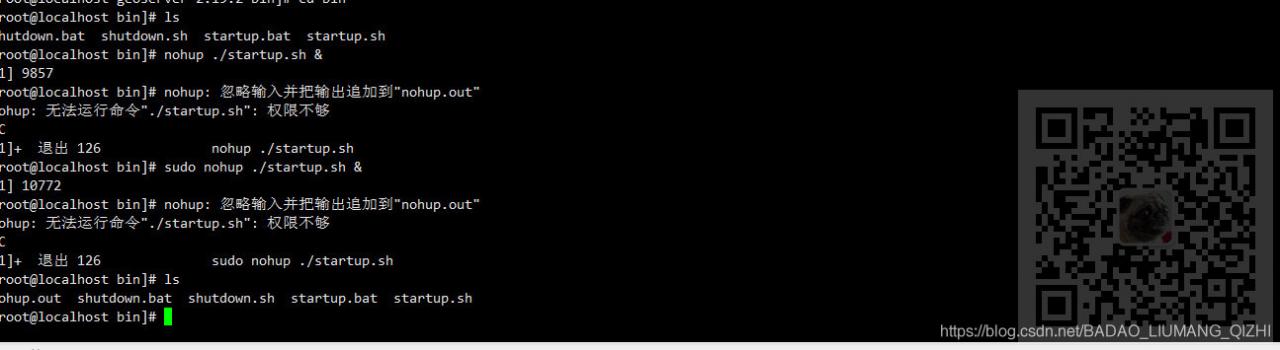
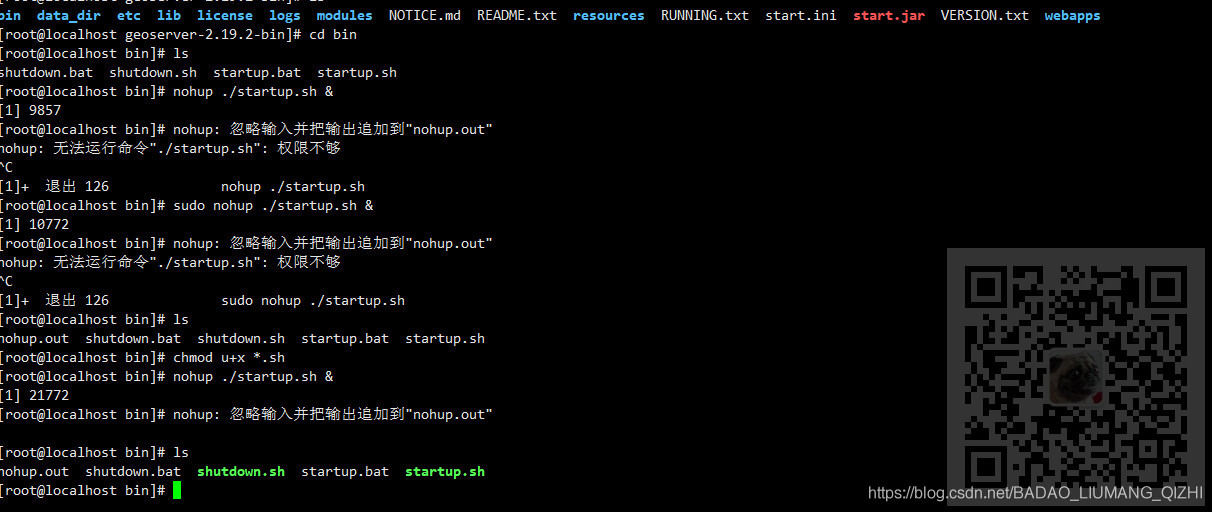
Linux server, when running the started. Sh file

nohup ./startup.sh &

Tips

Nohup: cannot run command ‘./startup. Sh’: insufficient permissions


Note:

Blog:
https://blog.csdn.net/badao_ liumang_ Qizhi
is concerned about the official account of
‘s overbearing program
, which is programmed to get e-books, tutorial push and free download.

realization

This is because the permission is not enough. First enter the bin directory and execute in the bin directory

chmod u+x *.sh

Then run it again


Solution of apt unable to update in the docker container of raspberry pie

Today, apt failed to update when building the image with dockerfile on raspberry pie

...
 ---> Running in 05393fa6f242
Get:1 http://ports.ubuntu.com/ubuntu-ports focal InRelease [265 kB]
Get:2 http://ports.ubuntu.com/ubuntu-ports focal-updates InRelease [114 kB]
Err:1 http://ports.ubuntu.com/ubuntu-ports focal InRelease
  At least one invalid signature was encountered.
Err:2 http://ports.ubuntu.com/ubuntu-ports focal-updates InRelease
  At least one invalid signature was encountered.
Get:3 http://ports.ubuntu.com/ubuntu-ports focal-backports InRelease [101 kB]
Err:3 http://ports.ubuntu.com/ubuntu-ports focal-backports InRelease
  At least one invalid signature was encountered.
Get:4 http://ports.ubuntu.com/ubuntu-ports focal-security InRelease [114 kB]
Err:4 http://ports.ubuntu.com/ubuntu-ports focal-security InRelease
  At least one invalid signature was encountered.
Reading package lists...
W: GPG error: http://ports.ubuntu.com/ubuntu-ports focal InRelease: At least one invalid signature was encountered.
E: The repository 'http://ports.ubuntu.com/ubuntu-ports focal InRelease' is not signed.
W: GPG error: http://ports.ubuntu.com/ubuntu-ports focal-updates InRelease: At least one invalid signature was encountered.
E: The repository 'http://ports.ubuntu.com/ubuntu-ports focal-updates InRelease' is not signed.
W: GPG error: http://ports.ubuntu.com/ubuntu-ports focal-backports InRelease: At least one invalid signature was encountered.
E: The repository 'http://ports.ubuntu.com/ubuntu-ports focal-backports InRelease' is not signed.
W: GPG error: http://ports.ubuntu.com/ubuntu-ports focal-security InRelease: At least one invalid signature was encountered.
E: The repository 'http://ports.ubuntu.com/ubuntu-ports focal-security InRelease' is not signed.
...

The solution is:
in http://ftp.debian.org/debian/pool/main/libs/libseccomp/ Download the latest version of libseccomp2. The current version is libseccomp2_ 2.5.1-1_ Armhf. DEB
install on raspberry pie

>>> sudo dpkg -i libseccomp2_2.5.1-1_armhf.deb

“20999;” 21448;”

[br] https://askubuntu.com/a/1264921/685786
https://stackoverflow.com/a/64463211/7151777

Solve the problem that vscode cannot convert the easy less plug-in to the less expression value

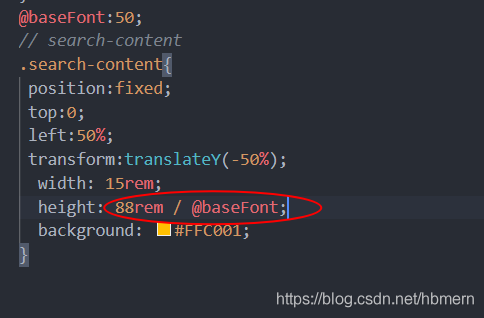
Problems encountered:

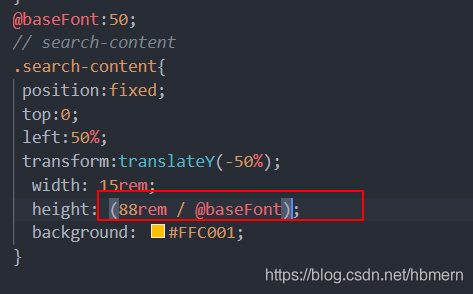
After installing the easy less plug-in in vscode, it is found that the value of the less expression cannot be converted correctly, so it cannot be converted correctly in the browser

Display style!!!

As shown in the figure:

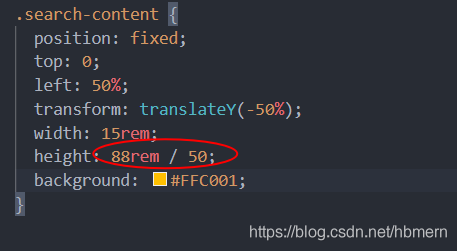
  resolvent:

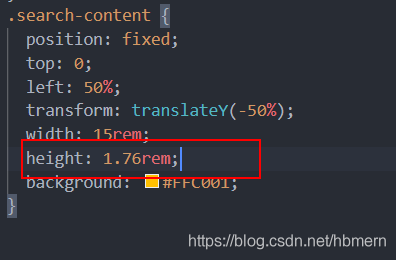
Add a bracket to the expression and you can convert it correctly!!

As shown in the figure:

  Over, over!!


RuntimeError: NCCL error in: /pytorch/torch/lib/c10d/ProcessGroupNCCL.cpp:784 torch

-- Process 6 terminated with the following error:
Traceback (most recent call last):
  File "/media/home/intern/anaconda3/envs/torch17/lib/python3.7/site-packages/torch/multiprocessing/spawn.py", line 19, in _wrap
    fn(i, *args)
  File "/media/home/intern/anaconda3/envs/torch17/lib/python3.7/site-packages/detectron2/engine/launch.py", line 108, in _distributed_worker
    raise e
  File "/media/home/intern/anaconda3/envs/torch17/lib/python3.7/site-packages/detectron2/engine/launch.py", line 103, in _distributed_worker
    timeout=timeout,
  File "/media/home/intern/anaconda3/envs/torch17/lib/python3.7/site-packages/torch/distributed/distributed_c10d.py", line 455, in init_process_group
    barrier()
  File "/media/home/intern/anaconda3/envs/torch17/lib/python3.7/site-packages/torch/distributed/distributed_c10d.py", line 1960, in barrier
    work = _default_pg.barrier()
RuntimeError: NCCL error in: /pytorch/torch/lib/c10d/ProcessGroupNCCL.cpp:784, invalid usage, NCCL version 2.7.8

The code requires 8 GPUs to run, while the machine has only two cards
so set the code to run with two cards.

Gradle:Using flatDir should be avoided because it doesn‘t support any meta-data formats.

app.gradle

Code snippet 1:

repositories {
    flatDir {
        dirs 'libs'
    }
}

Code snippet 2:

dependencies {
    classpath "com.android.tools.build:gradle:4.2.2"
}

After gradle is upgraded to 4.2.2, the following prompt message will appear during compilation. Delete & lt; Code snippet 1 & gt; The problem can be solved

Using flatDir should be avoided because it doesn’t support any meta-data formats.
Affected Modules: APP

Use the LIBS directory if necessary

        Add the following code to the project module.gradle

android {
    
    ...

    sourceSets {
        main {
            jniLibs.srcDirs = ['libs']
        }
    }
}

Problem solving.

Start Additional NameNode [How to Solve]

Problem description

When building HDP cluster and configuring namenode ha, an error is reported: start additional namenode

The cluster can be used normally, that is, the active namenode cannot be found when HA is configured

Solution

Two possible reasons

sudo su hdfs -l -c 'hdfs namenode -boostrapStandby'

This command is to be installed on another namenode

When setting the name in get started, the name entered conflicts with the host name