tsconfig.json
        "paths": {
            "@/*": ["src/*"]
        },
Err: an error is reported and the path cannot be found
solution: vscode open the workspace and save the file in the workspace
tsconfig.json
"paths": {
"@/*": ["src/*"]
},
Err: an error is reported and the path cannot be found
solution: vscode open the workspace and save the file in the workspace
Error creating index
“error” : “Content-Type header [application/x-www-form-urlencoded] is not supported”
Solution
Find the vendor.js file under the elasticsearch head plug-in directory
global search application/x-www-form-urlencoded, and replace application/x-www-form-urlencoded with application/JSON; Charset = UTF-8.
Question
Recently, I changed the computer and reconfigured the development environment. During unit testing, I found that the idea reported an error
Error running '*******Test.******'
Command line is too ling. Shorten command line for ******* or also for JUnit default configuration.

Solution
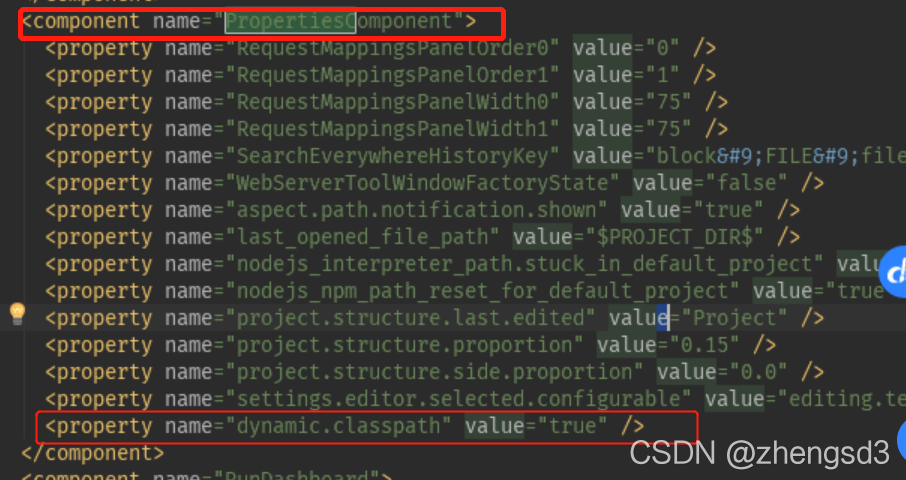
Edit the workspace.xml tag under the project. Idea
<component name=“PropertiesComponent”>
Add next
<property name="dynamic.classpath" value="true" />
PATH=$PATH:$JAVA_HOME/bin
NAME=$1
VERSION=$2
PORT=$3
echo $NAME
ID=`ps -ef | grep "$NAME" | grep -v "$0" | grep -v "grep" | awk '{print $2}'`
for id in $ID
do
kill -9 $id
echo "killed $id"
done
nohup java -server -Xms600m -Xmx600m -Xmn256m -XX:MetaspaceSize=128m -XX:MaxMetaspaceSize=256m -Xverify:none -XX:+DisableExplicitGC
-Djava.awt.headless=true -Xdebug -Xrunjdwp:server=y,transport=dt_socket,address=$PORT,suspend=n -Duser.timezone=Asia/Shanghai
-Denv=fat -Dapollo.cluster=vmfat03 -jar $NAME-$VERSION.jar  > $NAME.log 2>&1 &
The script is shown in the figure, which is a very common one. However, if I add a remote port when I start, an error will be reported when I run the script next time
ERROR: transport error 202: bind failed: Address already in use
ERROR: JDWP Transport dt_socket failed to initialize, TRANSPORT_INIT(510)
JDWP exit error AGENT_ERROR_TRANSPORT_INIT(197): No transports initialized [debugInit.c:750]
The remote port is occupied, but I have obviously killed the process, and the command query has also been killed.
After guessing whether it will take some time for the remote connection port to close completely after killing the process, but at this time, you use the same port number to start the remote debug mode, which will lead to the error shown in the figure above, so I’ll sleep 1 behind the done in the script. Let him wait 1s.
The result proved that the conjecture was correct, and then no such error was reported
When the type of the requested parameter is correct and various configurations are correct, a 400 error will appear, and the console will report an error failed to convert value of type ‘Java. Lang. string’ to required type ‘Java. Lang. Integer’; Nested exception is java.lang.numberformatexception: for input string: “XXX”] a similar error may be that the request path set by your control layer and the path of static resources have the same name,
For example:
the page I visit is/user/index.html
and the requestmapping (“user”) of the control layer
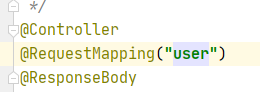
when accessing/user/index.html, the user request of the servlet will be followed, and the parameter type may not be correct, which will be 400.
if the correct estimation directly returns the requested JSON result,
[error 1]:
java.lang.RuntimeException: HMaster Aborted
	at org.apache.hadoop.hbase.master.HMasterCommandLine.startMaster(HMasterCommandLine.java:261)
	at org.apache.hadoop.hbase.master.HMasterCommandLine.run(HMasterCommandLine.java:149)
	at org.apache.hadoop.util.ToolRunner.run(ToolRunner.java:76)
	at org.apache.hadoop.hbase.util.ServerCommandLine.doMain(ServerCommandLine.java:149)
	at org.apache.hadoop.hbase.master.HMaster.main(HMaster.java:2971)
2021-08-26 12:25:35,269 INFO  [main-EventThread] zookeeper.ClientCnxn: EventThread shut down for session: 0x37b80a4f6560008
[attempt 1]: delete the HBase node under ZK
but not solve my problem
[attempt 2]: reinstall HBase
but not solve my problem
[attempt 3]: turn off HDFS security mode
hadoop dfsadmin -safemode leave
Still can’t solve my problem
[try 4]: check zookeeper. You can punch in spark normally or add new nodes. No problem.
Turn up and report an error
[error 2]:
master.HMaster: Failed to become active master
org.apache.hadoop.ipc.RemoteException(org.apache.hadoop.ipc.StandbyException): Operation category READ is not supported in state standby. Visit https://s.apache.org/sbnn-error
	at org.apache.hadoop.hdfs.server.namenode.ha.StandbyState.checkOperation(StandbyState.java:108)
	at org.apache.hadoop.hdfs.server.namenode.NameNode$NameNodeHAContext.checkOperation(NameNode.java:2044)
	at org.apache.hadoop.hdfs.server.namenode.FSNamesystem.checkOperation(FSNamesystem.java:1409)
	at org.apache.hadoop.hdfs.server.namenode.FSNamesystem.getFileInfo(FSNamesystem.java:2961)
	at org.apache.hadoop.hdfs.server.namenode.NameNodeRpcServer.getFileInfo(NameNodeRpcServer.java:1160)
	at org.apache.hadoop.hdfs.protocolPB.ClientNamenodeProtocolServerSideTranslatorPB.getFileInfo(ClientNamenodeProtocolServerSideTranslatorPB.java:880)
	at org.apache.hadoop.hdfs.protocol.proto.ClientNamenodeProtocolProtos$ClientNamenodeProtocol$2.callBlockingMethod(ClientNamenodeProtocolProtos.java)
	at org.apache.hadoop.ipc.ProtobufRpcEngine$Server$ProtoBufRpcInvoker.call(ProtobufRpcEngine.java:507)
	at org.apache.hadoop.ipc.RPC$Server.call(RPC.java:1034)
	at org.apache.hadoop.ipc.Server$RpcCall.run(Server.java:1003)
	at org.apache.hadoop.ipc.Server$RpcCall.run(Server.java:931)
	at java.security.AccessController.doPrivileged(Native Method)
	at javax.security.auth.Subject.doAs(Subject.java:422)
	at org.apache.hadoop.security.UserGroupInformation.doAs(UserGroupInformation.java:1926)
	at org.apache.hadoop.ipc.Server$Handler.run(Server.java:2854)
Here’s the point: an error is reported that my master failed to become an hmaster. The reason is: operation category read is not supported in state standby. That is, the read operation fails because it is in the standby state. Check the NN1 state at this time
# hdfs haadmin -getServiceState nn1
Sure enough, standby

[solution 1]:
manual activation
hdfs haadmin -transitionToActive --forcemanual nn1
Kill all HBase processes, restart, JPS view, access port
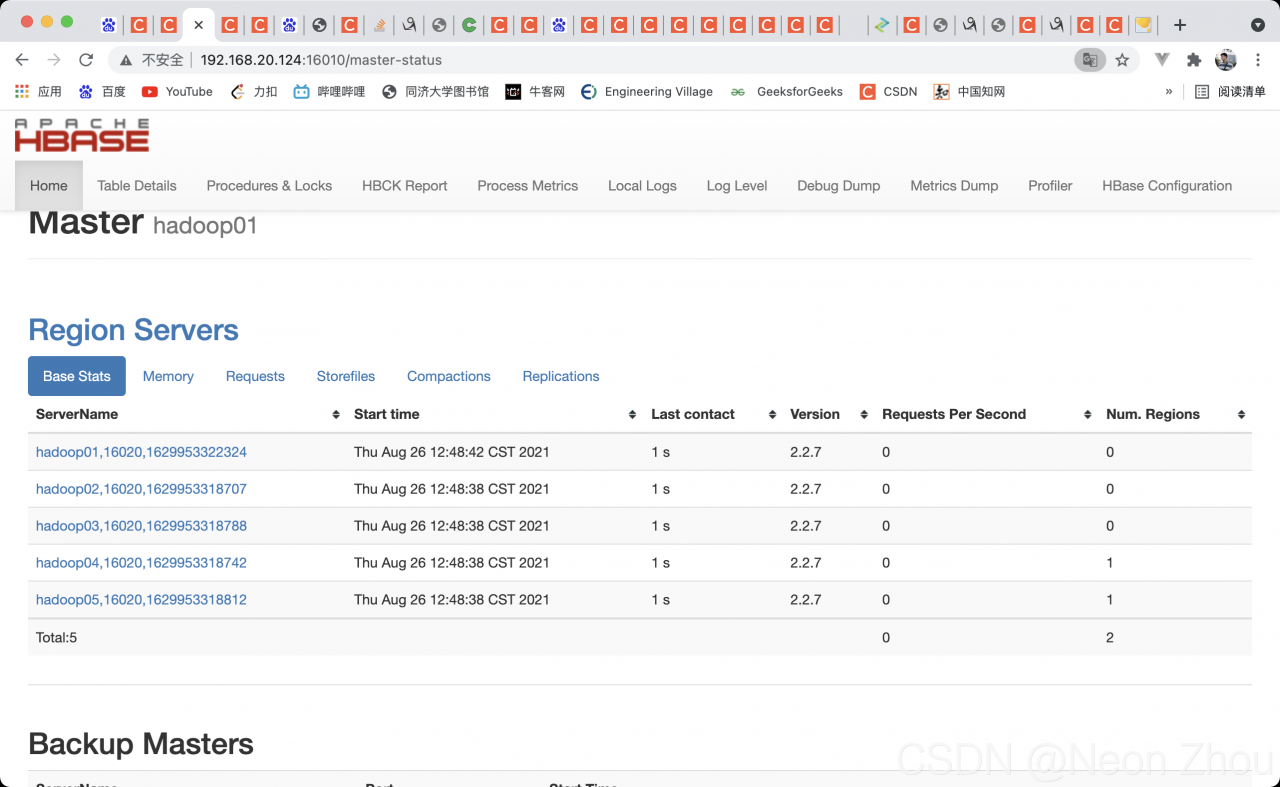
Bravo!!!
It’s been changed for a few hours. It’s finally good. The reason is that I forgot the correct startup sequence
zookeeper —— & gt; hadoop——-> HBase
every time I start Hadoop first, I waste a long time. I hope I can help you.
The following error is reported after executing yarn serve :

Solution:
Modify scripts and Vue cli service in package.json to full path reference, as shown in the following figure:
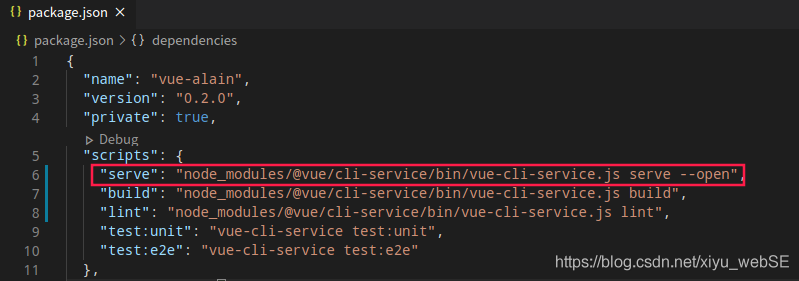
Build and lint are the same
This is described in the user manual of JetBrains. Project language level
It has two functions:

Use R package estimate
When performing tumor purity analysis
appear:
[ 1] “Merged dataset includes 0 genes (10412 mismatched).”
As long as the txt file is prepared, it can be changed during output Quote parameter, do not output double quotation marks
write.table(data,”data.txt”,header=T,quote=F)
Exception in thread "main" javax.mail.MessagingException: Could not connect to SMTP host: smtp.163.com, port: 25;
  nested exception is:
	javax.net.ssl.SSLException: Unrecognized SSL message, plaintext connection?
	at com.sun.mail.smtp.SMTPTransport.openServer(SMTPTransport.java:2212)
	at com.sun.mail.smtp.SMTPTransport.protocolConnect(SMTPTransport.java:722)
	at javax.mail.Service.connect(Service.java:342)
	at javax.mail.Service.connect(Service.java:222)
	at javax.mail.Service.connect(Service.java:243)
	at com.ailpha.aithink.job.controller.email.EmailUtil.deliverWithMime(EmailUtil.java:68)
	at com.ailpha.aithink.job.controller.email.EmailUtil.main(EmailUtil.java:149)
The reason is that the following code is used when SSL is enabled
if (emailConfigModel.getEnSsl() == 0) {
            MailSSLSocketFactory sf = new MailSSLSocketFactory();
            sf.setTrustAllHosts(true);
            prop.put("mail.smtp.ssl.enable", "true");
            prop.put("mail.smtp.ssl.socketFactory", sf);
        }
After searching various data, it is found that the port used when using SSL is port 465, not port 25. If SSL is not used, the port is port 25
1. First, you can download http://pecl.php.net/package/redis After decompressing the expansion package, it enters the first level for execution
/opt/homebrew/opt/ [email protected] /bin/phpize && amp; \
./configure –with-php-config=/opt/homebrew/opt/ [email protected] /bin/php-config
Please modify it according to your PHP version and the location of phpize.
2. If an error is reported in the first step as follows:

Available for download: https://github.com/phpredis/phpredis/archive/develop.zip
Then proceed to step 1
 , and then enter the command set executionpolicy remotesigned. If it is normal, there is no problem. If an error is reported as follows
  , then enter the command set executionpolicy – scope currentuser
 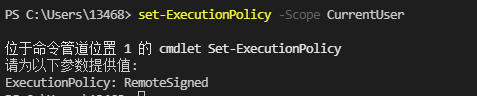 , and then enter remotesigned at the position shown in the figure