CV ::ColorMap only supports source images of type CV_8UC1 or CV_8UC3 in function cv2.applycolormap () error
recently used cv2.cv2.applycolormap () to convert a 2-d ndarray into a pseudo-color image. It is found that an error message “CV ::ColorMap only supports source images of type CV_8UC1 or CV_8UC3 in function” is frequently popped. It is found that the 2-d nDARray element data type must be converted to NP. uint8 type.
import numpy as np
import cv2
a = np.ones((2,3))
b = a.astype(np.uint8)
img1 = cv2.applyColorMap(a, cv2.COLORMAP_JET)  # 报错
img2 = cv2.applyColorMap(b, cv2.COLORMAP_JET)  # 正常
IDEA报Unable to save settings: Failed to save settings. Please restart IntelliJ IDEA
IDEA Failed to save Settings. Please restart IntelliJ IDEA
said the solution is to uninstall a “identifier Highlighter” plug-in, but my IDEA does not have this plug-in.
after Google finally found a solution.
solution
first make sure you have read/write access to the config file

if the permissions are okay and the error is still reported, move on to the next step.
view log file
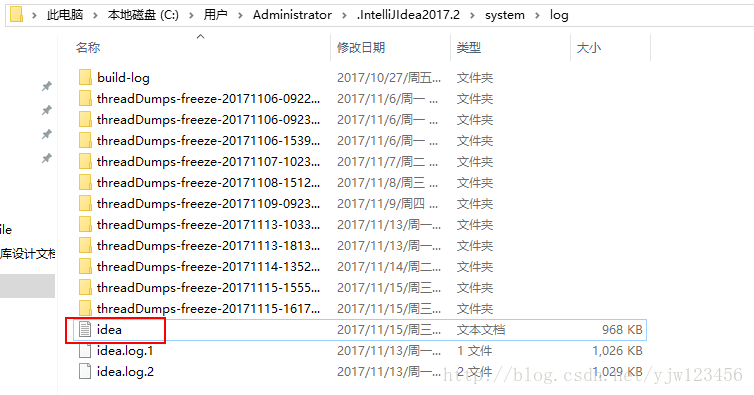
find the cause of the error, which may vary from person to person. Therefore, the solution is different.
2017-11-15 17:20:55,720 [ 196716]   WARN - mponents.impl.stores.StoreUtil - Save settings failed
java.lang.RuntimeException: java.lang.Exception: Cannot get RunManager component state
    at com.intellij.util.ExceptionUtil.rethrow(ExceptionUtil.java:179)
    at com.intellij.util.lang.CompoundRuntimeException.throwIfNotEmpty(CompoundRuntimeException.java:148)
    at com.intellij.configurationStore.ComponentStoreImpl.save(ComponentStoreImpl.kt:199)
    at com.intellij.openapi.components.impl.stores.StoreUtil.save(StoreUtil.java:49)
    at com.intellij.openapi.project.impl.ProjectImpl.save(ProjectImpl.java:349)
    at com.intellij.openapi.components.impl.stores.StoreUtil.saveDocumentsAndProjectsAndApp(StoreUtil.java:126)
    at com.intellij.openapi.application.impl.ApplicationImpl.saveAll(ApplicationImpl.java:1437)
    at com.intellij.ide.SaveAndSyncHandlerImpl.saveProjectsAndDocuments(SaveAndSyncHandlerImpl.java:126)
    at com.intellij.ide.SaveAndSyncHandlerImpl$2.a(SaveAndSyncHandlerImpl.java:94)
    at com.intellij.openapi.application.TransactionGuardImpl.a(TransactionGuardImpl.java:86)
    at com.intellij.openapi.application.TransactionGuardImpl.a(TransactionGuardImpl.java:109)
    at com.intellij.openapi.application.TransactionGuardImpl.submitTransaction(TransactionGuardImpl.java:118)
    at com.intellij.openapi.application.TransactionGuard.submitTransaction(TransactionGuard.java:122)
    at com.intellij.ide.SaveAndSyncHandlerImpl$2.onFrameDeactivated(SaveAndSyncHandlerImpl.java:92)
    at com.intellij.ide.FrameStateManagerImpl.a(FrameStateManagerImpl.java:84)
    at com.intellij.ide.FrameStateManagerImpl.access$500(FrameStateManagerImpl.java:32)
    at com.intellij.ide.FrameStateManagerImpl$2.a(FrameStateManagerImpl.java:70)
    at com.intellij.util.concurrency.QueueProcessor.runSafely(QueueProcessor.java:246)
    at com.intellij.util.Alarm$Request.runSafely(Alarm.java:417)
    at com.intellij.util.Alarm$Request.access$700(Alarm.java:344)
    at com.intellij.util.Alarm$Request$1.run(Alarm.java:384)
    at com.intellij.openapi.application.TransactionGuardImpl$2.run(TransactionGuardImpl.java:314)
    at com.intellij.openapi.application.impl.LaterInvocator$FlushQueue.a(LaterInvocator.java:416)
    at com.intellij.openapi.application.impl.LaterInvocator$FlushQueue.run(LaterInvocator.java:399)
    at java.awt.event.InvocationEvent.dispatch(InvocationEvent.java:311)
    at java.awt.EventQueue.dispatchEventImpl(EventQueue.java:762)
    at java.awt.EventQueue.access$500(EventQueue.java:98)
    at java.awt.EventQueue$3.run(EventQueue.java:715)
    at java.awt.EventQueue$3.run(EventQueue.java:709)
    at java.security.AccessController.doPrivileged(Native Method)
    at java.security.ProtectionDomain$JavaSecurityAccessImpl.doIntersectionPrivilege(ProtectionDomain.java:80)
    at java.awt.EventQueue.dispatchEvent(EventQueue.java:732)
    at com.intellij.ide.IdeEventQueue.c(IdeEventQueue.java:821)
    at com.intellij.ide.IdeEventQueue._dispatchEvent(IdeEventQueue.java:649)
    at com.intellij.ide.IdeEventQueue.dispatchEvent(IdeEventQueue.java:365)
    at java.awt.EventDispatchThread.pumpOneEventForFilters(EventDispatchThread.java:201)
    at java.awt.EventDispatchThread.pumpEventsForFilter(EventDispatchThread.java:116)
    at java.awt.EventDispatchThread.pumpEventsForHierarchy(EventDispatchThread.java:105)
    at java.awt.EventDispatchThread.pumpEvents(EventDispatchThread.java:101)
    at java.awt.EventDispatchThread.pumpEvents(EventDispatchThread.java:93)
    at java.awt.EventDispatchThread.run(EventDispatchThread.java:82)
Caused by: java.lang.Exception: Cannot get RunManager component state
    at com.intellij.configurationStore.ComponentStoreImpl.save(ComponentStoreImpl.kt:166)
    ... 38 more
Caused by: java.lang.RuntimeException: Cannot save scheme workspace/Jetty Server: jetty (level: WORKSPACE)
    at com.intellij.configurationStore.SchemeManagerImpl.save(SchemeManagerImpl.kt:535)
    at com.intellij.configurationStore.Scheme_implKt.save(scheme-impl.kt:154)
    at com.intellij.execution.impl.RunManagerImpl.getState(RunManagerImpl.kt:500)
    at com.intellij.execution.impl.RunManagerImpl.getState(RunManagerImpl.kt:63)
    at com.intellij.configurationStore.ComponentStoreImpl.a(ComponentStoreImpl.kt:227)
    at com.intellij.configurationStore.ComponentStoreImpl.save(ComponentStoreImpl.kt:159)
    ... 38 more
I found this sentence:
under Caused by: Java. Lang. RuntimeException: always save scheme workspace/Jetty Server: Jetty (level: workspace)
is my jetty configuration problem because I don't need jetty, so I temporarily removed the jetty related configuration.
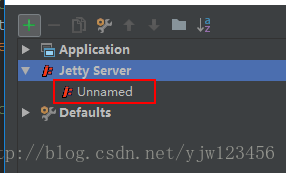
problem solved, no more annoying prompts.
JavaScript emoticon package encryption
- after reading this article you may feel that you know nothing about the power of JavaScript!
- let’s see what kind of encryption this is!
- is the author of the encryption: from Japan Yosuke HASEGAWA
- his project address: http://utf-8.jp/public/aaencode.html
we encrypt a string of JS code with this method: alert(” HelloWorld! );
function aaencode( text )
{
    var t;
    var b = [
		"(c^_^o)",
		"(゚Θ゚)",
		"((o^_^o) - (゚Θ゚))",
		"(o^_^o)",
		"(゚ー゚)",
		"((゚ー゚) + (゚Θ゚))",
		"((o^_^o) +(o^_^o))",
		"((゚ー゚) + (o^_^o))",
		"((゚ー゚) + (゚ー゚))",
		"((゚ー゚) + (゚ー゚) + (゚Θ゚))",
		"(゚Д゚) .゚ω゚ノ",
		"(゚Д゚) .゚Θ゚ノ",
		"(゚Д゚) ['c']",
		"(゚Д゚) .゚ー゚ノ",
		"(゚Д゚) .゚Д゚ノ",
		"(゚Д゚) [゚Θ゚]"
        ];
	var r = "゚ω゚ノ= /`m´)ノ ~┻━┻   //*´∇`*/ ['_']; o=(゚ー゚)  =_=3; c=(゚Θ゚) =(゚ー゚)-(゚ー゚); ";

	if( /ひだまりスケッチ×(365|356)\s*来週も見てくださいね[!!]/.test( text ) ){
		r += "X=_=3; ";
		r += "\r\n\r\n    X/_/X < \"来週も見てくださいね!\";\r\n\r\n";
	}
    r += "(゚Д゚) =(゚Θ゚)= (o^_^o)/ (o^_^o);"+
        "(゚Д゚)={゚Θ゚: '_' ,゚ω゚ノ : ((゚ω゚ノ==3) +'_') [゚Θ゚] "+
        ",゚ー゚ノ :(゚ω゚ノ+ '_')[o^_^o -(゚Θ゚)] "+
        ",゚Д゚ノ:((゚ー゚==3) +'_')[゚ー゚] }; (゚Д゚) [゚Θ゚] =((゚ω゚ノ==3) +'_') [c^_^o];"+
        "(゚Д゚) ['c'] = ((゚Д゚)+'_') [ (゚ー゚)+(゚ー゚)-(゚Θ゚) ];"+
        "(゚Д゚) ['o'] = ((゚Д゚)+'_') [゚Θ゚];"+
        "(゚o゚)=(゚Д゚) ['c']+(゚Д゚) ['o']+(゚ω゚ノ +'_')[゚Θ゚]+ ((゚ω゚ノ==3) +'_') [゚ー゚] + "+
        "((゚Д゚) +'_') [(゚ー゚)+(゚ー゚)]+ ((゚ー゚==3) +'_') [゚Θ゚]+"+
        "((゚ー゚==3) +'_') [(゚ー゚) - (゚Θ゚)]+(゚Д゚) ['c']+"+
        "((゚Д゚)+'_') [(゚ー゚)+(゚ー゚)]+ (゚Д゚) ['o']+"+
        "((゚ー゚==3) +'_') [゚Θ゚];(゚Д゚) ['_'] =(o^_^o) [゚o゚] [゚o゚];"+
        "(゚ε゚)=((゚ー゚==3) +'_') [゚Θ゚]+ (゚Д゚) .゚Д゚ノ+"+
        "((゚Д゚)+'_') [(゚ー゚) + (゚ー゚)]+((゚ー゚==3) +'_') [o^_^o -゚Θ゚]+"+
        "((゚ー゚==3) +'_') [゚Θ゚]+ (゚ω゚ノ +'_') [゚Θ゚]; "+
        "(゚ー゚)+=(゚Θ゚); (゚Д゚)[゚ε゚]='\\\\'; "+
        "(゚Д゚).゚Θ゚ノ=(゚Д゚+ ゚ー゚)[o^_^o -(゚Θ゚)];"+
		"(o゚ー゚o)=(゚ω゚ノ +'_')[c^_^o];"+//TODO
        "(゚Д゚) [゚o゚]='\\\"';"+
        "(゚Д゚) ['_'] ( (゚Д゚) ['_'] (゚ε゚+";
    r += "(゚Д゚)[゚o゚]+ ";
    for( var i = 0; i < text.length; i++ ){
        n = text.charCodeAt( i );
        t = "(゚Д゚)[゚ε゚]+";
		if( n <= 127 ){
			t += n.toString( 8 ).replace( /[0-7]/g, function(c){ return b[ c ] + "+ "; } );
		}else{
			var m = /[0-9a-f]{4}$/.exec( "000" + n.toString(16 ) )[0];
			t += "(o゚ー゚o)+ " + m.replace( /[0-9a-f]/gi, function(c){ return b[ parseInt( c,16 ) ] + "+ "; } );
		}
        r += t;

    }
    r += "(゚Д゚)[゚o゚]) (゚Θ゚)) ('_');";
    return r;
}
yes we got a bunch of cute memes!!

゚ω゚ノ= /`m´)ノ ~┻━┻ //*´∇`*/ ['_']; o=(゚ー゚) =_=3; c=(゚Θ゚) =(゚ー゚)-(゚ー゚); (゚Д゚) =(゚Θ゚)= (o^_^o)/ (o^_^o);(゚Д゚)={゚Θ゚: '_' ,゚ω゚ノ : ((゚ω゚ノ==3) +'_') [゚Θ゚] ,゚ー゚ノ :(゚ω゚ノ+ '_')[o^_^o -(゚Θ゚)] ,゚Д゚ノ:((゚ー゚==3) +'_')[゚ー゚] }; (゚Д゚) [゚Θ゚] =((゚ω゚ノ==3) +'_') [c^_^o];(゚Д゚) ['c'] = ((゚Д゚)+'_') [ (゚ー゚)+(゚ー゚)-(゚Θ゚) ];(゚Д゚) ['o'] = ((゚Д゚)+'_') [゚Θ゚];(゚o゚)=(゚Д゚) ['c']+(゚Д゚) ['o']+(゚ω゚ノ +'_')[゚Θ゚]+ ((゚ω゚ノ==3) +'_') [゚ー゚] + ((゚Д゚) +'_') [(゚ー゚)+(゚ー゚)]+ ((゚ー゚==3) +'_') [゚Θ゚]+((゚ー゚==3) +'_') [(゚ー゚) - (゚Θ゚)]+(゚Д゚) ['c']+((゚Д゚)+'_') [(゚ー゚)+(゚ー゚)]+ (゚Д゚) ['o']+((゚ー゚==3) +'_') [゚Θ゚];(゚Д゚) ['_'] =(o^_^o) [゚o゚] [゚o゚];(゚ε゚)=((゚ー゚==3) +'_') [゚Θ゚]+ (゚Д゚) .゚Д゚ノ+((゚Д゚)+'_') [(゚ー゚) + (゚ー゚)]+((゚ー゚==3) +'_') [o^_^o -゚Θ゚]+((゚ー゚==3) +'_') [゚Θ゚]+ (゚ω゚ノ +'_') [゚Θ゚]; (゚ー゚)+=(゚Θ゚); (゚Д゚)[゚ε゚]='\\'; (゚Д゚).゚Θ゚ノ=(゚Д゚+ ゚ー゚)[o^_^o -(゚Θ゚)];(o゚ー゚o)=(゚ω゚ノ +'_')[c^_^o];(゚Д゚) [゚o゚]='\"';(゚Д゚) ['_'] ( (゚Д゚) ['_'] (゚ε゚+(゚Д゚)[゚o゚]+ (゚Д゚)[゚ε゚]+(゚Θ゚)+ (゚ー゚)+ (゚Θ゚)+ (゚Д゚)[゚ε゚]+(゚Θ゚)+ ((゚ー゚) + (゚Θ゚))+ (゚ー゚)+ (゚Д゚)[゚ε゚]+(゚Θ゚)+ (゚ー゚)+ ((゚ー゚) + (゚Θ゚))+ (゚Д゚)[゚ε゚]+(゚Θ゚)+ ((o^_^o) +(o^_^o))+ ((o^_^o) - (゚Θ゚))+ (゚Д゚)[゚ε゚]+(゚Θ゚)+ ((o^_^o) +(o^_^o))+ (゚ー゚)+ (゚Д゚)[゚ε゚]+((゚ー゚) + (゚Θ゚))+ (c^_^o)+ (゚Д゚)[゚ε゚]+(゚ー゚)+ ((o^_^o) - (゚Θ゚))+ (゚Д゚)[゚ε゚]+(゚Θ゚)+ (゚Θ゚)+ (c^_^o)+ (゚Д゚)[゚ε゚]+(゚Θ゚)+ (゚ー゚)+ ((゚ー゚) + (゚Θ゚))+ (゚Д゚)[゚ε゚]+(゚Θ゚)+ ((゚ー゚) + (゚Θ゚))+ (゚ー゚)+ (゚Д゚)[゚ε゚]+(゚Θ゚)+ ((゚ー゚) + (゚Θ゚))+ (゚ー゚)+ (゚Д゚)[゚ε゚]+(゚Θ゚)+ ((゚ー゚) + (゚Θ゚))+ ((゚ー゚) + (o^_^o))+ (゚Д゚)[゚ε゚]+(゚Θ゚)+ ((o^_^o) - (゚Θ゚))+ ((゚ー゚) + (o^_^o))+ (゚Д゚)[゚ε゚]+(゚Θ゚)+ ((゚ー゚) + (゚Θ゚))+ ((゚ー゚) + (o^_^o))+ (゚Д゚)[゚ε゚]+(゚Θ゚)+ ((o^_^o) +(o^_^o))+ ((o^_^o) - (゚Θ゚))+ (゚Д゚)[゚ε゚]+(゚Θ゚)+ ((゚ー゚) + (゚Θ゚))+ (゚ー゚)+ (゚Д゚)[゚ε゚]+(゚Θ゚)+ (゚ー゚)+ (゚ー゚)+ (゚Д゚)[゚ε゚]+(゚ー゚)+ (゚Θ゚)+ (゚Д゚)[゚ε゚]+(゚ー゚)+ ((o^_^o) - (゚Θ゚))+ (゚Д゚)[゚ε゚]+((゚ー゚) + (゚Θ゚))+ (゚Θ゚)+ (゚Д゚)[゚ε゚]+((゚ー゚) + (o^_^o))+ (o^_^o)+ (゚Д゚)[゚o゚]) (゚Θ゚)) ('_');however, these memes are not as cute as you might think, and they are just as damaging!!
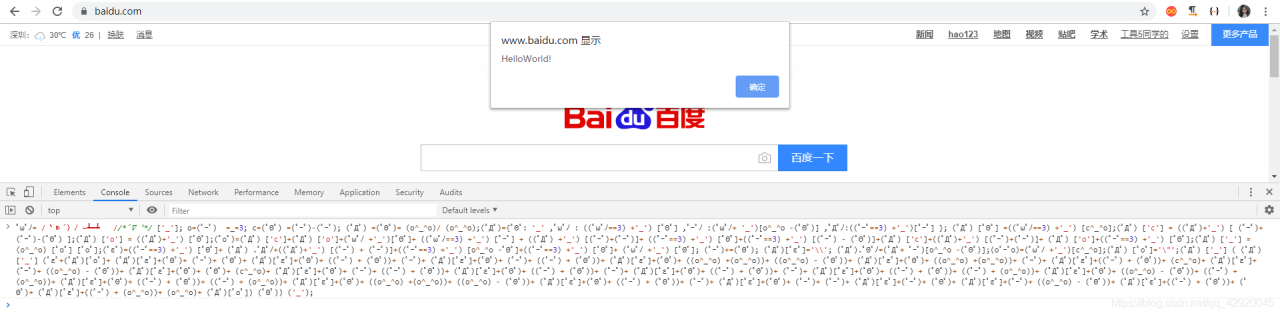
his corresponding decryption method is
function decrypt (text) {
	var evalPreamble = "(\uFF9F\u0414\uFF9F) ['_'] ( (\uFF9F\u0414\uFF9F) ['_'] (";
	var decodePreamble = "( (\uFF9F\u0414\uFF9F) ['_'] (";
	var evalPostamble = ") (\uFF9F\u0398\uFF9F)) ('_');";
	var decodePostamble = ") ());";

	// strip beginning/ending space.
	text = text.replace(/^\s*/, "").replace(/\s*$/, "");

	// returns empty text for empty input.
	if (/^\s*$/.test(text)) {
		return "";
	}
	// check if it is encoded.
	if (text.lastIndexOf(evalPreamble) < 0) {
		throw new Error("Given code is not encoded as aaencode.");
	}
	if (text.lastIndexOf(evalPostamble) != text.length - evalPostamble.length) {
		throw new Error("Given code is not encoded as aaencode.");
	}

	var decodingScript = text.replace(evalPreamble, decodePreamble)
							 .replace(evalPostamble, decodePostamble);
	return eval(decodingScript);
}
Apache allows specified IP access
system CentOS7.0
sets the site directory permissions to allow only specified IP access. Usually used for internal testing.
code as follows:
#just allow from xx's ip
<Directory "/data/www/xxoo">
Options All
AllowOverride None
Order Deny,Allow
Deny From all
Allow From 192.168.0.0/24
Allow From 127.0.0.1
Allow From xx.xx.xx.xx/28
</Directory>
Tomcat opens the startup.bat The reason for the flash
1. Reasons for not properly configuring JAVA_HOME,CLASSPATH,Path [verification method can open CMD, input Java,javac, and java-version in turn, if it can display some configuration information about Java, then the configuration is successful], if the configuration is not successful, a lot of people on the Internet have the answer, I will not go into details.
2. Default port 8080 is occupied
3 JDK and tomcat version does not match, this is also a problem, I used jdk11, found that the above two problems did not appear, but just can not run the tomcat server, finally find a needle in a haystack, looking for a long time, tomcat7.0X replaced by 9.0X,tomcat server can run normally.
Router DIO network request: dioerror[ DioErrorType.RESPONSE ]: HTTP status error [400] or [500]
DioError [DioErrorType.RESPONSE]: Http status error [400]
1) check if the request parameter is correct:
, for example, if the parameter value in the map is an array, the following code in the innerParticipateGroups and innerParticipators the value of the value can’t into the toString, otherwise it will be submitted to the 400
Map<String,dynamic> params = {
      "chamberId":resultId,
      "description":remark,
      "finishAt":1564979400000,
      "innerParticipateGroups":[],
      "innerParticipators":[],
      "name":meetingName,
      "reportId":"",
      "scheduleId":"",
      "startAt":1564975800000
    };
2) if above is correct, check the receive mode of parameters when get and post are called
see Dio(v2.1.0) GET request source code:
Future<Response<T>> get<T>(
    String path, {
    Map<String, dynamic> queryParameters,
    Options options,
    CancelToken cancelToken,
    ProgressCallback onReceiveProgress,
  }) {
    return request<T>(
      path,
      queryParameters: queryParameters,
      options: _checkOptions("GET", options),
      onReceiveProgress: onReceiveProgress,
      cancelToken: cancelToken,
    );
  }
queryParameters queryParameters
response = await dio.get(url, queryParameters: params);POST source:
/// Handy method to make http POST request, which is a alias of  [Dio.request].
  Future<Response<T>> post<T>(
    String path, {
    data,
    Map<String, dynamic> queryParameters,
    Options options,
    CancelToken cancelToken,
    ProgressCallback onSendProgress,
    ProgressCallback onReceiveProgress,
  }) {
    return request<T>(
      path,
      data: data,
      options: _checkOptions("POST", options),
      queryParameters: queryParameters,
      cancelToken: cancelToken,
      onSendProgress: onSendProgress,
      onReceiveProgress: onReceiveProgress,
    );
  }
POST parameters data queryParameters; queryParameters; 400; queryParameters;
response = await dio.post(url, data : params);DioError [dioerrortype.response]: Http status error [500]
Check if the header is set or set incorrectly
HttpGo() {
    dio = Dio(BaseOptions(
      baseUrl: 'https://www.***.com/',
      headers: getHeaders(),
      connectTimeout: 5000,
      receiveTimeout: 3000,
    ));
  }
  getHeaders () {
    return {
      'Accept':'application/json, text/plain, */*',
      'Content-Type':'application/json',
      'Authorization':"**",
      'User-Aagent':"4.1.0;android;6.0.1;default;A001",
      "HZUID":"2",
    };
  }
DioError [dioerrortype.response]: Http status error [415]
change the request parameter data format FormData to Map< String,dynamic> Try
if you think it will work for you, please click “like” to support it ~ thanks ~
Python program exit: OS_ Exit() and sys.exit ()
overview
The
Python program has two exits: os._exit() and sys.exit(). I looked up the difference between the two approaches.
os._exit() terminates the python program directly, and none of the code after that executes.
sys.exit() throws an exception: SystemExit, and if the exception is not caught, the python interpreter exits. If there is code to catch the exception, it will still execute.
for example
import os

try:
    os._exit(0)
except:
    print('Program is dead.')
this print does not print because no exception is caught.
import sys

try:
    sys.exit(0)
except:
    print('Program is dead.')
finally:
    print('clean-up')
Both print here because sys.exit() throws an exception.
Conclusion
exits the program gracefully by using sys.exit(), which raises a SystemExit exception, which we can then catch and do some cleanup. Os._exit () simply exits the Python interpreter, and none of the following statements are executed.
, in general, use sys.exit(); Os._exit () can be used in the child process produced by os.fork().
reference:
[1] https://docs.python.org/3.5/library/exceptions.html
[2] http://www.cnblogs.com/gaott/archive/2013/04/12/3016355.html
import os
try:
os._exit(0)
except:
print('Program is dead.')import sys
try:
sys.exit(0)
except:
print('Program is dead.')
finally:
print('clean-up')exits the program gracefully by using sys.exit(), which raises a SystemExit exception, which we can then catch and do some cleanup. Os._exit () simply exits the Python interpreter, and none of the following statements are executed.
, in general, use sys.exit(); Os._exit () can be used in the child process produced by os.fork().
reference:
[1] https://docs.python.org/3.5/library/exceptions.html
[2] http://www.cnblogs.com/gaott/archive/2013/04/12/3016355.html
Specify the configuration file when the spring boot command starts
has the following scenario :
deputy general manager needs to deploy the system. The system is written by spring boot + gradle, but it is written according to the module. It is packaged as war package, and
is used
Java – jar XXX. War
problem comes, database configuration needs to be changed, port needs to be changed, various address changes, but the configuration file is in the package, cannot be changed. So you need to use the command to specify an external configuration file to specify the configuration
directly
java-jar-dspring.config. location=application.yml XXXX. War

command inside the application. The yml in the XXX. The war directory, at the same level can be specified, so that you can use the configuration files outside the inside of the cover off the war file configuration file.

is done.
Python SyntaxError: (unicode error) ‘unicodeescape’ codec can’t decode bytes in position 2-3:
today Python digital image processing installed anaconda, using its default editor spyder. But an error occurred while running a simple program like the one shown below. The error is:
SyntaxError: (unicode error) ‘unicodeescape’ codec can’t decode bytes in position 2-3: truncated \UXXXXXXXX escape
where the simple test code is:
# -*- coding: utf-8 -*-
"""
Created on Tue Oct 24 21:31:25 2017

@author: harchi
"""
from skimage import io
img=io.imread('C:\Users\harchi\Desktop\图像处理\skeleton.bmp')
io.imshow(img)
the cause of the error is: imread(‘C:\Users\harchi\Desktop\ skeleton. BMP ‘) the “\” in the line represents an escape in Python.
the solution, of course, is not to let “\” stand for escape. So you can:
1, prefix the string with r or r, i.e. imread(r’C:\Users\harchi\Desktop\ skeleton. BMP ‘) where r or r denotes an unescaped string in python.
2, before “\” with “\” to achieve escape. Namely: imread (‘ C: \ \ Users \ \ harchi \ \ Desktop \ \ \ \ skeleton image processing BMP ‘) </ span> </ p>
</ span> 3, “\” change into “/”, namely: the imread (‘ C:/Users \ harchi/Desktop/image processing/skeleton BMP ‘) </ span> </ p>
</ span> finally: add python string prefix knowledge:
1, prefix the string with r or r to indicate that the string is an unescaped original string.
2, prefix a string with u or u to indicate that the string is unicode.
Linux Ping error name or service not known
forget to set DNS after setting static IP, ping error: Name or service not known
add DNS to
vi /etc/resolv.conf
nameserver 8.8.8.8
nameserver 8.8.4.4Three ways of adding cookie by scratch
Settings
, 1. Settings
Settings file annotation Cookies_enabled=False.
Settings cookie is the easiest to configure.
the cookie added in the latter two methods is in dictionary format and needs to be deserialized with json,
and set Cookies_enabled=True
in Settings
Go to the middleware file and find the class DownloadMiddleware. Change process_request and add request.cookies={}.
3. Rewrite start_request
in the crawler main file
def start_requests(self):
    yield scrapy.Request(url,dont_filter=True,cookies={自己的cookie})
module ‘tensorflow_core._api.v2.train’ has no attribute ‘slice_input_producer’
module ‘tensorflow_core._api.v2.train’ has no attribute ‘slice_input_producer’
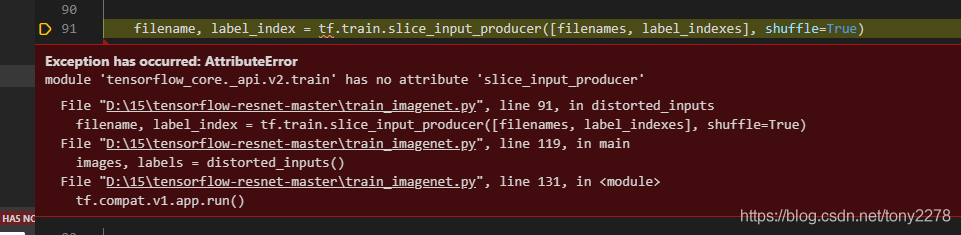
tensorflow version does not uninstall and reinstall
pip uninstall tensorflowI reinstalled version 2.1.0 and reinstalled version 1.5.0, and did not report this error
pip install tensorflow==1.5.0
<标题>
tf.train.slice_input_producer()和tf.train.batch ()