Category Archives: How to Fix

Python global variables and global keywords

Python global variables

and the global keyword

in Python variable usage, this error is often encountered :

local variable 'a' referenced before assignment

means that the local variable “a” is referenced before assignment.
such as running the following code will cause this problem:

a = 3
def Fuc():
    print (a)
    a = a + 1
Fuc()

, but if you delete a = a + 1, the above problem will not occur.

a = 3
def Fuc():
    print (a)
Fuc()

it turns out that in Python, a = 3 defines the global variable a, scope to the end of the code from the definition, in a = 3 of the following functions can be cited the global variable a, but if you want to modify the functions and global variables with the same name, the function of the variable will become a local variable, before the change of the variable reference nature presents undistributed or undefined error.

if you are sure to reference and modify global variables you must add the global keyword

a = 3
def Fuc():
    global a
    print (a)
    a=a+1
Fuc()

note: which function needs to modify the global variable, just declare it in the function.

but there is a special function, and that is the main function:

a = 3
def Fuc():
    global a
    print (a)  # 1
    a = a + 1
if __name__ == "__main__":
    print (a)  # 2
    a = a + 1
    Fuc()
    print (a)  # 3

output is as follows (in Python3) :

3
4
5

three prints are executed in the order of 2, 1, 3. You can see that there is no global declared variable A in the main function, but you can still modify the global variable A. In a normal function, the global variable A needs to be declared globally in order to modify it.

life is short, I use Python~

java.lang.UnsupportedOperationException resolvent

in the project List for operating times wrong Java. Lang. UnsupportedOperationException, later found operating List is composed of array transformation, by looking at the source code found problems, and write the test procedure is as follows.
code block:

public class ListTest {
    public static void main(String[] args) {
        String[] array = {"1","2","3","4","5"};
        List<String> list = Arrays.asList(array);
        list.add("6");
    }
}

execution result:

Exception in thread "main" java.lang.UnsupportedOperationException
	at java.util.AbstractList.add(AbstractList.java:148)
	at java.util.AbstractList.add(AbstractList.java:108)
	at com.atguigu.test.ListTest.main(ListTest.java:11)
	at sun.reflect.NativeMethodAccessorImpl.invoke0(Native Method)
	at sun.reflect.NativeMethodAccessorImpl.invoke(NativeMethodAccessorImpl.java:62)
	at sun.reflect.DelegatingMethodAccessorImpl.invoke(DelegatingMethodAccessorImpl.java:43)
	at java.lang.reflect.Method.invoke(Method.java:498)
	at com.intellij.rt.execution.application.AppMain.main(AppMain.java:144)

The problem with

is the following: the add and remove methods in the List generated by the
call on arrays.aslist () are exception because ArrayList of the inner class of arrays.aslist () is returned instead of java.util.ArrayList. Arrays of inner class ArrayList and Java. Util. ArrayList are inherited AbstractList, remove, add method is the default in AbstractList throw UnsupportedOperationException and don’t make any operation. Java.util.ArrayList overrides these methods, but the ArrayList of Arrays internal class does not, so it will throw an exception. The solution:

public class ListTest {
    public static void main(String[] args) {
        String[] array = {"1","2","3","4","5"};
        List<String> list = Arrays.asList(array);
        List arrList = new ArrayList(list);
        arrList.add("6");
    }
}

GoLand:Unresolved reference ‘NewFunction‘

GoLand: Unresolved reference ‘NewFunction’

(I) describe

after the upgrade to Goland, all the package references prompt Unresolved reference ‘method name’.

(b) cause

The idea folder in the project before

was created by the old version of Goland and should contain some data incompatible with the new version.

(iii) solution

remove the. Idea folder from the project and Goland will be automatically regenerated.

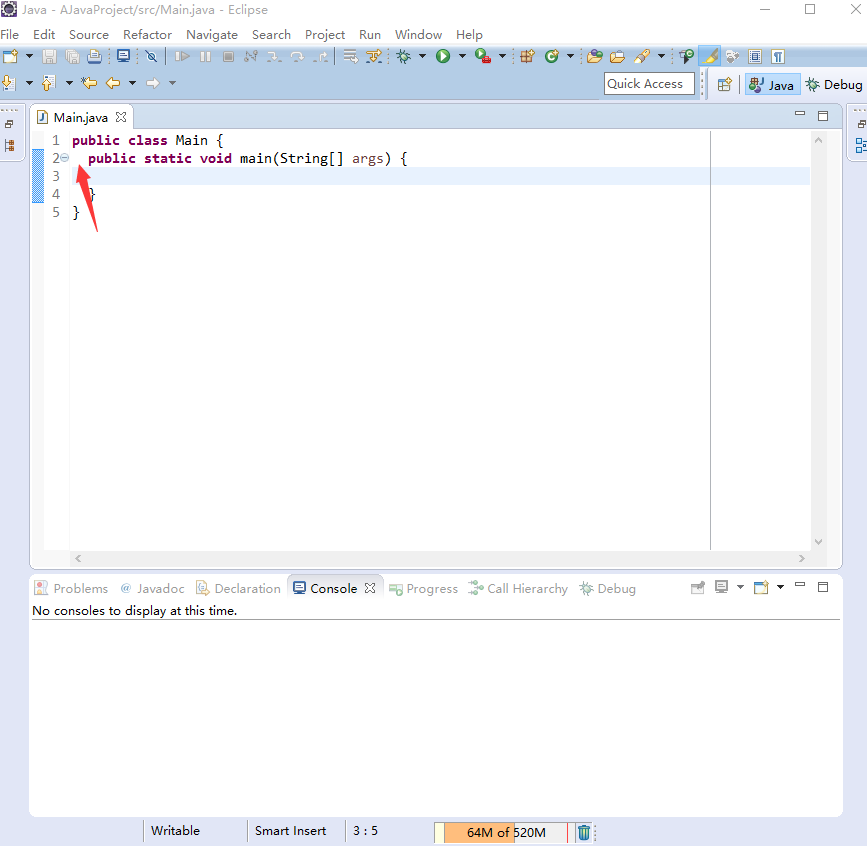
Set code indent to space indent in eclipse

the Google Java programming style specification recommends that blocks be indented to two Spaces, while Eclipse defaults to using tabs (\t) to indent blocks, and here’s how you can change the indentation of code in Eclipse:

  1. open Eclipse;
  2. Window -> Preferences -> Java -> Code Style -> The Formatter.
  3. on the right click ‘New…’ “Initialize Settings with the following Profile”. Just select “Eclipse [Builin]” and click OK.
  4. click on “Edit…” Button;
  5. either choose “Spaces only” or “Tab policy” in “General Settings” on the “Indentation” Tab, and enter “2” as the value of “Indentation size”;
  6. click OK.

thus, holding down the Tab key while writing code in the Eclipse code editing area indents the code with two Spaces.

Git removes the content of stash

delete stash content, feel the whole world is clean ::

is just a few lines :

git stash list // view the stash list

if you get this result it means that your stash is nothing

this means that there is a queue

then you can execute git stash clear: note that this clears all your content

$ git stash drop stash@{0}  这是删除第一个队列

Pandas sort according to a column_ values)

pandas sort

by a column
There are many ways to sort

pandas, sort_values means to sort

by a certain column

pd. Sort_values (” XXX “, inplace = True)

means that pd is sorted by the field XXX. Inplace defaults to False. If this value is False, then the original pd order does not change, but returns the sorted

In Java, int is converted to string, and zero is added before the number of bits is insufficient

reproduced from: http://ych0108.iteye.com/blog/2174134

Java int String number is not enough to fill in the front zero

String.format("%010d", 25); //25int

0 represents the character to be filled before
10 represents the length of the string
and d represents the argument of integer type

today I want to put an int to String not enough digits in front of the zero, in the original to see if there is a ready-made API, the results found most of the following

public static String addZeroForNum(String str,int strLength) {  
  int strLen =str.length();  
  if (strLen <strLength) {  
   while (strLen< strLength) {  
    StringBuffersb = new StringBuffer();  
    sb.append("0").append(str);//左补0  
//    sb.append(str).append("0");//右补0  
    str= sb.toString();  
    strLen= str.length();  
   }  
  }  

  return str;  
 }  

but I think it’s a little bit of a hassle, so I thought of a slightly easier way to do it, the following line would be

String str = String.format("%5d", num).replace(" ", "0");  

, where num is an int and STR is the converted result. That’s easy.

So,

, and I recently did a search on string.format, which actually comes with its own way to fill in the zero,

String.format("%06",12);//其中0表示补零而不是补空格,6表示至少6位  

Sorting out MySQL “too many connections” solutions

Many developers will encounter the abnormal situation of “MySQL: ERROR 1040: Too many connections”. One of the reasons for this situation is that the traffic volume is Too high and MySQL server cannot stand it. At this time, we should consider increasing the pressure of reading from the server. Another reason is that the max_connections value in the MySQL configuration file is too small.

view mysql maximum number of connections:

mysql> show variables like ‘%max_connections%’;

view server response maximum number of connections :

mysql> show global status like ‘Max_used_connections’;

you can see that the maximum number of connections that the server responds to is 2, far below the maximum number of connections allowed by the mysql server.

the ideal setting range for mysql server’s maximum connection value is that the maximum connection value of the server response accounts for more than 10% of the maximum connection value of the server. If the value is less than 10%, it indicates that the maximum connection limit of mysql server is set too high.

Max_used_connections/max_connections *100% = 2/151 *100% ≈ 1%

we can see that the percentage is much lower than 10% (because this is a local test server, the result value is not of great reference significance, you can set the upper limit of connection number according to the actual situation).

sets the maximum connection value:

mysql> set GLOBAL max_connections=256;

The number of connections

exceeds the value set by MySQL and is related to both max_connections and wait_timeout. The larger the value of wait_TIMEOUT, the longer the idle wait for the connection, resulting in a larger number of current connections.

wait_timeout had great disadvantages the default value is 28800 (8 hours), the amount of SLEEP on its embodiment is the MySQL process does not release in time, a drag on system performance, but also can’t take this refers to the set is too small, or you may encounter “ MySQL has gone away ” issues such as, generally speaking, I think the wait_timeout set to 10 is a good choice, but in some cases may also be a problem, For example, if you have a CRON script where the interval between two SQL queries is greater than 10 seconds, then this setting is problematic (of course, this is not a problem that cannot be solved, you can use mysql_ping every now and then in the program to let the server know that you are alive and recalcate wait_timeout)

mysql> show global variables like ‘wait_timeout’;

mysql> set global wait_timeout=10;

production server database can not be randomly restarted, we have to find a way to manually release some useless connections.

mysql> Show the processlist. You can get all MySQL connections to this server

you can see a list of MySQL data connections, and each will have a process ID number (in the first column of the above table). We just type the command:
mysql> kill 1180421;

where 1180421 is the process number found and killed in the process list

to prevent logins from occurring when too many connections occurs , the mysql manual has the following instructions:

mysqld actually allows max_connections+1 clients to connect. The extra connection is reserved for use by accounts that have the SUPER privilege. By granting the SUPER privilege to administrators and not to normal users (who should not need it), an administrator can connect to the server and use SHOW PROCESSLIST to diagnose problems even if the maximum number of unprivileged clients are connected.

therefore, must be only
gives root the SUPER privileges , and all database connected accounts cannot give SUPER privileges. The previously mentioned failure to log in after reporting an error is due to the root user configured directly by our application

view all users of the current database :
select user,host,password from mysql.user;

gives super PRIVILEGES (both super and ALL PRIVILEGES available) TO the user:
GRANT super ON *.* TO ‘mysql’@’localhost’;
GRANT super ON *.
GRANT ALL PRIVILEGES ON *.* TO ‘mysql’@’localhost’;

user’s super PRIVILEGES (both super and ALL PRIVILEGES are available) :
REVOKE super ON *.* FROM ‘mysql’@’localhost’;
REVOKE super ON *.
REVOKE ALL PRIVILEGES ON *.* FROM ‘mysql’@’localhost’;

view the permissions granted to users
SHOW GRANTS FOR ‘mysql’@’localhost’;