Category Archives: How to Fix

Solution to “the grub PC ‘package failed to install into / target / when installing Ubuntu server

“The ‘grub-pc’ package failed to install into /target/ “this is a problem I encountered in The process of installing Ubuntu server 14.10, solution: disconnect The network at The appropriate time (I was configuring APT) during The installation process, or directly install without network. this scheme has been tried by the author and confirmed to be feasible.


Slim error “failed to execute login command”

FreeBSD installed Mate desktop, using Slim as the login window, found that only Root can login normally, while other users appeared “failed to execute login command”.

solution:

copy ~/.xinitrc to /home/username/.

username is the name of the logged in user.

attached: my. Xinitrc content:

root@cheviko:/home/cheviko # vi ~/.xinitrc

#exec ck-launch-session dbus-launch mate-session
exec scim -d &
exec mate-session

Oracle12c client32 bit installation error: [ins-20802] Oracle net configuration assistant failed

Oracle12c Client32 [INS-20802] Oracle Net Configuration Assistant failed

Installation Of Oracle Client 12.1.0.2.0 (32-bit) Fails With An Error Message “[ins-20802] Oracle Net Configuration Assistant failed
.
installing Oracle Client12c client32 bit operating system in window 2008R2 has encountered an ins-20802 Oracle Net Configuration Assistant failure due to the failure of the execution method of the plug-in
solution:
problem because Installer found the wrong value, we open install/oraparam.ini file can see MSVCREDIST_LOC=vcredist_x64.exe, actually our file is vcredist_x86.exe, so this caused the problem.

we just go to the software directory :\client32\stage\ext\bin and install vcredist_x86.exe, the installation is complete, then go back to the oracle client where the error occurred, click retry, ok, perfectly solve the problem .

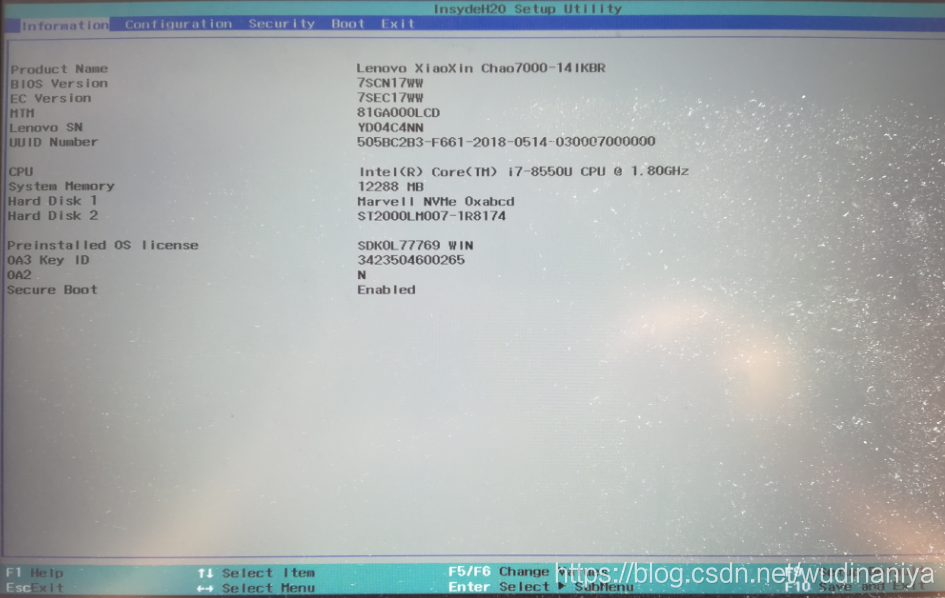
The solution of default boot device missing or boot failed appears on the blue screen of Lenovo xiaoxinchao 7000

recently bought lenovo small new tide 7000 notebook has a boot blue screen fault, the symptoms are as follows:

solution:

1 restore the BIOS default Settings and set the hard disk as the first boot entry.

BIOS:Basic Input Output System.

it is a set of solidified computer motherboard on a 0 1 ROM3 chip 4 7 program 7 program 7 program 9, It saves the specific information from CMOS system Settings the most important basic input and output program , after boot self-check program and system self-start program. The primary function of is to provide the lowest level, most direct hardware setup and control for the computer. The BIOS is the first program that is loaded when a PC is booted up.

press Fn+F2 to enter the BIOS setting interface.

switch to BOOT, if the hard disk is successfully detected and there is an EFI BOOT program, then congratulations you are done, reboot and you can BOOT normally.

if the hard disk cannot be detected, it means that the EFI boot partition of the system has been deleted, and the computer files can only be backed up out, then the hard disk is formatted and the system is reinstalled.

Tainted canvases may not be exported

Tainted canvases may not be exported.

  • scene
  • solution
  • summary

scene

used HTML canvas for drawing, and then tried to convert to base64 format or binary temporary file through canvas Api toDataURL toBlob, but the error was reported. The error message reads

DOMException: Failed to execute ‘toBlob’ on ‘HTMLCanvasElement: Tainted canvases may not be exported.

DOMException: Failed to execute ‘toDataURL’ on ‘HTMLCanvasElement: Tainted canvases may not be exported.

understand from literal meaning, said the canvas canvas is polluted, not allowed to export. What behavior causes the canvas to be polluted?After modifying the code, it turns out that the above two methods work as long as you don’t draw your drawImage. DrawImage is used here to draw network images.

solution

baidu time happened to see a
solution to canvas cross-domain access
in which the same-origin policy and the same-origin policy of canvas Api were explained. After reading this article, I am inspired by the use of

in this article

context.getImageData(x,y,width,height)

What if

USES this Api to replace canvas’s toBlob toDataURL interface?After trying, the console reported an error

DOMException: Failed to execute ‘getImageData’ on ‘CanvasRenderingContext2D’ : The canvas has had been tainted by cross – origin data.

same-origin policy error
where the code to load the Image is posted

loadImage(url) {
					return new Promise((resolve, reject) => {
						let img = new Image()
						//img.crossOrigin=""
						img.src = url
						img.onload = function() {
							resolve(img)
						}
					})
				}

after I set img.crossOrigin=”” || img.crossOrign=” “*”, context.getimagedata was able to work properly and was useless because of a problem with the same-origin policy. Could toBlob toDataURL also be a problem due to the same origin policy?After testing, toBlob, toDataURL, works fine.

summary

my problem is solved here, but it is worth noting here that I used the image source drawn with the CDN, and set img.crossOrign to allow cross-domain loading of image resources, but if the server itself does not allow cross-domain access, then this img.crossOrign will not solve any problems. Specific solutions are clearly pointed out in solving canvas cross-domain problem. If your server itself doesn’t support cross-domain, try the solution mentioned in the Canvas cross-domain article. Note down the resolution process here for your reference. If you have any problems, please leave a message.

all right, my old buddy. Bye.

[Mac OS] ASUS z97-k r2.0 + gtx960 + clover v2.4k r4098 install Sierra 10.12.5 problems and Solutions

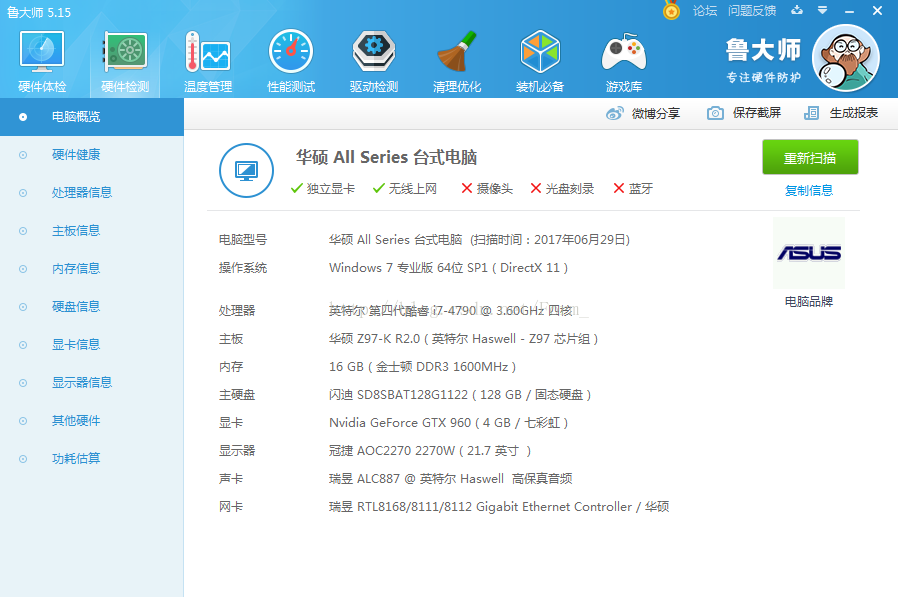
configuration information as follows:

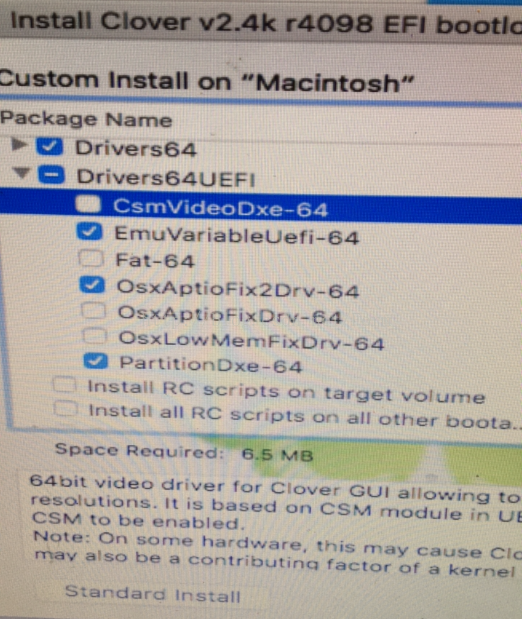
Clover installation driver:


question 1:

macOS could not be installed on your computer, could not unmount volume for repair
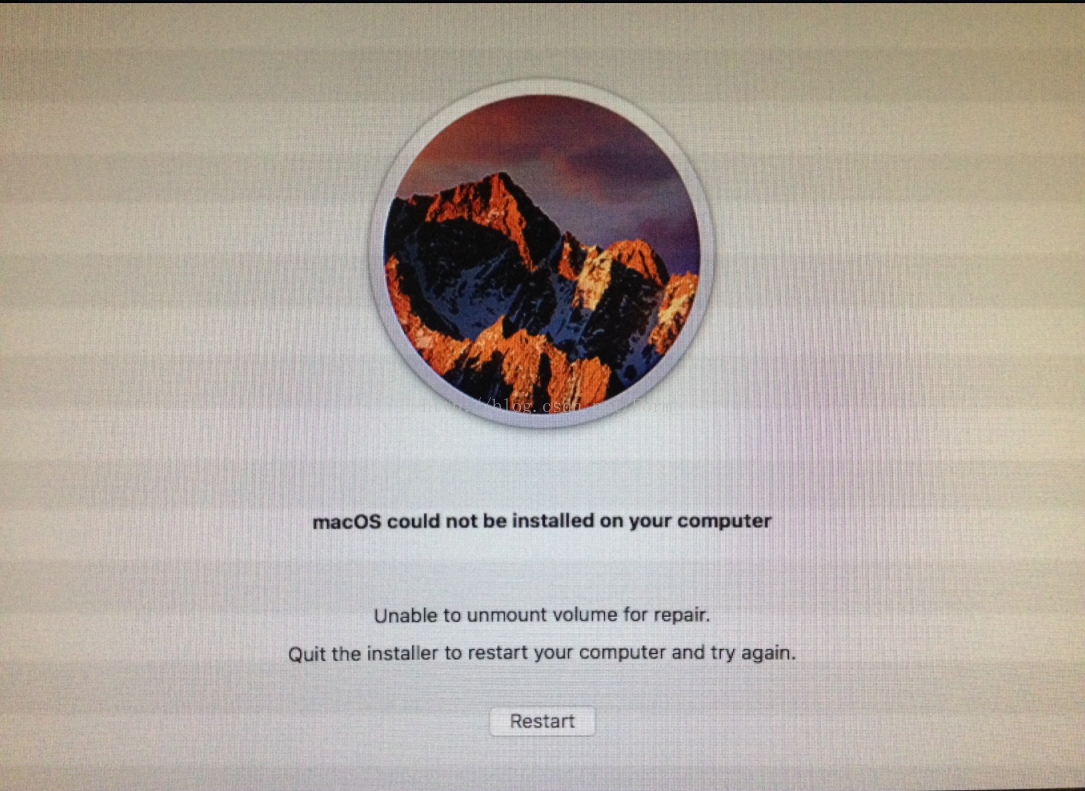

solution:

1. Copy the uncertified IAProductInfo hidden file to the root directory of the installation disk. Skip the first step and go directly to the second step installation without having to restart.

2. Install

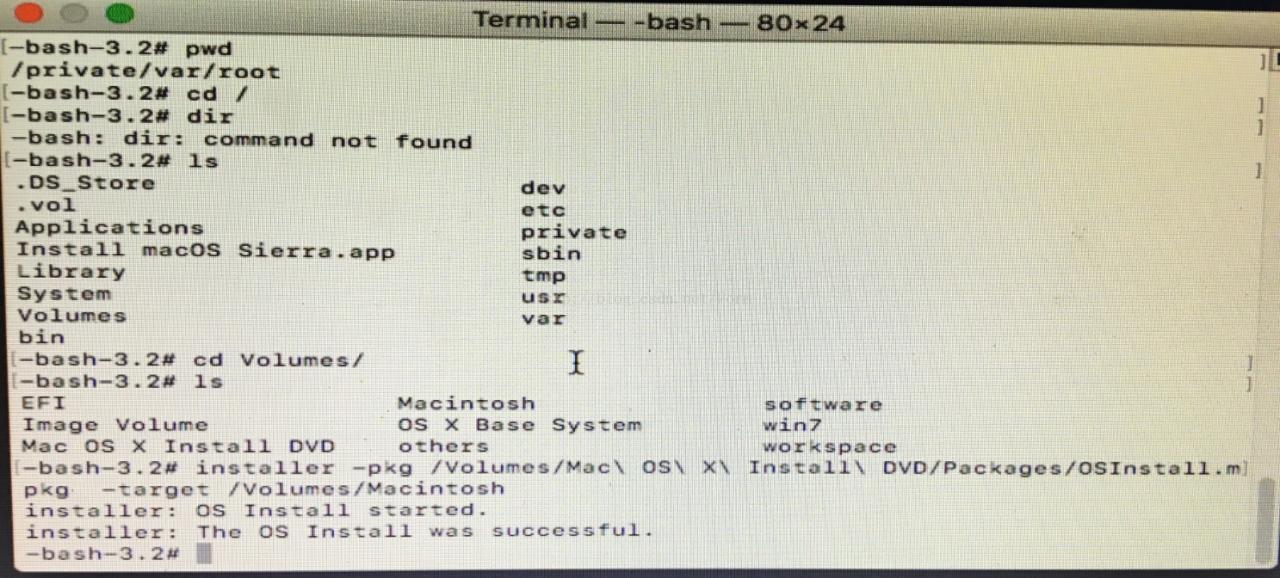
with terminal command

installer – PKG/Volumes/MAC OS is \ \ X \ Install \ DVD/Packages/OSInstall MPKG – target/Volumes/XXXX (XXX is the need to Install the OSX partition volume label name, pay attention to the space with a backslash escapes)
Refer Link: http://bbs.pcbeta.com/viewthread-1704712-1-1.html

= = = = = = = = = = = = = = = = = = = = = = = = = = = = = = = = = = = = = forgive green line = = = = = = = = = = = = = = = = = = = = = = = = = = = = = = = = = = = = = = = = = = = = = =

question 2:

haswell appleacpiplatformexpert start failed

start failed0

1

panic ( CPU 0 caller 0xffffff88886c3221):”Unable to find driver for thisplatform:\”ACPI\”,\n”@/SourceCache/…

solution:

use Rampagedev’s ssdt.aml and put it into the EFI partition Clover directory \EFI\ Clover \ACPI\patched \patched on U disk. Haswell DMG download link is as follows.

http://www.rampagedev.com/downloads/haswell-dmg/

Refer Link:

http://www.insanelymac.com/forum/topic/302554-ga-z97x-udh5-boot-failure-clover-uefi-appleacpiplatformexpertstart-failed/

= = = = = = = = = = = = = = = = = = = = = = = = = = = = = = = = = = = = = forgive green line = = = = = = = = = = = = = = = = = = = = = = = = = = = = = = = = = = = = = = = = = = = = = =

question 3:

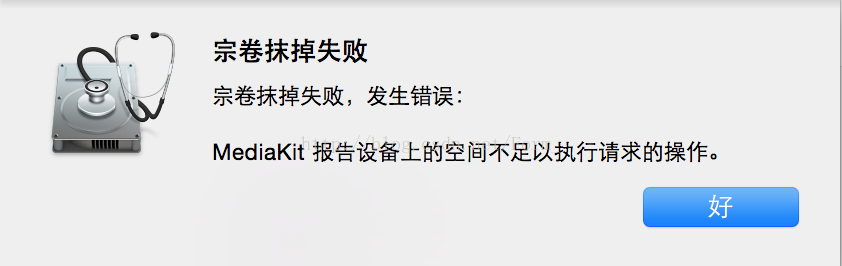
note: wipe the disk mediakit report equipment on the space is not enough to perform

: ESP partition capacity lack to 200 m +
solution:

1. Add EFI partition, then erase

2. Create new NTFS partition and convert it to HFS+

Refer Link:

http://bbs.pcbeta.com/viewthread-1669452-1-1.html

= = = = = = = = = = = = = = = = = = = = = = = = = = = = = = = = = = = = = forgive green line = = = = = = = = = = = = = = = = = = = = = = = = = = = = = = = = = = = = = = = = = = = = = =

question 4:

Clover failed to install to EFI partition
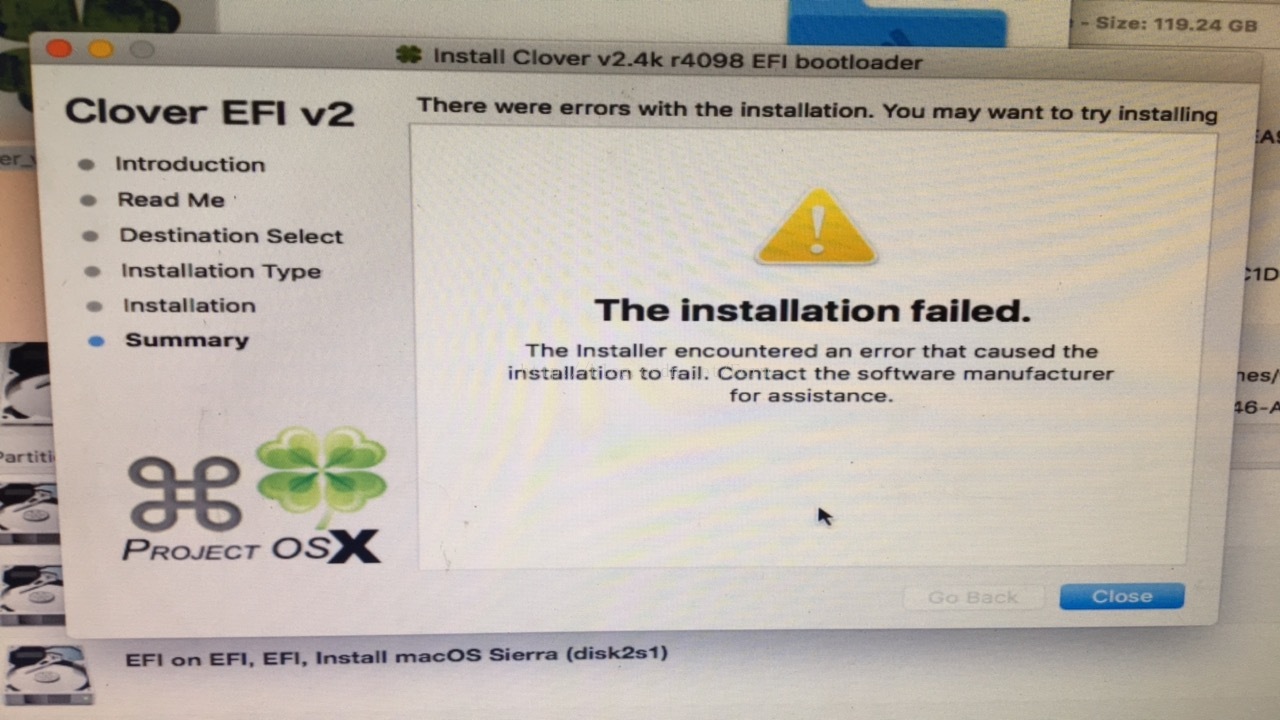

reason: not EFI partition formatted
solution:


= = = = = = = = = = = = = = = = = = = = = = = = = = = = = = = = = = = = = forgive green line = = = = = = = = = = = = = = = = = = = = = = = = = = = = = = = = = = = = = = = = = = = = = =

question 5:

GTX960 using the latest 10.12.5 webdriver, plug

because there is no VGA interface
solution:

1 does not transfer

directly using the DVI interface

2 using HDMI to VGA can also drive

= = = = = = = = = = = = = = = = = = = = = = = = = = = = = = = = = = = = = forgive green line = = = = = = = = = = = = = = = = = = = = = = = = = = = = = = = = = = = = = = = = = = = = = =

MacOS 10.12 allows APP

from any source

terminal execution: sudo SPCTL — mast-disable

xrdp_mm_process_login_response:login failed

as an aside:

was puzzled by this problem for more than a minute, baidu search is really not as good as Google search, finally is to use Google search immediately find the right answer suitable for yourself!

problem description:

win10 remote desktop connection to the ubuntu server, as the title of the error message. The network said that the remote desktop was not closed properly, although the Windows system closed the remote desktop connection, but in the Linux process is still running, resulting in the number of connections reached the limit, the problem occurred.

solution:

Xrdp_MM_Process_Login_Response: Login Failed – Solution

let me briefly describe my solution here.

1.ssh UserName@ServerAddress

CMD enter the command line above, where UserName is your UserName on the server, and ServerAddress is the address of your remote computer. It is worth mentioning that if the remote computer address you are connecting to has a port part, there is no need to add the port address under SSH, otherwise an error will be reported. Then type your password to SSH into your remote computer.

2.ps -ef | grep vnc

type the command line above to find a remote desktop application that is not closed on the server (although the full name of VNC is Virtual Network Console) and find the pid# for your username (look for an earlier VNC, if you are careful you will find the most recent VNC that you are using SSH!). .

3.kill -9 pid#

, where pid# is the process number for the corresponding VNC, and kill -9 forces the process to be killed. If a child like me does not know at first what pid# is, the number circled in the figure below is pid#.

execute kill -9 40778 40776, exit SSH and CMD, return to remote desktop connection, finally can log in to the server.

pit:

pit

1. XRDP implements Windows remote desktop connectivity issues by modifying the parameters in the sesman.in file, as mentioned in point 3 of this article. This does not work because the file is read-only and the non-root user cannot chmod it.

2. Remember that SSH +top/ps+kill is also the experience of killing all existing processes about their users when the remote desktop connection interface is stuck and unable to move, and then login to the remote desktop again to solve the problem, because I did not deeply realize that it was related to “VNC”, so this method failed.

3.Ubuntu remote connection error: xrdp_mm_process_login_response: login failed also changes the file content and restarts the XRDP service with sudo, which is obviously something that a non-root user cannot do.

ARP – s in win7 (ARP binding under win7)

1. Want to use arp-s to add static binding MAC and IP address

2. OS Windows 7 English

3. (1) prompt The ARP entry addition failed: The requested operation requires elevation

solution, use the administrator identity to run cmd.exe

4.(2) arp-s, still error.

prompt: The ARP entry addition failed: Access is denied

reason: win 7 does not support binding to an existing arp address, that is, the ip-mac you want to add already exists in the arp table.

5. In win7 to achieve the binding according to the following operation

(1) using netsh I I show in

C:/Windows/system32 & gt; netsh i i show in

(2) view the idx

of the network card being used

independence Idx Met MTU State Name
— — — — — — — — — — — — — — — — — — — — — — — — — — — — — — — — — — — — — — — — — — — — — — — — — — — — — — — — — — — — — —
1 50 4294967295 connected Loopback The Pseudo – Interface 1
13 25 1500 connected Wireless Network Connection
11 May 1500 disconnected Local Area Connection

(2) use the command (where 13 is the idx of the network card being used)

note the space bar, each symbol is followed by a space

C:/Windows/system32> Nesh-c “I I” add neighbors 13 “192.168.0.1” “00-22-b0-f8-0
d-6e”

(3) using arp-a

to see if

is successful

C:/Windows/system32 & gt; arp -a

Interface: 192.168.0.99-0 xd
Internet Address Physical Address Type
192.168.0.1 00-22 – b0 – f8-0-6 d e static

type static


6. Use netsh I I reset

is cancelled. Restart is required to take effect

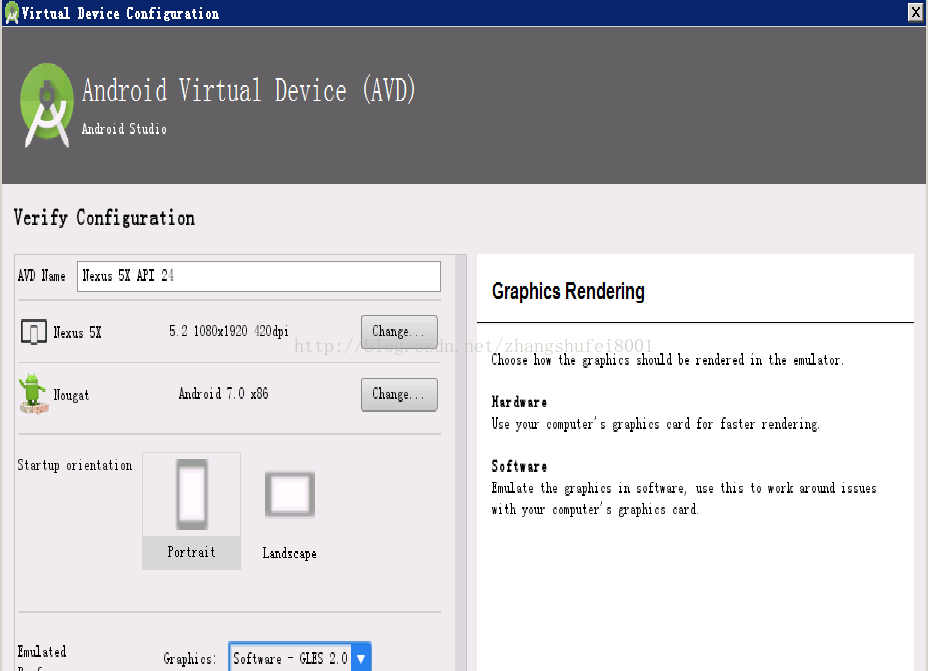
Resolve Audio: failed to create voice ` goldfish_ Audio ‘error

starting to read the second version of the first line of code Android, according to the introduction, set up the development environment, create the first HelloWorld program, strictly follow the steps, but when the Android simulator is launched, in

android studio console

init: Could not find wglGetExtensionsStringARB!

Hax is enabled
getGLES2ExtensionString: Could not find GLES 2.x config!
Hax ram_size 0x60000000
Failed to obtain GLES 2.x extensions string!
HAX is working and emulator runs in fast virt mode.
Could not initialize emulated framebuffer
audio: Failed to create voice `goldfish_audio’
qemu-system-i386.exe: warning: opening audio output failed
audio: Failed to create voice `goldfish_audio_in’
qemu-system-i386.exe: warning: opening audio input failed
audio: Failed to create voice `dac’
audio: Failed to create voice `adc’

emulator: ERROR: Could not initialize OpenglES emulation, use ‘-gpu off’ to disable it.

finally set Graphiscs: software-gles2.0, problem solving


Failure [INSTALL_ FAILED_ OLDER_ SDK] solutions

today, I want to learn the version of Android L Material Design required is Android 5.0, so I chose 5.1 Lolipop

when building the project in Android Studio
Failure [INSTALL_FAILED_OLDER_SDK]

error obviously, the SDK version is too old.

solution:

modify the minSdkVersion number in build. Gradble

defaultConfig {
    applicationId "com.example.mooreliu.androidl"
    minSdkVersion 13
    targetSdkVersion 22
    versionCode 1
    versionName "1.0"
}

Uncaught domexception: failed to read the ‘contentdocument’ property from ‘htmliframeelement’

1 problem found

recently developed Excel import and export tools, greatly improving the work efficiency, complacent. However, when the project was deployed in a test environment, it was found that the file could not be uploaded in chrome, and the log reported the following error:

Uncaught DOMException: Failed to read the 'contentDocument' property from 'HTMLIFrameElement': Blocked a frame with origin "http://xx.xx.xxx.xxx:8081 " from accessing a cross-origin frame.   

at HTMLIFrameElement.<anonymous>http://xx.xx.xxx.xxx:8081/static-v1.0.0/dwz/js/dwz.ajax.js:76:20    
at HTMLIFrameElement.dispatch http://xx.xx.xxx.xxx:8081/static-v1.0.0/dwz/js/jquery-2.1.4.min.js:3:6466 )   
at HTMLIFrameElement.r.handle http://xx.xx.xxx.xxx:8081/static-v1.0.0/dwz/js/jquery-2.1.4.min.js:3:3241 

2 analysis
The

read prompt is an exception that occurs when you fetch the iframe’s contentDocument. This exception is usually due to the browser’s same-domain readable and writeable policy, which is cross-domain readable but not writeable.

but we’re all in the same project and we’re all calling actions in the same field, so let’s put a breakpoint here and look at the actual iframe:

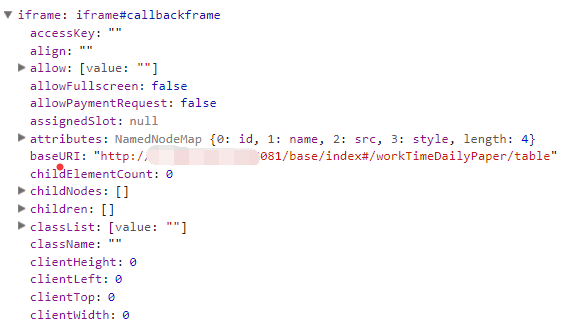
found this baseURI problem, the normal address should be the corresponding module URI, such as:
http://xxx/base/index#/xxx/table, but the address here is the previous module URL (no use of Excel import and export tools), that is, the browser did not recognize the URL of the new page.

looks at the code and finds that in the generic freemarker page it says:

action="${contextPath}/${importUrl}"

and the URL passed in is:

"/xxx/importExcel"

combined address is:

//xxx/importExcel

did you notice that there was an extra / in front of it, which caused the browser’s frame not to recognize this address!

3 address

remove this extra /, it’s ok to O(∩_∩)O~