Category Archives: How to Fix

How to Fix java.net.ConnectException: Connection refused: connect

java.net.ConnectException: Connection refused: connect

1. Error as above.
2. Reasons and Solutions:
 
1) The port number is occupied: kill the process occupying the port number (generally 8080) and release the port; Shut down the Tomcat server completely, or restart the project.
2) Use the following command to check the maximum number of processes allowed on the server: ulimit-u. If this value is set to a lower value, such as 1024, then increase it to 131072 or unrestricted with the following value: ulimit-u 131072 or ulimit-u unrestricted.
 
3) Client and server, either or both of which are not in the network.
They may not be connected to a LAN or the Internet or any other network, in which case Java will be thrown
The client “java.net.ConnectException:Connection refused” exception.

4) server not running
The server is down but not running. In this case, you will also get java.net.ConnectException: connection refused error. Ping to check if the server is running and listening on the port.

5) server running but not listening port, client trying to connect.
The server is running but listening on a different port. Verify the configuration. If you are working on a large project and have a hierarchical configuration file, it may be the default configuration or some other Settings overwrite your correct Settings.
 
6) Host port combination is not allowed to use firewall
Almost every corporate network is protected by a firewall. If you are connecting to other corporate networks, such as in any electronic trading system, you need to improve the firewall
Both parties are required to ensure that they allow each other’s IP address and port number. If the firewall is not allowed to connect, will also receive the same java.net.ConnectException:Java connection refused to abnormal in application.
 
7) Incorrect host port combination.
The host port combination provided is incorrect, or the earlier host port combination on the server side has changed. Check the latest configuration on both the client and server sides.
 
8) The protocol in the connection string is incorrect
TCP is the basis for many advanced protocols, including HTTP, RMI, and so on. Through the connection string, you need to make sure that you pass the correct protocol that the server expects. For example, if the server is exposed, a service that passes through RMI instead of a connection string should start with RMI: //.
 
 
3. My situation:
, my reason is relatively simple, which probably belongs to the 5th, 7th and 8th points above, but the configuration is not correct anyway. I just miswrote the IP address of the server where the database is located.

spring.datasource.url=jdbc:mysql://数据库所在服务器IP:3306/gaei_ms?useUnicode=true&characterEncoding=utf-8&useSSL=false

———————————————————————————————
July 4, 2019:
From the comments:
“The same can happen if all parameters are not added to the comment.”
Join the article, for reference, also very grateful to this friend: ‘Seven.


Reference: https://javarevisited.blogspot.com/2013/02/java-net-ConnectException-Connection-refused.html

ubuntu install mysqlclient error ERROR: Failed building wheel for mysqlclient solution

Under Windows error
This site has been written by many predecessors, go to this site to download the corresponding file installation is good I will not teach fish to swim.
An error under ubuntu

(cai_django) ubuntu@VM-0-2-ubuntu:~$ pip3 install mysqlclient
Looking in indexes: http://mirrors.tencentyun.com/pypi/simple
Collecting mysqlclient
  Downloading http://mirrors.tencentyun.com/pypi/packages/d0/97/7326248ac8d5049968bf4ec708a5d3d4806e412a42e74160d7f266a3e03a/mysqlclient-1.4.6.ta
     |████████████████████████████████| 92kB 711kB/s 
Building wheels for collected packages: mysqlclient
  Building wheel for mysqlclient (setup.py) ... error
  ERROR: Command errored out with exit status 1:
   command: /home/ubuntu/.virtualenvs/cai_django/bin/python3 -u -c 'import sys, setuptools, tokenize; sys.argv[0] = '"'"'/tmp/pip-install-jqj_z28, '"'"'open'"'"', open)(__file__);code=f.read().replace('"'"'\r\n'"'"', '"'"'\n'"'"');f.close();exec(compile(code, __file__, '"'"'exec'"'"'))' bd
       cwd: /tmp/pip-install-jqj_z28y/mysqlclient/
  Complete output (31 lines):
  running bdist_wheel
  running build
  running build_py
  creating build
  creating build/lib.linux-x86_64-3.6
  creating build/lib.linux-x86_64-3.6/MySQLdb
  copying MySQLdb/__init__.py -> build/lib.linux-x86_64-3.6/MySQLdb
  copying MySQLdb/_exceptions.py -> build/lib.linux-x86_64-3.6/MySQLdb
  copying MySQLdb/compat.py -> build/lib.linux-x86_64-3.6/MySQLdb
  copying MySQLdb/connections.py -> build/lib.linux-x86_64-3.6/MySQLdb
  copying MySQLdb/converters.py -> build/lib.linux-x86_64-3.6/MySQLdb
  copying MySQLdb/cursors.py -> build/lib.linux-x86_64-3.6/MySQLdb
  copying MySQLdb/release.py -> build/lib.linux-x86_64-3.6/MySQLdb
  copying MySQLdb/times.py -> build/lib.linux-x86_64-3.6/MySQLdb
  creating build/lib.linux-x86_64-3.6/MySQLdb/constants
  copying MySQLdb/constants/__init__.py -> build/lib.linux-x86_64-3.6/MySQLdb/constants
  copying MySQLdb/constants/CLIENT.py -> build/lib.linux-x86_64-3.6/MySQLdb/constants
  copying MySQLdb/constants/CR.py -> build/lib.linux-x86_64-3.6/MySQLdb/constants
  copying MySQLdb/constants/ER.py -> build/lib.linux-x86_64-3.6/MySQLdb/constants
  copying MySQLdb/constants/FIELD_TYPE.py -> build/lib.linux-x86_64-3.6/MySQLdb/constants
  copying MySQLdb/constants/FLAG.py -> build/lib.linux-x86_64-3.6/MySQLdb/constants
  running build_ext
  building 'MySQLdb._mysql' extension
  creating build/temp.linux-x86_64-3.6
  creating build/temp.linux-x86_64-3.6/MySQLdb
  x86_64-linux-gnu-gcc -pthread -DNDEBUG -g -fwrapv -O2 -Wall -g -fstack-protector-strong -Wformat -Werror=format-security -Wdate-time -D_FORTIFY6m -I/home/ubuntu/.virtualenvs/cai_django/include/python3.6m -c MySQLdb/_mysql.c -o build/temp.linux-x86_64-3.6/MySQLdb/_mysql.o
  x86_64-linux-gnu-gcc -pthread -shared -Wl,-O1 -Wl,-Bsymbolic-functions -Wl,-Bsymbolic-functions -Wl,-z,relro -Wl,-Bsymbolic-functions -Wl,-z,re-x86_64-3.6/MySQLdb/_mysql.o -lmysqlclient -lpthread -lz -lm -lrt -latomic -lssl -lcrypto -ldl -o build/lib.linux-x86_64-3.6/MySQLdb/_mysql.cpyth
  /usr/bin/ld: cannot find -lssl
  /usr/bin/ld: cannot find -lcrypto
  collect2: error: ld returned 1 exit status
  error: command 'x86_64-linux-gnu-gcc' failed with exit status 1
  ----------------------------------------
  ERROR: Failed building wheel for mysqlclient
  Running setup.py clean for mysqlclient
Failed to build mysqlclient
Installing collected packages: mysqlclient
    Running setup.py install for mysqlclient ... error
    ERROR: Command errored out with exit status 1:
     command: /home/ubuntu/.virtualenvs/cai_django/bin/python3 -u -c 'import sys, setuptools, tokenize; sys.argv[0] = '"'"'/tmp/pip-install-jqj_zze, '"'"'open'"'"', open)(__file__);code=f.read().replace('"'"'\r\n'"'"', '"'"'\n'"'"');f.close();exec(compile(code, __file__, '"'"'exec'"'"'))' all-headers /home/ubuntu/.virtualenvs/cai_django/include/site/python3.6/mysqlclient
         cwd: /tmp/pip-install-jqj_z28y/mysqlclient/
    Complete output (31 lines):
    running install
    running build
    running build_py
    creating build
    creating build/lib.linux-x86_64-3.6
    creating build/lib.linux-x86_64-3.6/MySQLdb
    copying MySQLdb/__init__.py -> build/lib.linux-x86_64-3.6/MySQLdb
    copying MySQLdb/_exceptions.py -> build/lib.linux-x86_64-3.6/MySQLdb
    copying MySQLdb/compat.py -> build/lib.linux-x86_64-3.6/MySQLdb
    copying MySQLdb/connections.py -> build/lib.linux-x86_64-3.6/MySQLdb
    copying MySQLdb/converters.py -> build/lib.linux-x86_64-3.6/MySQLdb
    copying MySQLdb/cursors.py -> build/lib.linux-x86_64-3.6/MySQLdb
    copying MySQLdb/release.py -> build/lib.linux-x86_64-3.6/MySQLdb
    copying MySQLdb/times.py -> build/lib.linux-x86_64-3.6/MySQLdb
    creating build/lib.linux-x86_64-3.6/MySQLdb/constants
    copying MySQLdb/constants/__init__.py -> build/lib.linux-x86_64-3.6/MySQLdb/constants
    copying MySQLdb/constants/CLIENT.py -> build/lib.linux-x86_64-3.6/MySQLdb/constants
    copying MySQLdb/constants/CR.py -> build/lib.linux-x86_64-3.6/MySQLdb/constants
    copying MySQLdb/constants/ER.py -> build/lib.linux-x86_64-3.6/MySQLdb/constants
    copying MySQLdb/constants/FIELD_TYPE.py -> build/lib.linux-x86_64-3.6/MySQLdb/constants
    copying MySQLdb/constants/FLAG.py -> build/lib.linux-x86_64-3.6/MySQLdb/constants
    running build_ext
    building 'MySQLdb._mysql' extension
    creating build/temp.linux-x86_64-3.6
    creating build/temp.linux-x86_64-3.6/MySQLdb
    x86_64-linux-gnu-gcc -pthread -DNDEBUG -g -fwrapv -O2 -Wall -g -fstack-protector-strong -Wformat -Werror=format-security -Wdate-time -D_FORTI3.6m -I/home/ubuntu/.virtualenvs/cai_django/include/python3.6m -c MySQLdb/_mysql.c -o build/temp.linux-x86_64-3.6/MySQLdb/_mysql.o
    x86_64-linux-gnu-gcc -pthread -shared -Wl,-O1 -Wl,-Bsymbolic-functions -Wl,-Bsymbolic-functions -Wl,-z,relro -Wl,-Bsymbolic-functions -Wl,-z,ux-x86_64-3.6/MySQLdb/_mysql.o -lmysqlclient -lpthread -lz -lm -lrt -latomic -lssl -lcrypto -ldl -o build/lib.linux-x86_64-3.6/MySQLdb/_mysql.cpy
    /usr/bin/ld: cannot find -lssl
    /usr/bin/ld: cannot find -lcrypto
    collect2: error: ld returned 1 exit status
    error: command 'x86_64-linux-gnu-gcc' failed with exit status 1
    ----------------------------------------
ERROR: Command errored out with exit status 1: /home/ubuntu/.virtualenvs/cai_django/bin/python3 -u -c 'import sys, setuptools, tokenize; sys.argvnt/setup.py'"'"';f=getattr(tokenize, '"'"'open'"'"', open)(__file__);code=f.read().replace('"'"'\r\n'"'"', '"'"'\n'"'"');f.close();exec(compile(cternally-managed --compile --install-headers /home/ubuntu/.virtualenvs/cai_django/include/site/python3.6/mysqlclient Check the logs for full com

The key point is ERROR: Failed Building Wheel for MysqlClient
The solution

sudo apt-get install python3 python-dev python3-dev
sudo apt-get install build-essential libssl-dev libffi-dev
sudo apt-get install libxml2-dev libxslt1-dev zlib1g-dev

Install it all again

pip3 install mysqlclient

The problem is solved.

C# SevenZip simple operation

using SevenZip;
using System;
using System.Collections.Generic;
using System.IO;
using System.Linq;
using System.Text;

namespace Test
{
    public static class ZipHelper
    {
        static bool Is64 = (IntPtr.Size == 8);
        internal const string Name32 = "7z.dll";
        internal const string Name64 = "7z64.dll";
        internal const string ZIP_FILE = "index.zip";

        static ZipHelper()
        {
            string name = Is64 ?Name64 : Name32;
            SevenZip.SevenZipExtractor.SetLibraryPath(name);
        }

        public static Stream GetSteamFrom7z(string fileName)
        {
            var stream = new MemoryStream();
            using (var tmp = new SevenZipExtractor(ZIP_FILE))
            {
                tmp.ExtractFile(fileName, stream);
            }
            stream.Position = 0;
            return stream;
        }
    }
}

SQL Server SSPI handshake failed Error

One, error content
Logon Error: 17806, Severity: 20, State: 14.
Logon SSPI handshake with Error code 0x8009030c, State 14 while fading a connection with integrated security; The Connection has been closed. Reason: AcceptSecurityContext failed. The Windows Error code indicates the cause of failure. The logon attempt failed [CLIENT: 192.168.1.3]
Logon Error: 18452, Severity: 14, State: 1.
Logon Login failed. The Login is from an untrusted domain and cannot be used with Windows authentication. [CLIENT: 192.168.1.3]
 
Second, report the cause of the error
The error message should be related to the domain account. The domain account is not trusted, so Windows authentication cannot be used.
It is commonly seen in 192.168.1.3 that user A was used to connect to the database (the case encountered was the domain account), and then the password of user A was changed, but the old password was still used in 192.168.1.3 to try to connect, resulting in an error in login verification.
In addition, user A’s domain account has been locked, and this error will be reported when logging in.
 
3. Solutions
Login 192.168.1.3 Server disconnects the previous user A
or
Log in to the database server and kill A user’s connection
 
reference
http://www.secretgeek.net/boring_sql_one
https://blogs.msdn.microsoft.com/docast/2016/02/11/common-sspi-handshake-failed-errors-and-troubleshooting/

Solve the error: gpg: keyserver receive failed: No dirmngr

My personal blog: Zhang0Peter’s personal blog


Today’s error in using Add-apt-Repository is as follows:

gpg: keybox '/tmp/tmpnh5y5w9a/pubring.gpg' created
gpg: failed to start the dirmngr '/usr/bin/dirmngr': No such file or directory
gpg: connecting dirmngr at '/run/user/0/gnupg/d.rkeyjbdrrh3u6cjumf59ra5t/S.dirmngr' failed: No such file or directory
gpg: keyserver receive failed: No dirmngr

The reason for this error is that GPG is not installed on Linux:

apt install dirmngr

An error to solve

Bug:Install Microsoft Visual C++ 2008 Redistributable (x86) Failed Installation aborted, Result=1603

This problem occurred when installing 3dMax software:
There seems to be a problem with the c++2008 library.
Uninstall the library on your computer, but the application management did not find the package, do not know how to uninstall.
The article goes on to say that it can be reloaded:
https://knowledge.autodesk.com/zh-hans/search-result/caas/sfdcarticles/sfdcarticles/CHS/2011-Troubleshooting-Error-1603-in-AutoCAD-Map-3D.html
So I wanted to reinstall it, but encountered the problem with Error1935,
Then follow:

Solved, installed 2008C ++ can continue to install 3dMax.

Some problems encountered in the development of ReportViewer

http://blog.csdn.net/hebeijg/article/details/7329019

1. The number of rows displayed per page is determined by the Report’s Interactivesize-height attribute. The rule is Height = row number *0.63492 row Height
2. How to display the table header, choose to open the report file in XML format, in
< TablixRowHierarchy>
& lt; TablixMembers>
& lt; TablixMember>
& lt; KeepWithGroup> After< /KeepWithGroup>
& lt; RepeatOnNewPage> true< /RepeatOnNewPage> // Just add this sentence.
<
<
<
<
< /TablixMember>
& lt; TablixMember>
& lt; Group Name=”Details” />
& lt; /TablixMember>
& lt; /TablixMembers>
& lt; /TablixRowHierarchy> PageCountModel property
has two values, Actual and Estimate, after adding the ReportView control to the page.
Actual is the Actual number of pages
Estimate is also the estimated page, with a question mark
4. If through the page loaded so
< LocalReport ReportPath = “Rdlc \ CopyRecordRdlc Rdlc” & gt;
& lt; /LocalReport>
is in the upper right corner of the page with control points triangular load RDLC files, so there is no problem in winform, but there is no data problem will appear in the Web, the correct way is to load in query button rvCopyRecord. LocalReport. ReportPath = @ “RDLC \ CopyRecordRdlc RDLC”;
so you don’t have that hint
5. Add parameters in the report,
increase total cost in the report, right-click under the parameter folder in the report toolbox, create a new parameter AllCost, drag this parameter into the report, pass the value on the page,
double AllCost =0;
ReportDataSource ReportDataSource = GetData(out allCost);
ReportParameter r = new ReportParameter(“AllCost”, allcost.tostring ());
rvCopyRecord. LocalReport. SetParameters (r);
this allows the total expenses to be passed into the report

6. Statistical function must be an int or a decimal field serving can be added, and other fields is first
the last line of the selected statements, increased Group of Blow in increase the bottom line, enter a meaningless in the GroupBy parameter, this will show only a line, if you choose meaningful field will appear many lines (don’t know why). Right click on the last column of the last row, select Fx, go to the expression page, go to Database, list all the fields that can be counted, int or Decimal is Sum and the rest is FIrst, double click on the Sum field, so an expression is automatically generated in the input box above, and the statistics function is generated.
 
7. Pie chart percentage,
Percentage in the pie chart shows the time display, the default is to display the decimal (vs2010) as 0.2, but want to show the percentage, the series label a Number attribute in the propertys, inside can set the percentage attributes, but don’t know what is Microsoft’s bug or I did not study, anyway setting percentage is not successful, each open again into a default value, namely the decimal,
Provide two ways to display percentages,
1), select the percentage number on the PieChart, select series label propertys, select fx in the label Data and add as follows = FormatPercent(CountRows()/CountRows(“PieChart”),2) (PieChart is the name of your PieChart, default is Chart1). This will show the percentage.
2), select the number property in Series Label Propertys and it will become default every time it is opened, but it can be set in the bar chart. By comparing THE XML files, the difference is found. Open the XML file of the pie chart with XML format, and there is a ChartDataLabel node under the ChartDataPoint node, and add the following code inside
< Style >
& lt; Format> 0.00% & lt; /Format>
& lt; /Style>
This will show you as a percentage.
8. How to display links in pie charts
If you want to click open the page on each scale, then pass in a parameter
Select the label on the pie chart and then select Series Label Propertys, select action in the URL, select URL, click FX, write, =”http://www.baidu.com?Id=”+Fields! Paremare.Value.
Note that the following code must be added where the RDLC file is referenced when using the URL
rvCopyRecord.LocalReport.EnableHyperlinks = true;
Otherwise no error will be reported at compile time, but no error will be reported at run time
9. How do I get the pie percentage to be on the outside of the pie and show the lines
Select the dataLable on the pie chart, then select the property on the right, CustomerAttirbutes inside, and set Pielabelstyle =outside, Pielablecolor =”color” to do the job
10. Problem with subReport control, place a subReport control in the parent report and set the reportName property to the name of the child report to be displayed.
Data retrieval failed for the subreport, ‘Subreport1’, located at: D:\Work\ ReportService\ReportService.Web\Rdlc\ProductDetail. Rdlc. Please check the log files for more information.
The problem is that there is no data source for the subreport,
In display report events add reportViewer1. LocalReport. SubreportProcessing + = new SubreportProcessingEventHandler (LocalReport_SubreportProcessing);
Void LocalReport_SubreportProcessing (object sender, SubreportProcessingEventArgs e)
{
the DataSet DataSet = null;
Try
{
// Load the data from the XML file
ReportDataSource ReportDataSource = GetData ();
///Supply a DataTable corresponding to each report dataset. The dataset name must match The name in The main report stream
// (in The name attribute of) the < DataSets> \< DataSet> Element.
e.D ataSources. Add (reportDataSource);

} finally
{
if (the dataSet. = null)
the dataSet. The Dispose ();

}}
 

Connection for controluser as defined in your configuration failed phpmyadmin xampp

Use XMAPP to configure mysql on Mac!!
Maybe I had installed mysql before, and started the installation of XAMPP5.6.12. But after the installation, I found that I could not start mysql. I was so surprised.
Connection for Controluser as defined in your Configuration Failed phpmyadmin Xampp, followed by a long what check Hostname, User, Password do not pull ~~
Various online search answers, stackflow, CSDN turned over, what config. Inc. PHP setting is wrong, set permissions ah,
Sudo rm/Applications/XAMPP/xamppfiles/bin/mysql server
Wait, I’ve tried them all, but it hasn’t worked…
Later, I realized that it was not phpmyAdmin configuration, but mysql that used the same port, so I uninstalled and deleted all the files of XMApp, and just reinstalled the magic one.
Hopefully this will be helpful for new installers, don’t tinker with configuration files!

Win10 UEFI+BMR losslessly changed to UEFI+GPt

UEFI+BMR to UEFI+GPt win10 under the installation of ubuntu16.04 dual system
UEFI+MBR lossless conversion to UEFI+GPt
First when the installation of Win10 non personal operation, resulting in the setting of UEFI+BMR neither fish nor fish. Although in principle it is possible to install UEFI+BMR with Rufus, ocD requires that you change to the most reasonable partitioning method and do not change or take advantage of subsequent installations of Ubuntu.
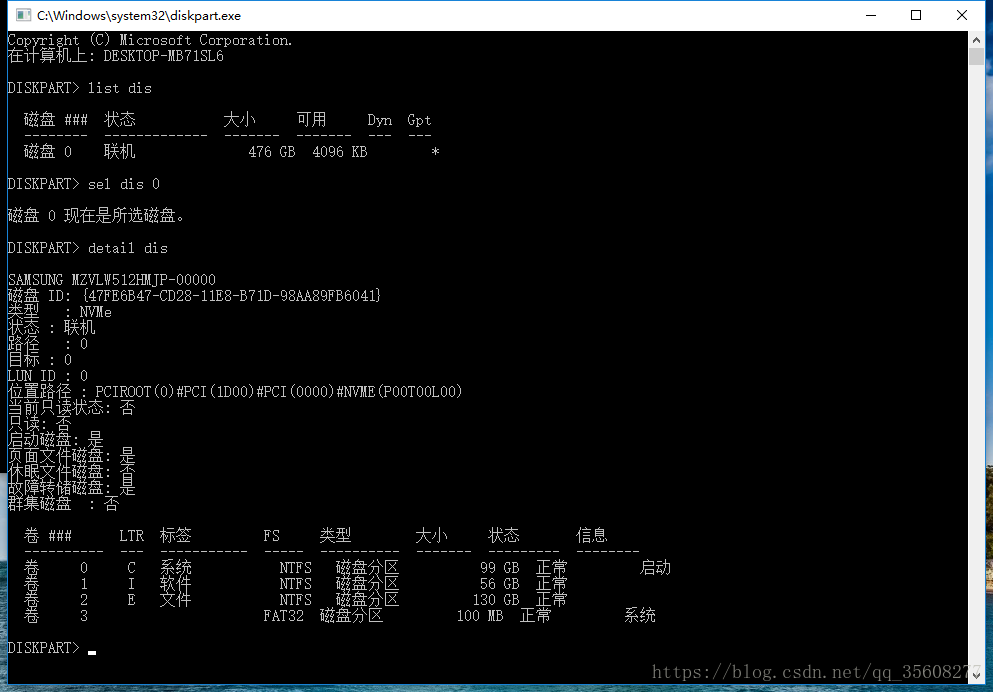
1.1 View the partitioning method:
1. Open the command prompt CMD (win+r, type CMD)
2. Type diskpart.exe
3. List dis
4. Sel dis 0
5. Detail dis

(It is strongly recommended to use Rufus to make ios image. Ultro in floppy disk does not set the partitioning mode, but there are actually differences between traditional legacy (corresponding to easyBCD,), UEFI+MBR, and UEFI+GPI, which will bring unnecessary error report when installing Ubuntu system)
Traditional Legacy USES easyBCD to set up boot and boot, but if it is UEFI, it does not need to download easyBCD, and it cannot be used.
So the first step is to change the hard disk partition mode to GPT
1.2 Partition helper changes disk information
Use Windows 10 with MBR2GPT
There are several prerequisites that may not be met:
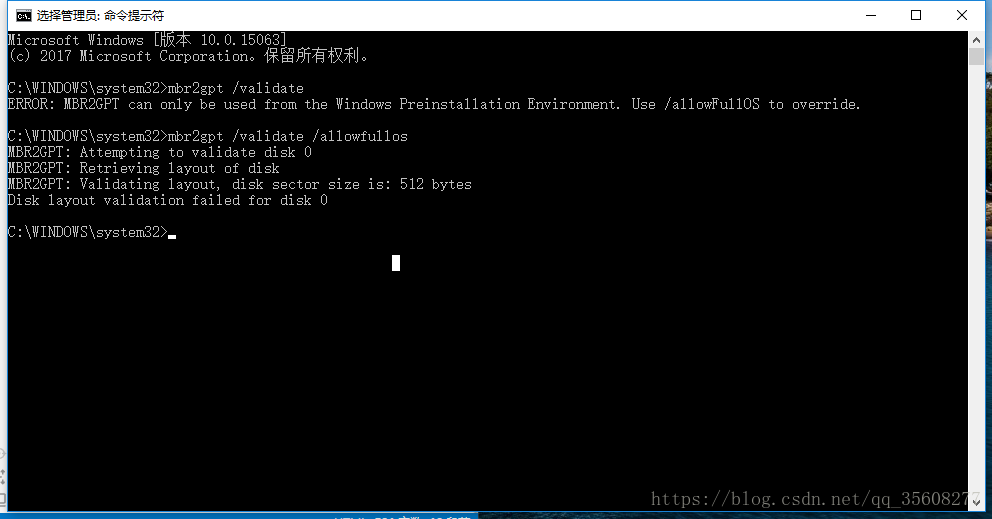
is primary except for the system partition. No more than three primary partitions at a time. Otherwise, the error is as follows.
Disk layout validation failed for disk 0
So the premises have to be met. Nondestructive changes to the hard disk partition are required.

How to do this: Make partition and primary partition changes to the disk yourself using partition Helper 6.3.
partition helper can split the disk and divide the disk space for Ubuntu. But do not split it until you have changed GPT.
if in addition to the system partition, more than 3, need to right merge partition first (later can be divided out again).
if the partition is a logical partition, right-click to convert the primary partition.
Just follow the instructions and go on. (It is better to make a copy of the software and run under C:\Program Files, otherwise the disk will be prompted to be occupied when processing)
Disk management is also possible
1.3 Windows 10 comes with MBR2GPR
After conversion, mBR2GPT should be normal.
step:
open CMD, input:
1.mbr2gpt /validate /allowfullos
2.mbr2gpt /convert /allowfullos
The conversion process automatically creates the EFI partition (100M) required for the UEFI + GPT partition format
Note:
this will encounter a problem:
before the boot menu option still exists, that is, there are two Windows boot manager.
boot will default when the MBR generated boot item, but can not start.
so in the case of single system need to enter uefi BIOS mode manual selection, very troublesome problem.
But when Ubuntu is installed and booted, there is no such problem.