Category Archives: How to Fix

React Error You should not use or withRouter() outside a

App.js in the code

import React, {Component , Fragment} from 'react';
import {withRouter , Route , Switch , Redirect} from 'react-router-dom';
import './App.css';
import 'antd/dist/antd.css'
import Home from './component/Home';
import List from './component/List';
@withRouter
class App extends Component {
    render() {
        return (
            <Fragment>
                <Switch>
                    <Route path='/homePage' component={Home}></Route>
                    <Route path='/listPage' component={List}></Route>
                    <Redirect to={`/homePage`}/>
                </Switch>
            </Fragment>

        );
    }
}
export default App;

Running project error:

←→1 of 2 errors on the page
You should not use <Route> or withRouter() outside a <Router>
▶ 26 stack frames were collapsed.
./src/index.js
C:/Users/abcd/WebstormProjects/ant-table-demo/src/index.js:7
   4 | import App from './App';
   5 | import registerServiceWorker from './registerServiceWorker';
   6 | 
>  7 | ReactDOM.render(<App />, document.getElementById('root'));
   8 | registerServiceWorker();
   9 | 
  10 | 
View compiled
▶ 6 stack frames were collapsed.
This screen is visible only in development. It will not appear if the app crashes in production.
Open your browser’s developer console to further inspect this error.

The solution
Package the App components via Route, as follows:

import React from 'react';
import ReactDOM from 'react-dom';
import './index.css';
import App from './App';
import {BrowserRouter, Route} from 'react-router-dom'

const Root = () => {
    return (
        <BrowserRouter basename='/'>
            <Route path={`/`} component={App}></Route>
        </BrowserRouter>
    )

}

ReactDOM.render(<Root/>, document.getElementById('root'));

Then it will run correctly

mvn install Error: Failed to read artifact descriptor org.apache.maven.plugins:maven-install-plugin:jar:2

I have been using my laptop for development. Today, I improved the desktop environment. I pulled the project from Git, and there was an error in Maven project install.
 

[INFO] Scanning for projects...
[INFO] Downloading from nexus: http://maven.aliyun.com/nexus/content/groups/public/com/bonc/ti/ti-parent/1.0.6-SNAPSHOT/maven-metadata.xml
[WARNING] Could not transfer metadata com.bonc.ti:ti-parent:1.0.6-SNAPSHOT/maven-metadata.xml from/to nexus (http://maven.aliyun.com/nexus/content/groups/public/): Operation not supported: connect
[INFO] 
[INFO] ------------------------------------------------------------------------
[INFO] Building vbap data model 3.0.7-SNAPSHOT
[INFO] ------------------------------------------------------------------------
[INFO] Downloading from nexus: http://maven.aliyun.com/nexus/content/groups/public/org/apache/maven/plugins/maven-install-plugin/2.5.2/maven-install-plugin-2.5.2.pom
[INFO] ------------------------------------------------------------------------
[INFO] BUILD FAILURE
[INFO] ------------------------------------------------------------------------
[INFO] Total time: 1.307 s
[INFO] Finished at: 2017-12-19T19:50:31+08:00
[INFO] Final Memory: 15M/155M
[INFO] ------------------------------------------------------------------------
[ERROR] Plugin org.apache.maven.plugins:maven-install-plugin:2.5.2 or one of its dependencies could not be resolved: Failed to read artifact descriptor for org.apache.maven.plugins:maven-install-plugin:jar:2.5.2: Could not transfer artifact org.apache.maven.plugins:maven-install-plugin:pom:2.5.2 from/to nexus (http://maven.aliyun.com/nexus/content/groups/public/): Operation not supported: connect -> [Help 1]
[ERROR] 
[ERROR] To see the full stack trace of the errors, re-run Maven with the -e switch.
[ERROR] Re-run Maven using the -X switch to enable full debug logging.
[ERROR] 
[ERROR] For more information about the errors and possible solutions, please read the following articles:
[ERROR] [Help 1] http://cwiki.apache.org/confluence/display/MAVEN/PluginResolutionException

The maven-install-Plugin :2.5.2 shows that it is not possible to transfer the Maven-install-plugin from the repository, because When Maven installs, it is done through the Maven-install-Plugin. The existence of the install plugin must be ensured first. Visit http://cwiki.apache.org/confluence/display/MAVEN/PluginResolutionException you can see the cause of abnormal PluginResolutionException this has six:


1. Trying to access a plug-in that doesn't exist in the repository, such as miswriting the Group ID, artifact ID, or version number.
2. The accessed plug-in is a third-party plug-in not published to the central library, but your pom file or setting.xml file does not have < pluginRepository> The tag indicates the plug-in to be downloaded from the repository. One thing to note here is that < repository> definition does not work when finding plug-ins and their dependencies, only < pluginRepository> works for the plug-in download.
3. The plug-in repository needs permission authentication, but Maven does not have permission authentication, so it cannot access the repository server, so it should go to < server> definition:

<server>
  <!-- server(服务器)的id,对应着mirrors中的id,指定了该地址的验证信息 -->
  <id>nexus</id>
  <username>xxx</username>
  <password>xxx</password>
</server>

4. Network problems, such as some addresses need VPN to access, then need proxy configuration, etc. Settings. XML file to set the agent:
 

<proxies>
 <proxy>
  <id>optional</id>
  <active>true</active>
  <protocol>http</protocol>
  <host>代理的ip地址</host>
  <port>端口</port>
 </proxy>
</proxies>

Maven failed to save the plug-in locally. According to LocalRepositoryNotAccessibleException for more information.
6. The configured plug-in repository is not visible to the plug-in you need. For example, if I want to access a SNAPSHOT version of the plug-in, I cannot access it in the official repository.


<pluginRepositories>
  <pluginRepository>
    <id>central</id>
    <url>http://central</url>
    <releases>
      <enabled>true</enabled>
    </releases>
    <snapshots>
      <enabled>true</enabled>
    </snapshots>
  </pluginRepository>
</pluginRepositories>

 
Going back to my own problem, I went to the warehouse and saw that again this version of the plug-in exists, so there is no 1 problem. It's not a 2.
Error: Operation not supported: connect. Look not to understand.
It is ok to say that there is a connection problem and That I can download other dependency package instructions. Then I went to the settings. XML file for configuration items, and I was fine.
Here are some solutions to this problem on StackOverflow:

1. Right click project -& GT; maven -> update-project -> Check force to Update Snapshot/Release -> OK
2. Delete all the files under. M2/and download them again.
3. Copy the Settings. XML file to.m2/ folder.
4. Check the Settings file configuration in Eclipse :Windows-& GT; preferences-> maven-> User Settings

Back in Eclipse, I right-click the project Update Project and found that it did not work. Then I copied the Settings.xml file to. M2/folder, ran MVN install and still reported an error.
I hope the above scheme can help you, thank you!
Reference link:
http://cwiki.apache.org/confluence/display/MAVEN/PluginResolutionException
https://stackoverflow.com/questions/18728792/failed-to-read-artifact-descriptor-for-artifact-present-in-my-localhost-nexus-re
https://stackoverflow.com/questions/10729394/artifactdescriptorexception-failed-to-read-artifact-descriptor-maven-error
If you have any related questions, please refer to:
https://stackoverflow.com/questions/12533885/could-not-calculate-build-plan-plugin-org-apache-maven-pluginsmaven-resources
https://stackoverflow.com/questions/6642146/maven-failed-to-read-artifact-descriptor


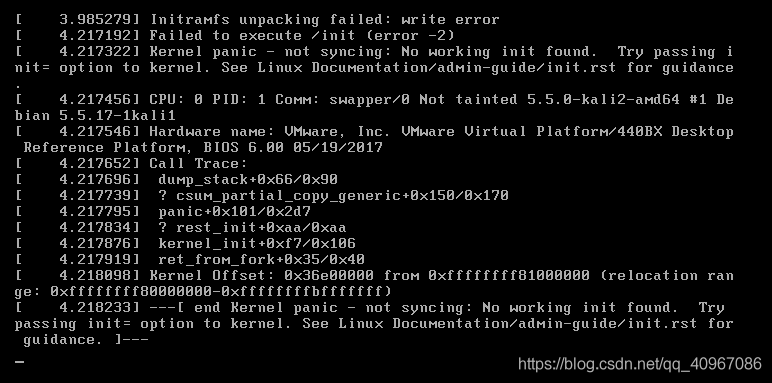
linux Run: initramfs unpacking failed:write error

Initramfs Unpacking Failed: write error when liunx started

To tell the truth, Baidu a lot, as a novice do not know how to do
Later their original memory allocation only 512MB, later changed to 2048MB, on the line. It’s amazing. I don’t know if there’s a god to explain it.
You installed your own live version, so you don’t have to wait for installation time. There was no problem with the installation of 512MB for the first experimental class. This time the error was reported. It was really amazing

Activation of network connection fail

Activation of Network Connection Fail displays activation of Network Connection fail in any VMware, Ubuntu or Keil environment
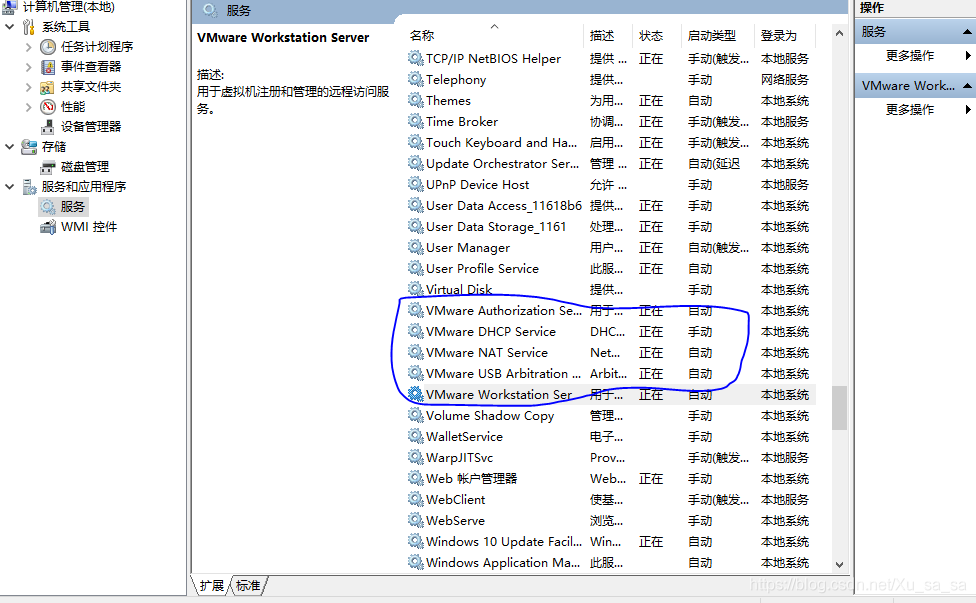
Anyway, I often run into it myself, in case I have any more problems with the computer right click management – the service finds at the beginning of vm
Just right-click and open it
 

WordPress cannot install themes and plugins online: wp_remote_post failed:

                                  使用WordPress出现无法在线安装主题和插件

USES domestic servers of ali cloud, while some wordpress resources need to use Google resources. Currently, Google cannot be accessed normally in China, which leads to the error.
solution:
directly in the pagoda PHP management, by setting the timeout limit, default 100 seconds to 600 seconds, restart PHP.

Create a D3D11 application process

Declaration meaning:
1. SwapChain is a COM interface object that is buffered before and after switching (double buffering). The scene is rendered first to buffered after rendering, so when rendered to the display, it will be fully drawn. If you don’t use this method, you’ll see a scan line, which is what happens when the program draws the scene from top to bottom.
ID3D11Device (a new DirectX11 interface) is an interface for representing hardware devices (Gpus). It is in two parts to support the new multithreading capabilities. Here, the ID3D11DeivceContext interface object will be used to call all the render methods, and the ID3D11Device interface will be used to call the remaining methods that need not be used for rendering.
The reason ID3D11Device is divided into two parts is because DirectX 11 has added new multithreading functions, which can improve the speed of the application. The ID3D11Device object is called to create or load a model or object into memory. When an object or model is loaded or created, the ID3D11DeviceContext interface object can be called to continue rendering the scene.
4. Another interface is the render target view. It is usually written to the render target view first, which is a 2D texture (i.e., post-buffered), rather than written directly to the screen. The texture is sent to the output blending phase of the pipeline before it is rendered to the screen.
This is followed by changing the color of the background.

IDXGISwapChain* SwapChain;
ID3D11Device* d3d11Device;
ID3D11DeviceContext* d3d11DevCon;
ID3D11RenderTargetView* renderTargetView;

float red = 0.0f;
float green = 0.0f;
float blue = 0.0f;
int colormodr = 1;
int colormodg = 1;
int colormodb = 1;

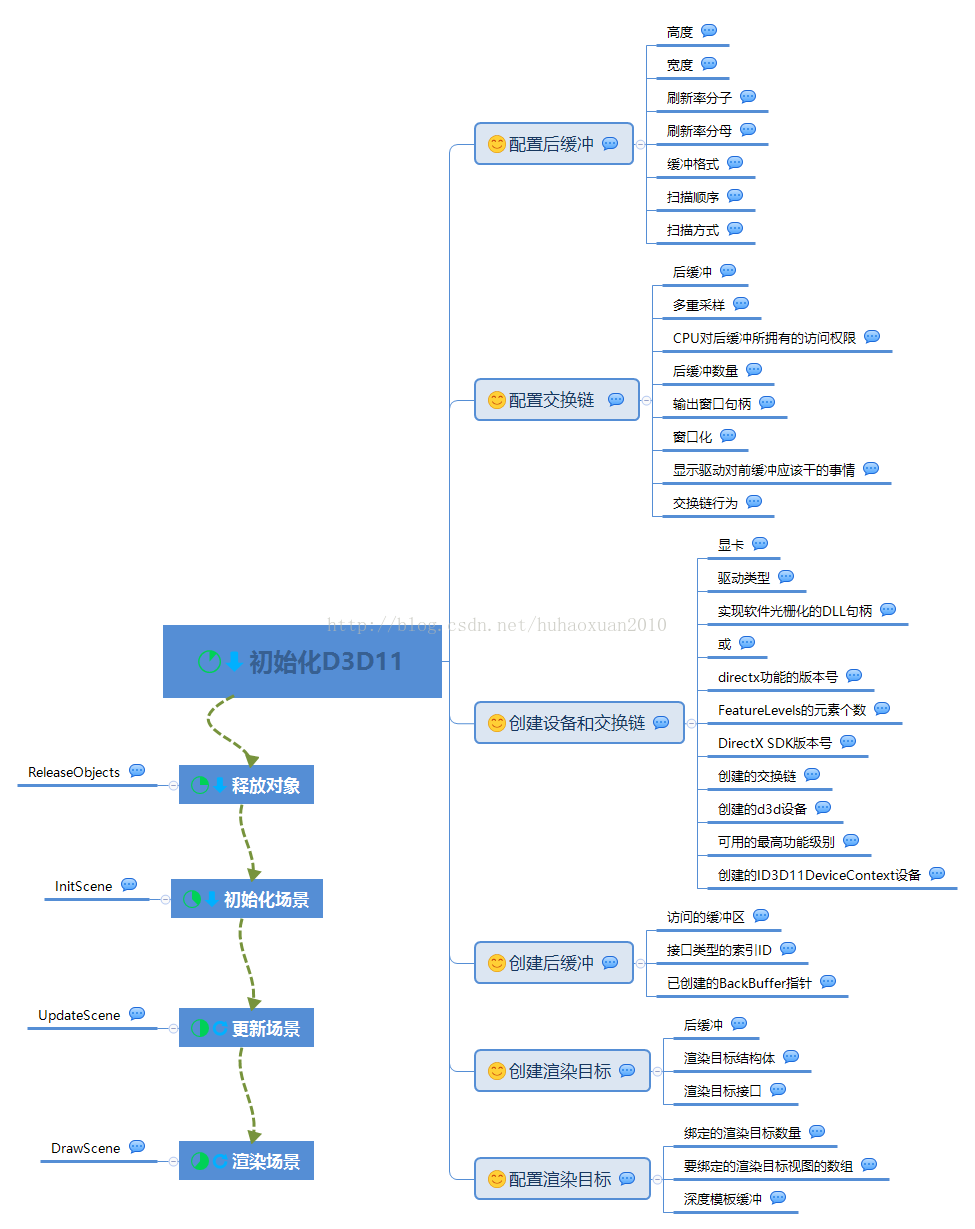
Function prototype: The first function is used to initialize Direct3D. The second is to release unwanted objects to avoid memory leaks. The third InitScene is used to initialize the scene. UpdateScene updates the scene for each frame, and the subsequent DrawScene is used to draw each frame scene to the screen, which is also updated for each frame.

bool InitializeDirect3d11App(HINSTANCE hInstance);
void ReleaseObjects();
bool InitScene();
void UpdateScene();
void DrawScene();

In the winMain function, call InitializeDirect3d11App, then InitScene. Call Messageloop again, and after the Message loop completes, release the object and end the program.

if(!InitializeDirect3d11App(hInstance))    //Initialize Direct3D
{
    MessageBox(0, L"Direct3D Initialization - Failed",
        L"Error", MB_OK);
    return 0;
}

if(!InitScene())    //Initialize our scene
{
    MessageBox(0, L"Scene Initialization - Failed",
        L"Error", MB_OK);
    return 0;
}

messageloop();

ReleaseObjects();    

Initialize D3D 11

The following is the function definition that initializes D3D, which has only one handle argument to the application.

bool InitializeDirect3dApp(HINSTANCE hInstance)
{
HRESULT hr;

//Describe our Buffer
DXGI_MODE_DESC bufferDesc;

ZeroMemory(&bufferDesc, sizeof(DXGI_MODE_DESC));

bufferDesc.Width = Width;
bufferDesc.Height = Height;
bufferDesc.RefreshRate.Numerator = 60;
bufferDesc.RefreshRate.Denominator = 1;
bufferDesc.Format = DXGI_FORMAT_R8G8B8A8_UNORM;
bufferDesc.ScanlineOrdering = DXGI_MODE_SCANLINE_ORDER_UNSPECIFIED;
bufferDesc.Scaling = DXGI_MODE_SCALING_UNSPECIFIED;

//Describe our SwapChain
DXGI_SWAP_CHAIN_DESC swapChainDesc; 
    
ZeroMemory(&swapChainDesc, sizeof(DXGI_SWAP_CHAIN_DESC));

swapChainDesc.BufferDesc = bufferDesc;
swapChainDesc.SampleDesc.Count = 1;
swapChainDesc.SampleDesc.Quality = 0;
swapChainDesc.BufferUsage = DXGI_USAGE_RENDER_TARGET_OUTPUT;
swapChainDesc.BufferCount = 1;
swapChainDesc.OutputWindow = hwnd; 
swapChainDesc.Windowed = TRUE; 
swapChainDesc.SwapEffect = DXGI_SWAP_EFFECT_DISCARD;


//Create our SwapChain
hr = D3D11CreateDeviceAndSwapChain(NULL, D3D_DRIVER_TYPE_HARDWARE, NULL, NULL, NULL, NULL,
    D3D11_SDK_VERSION, &swapChainDesc, &SwapChain, &d3d11Device, NULL, &d3d11DevCon);

//Create our BackBuffer
ID3D11Texture2D* BackBuffer;
hr = SwapChain->GetBuffer( 0, __uuidof( ID3D11Texture2D ), (void**)&BackBuffer );

//Create our Render Target
hr = d3d11Device->CreateRenderTargetView( BackBuffer, NULL, &renderTargetView );
BackBuffer->Release();

//Set our Render Target
d3d11DevCon->OMSetRenderTargets( 1, &renderTargetView, NULL );

return true;
}

Create an HRESULT object HR for error detection:
HRESULT hr;
Post-declaration buffering: ====. 20171220 correction
DXGI_MODE_DESC
The first thing to do in this function is to describe the post-buffer. Creates a DXGI_MODE_DESC object called bufferDesc. ZeroMemory clears the space (empties the dirty value) and fills in the post-buffer descriptor. The structure of DXGI_MODE_DESC is as follows:

typedef struct DXGI_MODE_DESC {
  UINT                     Width;
  UINT                     Height;
  DXGI_RATIONAL            RefreshRate;
  DXGI_FORMAT              Format;
  DXGI_MODE_SCANLINE_ORDER ScanlineOrdering;
  DXGI_MODE_SCALING        Scaling;
} DXGI_MODE_DESC, *LPDXGI_MODE_DESC;

The members are described as follows:
Width
Denotes resolution width
Height
Denotes resolution height
RefreshRate
Represents the DXGI_RATIONAL type, in Hertz, set to 60/1 or 60Hz.
Format
Represents a display format, which is the type of a DXGI_FORMAT enumeration. Is a 32-bit unsigned integer that can be used in the DXGI_FORMAT_R8G8B8A8_UNORM format, 8 bit for RGBA.
ScanlineOrdering
Indicates how rasterization is rendered to a window, of the DXGI_MODE_SCANLINE_ORDER enumeration type. It can be set to DXGI_MODE_SCANLINE_ORDER_UNSPECIFIED, indicating that it is independent of the order of rendering on the window.
Scaling
Represents how the image is stretched to meet the resolution of the display. An enumeration type of DXGI_MODE_SCALING. Use one of the following:
DXGI_MODE_SCALING_UNSPECIFIED means that no scaling or stretching is specified
DXGI_MODE_SCALING_CENTERED is the idea that the image is centered in the center of the screen and that it’s not scaled or stretched at all
Dxgi_mode_scaling_chord represents stretching the image to the display resolution

DXGI_MODE_DESC bufferDesc;

ZeroMemory(&bufferDesc, sizeof(DXGI_MODE_DESC));

bufferDesc.Width = Width;
bufferDesc.Height = Height;
bufferDesc.RefreshRate.Numerator = 60;
bufferDesc.RefreshRate.Denominator = 1;
bufferDesc.Format = DXGI_FORMAT_R8G8B8A8_UNORM;
bufferDesc.ScanlineOrdering = DXGI_MODE_SCANLINE_ORDER_UNSPECIFIED;
bufferDesc.Scaling = DXGI_MODE_SCALING_UNSPECIFIED;

Declaration exchange chain

(DXGI_SWAP_CHAIN_DESC)
Create a DXGI_CHAIN_DESC named swapChainDesc and call the ZeroMemory function to clear.

typedef struct DXGI_SWAP_CHAIN_DESC {
  DXGI_MODE_DESC   BufferDesc;
  DXGI_SAMPLE_DESC SampleDesc;
  DXGI_USAGE       BufferUsage;
  UINT             BufferCount;
  HWND             OutputWindow;
  BOOL             Windowed;
  DXGI_SWAP_EFFECT SwapEffect;
  UINT             Flags;
} DXGI_SWAP_CHAIN_DESC;

BufferDesc
Represents the post-buffered display mode, DXGI_MODE_DESC structure.
SampleDesc
Represents a multiple sampling parameter, the DXGI_SAMPLE_DESC structure. Multiple sampling is used to eliminate jagged lines and edges because the pixels on the display are not infinitely small.
BufferUsage
Represents the purpose of the window after the buffer and how the CPU is accessed. Is the enumerated type of DXGI_USAGE. The post-buffer can be used for the input to the shader or the output of the render target. When caching is to be rendered as the target output, set to DXGI_USAGE_RENDER_TARGET_OUTPUT.
BufferCount
Represents the number of buffers in the swap chain. “1” means double buffering, “2” means three buffering, and you can set more buffering.
OutputWindow
Window handle, HWND
Windowed
Use to specify whether a window is windowed or full-screen, and set it to true for windowing or false for windowing. Proposal to create a window of exchange of chain, and then let the user through IDXGISwapChain: : SetFullscreenState method to switch to full screen will exchange chain; In other words, do not force the switch chain to be full screen by setting this value to false. However, if you are creating a swap chain in full screen, the BufferDesc member also provides the user with a list of supported display modes. This is because if the exchange chain is created in an unsupported display mode, the display will go black.
SwapEffect
Represents the processing of the render buffer content after rendering a window, which is an enumeration type of DXGI_SWAP_EFFECT. Set to DXGI_SWAP_EFFECT_DISCARD to specify the bit block transfer model and to have DXGI discard the contents of the post-buffer. Although the application value reads and writes to buffer 0, this flag bit is useful for exchanges with more than one post-buffer. This flag enables the display driver to select the most efficient rendering technique for the exchange chain.
Flags
DXGI_SWAP_CHAIN_FLAG enumeration type. Used to describe the behavior of exchange chains. The only thing that might work now is DXGI_SWAP_CHAIN_FLAG_ALLOW_MODE_SWITCH, which changes the display resolution when switching between windowing and full-screen.

DXGI_SWAP_CHAIN_DESC swapChainDesc; 
    
ZeroMemory(&swapChainDesc, sizeof(DXGI_SWAP_CHAIN_DESC));

swapChainDesc.BufferDesc = bufferDesc;
swapChainDesc.SampleDesc.Count = 1;
swapChainDesc.SampleDesc.Quality = 0;
swapChainDesc.BufferUsage = DXGI_USAGE_RENDER_TARGET_OUTPUT;
swapChainDesc.BufferCount = 1;
swapChainDesc.OutputWindow = hwnd; 
swapChainDesc.Windowed = TRUE; 
swapChainDesc.SwapEffect = DXGI_SWAP_EFFECT_DISCARD;

Create device and exchange chains
(D3D11CreateDeviceAndSwapChain)
D3d core function called D3D11CreateDeviceAndSwapChain () function to create d3d device, the device context, as well as the exchange of chain. The function parameters are similar to the following:

HRESULT D3D11CreateDeviceAndSwapChain(
  __in   IDXGIAdapter *pAdapter,
  __in   D3D_DRIVER_TYPE DriverType,
  __in   HMODULE Software,
  __in   UINT Flags,
  __in   const D3D_FEATURE_LEVEL *pFeatureLevels,
  __in   UINT FeatureLevels,
  __in   UINT SDKVersion,
  __in   const DXGI_SWAP_CHAIN_DESC *pSwapChainDesc,
  __out  IDXGISwapChain **ppSwapChain,
  __out  ID3D11Device **ppDevice,
  __out  D3D_FEATURE_LEVEL *pFeatureLevel,
  __out  ID3D11DeviceContext **ppImmediateContext
);

pAdapter
Represents the video card to be used when creating the device, or NULL if the default video card is used. By enumeration method of graphics IDXGIFactory1: namely: EnumAdapters enumeration to the first video card.
DriverType
Represents the type of driver to create, the D3D_DRIVER_TYPE enumeration type. Use D3D_DRIVER_TYPE_HARDWARE to indicate that D3D functions will be implemented using hardware, which is the primary way for D3D applications, since it performs best.
Software
This is a handle to a DLL for rasterizing software. If DriverType is set to D3D_DRIVER_TYPE_SOFTWARE, this value cannot be set to NULL; Otherwise, it can be NULL. The handle can be obtained by the functions LoadLibrary, LoadLibraryEx, or GetModuleHandle.
Flags
Represents the result of one or more operations of type D3D11_CREATE_DEVICE_FLAG. It represents the runtime layer to enable.
pFeatureLevels
Represents a pointer to the D3D_FEATURE_LEVEL enumeration array, which determines which feature level is used to create the device. Setting NULL means the highest level of functionality is used.
FeatureLevels
Number of elements in the pFeatureLevels array. Set to NULL
SDKVersion
Version number of DirectX SDK, set to D3D11_SDK_VERSION
pSwapChainDesc
A pointer to the exchange chain (DXGI_SWAP_CHAIN_DESC), created earlier, which contains the initialization parameters for the exchange chain.
ppSwapChain[out]
Returns the address of a pointer to the IDXGISwapChain object, representing the swap chain to render.
ppDevice[out]
Returns the address of an ID3D11Device object pointer, representing the device that has been created. If this parameter is set to NULL, then no ID3D11Device device is returned.
pFeatureLevel[out]
Returns a pointer to D3D_FEATURE_LEVLE, which represents the first element in the feature-level array supported by the device. (Function levels are used for backward compatibility)
ppImmediateContext[out]
Returns the address of an ID3D11DeviceContext (device context) pointer. The device context will be used in the device’s rendering method to support multithreading to improve performance.

hr = D3D11CreateDeviceAndSwapChain(NULL, D3D_DRIVER_TYPE_HARDWARE, NULL, NULL, NULL, NULL,
    D3D11_SDK_VERSION, &swapChainDesc, &SwapChain, &d3d11Device, NULL, &d3d11DevCon);

Create post-buffer:
(GetBuffer())
Create a buffer before creating the render target view. Call the GetBuffer method of the SwapChain interface.

HRESULT GetBuffer(
  [in]       UINT Buffer,
  [in]       REFIID riid,
  [in, out]  void **ppSurface
);

Buffer
Is a buffered index number starting at 0.
Because I’ve already set swapchaindesc. SwapEffect to dxGI_swap_effect_effect, I can only access the first buffer, so the index is set to 0.
If swapchaindesc. SwapEffect is set to DXGI_SWAP_EFFECT_SEQUENTIAL or DXGI_SWAP_EFFECT_FLIP_SEQUENTIAL, only the 0 buffer of the swap chain can be read and written, and only buffers larger than 0 can be read. So if you call the IDXGIResource::GetUsage method on this buffer, you must set the flag DXGI_USAGE_READ_ONLY.
riid
The interface type used to manipulate the buffer is 2d texture (ID3D11Texture2D).
ppSurface
This is a pointer to the post-buffered interface and is the window to be rendered.

ID3D11Texture2D* BackBuffer;
hr = SwapChain->GetBuffer( 0, __uuidof( ID3D11Texture2D ), (void**)&BackBuffer );

Create render target view:

(ID3D11Device::CreateRenderTargetView())
Create the render target view, which will be sent to the output merge phase of the pipeline. The render target view is created by calling the CreateRenderTargetView method of the device interface

HRESULT CreateRenderTargetView(
  [in]   ID3D11Resource *pResource,
  [in]   const D3D11_RENDER_TARGET_VIEW_DESC *pDesc,
  [out]  ID3D11RenderTargetView **ppRTView
);

pResource [in]
Represents the render target, which points to an ID3D11Resource. The resource must have been created using the flag D3D11_BIND_RENDER_TARGET.
pDesc [in]
Represents the render target view descriptor. A pointer to the D3D11_RENDER_TARGET_VIEW_DESC structure. The view created when set to NULL will access all subresources with bitmap mapping level 0.
ppRTView[out,optional]
Pointing to the address of the pointer to the interface ID3D11RenderTargetView structure, setting this parameter to NULL will validate the other output parameters (this method will return S_FALSE if the other input parameters pass validation)
Post-release buffering

hr = d3d11Device->CreateRenderTargetView( BackBuffer, NULL, &renderTargetView );
BackBuffer->Release();

Set the render target
(ID3D11DeviceContext: : OMSetRenderTargets ())
The last thing to do in initialization is to bind the render target view and the depth template buffer to the pipeline’s output blending phase. But since the depth template buffer has not been created yet, set this parameter to NULL.

void OMSetRenderTargets(
  [in]  UINT NumViews,
  [in]  ID3D11RenderTargetView *const **ppRenderTargetViews,
  [in]  ID3D11DepthStencilView *pDepthStencilView
);

NumViews[in]

There is only one render target to bind to. Its range is 0~D3D11_SIMULTANEOUS_RENDER_TARGET_COUNT. If this parameter is non-zero, the number of entries in the array specified by ppRenderTargetViews must be equal to this parameter.
ppRenderTargetViews[in]
Points to the array of render target View ID3D11RenderTargetView to bind to the device. If this parameter is set to NULL and NumViews is 0, no render target is bound.
pDepthStencilView[in]
The depth template buffer pointer to bind to the device, which is not yet available, is set to NULL.
The maximum number of render targets that a device has activated is specified by a macro D3D11_SIMULTANEOUS_RENDER_TARGET_COUNT in the header file D3D11.h.

At this point, all the basic Direct3D 11 initialization has been completed.

d3d11DevCon->OMSetRenderTargets( 1, &renderTargetView, NULL );

Clean up recovered resources
ReleaseObjects() releases the COM object created, which will leak memory if forgotten.

void ReleaseObjects()
{
    //Release the COM Objects we created
    SwapChain->Release();
    d3d11Device->Release();
    d3dDevCon->Release();
}

Initialization scenario
InitScene() is used to initialize the scene. Within a video game, there are many different scenarios that can be renamed using the function InitScene. You can do the necessary things in the scene, such as placing objects, loading models, textures, sounds, etc.

bool InitScene()
{

    return true;
}

Update scenarios

Use the UpdateScene function to update the scene, such as changing object position, changing color values, etc. Anything that needs to be changed in the scene can be done here. In this case, you just change the background color of the scene.

void UpdateScene()
{
    //Update the colors of our scene
    red += colormodr * 0.00005f;
    green += colormodg * 0.00002f;
    blue += colormodb * 0.00001f;

    if(red >= 1.0f || red <= 0.0f)
        colormodr *= -1;
    if(green >= 1.0f || green <= 0.0f)
        colormodg *= -1;
    if(blue >= 1.0f || blue <= 0.0f)
        colormodb *= -1;
}

Render the scene

Render the scene using the DrawScene function, in which you do nothing to update the scene, make sure that the function only draws the scene. With earlier DirectX versions, such as Direct 10, all the rendering-related methods have been moved to the device context interface, so you should call the d3dDeviceContext object to get the ClearRenderTargetView method, rather than a d3dDevice object like the one used in Direct 10 to get it. But you can also use the d3dDevice object to call methods that are not related to rendering to do GPus related things. Finally, the Present method of the exchange link port is called to render the scenario. So here’s the buffer before and after swap, and in the drawScene method, it’s rendered to the buffer after, which then calls the Present method to render the content.

void DrawScene()
{
    //Clear our backbuffer to the updated color
    D3DXCOLOR bgColor( red, green, blue, 1.0f );

    d3d11DevCon->ClearRenderTargetView(renderTargetView, bgColor);

    //Present the backbuffer to the screen
    SwapChain->Present(0, 0);
}

in the messageloop function calls the UpdateScene() function to update the scene data, and then calls the DrawScene() function to draw the buffer to be rendered to the screen

int messageloop(){
MSG msg;
ZeroMemory(&msg, sizeof(MSG));
while(true)
{
    BOOL PeekMessageL( 
        LPMSG lpMsg,
        HWND hWnd,
        UINT wMsgFilterMin,
        UINT wMsgFilterMax,
        UINT wRemoveMsg
        );

    if (PeekMessage(&msg, NULL, 0, 0, PM_REMOVE))
    {
        if (msg.message == WM_QUIT)
            break;
        TranslateMessage(&msg);    
        DispatchMessage(&msg);
    }
    else{
///**************new**************
        // run game code
        
        UpdateScene();
        DrawScene();
        
///**************new**************
    }
}
return msg.wParam;
}

Error detection:
The application may continue to run even if the function fails, in which case using error detection in the code saves debugging time. When the function returns, the value of the HRESULT can be detected to determine how the code is running.
S_OK
Function returns success
E_NOTIMPL
The function is not implemented
E_NOINTERFACE
Interface not supported
E_ABORT
Abnormal function
E_FAIL
Function failure
E_INVALIDARG
More than one parameter is invalid
You can display the value of the error code by calling the function DXGetErrorDescription(HRESULT HRESULT). To use this function, you need the link library “DXErr. Lib “and the header file “DXErr. H”.
Here is the function InitializeDirect3d11App() with error detection :(when the error box pops up, you can set it to window mode before displaying the message if you want to leave it in full screen.)

#pragma comment (lib, "DXErr.lib")
#include <DXErr.h>

...

bool InitializeDirect3d11App(HINSTANCE hInstance)
{
    HRESULT hr;

    //Describe our Buffer
    DXGI_MODE_DESC bufferDesc;

    ZeroMemory(&bufferDesc, sizeof(DXGI_MODE_DESC));

    bufferDesc.Width = Width;
    bufferDesc.Height = Height;
    bufferDesc.RefreshRate.Numerator = 60;
    bufferDesc.RefreshRate.Denominator = 1;
    bufferDesc.Format = DXGI_FORMAT_R8G8B8A8_UNORM;
    bufferDesc.ScanlineOrdering = DXGI_MODE_SCANLINE_ORDER_UNSPECIFIED;
    bufferDesc.Scaling = DXGI_MODE_SCALING_UNSPECIFIED;
    
    //Describe our SwapChain
    DXGI_SWAP_CHAIN_DESC swapChainDesc; 
        
    ZeroMemory(&swapChainDesc, sizeof(DXGI_SWAP_CHAIN_DESC));

    swapChainDesc.BufferDesc = bufferDesc;
    swapChainDesc.SampleDesc.Count = 1;
    swapChainDesc.SampleDesc.Quality = 0;
    swapChainDesc.BufferUsage = DXGI_USAGE_RENDER_TARGET_OUTPUT;
    swapChainDesc.BufferCount = 1;
    swapChainDesc.OutputWindow = hwnd; 
    swapChainDesc.Windowed = TRUE; 
    swapChainDesc.SwapEffect = DXGI_SWAP_EFFECT_DISCARD;


    //Create our SwapChain
    hr = D3D11CreateDeviceAndSwapChain(NULL, D3D_DRIVER_TYPE_HARDWARE, NULL, NULL, NULL, NULL,
        D3D11_SDK_VERSION, &swapChainDesc, &SwapChain, &d3d11Device, NULL, &d3d11DevCon);
    if(FAILED(hr))
    {    
        MessageBox(NULL, DXGetErrorDescription(hr),
            TEXT(" D3D11CreateDeviceAndSwapChain"), MB_OK);    
        return 0;    
    }    

    //Create our BackBuffer
    ID3D11Texture2D* BackBuffer;
    hr = SwapChain->GetBuffer( 0, __uuidof( ID3D11Texture2D ), (void**)&BackBuffer );
    if(FAILED(hr))
    {    
        MessageBox(NULL, DXGetErrorDescription(hr),
            TEXT("SwapChain->GetBuffer"), MB_OK);    
        return 0;    
    }    

    //Create our Render Target
    hr = d3d11Device->CreateRenderTargetView( BackBuffer, NULL, &renderTargetView );
    BackBuffer->Release();
    if(FAILED(hr))
    {    
        MessageBox(NULL, DXGetErrorDescription(hr),
            TEXT("d3d11Device->CreateRenderTargetView"), MB_OK);    
        return 0;    
    }    

    //Set our Render Target
    d3d11DevCon->OMSetRenderTargets( 1, &renderTargetView, NULL );

    return true;
}

An instance of creating double buffering is as follows:

#include "stdafx.h"
#pragma comment(lib, "d3d11.lib")
#pragma comment(lib, "d3dx11.lib")
#pragma comment(lib, "d3dx10.lib")

#include <windows.h>
#include "Resource.h"
#include <d3d11.h>
#include <d3dx11.h>
#include <d3dx10.h>
#include <xnamath.h>

//全局描述符
IDXGISwapChain* SwapChain;
ID3D11Device* d3d11Device;
ID3D11DeviceContext* d3d11DevCon;
ID3D11RenderTargetView* renderTargetView;

float red = 0.0f;
float green = 0.0f;
float blue = 0.0f;
int colormodr = 1;
int colormodg = 1;
int colormodb = 1;

/
LPCTSTR WndClassName = "firstwindow";
HWND hwnd = NULL;

const int Width = 800; //设置宽
const int Height = 800; // 设置高
//函数声明
bool InitializeDirect3d11App(HINSTANCE hInstance);
void ReleaseObjects();
bool InitScene();
void UpdateScene();
void DrawScene();

// 初始化窗口
bool InitializeWindow(HINSTANCE hInstance,
	int ShowWnd,
	int width, int height,
	bool windowed);

//初始化消息循环函数
int messageloop();
//初始化窗口回调过程。Windows API是事件驱动型的编程模型。在该函数中捕获Windows消息,比如一个按键按下(也叫事件)以及程序操作流程。

LRESULT CALLBACK WndProc(HWND hWnd,
	UINT msg,
	WPARAM wParam,
	LPARAM lParam);

//主函数,传入应用程序句柄hInstance,前一个应用程序句柄hPrevInstance,传给函数处理的命令行lpCmdLine以及窗口显示方式的nShowCmd
int WINAPI WinMain(HINSTANCE hInstance,
	HINSTANCE hPrevInstance,
	LPSTR lpCmdLine,
	int nShowCmd)
{
	//创建并注册窗口
	if (!InitializeWindow(hInstance, nShowCmd, Width, Height, true))
	{
		MessageBox(0, "Window Initilization - Failed", "Error", MB_OK);
		return 0;
	}

	/new
	if (!InitializeDirect3d11App(hInstance)) // 初始化D3D
	{
		MessageBox(0, "Direct3D Initialization - Failed", "Error", MB_OK);
		return 0;
	}

	if (!InitScene)
	{
		MessageBox(0, "Scene Initialization - Failed", "Error", MB_OK);
		return 0;
	}
	
	messageloop();

	ReleaseObjects();

	return 0;
}
// windowed 若为true则为窗口模式显示,若为false则为全屏模式显示
bool InitializeWindow(HINSTANCE hInstance,
	int ShowWnd,
	int width, int height,
	bool windowed)
{
	/*typedef struct _WNDCLASS{
		UINT cbSize;
		UINT style;
		WNDPROC lpfnWndProc;
		int cbClsExtra;
		int cbWndExtra;
		HANDLE hInstance;
		HICON hIcon;
		HCURSOR hCursor;
		HBRUSH hbrBackground;
		LPCTSTR lpszMenuName;
		LPCTSTR lpszClassName;
	}WNDCLASS;
	*/
	WNDCLASSEX wc;
	wc.cbSize = sizeof(WNDCLASSEX); //window类的大小
	/********windows类风格
	*CS_CLASSDC 一个使用该类创建的在所有窗口间共享的设备上下文
	*CS_DBLCLKS 在窗口上使能双击功能
	*CS_HREDRAW 若窗口的宽度有改变或者窗口水平地移动,窗口将会刷新
	*CS_NOCLOSE 窗口菜单上禁止关闭选项
	*CS_OWNDC   为每个窗口创建自己的设备上下文。正好与CS_CLASSDC相反
	*CS_PARENTDC 这会设置创建的子窗口的剪裁四边形到父窗口,这允许子窗口能够在父窗口上绘画
	*CS_VERDRAW 若在窗口的高度或窗口在垂直方向有移动窗口会重绘
	**/
	wc.style = CS_HREDRAW | CS_VREDRAW;
	//lpfnWndProc是一个指向处理窗口消息函数的指针,设置窗口处理函数的函数名WndProc
	wc.lpfnWndProc = WndProc;
	//cbClsExtra是WNDCLASSEX之后额外申请的字节数
	wc.cbClsExtra = NULL;
	//cbWndExtra指定窗口实例之后所申请的字节数
	wc.cbWndExtra = NULL;
	//当前窗口应用程序的句柄,通过给函数GetModuleHandle()函数第一个参数传入NULL可获取当前窗口应用程序。
	wc.hInstance = hInstance;

	//hIcon用来指定窗口标题栏左上角的图标。以下是一些标准图标:
	/*
	*IDI_APPLICATION 默认应用程序图标
	*IDI_HAND 手形状的图标
	*IDI_EXCLAMATION 感叹号图标
	*IDI_INFORMATION 星号图标
	*IDI_QUESTION 问号图标
	*IDI_WINLOGO 若使用的是XP则是默认应用程序图标,否则是窗口logo
	*/
	wc.hIcon = LoadIcon(NULL, (LPCTSTR)IDI_SMALL);

	/*定义光标图标
	*IDC_APPSTARTING 标准箭头以及小型沙漏光标
	*IDC_ARROW 标准箭头光标
	*IDC_CROSS 十字线光标
	*IDC_HAND 手型光标
	*IDC_NO 斜线圈光标
	*IDC_WAIT 沙漏光标
	*/
	wc.hCursor = LoadCursor(NULL, IDC_ARROW);
	//hbrBackground是一个刷子的句柄,可使得背景黑色。
	wc.hbrBackground = (HBRUSH)(COLOR_BTNSHADOW + 2);
	//附加到窗口的菜单名字,不需要的话设置为NULL
	wc.lpszMenuName = NULL;
	//对类进行命名
	wc.lpszClassName = WndClassName;
	//指定任务栏的图标,使用上面的IDI_图标
	wc.hIconSm = LoadIcon(NULL, (LPCTSTR)IDI_MYICON);
	//注册类。若失败则会获得一个错误,若成功,则继续创建窗口
	if (!RegisterClassEx(&wc))
	{
		MessageBox(NULL, "Error registering class", "Error", MB_OK | MB_ICONERROR);
		return 1;
	}

	//创建窗口
	hwnd = CreateWindowEx(NULL, WndClassName, "Window Title", WS_OVERLAPPEDWINDOW, CW_USEDEFAULT, CW_USEDEFAULT, width,
		height, NULL, NULL, hInstance, NULL);

	if (!hwnd)
	{
		MessageBox(NULL, "Error registering class", "Error", MB_OK | MB_ICONERROR);
		return 1;
	}

	//BOOL ShowWindow(HWND hWnd, int nCmdShow);
	//BOOL UpdateWindow(HWND hWnd);

	ShowWindow(hwnd, ShowWnd);
	UpdateWindow(hwnd);// 发送WM_PAINT消息到窗口过程,若窗口客户区没有任何东西要显示,则不发送消息。返回true,继续运行到mainloop中去。

	return true;
}

bool InitializeDirect3d11App(HINSTANCE hInstance)
{
	//声明缓冲
	DXGI_MODE_DESC bufferDesc;

	ZeroMemory(&bufferDesc, sizeof(DXGI_MODE_DESC));

	bufferDesc.Width = Width;
	bufferDesc.Height = Height;
	bufferDesc.RefreshRate.Numerator = 60;
	bufferDesc.RefreshRate.Denominator = 1;
	bufferDesc.Format = DXGI_FORMAT_R8G8B8A8_UNORM;
	bufferDesc.ScanlineOrdering = DXGI_MODE_SCANLINE_ORDER_UNSPECIFIED;
	bufferDesc.Scaling = DXGI_MODE_SCALING_UNSPECIFIED;

	//声明交换链
	DXGI_SWAP_CHAIN_DESC swapChainDesc;

	ZeroMemory(&swapChainDesc, sizeof(DXGI_SWAP_CHAIN_DESC));

	swapChainDesc.BufferDesc = bufferDesc;
	swapChainDesc.SampleDesc.Count = 1;
	swapChainDesc.SampleDesc.Quality = 0;
	swapChainDesc.BufferUsage = DXGI_USAGE_RENDER_TARGET_OUTPUT;
	swapChainDesc.BufferCount = 1;
	swapChainDesc.OutputWindow = hwnd;
	swapChainDesc.Windowed = TRUE;
	swapChainDesc.SwapEffect = DXGI_SWAP_EFFECT_DISCARD;


	//创建交换链
	D3D11CreateDeviceAndSwapChain(NULL, D3D_DRIVER_TYPE_HARDWARE, NULL, NULL, NULL, NULL,
		D3D11_SDK_VERSION, &swapChainDesc, &SwapChain, &d3d11Device, NULL, &d3d11DevCon);

	//创建后缓冲
	ID3D11Texture2D* BackBuffer;
	SwapChain->GetBuffer(0, __uuidof(ID3D11Texture2D), (void**)&BackBuffer);

	//创建渲染目标
	d3d11Device->CreateRenderTargetView(BackBuffer, NULL, &renderTargetView);
	BackBuffer->Release();

	//设置渲染目标
	d3d11DevCon->OMSetRenderTargets(1, &renderTargetView, NULL);

	return true;
}

void ReleaseObjects()
{
//释放创建的COM对象
	SwapChain->Release();
	d3d11Device->Release();
	d3d11DevCon->Release();
}

bool InitScene()
{
	return true;
}

void UpdateScene()
{
	// 更新场景颜色
	red += colormodr * 0.00005f;
	green += colormodg * 0.00002f;
	blue += colormodb * 0.00001f;

	if (red >= 1.0f || red <= 0.0f)
		colormodr *= -1;
	if (green >= 1.0f || green <= 0.0f)
		colormodg *= -1;
	if (blue >= 1.0f || blue <= 0.0f)
		colormodb *= -1;
}

void DrawScene()
{
	//将更新的颜色填充后缓冲
	D3DXCOLOR bgColor(red, green, blue, 1.0f);
	d3d11DevCon->ClearRenderTargetView(renderTargetView, bgColor);

	//将后缓冲呈现到屏幕
	SwapChain->Present(0, 0);
}

int messageloop(){
	MSG msg;
	ZeroMemory(&msg, sizeof(MSG));//清除结构体被设为NULL。

	while (true){
		//使用PeekMessage()检查是否有消息传进来
		/*LPMSG lpMsg 消息结构体的指针
		*HWND hWnd 发送消息的窗口句柄。若设为NULL,那么它会从当前程序中接收来自任何一个窗口的消息
		*UINT wMsgFilterMin 指定消息范围内第一个要检查的消息的值。若wMsgFilterMin和wMsgFilterMax都设为0,那么PeekMessage将会检查素有的消息
		*UINT wMsgFilterMax 指定消息范围内最后一个要检测的消息的值
		*UINT wRemoveMsg 指定消息的处理方式。若设置为PM_REMOVE,则在读取之后会被删除
		*/
		if (PeekMessage(&msg, NULL, 0, 0, PM_REMOVE))
		{
			if (msg.message == WM_QUIT)
			{
				break;
			}
			//若消息为窗口消息,则解析并分发它。TranslateMessage()将会让窗口做一些解析,类似键盘的虚拟键值转换到字符形式。
			//而DispatchMessage()则发送消息到窗口过程WndProc。
			TranslateMessage(&msg);
			DispatchMessage(&msg);
		}
		else //若没有窗口消息,则运行游戏
		{
			 // run game code
			UpdateScene();
			DrawScene();
		}
	}
	return msg.wParam;
}

//窗口消息处理函数
//HWND hwnd 获取消息的窗口句柄
//UINT msg 消息的内容
/*
*WM_ACTIVE 当窗口激活时发送的消息
*WM_CLOSE 当窗口关闭时发送的消息
*WM_CREATE 当窗口创建时发送的消息
*WM_DESTROY 当窗口销毁时发送的消息
*/
//wParam和lParam时消息的额外信息。使用wParam来检测键盘输入消息
LRESULT CALLBACK WndProc(HWND hwnd,
	UINT msg,
	WPARAM wParam,
	LPARAM lParam
	)
{
	// 这是事件检测消息的地方,若escape键被按下,会显示一个消息框,询问是否真的退出。若点击yes,则程序关闭。若不点击,则消息框关闭。若消息包含WM_DESTROY
	// 则意味着窗口正在被销毁,返回0并且程序关闭
	switch (msg)
	{
	case WM_KEYDOWN:
		if (wParam == VK_ESCAPE)
		{
			if (MessageBox(0, "Are you sure you want to exit?",
				"Really?", MB_YESNO | MB_ICONASTERISK) == IDYES)
			{
				DestroyWindow(hwnd);
			}
			return 0;

		}
		break;

	case WM_DESTROY:
		PostQuitMessage(0);
		break;

	default:
		break;
	}

	//调用默认窗口过程函数
	return DefWindowProc(hwnd,
		msg,
		wParam,
		lParam);
}

DirectX SDK development kit can be downloaded from the official website
Refer to the website
The effects are as follows:
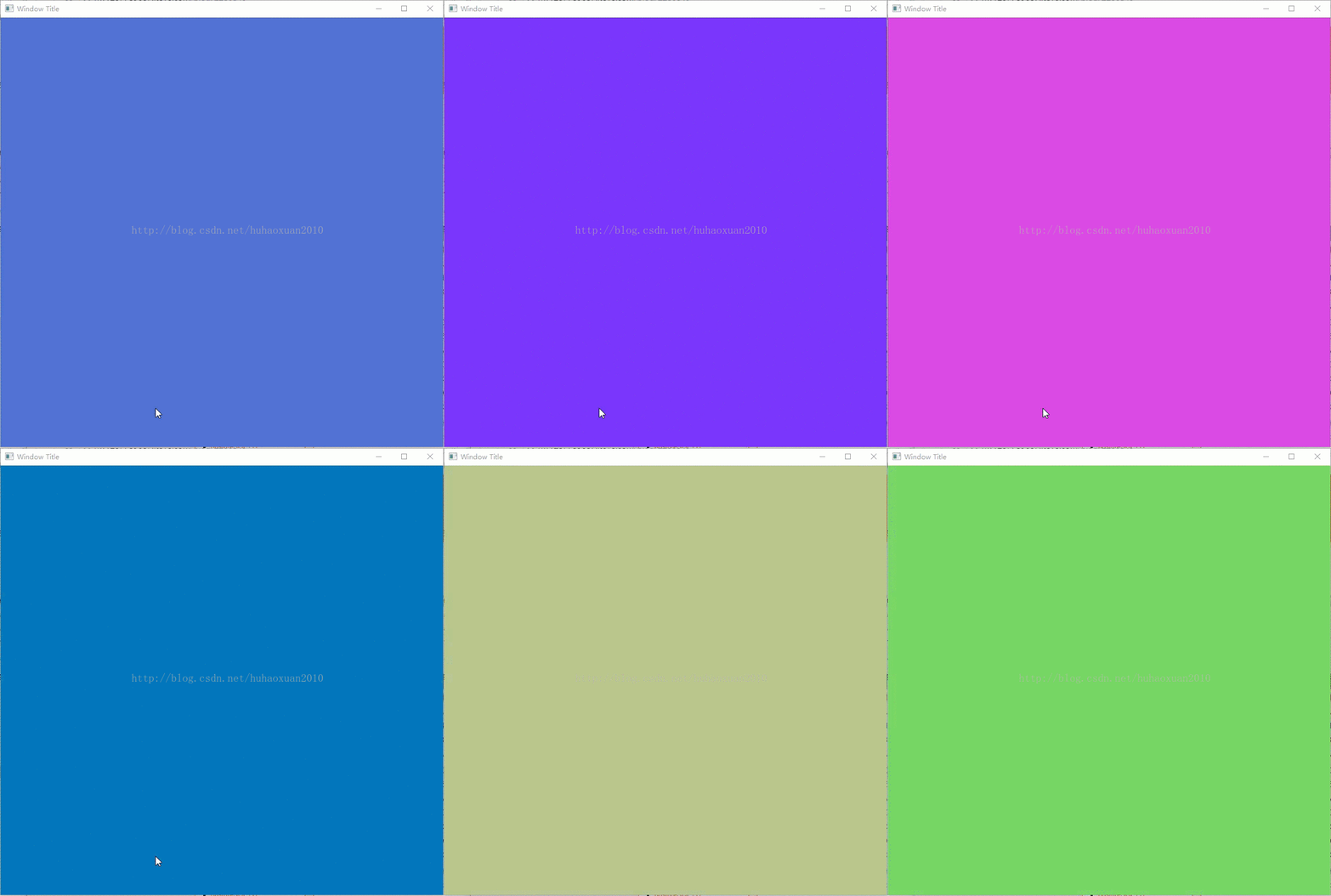
Introduction to flow chart:
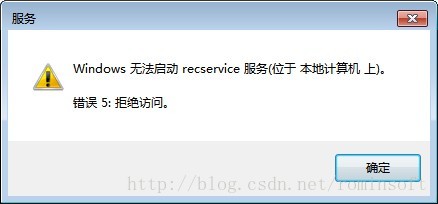
Installation window services prompt error [SC] OpenSCManager FAILED 5

E: \ SourceCode \ bin> sc create recservice binpath= E:\SourceCode\bin\record_service.exe

[SC] OpenSCManager FAILED 5:
Access is denied.

Solutions:
This problem is insufficient permissions, but in their own local operation how insufficient permissions, it is very confused, and then search found
The registry
HKEY_LOCAL_MACHINE\Software\Microsoft\Windows\CurrentVersion\Policies\System\ System\EnableLUA changed to 0
Change this value to 0 so that you still have real Administration on your own computer
One more thing to note when creating a service using SC Create is that the following parameter, binpath=, must be correct!
Otherwise, the above errors will also occur!

Android 9 (P) recovery upgrade Map of ‘@/cache/recovery/block.map’ failed problem analysis guide

Adnroid 9 (P) recovery upgrade Map of ‘@/cache/recovery/block. The Map’ failed problem analysis guide

Android 9 (P) development adaptation guide series blog directory:

Adnroid 9 (P) recovery upgrade Map of ‘@/cache/recovery/block. The Map’ failed problem analysis guide
Android version 9 (P) solve VNDK library: 87. XXX’s ABI has extend CHANGES
; Android 9 (P) is not extended by the SDK API. ; Android 9 (P) is extended to extend Ethernet functions Android 9 (P) ultimate guide to silent installation/uninstallation of App adaptation

introduction
since Android 4.4 will join the Android SELinux, this thing although have security but some puzzling problems in the development of often, this to say today is the problem is due to the SELinux rules lead to the Map of ‘@/cache/recovery/block. The Map’ failed cannot upgrade.
note: this section describes the code in the Android platform P high pass 8953 platform.

The 1. Problem disk
with android version upgrade, the upgrade package is more and more big, when upgrading packages should not be stored in the cache partition, can download updates to the data partition, and then from the upgrade data partition, recently from the load data partition upgrade package upgrade, encountered the following error, the error can be after the defeat of the upgrade in the/cache/recovery/last_log view, specific log is as follows:

[    0.000179] __bionic_open_tzdata: couldn't find any tzdata when looking for Asia/Shanghai!
[    0.000238] Starting recovery (pid 387) on Thu Jan  1 05:28:26 1970
[    0.001760] recovery filesystem table
[    0.001783] =========================
[    0.001789]   0 /vendor ext4 /dev/block/platform/soc/7824900.sdhci/by-name/vendor 0
[    0.001794]   1/ext4 /dev/block/bootdevice/by-name/system 0
[    0.001799]   2 /cache ext4 /dev/block/bootdevice/by-name/cache 0
[    0.001804]   3 /vendor ext4 /dev/block/bootdevice/by-name/vendor 0
[    0.001809]   4 /data ext4 /dev/block/bootdevice/by-name/userdata 0
[    0.001814]   5 /sdcard vfat /dev/block/mmcblk1p1 0
[    0.001819]   6 /boot emmc /dev/block/bootdevice/by-name/boot 0
[    0.001823]   7 /recovery emmc /dev/block/bootdevice/by-name/recovery 0
[    0.001828]   8 /misc emmc /dev/block/bootdevice/by-name/misc 0
[    0.001833]   9 /tmp ramdisk ramdisk 0
[    0.001837]
[    0.003088] I:Boot command: boot-recovery
[    0.003104] I:Got 3 arguments from boot message
[    0.047245] locale is [zh-CN]
[    0.047297] stage is []
[    0.047321] reason is [(null)]
[    0.047981] W:Failed to read max brightness: No such file or directory
[    0.048017] I:Screensaver disabled
[    0.049631] cannot find/open a drm device: No such file or directory
[    0.050030] fb0 reports (possibly inaccurate):
[    0.050049]   vi.bits_per_pixel = 32
[    0.050055]   vi.red.offset   =   0   .length =   8
[    0.050060]   vi.green.offset =   8   .length =   8
[    0.050065]   vi.blue.offset  =  16   .length =   8
[    0.064662] framebuffer: 0 (1920 x 1080)
[    0.515251]           erasing_text: zh (81 x 38 @ 5031)
[    0.527722]        no_command_text: zh (111 x 38 @ 5031)
[    0.538287]             error_text: zh (65 x 38 @ 5031)
[    0.993697]        installing_text: zh (222 x 38 @ 5922)
[    1.023212] SELinux: Loaded file_contexts
[    1.023333] Command: "/sbin/recovery" "--update_package=@/cache/recovery/block.map" "--locale=zh-CN"
[    1.152498] I:Update location: @/cache/recovery/block.map
[    1.152563] Opening update package...
[    1.185800] E:Failed to read /cache/recovery/block.map: No such file or directory
[    1.202350] E:Map of '@/cache/recovery/block.map' failed
[    1.235591] E:failed to map file
[    1.280567] W:Failed to read /sys/class/thermal/thermal_zone53/temp: Invalid argument
[    1.280665] W:Failed to read /sys/class/thermal/thermal_zone52/temp: Invalid argument
[    1.280730] W:Failed to read /sys/class/thermal/thermal_zone51/temp: Invalid argument
[    1.280872] W:Failed to read /sys/class/thermal/thermal_zone49/temp: No such device
[    1.280936] W:Failed to read /sys/class/thermal/thermal_zone48/temp: No such device
[    1.281001] W:Failed to read /sys/class/thermal/thermal_zone47/temp: No such device
[    1.281064] W:Failed to read /sys/class/thermal/thermal_zone46/temp: Invalid argument
[    1.281127] W:Failed to read /sys/class/thermal/thermal_zone45/temp: Invalid argument
[    1.287659] I:current maximum temperature: 90000
[    1.287840] I:@/cache/recovery/block.map
[    1.287866] I:0
[    1.287889] I:time_total: 0
[    1.287911] I:retry: 0
[    1.287933] I:error: 26
[    1.287955] I:uncrypt_time: 0
[    1.287977] I:uncrypt_error: 117
[    1.287999] I:temperature_start: 90000
[    1.288021] I:temperature_end: 90000
[    1.288043] I:temperature_max: 90000
[    1.288065] I:
[    1.288093] Installation aborted.
[    1.303354] Mounted /cache/xxx-recovery
[    1.336868] mkdir /cache/xxx-recovery error[File exists]
[    1.356593] Recovery install reason=update_package result=fail on Thu Jan  1 05:28:27 1970
[    1.356622]  !
[    6.421470] I:Saving locale "zh-CN"

where the key information is as follows:

[    1.185800] E:Failed to read /cache/recovery/block.map: No such file or directory
[    1.202350] E:Map of '@/cache/recovery/block.map' failed
[    1.235591] E:failed to map file

: : : :

130|msm8953_64:/cache/recovery # ls -l
total 448
-rw------- 1 root   root      277 2020-05-12 17:48 block.map
-rw-r--r-- 1 root   root      271 1970-01-02 15:42 last_install
-rw------- 1 system system 368240 1970-01-02 15:42 last_kmsg
-rw------- 1 root   root        5 1970-01-02 15:42 last_locale
-rw------- 1 system system     38 2020-05-12 17:47 uncrypt_file

If does not exist, this is the point.

The 2. Solve problem
we trace the log information before restarting to enter recovery, and check it by logcat-b events | grep avc. The log is shown as follows:

[ 1212.869820@3] type=1400 audit(1209.144:3355): avc: denied { setattr } for pid=4433 comm="Thread-3" name="uncrypt_file" dev="mmcblk0p32" ino=13 scontext=u:r:system_app:s0 tcontext=u:object_r:cache_recovery_file:s0 tclass=file permissive=0
[ 1212.885402@3] type=1400 audit(1212.820:3356): avc: denied { getattr } for pid=4501 comm="uncrypt" path="/data/cache" dev="mmcblk0p65" ino=19 scontext=u:r:uncrypt:s0 tcontext=u:object_r:cache_file:s0 tclass=dir permissive=0
[ 1212.906032@2] watchdogd: watchdogd started (interval 10, margin 20)!
[ 1212.906143@2] watchdogd: Failed to open /dev/watchdog: No such file or directory

it is obvious from the logs that the SELinux permission issue was encountered while working with /data and /cache partitions. (mmcblk0p32 and mmcblk0p65 correspond to cache and data partition respectively), the corresponding relation can be inquired under the terminal by the following way:

130|msm8953_64:/dev/block/by-name # ls  -l | grep cache
lrwxrwxrwx 1 root root 21 1970-01-01 08:00 cache -> /dev/block/mmcblk0p32
msm8953_64:/dev/block/by-name # ls  -l | grep data
lrwxrwxrwx 1 root root 21 1970-01-01 08:00 userdata -> /dev/block/mmcblk0p65
msm8953_64:/dev/block/by-name #

found the root point of the problem, we only need to give the corresponding SELinux authority for the upgraded application and recovery, but the SELinux authority encountered above did not continue, we need to know all the required SELinux authority, then we set SELinux as permissive state, and then upgrade again, we observe the log status:

[   98.295965@1] type=1400 audit(84.812:43): avc: denied { open } for pid=2890 comm="HwBinder:2890_1" path="/sys/module/tvin_hdmirx/parameters/en_4k_2_2k" dev="sysfs" ino=6874 scontext=u:r:system_control:s0 tcontext=u:object_r:sysfs_cec:s0 tclass=file permissive=1
[   98.313718@1] type=1400 audit(98.244:44): avc: denied { remove_name } for pid=4076 comm="Thread-4" name="update.zip" dev="mmcblk0p65" ino=316 scontext=u:r:system_app:s0 tcontext=u:object_r:cache_file:s0 tclass=dir permissive=1
[   98.333696@1] type=1400 audit(98.244:44): avc: denied { remove_name } for pid=4076 comm="Thread-4" name="update.zip" dev="mmcblk0p65" ino=316 scontext=u:r:system_app:s0 tcontext=u:object_r:cache_file:s0 tclass=dir permissive=1
[   98.353378@1] type=1400 audit(98.244:45): avc: denied { unlink } for pid=4076 comm="Thread-4" name="update.zip" dev="mmcblk0p65" ino=316 scontext=u:r:system_app:s0 tcontext=u:object_r:cache_file:s0 tclass=file permissive=1
[   98.373096@1] type=1400 audit(98.244:45): avc: denied { unlink } for pid=4076 comm="Thread-4" name="update.zip" dev="mmcblk0p65" ino=316 scontext=u:r:system_app:s0 tcontext=u:object_r:cache_file:s0 tclass=file permissive=1
[   98.392458@1] type=1400 audit(98.304:46): avc: denied { read } for pid=4076 comm="Thread-4" path="/data/cache/update.zip" dev="mmcblk0p65" ino=316 scontext=u:r:system_app:s0 tcontext=u:object_r:cache_file:s0 tclass=file permissive=1
[   98.618368@2] success set parent gpu_p1_composite rate to 500000000
[   99.302385@1] success set parent gpu_p0_composite rate to 400000000
[  100.074360@1] success set parent gpu_p1_composite rate to 285714285
[  101.234329@3] success set parent gpu_p0_composite rate to 125000000
[  101.344037@0] aml_snd_card_tv aml_snd_tv: I2S playback disable
[  101.344244@0] aml_snd_card_tv aml_snd_tv: IEC958 playback disable
[  120.075238@1] type=1400 audit(98.304:46): avc: denied { read } for pid=4076 comm="Thread-4" path="/data/cache/update.zip" dev="mmcblk0p65" ino=316 scontext=u:r:system_app:s0 tcontext=u:object_r:cache_file:s0 tclass=file permissive=1
[  120.090346@1] type=1400 audit(120.024:47): avc: denied { setattr } for pid=4076 comm="Thread-4" name="uncrypt_file" dev="mmcblk0p32" ino=13 scontext=u:r:system_app:s0 tcontext=u:object_r:cache_recovery_file:s0 tclass=file permissive=1
[  121.326417@0] success set parent gpu_p1_composite rate to 666666666
[  121.734307@0] success set parent gpu_p0_composite rate to 500000000
[  121.897440@1] BT_RADIO going: off
[  121.897470@1] BCM_BT: going OFF
[  122.342361@2] success set parent gpu_p1_composite rate to 400000000
[  123.438484@0] success set parent gpu_p0_composite rate to 285714285
[  123.556904@1] type=1400 audit(120.024:47): avc: denied { setattr } for pid=4076 comm="Thread-4" name="uncrypt_file" dev="mmcblk0p32" ino=13 scontext=u:r:system_app:s0 tcontext=u:object_r:cache_recovery_file:s0 tclass=file permissive=1
[  123.572107@1] type=1400 audit(123.508:48): avc: denied { getattr } for pid=4211 comm="uncrypt" path="/data/cache" dev="mmcblk0p65" ino=19 scontext=u:r:uncrypt:s0 tcontext=u:object_r:cache_file:s0 tclass=dir permissive=1
[  123.591568@1] type=1400 audit(123.508:48): avc: denied { getattr } for pid=4211 comm="uncrypt" path="/data/cache" dev="mmcblk0p65" ino=19 scontext=u:r:uncrypt:s0 tcontext=u:object_r:cache_file:s0 tclass=dir permissive=1
[  123.610598@1] type=1400 audit(123.508:49): avc: denied { getattr } for pid=4211 comm="uncrypt" path="/data/cache/update.zip" dev="mmcblk0p65" ino=316 scontext=u:r:uncrypt:s0 tcontext=u:object_r:cache_file:s0 tclass=file permissive=1
[  123.631453@1] type=1400 audit(123.508:49): avc: denied { getattr } for pid=4211 comm="uncrypt" path="/data/cache/update.zip" dev="mmcblk0p65" ino=316 scontext=u:r:uncrypt:s0 tcontext=u:object_r:cache_file:s0 tclass=file permissive=1
[  123.652217@1] type=1400 audit(123.512:50): avc: denied { read } for pid=4211 comm="uncrypt" name="update.zip" dev="mmcblk0p65" ino=316 scontext=u:r:uncrypt:s0 tcontext=u:object_r:cache_file:s0 tclass=file permissive=1
[  123.672583@1] type=1400 audit(123.512:50): avc: denied { read } for pid=4211 comm="uncrypt" name="update.zip" dev="mmcblk0p65" ino=316 scontext=u:r:uncrypt:s0 tcontext=u:object_r:cache_file:s0 tclass=file permissive=1
[  123.689809@1] type=1400 audit(123.512:51): avc: denied { open } for pid=4211 comm="uncrypt" path="/data/cache/update.zip" dev="mmcblk0p65" ino=316 scontext=u:r:uncrypt:s0 tcontext=u:object_r:cache_file:s0 tclass=file permissive=1
[  124.950389@3] success set parent gpu_p1_composite rate to 125000000

this is easy, add the corresponding rules of SELinux, about the study of SELinux you can refer to the blog Android SELinux development guide , here is not to do too much detail about the rules of SELinux, attached modified git commit record:

diff --git a/device/qcom/sepolicy/private/xxxdroid_share_file.te b/device/qcom/sepolicy/private/xxxdroid_share_file.te
index ea24edb..72f043d 100755
--- a/device/qcom/sepolicy/private/xxxdroid_share_file.te
+++ b/device/qcom/sepolicy/private/xxxdroid_share_file.te
@@ -31,5 +31,11 @@ allow PortPlugInit11 xxxdroid_share_file:file { create write setattr relabelfrom
 allow { auth_bpadownload posprintupdate} xxxdroid_share_file:dir { open search write create add_name remove_name setattr relabelfrom relabelto append unlink link rename getattr};
 allow { auth_bpadownload posprintupdate} xxxdroid_share_file:file { create write setattr relabelfrom relabelto append  rename open getattr read lock };
 
-allow {zygote bluetooth} xxxdroid_share_file:file {rw_file_perms};
-allow {zygote bluetooth} xxxdroid_share_file:dir {rw_dir_perms};
+allow {zygote bluetooth uncrypt} xxxdroid_share_file:file {rw_file_perms};
+allow {zygote bluetooth uncrypt} xxxdroid_share_file:dir {rw_dir_perms};
+
+allow system_app cache_file:dir { search add_name remove_name write };
+allow system_app cache_file:file { create getattr open write unlink read };
+
+allow uncrypt cache_file:dir getattr;
+allow uncrypt cache_file:file { open read getattr };

where xxxdroid_share_file.te is the policy file we added. If the child boots really encounter this problem, please add the policy according to the actual situation. Now that you have compiled the policy file, try again. Take a look at the success record of recovery. Check it in /cache/recovery/last_log. It’s too much.

[    0.000181] __bionic_open_tzdata: couldn't find any tzdata when looking for Asia/Shanghai!
[    0.000238] Starting recovery (pid 383) on Fri Jan  2 07:41:18 1970
[    0.001824] recovery filesystem table
[    0.001851] =========================
[    0.001857]   0 /vendor ext4 /dev/block/platform/soc/7824900.sdhci/by-name/vendor 0
[    0.001862]   1/ext4 /dev/block/bootdevice/by-name/system 0
[    0.001867]   2 /cache ext4 /dev/block/bootdevice/by-name/cache 0
[    0.001872]   3 /vendor ext4 /dev/block/bootdevice/by-name/vendor 0
[    0.001877]   4 /data ext4 /dev/block/bootdevice/by-name/userdata 0
[    0.001882]   5 /sdcard vfat /dev/block/mmcblk1p1 0
[    0.001886]   6 /boot emmc /dev/block/bootdevice/by-name/boot 0
[    0.001891]   7 /recovery emmc /dev/block/bootdevice/by-name/recovery 0
[    0.001896]   8 /misc emmc /dev/block/bootdevice/by-name/misc 0
[    0.001901]   9 /tmp ramdisk ramdisk 0
[    0.001905]
[    0.003103] I:Boot command: boot-recovery
[    0.003121] I:Got 3 arguments from boot message
[    0.057346] locale is [zh-CN]
[    0.057379] stage is []
[    0.057385] reason is [(null)]
[    0.057390] W:Failed to read max brightness: No such file or directory
[    0.057395] I:Screensaver disabled
[    0.058859] cannot find/open a drm device: No such file or directory
[    0.059139] fb0 reports (possibly inaccurate):
[    0.059150]   vi.bits_per_pixel = 32
[    0.059156]   vi.red.offset   =   0   .length =   8
[    0.059161]   vi.green.offset =   8   .length =   8
[    0.059166]   vi.blue.offset  =  16   .length =   8
[    0.072937] framebuffer: 0 (1920 x 1080)
[    0.521428]           erasing_text: zh (81 x 38 @ 5031)
[    0.533880]        no_command_text: zh (111 x 38 @ 5031)
[    0.544223]             error_text: zh (65 x 38 @ 5031)
[    0.998365]        installing_text: zh (222 x 38 @ 5922)
[    1.029506] SELinux: Loaded file_contexts
[    1.029631] Command: "/sbin/recovery" "--update_package=@/cache/recovery/block.map" "--locale=zh-CN"
[   88.676745] wrote 129279 blocks; expected 129279
[   88.676811] stashed 0 blocks
[   88.676840] max alloc needed was 4096
[   88.676930] deleting stash 34a21d3b3dc53f7084ea0b7f275c179b3062f9be
[   90.216571] Patching firmware images...
[   90.217492] prepare_partitions: Preparing for primary partition update
[   90.217700] 'apdp' partition not backup - skip safe update
[   90.217744] 'keystore' partition not backup - skip safe update
[   90.217795] 'msadp' partition not backup - skip safe update
[   90.217825] 'mdtp' partition not backup - skip safe update
[   90.217860] 'dsp' partition not backup - skip safe update
[   90.375081] prepare_partitions: Preparing for backup partition update
[   90.543922] prepare_partitions: Finalizing partitions
[   90.601289]
[   90.854443] W:Failed to read /sys/class/thermal/thermal_zone53/temp: Invalid argument
[   90.854541] W:Failed to read /sys/class/thermal/thermal_zone52/temp: Invalid argument
[   90.854606] W:Failed to read /sys/class/thermal/thermal_zone51/temp: Invalid argument
[   90.854752] W:Failed to read /sys/class/thermal/thermal_zone49/temp: No such device
[   90.854818] W:Failed to read /sys/class/thermal/thermal_zone48/temp: No such device
[   90.854883] W:Failed to read /sys/class/thermal/thermal_zone47/temp: No such device
[   90.854946] W:Failed to read /sys/class/thermal/thermal_zone46/temp: Invalid argument
[   90.855009] W:Failed to read /sys/class/thermal/thermal_zone45/temp: Invalid argument
[   90.861607] I:current maximum temperature: 90277
[   90.861798] I:@/cache/recovery/block.map
[   90.861823] I:1
[   90.861846] I:time_total: 89
[   90.861868] I:retry: 0
[   90.861890] I:target_build: 57
[   90.861913] I:bytes_written_system: 1574789120
[   90.861935] I:bytes_stashed_system: 0
[   90.861956] I:bytes_written_vendor: 529526784
[   90.861978] I:bytes_stashed_vendor: 0
[   90.862000] I:uncrypt_time: 20
[   90.862022] I:temperature_start: 90555
[   90.862043] I:temperature_end: 90277
[   90.862065] I:temperature_max: 90555
[   90.862087] I:
[   90.862308] Mounted /cache/xxx-recovery
[   90.882512] mkdir /cache/xxx-recovery error[File exists]
[   90.902829] Recovery install reason=update_package result=success on Fri Jan  2 07:42:48 1970
[   90.902859]  !
[   90.948791] I:Saving locale "zh-CN"

after the successful upgrade /cache/recovery directory structure is as follows:

msm8953_64:/cache/recovery # ls -l
total 448
-rw------- 1 root   root      277 2020-05-12 17:48 block.map
-rw-r--r-- 1 root   root      271 1970-01-02 15:42 last_install
-rw------- 1 system system 368240 1970-01-02 15:42 last_kmsg
-rw------- 1 root   root        5 1970-01-02 15:42 last_locale
-rw-r----- 1 root   root    49067 1970-01-02 15:42 last_log
-rw------- 1 system system     38 2020-05-12 17:47 uncrypt_file

epilogue
ok, I don’t need to say more about this problem, but if you do encounter this problem, make sure you go through the logcat-b events | grep avc to see the problem and then add the corresponding permissions.

write at the end
readers reader friends, upgrade the Android P recovery Map of ‘@/cache/recovery/block. The Map’ failed problem analysis guide already all finished, not what to say. In the end, readers, if this post is helpful to you, follow up with thumb up, and of course, if there are any mistakes or shortcomings, you can also post them.

Consult IDE log for more details (Help | Show Log),read failed, socket might closed or timeout,

Npi project error
Error:Read timed out
Consult IDE log for more details (Help | Show Log)
 
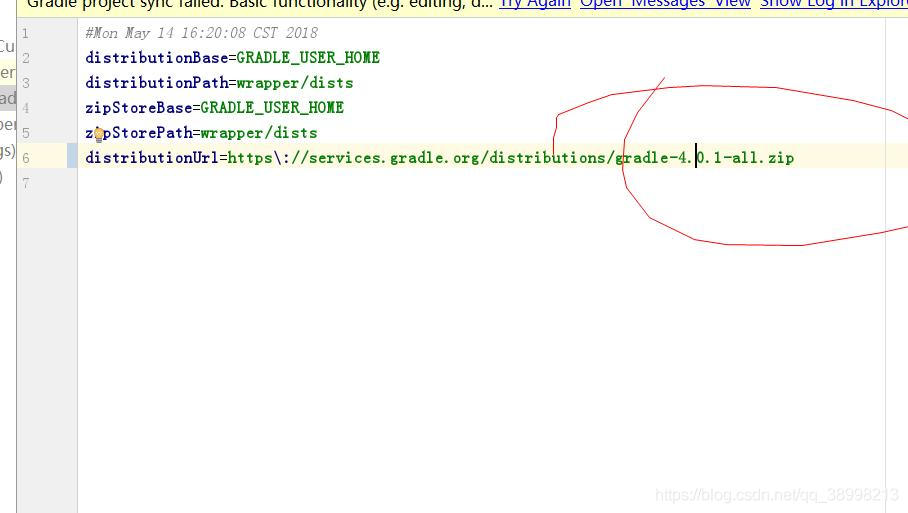
Modify Gradle for version adaptation:


2020.3.20 bluetooth remote control report error:
read failed, socket might closed or timeout, read ret: -1
bt socket closed, read return: -1
 
This general error will be tried catch, because IO operations are involved, so it is difficult to find without debug.
I don’t know how to solve it after I find it;
My practice, bluetooth transmission do not disconnect operation, no matter how do not love to send such instructions.
The reason for this error is that a Socket of Client or service is closed, so the message cannot be sent or accepted. Since there is a catch, the application will not crash.
 

server certificate verification failed. CAfile: /etc/ssl/certs/ca-certificates.crt CRLfile: none

ubuntu
NPM Install errs as follows:
npm ERR! Error while executing:
npm ERR! /usr/bin/git ls-remote -h -t https://test.com/scm/saf/test.git
npm ERR!
NPM ERR! fatal: unable to access ‘https://test.com/scm/saf/test.git/’: server certificate verification failed. CAfile: /etc/ssl/certs/ca-certificates.crt CRLfile: none
npm ERR!
NPM ERR! exited with error code: 128
npm ERR! A complete log of this run can be found in:
npm ERR!/home/test /. NPM/_logs/2020-05-08 T03_03_55_220Z – debug. Log

the reason is that the private certificate is used. After checking the data, the security authentication of the system is shut down.
git config –global http.sslverify “false”
or
export GIT_SSL_NO_VERIFY=1
Reference: https://blog.csdn.net/xunan003/article/details/82190419