Category Archives: How to Fix

Arduino ide 1.6.9 problems encountered error:’TKD2′ was not declared in this scope

Previously, I used an Arduino link to an infrared receiver to receive commands from the remote control. Control some peripherals. Using a library downloaded from Github.
I need to use it again these days. I’ve got a problem. The first error is
D:\Tools\Arduino\libraries\RobotIRremote\ SRC \ irremotetools.cpp :5:16: error: ‘TKD2’ was not declared in this scope
int RECV_PIN = TKD2; // the pin the IR receiver is connected to

            ^

Exit status 1
error for development board Arduino/Genuino Uno at compile time.
Tip me. TKD2 not found.
and then there’s the problem of finding two IRremote libraries. One of the libraries is used. So we can just delete the library that he gave the path to instead of the Arduino IDE installation directory. Write using the IRemote library provided by the Library in the Arduino IDE.
D:\Tools\Arduino\ Srtirremote \IRremoteTools. CPP :5:16: Error: ‘TKD2’ was not declared in this scope
int RECV_PIN = TKD2; // the pin the IR receiver is connected to

            ^

Exit status 1
error for development board Arduino/Genuino Uno at compile time.
I used an example of the arduino-CC remote control.
https://www.arduino.cc/en/Tutorial/RobotRemoteControl
He has too many examples. A lot I don’t need. I just want the code for his remote reception button. It is enough. But there is an error with a CPP in the library.
It looks like a CPP in the Library provided by Arduino IDE has an error. As a result. Open it up.
opens the CPP file prompted by the error.
D:\Tools\Arduino\libraries\RobotIRremote\src\IRremoteTools.cpp

#include "IRremote.h"
#include "IRremoteTools.h"
#include <Arduino.h>

int RECV_PIN = TKD2; // the pin the IR receiver is connected to
IRrecv irrecv(RECV_PIN); // an instance of the IR receiver object
decode_results results; // container for received IR codes

void beginIRremote(){
    irrecv.enableIRIn(); // Start the receiver
}

bool IRrecived(){
    return irrecv.decode(&results);
}

void resumeIRremote(){
    irrecv.resume(); // resume receiver
}

unsigned long getIRresult(){
    return results.value;
}

We found out he had this thing called TKD2. But there’s no declaration or define on it and then we’re going to look for his H header file.

#ifndef IRREMOTETOOLS_H
#define IRREMOTETOOLS_H

extern void beginIRremote();

extern bool IRrecived();

extern void resumeIRremote();

extern unsigned long getIRresult();

#endif

There is no declaration of TKD2
Then move on to D:\Tools\Arduino\libraries\RobotIRremote\ SRC \ irremotetools.cpp
to find the introduced.h header files. Let’s see if we have TKD2.
however. I am!

#include "IRremote.h"
#include "IRremoteTools.h"

I looked for both of them. There’s no such thing as TKD2. As for the

#include <Arduino.h>

You don’t have to look for this one. Because that’s what the Arduino environment comes with. The external library is definitely not going to have a variable or define in there.
so we come to the conclusion that there is a problem with the library code provided by the arduinio ide??Lie to me. I don’t read much. But as far as we can find out, the reason is that the library file code provided by his official is wrong… All right.
I went to the official place to get feedback. I did a little bit of searching. Some people say that 1.6.7 has this problem.
however. They either use something they don’t know why. Or code not written in the official tutorial. Then there are some messages and replies and so on that don’t make sense.
and of course I’m going to talk about it here. I got this error right here. Arduino.cc is a copy and paste of the code from the official arduino.CC tutorial. And check for basic syntax errors. Compile and you get this error

error: 'TKD2' was not declared in this scope

Arduino. Cc official remote library tutorial
https://www.arduino.cc/en/Tutorial/RobotRemoteControl
Let me just copy and paste it again. There’s still this mistake.
Ah. Let’s just do it ourselves. It’s easier.
We have two ways to solve this problem.
the first type:
modifier this CPP
D:\Tools\Arduino\libraries\RobotIRremote\ SRC \ irremotetools.cpp
bar

#include "IRremote.h"
#include "IRremoteTools.h"
#include <Arduino.h>

int RECV_PIN = TKD2; // the pin the IR receiver is connected to
IRrecv irrecv(RECV_PIN); // an instance of the IR receiver object
decode_results results; // container for received IR codes

void beginIRremote(){
    irrecv.enableIRIn(); // Start the receiver
}

bool IRrecived(){
    return irrecv.decode(&results);
}

void resumeIRremote(){
    irrecv.resume(); // resume receiver
}

unsigned long getIRresult(){
    return results.value;
}

Change TKD2 inside to 11 or the IO port on the data receiving port that you use to plug into the infrared receiver header to
to look like this

#include "IRremote.h"
#include "IRremoteTools.h"
#include <Arduino.h>

int RECV_PIN = 11; // the pin the IR receiver is connected to
IRrecv irrecv(RECV_PIN); // an instance of the IR receiver object
decode_results results; // container for received IR codes

void beginIRremote(){
    irrecv.enableIRIn(); // Start the receiver
}

bool IRrecived(){
    return irrecv.decode(&results);
}

void resumeIRremote(){
    irrecv.resume(); // resume receiver
}

unsigned long getIRresult(){
    return results.value;
}

I changed it to 11
Of course. So if you need to modify the port. Also modify the CPP file for the library of the Arduino IDE’s library. This is a bit of bull. Let’s do the second amendment.
second method. It’s written in C++ syntax.
of course. You can just copy my code.
modified
D:\Tools\Arduino\libraries\RobotIRremote\ SRC \ irremotetools.h

#ifndef IRREMOTETOOLS_H
#define IRREMOTETOOLS_H

extern void beginIRremote();

extern bool IRrecived();

extern void resumeIRremote();

extern unsigned long getIRresult();

#endif

Change the h file to

#ifndef IRREMOTETOOLS_H
#define IRREMOTETOOLS_H

extern void beginIRremote( int receivePin );

extern bool IRrecived();

extern void resumeIRremote();

extern unsigned long getIRresult();

#endif

It is an extern void beginIRremote(int receivePin);
this method adds a parameter
. Then we modify
D:\Tools\Arduino\libraries\RobotIRremote\ SRC \ irremotetools.cpp

#include "IRremote.h"
#include "IRremoteTools.h"
#include <Arduino.h>

int RECV_PIN = TKD2; // the pin the IR receiver is connected to
IRrecv irrecv(RECV_PIN); // an instance of the IR receiver object
decode_results results; // container for received IR codes

void beginIRremote(){
    irrecv.enableIRIn(); // Start the receiver
}

bool IRrecived(){
    return irrecv.decode(&results);
}

void resumeIRremote(){
    irrecv.resume(); // resume receiver
}

unsigned long getIRresult(){
    return results.value;
}

to

#include "IRremote.h"
#include "IRremoteTools.h"
#include <Arduino.h>

//int RECV_PIN = TKD2; // the pin the IR receiver is connected to
//IRrecv irrecv(RECV_PIN); // an instance of the IR receiver object
IRrecv *irr;
decode_results results; // container for received IR codes

void beginIRremote( int receivePin ){
    //irrecv.enableIRIn(); // Start the receiver
    irr = new IRrecv( receivePin );
    irr->enableIRIn(); 
}

bool IRrecived(){
    //return irrecv.decode(&results);
    return irr->decode(&results);
}

void resumeIRremote(){
    //irrecv.resume(); // resume receiver
    irr->resume();
}

unsigned long getIRresult(){
    return results.value;
}

All right. And then you fix it. Let’s look at the code we’re using

#include <IRremote.h>
#include <IRremoteTools.h>

void setup() {
  Serial.begin(9600);

  beginIRremote(11); // Start the receiver
}

void loop() {
  if (IRrecived()) {
    unsigned long res = getIRresult();
    Serial.println( res );
    resumeIRremote(); // resume receiver
  }
}

Then compile


The project uses 4,772 bytes and takes up (14%) of program memory. The maximum is 32,256 bytes.
Global variables use 432 bytes, (21%) of dynamic memory, leaving 1,616 bytes for local variables. The maximum is 2,048 bytes.

OK, that’s it.
Once again given the arduino. Cc official the use of remote control library tutorial address


error: a label can only be part of a statement and a declaration is not a statement (How to Fix)

The reason is an error caused by my declaration of variables after the case
Analysis of this problem:
Due to switch a few case statement in the same scope (because a case statement is label, but they belong to a switch beyond constant-like block), so if in some case the following statement variables, the scope of the object is between two curly braces, that is, the entire switch statement, other case statement can also see that such things can lead to errors. We can do this by adding curly braces to the statements that follow the case. The reason for the braces is to specify the scope of the variables we are declaring, just in this case. In fact, to write the switch-case statement more formally, we should add curly braces after the case statement.
Source code is as follows:

#include <stdio.h>

int main(int argc, char *argv[])
{
    int zt_num1 = 1, zt_num2 = 2;

    if (argc < 2) {
        printf("please input again\n");
        return -1;
    }

    if (!argv[1]) {
        printf("please input again\n");
        return -1;
    }

    switch(*argv[1])
    {
    case '+':
        zt_num1 = zt_num1 + zt_num2;
        break;
    case '$':
        zt_num1 = zt_num1 - zt_num2;
        break;
    case '#':
        int num = 3;
        zt_num1 = zt_num1 + zt_num2 + num;
        break;
    default:
        printf("please input again\n");
        break;
    }
    printf("%d\n", zt_num1);

    return 0;
}

The compilation results are as follows:

The modified code is as follows:

#include <stdio.h>

int main(int argc, char *argv[])
{
    int zt_num1 = 1, zt_num2 = 2;

    if (argc < 2) {
        printf("please input again\n");
        return -1;
    }

    if (!argv[1]) {
        printf("please input again\n");
        return -1;
    }

    switch(*argv[1])
    {
    case '+':
        zt_num1 = zt_num1 + zt_num2;
        break;
    case '$':
        zt_num1 = zt_num1 - zt_num2;
        break;
    case '#':
    {
        int num = 3;
        zt_num1 = zt_num1 + zt_num2 + num;
        break;
    }
    default:
        printf("please input again\n");
        break;
    }
    printf("%d\n", zt_num1);

    return 0;
}

The compilation and operation results are:

macos LibreSSL SSL_connect: SSL_ERROR_SYSCALL in connection to github.com:443

The following error occurred while submitting Git today:

LibreSSL SSL_connect: SSL_ERROR_SYSCALL in connection to github.com:443

Then I tried git clone other repositories, also reporting this error.
The proxy is used, but the solutions given by others, such as restart and reset commands, do not work.
Finally, a solution was found:

vim ~/.gitconfig

Delete the HTTPS configuration and you’re done. The proxy configuration was written to a file, so it’s no wonder Git doesn’t work.
reference
[1]. SSL_connect: SSL_ERROR_SYSCALL in connection to github.com: 443. https://stackoverflow.com/questions/48987512/ssl-connect-ssl-error-syscall-in-connection-to-github-com443
 

SQL Server calls Database Mail to send mail error: Msg 229, Level 14, State 5, Procedure sp_send_dbmail, Line 1 EXECUTE


Msg 229, Level 14, State 5, Procedure SP_send_dbmail, Line 1, EXECUTE Permission denied on Object ‘sp_send_dbmail’, Database ‘MSDB ‘, Schema’ dbO ‘.
This is because the current SQL Server login account (login) does not have permission to send database mail in the MSDB database, so you need to join the MSDB database user and give permission by joining the SP_addrolemEMBER role.
Assume that the SQL Server login account name is “DBA”
use msdb
The go
create user dba for login dba
go
Exec dbo.sp_addrolemember @rolename = ‘DatabaseMailUserRole’,
@ membername = ‘dbas’
go
 
At this point, if you send the database mail again, you may still have an error:
Msg 14607, Level 16, State 1, Procedure sp_send_dbmail, Line 119
profile name is not valid
Although the database user “DBA” already has permission to send messages in MSDB, this is not enough; he also needs permission to use profile: “dba_profile”.
 
use msdb
go
Exec sysmail_add_principalprofile_sp@principal_name = ‘DBA’
, @ profile_name = ‘dba_profile’
@ is_default = 1
 
This allows you to call Database Mail to send messages using your new account.

Solve the problem of Python in Windows environment: Fatal error in launcher: Unable to create process using'”‘ in pip installation

Resolve Fatal Error in Launcher: Unable to create process using ‘”‘ in Python: PIP installation in Windows environment
Python. Exe added to the system environment variables solution Python. Exe added to the system environment variables solution

directory
Python. Exe added to the system environment variable solution
When installing the requests package with PIP on the Windows Python2.7 environment, there was an error: Fatal error in launcher: Unable to create process using “”. At this point, you won’t know which one to use. The above error will occur.
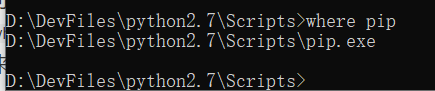
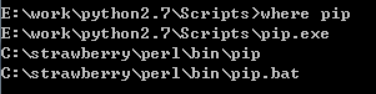
you can use the command where PIP
to see how many pips have been installed.

you can see that there is only one PIP on this computer, which is very strange.
if the following 1 situation occurs:

indicates that there are multiple pips, you can use the following command 1 to solve the installation problem:

python2-m PIP install XXX
or
python3-m PIP install XXX using the specified version of python
Python. Exe system environment variables not added to the solution
This same problem occurs when python.exe is not added to a system environment variable, and there is only one version of the system environment variable PIP.
= 1.Python. Exe is not added to the environment variable
2. PIP in the environment variable only one version
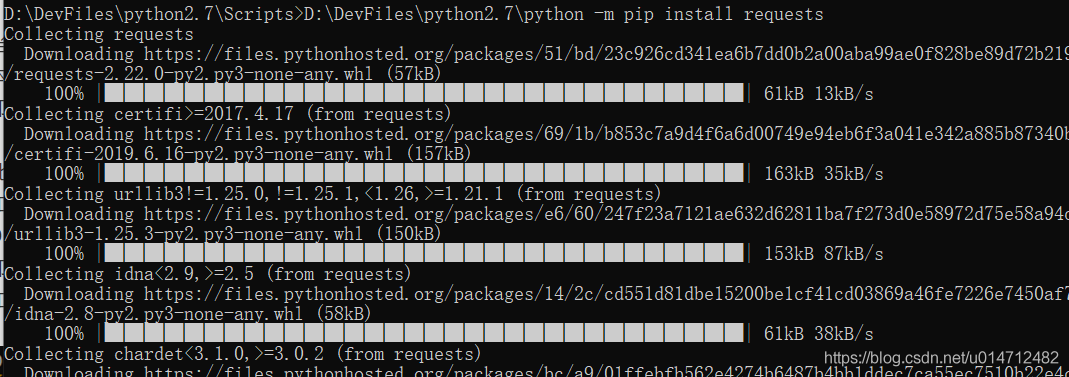
this time to use Python. Exe full path to perform PIP,
command:
D:\DevFiles\python2.7\ python-m PIP install XXX
that is Python installation path -m PIP install XXX
as shown in the figure below:

g++: internal compiler error: Killed (program cc1plus)

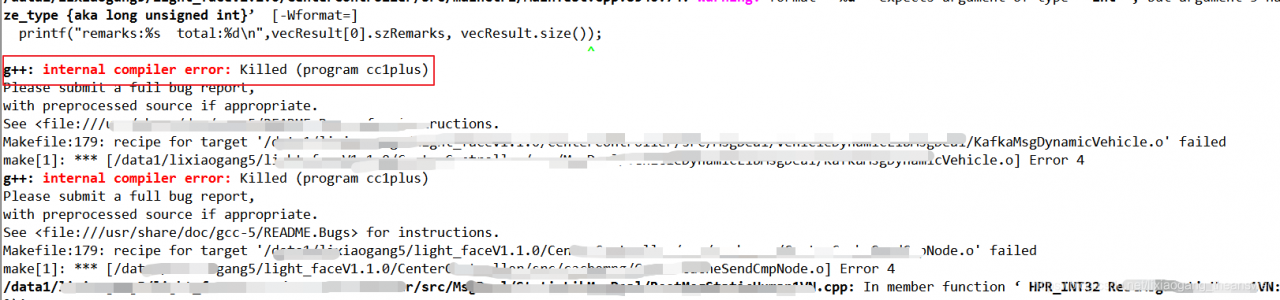
make compile time, prompt g++: internal compiler error: directed at program cc1plus , with the following detailed error message:

g++: internal compiler error: Killed (program cc1plus)
Please submit a full bug report,
with preprocessed source if appropriate.
See <file:///usr/share/doc/gcc-5/README.Bugs> for instructions.
.......
Error 4

The is shown in figure 1:

figure 1 compiler error message


Google, the unified answer is because memory is not enough , free looked at the system memory usage, it was really occupied. Since the device is the company’s uniform compilation platform (used by several colleagues), this is not surprising. As shown in figure 2:

figure 2 free – h details


can be solved by the following solution:
(1) sudo dd if=/dev/zero of=/swapfile bs=64M count=16 (the size of count is the size of the increased swap space, 64M is the block size, So the space size is bs*count=1024MB)
(2)sudo mkswap /swapfile (format the space just now as swap format) (3)sudo swapon /swapfile (use the swap space just created)


The


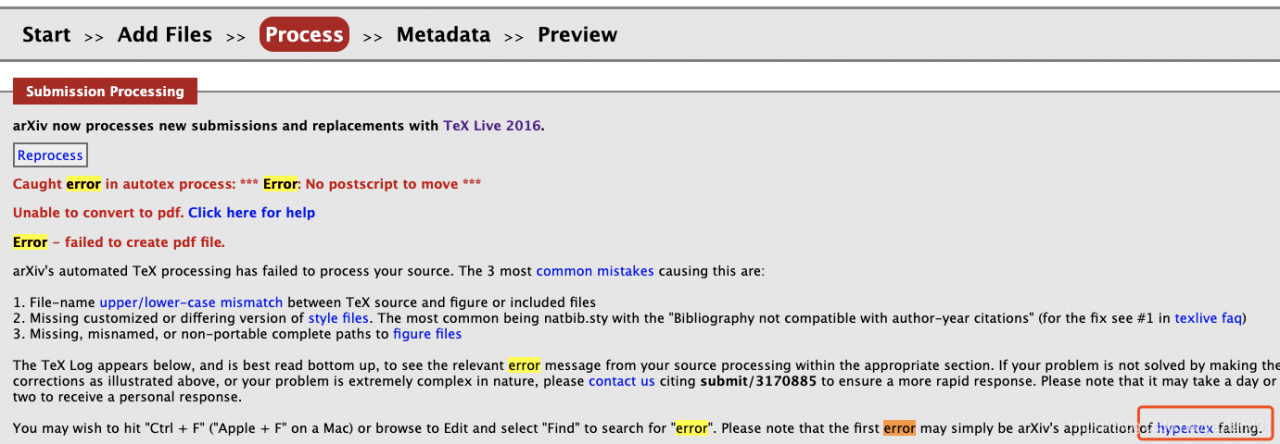
! LaTeX Error: Option clash for package hyperref.

The article directories
Causes, solutions, results

upload paper to arxiv. When compiling online, the following error occurs:

! LaTeX Error: Option clash for package hyperref.

why
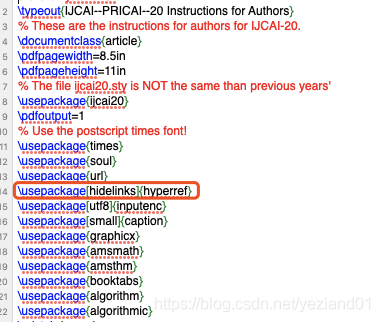
\usepackage[hidelinks]{hyperref} conflicts with other packages

The solution
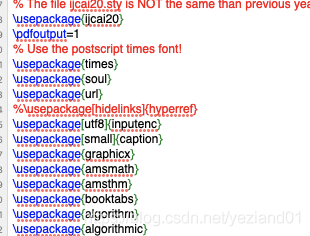
Remove the package %\usepackage[hidelinks]{hyperref}

The results of
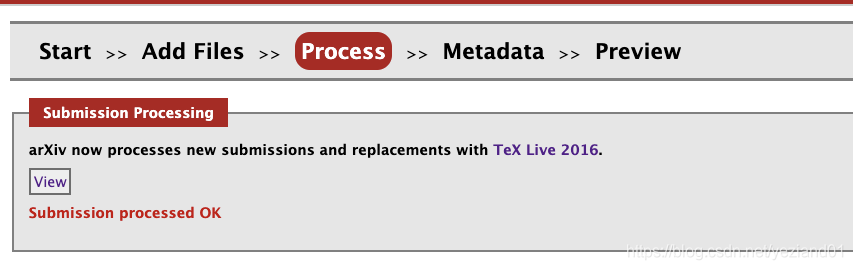
Compile successfully

Error: Cannot find module’webpack/bin/config-yargs’ solution

The following error occurred while running NPM Run Dev:

Error: Cannot find module 'webpack/bin/config-yargs'
Require stack:
- D:\javaProject\vue\myvue\node_modules\webpack-dev-server\bin\webpack-dev-server.js
    at Function.Module._resolveFilename (internal/modules/cjs/loader.js:980:15)
    at Function.Module._load (internal/modules/cjs/loader.js:862:27)
    at Module.require (internal/modules/cjs/loader.js:1042:19)
    at require (internal/modules/cjs/helpers.js:77:18)
    at Object.<anonymous> (D:\javaProject\vue\myvue\node_modules\webpack-dev-server\bin\webpack-dev-server.js:54:1)
    at Module._compile (internal/modules/cjs/loader.js:1156:30)
    at Object.Module._extensions..js (internal/modules/cjs/loader.js:1176:10)
    at Module.load (internal/modules/cjs/loader.js:1000:32)
    at Function.Module._load (internal/modules/cjs/loader.js:899:14)
    at Function.executeUserEntryPoint [as runMain] (internal/modules/run_main.js:74:12) {
  code: 'MODULE_NOT_FOUND',
  requireStack: [
    'D:\\javaProject\\vue\\myvue\\node_modules\\webpack-dev-server\\bin\\webpack-dev-server.js'
  ]
}
npm ERR! code ELIFECYCLE
npm ERR! errno 1
npm ERR! [email protected] dev: `webpack-dev-server --inline --progress --config build/webpack.dev.conf.js`
npm ERR! Exit status 1
npm ERR!
npm ERR! Failed at the [email protected] dev script.
npm ERR! This is probably not a problem with npm. There is likely additional logging output above.

npm ERR! A complete log of this run can be found in:
npm ERR!     C:\Users\Wenxindiao\AppData\Roaming\npm-cache\_logs\2020-04-22T03_06_48_257Z-debug.log

Solution:
this is because the current version of [email protected] does not support [email protected]. So simply delete the current Webpack-dev-Server folder and reinstall the higher version. The steps are as follows:

    find the project folder you created, mine is D:\javaProject\vue\myvue\node_modules\webpack-dev-server, delete the webpack-dev-server folder. Run NPM I [email protected] in the current project directory, and your webpack-dev-server version will be fine. Or update directly to the latest version
npm i –-save-dev webpack-dev-server@next