Category Archives: How to Fix

Debug assembler NTVDM has encountered a system error The equipment connected to the system does not work

The Debug assembler NTVDM has ritten a system error connected to the system and the device does not perform its function

Solutions:
Two attempts to
1. Open the control panel –& GT; Procedures and functions –& GT; Enable or disable Windows –& GT; Old component –& GT; Check the NTVDM
English is as follows
Go into Programs and Features -& GT; Turn Windows Features on or off -> Legacy Components -> Enable NTVDM?

2. Open the command prompt window,
Right click on the icon in the upper left hand corner –& GT; Attributes – & gt; Check “Use Older Console” –& GT; determine
Then close the Command Prompt window and reopen it
English is as follows:
Open “Command prompt”
Right click over title “Command prompt” and select “Properties”
select “Use legacy console (require relauch)”, Then “Accept”
Close and re-open “Command prompt” to test.

The official website replies with the following link
https://answers.microsoft.com/en-us/insider/forum/insider_wintp-insider_update/16-bits-applications-not-working-at-all/a776a720-ff62-4848-96b1-81b4371cff2c

FreeRDP installation configuration (error message: SSL_read: Failure in SSL library (protocol error?))

Latest post: Virson’s Blog
Using the xfreerdp [ServeripAddress] command, the connection to XP/Windows 2003 is normal, but the connection to Win7/2008 is always wrong:
; ——————————————————————————–
Root @pg-vm:/etc/ld.so.conf.d# xfreerdp 192.168.7.195-u empt-p 123456
connected to 192.168.7.195:3389
Password:
SSL_read: Failure in SSL library (protocol error?)
SSL_read: error:14094419:SSL :SSL3_READ_BYTES:tlsv1 alert access denied
credssp_recv() error: -1
Authentication failure, check credentials.
If credentials are valid, the NTLMSSP I Either mplementation may be to blame.
; — — — — — — — — — — — — — — — — — — — — — — — — — — — — — — — — — — — — — — — — — — — — — — — — — — — — — — — — — — — — — — — — — — — — — — — — — — — — — — — —
how to solve?
A: When freerDP connects to Win7/2008, you need to specify the user name in the command line. Note the parameters of FreerDP
The above error is due to the wrong order. Please use the following command line to connect:
Xfreerdp-u Empty-P 123456 192.168.7.195
————————–
References:
[1] [Freerdp-devel] Authentication Failure with Win2008 with Current Security Updates (worked some time ago)
http://sourceforge.net/mailarchive/forum.php?Thread_name = 4 fa84187. 40 8060009% wp. Pl& forum_name=freerdp-devel

Reproduced in: https://www.cnblogs.com/mawanglin2008/p/3493108.html

Solve the problem of “A TimThumb error has occured” in the WordPress program

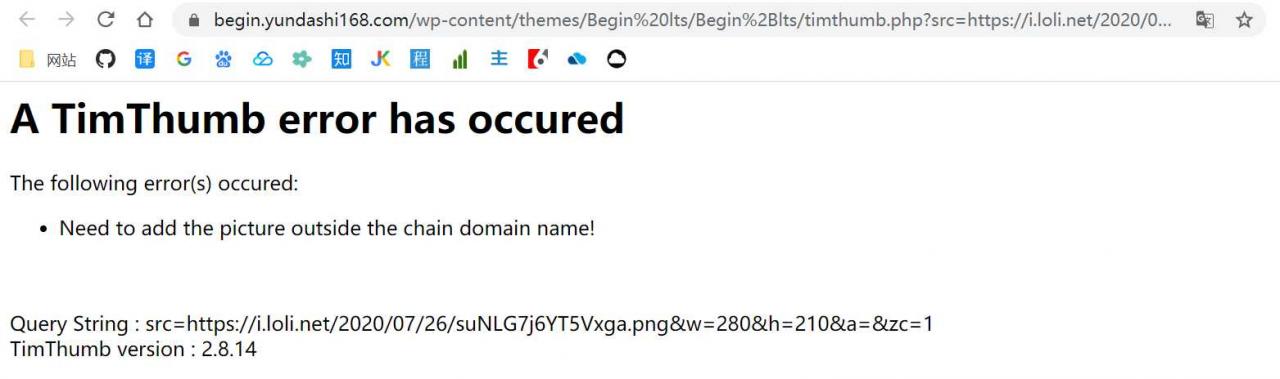
The thumbnail appears A TimThumb error has occuredWordPress solution
Nowadays, many sites like to use Timthumb to automatically crop thumbnails, but it often fails to occured. The error will be “A timthumb error has occured”.

Now this situation is generally due to the reference of the external link image (that is, not their own site image) caused, the solution is also very simple, just need to add the corresponding external link domain name to the $ALLOWED_SITES in the timthumb. PHP file in the following format. The details are as follows:

if(! isset($ALLOWED_SITES)){
 $ALLOWED_SITES = array ( 
'www.zmki.cn', 
'zmki.cn',
'a-oss.zmki.cn',
'pic.licaibiji.com ',
);
 }

The occured occured error of A TimThumb has occured not only because of the occured image, but also because of the occured image of the site. So the safest thing to do is to add the domain name of your site to $ALLOWED_SITES in the TimThumb. PHP file according to the above method.
If you add the external link address and your own domain address, you still cannot display the thumbnail properly
If you add the outer chain after the address and domain name or not normal display thumbnails, then it may be to store the thumbnail cache folder cache (PS: direct open can now use the theme folder is generally see the cache folder, Z – Blog theme is inside the theme folder template folder) without written permission. All we need to do is set the cache folder permissions to 777. Generally through the FTP link after the right folder can modify the permissions, or log in the corresponding server or virtual host file manager to set.
For those who don’t know how to use the Pagoda panel to build wordpress sites, take a look at the previous section:
Tutorial pagoda panel (1) based on the cloud server build pagodas panels most complete tutorial, a pagoda tutorial (2) add a WordPress site detailed graphic tutorials pagoda pagoda panel panel tutorial (3) based on the pagoda panels successfully configured web site SSL security certificate pagoda tutorial (4) the WordPress site backup and restore (pagoda panel)


The original address: http://tencent.yundashi168.com/683.html

Error while trying to retrieve text for error ORA-01019 solution

For a long time, this article helped me, thank you!
The original address: https://www.cnblogs.com/zhenfei/p/4425874.html

This issue involves 64-bit Oracle services and 32-bit clients causing problems.
The environment is as follows: Win8.1 + 64-bit Oracle 11.1 server, client because of the use of 32-bit program, do not support 64-bit Oracle client, so use 32-bit 10.2 InstantClient package.
Problem: Unable to connect oracle server, PLSQL and SQLPLUS all connect normally, Error Error while trying to retrieve Text for Error orA-01019.
The Oracle documentation describes this error as:
Ora-01019: incapable to allocate memory in the user
Cause: the user side memory allocator returns error.
Action: Increase the processes heap size or switch to the old set of calls.
 
Solution:
The reason for this seems to be that ODBC USES drivers provided by systems other than ORACLE_HOME instead of using drivers provided by Oracle. It’s obviously not a memory problem. So the first step is:
1. Add ORACLE_HOME to the environment variable to point to the 64-bit installation directory instead of instantClient. I think this step would allow Windows to use a matching file to drive
After you do the first step, and then connect, the error message becomes an error that you cannot allocate memory. And then the second step
2. Replace 10.2 Instantclinet package with 11.1 matching 32-bit InstantClient package
After changing, the connection is normal.
 
The tns_admin and PATH variables in the environment can both point to the 32-bit instantClient package location path.

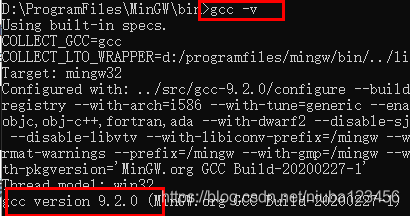
configure:3855: gcc -V >&5 gcc: error: unrecognized command line option ‘-V’

General:

configure:3866: $?= 0
configure:3855: gcc -V >&5
gcc: error: unrecognized command line option '-V'
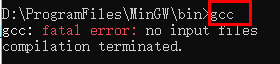
gcc: fatal error: no input files
compilation terminated.
configure:3866: $?= 1
configure:3855: gcc -qversion >&5
gcc: error: unrecognized command line option '-qversion'; did you mean '--version'?
gcc: fatal error: no input files
compilation terminated.

Similar errors include:

error: ac_nonexistent.h: No such file or directory,

Such a mistake should be ignored. Keep looking down.

When using Win32DiskImager to read and write SD card, error 1117 is reported

reference

Raspberry PI Error 1117, Win32 Disk Imager

screening method
    checks if you are running it as an administrator. You may already be logged in as administrator, use the right click “Run as Administrator”. You can switch to a USB port in real time on your laptop/desktop/PC. It works in most cases. This error also occurs when you use a faulty card reader. If that’s the case, or even if you’re not sure, try another card reader. It’s very likely to solve your problem.

Linux Mint installs Hadoop environment

Using Hadoop-Language-2.8.4.jar, the command is as follows: ./share/hadoop/tools/lib/hadoop – streaming – 2.8.4. Jar – input/Mr – – the output/input/* Mr – output – the file/home/LZH/external/Mapper. Py – Mapper ‘Mapper. Py’ – the file/home/LZH/external/Reducer. Py – Reducer ‘Reducer.py’
Problem 1: bash:/share/hadoop/tools/lib/hadoop – streaming – 2.8.4. Jar: Permission denied
Solution: expand the file permissions, chmod -r 777/share/hadoop/tools/lib/hadoop – streaming – 2.8.4. Jar
Invalid File (bad Magic Number): Exec format Error
Solution: I was careless, and the command omitted the hadoop JAR in the front, and added it, namely: Hadoop jar./share/hadoop/tools/lib/hadoop – streaming – 2.8.4. Jar – input/Mr – – the output/input/* Mr – output – the file/home/LZH/external/Mapper. Py – Mapper ‘Mapper. Py’ – the file/home/LZH/external/Reducer. Py – Reducer ‘Reducer.py’
Problem 3 May be encountered: Mapper.py and reduc. py have to be turned to executable. Chmod +x filename modification permission is executable
When writing MapReduce in Python, it’s a good idea to start with: #! The /usr/bin/env python statement
And finally it works

Hadoop worked fine, but for other reasons, I pressed the power button to force a shutdown, huh?After starting start-up, start start-up all-sh, and then JPS check that there is a missing Datanode in Hadoop, FS-LS/Input, it is found that it cannot connect to 127.0.0.1. Restart hadoop again when starting Hadoop, it is found that it can also create folders by running the command Hadoop, FS-LS/Input, but there is a problem 3 when putting file: Put the File/input/inputFile. TXT. _COPYING_ could only be replicated to 0 home nodes minReplication (= 1). There are 0 datanode (s) running and no node (s) are excluded in this operation.
At this point, stop-all.sh discovers no Proxyserver to stop and no Datanode to stop. (pro test the first solution is successful)
Reason 1: Every time the Namenode Format creates a namenodeId again, while under Hadoop.tmp. dir contains the ID generated by the last format. The Namenode format cleans up the data under the Namenode, but does not clean up the data under the Datanode, which causes failure at startup.
Here are two solutions:

rm -rf /opt/hadoop/ DFS /name/*
rm -rf/rf /hadoop/ DFS /name/*
remove the contents of the “DFS. Datand. data.dir”
rm-rf /opt/hadoop/ DFS /data/*
2) delete files beginning with “hadoop” under “hadoop.tmp.dir”
rm-rf /apt/hadoop/ TMP /hadoop*
3) reformat hadoop
hadoop namenode-format
4) start hadoop
The disadvantage of the start-all-sh
scheme is that all the important data on the original cluster is gone. Therefore, the second scheme is recommended:
1) modify the namespaceID of each Slave so that it is consistent with the Master’s namespaceID.
or
2) modify the Master’s namespaceID to match the Slave’s namespaceID.
Master “namespaceID” located in the “/ opt/hadoop/DFS/name/current/VERSION” file, the Slave “namespaceID” is located in the “//opt/hadoop/DFS/data/current/VERSION” file.

reason 2: the problem is that hadoop USES the mapred and DFS process Numbers on the datanode when it stops. While the default process number is saved under/TMP, Linux defaults to delete files in this directory every once in a while (usually a month or 7 days). Therefore, after deleting the two files of Hadoop-Hadoop-Jobtracker. pid and Hadoop-Hadoop-Namenode. Pid, the Namenode will naturally not find the two processes on the Datanode.
configuring export HADOOP_PID_DIR in the configuration file hadoop_env.sh solves this problem.
In the configuration file, the default path for HADOOP_PID_DIR is “/var/hadoop/pids”, we will manually create a “Hadoop” folder in the “/var” directory, if it already exists, do not create it, remember to chown the permissions to hadoop users. Then kill the process of the Datanode and Tasktracker in Slave (kill -9 process number), restart -all.sh and stop-all.sh without a “No Datanode to stop”, indicating that the problem has been solved.

Run.sh: Bash:./run.sh: Permission denied
Solutions:
Use the command chmod to modify the directory. Sh permissions can be
Such as chmod u + x *. Sh
A Container killed on requisition.exit code is 143.
I just ran out of memory. There are two ways to solve it perfectly:
1. Several more Mapper and Reducer are specified during the runtime:
-d mapred.map.tasks=10 \ #command [genericOptions] [commandOptions]
-d mapred.reduce.tasks=10 \ # note that -d is genericOptions,
before the other parameters
– numReduceTasks 10
2. Modify yarn-site.xml to add the following attributes:

<property>
   <name>yarn.nodemanager.vmem-check-enabled</name>
   <value>false</value>
   <description>Whether virtual memory limits will be enforced for containers</description>
</property>

<property>
   <name>yarn.nodemanager.vmem-pmem-ratio</name>
   <value>4</value>
   <description>Ratio between virtual memory to physical memory when setting memory limits for containers</description>
</property> 

Reference:

[Python] Implement Hadoop MapReduce program in Python: calculate the mean and variance of a set of data
error:could not open…jvm.cfg solution

Error: could not open… Jvm.cfg solution

this situation is mostly because the JDK was installed on the computer before, after uninstalling and reinstalling, the Java command will appear error:could not open… Error with JVM.cfg.
open system environment variables, view the PATH that will see such configuration information:
The % SystemRoot % \ system32; %SystemRoot%; . %JAVA_HOME%\lib; %JAVA_HOME%\bin
The
reason: when running Java, the default will be according to the PATH set in the PATH to find Java. Exe file, according to the above PATH information will first go to find the file in %SystemRoot%\system32 directory, and the corresponding JDK installation directory of Java. Exe in this directory has been uninstalled, it will naturally appear the file can not open.
The
see here you may see, there are two simple solution:
1. Directly delete java.exe under system32 directory (or Windows directory, depending on the PATH Settings) (in fact, if you look at the file date, you will find that the file date is not the same as the file date under the Java bin directory currently installed);
The 2, directly to the % JAVA_HOME % \ bin; At the top of the PATH PATH (see why);
try again, is it OH ~~

Python2.7 IOError: [Errno 0] Error when the cmd encoding is utf-8

Scene:
CMD terminal use: CHCP 65501 set to UTF-8
Set Python encoding environment: Set PYTHONIOENCODING= UTF-8 (LookupError: Unknown Encoding: CP65001)
Print (‘ program VERSION: {}’. Format (VERSION))
Preface version 1.1.1Traceback (most recent call last):
File “wechat_jump_auto. Py “, line 251, in < module>
main()
File “wechat_jump_auto-py “, line 216, in main
print(‘ program VERSION no. : {}’. Format (VERSION))
IOError: [Errno 0] Error
No solution: coding problem, haven’t found a good solution, really can’t change to English.

Prompt “libevent not found” when installing tmux

Ubuntu installation tMUx tutorial

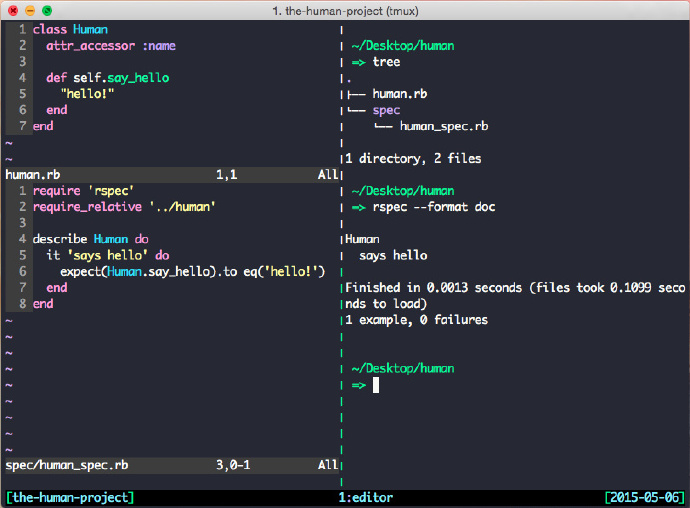
1. Tmux is a terminal split screen software, which can display different terminals in multiple areas on the same screen. The effects are as follows:

2. Ubuntu’s software warehouse is built with TMUx, which can be installed using the command Sudo Apt-get install Tmux, but the version in the warehouse is older. You can download the latest version of TMUX manually by going to tMUX official and the address is as follows:
https://github.com/tmux/tmux/releases

3. Download the source package, unzip, terminal into the tMUX unzip directory
4. Run terminal./configure
You might be prompted “Error: libEvent Not Found”
5. The solution is as follows. Run the following command respectively.
Skip step 6 if sudo Apt-get install libevent-dev #. If prompted for installation conflicts (XXXX conflicts libevent-2.0-5 XXXXX), perform the following steps:

Purge –force-depends libevent-2.0-5 Sudo DPKG — Purge — Force-depends libevent-2.0-5 Purge — 2.0-5 Purge — 2.0-5
Sudo apt-get install libevent-dev # skip step 6 if successful and do the following if unsuccessful
Sudo Apt-get Install – F # automatically fixes dependencies
Sudo Apt-get install libevent-dev # should be ready to install the libevent library
6. Run the terminal again./configure
7. Run make under the terminal
8. Run sudo make install
under terminal
9. At this point, tMUX can be successfully installed and then run tMUX under the terminal.
10. Some common tMUx shortcuts:
Tmux introduction articles – bole online http://blog.jobbole.com/87278/

Resources:
Linux – “libevent not found” error in Tmux-stack Overflow
http://stackoverflow.com/questions/21926202/libevent-not-found-error-in-tmux

Error 404:SRVE0190E: File not found: index.action when websphere publishes the project war package

Scenario: websphere published the project successfully, but at the time of access, enter the username and password, click the login button, wait for a long time, and then the page reports an error
Error 404:SRVE0190E: File not found: index.Action
Solutions:
1. Login to the websphere console as http://IP address :9060/admin
2. Enter the directory
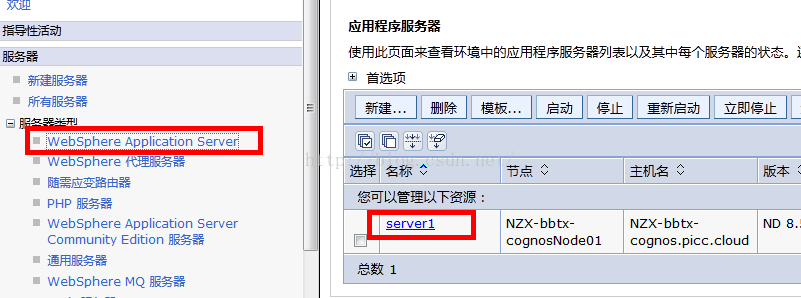
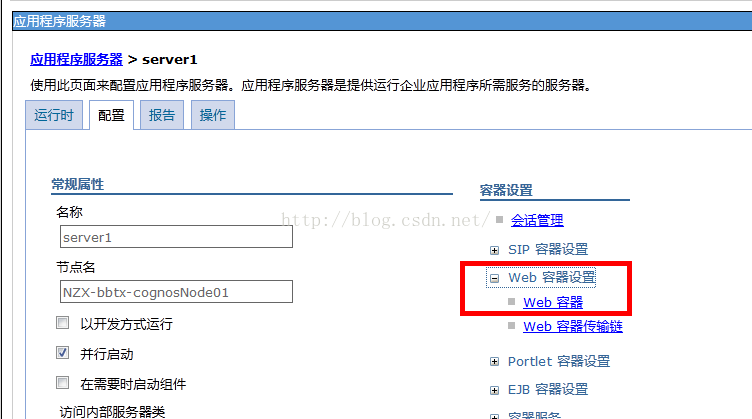
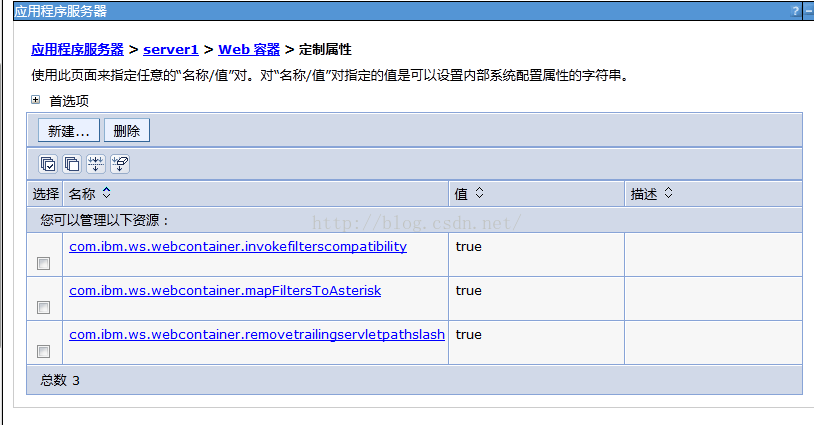
Server webSphere Application Server Server1 Container Settings Web Container Settings Web Container custom properties, as shown in the figure below:


The configuration is as follows:

1.
com.ibm.ws.webcontainer.invokefilterscompatibility=true

2,
com.ibm.ws.webcontainer.mapFiltersToAsterisk=true

3,
com.ibm.ws.webcontainer.removetrailingservletpathslash=true

3. After configuration, restart websphere, exit the console and log in again. This is important.