Category Archives: How to Fix

[How to Fix] Fatal error: init(coder:) has not been implemented

The problem
Customize view and then use xib to load this view. Run it and then crash :

Thread 1: Fatal error: init(coder:) has not been implemented

The solution
will

required init?(coder aDecoder: NSCoder) {
    fatalError("init(coder:) has not been implemented")
}

Just call the superclass method instead:

required init?(coder aDecoder: NSCoder) {
    super.init(coder: aDecoder)
}

[How to Fix] dpkg-deb: error: paste subprocess was killed by signal (Broken pipe)

1. Problem: There is a dependency problem during the Ubuntu software installation process

 “E: Unmet dependencies. Try 'apt-get -f install' with no packages (or specify a solution).” 

The following two commands as instructed did not solve the problem.

sudo apt-get -f install
sudo apt-get --fix-broken install

Instead, the problem of “DPkg-deb: error: paste subprocess was killed by signal (Broken pipe)” appeared again

Preparing to unpack .../ros-melodic-moveit-core_0.10.8-0bionic.20181227.040044_amd64.deb ...
Unpacking ros-melodic-moveit-core (0.10.8-0bionic.20181227.040044) over (0.10.5-0bionic.20181117.193206) ...
dpkg: error processing archive /var/cache/apt/archives/ros-melodic-moveit-core_0.10.8-0bionic.20181227.040044_amd64.deb (--unpack):
 trying to overwrite '/opt/ros/melodic/include/moveit/collision_distance_field/collision_detector_allocator_distance_field.h', which is also in package ros-melodic-moveit-experimental 0.10.5-0bionic.20181117.194840
dpkg-deb: error: paste subprocess was killed by signal (Broken pipe)
Errors were encountered while processing:
 /var/cache/apt/archives/ros-melodic-moveit-core_0.10.8-0bionic.20181227.040044_amd64.deb
E: Sub-process /usr/bin/dpkg returned an error code (1)

Final solution:

sudo apt-get autoremove ros-melodic-moveie-experimental
sudo apt-get -f install

Postscript: the origin of this problem is a legacy problem that occurred when installing ros under ubuntu18.04. As it had no impact on normal software installation, it was abandoned. However, today when installing teamviewer, I encountered a dependency problem and reported an error when -f install could not be performed. After many unsuccessful attempts to re-install ROS, I unexpectedly purge the command and failed to execute. As a result, The problem is overwhelming and I have little knowledge of the system.

[How to Fix] org.apache.cxf.binding.soap.SoapFault: Error reading XMLStreamReader.

org.apache.cxf.binding.soap.SoapFault: Error reading XMLStreamReader.
at org.apache.cxf.binding.soap.interceptor.ReadHeadersInterceptor.handleMessage(ReadHeadersInterceptor.java:230)
at org.apache.cxf.binding.soap.interceptor.ReadHeadersInterceptor.handleMessage(ReadHeadersInterceptor.java:60)
at org.apache.cxf.phase.PhaseInterceptorChain.doIntercept(PhaseInterceptorChain.java:244)
at org.apache.cxf.endpoint.ClientImpl.onMessage(ClientImpl.java:729)
at org.apache.cxf.transport.http.HTTPConduit$WrappedOutputStream.handleResponseInternal(HTTPConduit.java:2261)
at org.apache.cxf.transport.http.HTTPConduit$WrappedOutputStream.handleResponse(HTTPConduit.java:2134)
at org.apache.cxf.transport.http.HTTPConduit$WrappedOutputStream.close(HTTPConduit.java:1988)
at org.apache.cxf.transport.AbstractConduit.close(AbstractConduit.java:66)
at org.apache.cxf.transport.http.HTTPConduit.close(HTTPConduit.java:639)
at org.apache.cxf.interceptor.MessageSenderInterceptor$MessageSenderEndingInterceptor.handleMessage(MessageSenderInterceptor.java:62)
at org.apache.cxf.phase.PhaseInterceptorChain.doIntercept(PhaseInterceptorChain.java:244)
at org.apache.cxf.endpoint.ClientImpl.invoke(ClientImpl.java:516)
at org.apache.cxf.endpoint.ClientImpl.invoke(ClientImpl.java:313)
at org.apache.cxf.endpoint.ClientImpl.invoke(ClientImpl.java:265)
at org.apache.cxf.frontend.ClientProxy.invokeSync(ClientProxy.java:73)
at org.apache.cxf.jaxws.JaxWsClientProxy.invoke(JaxWsClientProxy.java:124)
at $Proxy54.save(Unknown Source)
at sun.reflect.NativeMethodAccessorImpl.invoke0(Native Method)
at sun.reflect.NativeMethodAccessorImpl.invoke(NativeMethodAccessorImpl.java:39)
at sun.reflect.DelegatingMethodAccessorImpl.invoke(DelegatingMethodAccessorImpl.java:25)
at java.lang.reflect.Method.invoke(Method.java:585)
at org.springframework.aop.support.AopUtils.invokeJoinpointUsingReflection(AopUtils.java:310)
at org.springframework.aop.framework.ReflectiveMethodInvocation.invokeJoinpoint(ReflectiveMethodInvocation.java:182)
at org.springframework.aop.framework.ReflectiveMethodInvocation.proceed(ReflectiveMethodInvocation.java:149)
at org.springframework.aop.aspectj.AspectJAfterThrowingAdvice.invoke(AspectJAfterThrowingAdvice.java:54)
at org.springframework.aop.framework.ReflectiveMethodInvocation.proceed(ReflectiveMethodInvocation.java:171)
at org.springframework.aop.aspectj.AspectJAfterThrowingAdvice.invoke(AspectJAfterThrowingAdvice.java:54)
at org.springframework.aop.framework.ReflectiveMethodInvocation.proceed(ReflectiveMethodInvocation.java:171)
at org.springframework.aop.interceptor.ExposeInvocationInterceptor.invoke(ExposeInvocationInterceptor.java:89)
at org.springframework.aop.framework.ReflectiveMethodInvocation.proceed(ReflectiveMethodInvocation.java:171)
at org.springframework.aop.framework.JdkDynamicAopProxy.invoke(JdkDynamicAopProxy.java:204)
at $Proxy55.save(Unknown Source)
at org.rtx.wmprd.test.TestAsnServices.main(TestAsnServices.java:37)
Caused by: com.ctc.wstx.exc.WstxIOException: Invalid UTF-8 middle byte 0xde (at char #541, byte #127)
at com.ctc.wstx.sr.StreamScanner.throwFromIOE(StreamScanner.java:708)
at com.ctc.wstx.sr.BasicStreamReader.next(BasicStreamReader.java:1086)
at org.apache.cxf.binding.soap.interceptor.ReadHeadersInterceptor.handleMessage(ReadHeadersInterceptor.java:218)
... 32 more
Caused by: java.io.CharConversionException: Invalid UTF-8 middle byte 0xde (at char #541, byte #127)
at com.ctc.wstx.io.UTF8Reader.reportInvalidOther(UTF8Reader.java:313)
at com.ctc.wstx.io.UTF8Reader.read(UTF8Reader.java:204)
at com.ctc.wstx.io.MergedReader.read(MergedReader.java:101)
at com.ctc.wstx.io.ReaderSource.readInto(ReaderSource.java:84)
at com.ctc.wstx.io.BranchingReaderSource.readInto(BranchingReaderSource.java:57)
at com.ctc.wstx.sr.StreamScanner.loadMore(StreamScanner.java:992)
at com.ctc.wstx.sr.StreamScanner.loadMore(StreamScanner.java:1034)
at com.ctc.wstx.sr.StreamScanner.getNextChar(StreamScanner.java:794)
at com.ctc.wstx.sr.BasicStreamReader.parseNormalizedAttrValue(BasicStreamReader.java:1900)
at com.ctc.wstx.sr.BasicStreamReader.handleNsAttrs(BasicStreamReader.java:3037)
at com.ctc.wstx.sr.BasicStreamReader.handleStartElem(BasicStreamReader.java:2936)
at com.ctc.wstx.sr.BasicStreamReader.nextFromTree(BasicStreamReader.java:2848)
at com.ctc.wstx.sr.BasicStreamReader.next(BasicStreamReader.java:1019)
... 33 more
Exception in thread "main" javax.xml.ws.soap.SOAPFaultException: Error reading XMLStreamReader.
at org.apache.cxf.jaxws.JaxWsClientProxy.invoke(JaxWsClientProxy.java:146)
at $Proxy54.save(Unknown Source)
at sun.reflect.NativeMethodAccessorImpl.invoke0(Native Method)
at sun.reflect.NativeMethodAccessorImpl.invoke(NativeMethodAccessorImpl.java:39)
at sun.reflect.DelegatingMethodAccessorImpl.invoke(DelegatingMethodAccessorImpl.java:25)
at java.lang.reflect.Method.invoke(Method.java:585)
at org.springframework.aop.support.AopUtils.invokeJoinpointUsingReflection(AopUtils.java:310)
at org.springframework.aop.framework.ReflectiveMethodInvocation.invokeJoinpoint(ReflectiveMethodInvocation.java:182)
at org.springframework.aop.framework.ReflectiveMethodInvocation.proceed(ReflectiveMethodInvocation.java:149)
at org.springframework.aop.aspectj.AspectJAfterThrowingAdvice.invoke(AspectJAfterThrowingAdvice.java:54)
at org.springframework.aop.framework.ReflectiveMethodInvocation.proceed(ReflectiveMethodInvocation.java:171)
at org.springframework.aop.aspectj.AspectJAfterThrowingAdvice.invoke(AspectJAfterThrowingAdvice.java:54)
at org.springframework.aop.framework.ReflectiveMethodInvocation.proceed(ReflectiveMethodInvocation.java:171)
at org.springframework.aop.interceptor.ExposeInvocationInterceptor.invoke(ExposeInvocationInterceptor.java:89)
at org.springframework.aop.framework.ReflectiveMethodInvocation.proceed(ReflectiveMethodInvocation.java:171)
at org.springframework.aop.framework.JdkDynamicAopProxy.invoke(JdkDynamicAopProxy.java:204)
at $Proxy55.save(Unknown Source)
at org.rtx.wmprd.test.TestAsnServices.main(TestAsnServices.java:37)
Caused by: com.ctc.wstx.exc.WstxIOException: Invalid UTF-8 middle byte 0xde (at char #541, byte #127)
at com.ctc.wstx.sr.StreamScanner.throwFromIOE(StreamScanner.java:708)
at com.ctc.wstx.sr.BasicStreamReader.next(BasicStreamReader.java:1086)
at org.apache.cxf.binding.soap.interceptor.ReadHeadersInterceptor.handleMessage(ReadHeadersInterceptor.java:218)
at org.apache.cxf.binding.soap.interceptor.ReadHeadersInterceptor.handleMessage(ReadHeadersInterceptor.java:60)
at org.apache.cxf.phase.PhaseInterceptorChain.doIntercept(PhaseInterceptorChain.java:244)
at org.apache.cxf.endpoint.ClientImpl.onMessage(ClientImpl.java:729)
at org.apache.cxf.transport.http.HTTPConduit$WrappedOutputStream.handleResponseInternal(HTTPConduit.java:2261)
at org.apache.cxf.transport.http.HTTPConduit$WrappedOutputStream.handleResponse(HTTPConduit.java:2134)
at org.apache.cxf.transport.http.HTTPConduit$WrappedOutputStream.close(HTTPConduit.java:1988)
at org.apache.cxf.transport.AbstractConduit.close(AbstractConduit.java:66)
at org.apache.cxf.transport.http.HTTPConduit.close(HTTPConduit.java:639)
at org.apache.cxf.interceptor.MessageSenderInterceptor$MessageSenderEndingInterceptor.handleMessage(MessageSenderInterceptor.java:62)
at org.apache.cxf.phase.PhaseInterceptorChain.doIntercept(PhaseInterceptorChain.java:244)
at org.apache.cxf.endpoint.ClientImpl.invoke(ClientImpl.java:516)
at org.apache.cxf.endpoint.ClientImpl.invoke(ClientImpl.java:313)
at org.apache.cxf.endpoint.ClientImpl.invoke(ClientImpl.java:265)
at org.apache.cxf.frontend.ClientProxy.invokeSync(ClientProxy.java:73)
at org.apache.cxf.jaxws.JaxWsClientProxy.invoke(JaxWsClientProxy.java:124)
... 17 more
Caused by: java.io.CharConversionException: Invalid UTF-8 middle byte 0xde (at char #541, byte #127)
at com.ctc.wstx.io.UTF8Reader.reportInvalidOther(UTF8Reader.java:313)
at com.ctc.wstx.io.UTF8Reader.read(UTF8Reader.java:204)
at com.ctc.wstx.io.MergedReader.read(MergedReader.java:101)
at com.ctc.wstx.io.ReaderSource.readInto(ReaderSource.java:84)
at com.ctc.wstx.io.BranchingReaderSource.readInto(BranchingReaderSource.java:57)
at com.ctc.wstx.sr.StreamScanner.loadMore(StreamScanner.java:992)
at com.ctc.wstx.sr.StreamScanner.loadMore(StreamScanner.java:1034)
at com.ctc.wstx.sr.StreamScanner.getNextChar(StreamScanner.java:794)
at com.ctc.wstx.sr.BasicStreamReader.parseNormalizedAttrValue(BasicStreamReader.java:1900)
at com.ctc.wstx.sr.BasicStreamReader.handleNsAttrs(BasicStreamReader.java:3037)
at com.ctc.wstx.sr.BasicStreamReader.handleStartElem(BasicStreamReader.java:2936)
at com.ctc.wstx.sr.BasicStreamReader.nextFromTree(BasicStreamReader.java:2848)
at com.ctc.wstx.sr.BasicStreamReader.next(BasicStreamReader.java:1019)
... 33 more

When using Apache CXF, the above exception appears in the calling method. After careful inspection, the ASM package is missing. Just introduce the ASM package.

-1: error: fatal error: no input files problem solved

QT error is reported as follows: -1: error: fatal error: no input files
cause: two consecutive // causes in project pro file SOURCES += configuration.
qmake syntax to add a source file or a configuration ends with a slash, if two slashes appear in a row, then there is an empty input, but qmake does not avoid the empty file input, causing GCC to pass to the empty file compilation business.

Error: unrecognized command line option “-std=c++11”, to solve the problem that ubuntu does not support c++11

The cause of this compilation error is not high enough in the g++ GCC version.
Add the source

$ sudo add-apt-repository ppa:ubuntu-toolchain-r/test

$ sudo apt-get update

Install version 4.8

$ sudo apt-get install gcc-4.8 g++-4.8

View the local installation version

$ ls -lh /usr/bin/g++*

You should see that 4.6 and 4.8 are shipped.
Switch version

$ sudo update-alternatives --install /usr/bin/gcc gcc /usr/bin/gcc-4.6 60 --slave /usr/bin/g++ g++ /usr/bin/g++-4.6

$ sudo update-alternatives --install /usr/bin/gcc gcc /usr/bin/gcc-4.8 40 --slave /usr/bin/g++ g++ /usr/bin/g++-4.8

$ sudo update-alternatives --config gcc

here select version 4.8 serial number
Check the g++ version again

$ g++ --version

Confirm that the current version is 4.8, the problem has been solved!
From: http://my.oschina.net/chenyoca/blog/226455

psycopg2.OperationalError: SSL SYSCALL error: EOF detected

Q:
psycopg2.OperationalError: SSL SYSCALL error: EOF detected
A:

exception psycopg2.OperationalError
Exception raised for errors that are related to the database’s
operation and not necessarily under the control of the programmer,
an unexpected disconnect occurs, the data source name is not
found, a transaction could not be processed, a memory allocation error
occurred during processing, etc.

an exception thrown for an error (not necessarily under programmer control) related to a database operation. An unexpected disconnect occurred, the data source name was not found, transactions could not be processed, memory allocation errors occurred during processing,
There are several possible causes of error reporting

1. Slow query
2. Process out of memory
3. Other queries are running, causing the table to be locked indefinitely
4. Insufficient disk space
5. Firewall

When the code successfully connected, but later an OperationalError occurred. Try to handle these broken connections in your code: the command to be executed is put into a try-catch block, and if the connection is broken, try to reconnect
Reference: https://stackoverflow.com/a/51764831/10051290

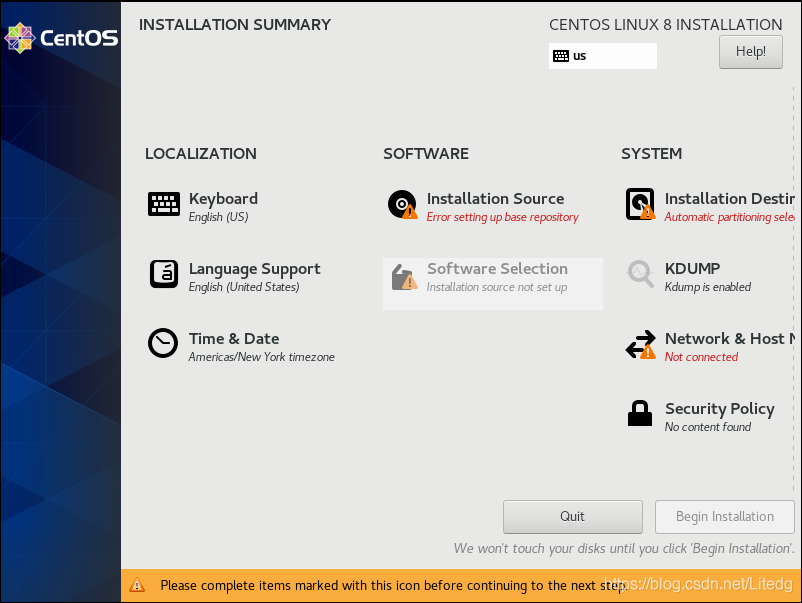
CentOS 8.2 installation-solve Error setting up base repository

Install CentOS 8.2- Error setting up Base Repository
Prepare to download the system image to make the U disk boot disk

CentOS 8 also came out for a while, replacing CentOS 8.2 on your computer from 7.6 with new, in keeping with the old principle. Removed the original system drive and installed a new 250G Samsung 850EVO. Prepare to install CentOS 8.2.
The preparatory work
Download system image
Direct downloads are not available on the CentOS official website and are required from a mirror. Can download directly, also can use thunderbolt and so on. For intramural traffic users, they can use uTorrent to use ipv6 and download it from the mirror of other universities (Shanghai Jiaotong University mirror station) to avoid heavy traffic. CentOS 8.2 provides boot, dvd1 and minimal installation methods. For convenience, the DVD1 image package (i.e., Cenos-8.2.2004-x86_64-dvd1.iso) was downloaded.
Make U disk starter disk
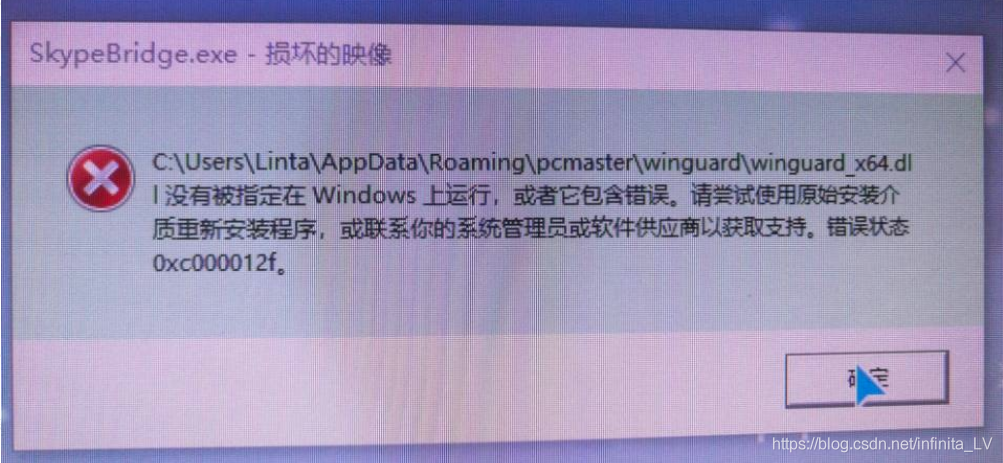
Cenos-8.2.2004-x86_64-dvd1.iso images are huge, at 7.66 GB, compared with about 4 GB for CentOS 7.6. It is recommended to prepare a larger USB flash disk for the startup disk. A 64GB or larger USB flash disk is recommended. I started to use a 16-g USB flash disk to make the startup disk. In the installation process, Error setting up the base Repository would occur. At one point, I thought it was a mirror file error and dropped it three times from three different mirror sources. It turns out that installing directly with virtual machines. Iso mirroring is not problematic, while ultraISO usb flash drives are. It took a 64GB USB stick to make the error go away. If you have doubts about your usb flash drive or are worried that you are not familiar with the installation process, you can use the virtual machine to install the usb flash drive first, then install it on a physical machine.
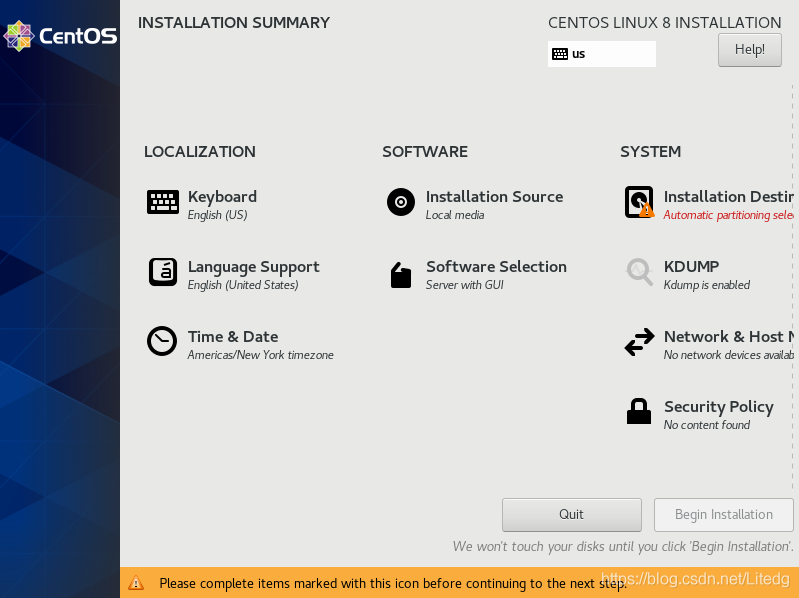
When using a normal USB flash drive for Installation, the Software-Installation Source will become Local media.

in this way, only need to select the SYSTEM partition in system-installation Destination, usually just select /boot and/and swap. No other partitions are selected.
is then installed normally.

Error code 2: Access violation error.

Error code 2: Access Cheesecake I have been researching for hours and TFTP keeps popping up this cheesecake Factory Error.
I checked all the answers, but they all said no, I chmod almost to 888
Finally, I made it
The first thing you need to do to run into this problem is install it correctly.

1. Install the software package

 
sudo apt-get install tftpd tftp xinetd
 
2. Create a profile
 
Set up a configuration file TFTP under /etc/xinetd.d/
 
sudo vi /etc/xinetd.d/tftp
 
The following
 
Service TFTP
{
Socket_type = dgram
Protocol = udp
Wait = yes
User = root
Server =/usr/sbin/in TFTPD
Server_args = -s /tftpboot // This is the location of ubuntu’s TFPT directory and the current one is in the root directory.
Disable = no
Per_source = 11
The CPS = 100 2
Flags = IPv4
}
3. Establish TFTP service file directory
 
In the above configuration, server_args = -s /tftpboot, where /tftpboot is where the files are uploaded and downloaded.
 
Sudo mkdir /tftpboot — Create /tftpboot in the root directory
 
Sudo Chmod 777/tFTpboot-r — set permissions to 777
 
4. Restart TFTP service
 
Sudo /etc/init.d/xinetd restart — RESTART the TFTP server
 
5, test,
Sudo netstat -a | grep TFTP — to see if the startup was successful, you can see udp 0 0 *: TFTP *:*
 
But mine is special
Udp60 0 *: TFTP [] :*
But it’s still installed correctly.
And then install this thing
apt-get install inetutils-inetd
What service management is said to be TFTP server

The following
I entered TFTP 192.168.1.205-G-R ABC in the development board
// 192.168.1.205 is my Ubuntu address
-g is for download
-r stands for remote file download
ABC is the test file I placed in the virtual machine TFTP

TFTP 192.168.1.205-p-r ABC
tftp: server error: (2) Access violatio

Encountered this problem TFTP: Server Error: (2) Access Violatio

Server_args = -s /tftpboot // (now I share TFTP directory, set in the root directory)
2: In the configuration file to set the path, but also to create the corresponding directory.
3: Then authorize the Shared directory
Chmod 777/tftpboot:
4: In the virtual machine/tFTpboot we create a file and write anything in it
Touch the ABC
gedit abc
And authorization
chmod 766 abc
5: Where do I type on the development board
[root@gec210 /] TFTP 192.168.1.205-G-R ABC
tftp: server error: (2) Access violatio
6: Again, we are in the current directory of the development board
Touch ABC // Create a file with the same name as the file we want to download // re-authorize it
chmod 766 abc
7: [root@gec210 /] TFTP 192.168.1.205-G-R ABC again
8: Successful ~~~~// success is not shown at all. You can only cat a file on the virtual machine to see if it’s your own.

Upload from the development board (to upload, you must first create a file with the same name in the VIRTUAL machine TFTP, permission is still 766, because the upload is covering write, you need to create a corresponding file name first.)
 
The first time failed
/ root @ GEC210/TFTP 192.168.1.205 – p – r ABC
0% ABC | | 0 – stalled –
TFTP: a timeout
Once again successfully uploaded ~ ~ ~ ~
/root @ GEC210/TFTP 192.168.1.205 – p – r ABC
100% ABC | * * * * * * * * * * * * * * * * * * * * * * * * * * * * * * * | 16 0:00:00 ETA


Solr 4.0 SolrException: Error opening new searcher java.io.FileNotFoundException problem solution

Encounter this kind of problem, very tricky, especially when the design to the index file is very large, this kind of problem, is caused by index corruption.
Check out lucene’s official documentation and see that Lucene actually provides indexing repair and checking tools. The specific usage is as follows.
Java – cp/solr/lucene/lucene – core – 4.0. Jar org.. Apache lucene. But CheckIndex/solr/core0/data/index – fix
The CheckIndex has other parameters to check out its Help
Note that when you use CheckIndex, you must ensure that the index is not being used and written at this time.
If you run this tool, a Java. IO. FileNotFoundException core0/data/index/_1tgo. Si, this type of mistake, you can use a skill, copy a file of the same suffix, to rename the file, make the repair can proceed.