Category Archives: How to Fix

[Errno 8] nodename nor servname provided, or not known

python2.7
gevent
Use the GEvent coroutine to initiate an HTTP request
Using python’s own standard DNS library,
Frequent errors
[Errno 8] nodename nor servname provided, or not known
Check some articles, DNS resolution is a problem with a lot of concurrency.
Solution: Instead of using Python’s DNS resolution standard library, use gEvent’s built-in DNS resolution module to replace the standard library.
(When the following patch_all() is implemented, GEvent will help us replace a series of standard libraries.)
 

from gevent import monkey;monkey.patch_all()


At this point, [Errno 8] Nodename Nor Servname provided, or Not known issues only happen the first time DNS is resolved, only once.
 

no target device found problem solved

In the process of developing apps with Android Studio, I believe everyone has encountered this problem. However, I have read some answers on the Internet and failed to solve the problem. Therefore, I have checked again myself.
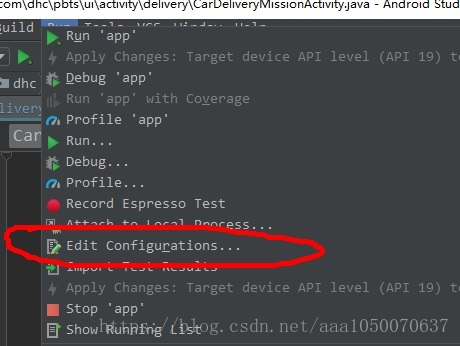
Start by selecting Run from the Top navigation bar of Android Studio, as shown in the figure

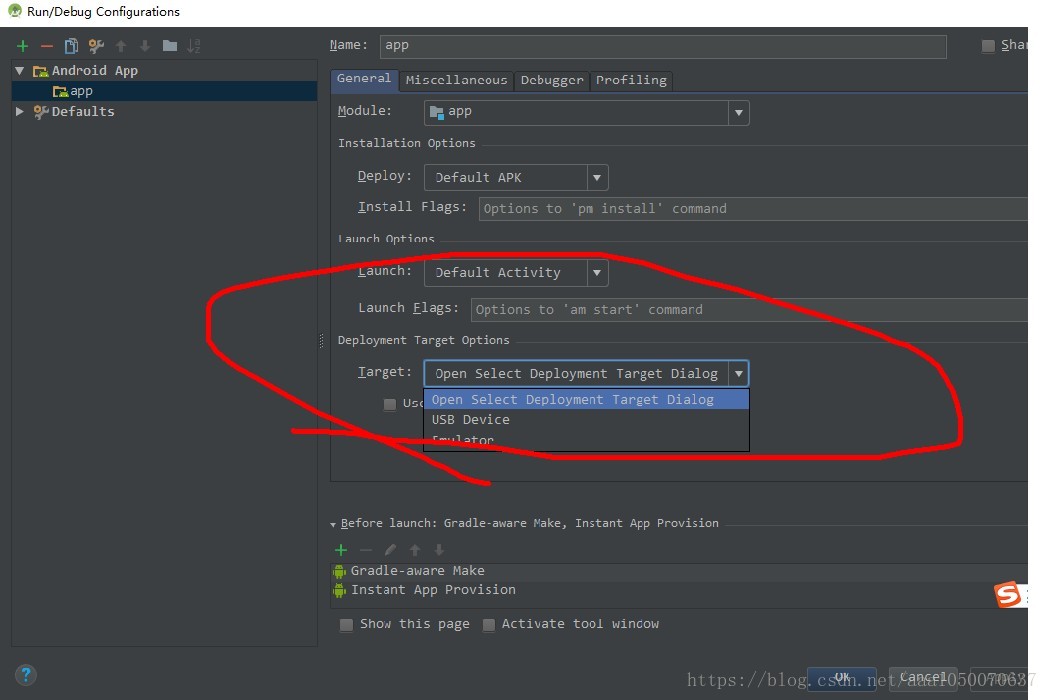
Then open Edit Configurations… , the following options appear, as shown in the figure

Select the first one here

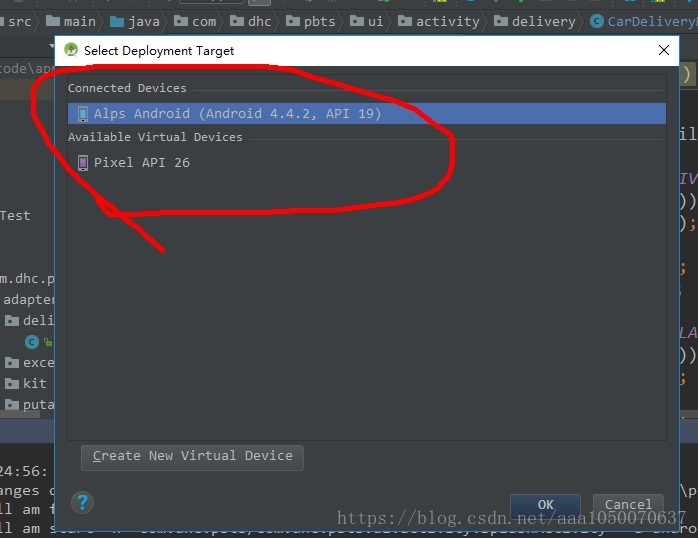
And then at this point, run the APP, click Run, and the following one will appear, as shown in the figure

Congratulations, now your virtual machine, or real machine, is out!!
If this interface does not come out, you can choose to restart the simulator or re-plug the UB real machine, and it will come out. Thank you for watching. I hope it helped you

Eclipse Syntax error, annotations are only available if source level is 1.5 or greater

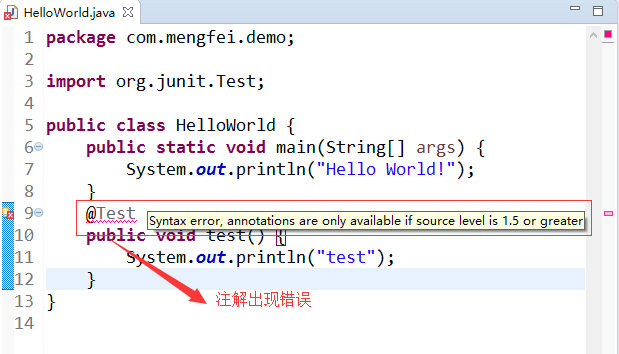
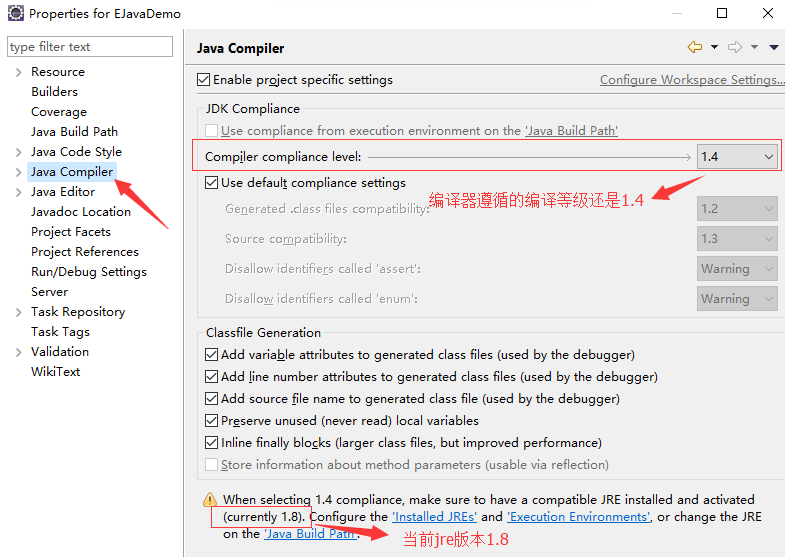
I. Problem descriptionSyntax error, annotations are only available if source level is 1.5 or greater, indicating that the annotations are only available in jdk1.5 or higher, as shown in the figure below:

My JDK is configured to be 1.8, which is not supposed to be the case. I checked the configuration of my project and found the problem

Second, the cause of the problem

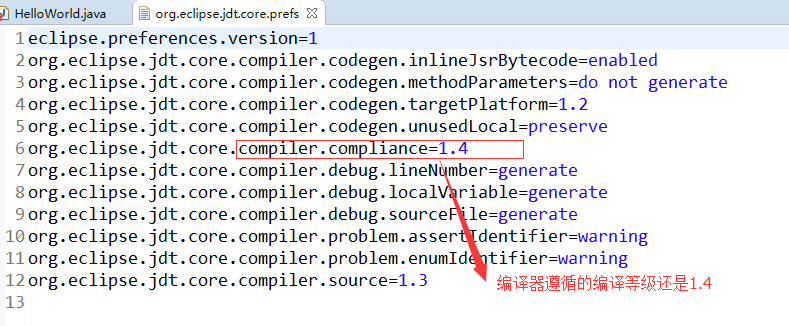
The compiler followed a low compilation level, used the default configuration file at project creation time, and did not update as configured with the JDK version

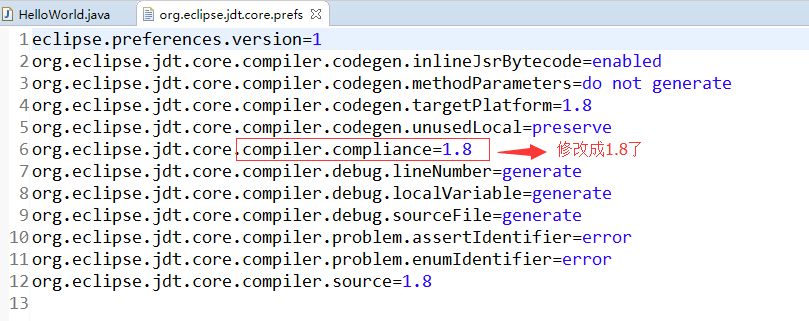
Here is the configuration information for the configuration file:

3. Solutions

1. Click the project shortcut Alt + Enter or right-click the project and select Properties at the bottom to enter the project configuration page

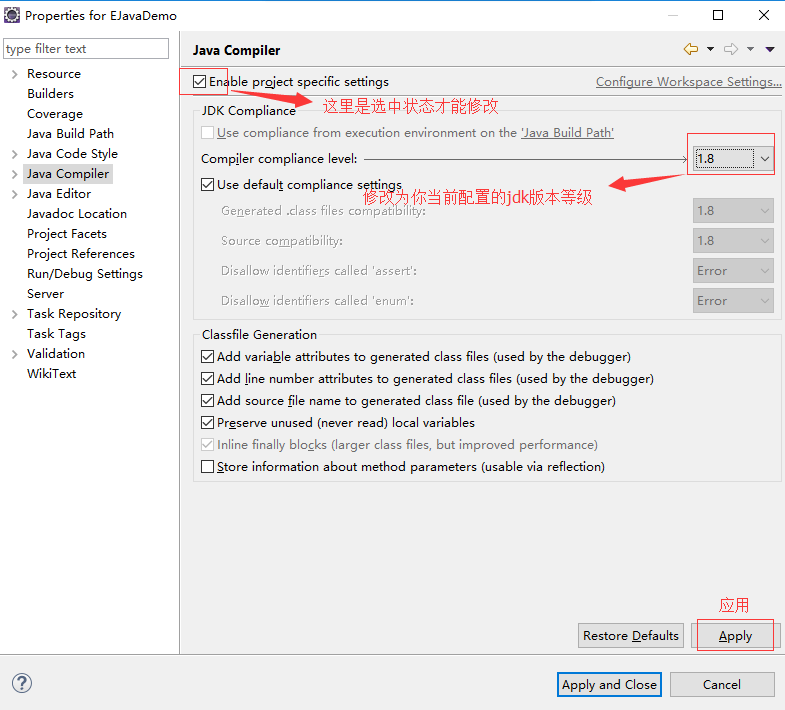
2. Modify the compilation level of the compiler

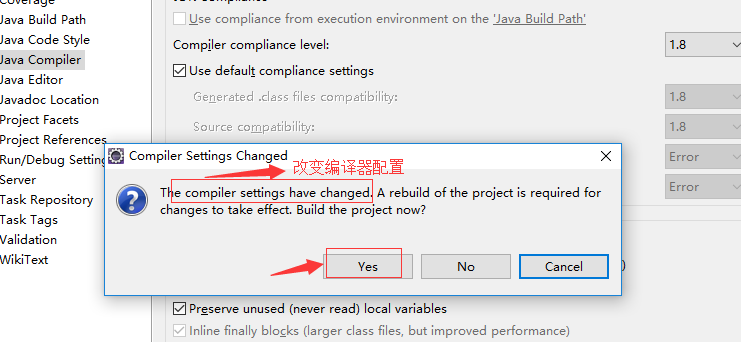
3. Change the configuration

4. The configuration file was modified successfully

Ok, problem solved


How to Fix Unknown error: Unable to build: the file dx.jar was not loaded from the SDK folder!

Unknown error: to the dx.jar the SDK folder! Recently, I gradually migrated to Android Studio. After updating the Android SDK Manager, I opened the Eclipse Run project and reported an error. Search for various solutions and find:
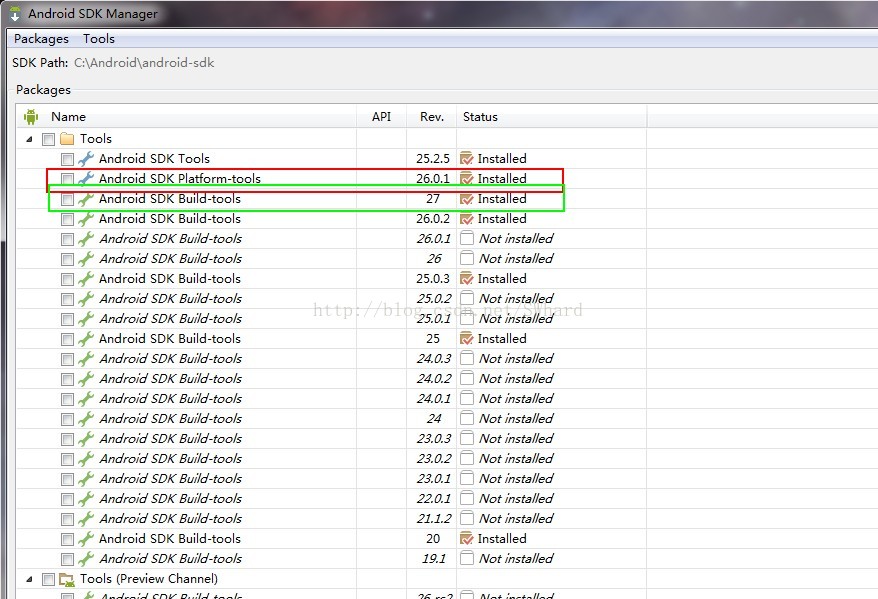
The version of Android SDK build-Tools has been higher than the version of Android SDK platform-tools, as shown in the figure

Since Android Studio sometimes has to use the higher-version build-Tools, simply deleting the higher-version build-Tools won’t do (see Unknown Error: to the dx.jar the SDK Folder! Solution).
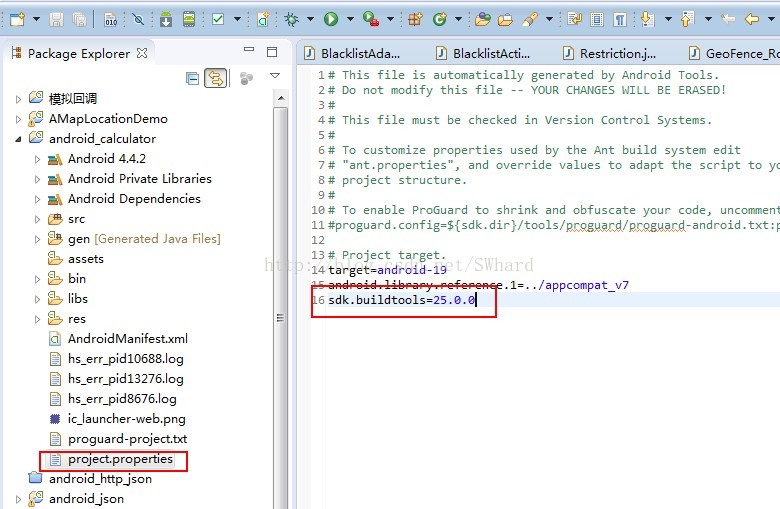
Finally, the relevant answer is found on Stack Overflow (Android ADT Error, was not loaded from the SDK Folder), and the modification is shown in the figure:

Add sdK.buildTools = the build Tools version already installed on your computer

Can.Close test:
Target = android – 24.
SDK buildtools = 25.0.3
Effective!!!!!

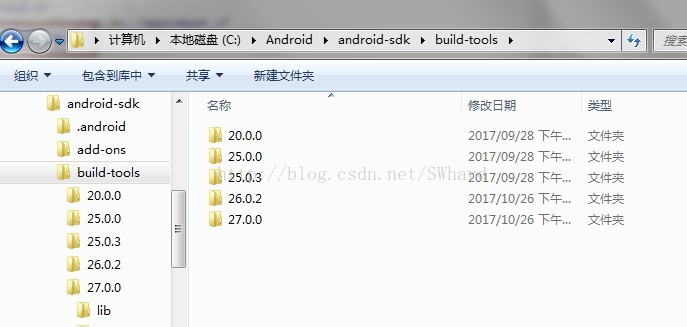
You can also avoid this problem by simply deleting the latest 26.0.0 and 27.0.0 folders

Fedora 14 yum Error: Cannot retrieve repository metadata (repomd.xml) for repository

Due to work reasons, Fedora 14 is needed. After installing the system, yum is used to install the software and report an error:
[root@bogon liu]# yum install samba samba-client samba-swat
Loaded plugins: langpacks, presto, refresh-packagekit
Adding en_US to language list
Error: Cannot retrieve repository metadata (repomd.xml) for repository: fedora. Please verify its path and try again
The solution is as follows:
1. Delete all files except Fedora.repo in /etc/yum.repos. D.
2. Modify the content of fedora.repo file, add the comment symbol ‘#’ in front of mirrorList, remove the comment symbol before baseurl, and replace the url.
The modified Fedora.repo file reads as follows:

[fedora]
name=Fedora $releasever - $basearch
failovermethod=priority
baseurl=http://archives.fedoraproject.org/pub/archive/fedora/linux/releases/$releasever/Everything/$basearch/os/
#mirrorlist=https://mirrors.fedoraproject.org/metalink?repo=fedora-$releasever&arch=$basearch
enabled=1
metadata_expire=7d
gpgcheck=1
gpgkey=file:///etc/pki/rpm-gpg/RPM-GPG-KEY-fedora-$basearch

[fedora-debuginfo]
name=Fedora $releasever - $basearch - Debug
failovermethod=priority
baseurl=http://archives.fedoraproject.org/pub/archive/fedora/linux/releases/$releasever/Everything/$basearch/debug/
#mirrorlist=https://mirrors.fedoraproject.org/metalink?repo=fedora-debug-$releasever&arch=$basearch
enabled=0
metadata_expire=7d
gpgcheck=1
gpgkey=file:///etc/pki/rpm-gpg/RPM-GPG-KEY-fedora-$basearch

[fedora-source]
name=Fedora $releasever - Source
failovermethod=priority
baseurl=http://archives.fedoraproject.org/pub/archive/fedora/linux/releases/$releasever/Everything/source/SRPMS/
#mirrorlist=https://mirrors.fedoraproject.org/metalink?repo=fedora-source-$releasever&arch=$basearch
enabled=0
metadata_expire=7d
gpgcheck=1
gpgkey=file:///etc/pki/rpm-gpg/RPM-GPG-KEY-fedora-$basearch

Then you can install the software normally
.

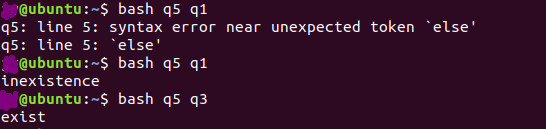
syntax error near unexpected token `else’

I wrote it this way at first, but I got an error

#!/bin/bash
filename=$1
if [ -e /home/xx/$filename ]
echo "exist"
else
echo "inexistence"
fi 

It turned out there was a then missing

#!/bin/bash
filename=$1
if [ -e /home/xx/$filename ]
then
echo "exist"
else
echo "inexistence"
fi 


It’s ok after modification!

Adb error: more than one device/emulator error handling

During the development of projects, it is often necessary to use ADB command for debugging. When the mobile phone is connected to the computer and ready to use adb shell command, the following error occurs
jason@zhanghailongdeMacBook-Pro ~ % adb shell
error: more than one device/emulator
According to the error prompt, the error is caused by the connection of multiple devices on the computer, and adb shell command does not know which one to operate, so the error is exploded. Check with ADB Devices:

jason@zhanghailongdeMacBook-Pro ~ % adb devices

List of devices attached
LGUS9982d76c740 device
192.168.201.7:5555 device
Sure enough, several devices appear. If you want to debug for a particular device, you need to specify the name of the device for adb command, such as debugging for device 2F54EE0:
jason@zhanghailongdeMacBook-Pro ~ % adb -s LGUS9982d76c740 shell
Joan:/$
In this way, it is possible to debug normally. If there is still a problem with the above method, the following scheme is recommended:
// Kill adb Server first :adb kill-server
// Restart ADB Server: ADB Start-up – Server

C++ error: jump to case label crosses initialization

A compiler, the compiler error error: jump to case label [- fpermissive], the error: crosses initialization of 'XXXX' </ code>, to simple combing the related content

I. Problem code

int main()
{
  int test = 2;
  switch(test)
  {
    case 1:
      int i = 1;  
      cout << i;
      break;
    case 2:
      cout << i;  
      break;
    default:
      cout << "error" << endl;
  }
}

//test.cpp: In function 'int main()':
//test.cpp: error: jump to case label [-fpermissive]
//   case 2:
//        ^
//test.cpp: error:   crosses initialization of 'int i'
//    int b = 1;
//test.cpp: error: jump to case label [-fpermissive]
//   default:
//   ^
//test.cpp:11:8: error:   crosses initialization of 'int i'
//    int b = 1;

As can be seen from the above code, since there is no separate block in switch to qualify the declaration period of variable I, the scope of the variable is the initialization point to the end of switch. In this case, the compiler will report an error because we are not sure whether this variable will be used in other cases and whether it was initialized before it was used. For example, if test has a value of 2 and case 2 is executed directly, an undefined variable will cause an exception. This is a compiler error crosses initialization </ code>.
After inspection, it is found that the compiler will report an error
no matter whether the other branches contain defined variables or not, as long as the variables are not braced in the case.

int main()
{
  int test = 2;
  switch(test)
  {
    case 1:
      int i = 1; 
      cout << i;  
      break;
    case 2:
      cout << 3; 
      break;
    default:
      cout << "error" << endl;
  }
}

//test.cpp: In function 'int main()':
//test.cpp: error: jump to case label [-fpermissive]
//   case 2:
//        ^
//test.cpp: error:   crosses initialization of 'int i'
//    int i = 1;
//test.cpp: error: jump to case label [-fpermissive]
//   default:
//   ^
//test.cpp: error:   crosses initialization of 'int i'
//    int i = 1;

The code of case 1 is enclosed with {}, and the scope of variable I is clearly set to avoid access by other cases
2. The scope of variable I is put outside the switch, and every case in the switch can be accessed
The
switch statement is a kind of goto statement, so goto has the same properties. The following goto statement will not be executed, variable I will definitely be defined, but will report the same error as above. This means that there can be no variables between goto and the tag. Variables must appear before the goto or after the tag.

int main()
{
    if(0)
    {
        goto end;
    }

    int i = 1;

    end:
       cout << i;
}

//test.cpp: In function 'int main()':
//test.cpp error: jump to label 'end' [-fpermissive]
//   end:
//   ^
//test.cpp error:   from here [-fpermissive]
//          goto end;
//               ^
//test.cpp: error:   crosses initialization of 'int i'
//     int i = 1;

In the above example, it is possible to initialize a variable before the goto tag or after the end tag

linux VMware Unable to change virtual machine power state: Internal error

Linux installation of VMWare under a problem, recently due to project needs, we have to Fedora8 system to install a virtual machine, the above run a Windows Server 2003, after a hard time to find a Linux version of VMWare, after installation, every time you start the virtual machine will report.

Unable to change the power state of the virtual machine: internal error.
This is an error.
At first I thought there was a problem with the vmware settings, but I finally found the answer on the Internet:
I encountered this problem when running a Vmware workstation under Ubuntu Jaunty. I get an error when shutting down the machine via an NX session.
It’s the result of a zombie ‘vmware-vmx’ process running. All you need to do is kill the process. This command sends ‘signal 9’ to the process. When sent to the process, SIGKILL causes the process to terminate immediately. Contrary to SIGTERM and SIGINT, this signal cannot be captured or ignored. More info:More sigkill info.
After that, I was able to start the virtual machine without any problems.

How to eliminate ADB error “more than one device and emulator”

When I connected to the phone to charge, I started the emulator debugging and executed ADB instruction, and reported an error.
C:\Users\gaojs> adb shell
error: more than one device and emulator
C:\Users\gaojs> adb install e:\good.apk
error: more than one device and emulator
In this case, first check to see if there are actually multiple devices or simulators.
C:\Users\gaojs> Adb devices
List of devices attached
emulator-5554 device
4dfadcb86b00cf05 device
you can find out that there are multiple devices, so you need to specify the device serial number for the adb command.
C:\Users\gaojs> Adb -s emulator-5554 shell
as shown above, add the -s parameter to the command! If there is actually only one device or simulator, and we have offline status;

, which means that ADB has a BUG, needs to be handled in the following way:

C:\Users\gaojs>
adb kill-server

C:\Users\gaojs>
Taskkill /f /im adb. Exe
the first command is a service to kill adb and the second command is a process to kill adb!

if the first command doesn’t work, consider using the second command to try again!

MySQL appears: ERROR 1049 (42000): Unknown database’XXX’ solution

The problem
Remember that when you installed MySQL database, you typed it from the command line

mysql -u root -p password

When I entered the command today, I found that it was incorrect, and I was asked to enter the password again, and then returned

“ERROR 1049 (42000): Unknown database '123'”

The figure shows

The error message is that you don’t know the 123 database, meaning that the password after -p represents the database name. But the argument after -p is supposed to mean password, which is weird.
To solve
So I went through the blog that I summarized earlier and found that the statement looked like this

mysql -u root -p123

can see that -p and password are linked together, there is no space between them
and then log in naturally!!
Then I looked at a wave and I found:
-U can be followed by the user name or a space, but the password must not be followed by a space.
if Spaces are added, mysql will assume that the last one is a library name.
we can look at the correct statement:

(1)mysql -u root -p123

(2)mysql -uroot -p123