Category Archives: How to Fix

PIP installation error: error: Microsoft Visual c++ 14.0 is required perfect solution

In the process of using Python development, it is often necessary to install various modules, but in the process of installation, various errors are often encountered. For example, error: error: Microsoft Visual C++ 14.0 is required. This error is due to the lack of C++ compiler components.
There are two solutions to this error
One is to directly download the corresponding WHEEL file for installation and provide three download addresses:
Tsinghua download (domestic site, faster) : https://pypi.tuna.tsinghua.edu.cn/simple/pip/
The official download: https://pypi.org/project/face-recognition/1.0.0/#files
Python package: https://www.lfd.uci.edu/~gohlke/pythonlibs/
Another solution is to install the missing component.
For the second solution, I believe most people will download a Visual Studio 201X and install it, as I did before. However, installing a VS takes up a lot of space, not to say the key, but it is still unusable after installation, which is really annoying.
After a variety of search, later found that you can directly install the official C++ runtime can be a perfect solution, leave an address: Microsoft Visual C++ Build Tools 2015
 
Double-click to run after downloading and install using default Settings. After the installation is complete, proceed to PIP Install XXX to indicate a successful installation.

 
Welcome to my personal blog: The Road to Machine Learning
Memory error in Python numpy matrix

Python calls NP to store the data. All of a sudden there were no prompts, and the MemoryError stopped.
Some people on the Internet say
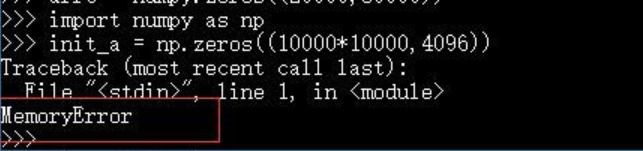
The matrix created by NumPY in Python is of limited size and cannot be created with tens of thousands of rows or columns, as shown in the following error

If you think about my code, it’s similar. I store 40,000 pictures at one time, maybe a little too much, so I make it a little smaller, and I don’t make any mistakes.


Take advice from others:
When dealing with big data in Python, the 16GB of memory started to report MemoryError before a quarter of the memory was used. Later, I learned that 32bit Python would report this error after using more than 2 gb of memory, but there were no other prompt messages. Decide to switch to 64bit Python.
originally installed 32bit Python because the official numpy and scipy versions only supported 32bit. Later, an unofficial version was found: http://www.lfd.uci.edu/~gohlke/ Python /#numpy
wheel file was installed: Fatal error in launcher: Python33\python.exe “” C:\Program Files (x86)\ python.exe” “C:\Program Files (x86)\ pipi.exe”
Find a solution on http://stackoverflow.com/questions/24627525/fatal-error-in-launcher-unable-to-create-process-using-c-program-files-x86:
python -m PIP install XXX


Python is prone to memory errors when dealing with large data sets, that is, running out of memory.
1. The original python data type takes up a lot of space, and does not have too many choices, the default is generally like 24 bytes, but in fact sometimes it does not need to be so big or so high precision, at this time you can use Float32, Float16 and so on in NumPY, in short, choose enough according to your own needs, this is several times of memory savings.
2. Python’s garbage collection mechanism is relatively lazy. Sometimes, variables in a for loop will not be collected when they are used up, and space will be opened up again in the next reinitialization.
3. In the case of sparse data, such as a large number of one Hot features in the training set, the dense data will be turned into sparse storage. Refer to the SPARSE module in SCIPY, where several data structures supporting sparse storage can be called directly. But notice that a centralized data structure requires at least two or three times the space in a dense data store. That means sparse arrays would take up even more space if they are half or less sparse. It only works if a lot of the data is sparse.
4. In essence, it is about checking whether there is something wrong with the way you organize your data, such as whether it can be one hot in each batch. In other words, don’t store all the things you need or don’t need in memory at one time.
— — — — — — — — — — — — — — — — — — — — —

the original: https://blog.csdn.net/yimingsilence/article/details/79717768
Reference: https://jingyan.baidu.com/article/a65957f434970a24e67f9be6.html
https://zhidao.baidu.com/question/2058013252876894707.html
Recommend interested can look at: https://blog.csdn.net/weixin_39750084/article/details/81501395

On the kernel error of jupyter notebook

Recently opened up The jupyter notebook found kernel error [kernal error]
FileNotFoundError: [WinError 2] The system cannot find The file specified, turned out to be I used conda to delete some environment at noon, so involved in this jupyter, may be The path problem, resulting in The file cannot be found. Finally, a solution was found:
Run in CMD:

python -m ipykernel install --user

1
Get things done.

Error: cannot allocate vector of size 88.1 MB

Tags: TPS ace should be the reference of the big err is unable to pay attention to the hive
When I was training the model to run the code these days, I was always prompted to say: Error: cannot allocate vector of size 88.1MB, only knowing that the allocated space is insufficient.
Here are some of the answers we looked up:
1, this is the characteristics of R, there are several solutions:
1. Upgrade to R3.3.0 or above, the memory management and matrix calculation is too good. Calculations that can crash on R3.2.5 will work fine above R3.3.0. 2. Load some R language disk cache packets, search
3. Write code when appropriate to add some clean memory command.
4. I should run multiple threads.
5. Add memory function is limited. R3.2.5 can crash the server, which has 44 cores and 512 gigabytes of memory. It is necessary to optimize the code.
Second, sometimes adding memory chips can’t meet the demand of large data volume, so parallel computing strategy is adopted. If the data is read in one time, it can be combined with filematrix package to read the data from the hard disk in several times, but it will be much slower.
Three, find that parameter in R, there’s a place where you can change the maximum memory allocation, in Preference or something like that.
Download a Package called BigMemory. It rebuilds classes for large data sets, and is basically cutting edge in the ability to handle large data sets (including tens of GIGABYtes).
Links to cran.r-project.org/web/packages/bigmemory/
The BigMemory package is ok. Two other options are also available, mapReduce and RHIPE(using Hadoop), which can also work with large data sets.
Six, the great spirit guide (http://bbs.pinggu.org/thread-3682816-1-1.html), always the allocate a vector is the typical data too big can’t read
There are three methods:
1, upgrade hardware
2, improve algorithm
3, modify the upper limit of memory allocated by the operating system to R, memory.size(T) check the allocated memory
Memory.size (F) checks the memory used
Memory.limit () check the memory limit
Object.size () looks at how much memory each variable takes up.
memory.size() view current work space memory usage
memory.limit() view system memory usage limit.
If the current memory limit is not sufficient, you can change it to a newLimit by using memory.limit(newLimit). Note that in 32-bit R, the capped limit is 4G, and you cannot use more than 4G (digit limit) on a program. In such cases, consider using a 64-bit version.
Detail can refer to this article, is very good at https://blog.csdn.net/sinat_26917383/article/details/51114265
1 http://jliblog.com/archives/276
2 http://cos.name/wp-content/uploads/2011/05/01-Li-Jian-HPC.pdf
http://cran.r-project.org/web/views/HighPerformanceComputing.html 3 R high performance computing and parallel computing
If you encounter this problem, you can try the corresponding solution, the method is not bad oh ~
Error: Cannot allocate Vector of size 88.1MB
Tags: TPS ace should be the reference of the big err is unable to pay attention to the hive
The original address: https://www.cnblogs.com/babyfei/p/9565143.html

ORA-12801

Ora-12801 error in parallel query today. Simple query: select/*+parallel(t 16)*/count(1) from A
Look at the official explanation:

ORA-12801: error signaled in parallel query server string

Cause: A parallel query server reached an exception condition.

Action: Check the following error message for the cause, and consult your error manual for the appropriate action.
This explanation is too abstract, I don’t understand the specific reason, finally changed the parallelism to 8:
Select /*+parallel(t 8)*/count(1) from A is OK.

Debugging mode of MATLAB: dbstop if error

Because I wanted to debug MATLAB program in Terminal, I stumbled into DBStop if Error by mistake. This is a brief encounter, right?Who benefits from whom?I have to tell you more about it.
MATLAB programming has some common errors, such as dimension mismatch problems. If the error is inside the function, we usually need to run the program at least twice to solve the problem by debugging: the first time we run the program, after the program reports an error, we cannot debug because we have already quit the function in error; Before running the second time, manually set the breakpoint inside the failed function and run the program a second time for debugging.
In this case, a more efficient debugging method for MATLAB is to use dbStop if Error, rather than running the program multiple times and manually setting breakpoints. When MATLAB travel, MATLAB encountered errors will stop in the error of the line of code, directly can be debugged, do not need to run again.
There are also infrequent errors in MATLAB programming, where you don’t know where to set a breakpoint before the first run. In this case, dbStop if Error can be used as a precautionary measure.
Dbstop if Error can be set on the command line and in programs, as well as in the GUI. See the video below and the related web page.

Could not find or load main class

It’s a shame that after all this time, Javac hello. Java is normal today when Java is running in CMD, Java hello, Could not find or load main class

public class TestHuman {

public static void main(String[] args) {

system.out.println (” hello Word!!”) );

}

}

can execute javac hello. Java instruction code is ok, when executing Java hello, there is a problem, it should be the environment variable configuration, what is the problem…

After a long search, I found the CLASSPATH {%JAVA_HOME%\lib; %JAVA_HOME%\lib\tools.jar}, preceded by “.;” .
Why is it missing?Does not affect Eclipse but will affect the operation of CMD…
Eclipse will automatically configure packages, projects, and paths for us, so that’s fine,
CMD has to manually configure these paths by itself, adding “. “means the current path, so there is no need to write the path step by step.

And I at the beginning of the configuration, should not understand what the point here is, there is no configuration, almost make a joke, mutual encouragement ~ mutual encouragement ~

Error = [Microsoft][SQL Server Native Client 11.0]Unable to open BCP host data-file

Execute the BCP command today, and put the query results into an Excel file locally.
Command:
EXEC master.. Arbitrary N ‘BCP “SELECT” database ID’, ‘ ‘the name of the database “, “object ID”‘, ‘ ‘the name of the table “, “query”‘, ‘total consumption of CPU time (ms)’, ‘execution times’,’ ‘the average consumption of CPU time (ms)’, ‘ ‘ ‘ ‘the last execution time,’ minimum execution time (ms)] ‘, ‘ ‘maximum execution time (ms)’ UNION ALL SELECT CAST (dbid AS NVARCHAR(100)),dbname,CAST(ObjectId AS NVARCHAR(100)) ,ObjectName ,SelectStatement ,CAST(total_worker_time AS NVARCHAR(100)) , CAST(execution_count AS NVARCHAR(100)) ,CAST( avg_elasped_time AS NVARCHAR(100)) ,CAST( last_execution_time AS NVARCHAR(100)),CAST(min_worker_time AS NVARCHAR(100)) ,CAST( max_worker_time AS NVARCHAR(100)) FROM db.dbo.bdd_temp_find_top_select_cpu “queryout e: top_select_cpu.txt-c-s “10.0.8.102\sqlinstance” -t ‘
Error:

What went wrong:
You may not have the path or you may not have write permission for the path.
Solution: Change to a path with permissions or grant the corresponding permissions.
I chose to switch to a path with permission:
EXEC master.. Arbitrary N ‘BCP “SELECT” database ID’, ‘ ‘the name of the database “, “object ID”‘, ‘ ‘the name of the table “, “query”‘, ‘total consumption of CPU time (ms)’, ‘execution times’,’ ‘the average consumption of CPU time (ms)’, ‘ ‘ ‘ ‘the last execution time,’ minimum execution time (ms)] ‘, ‘ ‘maximum execution time (ms)’ UNION ALL SELECT CAST (dbid AS NVARCHAR(100)),dbname,CAST(ObjectId AS NVARCHAR(100)) ,ObjectName ,SelectStatement ,CAST(total_worker_time AS NVARCHAR(100)) , CAST(execution_count AS NVARCHAR(100)) ,CAST( avg_elasped_time AS NVARCHAR(100)) ,CAST( last_execution_time AS NVARCHAR(100)),CAST(min_worker_time AS NVARCHAR(100)) ,CAST( max_worker_time AS NVARCHAR(100)) FROM db.dbo.bdd_temp_find_top_select_cpu “queryout \\10.0.9.177\software\ top_select_cpu.txt-c-s “10.0.8.102\sqlinstance” -t ‘

Adobe audit cannot play solutions

Adobe Audition — A solution that cannot be played
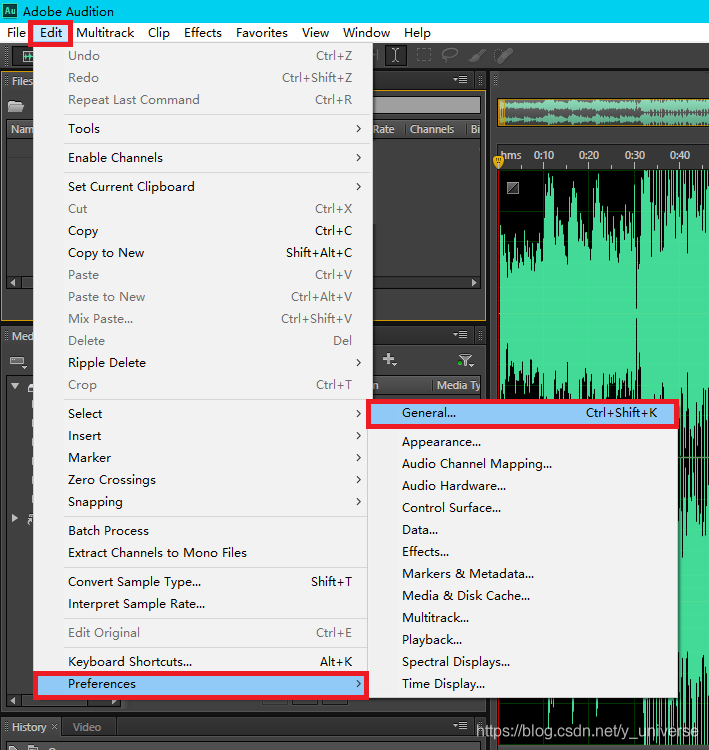
Problem description (Win10 & AMP; AU6)
Adobe Audition CS6 Audition(AU) audio editing, but found a little play button on the stuck flash back (Adobe Audition CS6 has stopped working).

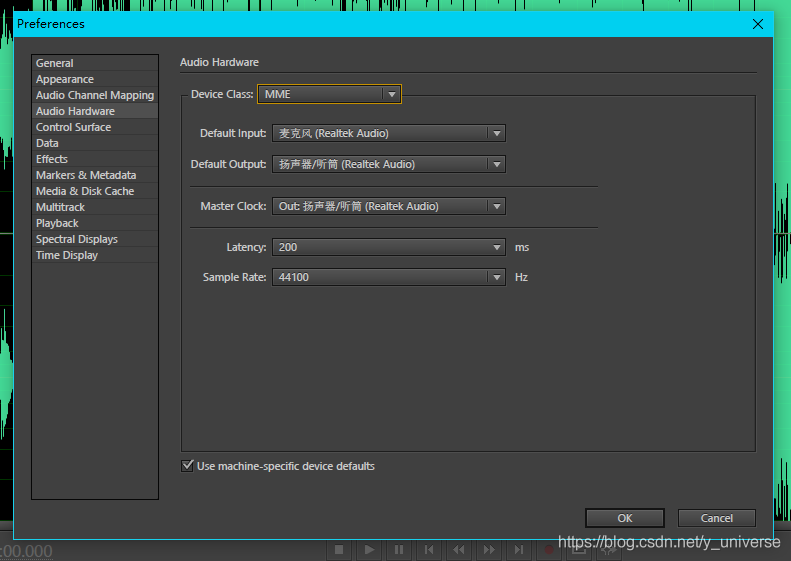
ready to take a look at the hardware Settings

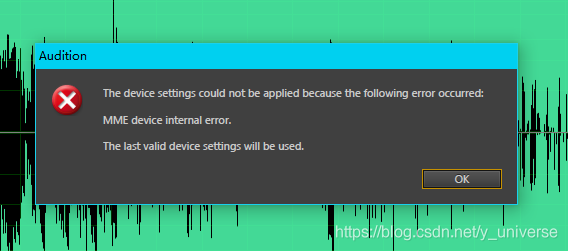
but found a new problem: the dot Settings reported an “MME device internal error” error.

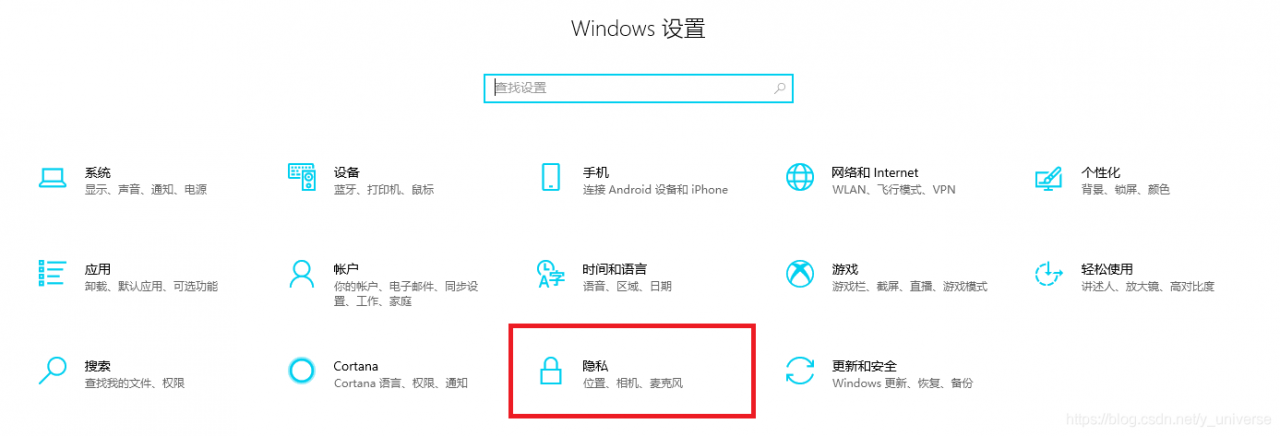
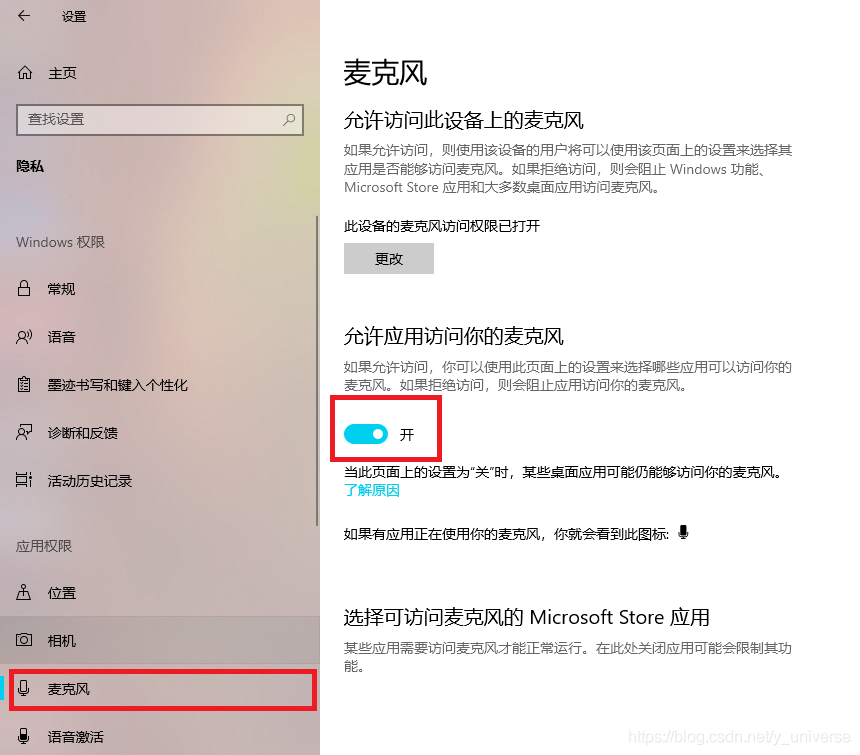
The solution


You can see that the Settings are open as normal for

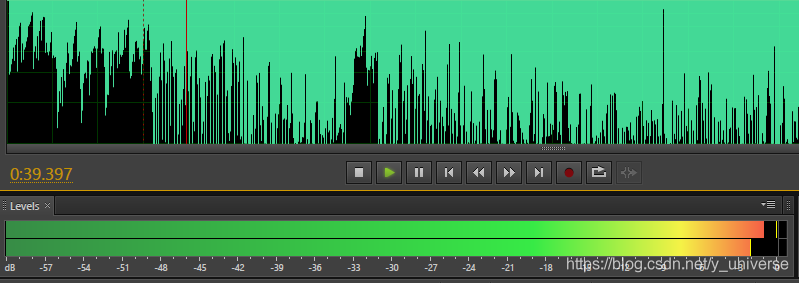
Audio can also play clips
normally