Category Archives: How to Fix

configure: error: C++ preprocessor “/lib/cpp” fails sanity check

The following error occurred while installing TigerVnc for Ubuntu 10.04.3 LTS

checking how to run the C++ preprocessor... /lib/cpp
configure: error: C++ preprocessor "/lib/cpp" fails sanity check
See `config.log' for more details.

This is due to the lack of appropriate libraries, so it can occur on different systems and when installing different software.
Since there is no corresponding library, the solution is simple and the corresponding library can be installed.
Here is one of the results I found. It reads as follows:
/lib/ CPP fails to solve puzzles check
When you run./configure, you’ll get an error:
Configure: error: C++ preprocessor “/lib/ CPP” fails sanity
check See ‘config.log’ for more details
Solution: this situation occurs because the relevant package of the c++ compiler is not installed. Log in as root and execute on the terminal:
# yum install glibc-headers
# yum install gcc-c++
This comrade USES the red hat version, for Ubuntu, just change yum to apt-get.
 
But I didn’t use this method myself, because Build-Essential contains a lot of base libraries, so I decided to give it a try and type

#sudo apt-get install build-essential

Run./configure again
This approach is recommended because it contains a number of basic libraries and may save you the trouble of missing libraries when you already have other software installed.

MySQL error: can’t create table ‘..’( errno:150 )Solutions

scenario
Student table S (SNO, SNAME, SAGE), class schedule C (CNO, CNAME)
When the course selection table (SC) is created, set (SNO, CNO) as the primary key and SNO and CNO as the foreign keys

drop table if exists sc1;
create table sc1(
    sno varchar(10),
    cno varchar(10),
    grade numeric,
    primary key(sno,cno),
    foreign key(sno) references s(sno),
    foreign key(cno) references c(cno)
);

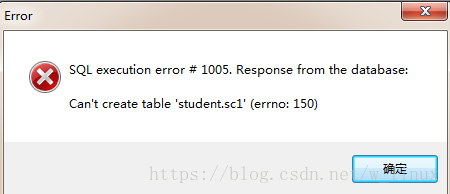
Error warning:

The solution
1. Check whether the types and sizes of foreign key fields in SC table are exactly the same as those in S table C table
2. One of the foreign keys you are trying to reference has no index or is not a primary key. If one of the foreign keys is not a primary key, you must create an index for it.
3, one or two tables are MyISAM engine table, if you want to use foreign key constraints, must be InnoDB engine

The error of the author is that cNO is not set as primary key in Table C, which can be solved by setting it once

mysql error 1093

Error Code: 1093. You can’t specify target table ‘t_user’ for update in FROM clause 0.015 SEC
data cannot be query in the same table as update data in the same table.
note that this problem occurs only in mysql; MSSQL and oracle do not.
Keyword search: mysql Error 1093
Example:


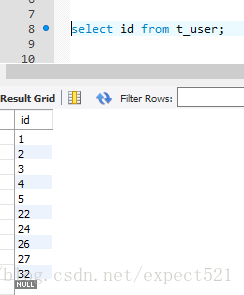
delete from t_user where id in (select id from t_user where id > 26);
Error Code: 1093. You can’t specify target table ‘t_user’ for update in FROM clause 0.000 SEC

Solution: select the result of the select through the intermediate table again, so as to avoid the error
change the SQL statement to:

delete from t_user where id in (select * from (select id from t_user where id > 26) tmp);

Then optimize it:

delete t from t_user t join (select id from t_user where id > 22) tmp on tmp.id = t.id;

query data in the same table as the same table update or delete delete, the SQL statement is as follows:
select * from (clause temp)

Possible causes of [errror] ID returned 1 exit status error in dev C + + Programmer

Yesterday, when I was debugging C program, I made this mistake, and my mentality was broken. But fortunately through their own a period of a period of program debugging, finally or to find the error. I will write it down, and I hope that the same small white encountered such mistakes, in time to find.
When the following error occurs:

There may be several reasons:
1. Library function spelling error. Such as: printf, Scanf, etc
2. The function name defined was misspelled during the call
3, when the execution of the function may function body itself
4. I haven’t noticed (maybe I haven’t come across yet) that other people say there are programs running.

That’s all I’ve found so far in writing C programs, and I hope it helps you

The performance of these shells in Windows Vista

(1) Before the Server 2003 in good use of mole (Armadillo), EXE shell, running in the WIN98 environment, exit the program always report an error, but click “OK”, there is no other exception. So we keep putting shells in it.

in VISTA, however, it can only protect EXE files directly. If you want to create or edit a project, yes
! The “general extraction error: locate at ES1(
General Extraction Error location ES1) “. And it doesn’t matter what operating system the client is running in. So that it doesn’t work at all, it has to be done differently.

(2) asprotect_ske_2.3 0514 beta, serial number is required first after installation. The serial number generated with the crack file in its installation package is not recognized. So it can only be said that the installation is successful, the use of failure.

(3) Obsidium has reduced the EXE files I originally “occupy” a few megabytes to only a few hundred kilobytes, which is such a high compression rate that even the most professional compression software has to yield to it, right?You can imagine the consequences of the program running to pop”
stopped working
ends with a “message box.

(4) PELock’s case is similar to Obsidium’s.

(5) finally a success, due to my need to protect “own intellectual property”, I will not tell you. So that’s the end of the shell test.

Launchanywhere windows error loading Java VM: 2 and 216

background
I haven’t come across such a problem for a long time. It’s all about JavaVM. Learn as you go.

LaunchAnywhere Error:
Windows error 2 occured while loading the Java VM

or

LaunchAnywhere Error:
Windows error 216 occured while loading the Java VM

English version of the error message is important, mainly when searching, the likelihood of finding the answer is greatly increased.
To solve
The first case:

LaunchAnywhere Error:
Windows error 2 occured while loading the Java VM

The reason is that after installing the Java JDK or the compact version of RE runtime environment (which is included in the former), you need to manually set the environment variables based on the version. Can’t Oracle check for environment variables at install time and set them if necessary?
Set the method
The second case:

LaunchAnywhere Error:
Windows error 216 occured while loading the Java VM

This error occurred while trying to install a 64-bit program on a 32-bit machine.

NPX webpack cannot find module’html webpack plugin’a bug causes headache

bug bug bug

Once I initialized the puzzling bug of Webpack, And I did a half-day’s work, really a half-day’s work. I didn’t finish it from around 3:00 in the afternoon until I got off work. Finally, I got upset and had a headache, and then I made a big meal of noodles.
To start with the bug,
initializes a webpack project, runs the packaging command, and reports the following error:
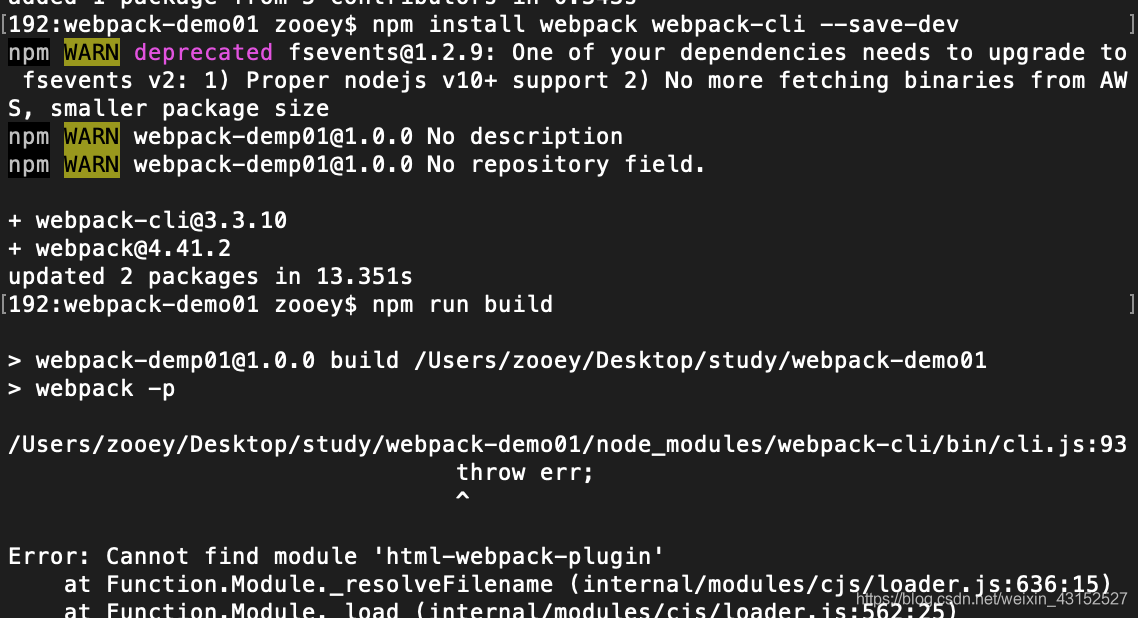
encountered such a bug at first. As usual, I simply read the error message. The module html-webpack-plugin was not found. This package is not used in an initial project. Well, baidu asks baidu, and a bunch of them come out, all irrelevant answer. There is no way to check, again, is it the problem of NPM warning above?First check [email protected], baidu check, a lot of said node version problem, to change the node version, bang bang, installed 7+, 8+, 10+, 12+ four versions of Node, it will not work. Also, it takes too long to clean up the Node cache. Okay, let’s give it up.
look at the second warning node-pre-gyp WARN Using needle for node-pre-gyp HTTPS download some said that there is no permission when installing, OK add sudo –> No effect, sudo NPM install Node-pre-gyp-g OK did not alarm, but Webpack packaging still reported the same error before, well do it again, [email protected] sudo NPM install fsevents-g –> Invalid, warning as before, ok, HTML – Webpack-plugin can’t be found. NPM install HTML-Webpack-plugin –save-dev NPM install HTml-Webpack-plugin — G Dunima tries webpack packaging like a goddamn bug.
back and forth again and again, three times I wanted to write some code in the afternoon, but I was bothered by this puzzling bug. I thought it was because I didn’t eat enough and had low blood sugar at noon, so I submitted the code after work at 7 o ‘clock, and went home to replenish blood.
cooked a bowl of noodles to eat, wonder is it the company network reason?Well, I changed the Internet at home. Open webpack Chinese official website, according to the tutorial to re-initialize a project Webpack packaging still reported the same error in the afternoon, ok, new Baidu, go again not good, again think is taobao mirror source problem?Change the NPM source to switch to the official source, install Wabpack wabpack-CLI half installed still appear [email protected] warning, thought to estimate cool, installation speed with Taobao source is not compared, decisively end.
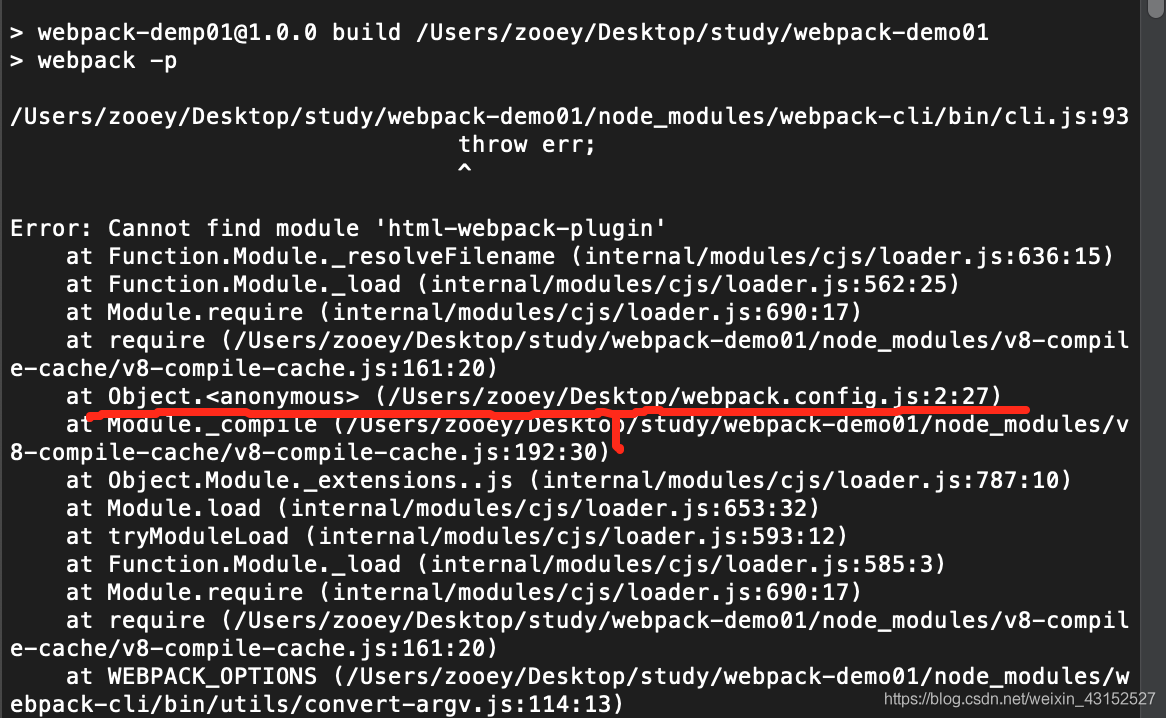
my project directory is not on the Desktop and there is no webpack configuration file in the initialized project. How can this Desktop path appear?
is thought to be broken, so it is estimated that there is a webpack.config.js file on the desktop. When webpack is packaged, it will automatically look for this file until it finds the file on the desktop, and then it will be packaged according to this configuration, and then it will report the error of html-webpack-plugin.
sure enough:

resolutely deleted, repackaged, everything is OK.
is really a bug check that makes me don’t know how to phrase it.
then decided to record here.
think carefully, if you carefully check the error message may not be so many annoying operation,
bug long to fix, I will be up and down to find out.
[Python error] using PIP / easy under Windows_ Fail error in launcher: unable to create process using

Once the Python installation under Windows is complete, several exe files are generated under the Python installation directory scripts, including easy_install and PIP,
We add the above path to the system environment variable after normal conditions
You can use tools such as easy_install, but on 64-bit systems you will get errors like the following:
C:\Python27\Scripts> easy_install sqlalchemy
Fatal error in launcher: Python27\python.exe
“”C:\Python27\Scripts\easy_install. Exe” sqlalchemy
is not consistent with the default python installation path in the tool when using tools such as easy_install, so we need to explicitly call python to install:
Python -m easy_install sqlalchemy
— — — — — — — — — — — — — — — — — — — — —
the author: HymanLiuTS
source: CSDN:
the original https://blog.csdn.net/hyman_c/article/details/52755628
copyright statement: this article original articles for bloggers, reproduced please attach link to blog!

You can’t specify target table ‘car’ for update in from clause

Error Code: 1093 occurs when the following SQL statement is executed:

update car set tag = 1 where id in (select id from car where brand_id=182 and tag=0);

The reason for the error is that the modified table and the queried table are the same table, which is not allowed in MySQL. We can solve this problem by querying again in the middle:

update car set tag = 1 where id in (select id from (select id from car where brand_id=182 and tag=0) As temp);

pip Import Error:cannot import Name main solution

When using PIP for an installation operation, you run into this problem:


was later found to be caused by a change in the function in the library that updated PIP to 10.0.0.

solution:

sudo gedit /usr/bin/pip

Will the original:

from pip import main
if __name__ == '__main__':
    sys.exit(main())

To:

from pip import __main__
if __name__ == '__main__':
    sys.exit(__main__._main())

With respect to OK

Analysis and solution of RSA premaster secret error

Problem description
Java is packaged and runs with Java-XMx1g-java.ext.dirs =lib2 Runner XX.
error: RSA premaster secret error
test has no problem, it can run locally and the result is correct; The server can run, but the results are incorrect. Report the above error.
Problem analysis
Java-cp XX. Jar YY is operational.
java-djava.ext.dirs will not run.
After java-java.ext.dirs loads the Lib, the JAR package under %JAVA_HOME%\ jRE \ Lib \ext will not load.
is queried, involving sunjce_provider.jar.
Solution 1
Find Sunjce, copy it to lib, and run the solution.

echo $JAVA_HOME  
> find $JAVA_HOME -iname "*sunjce*jar"   # find sunjce
/usr/lib/jvm/java-7-openjdk-amd64/jre/lib/ext/sunjce_provider.jar

Just copy this into lib.
Solution 2
You just have to load the JAR package under Ext, otherwise it’s a problem.
for example: java-java.ext.dirs =lib:$JAVA_HOME/jre/lib/ ext-jar build/ myappjar.jar
conclusion

    cp makes use of the current jar package and the lib/ext directory jar package in the jre, -d does not. Copy the past jar

if necessary
Refer to the reference
https://stackoverflow.com/questions/21390157/rsa-premaster-secret-error

