An error occurred while Detach database was running today, DBCC CHECKDB saw the following information from the SQL Server error log:
Error: 17053, Severity: 16, State: 1.
LogWriter: Operating system error 21(The device is not ready.)encountered.
Write error during log flush.
Error: 9001, Severity: 21, State: 4.
The log for database ” is not available.Check the event log for related error messages. Resolve any errors and restartthe database.
Error: 823, Severity: 24, State: 2.
The operating system returned error 21(The device is not ready.) to SQLServer during a read at offset 0x000000000de000 in file ‘xx.mdf’. Additional messages in the SQL Server error log and system eventlog may provide more detail. This is a severe system-level error condition thatthreatens database integrity and must be corrected immediately. Complete a fulldatabase consistency check (DBCC CHECKDB). This error can be caused by manyfactors; for more information, see SQL Server Books Online.
According to error 21, there should be a disk problem, but this disk has a lot of other databases on it that will work, and the newly created files will be fine.
Then I saw the error of 823, which should be caused by a hardware error. Microsoft’s recommendation is to run DBCC CHECKDB. But it doesn’t work at all.
Trying to run DBCC CHECKDB WITH TABLOCK still reports an error.
Then I tried to restart the service once, and the database worked. Running DBCC CHECKDB found no errors.
Feel this problem is very bogey, in the hardware disk is no problem even reported disk error.
This error was caused by the lack of lib files or include, but the UI in VS2010 was set up so badly that people didn’t know how to edit the original VC++ directory files. The solution is as follows:
Open the VS2010 project
Notice that in the lower left corner are Solution Explorer, Class View, Property Manager, and many other options. is revised for Directories like the one we introduced in VS2010.
display Property Manager contains the Debug|Win32 and Release|Win32 options . You can set the project properties of Debug and Release . Open any of them . Double click microsoft.cpp.win32. is modified here for the tutorial vc Directories. H (11266) : error C2061: syntax error: identifier ‘___, rpc___, out_xcount_part’ use the above method to delete the DirectX SDK Include from the Include path. Supplements: the
Directories that were modified for VC++ Directories in the project property dialog are project specific. The above modified VC++ Directories are large, affecting all project Directories and configuration Directories (Debug/Release/…) .
The original link: http://www.cnblogs.com/myyouthlife/p/3284291.html
Problem description:
An error message appears when the deployed SOE is enabled for a service. If the newly deployed SOE is enabled for SampleWorldCities, the error message is as follows:
service failed to start
SampleWorldCities.MapServer:
ClassFactory cannot supply requested class
Causes:
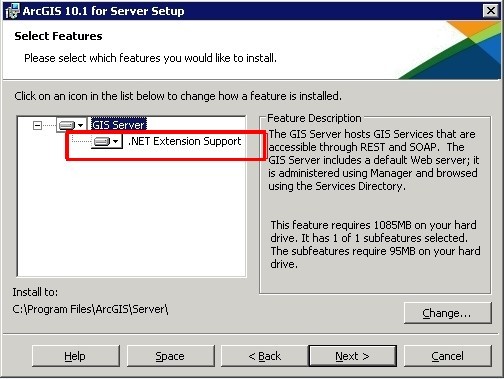
This error message usually appears in.NET SOE because.NET extension support was not enabled when ArcGIS Server was installed.
Solutions:
Fix arcGIS Server, enable.NET support. The screenshot below
==== dividing line ===
Update 9.29 days
In addition to the above, there is another situation in which the arcobjects SDK that is adopted by the opening of SOE is issued with the wrong version and the arcobjects SDK that is owned on the deployment machine. For example, the ARcobjects SDK for.NET 10.2 is adopted for soe development and deployed on a 10.1 Server machine, and only the Arcobjects SDK for.NET 10.1 is on the machine. The above error will also occur
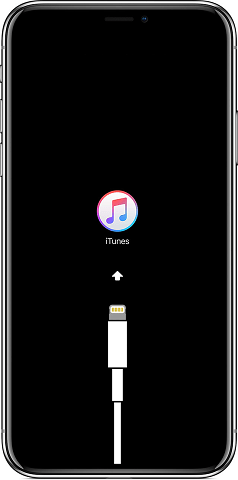
Disconnect your iPhone/iPad from your computerGo to Settings on your iOS deviceOpen Photos and scroll to the bottomUnder ‘Transfer to Mac or PC’, chang efrom Automatic to Keep Originals (“Automatically transfer photos and videos in a compatible format, or always transfer the original file without checking for compatibility.”)
Now connect again the device to the Windows 10 computer and copy/paste the files again; it should work fine now!
iPhone connected to Windows 10 computer. iTunes is not a necessity to be installed when copying files from one to the other.
Share my teacher’s artificial intelligence tutorial! Zero basis, easy to understand! http://blog.csdn.net/jiangjunshow
You are also welcome to reprint this article. Share knowledge, benefit the people, and realize the great rejuvenation of the Chinese nation!
1. Execute DELETE to report an error
mysql> delete from JBPM4_EXECUTION;
ERROR 1451 (23000): Cannot delete or updatea parent row: a foreign key constraint fails (`jbpm_db`.`JBPM4_EXECUTION`,CONSTRAINT `FK_EXEC_INSTANCE` FOREIGN KEY (`INSTANCE_`) REFERENCES`JBPM4_EXECUTION` (`DBID_`))
mysql>
The table has a foreign key, so delete is wrong. Here are two ways to handle it:
(1) Temporary setting of foreign key failure
(2) Delete the table data of the foreign key involved in the table
2. Handling scheme of foreign key failure
mysql> SET FOREIGN_KEY_CHECKS = 0; # Temporarily set foreign key invalidation Query OK, 0 Rows affected (0.00 SEC) MySQL> Mysql> delete from JBPM4_EXECUTION; # Execute delete operation Query OK, 110 Rows Affected (0.00 SEC) MySQL> Mysql> SET FOREIGN_KEY_CHECKS = 1; After the # operation restore foreign keys Query OK, 0 Rows affected (0.00 SEC) MySQL>
3, delete the foreign key table data out of the scheme
First, query all the foreign key situations involved in table lock, and query THE SQL as follows:
The
SELECT TABLE_NAME, COLUMN_NAME, CONSTRAINT_NAME, REFERENCED_TABLE_NAME, REFERENCED_COLUMN_NAME the FROM Information_schema.key_column_usage WHERE REFERENCED_TABLE_NAME = ‘JBPM4_EXECUTION’; usage WHERE REFERENCED_TABLE_NAME = ‘JBPM4_EXECUTION’;
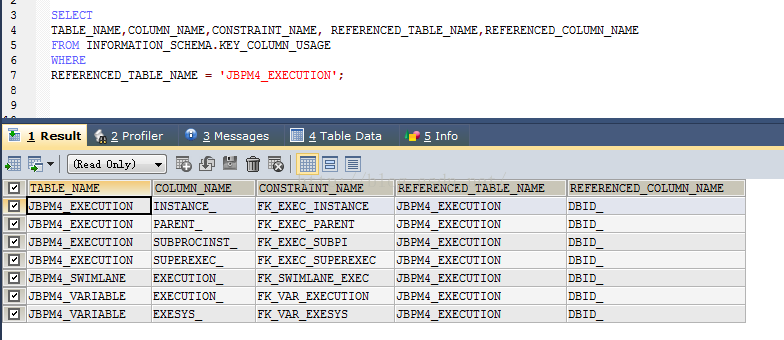
Executing the query will see the following foreign key:
E:\u\mysql\problem\pic\02.jpg
Then you see the tables that involve foreign keys are JBPM4_VARIABLE, JBPM4_EXECUTION, and JBPM4_SWIMLANE three tables, and then you can clear the data for these three tables.
The
mysql> delete from JBPM4_VARIABLE; Query OK, 1404 Rows Affected (0.03 SEC) MySQL> delete fromJBPM4_SWIMLANE; Query OK, 13 Rows Affected (0.03 SEC) MySQL> The delete from JBPM4_EXECUTION; ERROR 1451 (23000): Cannot delete or update a parent Row: Cannot delete or update a parent Row: Fails (‘ jbPM_DB ‘. ‘JBPM4_EXECUTION’, constraint ‘FK_EXEC_INSTANCE’ foreign key (‘ INSTANCE_ ‘) REFERENCES ‘JBPM4_EXECUTION’ (‘ DBID_ ‘)) mySQL> Mysql> The update JBPM4_EXECUTION set INSTANCE_ = null, PARENT_ = null, SUBPROCINST_ = null, SUPEREXEC_ = null; Query OK, 203 rows affected (0.02 SEC) Rows matched: 203 Changed: 203 Warnings: 0 MySQL> The delete from JBPM4_EXECUTION; All foreign key associated data has been cleared. Now delete the data. Query OK, 203 rows affected (0.02 SEC) MySQL>
Call my teacher’s artificial intelligence tutorial! http://blog.csdn.net/jiangjunshow
The actual test found that changing let to var did not report the error. the error message doesn’t say the wrong semicolon, it says the compiler can’t recognize the let keyword.
Running tsc-v found version 1.0.3.0
Then I learned online that Typescript supports let syntax in 1.4. Just open the Windows environment variable and see where TSC is using the command, if the version is wrong.
The following statement is found in path within the Windows environment variable: C:\Program Files (x86)\Microsoft SDKs\TypeScript\1.0; seems to be using the 1.0 that comes with the system.
Delete the environment variable here. Also delete Typescript 1.0 under the path. Let’s reinstall it
npm install -g typescript@latest
finally run: tsc-v found this time is not 1.0.3.0 but the latest installation 3.8.3. No problem.
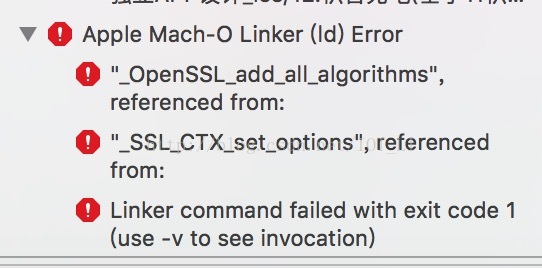
An old project changed from Xcode7 to Xcode8 and updated Baidu map and Baidu navigation. The error report is as follows:
Apple Mach-O Linker (ld) Error Group
iOS “_OpenSSL_add_all_algorithms”, referenced from:
.
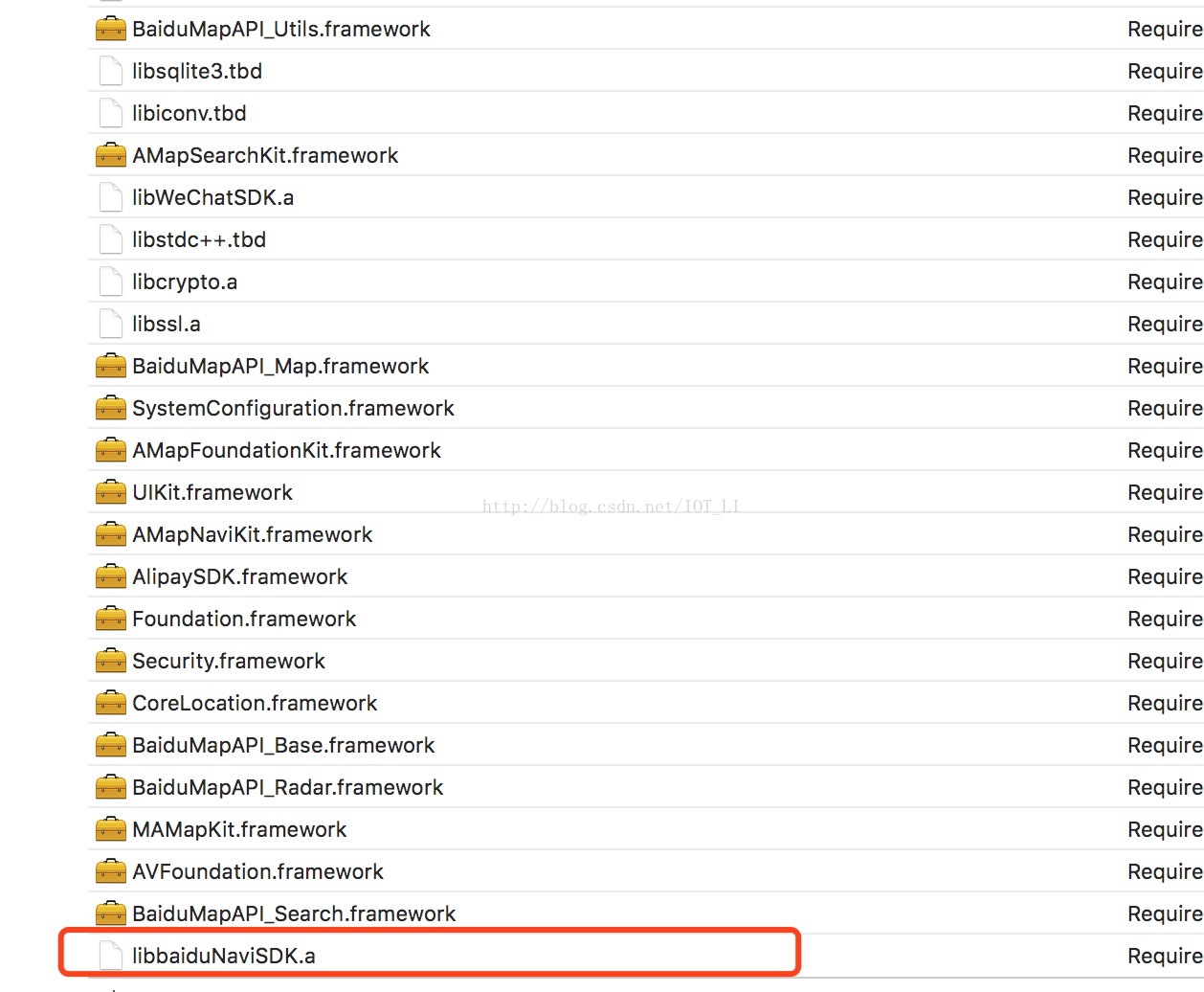
After checking the reasons, the solution is to put Baidu navigation on libbaidunavisdK.a at the bottom, as follows:
#additional packages thatmay be useful
[extras]
Name = CentOS – 5.9 – Extras – mirrors.ustc.edu.cn
baseurl=http://mirrors.ustc.edu.cn/centos/5.9/extras/$basearch/
gpgcheck=0
enabled=1
Once configured, perform YUM Update, Error Performing Checksum
[root@web1 yum.repos.d]# yum update
Loaded plugins: katello, product-id,security, subscription-manager
Updating certificate-based repositories.
Unable to read consumer identity
Base | 3.7 kB 00:00
The base/primary_db | 4.4 MB 00:02
http://mirrors.ustc.edu.cn/centos/6.4/os/x86_64/repodata/1e584feac3f3fb76ad4b6fb7e1bc8d44fa124814e9d186dc913ded3c63a216b3-primary.sqlite.bz2: [Errno – 3] Error performingchecksum
Trying other mirror.
The base/primary_db | 4.4 MB 00:02
http://mirrors.ustc.edu.cn/centos/6.4/os/x86_64/repodata/1e584feac3f3fb76ad4b6fb7e1bc8d44fa124814e9d186dc913ded3c63a216b3-primary.sqlite.bz2: [Errno – 3] Error performing checksum
Trying other mirror.
Error: failure:repodata/1e584feac3f3fb76ad4b6fb7e1bc8d44fa124814e9d186dc913ded3c63a216b3-primary.sqlite.bz2from base: [Errno 256] No more mirrors to try.
Google says that the REPomd.xml file USES SHA256 as the hash algorithm in RHEL 6, and SHA as the hash algorithm by default in RHEL 5.
But I’m using yum with 5.9 on Redhat 5.8. This error also occurs.
The online solution is to use the new SHA1 to rebuild repo:
# createrepo -s sha1 dave-el5-x86_64
I did not create it here, but just execute the following command:
# yum clean all
And then it’s ok. Little knowledge, along with notes.
——————————————————————————————–
Copyright, the article is allowed to reprint, but must indicate the source address in the way of link, otherwise the legal responsibility!
QQ:492913789
Email:[email protected]
Blog: http://www.cndba.cn/dave
Weibo: http://weibo.com/tianlesoftware
Twitter: http://twitter.com/tianlesoftware
Facebook: http://www.facebook.com/tianlesoftware
Linkedin: http://cn.linkedin.com/in/tianlesoftware
When executing a SQL query, I suddenly reported 1452, which made me totally confused.
In fact, the main reason for the error of 1452 is that there is no data in the main table corresponding to the child table with foreign keys.
For example:
Class list:
The
id
name
1
advanced classes
2
regular class
Student table:
id
name
class_id
1
* *
1
2
and
2
3
fifty
3
As a result, there is no data for the class with class_ID 3 for king 5 in the table.
So no matter how you do the update statement on king five he’s going to report an error.
The real reason:
I copied a “class list” from the official library, and then I copied a “student list”, and then I made a mistake in the operation of the student list.
Because after the class table was copied and before the student table was copied, new classes and students were added on the line. Then the data I copied here was only students, and no class was finished…
It’s embarrassing.
So don’t mess around…
Solution 1:
Clear both tables and redo them.
Solution 2:
Use SQL to delete data that has no data in the main table corresponding to the foreign key.
Take the above example: Delete Wang Wu.
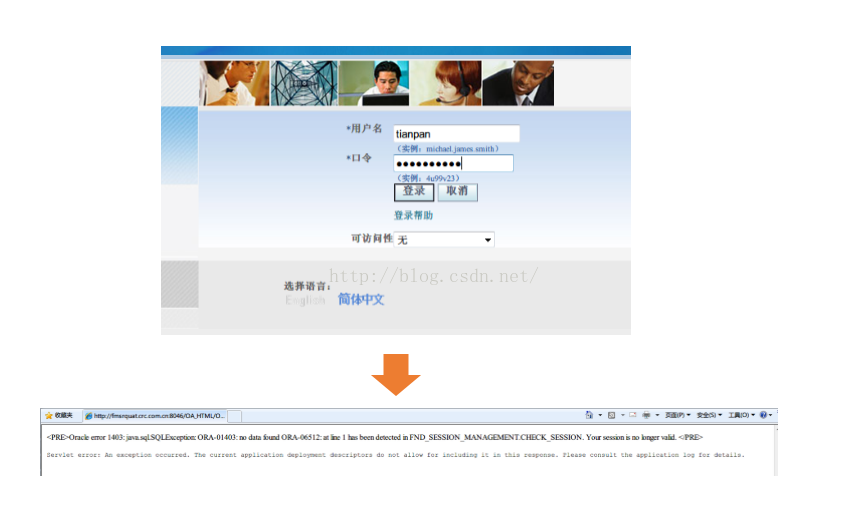
Internet Explorer 8.0 logged in Oracle EBS and reported an error. The login page opened without any problem, but entered the user name and password and logged in. The following error occurred:
< PRE> Oracle error 1403: java.sql.SQLException: ORA-01403: no data found ORA-06512: at line 1 has been detected in FND_SESSION_MANAGEMENT.CHECK_SESSION. Your session is no longer valid. < /PRE>
Servlet error: An exception occurred. The current application Deployment descriptors do not allow for including it in this response. Please consult The application log for details.
Trying to clear the cache and restart the browser, the login problem remains unresolved. (But with Firefox, login is normal).
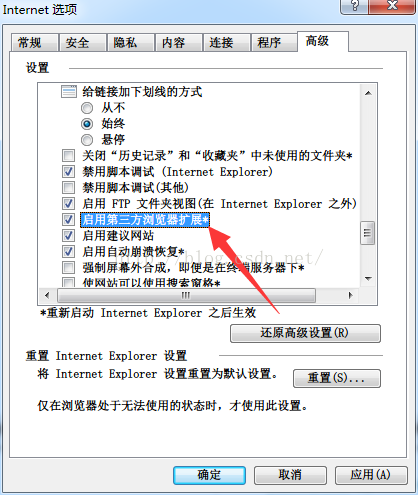
Solution: IE browser -> Tools – & gt; Internet options – & gt; “Advanced” TAB, remove the “enable third-party browser extensions” option, and close all IE browsers, try again, problem resolved.
Error connecting to a colleague’s Shared service:
Smbclient-l ip-u user WARNING: The “syslog” option is deprecated Enter WORKGROUP\administrator’s password:
Sharename Type the Comment — — — — — — — — — — — — — — — — —
XXX XXX Disk remote management Shared Disk default IPC remote IPC
XXX XXX Disk Logon server share XXX Disk Logon server share share_dir Disk Reconnecting with SMB1 for workgroup listing. Connection To IP failed (Error nt_status_connection_union) failed to connect with SMB1 — no workgroup available
The problem was located for a long time, and finally it was found that the problem could be ignored and accessed directly by using the following instructions:
The smbclient// IP/share_dir -u administrator
These days when I do crawler with Python, I always encounter Python URLError: < urlopen error timed out> The more threads open, the more frequently they occur. Later proved that the program did not have a problem, checked the information on the Internet, the network is blocked, more than a few times to try it.
For example, the original code looks like this:
if headers:
		req=urllib2.Request(url,headers=headers)
	else :
		req=urllib2.Request(url)
	opener=urllib2.build_opener(cookieproc)
	urllib2.install_opener(opener)
	page=urllib2.urlopen(req,timeout=5).read()
can be changed after adding a loop:
if headers:
		req=urllib2.Request(url,headers=headers)
	else :
		req=urllib2.Request(url)
	opener=urllib2.build_opener(cookieproc)
	urllib2.install_opener(opener)
	global Max_Num
	Max_Num=6
	for i in range(Max_Num):
		try:
			page=urllib2.urlopen(req,timeout=5).read()
			break
		except:
			if i < Max_Num-1:
				continue
			else :
				print 'URLError: <urlopen error timed out> All times is failed '