Category Archives: How to Fix

Solution to msxml3.dll error ‘80072efd’

msxml3.dll error ‘80072efd’

A connection with the server could not be established
The code below
is incorrect

dim XMLHTTP blnLoadXml

set XMLHTTP = server.createobject (” msxml2.serverhttp “)

XMLHTTP. Open “POST”, dhb133 & amp; “/ index. Asp”, false
.
XMLHTTP setRequestHeader “content-type”, “application/x – WWW – form – urlencoded”

XMLHTTP. Send objDom. XML

this error is because dhb133/index.asp cannot be reached.

should be a firewall problem.

what I encountered was that the machine could not be submitted. Because it was placed in the mobile computer room, it was shielded by the computer room firewall, so I could not access my own IP of the external network.

add 127.0.0.1 dhb133 to host

Reproduced in: https://www.cnblogs.com/dhb133/archive/2008/08/26/1276784.html

Can’t find Python executable “D:\python3\python.exe”, you can set the PYTHON env variable.

An error
When installing APpium with NPM under Win10, the following error is reported:

Can't find Python executable "D:\Anaconda3\python.exe", you can set the PYTHON env variable.

solution
1. Set the Python execution file path. 2, to use python version 2.7.
Methods a
Set the global variable in Windows PYTHON to be the absolute path of PYTHON 2.7, for example:

D:\Anaconda2\python.exe

Set variables:

set PYTHONPATH=%PYTHON%

Method 2

npm config

Solution of header file StdAfx. H “no such file or directory” in Visual Studio

1. Stdafx.h is not a standard C++ header file. Here is the default custom file of VS. Used in system precompilation headers. An error like “stdafx.h” : No such file or directory generally occurs, possibly because the compiler cannot create a precompiled file via stdafx.cpp, so other files cannot refer to the PCH file.
Solution: Select the source file stdafx.cpp, right-click -> Property – & gt; C/C++ -> Precompiled headers. The above problem is usually caused by changing the options for precompiled headers from create to use, which can be resolved by changing the options back to create.

SSIS Error:Package Validation Error. SSIS Error Code DTS_E_OLEDBERROR. .Error code: 0x80040E37. An …

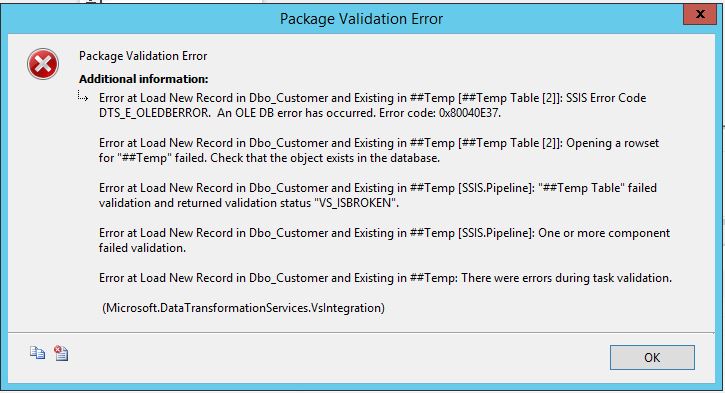
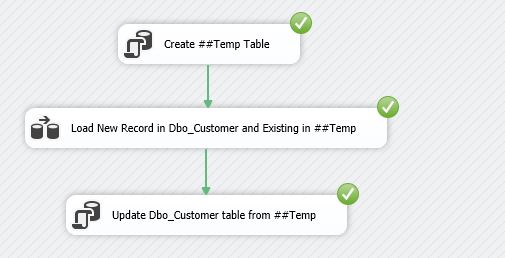
When I refer to the following link and try to dynamically create global temporary table ##Temp in the SSIS package and assign values to global temporary table variables using the Lookup component as a data source, the validation error shown in the figure below occurs.
http://sqlage.blogspot.com/2014/04/ssis-how-to-create-use-temp-table-in.html

Since the message has clearly indicated that this is a validation error and this is another package that dynamically creates a global temporary table, I suspect that there is a problem with the DelayValidation attribute setting. But out of my idation, I idation set the value of DelayVilidation to False. Out of my idation, I press F5 to execute the idation.

Duang! Indicates successful operation and problem resolved.
 

Reproduced in: https://www.cnblogs.com/HlxDo/p/4544378.html

[resolved] exception java.net.ConnectException : Error opening socket to server Connection timed out.

The following error appears when using DB2 Data Studio to link to the server’s database: SQL4499N

Ensure that the data server has been started.
Check that the database name used is the actual database name and not an alias name.
Check that the host is a valid name or IP address, and that the port number is valid for communication with the data server.
To further diagnose the problem, return to the Properties section and use the Tracing page to enable tracing. Contact the 
database administrator and provide the trace and other support information available.
Full message content: [jcc][t4][2043][11550][4.13.111] Exception java.net.ConnectException: Error opening socket to server 
/127.0.0.1 on port 50,000 with message: Connection timed out.

When I went to the test server to check the connection, I found that I could not connect to the company’s internal network, so I could connect to the external network. Because I configured the static IP address.
Found that /etc/resolv.conf did not have a company gateway address. So after adding, you can connect the company Intranet. But the db2 connection problem remains.

Then checked the online information: https://www.ibm.com/developerworks/community/forums/html/topic?id=77777777-0000-0000-0000-000014881167#77777777-0000-0000-0000-000014882240

Enter the following command:
Db2set DB2COMM=tcpip, which is the command to set the db2 connection to tcpip
Db2 UPDATE DBM CFG using SVCENAME db2c_db2inst1, this command should be used to add the service name to db2’s config file. And then restart DB2

[db2inst1@oc3354425588 ~]$ db2set DB2COMM=tcpip
[db2inst1@oc3354425588 ~]$ db2stop
SQL1064N  DB2STOP processing was successful.
[db2inst1@oc3354425588 ~]$ db2start
SQL1063N  DB2START processing was successful.
[db2inst1@oc3354425588 ~]$ vi /etc/services

[db2inst1@oc3354425588 ~]$ db2 update dbm cfg using SVCENAME db2c_db2inst1
DB20000I  The UPDATE DATABASE MANAGER CONFIGURATION command completed 
successfully.
[db2inst1@oc3354425588 ~]$ db2stop
dbSQL1064N  DB2STOP processing was successful.
[db2inst1@oc3354425588 ~]$ db2start
SQL1063N  DB2START processing was successful.

Enter db2 get DBM CFG to see all of db2’s config

[db2inst1@oc3354425588 ~]$ db2 get dbm cfg

          Database Manager Configuration

     Node type = Database Server with local and remote clients

 Database manager configuration release level            = 0x0f00

 CPU speed (millisec/instruction)             (CPUSPEED) = 1.259585e-07

 Max number of concurrently active databases     (NUMDB) = 32
 Federated Database System Support           (FEDERATED) = NO
 Transaction processor monitor name        (TP_MON_NAME) = 

 Default charge-back account           (DFT_ACCOUNT_STR) = 

 Java Development Kit installation path       (JDK_PATH) = /home/db2inst1/sqllib/java/jdk64

 Diagnostic error capture level              (DIAGLEVEL) = 3
 Notify Level                              (NOTIFYLEVEL) = 3
 Diagnostic data directory path               (DIAGPATH) = /home/db2inst1/sqllib/db2dump/
 Current member resolved DIAGPATH                        = /home/db2inst1/sqllib/db2dump/
 Alternate diagnostic data directory path (ALT_DIAGPATH) = 
 Current member resolved ALT_DIAGPATH                    = 
 Size of rotating db2diag & notify logs (MB)  (DIAGSIZE) = 0

 Default database monitor switches
   Buffer pool                         (DFT_MON_BUFPOOL) = OFF
   Lock                                   (DFT_MON_LOCK) = OFF
   Sort                                   (DFT_MON_SORT) = OFF
   Statement                              (DFT_MON_STMT) = OFF
   Table                                 (DFT_MON_TABLE) = OFF
   Timestamp                         (DFT_MON_TIMESTAMP) = ON
   Unit of work                            (DFT_MON_UOW) = OFF
 Monitor health of instance and databases   (HEALTH_MON) = OFF

 SYSADM group name                        (SYSADM_GROUP) = DB2IADM1
 SYSCTRL group name                      (SYSCTRL_GROUP) = 
 SYSMAINT group name                    (SYSMAINT_GROUP) = 
 SYSMON group name                        (SYSMON_GROUP) = 

 Client Userid-Password Plugin          (CLNT_PW_PLUGIN) = 
 Client Kerberos Plugin                (CLNT_KRB_PLUGIN) = 
 Group Plugin                             (GROUP_PLUGIN) = 
 GSS Plugin for Local Authorization    (LOCAL_GSSPLUGIN) = 
 Server Plugin Mode                    (SRV_PLUGIN_MODE) = UNFENCED
 Server List of GSS Plugins      (SRVCON_GSSPLUGIN_LIST) = 
 Server Userid-Password Plugin        (SRVCON_PW_PLUGIN) = 
 Server Connection Authentication          (SRVCON_AUTH) = NOT_SPECIFIED
 Cluster manager                                         = 

 Database manager authentication        (AUTHENTICATION) = SERVER
 Alternate authentication           (ALTERNATE_AUTH_ENC) = NOT_SPECIFIED
 Cataloging allowed without authority   (CATALOG_NOAUTH) = NO
 Trust all clients                      (TRUST_ALLCLNTS) = YES
 Trusted client authentication          (TRUST_CLNTAUTH) = CLIENT
 Bypass federated authentication            (FED_NOAUTH) = NO

 Default database path                       (DFTDBPATH) = /home/db2inst1

 Database monitor heap size (4KB)          (MON_HEAP_SZ) = AUTOMATIC(90)
 Java Virtual Machine heap size (4KB)     (JAVA_HEAP_SZ) = 2048
 Audit buffer size (4KB)                  (AUDIT_BUF_SZ) = 0
 Size of instance shared memory (4KB)  (INSTANCE_MEMORY) = AUTOMATIC(1048576)
 Instance memory for restart light (%) (RSTRT_LIGHT_MEM) = AUTOMATIC(10)
 Agent stack size                       (AGENT_STACK_SZ) = 1024
 Sort heap threshold (4KB)                  (SHEAPTHRES) = 0

 Directory cache support                     (DIR_CACHE) = YES

 Application support layer heap size (4KB)   (ASLHEAPSZ) = 15
 Max requester I/O block size (bytes)         (RQRIOBLK) = 32767
 Workload impact by throttled utilities(UTIL_IMPACT_LIM) = 10

 Priority of agents                           (AGENTPRI) = SYSTEM
 Agent pool size                        (NUM_POOLAGENTS) = AUTOMATIC(100)
 Initial number of agents in pool       (NUM_INITAGENTS) = 0
 Max number of coordinating agents     (MAX_COORDAGENTS) = AUTOMATIC(200)
 Max number of client connections      (MAX_CONNECTIONS) = AUTOMATIC(MAX_COORDAGENTS)

 Keep fenced process                        (KEEPFENCED) = YES
 Number of pooled fenced processes         (FENCED_POOL) = AUTOMATIC(MAX_COORDAGENTS)
 Initial number of fenced processes     (NUM_INITFENCED) = 0

 Index re-creation time and redo index build  (INDEXREC) = RESTART

 Transaction manager database name         (TM_DATABASE) = 1ST_CONN
 Transaction resync interval (sec)     (RESYNC_INTERVAL) = 180

 SPM name                                     (SPM_NAME) = oc335442
 SPM log size                          (SPM_LOG_FILE_SZ) = 256
 SPM resync agent limit                 (SPM_MAX_RESYNC) = 20
 SPM log path                             (SPM_LOG_PATH) = 

 TCP/IP Service name                          (SVCENAME) = db2c_db2inst1
 Discovery mode                               (DISCOVER) = SEARCH
 Discover server instance                (DISCOVER_INST) = ENABLE

 SSL server keydb file                   (SSL_SVR_KEYDB) = 
 SSL server stash file                   (SSL_SVR_STASH) = 
 SSL server certificate label            (SSL_SVR_LABEL) = 
 SSL service name                         (SSL_SVCENAME) = 
 SSL cipher specs                      (SSL_CIPHERSPECS) = 
 SSL versions                             (SSL_VERSIONS) = 
 SSL client keydb file                  (SSL_CLNT_KEYDB) = 
 SSL client stash file                  (SSL_CLNT_STASH) = 

 Maximum query degree of parallelism   (MAX_QUERYDEGREE) = ANY
 Enable intra-partition parallelism     (INTRA_PARALLEL) = NO

 No. of int. communication buffers(4KB)(FCM_NUM_BUFFERS) = AUTOMATIC(1024)
 No. of int. communication channels   (FCM_NUM_CHANNELS) = AUTOMATIC(512)
 db2start/db2stop timeout (min)        (START_STOP_TIME) = 10

 WLM dispatcher enabled                 (WLM_DISPATCHER) = NO
 WLM dispatcher concurrency            (WLM_DISP_CONCUR) = COMPUTED
 WLM dispatcher CPU shares enabled (WLM_DISP_CPU_SHARES) = NO
 WLM dispatcher min. utilization (%) (WLM_DISP_MIN_UTIL) = 5

 Communication buffer exit library list (COMM_EXIT_LIST) = 

If you only see if the service was added successfully:

[db2inst1@oc3354425588 ~]$ db2 get dbm cfg|grep SVC
 TCP/IP Service name                          (SVCENAME) = db2c_db2inst1
 SSL service name                         (SSL_SVCENAME) = 

Restart DB and the problem remains.

Later, I saw other materials on the Internet and said that it would not be the problem of the firewall… Then I looked at the firewall…

Computer-> Control Center-> Firewall-> Other Ports
Click the + sign, then in the popup dialog find Port 50000 | Protocal TCP | Service db2c_db2inst1, click OK. Click on the green in the upper left corner and check Apply.
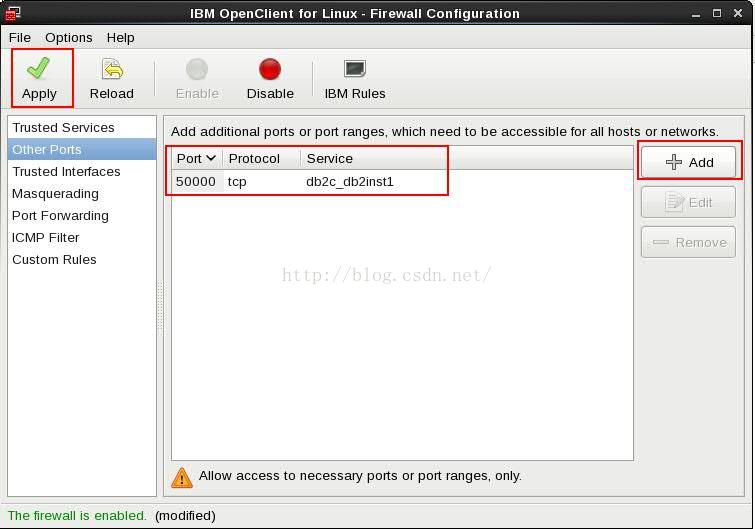
Go back to Data Studio and try to connect again. The connection is successful!
Sure enough, it’s the firewall again… Lift the table!
python root:code for Hash MD5 was not found. Error

A host of other errors can come along:

ERROR:root:code for hash md5 was not found.
Traceback (most recent call last):
  File "/usr/local/Cellar/python@2/2.7.15/Frameworks/Python.framework/Versions/2.7/lib/python2.7/hashlib.py", line 147, in <module>
    globals()[__func_name] = __get_hash(__func_name)
  File "/usr/local/Cellar/python@2/2.7.15/Frameworks/Python.framework/Versions/2.7/lib/python2.7/hashlib.py", line 97, in __get_builtin_constructor
    raise ValueError('unsupported hash type ' + name)
ValueError: unsupported hash type md5
ERROR:root:code for hash sha1 was not found.
Traceback (most recent call last):
  File "/usr/local/Cellar/python@2/2.7.15/Frameworks/Python.framework/Versions/2.7/lib/python2.7/hashlib.py", line 147, in <module>
    globals()[__func_name] = __get_hash(__func_name)
  File "/usr/local/Cellar/python@2/2.7.15/Frameworks/Python.framework/Versions/2.7/lib/python2.7/hashlib.py", line 97, in __get_builtin_constructor
    raise ValueError('unsupported hash type ' + name)
ValueError: unsupported hash type sha1
ERROR:root:code for hash sha224 was not found.
Traceback (most recent call last):
  File "/usr/local/Cellar/python@2/2.7.15/Frameworks/Python.framework/Versions/2.7/lib/python2.7/hashlib.py", line 147, in <module>
    globals()[__func_name] = __get_hash(__func_name)
  File "/usr/local/Cellar/python@2/2.7.15/Frameworks/Python.framework/Versions/2.7/lib/python2.7/hashlib.py", line 97, in __get_builtin_constructor
    raise ValueError('unsupported hash type ' + name)
ValueError: unsupported hash type sha224
ERROR:root:code for hash sha256 was not found.
Traceback (most recent call last):
  File "/usr/local/Cellar/python@2/2.7.15/Frameworks/Python.framework/Versions/2.7/lib/python2.7/hashlib.py", line 147, in <module>
    globals()[__func_name] = __get_hash(__func_name)
  File "/usr/local/Cellar/python@2/2.7.15/Frameworks/Python.framework/Versions/2.7/lib/python2.7/hashlib.py", line 97, in __get_builtin_constructor
    raise ValueError('unsupported hash type ' + name)
ValueError: unsupported hash type sha256
ERROR:root:code for hash sha384 was not found.
Traceback (most recent call last):
  File "/usr/local/Cellar/python@2/2.7.15/Frameworks/Python.framework/Versions/2.7/lib/python2.7/hashlib.py", line 147, in <module>
    globals()[__func_name] = __get_hash(__func_name)
  File "/usr/local/Cellar/python@2/2.7.15/Frameworks/Python.framework/Versions/2.7/lib/python2.7/hashlib.py", line 97, in __get_builtin_constructor
    raise ValueError('unsupported hash type ' + name)
ValueError: unsupported hash type sha384
ERROR:root:code for hash sha512 was not found.
Traceback (most recent call last):
  File "/usr/local/Cellar/python@2/2.7.15/Frameworks/Python.framework/Versions/2.7/lib/python2.7/hashlib.py", line 147, in <module>
    globals()[__func_name] = __get_hash(__func_name)
  File "/usr/local/Cellar/python@2/2.7.15/Frameworks/Python.framework/Versions/2.7/lib/python2.7/hashlib.py", line 97, in __get_builtin_constructor
    raise ValueError('unsupported hash type ' + name)
ValueError: unsupported hash type sha512

This can generally be solved by brew reinstalling Python @2

brew install http://raw.githubusercontent.com/Homebrew/homebrew-core/86a44a0a552c673a05f11018459c9f5faae3becc/Formula/[email protected]

Note that brew install python@2 may report an Error: Error: No available formula with the name "python@2"

Brew unlink openssl if not possible.
openssl

Syntax error or access violation: 1055 Expression #1 of SELECT list is not in GROUP BY clause and co

MySQL5.7 Group BY statement error:
Syntax error or access violation: 1055 Expression #1 of SELECT list is not in GROUP BY clause and contains nonaggregated column ‘t.road_name’ which is not functionally dependent on columns in GROUP BY clause; this is incompatible with sql_mode=only_full_group_by
The reason I looked for it was because in versions prior to MySQL5.7,
MySQL does not detect functional dependencies,
The only_FULL_group_BY default is not enabled.
Only_full_group_by default is enabled in MYSQL5.7.
So MySQL will reject queries that reference a list, condition, or order,
These queries refer to unnamed non-aggregated columns in a group rather than relying on them functionally.
Solutions:
Find the MySQL configuration file
Find /etc/my.cnf on the server and edit it

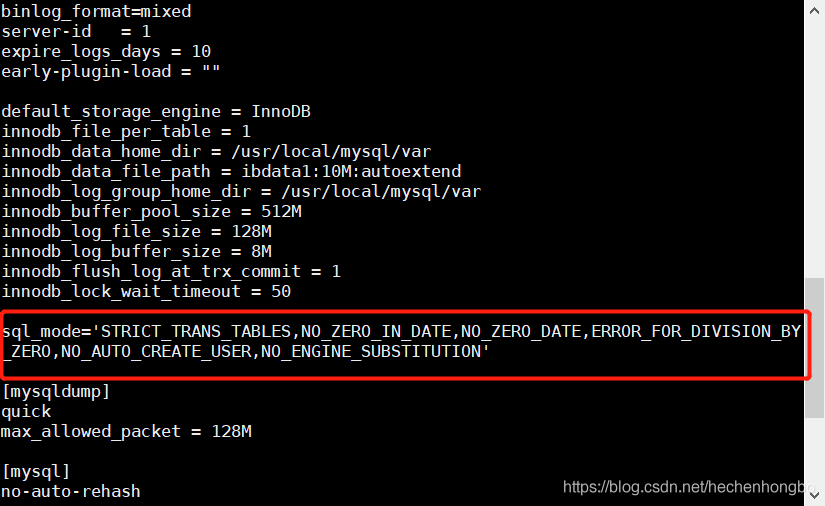
Add a sentence to the document:
sql_mode=’STRICT_TRANS_TABLES,NO_ZERO_IN_DATE,NO_ZERO_DATE,ERROR_FOR_DIVISION_BY_ZERO,NO_AUTO_CREATE_USER,NO_ENGINE_SUBSTITUTION’

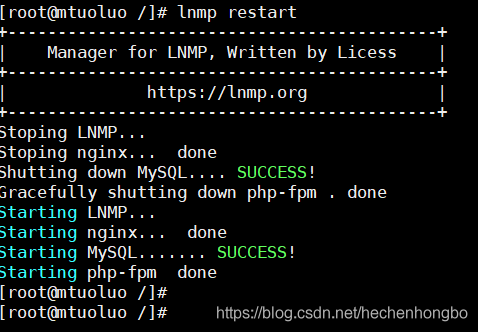
Then restart MySQL. LNMP is installed here. Just enter LNMP restart

ERROR 2005 (HY000): Unknown MySQL server host

One: Problem description
[root @ localhost mytop 1.6] #/usr/local/webserver/mysql/bin/mysql -u admin – p12345678 – h 172.29.141.112:3306 – e “show databases;”
ERROR 2005 (HY000): Unknown MySQL server host ‘172.29.141.112:3306’ (0)
[root@localhost mytop-1.6]#
 
Two: Problem solving
[root @ localhost mytop 1.6] #/usr/local/webserver/mysql/bin/mysql -u admin – p12345678 172.29.141.112 – P – 3306 – h e “show databases;”
+ — — — — — — — — — — — — — — — — — — — — +
| Database |
+ — — — — — — — — — — — — — — — — — — — — +
| information_schema |
| | blog
| mysql |
| performance_schema |
| Test |
+ — — — — — — — — — — — — — — — — — — — — +
[root @ localhost mytop 1.6] #
 
Three: The problem
Mysql didn’t support mysql-H IP :port. You might have thought something was wrong, but if you thought about it at the time, you would have found it. You would have posted it on the iptub.
 
Four: Other reasons
Firewall issues, /etc/init.d/iptables stop off, or reset

pathspec ‘master’ did not match any files known to git

The scene that emerges
Init init a warehouse locally, then create a develop branch, and do file operations on this branch, followed by the changes made by commit.

$ git init
Initialized empty Git repository in D:/practice/testBranch/.git/
$ git checkout -b develop
Switched to a new branch 'develop'
$ vim a.txt
$ git add a.txt
$ git commit -m "add a new file"
[develop (root-commit) f9ac3b8] add a new file
 1 file changed, 1 insertion(+)
 create mode 100644 a.txt

And then you go to the master branch, and you do the file manipulation. This is where the following error occurs:

$ git checkout master
error: pathspec 'master' did not match any file(s) known to git.

The cause of the problem
The command parsing
By default, the git init command creates a master branch and points the HEAD(which is a special pointer to the current local branch) to that branch. However, when you view local and remote branches using the git branch-a command, you won’t see any branches.
git checkout master command actually does two things: one is to make HEAD point back to master branch; The other is to restore the working directory to the snapshot content pointed to by the master branch.
Problem analysis
After the HEAD refers back to the master branch, the working directory needs to be restored to the content pointed to by the master branch. But since you’ve been working on the develop branch since the beginning, the working directory corresponding to the master branch is as good as nothing, so you can’t match any files.
How to solve
You just need to initialize a warehouse and first do some commit on the master branch, such as adding a readme.md file, thus creating a master branch. Such as:

$ git init
Reinitialized existing Git repository in D:/practice/testBranch/.git/
$ vim README.md
$ git add README.md
warning: LF will be replaced by CRLF in README.md.
The file will have its original line endings in your working directory.
$ git commit -m "add a new file"
[master (root-commit) 0e8c7c3] add a new file
 1 file changed, 1 insertion(+)
 create mode 100644 README.md
$ git push
Counting objects: 3, done.
Writing objects: 100% (3/3), 219 bytes | 0 bytes/s, done.
Total 3 (delta 0), reused 0 (delta 0)
remote:
remote: Create a pull request for 'master' on GitHub by visiting:
remote:      https://github.com/benben/testBranch/pull/new/master
remote:
To github.com:benben/testBranch.git
 * [new branch]      master -> master

When you do a push operation, you will see that a master branch has been created in the remote warehouse, and the local master branch points to the remote master branch.
then you can see all local and remote branches by using git branch -a. You can then create additional branches and switch between master branches at will.

$ git branch -a
* master
  remotes/origin/master

When switching branches, make sure that the files in your working directory are changed. If you switch to an older branch, your working directory will revert to the way it looked the last time the branch was committed. If Git cannot do this cleanly, it will forbid switching branches.