Recently, I participated in a virtual community Project, in which I made a farm game and video conferencing application module. The whole Project has several Flex projects, including the main program, public library and various functional modules. Because I was a late participant, I did not know much about the development mode of the Project, and of course because the two applications I made were independent, So I used the independent Flex Project to build the two applications.
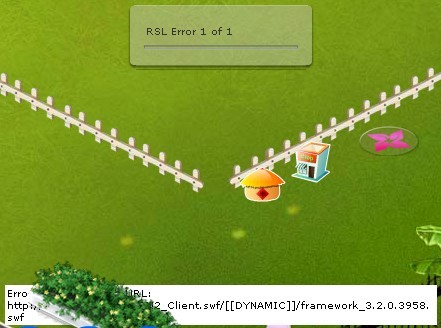
The project used RSL(Runtime Shared Library) to link external libraries, so I also used RSL when making those two applications. At the beginning, everything was normal. After the project was launched, the customer service staff occasionally received a call from the customer saying that the farm could not be opened, and the location of the farm appeared “RSL Error 1 of 1”, with a paragraph below “Error #2032: flow Error”. URL: http://www.xxx.com/XXX.swf/ [[DYNAMIC]]/framework_3 2.0.3958. SWF.
For a period of time, I was quite confused. At that time, I found the cause of the problem and came up with a solution.
First make a brief introduction of RSL, RSL is to compile multiple Project to create classes to multiple SWF, which includes the class library Project, the Flex framework library (framework_xxx. SWF), so that you can put the SWF contained in class sharing for multiple projects, on the client side load when it is ok to only need to load a (if not using RSL, all use class will compile into a SWF, if there are multiple SWF, repeat each part is contained inside the class, increase the user downloads). In the case of only one Project, the effect of using the RSL is not obvious because the generated SWF needs to be loaded for all other SWF Shared libraries that are used; However, if there are multiple projects, the advantage will emerge. After the first SWF loads the Shared library, the later SWF will not need to be loaded again, which can improve the access speed.
After using RSL, there will be two framework files “framework_3.2.0.3958. SWZ” and “framework_3.2.0.3958. SWF” in the root directory of the generated project (using different Flex SDK, the latter version number of these two framework files will be different). If the framework.swz file fails to load, Flash Player will go to the framework.swf file, one of the two is successfully loaded, and the project will run correctly.
In the event of a “RSL Error” Error, I tried to reproduce this Error on your computer, operating system, using XP when I cancel the SWZ files from the Flash Player cache, and built an empty read-only SWZ files, name and just delete the SWZ file name, to run the project again, and sure enough the “RSL Error”, below, write a new framework for Flash Player to the cache. SWZ failed, at the same time framework. The SWF also failed to load. The solution was to manually save the framework.swz file to the client’s Flash Player cache. I didn’t think much about why the file didn’t load successfully on the client’s computer (maybe it was a permission issue), but I just posted on the forum to see if anyone had a similar problem.
Everyone has a lazy side, which was exactly what I did at that time. If you think about it carefully, there are at least two questions that should be explored: 1. The whole project is using RSL, why only the two applications I wrote have RSL errors, and what is the difference between the application I wrote and the whole project; 2. 2, my application in framework. SWZ failed to load, framework. SWF also failed to load, so it can not run, the whole project in SWZ failed to load, but can run, later look, IE cache does exist framework. SWF, then this can be the whole project file load framework. SWF.
For a while, no one on the forum was sure of a solution to the problem. Once again, let me dig into this problem to help a customer solve the farm can not be opened, that is, there is an “RSL Error”. The client’s computer is Vista and Internet Explorer 8. When I put the framework.swz used in RSL into the client’s Flash cache, it occurred to me that it might be caused by the operating system. We are developing on XP. Because there is no SWZ file in the client’s Flash cache, the previous access failed to load the SWZ at all.
I installed Win7 in the virtual machine to do the test (Win7 and Vista kernel), sure enough, under Win7 can not normally access the farm, Flash cache without SWZ file. Because the project of other modules can be normal visit, so I think framework. The SWF file should be loaded successfully, but when I open the IE cache, find IE cache is framework. SWZ, rather surprised, as the chart, because always thought before the SWZ framework cache files will be saved to Flash, never think under Windows 7 will be put into IE cache (I Flash Player version is 10.0.45), which is why no SWZ framework in the Flash cache files. (If frame. SWZ is in Flash cache, SWFS in multiple domains can be Shared; if in IE cache, SWFS in the same domain can only be Shared).
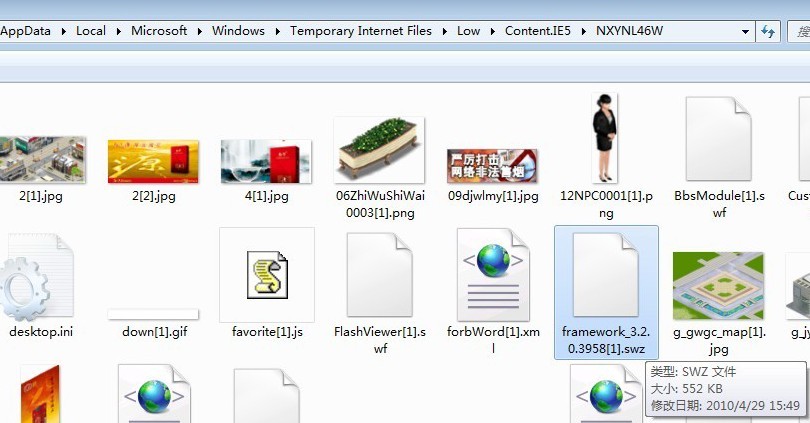
Discovering this has certainly given me a better understanding of the RSL bug, which could be a bug in Flash Player, or a manipulation of Adobe by Microsoft, but this cannot be confirmed at this time.
Question to this, of course, is not the end, because we have a question: framework. SWZ loading failure, and framework. The SWF can choose ah, why the second choice is also failed, I use firefox HttpFox plugin to view the request to the server client, finally found the problem, and it is concluded that the second question framework. SWF loading failure has nothing to do with the operating system. Summary of the cause of the problem: “Loading an external SWF file that USES an RSL causes an error path to the Framework file that the external SWF points to.”
Firefox browsing, and open the HttpFox plugin to view the Http request, after loading the main routine, can detect the client request the framework. SWZ file (if the SWZ cannot load may be loaded framework. The SWF file), when I disable the SWZ file after loading, into the farm, found the farm reload framework. SWZ and framework. The SWF, but these two files are failed to load, the two pictures below the first one is the main process successfully loaded framework. SWZ, The second path to the Framework file that shows the farm loaded is an error.
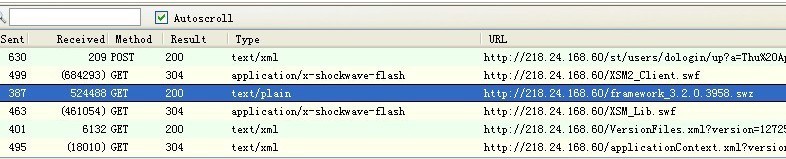

The problem is clear, the farm is a separate Project and USES the RSL and is loaded into the main program using Loader. It looks as if this changes the URL path of the farm program, but the resource path used by the farm does not change. So the conclusion should be that only the path of framework file used by this application is changed, and this path is only used in Flash Player, I don’t know if there is any other place to set it, is this another Flash Player bug?
I hope to further study the RSL.
PS: I forgot to write the solution in this article. At present, I know of two solutions. One is to stop using the RSL. The second is to manually copy the FlashPlayer cache file to the client. The disadvantage of this method is that sometimes we cannot operate the client. For the second approach, the cache directory of FlashPlayer is: XP system is C:/Documents and Settings/user/Application Data/Adobe Flash Player/AssetCache/H7UC3H3Y, VISTA and Windows 7 system is C:/Users/username/AppData/Roaming/Adobe Flash Player/AssetCache/RAU4Y963, this the end of the two paths a folder name is random, Another copy SWZ file also need to pay attention to in the past, such as FlexSDK3.2 SWZ filename in the cache is 1 c04c61346a1fa3139a37d860ed92632aa13decf. SWZ, this files need to be from a flashplayer cache is a problem with the copy machine to machine.
 is a perfect solution to the problem