Category Archives: How to Fix

ABAQUS FLEXlm error: – 15, 10. System error: 10061 “Winsock: problem solving of connection reused”

After reinstalling the system, the computer reinstalled ABAQUS6.10. As a result, this error occurred when verifying license status:

FLEXlm Error: -15, 10. System Error: 10061″WinSock: Connection union union

In addition, the server could not stop and the license file could not be reloaded, so I started all kinds of tutorials. Later, I could not help but shut down the LMGRd. exe in the process, and then re-start the server and Reload license.
In addition, using the deadline is 2017.11.11 abaqus6.10 cracked versions, if prompt license has passed life can refer to this thread https://tieba.baidu.com/p/5377311340, which directly use the high version of the license registration dat file.

AngularJS: Error reports on $injector:modulerr

The most common problem Angular JS has is that an application has failed to launch with an error of $Injector: Modulerr
The error was caused by a failure to load the corresponding Module, but it was difficult to find the Module that needed to be modified.
A simple trick is not to use Angular.min.js, but to use Angular.js. At this point, AngularJS gives detailed error information, which is very helpful in troubleshooting errors.
This is the error I see when I use Angular.js, so I simply remove the $translateProvider issue.
angular.js:68 Uncaught Error: [$injector:modulerr] Failed to instantiate module acTodoApp due to:
Error: [$injector:unpr] Unknown provider: $translateProvider
http://errors.angularjs.org/1.5.5/$injector/unpr?24 translateprovider p0 = %

at http://localhost:1337/node_modules/angular/angular.js:68:12 at http://localhost:1337/node_modules/angular/angular.js:4458:19
It’s for the record.
Alva Chien,
2016.5.2

array type has an incomplete element type

I. Details of the error
array type has an incomplete element type
Second, error analysis
·1) Error code:

int readInfo(int B[][],int n);
int findMax(int B[][],int n,int m);

2) Error reasons:

Void Func(int array[3][10])
void Func(int array[][10])
)
; void Func(int array[][10])
)
void Func(int array[][10])
3) Correction code:

int readInfo(int B[2][40],int n);
int findMax(int B[2][40],int n,int m);

HTTP error 405.0 – method not allowed solution for put and delete operations of rest Service on iis7.5

The Put and Delete operation of REST service on IIS7.5 occurs HTTP Error 405.0-method Not Allowed

WebDAV is a set of extensions to the hypertext transfer protocol (HTTP) that provide standards for editing and file management between computers on the Internet. Using this protocol, users can perform remote basic file operations, such as copying, moving, deleting, etc., over the Web. In IIS 7.0, WebDAV is a stand-alone extension module that needs to be downloaded separately. In IIS 7.5, WebDAV will integrate WebDAV, but WebDAV puts and Deletes. So the RESTful Service deployed on IIS 7.5 (WCF Data Service, WCF Rest Service,ASP.NET Web API,ASP.NET MVC) is a tragedy. HTTP Error 405.0 — Method Not Allowed occurs when a Put request is sent.

< system.webServer>  

& lt; modules>  

& lt; remove name=”WebDAVModule” />  

& lt; /modules>  

& lt; handlers>  

& lt; remove name=”WebDAV” />  

& lt; /handlers>  

< /system.webServer>

Error 1364 (HY000): field ‘SSL_ cipher’ doesn’t have a default value

When creating a user in mysql today, you can see how to insert data directly into the User table when someone is using it, as follows:

mysql> insert into mysql.user(Host,User,Password) values("localhost","test",password("1234"));

So I also tried to create users with this method in the database, but got the following error:

mysql> insert into mysql.user(Host,User,Password) values('localhost','siu',password('siu'));       
ERROR 1364 (HY000): Field 'ssl_cipher' doesn't have a default value

The reason for this error is that mysql’s default configuration is strict mode, which prohibits adding new users by directly modifying the USER table in the mysql library by INSERT.
solution is to modify my. Ini (Windows system) or my. Conf (Linux system) configuration file, taking Linux system as an example:

sql-mode=STRICT_TRANS_TABLES,NO_AUTO_CREATE_USER,NO_ENGINE_SUBSTITUTION

Modified to:

sql-mode=NO_AUTO_CREATE_USER,NO_ENGINE_SUBSTITUTION

Then restart the mysql service

service mysql restart

Create the user again and it will be successful

mysql> insert into mysql.user(Host,User,Password) values("localhost","joey",password("1234"));    
Query OK, 1 row affected, 3 warnings (0.00 sec)

It is important to note, however, that since mysql by default forbids this method to create users for database security, we should also avoid creating users by inserting. The correct way to create a user is:

mysql> create user 'joey'@'localhost' identified by 'joey';
Query OK, 0 rows affected (0.00 sec)

This user is then authorized for certain databases:

grant all privileges on joey.* to 'joey'@'localhost' identified by 'joey'; 
Query OK, 0 rows affected (0.00 sec)
mysql> flush privileges;
Query OK, 0 rows affected (0.00 sec)

Passwd: authentication token manipulation error in Linux

If in Linux, whether root or ordinary user logs in and changes their password, passwd: Authenticationtoken Manipulation error occurs — the solution to the error:
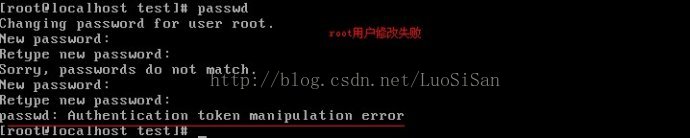
Root herself failed to change the password

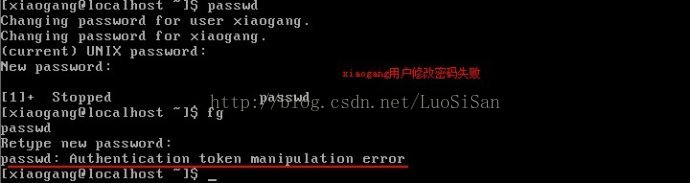
Normal user failed to change password

1. Reporting such an error is: password: authentication token operation error, usually due to the permissions of the password file, but may also be the root directory space is full.

Using the Lsattr command to view the file properties that hold the user and password, you find the I option: (I: Do not arbitrarily change files or directories.) As a result, all users cannot change their passwords because they have no permission to do so.
2. We need to use the chattr command to revoke the I permission, and then modify, it is ok.

3. Then test root and Xiaogang users to change their passwords.
Test the root user to change the password

Test xiaogang users to change their passwords

4. For security reasons, it is better to change the password and protect the file where the user and password are stored.
Also chattr + I /etc/passwd and chattr + I /etc/shadow files
5 ordinary users to modify their passwords, is required, the password must be complex, and in the password dictionary some characters can be set.

Solve the problem of pychar import error

Question:
Pycharm shows those classes that cannot be referenced, even if they are in the project.
Analysis:
Pycharm defaults the project’s root directory to the source directory, so if the import USES an absolute path instead of a relative path, it will be looked up in the project’s root directory, not the project’s own root directory.
Methods:
Set the root directory of the item in Pycharm:
The file – & gt; Setting – & gt; Project: server – & gt; project structure
Set the path to Source in the root directory of the project.

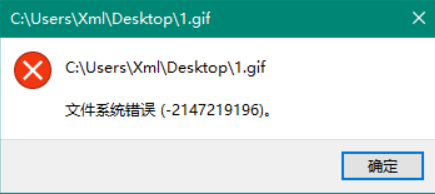
Win10 can not open the picture, file system error (- 214721996) repair method

Today, I opened my computer and wanted to continue my graduation project. I spliced my 1.jpg and 2.jpg together, and then I double-clicked the picture file and couldn’t open it. Baidu searched and found the solution, as follows:
After the update, win10 opened some of the system’s own applications, will report an error message “file system error (-2147219196)”.
For example, we usually open the photo application of Win10 pictures:


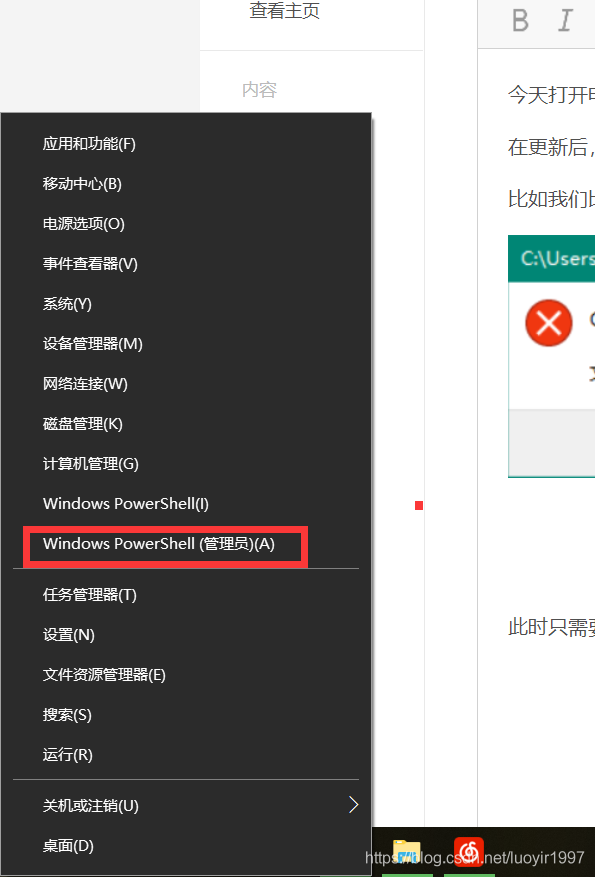
All you have to do is right click on the Start menu and click on Windows PowerShell

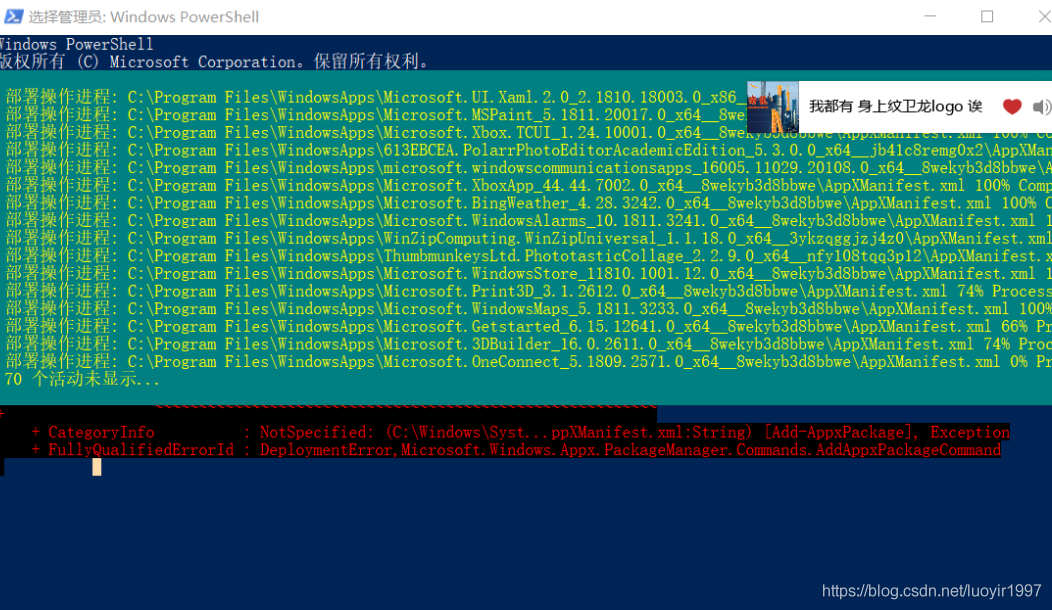
Enter the selection manager page and enter the following command:
Get-appxpackage | Foreach {add-appxpackage-disabledevelopmentmode -Register “$($_installlocation)\ appxmanifest.xml”}
enter
Waiting for the lost packet installation process
after installation
Open the picture to open ~
 

JavaFX 11: “missing JavaFX runtime component”

I am trying to use jGRASP 2 under Windows 10 to run the sample JavaFX code under JavaFX 11 and Java 11 (taken from Java Illuminated Edition 5).
 
I have carefully read the introduction to deployment headaches guide (https://openjfx.io/openjfx-docs/), although has made some progress, but I’m still very confused.
I downloaded the latest ZIP file, unzipped it, and updated the CLASSPATH to include the path to the JAR files needed to compile. I can compile the file successfully. However, when I tried to run it, the following error message appeared:
 

Error: JavaFX runtime components are missing, and are required to run this application

The getting Started guide says you can solve this problem by adding the following options to the runtime call:
 

– the module – the path “/ path \ lib” – add – modules = deployment headaches. Controls, deployment headaches. FXML

I’ve added options, but I still get an error message.
Previous StackOverflow articles usually end with the above option; Las, I don’t know what to do.
The best answer
As a first-time user, I managed to make it work, but it wasn’t easy for me.
 
I don’t think many people are familiar with this IDE, so I’ll follow the basic steps to publish the steps I followed:
> Download and install jGRASP version 2.0.5_05 Beta.
> Since I already had some JDKS installed, JDK 10.0.2 was selected by default, so my first step was to find a way to use JDK 11. In the Settings – & gt; The jGrasp boot setup, where you can set the path to the Java executable:
 
Then I reactivated the jGrasp. You can check out the tool -> Verify which JDKS are used in the IDE. System information -& GT; Java version.
> Open the HelloFX sample class. I’ll start with the OpenJFX Docs for the most basic example. You can find the code here.
> Build – & gt; Since JavaFX is no longer part of the JDK, compiling as expected causes a lot of errors:
 
> According to the OpenJFX documentation, we need to download the JavaFX SDK from here and then add the libraries to the classpath. Go to Settings -& GT; Path/classpath -& GT; In the workspace, press “new,” then add the different javafx jars one by one from the SDK/lib folders you downloaded (at least javafx-base.jar,javafx-graphics.jar and javafx-controls. Jar).
> Build – & gt; The compile should work now. Next step: Build -& GT; Run. This will fail:

----jGRASP exec: java HelloFX
Error: JavaFX runtime components are missing, and are required to run this application

 ----jGRASP wedge: exit code for process is 1.
 ----jGRASP: operation complete.

That was to be expected. According to the documentation, we need to set the module-Path and Add-Modules parameters.
> First try: Using run parameters. After the Settings:

--module-path /Users/<user>/Downloads/javafx-sdk-11.0.2/lib --add-modules javafx.controls

It fails to run again and displays exactly the same error message as above, but with one difference in the console log:
 

----jGRASP exec: java HelloFX --module-path /Users/<user>/Downloads/javafx-sdk-11.0.2/lib --add-modules javafx.controls

What’s wrong!! Well… If you try this on the command line, it will also fail because the arguments are in the wrong order, so the VM arguments should precede the class name.
Conclusion: Run parameters are not VM parameters!
> Second try: To provide VM parameters, The option I found was edit Settings -> Compiler Settings -& GT; Workspace. By default, it USES a generic JDK (integration debugger). You can view it and see it in action using:

java %S -ea %S %<FLAGS2> %<MAIN_CLASS> %<ARGS>

So we need to find a way to set up FLAGS2 instead of ARGS.
Fortunately, next to the Environment TAB, there is a Flag/Args TAB where we can set the VM parameters in FLAGS2:
 

--module-path /Users/<user>/Downloads/javafx-sdk-11.0.2/lib --add-modules javafx.controls

 
> Apply, close the dialog, and then Build-> Run the course, it’s now ready to use!
If you see the console log, it contains exactly what commands you will use when running on the command line:
 

----jGRASP exec: java --module-path /Users/<user>/Downloads/javafx-sdk-11.0.2/lib --add-modules javafx.controls HelloFX

 ----jGRASP: operation complete.

I think the next step will be to run a more complex project…