Category Archives: How to Fix

Failed to create VirtualBox client com

Normal shutdown of VirtualBox a few days ago, today found unable to boot my system when OS X 10.10. This may be the result of the recent frequent VirtualBox upgrades.

Advice:
Provide a snapshot of the Linux virtual machine that is normally performing major configuration or project work

Error message:
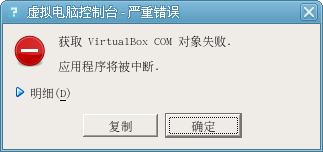
VirtualBox client COM failed to create
Caller RC: NS_ERROR_FACTORY_NOT_REGISTERED (0x80040154)

Try solutions:
Restart the computer;
Reinstall VirtualBox
Correct solution:
Access to the Internet caused by access problems.
Find my VirtualBox application is in/usr/local/bin/VirtualBox
Open the terminal operation failure directly, use sudo/usr/local/bin/VirtualBox can run. But this is inconvenient. You have to run from Terminal as root every time.
Find the solution on the VirtualBox website below:
The first step:
View permission information for/TMP directory:

/bin/ls -ld /tmp

The second step:

Sets the owner of the/TMP directory to root

chown root /tmp

Third part:

Change the access control permissions of the file owner and group, -s is to give suID permissions, ordinary users can also run as root permissions.

chmod ug-s /tmp

Step 4:

Grant permission to the/TMP directory RWX 777

chmod 1777 /tmp

Step 5:

Delete the old.vbox directory

rm -fr /tmp/.vbox-root-ipc/

Then start VirtualBox!
Another installation is in progress… “Or error code 0-1018

Article contents:


I. installation of Office2016 failed
1. Problem description 2. Error cause 3. Problem solution 4
1. Official download address: Office2016 repair tool 2. Download address: Office2016 repair tool Password: SK0C


I. installation of Office2016 failed
1. Problem description
Office2016Another Installation is in progress…” Or error code 0-1018 when Installing Office, or the other installation is underway, “error code 0 ~ 1018”, etc
2. Error reason
The reason for this error is that we installed Office before and then improperly deleted it. For example, we directly deleted the folder, and used the third-party software which was not quite normal, so the uninstall was not clean. When the installation program detected the residual information of the system, it caused such a false impression that the installation failed
3. Problem solving
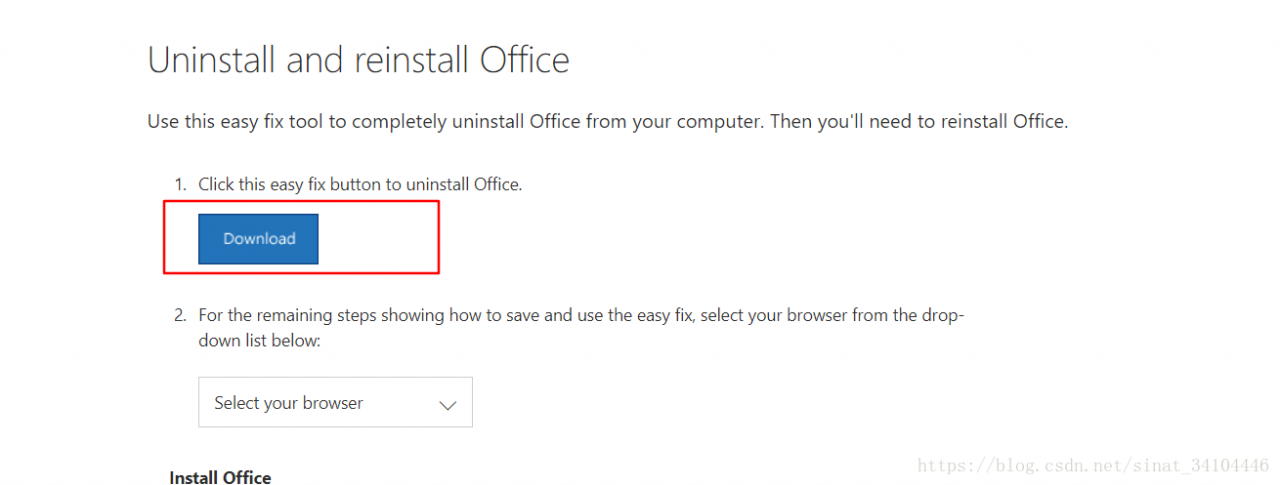
The solution to the problem is to completely uninstall the residual information of the system Office, specifically, to use the official cleaning tool of Office, which is relatively simple to use and no longer cumbersome. The repair software can be downloaded from the repair software of Office2016 (if invalid, please leave a message).
4. Tips
The best way to uninstall large software such as Office is through the control panel or Office uninstaller
Official download
The official Download web page is in English, find the Download button in the web page, click Download to Download

Ii. Office2016 repair software
1. Official download address: Office2016 repair tool
2. Network disk download address: Office2016 repair tool password: SK0C

Encounter: cannot open volume for direct access

One day, if you don’t know what software you have installed, it will appear in the boot process when you boot or reboot:
Cannot open volume for direct access.
Autochk cannot run due to an error caused by a recently installed software package.
Use the system restore feature from the control panel to restore
An unspecified error
boot time of my machine also jumped directly from 12 seconds to 29 seconds, and the self-check would automatically skip, without actually going to self-check.
After a random search, they all need to enter the safe mode for CHKDSK for detection and repair. I don’t want to go to such trouble. I always feel that my machine is not in such trouble.
here will repair method of Microsoft in the BBS links posted

https://answers.microsoft.com/en-us/windows/forum/windows_7-performance/chkdsk-error-cannot-open-volume-for-direct-access/5f8c4a7f-e609-445b-a63d-aa63f7112440 but, I still think, I did it because I installed the software. But why doesn’t the machine detect it automatically and skip it every time?
there must be a reason that pre-loaded software such as anti-virus software is preventing automatic detection (remember win95 to xp encountered similar things, but not automatically skipped detection), try uninstalling 360.
Sure enough, after uninstalling 360 and restarting the machine, the machine will no longer skip the automatic detection, and restart the machine after the successful completion of the detection. There is no longer any annoying reminder that Cannot open volume for direct Access.
machine startup time is back to 12 seconds.

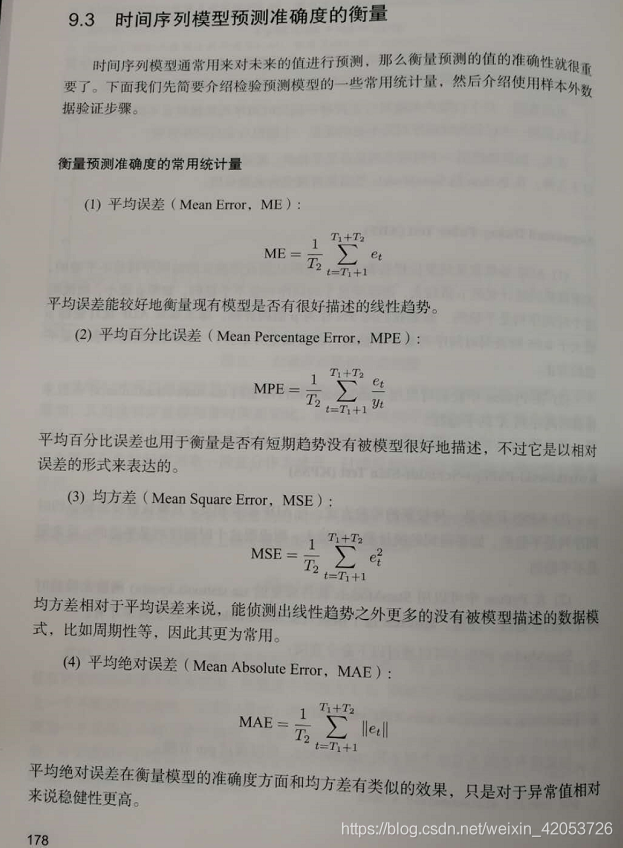
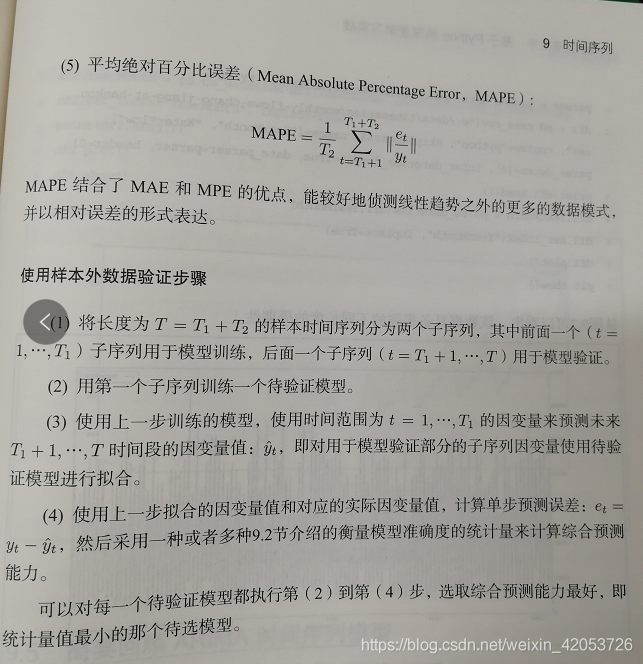
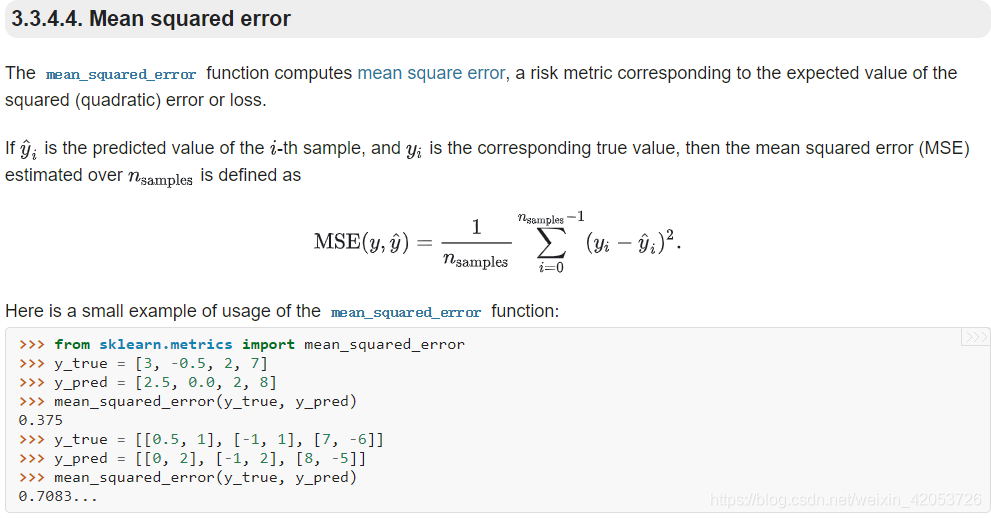
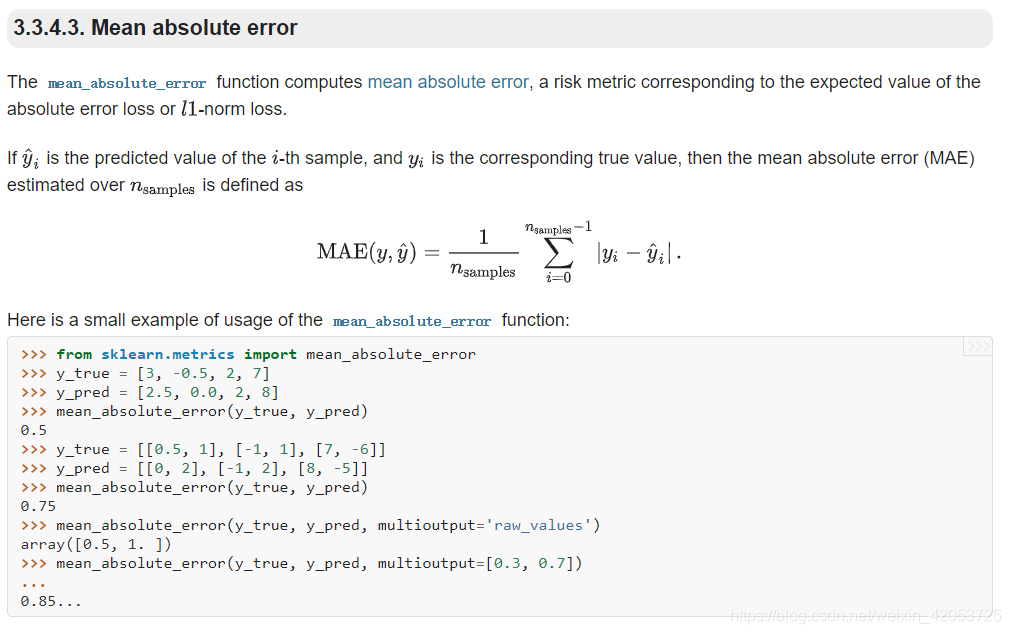
In machine learning, the prediction errors in sklearn, such as mean square error, etc

directory
1. Implementation of mean square deviation – using the module in Sklearn
2 Mean absolute error means absolute error


Sklearn contains a package for calculating errors, as shown in the code below
From FbProphet. Diagnostics Import Performance_metrics # this module is error calculation but has not been learned
Keras’s quick Start summary:


website
1. Implementation of mean square deviation – using the module in Sklearn

2 Mean absolute error means absolute error

VBA 400 error

Failure phenomenon: VBA small program, after running macro, sometimes can proceed smoothly, sometimes on the “wind”, 400 errors

Solution: There are a lot of things that could cause 400 errors, but my solution is strange, just activate the worksheet of the action. This object is probably caused by the use of thisWorkBook… This problem can be fixed by using thisWorkbook.sheets (“Sheet1”).activate.

Such as
Set objData = New DataObject
sHTML = Range(“E” & (I)). The Value
sHTML = Replace (sHTML, “& lt; br />” PutInClipboard
ActiveSheet.Paste Destination:=Range(“E” & (i))

As long as to
Set objData = New DataObject
SHTML = Range (” E “& amp; (I)). The Value
sHTML = Replace (sHTML, “& lt; br />” . PutInClipboard
thisworkbook.sheets (“Sheet1”).Activate
activesheet.paste Destination:=Range(“E” & (i))
I’m going to report 400 errors

Linux getsockopt SO_ERROR values (errno.h)

The C function getsockopt lets you get the error codes with the option SO_ERROR.
The possible error numbers are defined in the global errno.h. The relevant values are:

#define ETIMEDOUT   110 /* Connection timed out */
#define ECONNREFUSED    111 /* Connection refused */
#define EHOSTDOWN   112 /* Host is down */
#define EHOSTUNREACH    113 /* No route to host */
#define EALREADY    114 /* Operation already in progress */
#define EINPROGRESS 115 /* Operation now in progress */


//But here's the whole list on my Linux system (/usr/include/asm-generic/errno.h):

#ifndef _ASM_GENERIC_ERRNO_H
#define _ASM_GENERIC_ERRNO_H

#include <asm-generic/errno-base.h>

#define EDEADLK     35  /* Resource deadlock would occur */
#define ENAMETOOLONG    36  /* File name too long */
#define ENOLCK      37  /* No record locks available */
#define ENOSYS      38  /* Function not implemented */
#define ENOTEMPTY   39  /* Directory not empty */
#define ELOOP       40  /* Too many symbolic links encountered */
#define EWOULDBLOCK EAGAIN  /* Operation would block */
#define ENOMSG      42  /* No message of desired type */
#define EIDRM       43  /* Identifier removed */
#define ECHRNG      44  /* Channel number out of range */
#define EL2NSYNC    45  /* Level 2 not synchronized */
#define EL3HLT      46  /* Level 3 halted */
#define EL3RST      47  /* Level 3 reset */
#define ELNRNG      48  /* Link number out of range */
#define EUNATCH     49  /* Protocol driver not attached */
#define ENOCSI      50  /* No CSI structure available */
#define EL2HLT      51  /* Level 2 halted */
#define EBADE       52  /* Invalid exchange */
#define EBADR       53  /* Invalid request descriptor */
#define EXFULL      54  /* Exchange full */
#define ENOANO      55  /* No anode */
#define EBADRQC     56  /* Invalid request code */
#define EBADSLT     57  /* Invalid slot */

#define EDEADLOCK   EDEADLK

#define EBFONT      59  /* Bad font file format */
#define ENOSTR      60  /* Device not a stream */
#define ENODATA     61  /* No data available */
#define ETIME       62  /* Timer expired */
#define ENOSR       63  /* Out of streams resources */
#define ENONET      64  /* Machine is not on the network */
#define ENOPKG      65  /* Package not installed */
#define EREMOTE     66  /* Object is remote */
#define ENOLINK     67  /* Link has been severed */
#define EADV        68  /* Advertise error */
#define ESRMNT      69  /* Srmount error */
#define ECOMM       70  /* Communication error on send */
#define EPROTO      71  /* Protocol error */
#define EMULTIHOP   72  /* Multihop attempted */
#define EDOTDOT     73  /* RFS specific error */
#define EBADMSG     74  /* Not a data message */
#define EOVERFLOW   75  /* Value too large for defined data type */
#define ENOTUNIQ    76  /* Name not unique on network */
#define EBADFD      77  /* File descriptor in bad state */
#define EREMCHG     78  /* Remote address changed */
#define ELIBACC     79  /* Can not access a needed shared library */
#define ELIBBAD     80  /* Accessing a corrupted shared library */
#define ELIBSCN     81  /* .lib section in a.out corrupted */
#define ELIBMAX     82  /* Attempting to link in too many shared libraries */
#define ELIBEXEC    83  /* Cannot exec a shared library directly */
#define EILSEQ      84  /* Illegal byte sequence */
#define ERESTART    85  /* Interrupted system call should be restarted */
#define ESTRPIPE    86  /* Streams pipe error */
#define EUSERS      87  /* Too many users */
#define ENOTSOCK    88  /* Socket operation on non-socket */
#define EDESTADDRREQ    89  /* Destination address required */
#define EMSGSIZE    90  /* Message too long */
#define EPROTOTYPE  91  /* Protocol wrong type for socket */
#define ENOPROTOOPT 92  /* Protocol not available */
#define EPROTONOSUPPORT 93  /* Protocol not supported */
#define ESOCKTNOSUPPORT 94  /* Socket type not supported */
#define EOPNOTSUPP  95  /* Operation not supported on transport endpoint */
#define EPFNOSUPPORT    96  /* Protocol family not supported */
#define EAFNOSUPPORT    97  /* Address family not supported by protocol */
#define EADDRINUSE  98  /* Address already in use */
#define EADDRNOTAVAIL   99  /* Cannot assign requested address */
#define ENETDOWN    100 /* Network is down */
#define ENETUNREACH 101 /* Network is unreachable */
#define ENETRESET   102 /* Network dropped connection because of reset */
#define ECONNABORTED    103 /* Software caused connection abort */
#define ECONNRESET  104 /* Connection reset by peer */
#define ENOBUFS     105 /* No buffer space available */
#define EISCONN     106 /* Transport endpoint is already connected */
#define ENOTCONN    107 /* Transport endpoint is not connected */
#define ESHUTDOWN   108 /* Cannot send after transport endpoint shutdown */
#define ETOOMANYREFS    109 /* Too many references: cannot splice */
#define ETIMEDOUT   110 /* Connection timed out */
#define ECONNREFUSED    111 /* Connection refused */
#define EHOSTDOWN   112 /* Host is down */
#define EHOSTUNREACH    113 /* No route to host */
#define EALREADY    114 /* Operation already in progress */
#define EINPROGRESS 115 /* Operation now in progress */
#define ESTALE      116 /* Stale NFS file handle */
#define EUCLEAN     117 /* Structure needs cleaning */
#define ENOTNAM     118 /* Not a XENIX named type file */
#define ENAVAIL     119 /* No XENIX semaphores available */
#define EISNAM      120 /* Is a named type file */
#define EREMOTEIO   121 /* Remote I/O error */
#define EDQUOT      122 /* Quota exceeded */

#define ENOMEDIUM   123 /* No medium found */
#define EMEDIUMTYPE 124 /* Wrong medium type */
#define ECANCELED   125 /* Operation Canceled */
#define ENOKEY      126 /* Required key not available */
#define EKEYEXPIRED 127 /* Key has expired */
#define EKEYREVOKED 128 /* Key has been revoked */
#define EKEYREJECTED    129 /* Key was rejected by service */

/* for robust mutexes */
#define EOWNERDEAD  130 /* Owner died */
#define ENOTRECOVERABLE 131 /* State not recoverable */

#define ERFKILL     132 /* Operation not possible due to RF-kill */

#define EHWPOISON   133 /* Memory page has hardware error */

#endif

Source: http://www.xinotes.net/notes/note/1793/

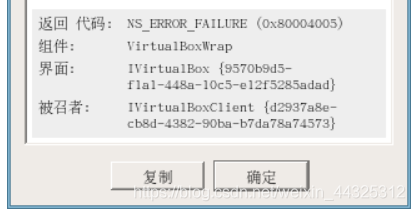
VirtualBox start error NS_ ERROR_ FAILURE (0x80004005)

VirtualBox startup error NS_ERROR_FAILURE (0x80004005)


detail forgot the screenshot, the specific error message is NS_ERROR_FAILURE (0x80004005)
Causes:
(personally) During code debugging, for some reason the project’s log files filled disk C (my native Shared folder with vm was on disk C, crying… If you are using Windows, put the Shared folder on another disk), the virtual machine automatically pauses, and the forced exit occurs. After two forced exits, the 0x80004005 error occurs.
Solutions:

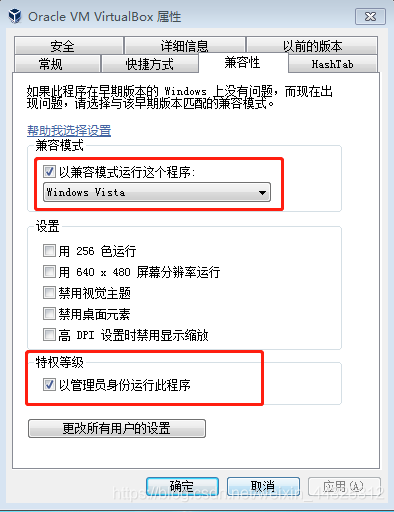
    find your virtualbox, or virtualbox shortcut on the desktop, right-click – > Property – & gt;
    after modification, open VirtualBox again, error message is as follows:
    the Document is empty.
    Location: “C:/Users/Administrator /./VirtualBox VirtualBox. XML ‘. The line 1 (0), column 1

Expected primary expression before ‘unsigned’ solution

statement result += unsigned int(1) < < i; can be compiled and run locally, but a compilation error appears after uploading to LeetCode: expected primary-expression before ‘unsigned’.
analysis:
statement is too complex, the compiler on LeetCode can not fully compile, need to add the basic expression.
solution:
1 for unsigned int add parentheses: (unsigned int).
2 add intermediate variable unsigned int one = 1; result += one < < I .

Cannot read configuration file due to insufficient permissions

HTTP Error 500.19 – Internal Server Error
The requested page cannot be accessed because the related configuration data for the page is invalid.

Detailed Error Information

Module IIS Web Core
Notification Unknown
Handler Not yet determined
Error Code 0x80070005
Config Error Cannot read configuration file due to insufficient permissions
Config File \\?\C:\Users\EricSun\Documents\Visual Studio 2010\WebSites\SSOAuthWebSite1\web.config
Requested URL http://10.2.5.153:10001/
Physical Path  
Logon Method Not yet determined
Logon User Not yet determined

Config Source

 -1:     0:  

Links and More InformationThis error occurs when there is a problem reading the configuration file for the Web server or Web application. In some cases, the event logs may contain more information about what caused this error.
View more information »

 
Cause: 1) not registering the. Net framework with iis (one of the causes: installed the. Net framework first, installed iis later)
2) Insufficient operation permission (Modify permission) for the site configured in IIS
Solution:
1) go to c :\Windows\Microsoft \ net \Framework64\v2.0.50727,
Reregister the.net framework: aspnet_regiis-i
with the iis command
2) IIS Manager –> Sites –> Corresponding site –& GT; Right click –> Edit Permissions – & gt; Security – & gt; Group or User Names –& GT; Edit – & gt; Add – & gt; Add the Everyone user who is granted Full Control permissions (essentially Modify permissions)

Reproduced in: https://www.cnblogs.com/Jian-Zhang/p/6054770.html

There is a solution to the problem: severity = corrected, type = physical layer, id = 00e5 or id = 00e8 (receiver ID) under Ubuntu

I press CTR + Alt +F1 or F2 on Ubuntu and the screen flashes repeatedly as follows:
PCIe Bus Error: severity=Corrected, type=Physical Layer, id=00e8(Receiver ID)
As the search on the Internet, I found only: https://blog.csdn.net/qimengxingyuan/article/details/80874314?utm_source=blogxgwz2
His id=00e5 is different from mine, but I can’t find it. Follow the instructions:
——————— 
Specific operation
Edit the grub
Sudo gedit – H/etc/default/grub
Add boot option
Find GRUB_CMDLINE_LINUX_DEFAULT = “quiet splash.” ”
Add behind pci = nomsi pci = noaer pcie_aspm = off
— — — — — — — — — — — — — — — — — — — — —
I am in GRUB_CMDLINE_LINUX_DEFAULT = “quiet splash” added after the concrete is:
GRUB_CMDLINE_LINUX_DEFAULT=”quiet splash” pci=nomsi pci=noaer pcie_aspm=off
I tried it and it still didn’t work, And I thought I made a mistake and I tried it a couple of times and it still didn’t work, and finally I saw this
https://askubuntu.com/questions/863150/pcie-bus-error-severity-corrected-type-physical-layer-id-00e5receiver-id
Oh, I finally found it. It was my wrong way to modify it. The correct modification is as follows:
GRUB_CMDLINE_LINUX_DEFAULT=”quiet splash pci=nomsi pci=noaer pcie_aspm=off
Then, as described in the two blogs above, perform:
1. Save the modification and exit
2, execute sudo update-grub
The 3, reboot
is now complete.
thanks for the above two detailed records