Category Archives: How to Fix

# pip install scipy — distutils.errors.LinkError: Command

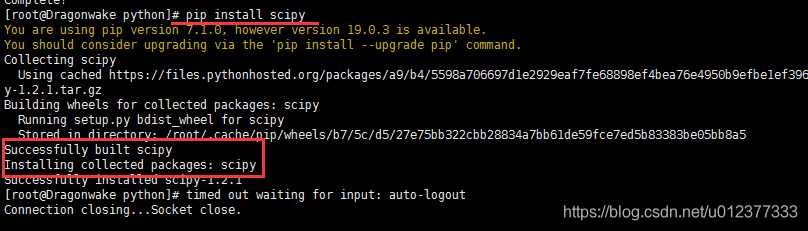
[root@Dragonwake python]# pip install scipy
You are using pip version 7.1.0, however version 19.0.3 is available.
You should consider upgrading via the 'pip install --upgrade pip' command.
Collecting scipy
  Using cached https://files.pythonhosted.org/packages/a9/b4/5598a706697d1e2929eaf7fe68898ef4bea76e4950b9efbe1ef396b8813a/scipy-1.2.1.tar.gz
Building wheels for collected packages: scipy
  Running setup.py bdist_wheel for scipy
  Complete output from command /usr/local/bin/python2.7 -c "import setuptools;__file__='/tmp/pip-build-5bcAZx/scipy/setup.py';exec(compile(open(__file__).read().replace('\r\n', '\n'), __file__, 'exec'))" bdist_wheel -d /tmp/tmptS4PsQpip-wheel-:
  Running from scipy source directory.
  lapack_opt_info:
  lapack_mkl_info:
  customize UnixCCompiler
    libraries mkl_rt not found in ['/usr/local/lib64', '/usr/local/lib', '/usr/lib64', '/usr/lib']
    NOT AVAILABLE
  
  openblas_lapack_info:
  customize UnixCCompiler
  customize UnixCCompiler
    libraries openblas not found in ['/usr/local/lib64', '/usr/local/lib', '/usr/lib64', '/usr/lib']
    NOT AVAILABLE
  
  openblas_clapack_info:
  customize UnixCCompiler
  customize UnixCCompiler
    libraries openblas,lapack not found in ['/usr/local/lib64', '/usr/local/lib', '/usr/lib64', '/usr/lib']
    NOT AVAILABLE
  
  atlas_3_10_threads_info:
  Setting PTATLAS=ATLAS
  customize UnixCCompiler
    libraries lapack_atlas not found in /usr/local/lib64
  customize UnixCCompiler
    libraries tatlas,tatlas not found in /usr/local/lib64
  customize UnixCCompiler
    libraries lapack_atlas not found in /usr/local/lib
  customize UnixCCompiler
    libraries tatlas,tatlas not found in /usr/local/lib
  customize UnixCCompiler
    libraries lapack_atlas not found in /usr/lib64/sse2
  customize UnixCCompiler
    libraries tatlas,tatlas not found in /usr/lib64/sse2
  customize UnixCCompiler
    libraries lapack_atlas not found in /usr/lib64
  customize UnixCCompiler
    libraries tatlas,tatlas not found in /usr/lib64
  customize UnixCCompiler
    libraries lapack_atlas not found in /usr/lib
  customize UnixCCompiler
    libraries tatlas,tatlas not found in /usr/lib
  <class 'numpy.distutils.system_info.atlas_3_10_threads_info'>
    NOT AVAILABLE
  
  atlas_3_10_info:
  customize UnixCCompiler
    libraries lapack_atlas not found in /usr/local/lib64
  customize UnixCCompiler
    libraries satlas,satlas not found in /usr/local/lib64
  customize UnixCCompiler
    libraries lapack_atlas not found in /usr/local/lib
  customize UnixCCompiler
    libraries satlas,satlas not found in /usr/local/lib
  customize UnixCCompiler
    libraries lapack_atlas not found in /usr/lib64/sse2
  customize UnixCCompiler
    libraries satlas,satlas not found in /usr/lib64/sse2
  customize UnixCCompiler
    libraries lapack_atlas not found in /usr/lib64
  customize UnixCCompiler
    libraries satlas,satlas not found in /usr/lib64
  customize UnixCCompiler
    libraries lapack_atlas not found in /usr/lib
  customize UnixCCompiler
    libraries satlas,satlas not found in /usr/lib
  <class 'numpy.distutils.system_info.atlas_3_10_info'>
    NOT AVAILABLE
  
  atlas_threads_info:
  Setting PTATLAS=ATLAS
  customize UnixCCompiler
    libraries lapack_atlas not found in /usr/local/lib64
  customize UnixCCompiler
    libraries ptf77blas,ptcblas,atlas not found in /usr/local/lib64
  customize UnixCCompiler
    libraries lapack_atlas not found in /usr/local/lib
  customize UnixCCompiler
    libraries ptf77blas,ptcblas,atlas not found in /usr/local/lib
  customize UnixCCompiler
    libraries lapack_atlas not found in /usr/lib64/sse2
  customize UnixCCompiler
    libraries ptf77blas,ptcblas,atlas not found in /usr/lib64/sse2
  customize UnixCCompiler
    libraries lapack_atlas not found in /usr/lib64
  customize UnixCCompiler
    libraries ptf77blas,ptcblas,atlas not found in /usr/lib64
  customize UnixCCompiler
    libraries lapack_atlas not found in /usr/lib
  customize UnixCCompiler
    libraries ptf77blas,ptcblas,atlas not found in /usr/lib
  <class 'numpy.distutils.system_info.atlas_threads_info'>
    NOT AVAILABLE
  
  atlas_info:
  customize UnixCCompiler
    libraries lapack_atlas not found in /usr/local/lib64
  customize UnixCCompiler
    libraries f77blas,cblas,atlas not found in /usr/local/lib64
  customize UnixCCompiler
    libraries lapack_atlas not found in /usr/local/lib
  customize UnixCCompiler
    libraries f77blas,cblas,atlas not found in /usr/local/lib
  customize UnixCCompiler
    libraries lapack_atlas not found in /usr/lib64/sse2
  customize UnixCCompiler
    libraries f77blas,cblas,atlas not found in /usr/lib64/sse2
  customize UnixCCompiler
    libraries lapack_atlas not found in /usr/lib64
  customize UnixCCompiler
    libraries f77blas,cblas,atlas not found in /usr/lib64
  customize UnixCCompiler
    libraries lapack_atlas not found in /usr/lib
  customize UnixCCompiler
    libraries f77blas,cblas,atlas not found in /usr/lib
  <class 'numpy.distutils.system_info.atlas_info'>
    NOT AVAILABLE
  
  accelerate_info:
    NOT AVAILABLE
  
  /usr/local/lib/python2.7/site-packages/numpy/distutils/system_info.py:638: UserWarning:
      Atlas (http://math-atlas.sourceforge.net/) libraries not found.
      Directories to search for the libraries can be specified in the
      numpy/distutils/site.cfg file (section [atlas]) or by setting
      the ATLAS environment variable.
    self.calc_info()
  lapack_info:
  customize UnixCCompiler
  customize UnixCCompiler
    FOUND:
      libraries = ['lapack', 'lapack']
      library_dirs = ['/usr/lib64']
      language = f77
  
  blas_info:
  customize UnixCCompiler
  customize UnixCCompiler
  C compiler: gcc -pthread -fno-strict-aliasing -g -O2 -DNDEBUG -g -fwrapv -O3 -Wall -Wstrict-prototypes -fPIC
  
  creating /tmp/tmp_D3_qJ/tmp
  creating /tmp/tmp_D3_qJ/tmp/tmp_D3_qJ
  compile options: '-I/usr/local/include -I/usr/include -c'
  gcc: /tmp/tmp_D3_qJ/source.c
  /tmp/tmp_D3_qJ/source.c:1:19: warning: cblas.h: No such file or directory
  /tmp/tmp_D3_qJ/source.c: In function ‘main’:
  /tmp/tmp_D3_qJ/source.c:6: warning: implicit declaration of function ‘cblas_ddot’
  gcc -pthread /tmp/tmp_D3_qJ/tmp/tmp_D3_qJ/source.o -L/usr/lib64 -lcblas -o /tmp/tmp_D3_qJ/a.out
  /usr/bin/ld: cannot find -lcblas
  collect2: ld returned 1 exit status
  gcc -pthread /tmp/tmp_D3_qJ/tmp/tmp_D3_qJ/source.o -L/usr/lib64 -lblas -o /tmp/tmp_D3_qJ/a.out
  /tmp/tmp_D3_qJ/tmp/tmp_D3_qJ/source.o: In function `main':
  /tmp/tmp_D3_qJ/source.c:6: undefined reference to `cblas_ddot'
  collect2: ld returned 1 exit status
  Traceback (most recent call last):
    File "<string>", line 1, in <module>
    File "/tmp/pip-build-5bcAZx/scipy/setup.py", line 492, in <module>
      setup_package()
    File "/tmp/pip-build-5bcAZx/scipy/setup.py", line 488, in setup_package
      setup(**metadata)
    File "/usr/local/lib/python2.7/site-packages/numpy/distutils/core.py", line 137, in setup
      config = configuration()
    File "/tmp/pip-build-5bcAZx/scipy/setup.py", line 388, in configuration
      lapack_opt = get_info('lapack_opt')
    File "/usr/local/lib/python2.7/site-packages/numpy/distutils/system_info.py", line 445, in get_info
      return cl().get_info(notfound_action)
    File "/usr/local/lib/python2.7/site-packages/numpy/distutils/system_info.py", line 638, in get_info
      self.calc_info()
    File "/usr/local/lib/python2.7/site-packages/numpy/distutils/system_info.py", line 1604, in calc_info
      blas_info = get_info('blas')
    File "/usr/local/lib/python2.7/site-packages/numpy/distutils/system_info.py", line 445, in get_info
      return cl().get_info(notfound_action)
    File "/usr/local/lib/python2.7/site-packages/numpy/distutils/system_info.py", line 638, in get_info
      self.calc_info()
    File "/usr/local/lib/python2.7/site-packages/numpy/distutils/system_info.py", line 1699, in calc_info
      lib = self.has_cblas(info)
    File "/usr/local/lib/python2.7/site-packages/numpy/distutils/system_info.py", line 1742, in has_cblas
      extra_postargs=info.get('extra_link_args', []))
    File "/usr/local/lib/python2.7/distutils/ccompiler.py", line 700, in link_executable
      debug, extra_preargs, extra_postargs, None, target_lang)
    File "/usr/local/lib/python2.7/distutils/unixccompiler.py", line 200, in link
      raise LinkError, msg
  distutils.errors.LinkError: Command "gcc -pthread /tmp/tmp_D3_qJ/tmp/tmp_D3_qJ/source.o -L/usr/lib64 -lblas -o /tmp/tmp_D3_qJ/a.out" failed with exit status 1
  
  ----------------------------------------
  Failed building wheel for scipy
Failed to build scipy
Installing collected packages: scipy
  Running setup.py install for scipy
    Complete output from command /usr/local/bin/python2.7 -c "import setuptools, tokenize;__file__='/tmp/pip-build-5bcAZx/scipy/setup.py';exec(compile(getattr(tokenize, 'open', open)(__file__).read().replace('\r\n', '\n'), __file__, 'exec'))" install --record /tmp/pip-gqE_Ie-record/install-record.txt --single-version-externally-managed --compile:
    Running from scipy source directory.
    
    Note: if you need reliable uninstall behavior, then install
    with pip instead of using `setup.py install`:
    
      - `pip install .`       (from a git repo or downloaded source
                               release)
      - `pip install scipy`   (last SciPy release on PyPI)
    
    
    lapack_opt_info:
    lapack_mkl_info:
    customize UnixCCompiler
      libraries mkl_rt not found in ['/usr/local/lib64', '/usr/local/lib', '/usr/lib64', '/usr/lib']
      NOT AVAILABLE
    
    openblas_lapack_info:
    customize UnixCCompiler
    customize UnixCCompiler
      libraries openblas not found in ['/usr/local/lib64', '/usr/local/lib', '/usr/lib64', '/usr/lib']
      NOT AVAILABLE
    
    openblas_clapack_info:
    customize UnixCCompiler
    customize UnixCCompiler
      libraries openblas,lapack not found in ['/usr/local/lib64', '/usr/local/lib', '/usr/lib64', '/usr/lib']
      NOT AVAILABLE
    
    atlas_3_10_threads_info:
    Setting PTATLAS=ATLAS
    customize UnixCCompiler
      libraries lapack_atlas not found in /usr/local/lib64
    customize UnixCCompiler
      libraries tatlas,tatlas not found in /usr/local/lib64
    customize UnixCCompiler
      libraries lapack_atlas not found in /usr/local/lib
    customize UnixCCompiler
      libraries tatlas,tatlas not found in /usr/local/lib
    customize UnixCCompiler
      libraries lapack_atlas not found in /usr/lib64/sse2
    customize UnixCCompiler
      libraries tatlas,tatlas not found in /usr/lib64/sse2
    customize UnixCCompiler
      libraries lapack_atlas not found in /usr/lib64
    customize UnixCCompiler
      libraries tatlas,tatlas not found in /usr/lib64
    customize UnixCCompiler
      libraries lapack_atlas not found in /usr/lib
    customize UnixCCompiler
      libraries tatlas,tatlas not found in /usr/lib
    <class 'numpy.distutils.system_info.atlas_3_10_threads_info'>
      NOT AVAILABLE
    
    atlas_3_10_info:
    customize UnixCCompiler
      libraries lapack_atlas not found in /usr/local/lib64
    customize UnixCCompiler
      libraries satlas,satlas not found in /usr/local/lib64
    customize UnixCCompiler
      libraries lapack_atlas not found in /usr/local/lib
    customize UnixCCompiler
      libraries satlas,satlas not found in /usr/local/lib
    customize UnixCCompiler
      libraries lapack_atlas not found in /usr/lib64/sse2
    customize UnixCCompiler
      libraries satlas,satlas not found in /usr/lib64/sse2
    customize UnixCCompiler
      libraries lapack_atlas not found in /usr/lib64
    customize UnixCCompiler
      libraries satlas,satlas not found in /usr/lib64
    customize UnixCCompiler
      libraries lapack_atlas not found in /usr/lib
    customize UnixCCompiler
      libraries satlas,satlas not found in /usr/lib
    <class 'numpy.distutils.system_info.atlas_3_10_info'>
      NOT AVAILABLE
    
    atlas_threads_info:
    Setting PTATLAS=ATLAS
    customize UnixCCompiler
      libraries lapack_atlas not found in /usr/local/lib64
    customize UnixCCompiler
      libraries ptf77blas,ptcblas,atlas not found in /usr/local/lib64
    customize UnixCCompiler
      libraries lapack_atlas not found in /usr/local/lib
    customize UnixCCompiler
      libraries ptf77blas,ptcblas,atlas not found in /usr/local/lib
    customize UnixCCompiler
      libraries lapack_atlas not found in /usr/lib64/sse2
    customize UnixCCompiler
      libraries ptf77blas,ptcblas,atlas not found in /usr/lib64/sse2
    customize UnixCCompiler
      libraries lapack_atlas not found in /usr/lib64
    customize UnixCCompiler
      libraries ptf77blas,ptcblas,atlas not found in /usr/lib64
    customize UnixCCompiler
      libraries lapack_atlas not found in /usr/lib
    customize UnixCCompiler
      libraries ptf77blas,ptcblas,atlas not found in /usr/lib
    <class 'numpy.distutils.system_info.atlas_threads_info'>
      NOT AVAILABLE
    
    atlas_info:
    customize UnixCCompiler
      libraries lapack_atlas not found in /usr/local/lib64
    customize UnixCCompiler
      libraries f77blas,cblas,atlas not found in /usr/local/lib64
    customize UnixCCompiler
      libraries lapack_atlas not found in /usr/local/lib
    customize UnixCCompiler
      libraries f77blas,cblas,atlas not found in /usr/local/lib
    customize UnixCCompiler
      libraries lapack_atlas not found in /usr/lib64/sse2
    customize UnixCCompiler
      libraries f77blas,cblas,atlas not found in /usr/lib64/sse2
    customize UnixCCompiler
      libraries lapack_atlas not found in /usr/lib64
    customize UnixCCompiler
      libraries f77blas,cblas,atlas not found in /usr/lib64
    customize UnixCCompiler
      libraries lapack_atlas not found in /usr/lib
    customize UnixCCompiler
      libraries f77blas,cblas,atlas not found in /usr/lib
    <class 'numpy.distutils.system_info.atlas_info'>
      NOT AVAILABLE
    
    accelerate_info:
      NOT AVAILABLE
    
    /usr/local/lib/python2.7/site-packages/numpy/distutils/system_info.py:638: UserWarning:
        Atlas (http://math-atlas.sourceforge.net/) libraries not found.
        Directories to search for the libraries can be specified in the
        numpy/distutils/site.cfg file (section [atlas]) or by setting
        the ATLAS environment variable.
      self.calc_info()
    lapack_info:
    customize UnixCCompiler
    customize UnixCCompiler
      FOUND:
        libraries = ['lapack', 'lapack']
        library_dirs = ['/usr/lib64']
        language = f77
    
    blas_info:
    customize UnixCCompiler
    customize UnixCCompiler
    C compiler: gcc -pthread -fno-strict-aliasing -g -O2 -DNDEBUG -g -fwrapv -O3 -Wall -Wstrict-prototypes -fPIC
    
    creating /tmp/tmpzUwJsa/tmp
    creating /tmp/tmpzUwJsa/tmp/tmpzUwJsa
    compile options: '-I/usr/local/include -I/usr/include -c'
    gcc: /tmp/tmpzUwJsa/source.c
    /tmp/tmpzUwJsa/source.c:1:19: warning: cblas.h: No such file or directory
    /tmp/tmpzUwJsa/source.c: In function ‘main’:
    /tmp/tmpzUwJsa/source.c:6: warning: implicit declaration of function ‘cblas_ddot’
    gcc -pthread /tmp/tmpzUwJsa/tmp/tmpzUwJsa/source.o -L/usr/lib64 -lcblas -o /tmp/tmpzUwJsa/a.out
    /usr/bin/ld: cannot find -lcblas
    collect2: ld returned 1 exit status
    gcc -pthread /tmp/tmpzUwJsa/tmp/tmpzUwJsa/source.o -L/usr/lib64 -lblas -o /tmp/tmpzUwJsa/a.out
    /tmp/tmpzUwJsa/tmp/tmpzUwJsa/source.o: In function `main':
    /tmp/tmpzUwJsa/source.c:6: undefined reference to `cblas_ddot'
    collect2: ld returned 1 exit status
    Traceback (most recent call last):
      File "<string>", line 1, in <module>
      File "/tmp/pip-build-5bcAZx/scipy/setup.py", line 492, in <module>
        setup_package()
      File "/tmp/pip-build-5bcAZx/scipy/setup.py", line 488, in setup_package
        setup(**metadata)
      File "/usr/local/lib/python2.7/site-packages/numpy/distutils/core.py", line 137, in setup
        config = configuration()
      File "/tmp/pip-build-5bcAZx/scipy/setup.py", line 388, in configuration
        lapack_opt = get_info('lapack_opt')
      File "/usr/local/lib/python2.7/site-packages/numpy/distutils/system_info.py", line 445, in get_info
        return cl().get_info(notfound_action)
      File "/usr/local/lib/python2.7/site-packages/numpy/distutils/system_info.py", line 638, in get_info
        self.calc_info()
      File "/usr/local/lib/python2.7/site-packages/numpy/distutils/system_info.py", line 1604, in calc_info
        blas_info = get_info('blas')
      File "/usr/local/lib/python2.7/site-packages/numpy/distutils/system_info.py", line 445, in get_info
        return cl().get_info(notfound_action)
      File "/usr/local/lib/python2.7/site-packages/numpy/distutils/system_info.py", line 638, in get_info
        self.calc_info()
      File "/usr/local/lib/python2.7/site-packages/numpy/distutils/system_info.py", line 1699, in calc_info
        lib = self.has_cblas(info)
      File "/usr/local/lib/python2.7/site-packages/numpy/distutils/system_info.py", line 1742, in has_cblas
        extra_postargs=info.get('extra_link_args', []))
      File "/usr/local/lib/python2.7/distutils/ccompiler.py", line 700, in link_executable
        debug, extra_preargs, extra_postargs, None, target_lang)
      File "/usr/local/lib/python2.7/distutils/unixccompiler.py", line 200, in link
        raise LinkError, msg
    distutils.errors.LinkError: Command "gcc -pthread /tmp/tmpzUwJsa/tmp/tmpzUwJsa/source.o -L/usr/lib64 -lblas -o /tmp/tmpzUwJsa/a.out" failed with exit status 1
    
    ----------------------------------------
Command "/usr/local/bin/python2.7 -c "import setuptools, tokenize;__file__='/tmp/pip-build-5bcAZx/scipy/setup.py';exec(compile(getattr(tokenize, 'open', open)(__file__).read().replace('\r\n', '\n'), __file__, 'exec'))" install --record /tmp/pip-gqE_Ie-record/install-record.txt --single-version-externally-managed --compile" failed with error code 1 in /tmp/pip-build-5bcAZx/scipy

The following error occurs:

distutils.errors.LinkError: Command "gcc -pthread /tmp/tmp2AUeGJ/tmp/tmp2AUeGJ/source.o -L/usr/lib64 -lblas -o /tmp/tmp2AUeGJ/a.out" failed with exit status 1

Refer to the address: https://stackoverflow.com/questions/53565726/failed-building-wheel-for-numpy-pandas
The installation

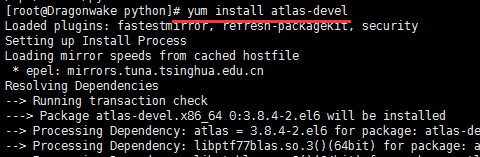
sudo yum install atlas-devel

Solution to prompt “error opening terminal: xterm.” when making menuconfig

The solution to make Menuconfig is to prompt “Error opening terminal: xterm.

Under Linux environment, make menuconfig or make config commands are used when compiling embedded systems. These commands usually use the ncurses library. If the ncurses library is not installed and set correctly, the following Error message may appear:
Error opening terminal: xterm

Solutions:

1. First make sure that the ncurses library is installed correctly. On debian, Ubuntu, you can use dpkg-l | grep ncurses to see if the ncurses library is installed.
2. If ncurses is already installed, check to see if the TERM and TERMINFO environment variables have been set correctly. If it is not set correctly, you need to set it to the correct value.
$ echo $TERM
$ echo $TERMINFO

For TERMINFO, the path to TERMINFO should be set, such as /usr/share/ TERMINFO or /lib/ TERMINFO. To view Terminfo's storage location with the following instruction:

$whereis terminfo
terminfo: /etc/terminfo /lib/terminfo /usr/share/terminfo /usr/share/man/man5/terminfo.5.gz

See if the terminal information file is saved in the Terminfo directory: It is usually divided into A, B, C, D... Z these alphabetic directories, each containing term information beginning with that letter. For example, vT100 is placed in the "V" directory. The term we need must have the term information in the corresponding directory. Once you have identified this information, you can set the TERM and TERMINFO information:

export TERM=xterm
export TERMINFO=/lib/terminfo

The Settings above, must ensure that the/usr/share/terminfo term existing in the information, and/usr/share/terminfo/v/vt100 exists.
Regarding the setting of terms, it may need to be set to different terms such as Linux, VT100-putty, etc. Linux is commonly used for the Linux console, and vT100-putty is, as the name implies, a VT100 terminal that USES PuTTY to log in remotely.
The following are the values of the TERM and TERMINFO environment variables in the Ubuntu12.10 environment after the problem is resolved.

$ echo $TERM
xterm
$ echo $TERMINFO
/lib/terminfo/

DB2 SQL error: SQLCODE: -433, SQLSTATE: 22001, SQLERRMC

When I perform a file upload process, I need to pass the file information into the database
An error occurred while performing a data insert operation. The log message is:
[the 12-11-28 13:58:34:367 CST] 00000066 SystemOut O ERROR – document UNID = 123234 ERROR AddConvertItem method to add convertitem had errors: DB2 SQL ERROR: SQLCODE: – 433, SQLSTATE: 22001, SQLERRMC:   Query: Insert into ConvertItem (identifier, fileTypeSettings urgentLevel, tablename, oaparms, securitySettings, id, sourceUrl, sourcePath, convertStatus, precision, pdfpath, uploadUrl) values (‘ 123234 ‘, ‘Standard’, ‘o?°?’,’snkkk’,’other’,’No Security ‘, 1786, ‘http://192.168.52.8:8080/zonypdfgenserver/test2.doc’, ‘E:/filequeues/bocomm/sourcesavedir/2012-11/123234/123234 _test2. Doc’, ‘0’, ‘Standard’, ‘E:/filequeues/bocomm pdfsavedir/2012-11/123234/123234. PDF ‘, ‘http://192.168.52.114:9080/zonypdfgenserver/oapdfserver.do’) Parameters: []
 
The reason for the error, according to the query, is that the length of the field in red is too long, exceeding the maximum length of the field urgentLevel
 
If you encounter the above problems in the future, you can use the following database: DB2?Sql433 to query
Where 433 is the content corresponding to SQLCODE in the error message

appear pygame.error : font not initialized problem, remember to check whether the program calls pygame.init ()

The pygame.init() function, which must be called after the pygame module is imported and before you start using any of the functions provided by PyGame, you don’t have to know what this function does, just know that in order to work with pyGame functions, you must call it at the beginning. If you run into an error like Pygame.error: font not initialized, check to see if you forgot to call Pygame.init () in front of your program

The solution to the error of / etc / sudoers: syntax error in sudoer file under mac

In recent days, I tried to configure sudo for passwordless operation, which smashed the sudoers file and reported the following error

/etc/sudoers: syntax error near line 59 <<<
sudo: parse error in /etc/sudoers near line 59
sudo: no valid sudoers sources found, quitting
sudo: unable to initialize policy plugin

Search the Internet and jot down solutions

pkexec visudo

pkexec function is to execute the command as root, it doesn't seem to work on MAC, but ~ ~, I will update the solution later
 
MAC solution:
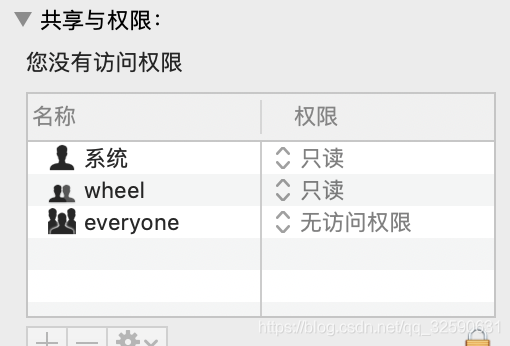
open /etc directory with folder, right-click -> Show introduction

Undid the bottom right?”, and then change the everyone permission to read and write to be able to modify the sudoers file freely

django.core.exceptions . improveconfigured: error loading MySQL DB module. Django configuring MySQL database

A, errors,

Traceback (most recent call last):
  File "/home/ubuntu/anaconda2/envs/python3/lib/python3.6/site-packages/django/db/backends/mysql/base.py", line 15, in <module>
    import MySQLdb as Database
ModuleNotFoundError: No module named 'MySQLdb'

The above exception was the direct cause of the following exception:

Traceback (most recent call last):
  File "manage.py", line 15, in <module>
    execute_from_command_line(sys.argv)
  File "/home/ubuntu/anaconda2/envs/python3/lib/python3.6/site-packages/django/core/management/__init__.py", line 371, in execute_from_command_line
    utility.execute()
  File "/home/ubuntu/anaconda2/envs/python3/lib/python3.6/site-packages/django/core/management/__init__.py", line 347, in execute
    django.setup()
  File "/home/ubuntu/anaconda2/envs/python3/lib/python3.6/site-packages/django/__init__.py", line 24, in setup
    apps.populate(settings.INSTALLED_APPS)
  File "/home/ubuntu/anaconda2/envs/python3/lib/python3.6/site-packages/django/apps/registry.py", line 112, in populate
    app_config.import_models()
  File "/home/ubuntu/anaconda2/envs/python3/lib/python3.6/site-packages/django/apps/config.py", line 198, in import_models
    self.models_module = import_module(models_module_name)
  File "/home/ubuntu/anaconda2/envs/python3/lib/python3.6/importlib/__init__.py", line 126, in import_module
    return _bootstrap._gcd_import(name[level:], package, level)
  File "<frozen importlib._bootstrap>", line 994, in _gcd_import
  File "<frozen importlib._bootstrap>", line 971, in _find_and_load
  File "<frozen importlib._bootstrap>", line 955, in _find_and_load_unlocked
  File "<frozen importlib._bootstrap>", line 665, in _load_unlocked
  File "<frozen importlib._bootstrap_external>", line 678, in exec_module
  File "<frozen importlib._bootstrap>", line 219, in _call_with_frames_removed
  File "/home/ubuntu/anaconda2/envs/python3/lib/python3.6/site-packages/django/contrib/auth/models.py", line 2, in <module>
    from django.contrib.auth.base_user import AbstractBaseUser, BaseUserManager
  File "/home/ubuntu/anaconda2/envs/python3/lib/python3.6/site-packages/django/contrib/auth/base_user.py", line 47, in <module>
    class AbstractBaseUser(models.Model):
  File "/home/ubuntu/anaconda2/envs/python3/lib/python3.6/site-packages/django/db/models/base.py", line 114, in __new__
    new_class.add_to_class('_meta', Options(meta, app_label))
  File "/home/ubuntu/anaconda2/envs/python3/lib/python3.6/site-packages/django/db/models/base.py", line 315, in add_to_class
    value.contribute_to_class(cls, name)
  File "/home/ubuntu/anaconda2/envs/python3/lib/python3.6/site-packages/django/db/models/options.py", line 205, in contribute_to_class
    self.db_table = truncate_name(self.db_table, connection.ops.max_name_length())
  File "/home/ubuntu/anaconda2/envs/python3/lib/python3.6/site-packages/django/db/__init__.py", line 33, in __getattr__
    return getattr(connections[DEFAULT_DB_ALIAS], item)
  File "/home/ubuntu/anaconda2/envs/python3/lib/python3.6/site-packages/django/db/utils.py", line 202, in __getitem__
    backend = load_backend(db['ENGINE'])
  File "/home/ubuntu/anaconda2/envs/python3/lib/python3.6/site-packages/django/db/utils.py", line 110, in load_backend
    return import_module('%s.base' % backend_name)
  File "/home/ubuntu/anaconda2/envs/python3/lib/python3.6/importlib/__init__.py", line 126, in import_module
    return _bootstrap._gcd_import(name[level:], package, level)
  File "/home/ubuntu/anaconda2/envs/python3/lib/python3.6/site-packages/django/db/backends/mysql/base.py", line 20, in <module>
    ) from err
django.core.exceptions.ImproperlyConfigured: Error loading MySQLdb module.
Did you install mysqlclient?

Ii. Problem Solving
1. Source of problem
After installation of Django, the default database driver is sqlite, but I do not have sqlite database, so change to
mysql, then go to the directory first/first/settings.py, and find:

DATABASES = {
    'default': {
        'ENGINE': 'django.db.backends.sqlite3',
        'NAME': os.path.join(BASE_DIR, 'db.sqlite3'),
    }
}

Modified to:

DATABASES = {
    'default': {
        'ENGINE': 'django.db.backends.mysql',
        'NAME': 'first',
        'USER': 'python',
        'PASSWORD': '123456',
        'HOST': '192.168.99.124',
        # 'PORT': '',
    }
}

Run the command python manage. Py runserver then executes to start the service at the following Error:
django. Core. Exceptions. ImproperlyConfigured: Error loading MySQLdb module: No module named MySQLdb
2. Solve
Obviously, there is no mysql driver installed, just install it, so I quickly typed the command line:

pip install mysql-python

ImportError: No module named 'ConfigParser'
Python3.x is changed to lowercase relative to PYTHON 2.x, indicating that THE MYSQL python in PIP does not support Python3.x. Maybe the update in PIP is relatively slow, so we will download their source code installation. However, the latest update date of the source code is 2012, and there is still no support for Python3.x!
How does this work?Change the support python3 driver try, heart energizes, grass mud horse, of course, as a result on making a search, found a PyMySQL (https://github.com/PyMySQL/PyMySQL), which, of course, also have it in the PIP, then I quickly on the command line with:

pip install PyMySQL

Django does not recognize this alien monk, how to do, or to do, find mysite/mysite/init.py, enter the following content and save:

import pymysql
pymysql.install_as_MySQLdb()

Then When I ran Python Manager.py Runserver, another prompt popped up:
You have unapplied migrations; Run 'Python manage. Py Migrate' to apply them.
Of course, this prompt does not affect the operation of the native server. At this time, when we visit http://127.0.0.1:8000, we will see the successful prompt:

It worked!

Congratulations on your first Django-powered page.

Of course, you haven't actually done any work yet. Next, start your first app by running python manage.py startapp [app_label].

You're seeing this message because you have DEBUG = True in your Django settings file and you haven't configured any URLs. Get to work!

Of course, I didn't like the warning, and he told me what to do to get rid of him, of course! I quickly copy the contents to the command line:

python manage.py makemigrations
python manage.py migrate

Then restart the service, it's normal!


The environment

    Python version: 3.6.0Django version: 2.5

Deployment project websocket failed: error during websocket Handshake: unexpected response code: 400

Fixed nginx forwarding WebSocket 400 error
Reprint link: https://www.cnblogs.com/duanweishi/p/9286461.html

because the personal server has a number of projects, configured with a secondary domain name, the need to forward the secondary domain name, in the forwarding work this quickly took the famous nginx. Before this, all the projects had no problem running forward, but today, when deploying a project with WebSocket communication, an unexpected error was reported, with the following error message:
Failed: Error during WebSocket handshake: Unexpected response code: 400
. This error worked in both the local test environment and access to non-Nginx forwarding, which inferred that the problem should have occurred in nginx forwarding.
Then, with the help of Google, saw the socket. IO official issues have a discussion about this problem, link: https://github.com/socketio/socket.io/issues/1942
Solution
read the solution in the discussion section, the problem appears in the configuration file of nginx, and the nginx.conf file needs to be modified. Type vim /etc/nginx/nginx.conf into the Linux terminal and find the location. The configuration file is as follows:

server {
        listen       80;
        server_name  school.godotdotdot.com;
        charset utf-8;

        location/{
            proxy_pass http://127.0.0.1:3000;
            proxy_set_header Host $host;
            proxy_http_version 1.1; 
            proxy_set_header Upgrade $http_upgrade;
            proxy_set_header Connection "upgrade";
            proxy_set_header X-Real-IP $remote_addr;
            proxy_set_header X-Forwarded-For $proxy_add_x_forwarded_for;
            proxy_connect_timeout 60;
           proxy_read_timeout 600;
           proxy_send_timeout 600;
        }

        error_page   500 502 503 504  /50x.html;
        location = /50x.html {
            root   html;
        }
 }

The most important of these are the following three lines

proxy_http_version 1.1;
proxy_set_header Upgrade $http_upgrade;
proxy_set_header Connection "upgrade";

The first line tells Nginx to use the HTTP/1.1 communication protocol, which websoket must use.
The second and third lines tell Nginx to respond to an HTTP upgrade request when it wants to use WebSocket.
Supplement:

	server {
	        listen       80;
	        server_name  school.godotdotdot.com;
	        charset utf-8;
	        
			proxy_http_version 1.1; 
			proxy_set_header Upgrade $http_upgrade;
			proxy_set_header Connection "upgrade";
	

	        location/{
	            proxy_pass http://127.0.0.1:3000;
	            proxy_set_header Host $host;
	            proxy_set_header X-Real-IP $remote_addr;
	            proxy_set_header X-Forwarded-For $proxy_add_x_forwarded_for;
	            proxy_connect_timeout 60;
	           proxy_read_timeout 600;
	           proxy_send_timeout 600;
	        }

	        error_page   500 502 503 504  /50x.html;
	        location = /50x.html {
	            root   html;
	        }
	 }

Cannot connect to MySQL server on “host” (113)

Connection to remote MySQL error:
ERROR 2003 (HY000): Can’t connect to MySQL Server ‘IP’ (113)
View error types (Linux system)

perror 113

The results are as follows:
OS error code 113: No route to host
The reason for this error is that the server-side firewall does not open the port used by the MySQL program. By default, it is 3306 and the open port is ok

/sbin/iptables -I INPUT -p tcp --dport 3306 -j ACCEPT 

Save the Settings and restart the firewall

service iptables save
service iptables restart

The difference and usage of insmod and modprobe

Differences between Insmod and modprobe and their usage
(the 2013-01-04 14:55:03)

The reproduced ▼

tag: insmod modprobe driver load driver repeat load insmod and modprobe area hash category: embedded Linux

There was a problem loading the SD card driver into the development board

/ $ modprobe hi_mci

mmc_core: exports duplicate symbol mmc_detect_change (owned by kernel)

Insmod: always insert a `/lib/modules/2.6.24 – rt1 – hi3515v100/kernel/drivers/MMC/cor

e/mmc_core.ko’: Invalid module format (-1): Exec format error

modprobe: failed to load module hi_mci

Mmc_core loads modules twice (once manually and once automatically for the kernel);

The cause of the problem has been found for a long time, and will be manually loaded later
Modprobe hi_mci was changed to insmod /lib/modules/2.6.24-rt1-hi3515v100/misc/hi_mci. Ok, the problem was solved.

Later, the relationship between modprobe and Insmod was analyzed. The reason for the error is that although both modprobe and Insmod commands can load the module, modprobe is relatively intelligent. When you use modprobe to load the module, the system will load other modules according to the dependency of the module (that is, other modules that the module depends on). As a result, the MMC_core module was loaded twice. With insmod, the system loads only one specific module, the one we want to load
Hi_mci.ko, so no more error, error resolved.

The difference between modprobe and Insmod is as follows:

(The following is excerpted from online sources)
On Linux, both modprobe and Insmod can be used to load modules, but modprobe is now generally recommended instead of Insmod.

What’s the difference between modprobe and Insmod?

1. Modprobe can solve the load module dependencies, such as the load moudleA must first load mouduleB, such as it is through the/lib/modules// modules. Dep files to find the dependencies. Insmod doesn’t solve the dependency problem.

2. Modprobe looks for modules by default under /lib/modules//, and Insmod only looks for modules in the arguments given to it (by default, in the current directory). Sometimes, insmod has its USES, for example.

Have/root/my – mod. Ko this module, CD/root /, and then use insmod my – mod. Ko (insmod/root/my – mod. Ko) can insert the module, but with modprobe my – mod. Ko (modprobe/root/my – mod. Ko) does suggest “FATAL: Ko not found”. This is because modprobe is looking for /lib/modules/ ‘uname-r’/to find Module.

Linux device drivers can be loaded in two ways, insmod and modprobe, let’s talk about the differences in their usage.
1, insmod can only load a specific device driver at a time, and the specific address of the driver is required.
insmod drv.ko
2. Modprobe can load all the dependent drivers into the kernel at one time. The address of the driver is not added, but the driver module needs to be installed as make modues_install when installing the file system. Drivers are installed in /lib/ Modules /$(uname -r)/… Under.
modprob DRV

modprobe and insmod are used to load the kernel module
but modprobe is more intelligent, it can be based on the module dependency to automatically load for you;
and insmod can’t do that.
— — — — — — — — — — — — — separation line — — — — — — — — — — — — — — — — — —
for example USES ipmitool this tool need to exist in the dev/ipmi0 equipment, if not you need to load the
modprobe ipmi_si
modprobe ipmi_devintf
Read data from the local KCS interface using -i open for example
ipmitol-i open sensor
You want to uninstall modules. Use the rmmod

 
(the 2013-01-04 14:55:03)

The reproduced ▼

tag: insmod modprobe driver load driver repeat load insmod and modprobe area hash category: embedded Linux

There was a problem loading the SD card driver into the development board

/ $ modprobe hi_mci

mmc_core: exports duplicate symbol mmc_detect_change (owned by kernel)

Insmod: always insert a `/lib/modules/2.6.24 – rt1 – hi3515v100/kernel/drivers/MMC/cor

e/mmc_core.ko’: Invalid module format (-1): Exec format error

modprobe: failed to load module hi_mci

Mmc_core loads modules twice (once manually and once automatically for the kernel);

The cause of the problem has been found for a long time, and will be manually loaded later
Modprobe hi_mci was changed to insmod /lib/modules/2.6.24-rt1-hi3515v100/misc/hi_mci. Ok, the problem was solved.

Later, the relationship between modprobe and Insmod was analyzed. The reason for the error is that although both modprobe and Insmod commands can load the module, modprobe is relatively intelligent. When you use modprobe to load the module, the system will load other modules according to the dependency of the module (that is, other modules that the module depends on). As a result, the MMC_core module was loaded twice. With insmod, the system loads only one specific module, the one we want to load
Hi_mci.ko, so no more error, error resolved.

The difference between modprobe and Insmod is as follows:

(The following is excerpted from online sources)
On Linux, both modprobe and Insmod can be used to load modules, but modprobe is now generally recommended instead of Insmod.

What’s the difference between modprobe and Insmod?

1. Modprobe can solve the load module dependencies, such as the load moudleA must first load mouduleB, such as it is through the/lib/modules// modules. Dep files to find the dependencies. Insmod doesn’t solve the dependency problem.

2. Modprobe looks for modules by default under /lib/modules//, and Insmod only looks for modules in the arguments given to it (by default, in the current directory). Sometimes, insmod has its USES, for example.

Have/root/my – mod. Ko this module, CD/root /, and then use insmod my – mod. Ko (insmod/root/my – mod. Ko) can insert the module, but with modprobe my – mod. Ko (modprobe/root/my – mod. Ko) does suggest “FATAL: Ko not found”. This is because modprobe is looking for /lib/modules/ ‘uname-r’/to find Module.

Linux device drivers can be loaded in two ways, insmod and modprobe, let’s talk about the differences in their usage.
1, insmod can only load a specific device driver at a time, and the specific address of the driver is required.
insmod drv.ko
2. Modprobe can load all the dependent drivers into the kernel at one time. The address of the driver is not added, but the driver module needs to be installed as make modues_install when installing the file system. Drivers are installed in /lib/ Modules /$(uname -r)/… Under.
modprob DRV

modprobe and insmod are used to load the kernel module
but modprobe is more intelligent, it can be based on the module dependency to automatically load for you;
and insmod can’t do that.
— — — — — — — — — — — — — separation line — — — — — — — — — — — — — — — — — —
for example USES ipmitool this tool need to exist in the dev/ipmi0 equipment, if not you need to load the
modprobe ipmi_si
modprobe ipmi_devintf
Read data from the local KCS interface using -i open for example
ipmitol-i open sensor
You want to uninstall modules. Use the rmmod

Recovery your PC / device needs to be repaired, boot

Windows failed to start, Recovery Your PC/Device needs to be repaired
Reconvery
Your PC/Device needs to be repaired
File: Boot\BCD
Error Code: 0Xc000000d

use the start U disk, enter the command prompt, respectively type:
BOOTREC /SCANOS
BOOTREC /FIXMBR
BOOTREC /FIXBOOT
BOOTREC /REBUILDBCD
Note:
BOOTREC /SCANOS scan hard disk has several startup
BOOTREC /REBUILDBCD rebuild startup, according to the prompt input can be.