= = = = = = = = = = = = = = = = = = = = = = = = = = = = = = = = = = = = = = = = = = = = = = = = = = = = = = = = = = = = = = = = = = = = = = = = = = = = = = = = = = = =
Centos7’s default file system, why abandon the EXT family?
EXT family has the most support:
But creating a file system (formatting) is slow!
But the repair is slow!
But file system storage capacity is limited!
XFS is also a journaling file system:
High capacity, support for large storage
High performance, fast file system creation/repair
Both inodes and blocks are generated dynamically when the system needs them
XFS file system
• Data section
The data area is the same as the ext family we learned about earlier, including information such as inode/data block/superblock.
• File system log section
• RealTime Section
Fix XFS file system XFS_repair
[root@tianyun ~]# xfs_repair /dev/vda1
xfs_repair: /dev/vda1 contains a mounted filesystem
xfs_repair: /dev/vda1 contains a mounted and writable filesystem
Fatal error – Couldn’t initialize XFS Library
[root@tianyun ~]# umount /dev/vda1
[root@tianyun ~]# xfs_repair /dev/vda1
Phase 1 – Find and Verify Superblock…
Phase 2 – using internal log
Zero the log… Scan filesystem freespace and inode maps… found root inode chunk
Category Archives: How to Fix
mac gem install nokogiri error
Gem::Ext::BuildError: ERROR: Failed to build gem native extension.

    /Users/angela/.rbenv/versions/1.9.3-p545/bin/ruby -r ./siteconf20170106-59264-robjdg.rb extconf.rb --use-system-libraries
checking if the C compiler accepts ... yes
checking if the C compiler accepts -Wno-error=unused-command-line-argument-hard-error-in-future... no
Building nokogiri using system libraries.
libxml2 version 2.6.21 or later is required!
*** extconf.rb failed ***
Could not create Makefile due to some reason, probably lack of
necessary libraries and/or headers.  Check the mkmf.log file for more
details.  You may need configuration options.

Provided configuration options:
	--with-opt-dir
	--without-opt-dir
	--with-opt-include
	--without-opt-include=${opt-dir}/include
	--with-opt-lib
	--without-opt-lib=${opt-dir}/lib
	--with-make-prog
	--without-make-prog
	--srcdir=.
	--curdir
	--ruby=/Users/angela/.rbenv/versions/1.9.3-p545/bin/ruby
	--help
	--clean
	--use-system-libraries
	--with-zlib-dir
	--without-zlib-dir
	--with-zlib-include
	--without-zlib-include=${zlib-dir}/include
	--with-zlib-lib
	--without-zlib-lib=${zlib-dir}/lib
	--with-xml2-dir
	--without-xml2-dir
	--with-xml2-include
	--without-xml2-include=${xml2-dir}/include
	--with-xml2-lib
	--without-xml2-lib=${xml2-dir}/lib
	--with-libxml-2.0-config
	--without-libxml-2.0-config
	--with-pkg-config
	--without-pkg-config
	--with-xslt-dir
	--without-xslt-dir
	--with-xslt-include
	--without-xslt-include=${xslt-dir}/include
	--with-xslt-lib
	--without-xslt-lib=${xslt-dir}/lib
	--with-libxslt-config
	--without-libxslt-config
	--with-exslt-dir
	--without-exslt-dir
	--with-exslt-include
	--without-exslt-include=${exslt-dir}/include
	--with-exslt-lib
	--without-exslt-lib=${exslt-dir}/lib
	--with-libexslt-config
	--without-libexslt-config

extconf failed, exit code 1

Gem files will remain installed in /Users/angela/.rbenv/versions/1.9.3-p545/lib/ruby/gems/1.9.1/gems/nokogiri-1.6.7.2 for inspection.
Results logged to /Users/angela/.rbenv/versions/1.9.3-p545/lib/ruby/gems/1.9.1/extensions/x86_64-darwin-13/1.9.1-static/nokogiri-1.6.7.2/gem_make.out
/Users/angela/.rbenv/versions/1.9.3-p545/lib/ruby/site_ruby/1.9.1/rubygems/ext/builder.rb:89:in `run'
/Users/angela/.rbenv/versions/1.9.3-p545/lib/ruby/site_ruby/1.9.1/rubygems/ext/ext_conf_builder.rb:36:in `block in build'
/Users/angela/.rbenv/versions/1.9.3-p545/lib/ruby/1.9.1/tempfile.rb:320:in `open'
/Users/angela/.rbenv/versions/1.9.3-p545/lib/ruby/site_ruby/1.9.1/rubygems/ext/ext_conf_builder.rb:19:in `build'
/Users/angela/.rbenv/versions/1.9.3-p545/lib/ruby/site_ruby/1.9.1/rubygems/ext/builder.rb:161:in `block (2 levels) in build_extension'
/Users/angela/.rbenv/versions/1.9.3-p545/lib/ruby/site_ruby/1.9.1/rubygems/ext/builder.rb:160:in `chdir'
/Users/angela/.rbenv/versions/1.9.3-p545/lib/ruby/site_ruby/1.9.1/rubygems/ext/builder.rb:160:in `block in build_extension'
<internal:prelude>:10:in `synchronize'
/Users/angela/.rbenv/versions/1.9.3-p545/lib/ruby/site_ruby/1.9.1/rubygems/ext/builder.rb:159:in `build_extension'
/Users/angela/.rbenv/versions/1.9.3-p545/lib/ruby/site_ruby/1.9.1/rubygems/ext/builder.rb:198:in `block in build_extensions'
/Users/angela/.rbenv/versions/1.9.3-p545/lib/ruby/site_ruby/1.9.1/rubygems/ext/builder.rb:195:in `each'
/Users/angela/.rbenv/versions/1.9.3-p545/lib/ruby/site_ruby/1.9.1/rubygems/ext/builder.rb:195:in `build_extensions'
/Users/angela/.rbenv/versions/1.9.3-p545/lib/ruby/site_ruby/1.9.1/rubygems/installer.rb:702:in `build_extensions'
/Users/angela/.rbenv/versions/1.9.3-p545/lib/ruby/site_ruby/1.9.1/rubygems/installer.rb:250:in `install'
/Users/angela/.rbenv/versions/1.9.3-p545/lib/ruby/gems/1.9.1/gems/bundler-1.6.5/lib/bundler/source/rubygems.rb:90:in `block in install'
/Users/angela/.rbenv/versions/1.9.3-p545/lib/ruby/gems/1.9.1/gems/bundler-1.6.5/lib/bundler/rubygems_integration.rb:130:in `preserve_paths'
/Users/angela/.rbenv/versions/1.9.3-p545/lib/ruby/gems/1.9.1/gems/bundler-1.6.5/lib/bundler/source/rubygems.rb:89:in `install'
/Users/angela/.rbenv/versions/1.9.3-p545/lib/ruby/gems/1.9.1/gems/bundler-1.6.5/lib/bundler/installer.rb:105:in `block in install_gem_from_spec'
/Users/angela/.rbenv/versions/1.9.3-p545/lib/ruby/gems/1.9.1/gems/bundler-1.6.5/lib/bundler/rubygems_integration.rb:162:in `with_build_args'
/Users/angela/.rbenv/versions/1.9.3-p545/lib/ruby/gems/1.9.1/gems/bundler-1.6.5/lib/bundler/installer.rb:104:in `install_gem_from_spec'
/Users/angela/.rbenv/versions/1.9.3-p545/lib/ruby/gems/1.9.1/gems/bundler-1.6.5/lib/bundler/installer.rb:262:in `block in install_sequentially'
/Users/angela/.rbenv/versions/1.9.3-p545/lib/ruby/1.9.1/forwardable.rb:201:in `each'
/Users/angela/.rbenv/versions/1.9.3-p545/lib/ruby/1.9.1/forwardable.rb:201:in `each'
/Users/angela/.rbenv/versions/1.9.3-p545/lib/ruby/gems/1.9.1/gems/bundler-1.6.5/lib/bundler/installer.rb:261:in `install_sequentially'
/Users/angela/.rbenv/versions/1.9.3-p545/lib/ruby/gems/1.9.1/gems/bundler-1.6.5/lib/bundler/installer.rb:91:in `run'
/Users/angela/.rbenv/versions/1.9.3-p545/lib/ruby/gems/1.9.1/gems/bundler-1.6.5/lib/bundler/installer.rb:15:in `install'
/Users/angela/.rbenv/rbenv.d/exec/gem-rehash/rubygems_plugin.rb:27:in `install'
/Users/angela/.rbenv/versions/1.9.3-p545/lib/ruby/gems/1.9.1/gems/bundler-1.6.5/lib/bundler/cli/install.rb:78:in `run'
/Users/angela/.rbenv/versions/1.9.3-p545/lib/ruby/gems/1.9.1/gems/bundler-1.6.5/lib/bundler/cli.rb:145:in `install'
/Users/angela/.rbenv/versions/1.9.3-p545/lib/ruby/gems/1.9.1/gems/bundler-1.6.5/lib/bundler/vendor/thor/command.rb:27:in `run'
/Users/angela/.rbenv/versions/1.9.3-p545/lib/ruby/gems/1.9.1/gems/bundler-1.6.5/lib/bundler/vendor/thor/invocation.rb:121:in `invoke_command'
/Users/angela/.rbenv/versions/1.9.3-p545/lib/ruby/gems/1.9.1/gems/bundler-1.6.5/lib/bundler/vendor/thor.rb:363:in `dispatch'
/Users/angela/.rbenv/versions/1.9.3-p545/lib/ruby/gems/1.9.1/gems/bundler-1.6.5/lib/bundler/vendor/thor/base.rb:440:in `start'
/Users/angela/.rbenv/versions/1.9.3-p545/lib/ruby/gems/1.9.1/gems/bundler-1.6.5/lib/bundler/cli.rb:9:in `start'
/Users/angela/.rbenv/versions/1.9.3-p545/lib/ruby/gems/1.9.1/gems/bundler-1.6.5/bin/bundle:20:in `block in <top (required)>'
/Users/angela/.rbenv/versions/1.9.3-p545/lib/ruby/gems/1.9.1/gems/bundler-1.6.5/lib/bundler/friendly_errors.rb:5:in `with_friendly_errors'
/Users/angela/.rbenv/versions/1.9.3-p545/lib/ruby/gems/1.9.1/gems/bundler-1.6.5/bin/bundle:18:in `<top (required)>'
/Users/angela/.rbenv/versions/1.9.3-p545/bin/bundle:23:in `load'
/Users/angela/.rbenv/versions/1.9.3-p545/bin/bundle:23:in `<main>'
An error occurred while installing nokogiri (1.6.7.2), and Bundler cannot continue.
Make sure that `gem install nokogiri -v '1.6.7.2'` succeeds before bundling.
Solutions:
brew install --force libxml2 libxslt
brew install --force libiconv

xcode-select --installPython FileNotFoundError: [Errno 2] No such file or directory: ‘objects/epsilon.pkl
Directory:
The preface explains in detail
preface
Go to WeChat and put on a fun application reinforcement learning. But go on the run and come across the problem before you go:
FileNotFoundError: [Errno 2] No such file or directory: ‘objects/ ingfix.pkl
has to learn and come up with a solution:
explain
There is no folder or file, that is, you have access to a file that does not exist, but in fact, if the file you are accessing does not exist, the method w is used to cut access, it will create a new document, so the main problem is, there is no folder, just create a new one.
Explain in detail
Python, the OS library, is required to read and write files. Due to open the way to your files is “w”, namely file does not exist when they create a file, so the PKL documents (I mean the relative path of the PKL) does not exist is automatically created, this is not the problem, the problem is the relative path, that is the path exists, this folder does not exist as a problem. So we have to determine if this path exists. Create if it doesn’t exist.
import os
if not os.path.exists(path):
    os.mkdir(path)
Also, note that you can only create one layer at a time for paths, meaning that the layer above your Objects exists, or you will still get an error.
solve java.util.prefs . backingstoreexception error
Thank you for sharing
The server log shows that an error is reported every half a minute:
The server log shows that an error is reported every half a minute:
Mar 29, 2016 10:37:23 AM java.util.prefs.FileSystemPreferences checkLockFile0ErrorCode
WARNING: Could not lock User prefs.
Mar 29, 2016 10:37:23 AM java.util.prefs.FileSystemPreferences checkLockFile0ErrorCode
WARNING: Could not lock User prefs.
Mar 29, 2016 10:37:23 AM java.util.prefs.FileSystemPreferences syncWorld
WARNING: Couldn’t flush user prefs: java.util.prefs.BackingStoreException: Couldn’t get file lock.
Mar 29, 2016 10:37:23 AM java.util.prefs.FileSystemPreferences syncWorld
WARNING: Couldn’t flush user prefs: java.util.prefs.BackingStoreException: Couldn’t get file lock.
Mar 29, 2016 10:37:25 AM java.util.prefs.FileSystemPreferences checkLockFile0ErrorCode
WARNING: Could not lock System prefs. Unix error code 0.
Mar 29, 2016 10:37:25 AM java.util.prefs.FileSystemPreferences checkLockFile0ErrorCode
WARNING: Could not lock System prefs. Unix error code 0.
Mar 29, 2016 10:37:25 AM java.util.prefs.FileSystemPreferences syncWorld
WARNING: Couldn’t flush system prefs: java.util.prefs.BackingStoreException: Couldn’t get file lock.
Mar 29, 2016 10:37:25 AM java.util.prefs.FileSystemPreferences syncWorld
WARNING: Couldn’t flush system prefs: java.util.prefs.BackingStoreException: Couldn’t get file lock.
It was harmless enough, but it made me very sad, so I decided to solve it. After many queries, I found that the cause of this problem was that the JDK could not be locked when locking user configuration. In fact, it was a variety of permission problems
Read the following two articles
http://www.ithao123.cn/content-10680341.html
http://www-01.ibm.com/support/docview.wss?uid=swg21515420
I got some inspiration
Then I found that I needed to assign /etc/java operation permission to the tomcat logon user. Since it came with tomcat6, I opened the tomcat6.conf file and found this line:
TOMCAT_USER=”tomcat”
To be lazy, change it decisively to root, and at this point, the problem is solved
Now that’s the point
After all, it is not safe for Tomcat to get the root permission. If the group security check is carried out in the future, the vulnerability will be swept out. Therefore, all privileges of Tomcat users should be assigned:
# chown tomcat:tomcat -R /etc/.java/.systemPrefs
# chown tomcat:tomcat -R /etc/.java
# chown tomcat:tomcat -R /var/lock/subsys/tomcat6
# chown tomcat:tomcat -R /var/log/tomcat6
# chown tomcat:tomcat -R /var/lib/tomcat6
# chown tomcat:tomcat -R /var/cache/tomcat6
# chown tomcat:tomcat -R /etc/rc.d/init.d/tomcat6
# chown tomcat:tomcat -R /etc/logrotate.d/tomcat6
# chown tomcat:tomcat -R /etc/sysconfig/tomcat6
# chown tomcat:tomcat -R /etc/tomcat6
# chown tomcat:tomcat -R /usr/sbin/tomcat6
# chown tomcat:tomcat -R /usr/share/tomcat6
# chown tomcat:tomcat -R /usr/share/java/tomcat6
Then change the logged-in Tomcat user back to Tomcat and restart, and there is still no problem
Solution: PIP install MySQL Python has the following problems
Question 1:
Error: Microsoft Visual C++ 9.0 is required
Install mysql-Python with PIP on Windows with the following error message and see http://aka.ms/vcPython27 for a solution
Error: Microsoft Visual C++ 9.0 is required (Unable to find vcvarsall.bat). Get it from http://aka.ms/vcpython27
Open the http://aka.ms/vcpython27 will jump to http://www.microsoft.com/en-us/download/confirmation.aspx?id=44266
Download the installation package
Microsoft Visual C++ Compiler for Python 2.7
solves the problem after installation
Problem 2:
Resolve ‘C:\ Users\\Administrator\\AppData\\Local\\ Microsoft\\Visual C++ for Python\\9.0\\VC\\Bin\\ Cl.exe ‘failed with exit 2
Error: Cannot open include file: ‘config-win.h’: No such file or Directory
Problem description:
pip instal MySQL-python
The following error occurs:
Operating environment:
Python 2.7.14
Setuptools 16.0
PIP 7.0.1
Operating system: Windows7.0.10240 64-bit
Solutions:
1) Install the mysql Connector. Install the 32-bit or 64-bit version of the system at the following download address:
http://dev.mysql.com/downloads/connector/c/6.0.html#downloads
2) install Microsoft Visual C++ Compiler for Python 2.7. If the installation of mysql-python requires even some vc runtime, the download address is:
http://www.microsoft.com/en-us/download/confirmation.aspx?id=44266
(refer to the previous blog: http://blog.csdn.net/xxm524/article/details/47360229)
Once the dependency software is installed as described above, running PIP Install mysql-Python again should succeed;
However, I encountered this problem again. After a careful look at the error message, I found the following prompts:
** Note * : If ‘C:\ Users\\Administrator\\AppData\\ Common\\Microsoft\\Visual C++ for Python\\9.0\\VC\\Bin\\ cl.Exe ‘failed with exit 2 still appears, maybe the version you installed is different from your Python and PIP version, maybe Python is 32 bits, You have a 64-bit Connector installed
The mysql Connector installed was 64-bit and was installed in the Directory C:\Program Files \ mysql \ mysql Connector C 6.0.2. However, from the prompt I see that it wants to install to C:\Program Files (x86)\ mysql \ mysql Connector C 6.0.2, so a 32-bit mysql connector should be installed.
Reinstall the 32-bit mysql Connector, re-run PIP Install mysql-Python, and the installation was successful!
In summary, the main reason for this is that python and PIP are both 32-bits installed on the system.
Reference article:
http://www.cnblogs.com/yuguoguo/p/4089427.html
http://blog.csdn.net/xxm524/article/details/47360229
Certificate chaining error in sphere
When trying to connect to the LDAP server via SSL in Websphere, I encountered the following error:
used by:com.ibm.jsse2.util:KIX path building failed: java.security.cert.CertPathBuilderException: PKIXCertPathBuilderImpl could not build a valid CertPath.; internal cause is:
java.security.cert.CertPathValidatorException: The certificate issued by CN=VeriSign class 3 xxxxxxx [color=red]is not trusted[/color]; internal cause is:
java.security.cert.CertPathValidatorException: [color=red]Certificate chaining error[/color]
at com.ibm.jsse2.util.h.b(h.java:86)
at com.ibm.jsse2.util.h.b(h.java:2)
at com.ibm.jsse2.util.g.a(g.java:27)
check the data, it should be in the default trust store list did not add the address I connected to.
specific method
operates on the IBM Websphere console interface as follows:
[b]1# [/b] Security > SSL certificate and key management > Key stores and certificates > NodeDefaultTrustStore > Signer certificates > Retrieve from port
fill in the form entry: Host\Post\Alias
click: Retrieve signer information > Apply
[b]2# [/b] Security > SSL certificate and key management > Manage endpoint security configurations > Inbound(CellDefaultSSLSettings) > Key stores and certificates > CellDefaultTrustStore > Signer certificates > Retrieve from port
fill in the form entry: Host\Post\Alias
click: Retrieve signer information > Apply
——————————————-
Note: if the CA certificate has already been imported into the keystore. If there is no import, search for import methods.
“reference” [url] http://stackoverflow.com/questions/27701181/certificate-chaining-error-in-websphere [/ url]
c:\Git\bin\ssh.exe: *** Couldn’t reserve space for cygwin’s heap, Win32 error 487
Today, suddenly uploading code to the code cloud with AS failed and there was a problem
Tried to save uncommitted changes in stash before Update, but failed with an error. stash file://D:/AndroidStudioProjects/VRvr: 0 [main] us 0 init_cheap: VirtualAlloc pointer is null, Win32 error 487 AllocationBase 0x0, BaseAddress 0x68550000, RegionSize 0x1E0000, State 0x10000 C:\Program Files (x86)\Git\bin\sh.exe: *** Couldn’t reserve space for cygwin’s heap, Win32 error 0
Found click Git bash flash back
Looked up a lot of data on the net also made along while, my solution is as follows
1. Reinstalled git client first
Find it useless
2. Run the CMD window
perform
Tried to save uncommitted changes in stash before Update, but failed with an error. stash file://D:/AndroidStudioProjects/VRvr: 0 [main] us 0 init_cheap: VirtualAlloc pointer is null, Win32 error 487 AllocationBase 0x0, BaseAddress 0x68550000, RegionSize 0x1E0000, State 0x10000 C:\Program Files (x86)\Git\bin\sh.exe: *** Couldn’t reserve space for cygwin’s heap, Win32 error 0
Found click Git bash flash back
Looked up a lot of data on the net also made along while, my solution is as follows
1. Reinstalled git client first
Find it useless
2. Run the CMD window
perform
c:\msysgit\bin>rebase.exe -b 0x50000000 msys-1.0.dllFound in
ReBaseImage (Msys-1.0.DLL) failed with last error = 6
A few more runs still won’t do
3. According to the Internet
It is still useless to copy out the Msys-1.0.DLL under C:\Program Files (x86)\Git\bin and then copy it in.
Solutions;
Finally, I executed step 2 as an administrator and it was successful
Run as an administrator:
Find the CMD. Exe file under C:\Windows\System32, right-click and select Run as administrator — ‘OK
Solve the Java “syntax error on token enum” problem
Reference:
http://stackoverflow.com/questions/8598661/eclipse-chokes-on-enum-even-though-compiler-compliance-level-is-1-6
http://ywj852752270.blog.51cto.com/4105805/1248526
http://stackoverflow.com/questions/8598661/eclipse-chokes-on-enum-even-though-compiler-compliance-level-is-1-6
http://ywj852752270.blog.51cto.com/4105805/1248526
“Why”
Enum is a Java reserved keyword, and in Java 1.4 and prior versions, warninig may be prompted at compile time to indicate that enum is a keyword and is not recommended. However, since Java version 1.5 an error will be reported: Syntax Error on token enum
“Address”
You can rename a variable named enum.
If it is inconvenient to modify, such as the old code can not work, this can be solved as follows.
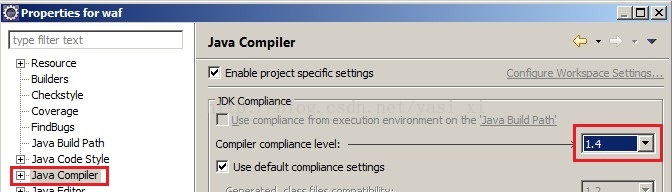
The project is then rebuilt. If the syntax error on token enum error is also reported, the project is deleted from the workspace, then re-imported and rebuilt.
Solve the error “unable to perform operation, unexpected error (0x65b)” when inputting powercfg / h off in CMD
Enter powercfg /h off in CMD to shut down virtual memory, but the error “cannot perform operation, unexpected error (0x65b)” has occurred.
solution: enter powercfg-h off at the command prompt (CMD) in administrator mode.
added: powercfg /h on is to open virtual memory.
Django debug = false internal server error 500
Add the following in Setting.py
# AMDIN CONFIGURATION
#-------------------------------------------------------------------------------
ADMINS = [('hiveme', '[email protected]')]

# EMAIL CONFIGURATION
#-------------------------------------------------------------------------------
EMAIL_BACKEND = 'django.core.mail.backends.console.EmailBackend'
When set from this, if the server generates 500 errors it prints the error message to the log/screen. You can also set up other EMAIL_BACKEND so that it will email errors to your email.
Ubuntu 16.04 Samba shared folder
Ubuntu 16.04 comes with Samba, so you can use it directly.
right click on the folder you want to share -> Local Network Share, all points can be determined, and it can be done.
if the following error occurs:
'net usershare' returned error 255: net usershare: cannot open usershare directory /var/lib/samba/usershares. Error Permission denied
You do not have permission to create a usershare. Ask your administrator to grant you permissions to create a share
Perform the following steps to resolve:
Add your username to sambashare.
sudo adduser yourname sambashareLog out, Log in again, and execute Local Network Share.
mysql load data infile ERROR 13 (HY000): Can’t get stat of
bug:
http://bugs.mysql.com/bug.php?id=31670
This problem
Replace the LOAD DATA INFILE with the LOAD DATA LOCAL INFILE
The problem goes away.
http://bugs.mysql.com/bug.php?id=31670
This problem
Replace the LOAD DATA INFILE with the LOAD DATA LOCAL INFILE
The problem goes away.