0x80042108 error code meaning general
0x800C0131
0x800C013E May be Folders. DBX file attribute error or damage.
0x800CCC00 Authentication not loaded
0x800CCC01 Authentication (Certificate) content error
0x800CCC02 Authentication date error
0x800CCC03 user is online
0x800CCC05 not online to the server
0x800CCC0A mail line download not completed
0x800CCC0B server busy
0x800CCC0D can’t find the host (check if your SMTP server is set wrong)
0x800CCC0E online to the server failed, unable to establish online with the host. Wait a while and try again. Ping and other network commands test to see if it is possible to connect the through server
0x800CCC0F server end online (the other server is overloaded, network transmission congestion is easy to cause this phenomenon, can try to increase your online over the waiting time try, Or in an online quality better ISP)
0 x800ccc10 servers can’t recognize this email address
0 x800ccc11 server unidentifiable Mailing list
0 x800ccc12 cannot transmit Winsock request
0 x800ccc13 cannot receive Winsock reply
0 x800ccc14 cannot start Winsock
0 x800ccc15 couldn’t open it Windows Socket
0x800CCC16 cannot recognize user account, user account error
0x800CCC17 user interrupt operation
0x800CCC18 login failure (for example: No secure password authentication is required for login, Ims cannot use
0x800CCC41 Windows Sockets are not supported on this application
0x800CCC43 Bad address.
0x800CCC44 Bad address
0x800CCC44 Bad address
0x800CCC44 Bad address Windows Sockets cannot load
0x800CCC45 Operation now in progress..
SMTP error
0x800CCC60 illegal response
0x800CCC61 unknown error code
0x800CCC62 received syntax error
0x800CCC63 syntax parameter incorrect
0x800CCC64 instruction incomplete
0x800CCC65 incorrect instruction sequence
0x800CCC66 instruction incomplete
0x800CCC60 instruction incomplete
0x800CCC60 instruction incomplete
0x800CCC60 instruction incomplete
0x800CCC60 instruction incomplete
0x800CCC67 without this instruction
0x800CCC68 mail box is locked or busy
0x800CCC69 can’t find mail box
0x800CCC6A processing request error
0x800CCC6B mail box is not on this server
0x800CCC6C has no space to store mail
0x800CCC6D has exceeded the limit storage capacity limit
0x800CCC6E illegal mail box name
0x800CCC6F Transaction error, this message appears, may be the server does not accept your mail, please contact your ISP.
0x800CCC78 unknown sender, or reply-to address incorrect
0x800CCC79 recipient rejected by the server
Relay Denied: Outlook Express SMTP setting is not correct, please use the SMTP server of the ISP that provides your contact service to send the letter,)
0x800CCC7A without designated sender
0x800CCC7B without designated receiver
0x800CCC7D open IE-& gt; Tools – & amp; gt; Internet options – & amp; gt; Content – & amp; gt; Clear THE SSL status, turn Outlook off, and when you open it again, it seems to work.
POP3 error
0x800CCC90 logon to mail server error, check if you have permission to use this server. Or: No secure password authentication is required for login, User name error or password error
0x800CCC91 user
0x800CCC92 account, password error
0x800CCC93 unable to explain response
0x800CCC94 required instruction
0x800CCC95 server no mail
0x800CCC96 no mail marked to download
0x800CCC97 Message ID out of range
NNTP Error
0x800CCCA0 news server response error, maybe you do not have the right to use the server.
0x800CCCA1 failed to read the news group
0x800CCCA1 failed to read the news group
0x800CCCA3 failed to display the list
0x800CCCA3 failed to display the list
0x800CCCA4 failed to open the group
0x800CCCA5 server without this group
0x800CCCA6 mail is not on the server
0x800CCCA6 mail is not found on the server
0x800CCCA7 mail is not found on the subject
0x800CCCA8 mail is not found in this article
0x800CCCA9 unable to publish to server
0x800CCCA9 unable to open next mail
0x800CCCAB unable to display date
0x800CCCAC unable to display title
0x800CCCAD unable to display MIME title
0x800CCCAE user name or password incorrect
RAS error
0x800CCCA9 uninstalled dial up network
0x800ccca3 Unable to find dial-up network
0x800CCCD2 Message tagged
0x800CCCD2 Message tagged
0x800CCCD3 Invalid response to request
0x800CCCD4 error
0x800CCCD5 not IMAP server
0x800CCCD6 Buffer has exceeded the upper limit
0x800CCCD7 Recovery error
0x800CCCD8 data incomplete
0x800CCCD9 online denied
0x800CCCDA unknown response
0x800CCCDB User ID has been changed
0x800CCCDC User ID instruction fails
0x800CCCDD Unexpected disconnect
0x800CCCDE Invalid server state
0x800CCCDF could not authenticate the client
Category Archives: How to Fix
Error 999999: error executing function
Today, when arcGIS is used for projection, it is mainly carried out in the WGS84 coordinate system.
But ArcGIS kept reporting errors.
Compared with various methods, this problem has not been solved.
And then finally, with the guidance of the great God, we found the root of the problem, it turned out that the latitude and longitude had been reversed, and the projection had to be longitude, latitude, something like that.
Let’s make sure that this doesn’t happen again.
Solve the problem of ATA bus error after centos7 restart
Yesterday, I installed CentOS7 on my computer, and I also dropped the Win7 system. Since then, Only Centos is installed on my computer, which gives me a feeling of abandonment.
A HALT command tried to shut down the system, but found that the screen wasn’t black, that the machine wasn’t working, and that the power light was still on. So it did its best to hold down the power button and force it off.
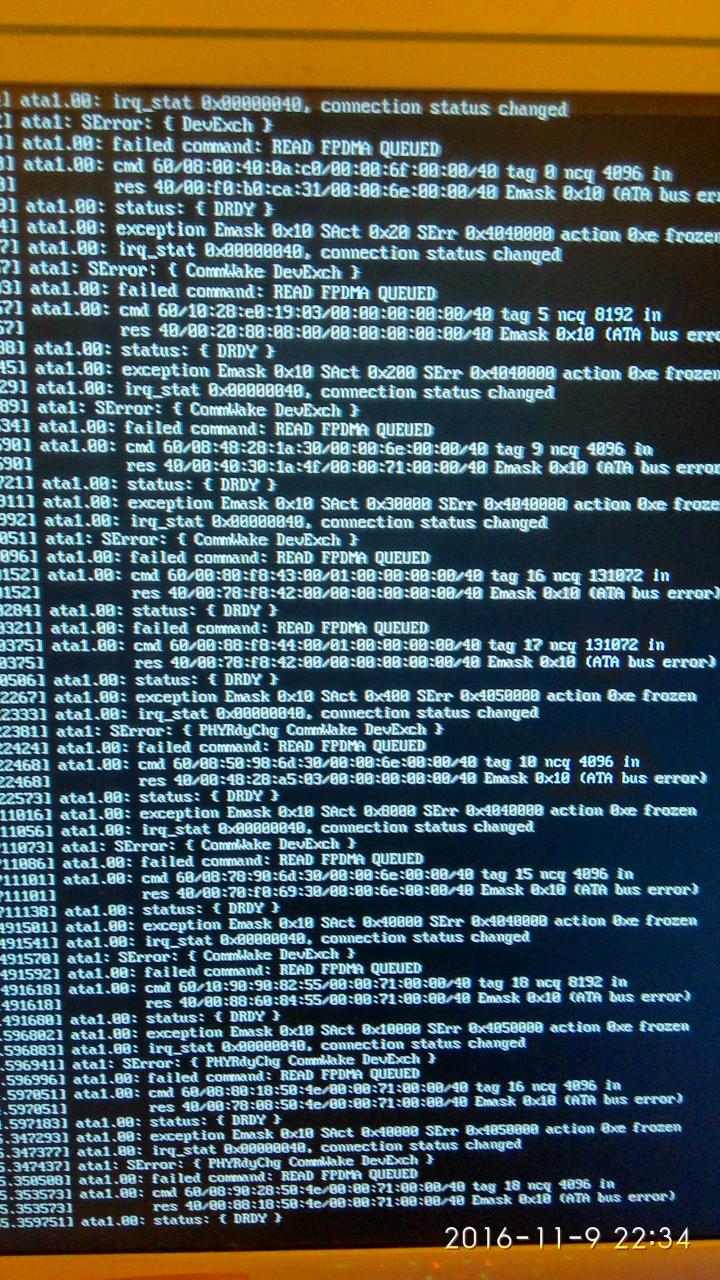
When I came back the next night and started the machine, it was abnormal. After starting the machine, there was always an ATA Bus error. Please see the last picture for details.
How to do, Lao Tze did sth. for two or three hours, reinstalled three times the system is the same result! No way I’m white.
Finally search, omnipotent netizens said that the hard disk fault, but my hard disk is absolutely forced not to be broken… In the end,
I tried to solve my problem with one of my better tools, the CMOS discharge!
Think back, the last time I did this was ten years ago, and alas, how time flies… Beside the point.
Yes, open the case, take out the piece of electronics on the motherboard and put it in again. Restart it.
It’s a bloody lesson to shut down the halt command.
No, no, no, no, no, no, no, no, no, no, no, no, no, no, no, no, no, no, no, no, no, no, no, no, no, no, no, no, no, no, no. Finally, I have an error report.
Putty prompt network error: software caused connection abort solution
Cause Connection Abort. Network error software causes Connection abort
Here’s how to resolve a puTTY connection outage:
1. Setting on the Linux server:
vi /etc/ssh/sshd_config
Find TCPKeepAlive Yes and remove the previous #
Find the ClientAliveInterval parameter and remove the previous #
ClientAliveInterval 60 Changes the following 0 to 60
ClientAliveInterval specifies how long it takes the server to request a message from the client. The default is 0 and no message is sent. ClientAliveInterval 60 means once a minute and then the client responds, which keeps the connection long. The oddity here is that instead of the client initiating the request to stay connected (FTerm, CTerm, etc.), the server is required to initiate the request first.
In addition, for ClientAliveCountMax, the default value is 3. ClientAliveCountMax means that when the server makes a request and the client does not respond to it a certain number of times, the client automatically disconnects. Under normal circumstances, the client will not fail to respond.
2. Putty client Settings:
In the Connection, there are Seconds between Keepaliaves, in which an empty packet is sent to the server to keep the Connection alive. In case the logged in host does not receive the data for a long time, it will automatically disconnect the SSH connection
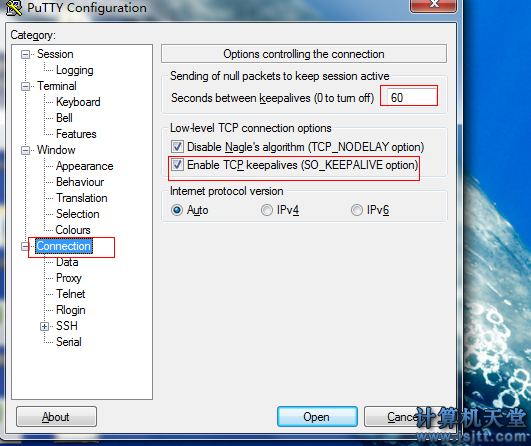
In the figure above, the default input 0 is to disable keeping a connection, in this case I’m used to setting 60. Both check boxes remain selected by default.
From: https://blog.csdn.net/xiaobaoroy/article/details/51556320
Here’s how to resolve a puTTY connection outage:
1. Setting on the Linux server:
vi /etc/ssh/sshd_config
Find TCPKeepAlive Yes and remove the previous #
Find the ClientAliveInterval parameter and remove the previous #
ClientAliveInterval 60 Changes the following 0 to 60
ClientAliveInterval specifies how long it takes the server to request a message from the client. The default is 0 and no message is sent. ClientAliveInterval 60 means once a minute and then the client responds, which keeps the connection long. The oddity here is that instead of the client initiating the request to stay connected (FTerm, CTerm, etc.), the server is required to initiate the request first.
In addition, for ClientAliveCountMax, the default value is 3. ClientAliveCountMax means that when the server makes a request and the client does not respond to it a certain number of times, the client automatically disconnects. Under normal circumstances, the client will not fail to respond.
2. Putty client Settings:
In the Connection, there are Seconds between Keepaliaves, in which an empty packet is sent to the server to keep the Connection alive. In case the logged in host does not receive the data for a long time, it will automatically disconnect the SSH connection
In the figure above, the default input 0 is to disable keeping a connection, in this case I’m used to setting 60. Both check boxes remain selected by default.
From: https://blog.csdn.net/xiaobaoroy/article/details/51556320
[wechat Payment] use OpenSSL command to generate apicclient_ key.pem Error report URL error 58
Problem description
At present, there are only files apiclient_cert.p12 in the development group, but PHP projects need apiclient_cert.pem and apiclient_key.pem as the certificate of refund operation
After WeChat payment document at https://pay.weixin.qq.com/wiki/doc/api/tools/mch_pay.php?Chapter = command in 4_3
openssl pkcs12 -nocerts -in apiclient_cert.p12 -out apiclient_key.pem
After the operation, the exported file should not only enter the merchant ID as the password, but also set the password
And after importing the project, the project reports an error cURL error 58
The solution
The exported command is corrected to
openssl pkcs12 -nodes -clcerts -in apiclient_cert.p12 -out apiclient_key.pem
How to Fix Fatal Error lnk1120: 1 unresolved externals
Error 5 error LNK1120: 3 unresolved externals D:\Code\simpleTest-
mqo
\Debug\simpleTest-
mqo
.exe 1 1 simpleTest-
mqo
Error 4 error LNK2019: unresolved external symbol _
mqo
CallModel referenced in function “void __cdecl draw(void)” (?draw@@YAXXZ) D:\Code\simpleTest-
mqo
\simpleTest-
mqo
\
mqo
test. obj simpleTest-
mqo
Error 2 error LNK2019: unresolved external symbol _
mqo
CreateModel referenced in function “void __cdecl init(void)” (?init@@YAXXZ) D:\Code\simpleTest-
mqo
\simpleTest-
mqo
\
mqo
test. obj simpleTest-
mqo
Error 3 error LNK2019: unresolved external symbol _
mqo
Init referenced in function “void __cdecl init(void)” (?init@@YAXXZ) D:\Code\simpleTest-
mqo
\simpleTest-
mqo
\
mqo
test. obj simpleTest-
mqo
Warning 1 warning LNK4098: defaultlib ‘LIBCMTD’ conflicts with use of other libs; use /NODEFAULTLIB:library D:\Code\simpleTest-
mqo
\simpleTest-
mqo
\LINK simpleTest-
mqo
How to Fix this error?
Only the header files are included, but the corresponding library files are missing, resulting in functions that are only declared but not implemented.
The problem I have is that there are h and c files, but no lib and dll! !
I was puzzled and asked a colleague for help, and finally found the problem, I put the c file with the header file in include, when the link can not find the function definition, so the report error. The solution is to add both the h and c files to the project.
Yum error: cannot retrieve repository metadata( repomd.xml )For repository solution
The Cannot Retrieve Repository metadata (repomd.xml) for Repository solution
Use network monitoring software Cacti to detect the traffic of a server using SNMP service! I ran the command Yum-y install net-SNMP as usual and the results came up with some error messages! Repository metadata (repomd.xml) for Repository Is not possible.
The solution is as follows:
copy code
The code is as follows:
# cd /etc/
#ls
Find. Yum repos. D. this directory, a file inside a zl. ‘(your machine may not be the name, the name should be customized), vi baseurl=http://centos.ustc.edu.cn/centos/5/os/i386/ compile the inside address
Then #yum Clean All
After that: Yum-y install net-SNMP will install it!
CHECK_NRPE: Error – Could not complete SSL handshake.
Question:
[root @ mode objects] #/usr/local/nagios/libexec/172.30.71.238 check_nrpe – H – c check_load check_nrpe: Error – Could not complete the SSL handshake.
Solutions:
There are many reasons for this problem, and the aspects to consider are very broad
First of all:
Troubleshooting client:
First: VI NRPE.cfg
[root @ mode objects] #/usr/local/nagios/libexec/172.30.71.238 check_nrpe – H – c check_load check_nrpe: Error – Could not complete the SSL handshake.
Solutions:
There are many reasons for this problem, and the aspects to consider are very broad
First of all:
Troubleshooting client:
First: VI NRPE.cfg
command[check_load]=/usr/local/nagios/libexec/check_load -w 15.10.5 -c 30.25.20
command[check_mem]=/usr/local/nagios/libexec/check_mem.pl -w 10% -c 3%
command[check_disk]=/usr/local/nagios/libexec/check_disk -w 15% -c 7% -p /
command[check_swap]=/usr/local/nagios/libexec/check_swap -w 20% -c 10%
command[check_iostat]=/usr/local/nagios/libexec/check_iostat -w 6 -c 10
Using these commands on the client side to monitor the information on the client side,
If successful, this means that there is no problem with the client configuration. Generally speaking, there is no problem here, but there is no exception. The following two are client-side 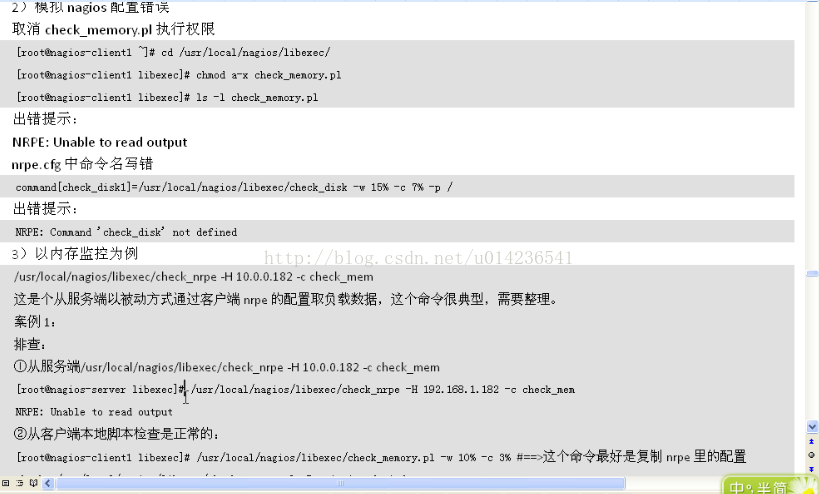
If the client problem is fixed and not fixed, the next step is to troubleshoot
Information about the server that is contained in the client configuration file
Such as: vi nrpe. CFG
Allowed_hosts = 172.30.71.20, 172.30.71.238
Add server IP, separated by English commas, no Spaces left or right of equal sign
Also, the check_NRPE plugin is not defined causing, of course, the Nagios server syntax check to error if it is not defined
Check grammar:
/etc/init.d/nagios checkconfig
Error message will be found:
Checking services…
Error: Service check Command ‘check_NRpe’ specified in Service ‘Swap Useage’ for host ‘197-etiantian-1-1’ not
defined anywhere!
Omit some.
Total Warnings: 0
Total Errors: 5
Check_nrpe’s plug-in configuration (server side) needs to be added to commands.cfg
CFG enters and shifts +g to the end to add the following.
# ‘check_nrpe’ command definition
define command{
command_name check_nrpe
command_line $USER1$/check_nrpe -H $HOSTADDRESS$ -c $ARG1$
}
At this point, re-execute the syntax check command:
Check grammar:
/etc/init.d/nagios checkconfig
Total Warnings: 0
Total Errors: 0
There are also some screening sites
1. Make sure that the versions of check_NRpe and nrPE daemon are the same.
RPMS — qa|grep openssl view
2. Verify that the check_nrpe and nrpe deamon sides enable or disable SSL support at the same time.
/ usr/local/nagios/bin/nrpe c/usr/local/nagios/etc/nrpe. The CFG – d – n
-n stands for not using SSL. To start SSL, start both sides; If you don’t start it, both sides will close; You cannot start and close at the same time
In this way
Remote desktop 0x104 solution?
The protocol error indicates that the server 3389 port is open, but the 3389 port has been modified to another service port, that is, the remote terminal of the server has changed the port, you can go to the server to check whether this is the case. If 3389 is already occupied by another service application, then change the remote desktop port and use the modified port to log in!
Iis7 Remote Control:
A computer remote monitoring tool, IIS7 remote Desktop management is a professional remote desktop connection software, no installation. Easy to operate. Perfect interface design, powerful monitoring function, stable system platform, to meet the needs of users to achieve remote desktop connectivity.
1. Grouping function.
2. Import text format selection to prevent coding errors.
3, a single server to add manually.
4. Support feature search.
5. Reminder of expiration function.
6. Import server information with one click.
7. The program is automatically updated.
Reproduced in: https://my.oschina.net/u/4172372/blog/3085072
“Error: a JNI error has occurred” and “error of” jvm.cfg To solve the problem
Today in the CMD environment
java Helloworld.java
javac Helloworld
If it doesn’t work, it shows up
Exception in thread "main" java.lang.UnsupportedClassVersionError: helloworld has been compiled by a more recent version of the Java Runtime (class file version 57.0), this version of the Java Runtime only recognizes class file versions up to 52.0
Error message.
after thinking about it, I probably made a java8 environment by playing mine craft before. Later, I downloaded and installed jdk13 for development, which caused the problems caused by the difference between javac and Java version.
then reset JAVA_HOME to C:\Program Files\Java\jdk-13 should be solved.
when something weird happens, still report this error. In a rage, I deleted
and reported an error after I deleted
directory which caused the conflict
Error: could not open `C:\Program Files\Java\jre1.8.0_201\lib\amd64\jvm.cfg
The problem should be clear, because I don’t know which environment variable is still pointing to this folder, I find the same problem in stackoverflow, where Jason Hughes mentioned that this guideline exists in C:\Program Files\Common Files\oracle\ folder, (my word is C:\Program Files(x86)\Common Files\oracle\), delete the directory directly and restart once it comes.
problem solved.
Explain MySQL replication error 1032 & 1205
Most of the businesses using MySQL involve Replication, and master-slave mechanisms are often used for reading and writing separation,HA, hot backup, or incremental Replication.
However, in many cases, 1032 and 1205 errors are reported
1032 in the first place.
Error_code: 1032; handler error HA_ERR_KEY_NOT_FOUND;
The root cause of the 1032 error was inconsistency in the master-slave database data, resulting in the synchronization operation not being performed on the slave library.
There are two kinds of situations I have encountered so far:
For Replication, I used master –binlog-do-db=db_name or slave — Replicate_do_db =db_name.
If two libraries pubs and test, ignore the test, the results have a SQL in the master test library implementation: insert into pubs. Tname values (XXXXX);
Then, depending on the configuration of the service, a 1032 error is raised if the master executes successfully and the master does not
2 TRIGGER and PROCEDURE version problem. If the master-slave version is inconsistent, for example, five pieces of data are written after the execution of a PROCEDURE on the master-slave version, while only one line of data is written after the execution of a PROCEDURE on the master-slave version, then a 1032 error is bound to occur
Solutions:
1. It doesn’t use –binlog-do-db and — Replicate_do_DB =db_name
Change from top — Replicate_wild_do_table =db_name.%
2 Ensure that the master-slave TRIGGER and PROCEDURE versions are consistent
Say again 1205:
This error is easy to understand. Typically, the primary operation connection is autocommit, and as a result, the runtime fails and an error is reported when synchronizing from the library.
Two ways to do it:
Set my.cnF Innodb_rollback_on_TIMEOUT =1 on the primary, rollback for timeout
2. Ignore 1052. My. CNF — slave-skipping-errors =1205 from above
1205 occurs on the main library, often because of lock timeouts. For example, using a transaction on a table results in one transaction not committing late, another transaction waiting for the previous transaction to commit, lock wait timeout, and the latter transaction hanging. A 1205 error occurred on the main library. The most common is when a table has a self-growing ID, and an INSERT initiated transaction is delayed for several reasons, so that subsequent transactions wait for the previous INSERT operation to commit when performing the insert operation on the table. These all require DBAs and R& D Cooperate to complete. The service performance is low CPU utilization, but load is unusually high. If you look innoDB status, you can catch lock conflicts randomly.
However, in many cases, 1032 and 1205 errors are reported
1032 in the first place.
Error_code: 1032; handler error HA_ERR_KEY_NOT_FOUND;
The root cause of the 1032 error was inconsistency in the master-slave database data, resulting in the synchronization operation not being performed on the slave library.
There are two kinds of situations I have encountered so far:
For Replication, I used master –binlog-do-db=db_name or slave — Replicate_do_db =db_name.
If two libraries pubs and test, ignore the test, the results have a SQL in the master test library implementation: insert into pubs. Tname values (XXXXX);
Then, depending on the configuration of the service, a 1032 error is raised if the master executes successfully and the master does not
2 TRIGGER and PROCEDURE version problem. If the master-slave version is inconsistent, for example, five pieces of data are written after the execution of a PROCEDURE on the master-slave version, while only one line of data is written after the execution of a PROCEDURE on the master-slave version, then a 1032 error is bound to occur
Solutions:
1. It doesn’t use –binlog-do-db and — Replicate_do_DB =db_name
Change from top — Replicate_wild_do_table =db_name.%
2 Ensure that the master-slave TRIGGER and PROCEDURE versions are consistent
Say again 1205:
This error is easy to understand. Typically, the primary operation connection is autocommit, and as a result, the runtime fails and an error is reported when synchronizing from the library.
Two ways to do it:
Set my.cnF Innodb_rollback_on_TIMEOUT =1 on the primary, rollback for timeout
2. Ignore 1052. My. CNF — slave-skipping-errors =1205 from above
1205 occurs on the main library, often because of lock timeouts. For example, using a transaction on a table results in one transaction not committing late, another transaction waiting for the previous transaction to commit, lock wait timeout, and the latter transaction hanging. A 1205 error occurred on the main library. The most common is when a table has a self-growing ID, and an INSERT initiated transaction is delayed for several reasons, so that subsequent transactions wait for the previous INSERT operation to commit when performing the insert operation on the table. These all require DBAs and R& D Cooperate to complete. The service performance is low CPU utilization, but load is unusually high. If you look innoDB status, you can catch lock conflicts randomly.
[ERROR] ERROR reading packet from Server: Lost Connection to MySQL Server during Query (server_errno=2013)
In general, three situations will lead to 2013 errors
1 Reverse parsing
2 Max_allowed_packet is inconsistent
3. Network Problems
The solution
1 Skip-name-resolve is forbidden to reverse resolve
Configure master slave max_allowed_packet with the same value
3 Adjust the value of net_write_TIMEOUT
A friend of mine reported a mistake in 2013 when I was writing notes. None of the three schemes mentioned above worked, and Lost Connection to MySQL Server appeared very timely. Finally, I found out that the network agent controlled the connection for more than 30 minutes and automatically hung up…
PHP error: call to undefined function curl_ init() window
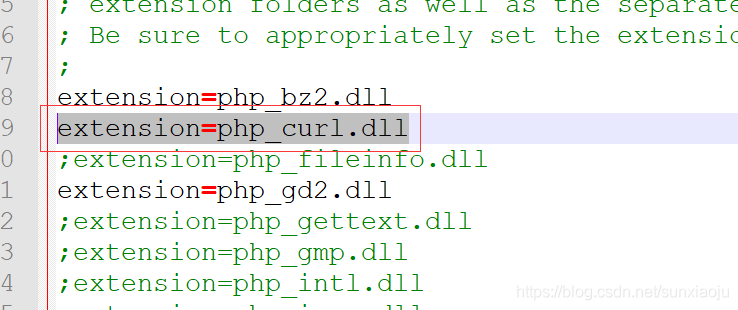
1. First, remove the extension=php_curl. DLL comment in php.ini file, as shown in the figure below:
2. To configure ext directory, absolute path is required, extension_dir = “D:/InstallFile/ PHp-5.6.9-win32-vc11-x64 /ext”, as shown in the figure below:

3, the apache/bin directory requires libssh2. DLL, ssleay32. DLL, libeay32. DLL, due to my lack of libssh2. DLL, so you need to download a, will libssh2. DLL in the apache/bin directory, and then restart the apache.
2. To configure ext directory, absolute path is required, extension_dir = “D:/InstallFile/ PHp-5.6.9-win32-vc11-x64 /ext”, as shown in the figure below:
3, the apache/bin directory requires libssh2. DLL, ssleay32. DLL, libeay32. DLL, due to my lack of libssh2. DLL, so you need to download a, will libssh2. DLL in the apache/bin directory, and then restart the apache.