Category Archives: How to Fix

error: expected unqualified-id before ‘dynamic_cast’

Error code:

Deride * q= std::dynamic_cast<Deride*>(p);

Dynamic_cast is not part of STD library, but C++ keyword, so it should be removed.

Deride * q= dynamic_cast<Deride*>(p);

A word of caution:
STD :: Dynamic_pointer_cast for dynamic conversion shared_PTR is the part in STD. This is also obvious because shared_PTR is a part in STD

An error occurred while win7 was sharing the Internet

The following errors may occur when sharing an Internet connection in Windows 7:
An error occurred while Internet Connection Sharing we being enabled.Internet Connection Sharing cannot be enabled. A LAN connection is already configured with the IP address that is required for automatic IP addressing.
This can be fixed with the following two commands:
netsh int ip reset
netsh winsock reset catalog
After executing these two commands with administrator privileges, restart and you should be able to share your Internet connection normally.

Error: EACCES: permission denied, access ‘/usr/local/lib/node_modules’ npm ERR! at Error (native)

Use the command line to keep this Error similar to: Error: EACCES: Permission Denied, Access ‘/usr/local/lib/node_modules’ NPM ERR! at Error (native)

Reason: No administrator rights were obtained while executing command line commands

Solution: Simply prefix the command with sudo. Then enter the computer administrator password operation can be completed.

How to solve the Mapi error of outbook that can’t send mail directly

Recently, when I upgraded from office2010 to 2013, I found that the right file could not be sent to the email. Meanwhile, in word document, it could not be sent to the email as an attachment.
Error:
Mapi Failure – “Unspecified Error”, meaning Mapi Error: The cause is Unspecified.

Through research, find an article: http://answers.microsoft.com/en-us/office/forum/officeversion_other-word/word-could-not-send-mail-because-of-mapi-failure/f62678fe-ef1d-42b5-8cfe-1e43d6a1d609?auth=1

The solution:
HKEY_Current_User> Software> Microsoft> Office> 15.0 & gt; Outlook> Preferences> MaximumAttachmentSize
Change the value 0 to another value, such as 5000, to indicate that an attachment of 5M size can be sent. Of course, you can also make it bigger, like 50000m, 50m!

All right, problem solved!

Error in brew install: curl: (22) the requested URL returned error: 404 Not Found

When installing ZooKeeper today, I reported the following error

brew install zookeeper

Updating Homebrew...
==> Downloading https://mirrors.aliyun.com/homebrew/homebrew-bottles/bottles/zookeeper-3.4.13.mojave.bottle.tar.gz
######################################################################## 100.0
curl: (22) The requested URL returned error: 416
Error: Failed to download resource "zookeeper"
curl: (22) The requested URL returned error: 404 Not Found
Trying a mirror...
==> Downloading https://www-eu.apache.org/dist/zookeeper/zookeeper-3.4.13/zookeeper-3.4.13.tar.gz

curl: (22) The requested URL returned error: 404 Not Found
Error: An exception occurred within a child process:
  DownloadError: Failed to download resource "zookeeper"
Download failed: https://www-us.apache.org/dist/zookeeper/zookeeper-3.4.13/zookeeper-3.4.13.tar.gz

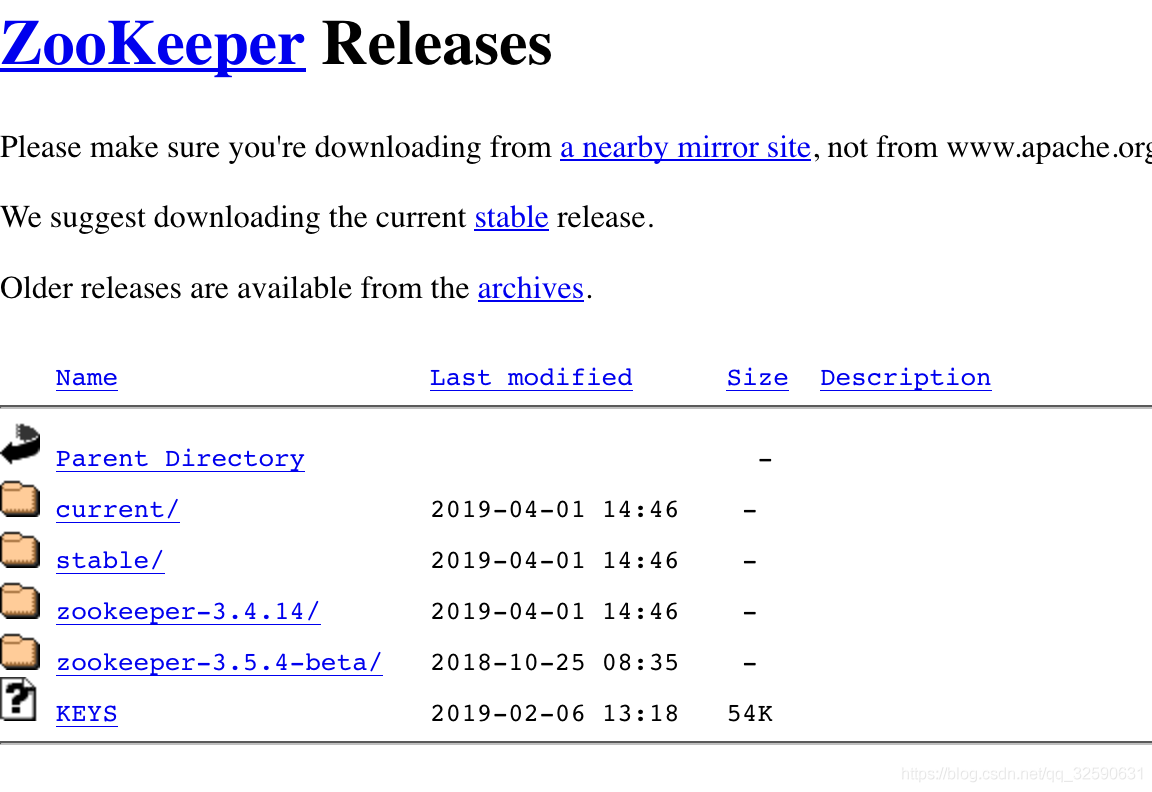
When I saw the error, I checked out zookeeper’s official website

I found that the official website had been updated to version 3.4.14, but BREW still downloaded version 3.4.13, so the above problems would be caused. I found that by looking up information online, I could operate this way and directly use the download address of the official website

brew install https://www-us.apache.org/dist/zookeeper/zookeeper-3.4.14/zookeeper-3.4.14.tar.gz

It has been proved that this method does not work
You need to update Git

brew install git

then

brew install zookeeper

done

DB2 SQL ERROR: SQLCODE=-803, SQLSTATE=23505, SQL

As soon as I came into contact with DB2, I encountered a problem. I felt that the explanation of DB2 error was not obvious. The novice was overwhelmed by the error information as follows

Error for batch element #1: DB2 SQL Error: SQLCODE=-803, SQLSTATE=23505, SQL

The reason is a violation of the uniqueness constraint…

Frequently asked questions about docker

FAQ: 1, Cannot connect to the Docker daemon. Is the Docker daemon running on this host?Solution: This is the most common problem with docker when it’s first installed. There are two standard ways to solve this problem: A, start the Docker background service with root authority, and Service Docker Start. B, or add the current user to the Docker group. Apart from these two reasons, Docker daemon could not start, but more because the system boot time was wrong. Because the Gentoo kernel is self-defined, the majority of error reporting may be caused by parameter configuration in the kernel. Check /var/log/docker.log for any errors.
Error starting Daemon: Devices CGroup isn’t mounted in the kernel of Gentoo. It is required to open the cGroup, such as memory CFS RT, etc. For the BLkio error of cGroup, it needs to be turned on through the Settings inside the block.
3, Can’t Initialize iptables table ‘NAT ‘: Table does not Exist solution: Because iptables is the dependent component required to run for Docker (security Settings are required), it is crucial to set up the iptable correctly. If NAT is wrong when Docker starts, there are usually two reasons. The first reason is that iptables is not set correctly, and the second reason is the kernel setting. The standard iptables setup sequence is as follows: Iptables -F Service IPtables Save Service Iptables Restart has Gentoo installed and configured properly and should theoretically have an IPtable and NAT side. If the IPtables or NAT Settings are not correct, there is a problem with the kernel configuration. In kernel configuration, to activate IPtable and NAT, it is necessary to open netFilter and all the following functions in the network. Otherwise, at runtime, you’ll get all sorts of weird bugs. After the compilation core is restarted, the problem is resolved.
4, Error starting daemon: error initializing graphdriver: devmapper: Base Device UUID and F ilesystem verification failed: devicemapper: Error running deviceCreate (ActivateDevice) dm_task_run failed, fault analysis, the causes of the failure of several, one is the docker storage space is full, the new add or modify the container will be an Error, another reason is more direct,/var/log/docker/under the devicemapper data and metadata file is deleted. But the bottom line is that the uUID of the existing Storage-set is inconsistent with the UUID saved in the Docker configuration. Solution: The solution to this problem is simple and brutal. Clean all the configuration files of Docker directly (all the existing data will be lost), restart the service, and let Docker rebuild automatically. rm -rf /var/lib/docker/* service docker restart
 
Copyright belongs to the author. Please contact the author for any reprint.
the author: keenshoes (from douban)
source: https://www.douban.com/note/636127425/
Record of solutions to internal error when VMware starts virtual machine

Before, the folder name of VMVARE installation was “virtual machine”. Today, I think the Chinese name is not good, so I’ll change it to “VMvare” in English. However, after the change, an internal error will appear when I start vmware virtual machine.

After testing, I changed the name of the file back to “virtual machine” (if the name cannot be changed, it should be a problem of occupancy, just restart the computer and change the name again).

Then look at the system service and open the corresponding service. First, the run window pops up with the win+ R key, then type “Services.MSC”, press enter, and find “VMware Authorization Service” in a pile of services, and right click to start the Service.

Then run the virtual machine.

I later run when there is a physical memory problem, this problem on the Internet to solve more, do not elaborate.

In addition, I did not use a specific way to solve the physical memory, just remember to change more than 200 memory into 500, other did not move. I don’t know if this change has any effect, but after a few minutes, when I am writing this article, there is no problem and I go directly to the CDLinux installed.

For reference only

Solutions to flex4 error ා 2032 stream error

Recently, I was working on a project, and found no problems in the initial release of the program, but some users reported that they could not see the site, and screenshot Error#2032 error. But it worked in the r&d center, and was later tested and luckily found on a test machine. While the other 9 machines were tested at the same time, and found that they could display normally. Then I searched the Internet. No results. Set Cache, compile Settings, try a bunch of them. No response. Weird question! I was even thinking about going back to Flex3, because I stumbled upon a Flex3 project that made sense here. But then I came across a foreigner’s website:
Salesforce Flex: “Error #2032: Stream Error. URL: “
Give it a try, re-select the frame join and merge into the code.
Oh, my God, it worked.
This setting can be found in the Flex build path library path for project properties.
Originally, the first default in Flash Builder4 was to use the SDK default. This is exactly the difference from Flex3.
But it’s not clear what the difference is between the first option, the SDK default. But from the results of the release. It’s a lot smaller when you merge it into code.