Anaconda installs the PyAudio method
Open Anaconda Prompt(run as administrator)

enter PIP install pipwin next enter the pipwin installation
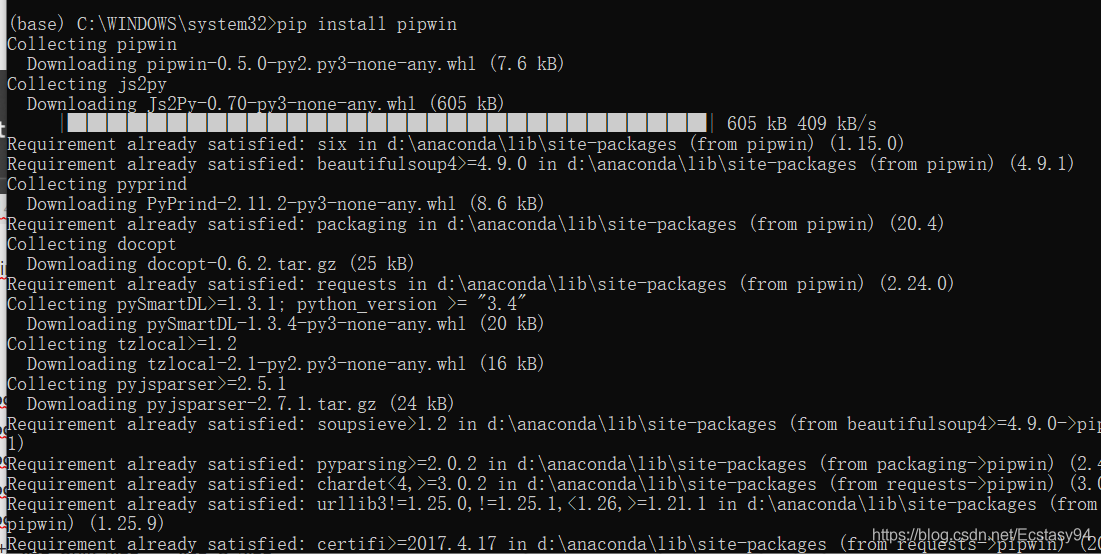
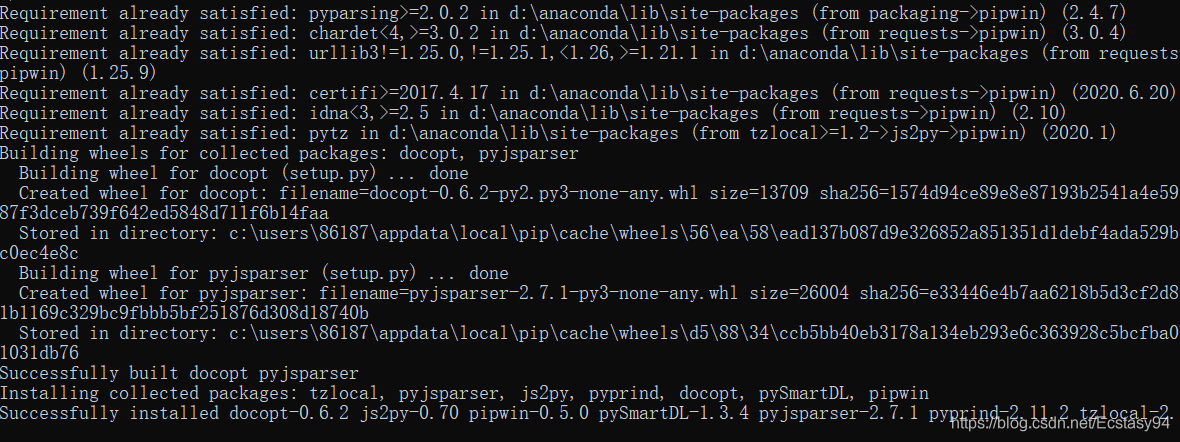
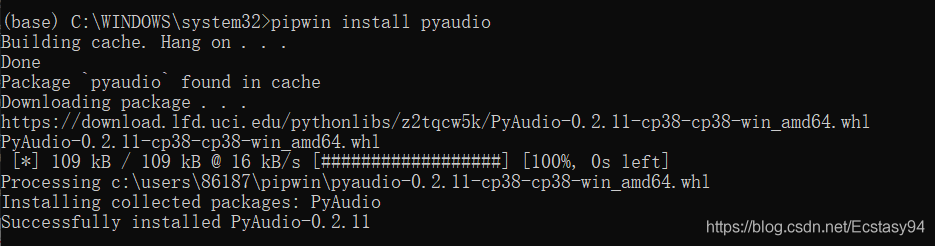
after installation enter pipwin install pyaudio
in Hang on… Click enter to confirm and finally complete the installation.
VMware Workstation failed to recover error: (VMX) exception 0xc0000006 (disk error while paging) has
I am getting the following error when running vmware workstation.
Warning: the system was unable to load a page of memory; this can be caused
by network problems or a failing hard disk drive.
VMware Player unrecoverable error: (vcpu-0)
Exception 0xc0000006 (disk error while paging) has occurred.
A log file is available in “C:/My Virtual Machines/Windows 2000
Professional/vmware.log”. A core file is available in “C:/Documents and
Settings/Administrator/Application Data/VMware/vmware-vmx-1464.dmp”. Please
request support and include the contents of the log file and core file.
To collect files to submit to VMware support, run cscript vm-support.vbs.
We will respond on the basis of your support entitlement.
When my vmware stops, it uses a pause to suspend the system, which is similar to hibernating a windows system, so that all the current operations can be saved, and when it starts up again, it can go directly into operation, but today the startup error.
Then I went online and found that renaming or simply deleting the vmss file in the directory of the installed virtual machine system and reopening the virtual system would do the trick.
Raise in Oracle_APPLICATION_Error Usage
actually RAISE_APPLICATION_ERROR is the declaration that the application-specific errors are conveyed from the server side to the client application (SQLPLUS on another machine or other front-end development language)
RAISE_APPLICATION_ERROR:
PROCEDURE RAISE_APPLICATION_ERROR( error_number_in IN NUMBER, error_msg_in IN VARCHAR2);
inside the error code and content, are custom. Custom, of course, is not the system has named the existence of the error category, is a custom transaction error type, only called this function. Error_number_in allows tolerance between -20,000 and -20999 so that it does not conflict with any ORACLE error code. The length of error_MSG_in cannot exceed 2k, otherwise intercept 2k. For example,
prevents users under 18 years of age from adding to the database table temp_age.
-- building a watch
create table temp_age(
age_id number(5),
age number(3)
);
-- Build Trigger
create or replace trigger t_temp_age_check
before insert on temp_age
  for each row
    begin
      if :new.age < 18
        then
          raise_application_error(-20001,'age must at least 18 years old');
        end if;
    end;
-- client program
declare
  no_baby_allowed exception;
  pragma exception_init(no_baby_allowed,-20001);
  begin
    insert into temp_age(age_id,age) values(1,20);
    insert into temp_age(age_id,age) values(2,17);
    insert into temp_age(age_id,age) values(3,18);
    exception
      when no_baby_allowed
        then
          dbms_output.put_line(sqlerrm);
  end;
Client program execution output results:
Ora-20001: age must at least 18 years old
ora-06512: error during ‘lcam_develop.t_temp_age_check’, line 4
ora-04088: trigger ‘lcam_develop.t_temp_age_check’ execution
ssl_ error_ Rx_ record_ too_ Long and Apache SSL solution
Reference links: https://stackoverflow.com/questions/119336/ssl-error-rx-record-too-long-and-apache-ssl
Solution to the problem of “undefined external error” after registering PBX of microsip
During a MicroSIP soft phone test of dot star PBX(DotAsterisk) call, it was found that once dialed, an “undefined External error” would pop up. The screenshot of the error is shown below.
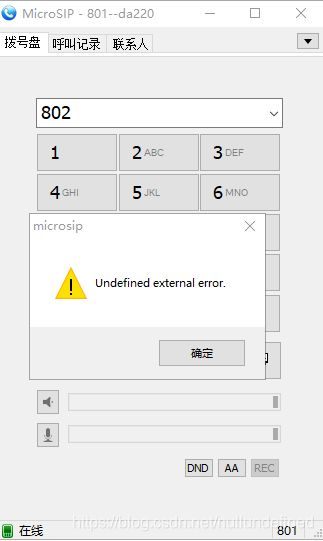
When Windows 10 was updated to 1803, access to sensitive and private devices (microphones) was restricted. However, the MicroSIP error message is too unfriendly.
Solutions:
In the lower right corner [Start menu] — [Settings] — [privacy] — on the left [reference permissions], select “Microphone”, and in the right “Allow Applications to access your microphone” switch, just keep it on. The diagram below.
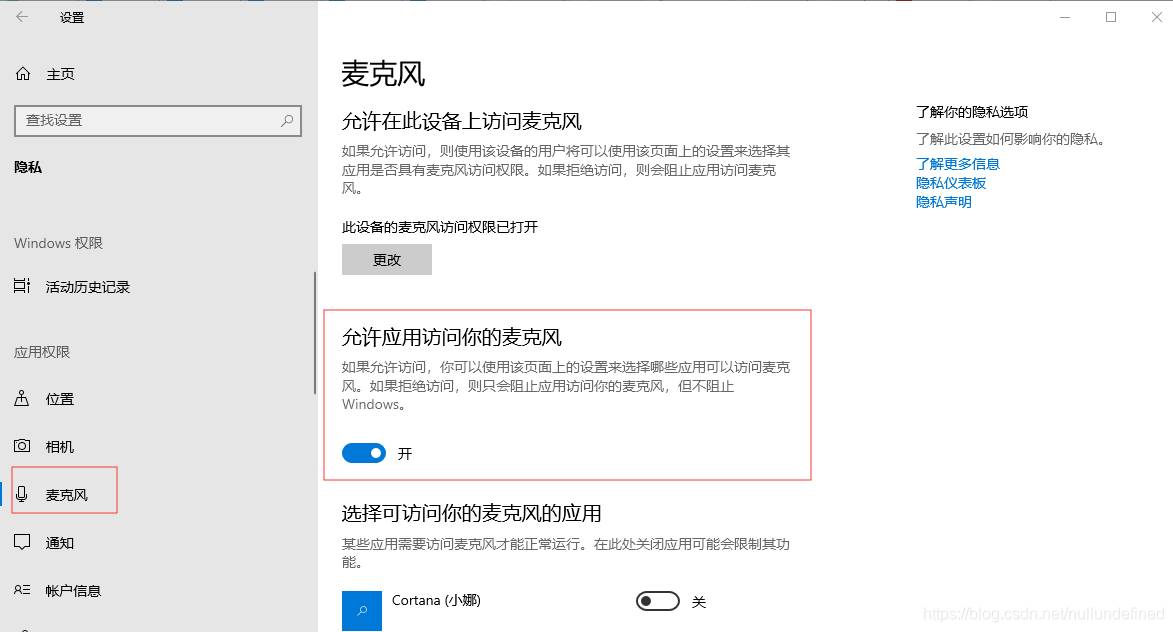
Once the state is on, register the Dot Star PBX(DotAsterisk) with the MicroSIP soft phone, make a dial-up call, and find that everything is fine.
OpenGL runtime returned 1283 (stack overflow) error
// check for errors
	m_glErrorCode=glGetError();
	if(m_glErrorCode != GL_NO_ERROR)
	{
		const GLubyte *estring;
		CString mexstr;
// get the error descritption from OGL
		estring = gluErrorString(m_glErrorCode);
// prepare and show a message box
		mexstr.Format(L"GLEnabledView:\n\tAn OpenGL error occurred: %s\n", estring);
		AfxMessageBox(mexstr,MB_OK | MB_ICONEXCLAMATION);
	}
The value of m_glErrorCode for debugging is 1283 and eString is a stack overflow
After talking to friends and Googling, I came to the following conclusion:
The push and POP classes in OpengL don’t match.
The reason for the problem is that after a push, an opengL function made an error running, and then the return dropped, causing the subsequent POP not to run, reporting the error.
After the problem is solved, I find that the previous code will make a judgment on the return value of some OpengL functions. Let’s learn. This will help you find out quickly what the problem is.
	if(!gluUnProject(winx,winy,winz,modelMatrix,projMatrix,viewport,&objx1,&objy1,&objz1))
		return FALSE;
If you want to discuss it, please email me.
[338] MySQL error: error 1205: lock wait timeout exceeded solution
Solutions:
Execute mysql command: Show Full ProcessList;
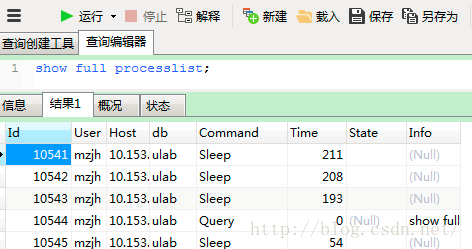
Then find the system ID of the query statement: kill the thread ID that is being locked
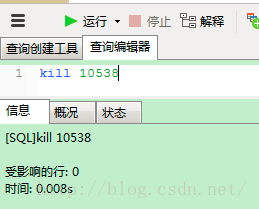
Select * from information_schema.innodb_trx; select * from information_schema.innodb_trx;

Refer to the article: http://my.oschina.net/quanzhong/blog/222091
http://blog.sina.com.cn/s/blog_53e68b3b0101bjxi.html
Sudo: parse error in / etc / sudoers near line 24
From: https://www.cnblogs.com/starsea/p/4926658.html
Ubuntu USES viM for adding user permissions
/etc/sudoers
File editing, save and exit, sudo SU and other commands have been reported as follows:
sudo: parse error in /etc/sudoers near line 24
sudo: no valid sudoers sources found, quitting
sudo: unable to initialize policy plugin
The reason is that it is wrong to use Vim to modify the file. For example, Google says you should use visudo to edit sudoers.
If something goes wrong, the following solution is executed:
pkexec visudo
Enter the file edit, for just modify the wrong place, directly modify, save exit, restore normal
Python error: typeerror: ‘module’ object is not callable
To be clear, attention_keras.py and attention_tf.py are in the same package (i.e. under the same folder)
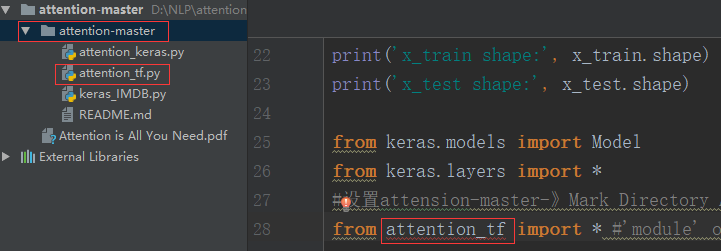
While calling a function in the attention_Tf.py file, it is found that attention_TF cannot be called
# Set attensons-Master – Mark Directory As -& GT; Resources ROOT
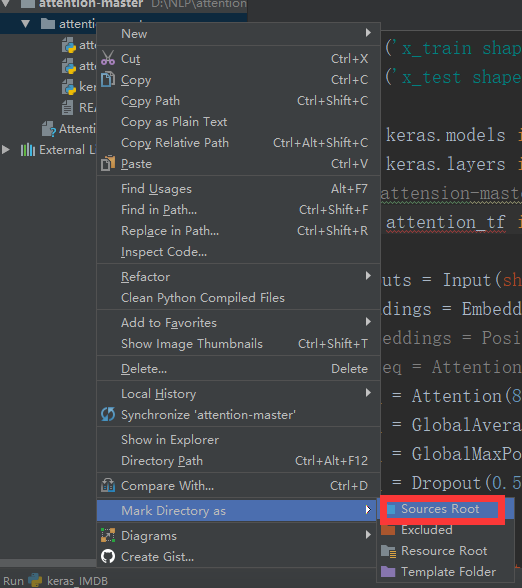
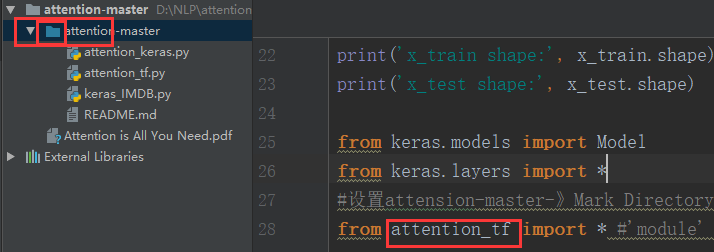
rule: 1, if the method in b.> file is called, that is, B.py has Class B: the principle of calling is: module name-class name-method name
2, if calling a function in the b.py file: module name – function name
SQL Server “login failed for user ‘domain account”. [sqlstate 28000] (error 18456). “Problem solving
Problem: SQL Server 2014, synchronized data from Linked Server with Job timing, executed times “Login Failed for User ‘domain account’ “(SQLSTATE 28000) (Error 18456).
Solution: Modify the SQL Server Agent service startup account as the domain account through the configuration management tool, see: Login Failed for [SQLSTATE 28000] (Error 18456) The Step Failed
Reproduced in: https://www.cnblogs.com/abelard/p/4840962.html
IIS 7.5, ASP.NET MVC. HTTP error 500 (internal server error), but debugging does not enter the background, the browser only reports 500 errors
IIS 7.5, ASP.NET MVC. HTTP Error 500 (Internal Server Error) uploadify uploads images, the browser only reported 500 errors, the progress bar does not move, but debugging does not enter the background
After several days of searching, I could not debug the source of the error. I also wondered whether the maximum byte limit of the upload was limited. However, I finally found the prompt of foreign gods under Google and determined that it was this error.
http://stackoverflow.com/questions/17188930/iis-7-5-asp-net-mvc-http-error-500-internal-server-error-an-unexpected-cond
Solutions:
& lt; The httpRuntime requestValidationMode = “2.0” maxRequestLength = “100000”/& gt; The configuration file adds a maximum byte limit
Error 1606 Could Not Access Network Location %SystemDrive%/inetpub/wwwroot/
Under Windows 7
1. Open registry Regedit
2, find the HKEY_LOCAL_MACHINE/SOFTWARE/Microsoft/InetStp PathWWWRoot
64-bit operating system: HKEY_LOCAL_MACHINE\SOFTWARE\Wow6432Node\Microsoft\InetStp\PathWWWRoot
% SystemDrive %/inetpub/below/= = “C: \ inetpub \ below
