Error given when trying to directly modify the key of a pair in the map. The error indicates that the key for pair should be read-only. Therefore, you can delete the pair first, and then insert a matching pair.
Category Archives: How to Fix
Python error: typeerror: ‘Int’ object is not subscribable
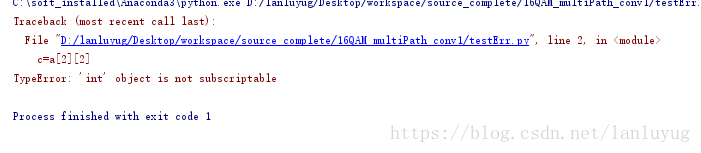
Check the error line, the error is generally in the integer subscript:
Such as:
Such as:
a = 4
c=a[2]
Error: line 2, in < module>
c = a [2]
TypeError: ‘int’ object is not subscriptable
Take the more complicated one: two dimensions
a = [1,2,3,4]
c=a[2][2]
It’s a one-dimensional array, but it takes an array index, and then it adds a index, same problem.
VBA error values in Excel
The cell error value can be inserted into the cell, or the CVErr function can be used to test whether the cell value is an error value. The cell error value can be one of the following XlCVError constants.
| constant | error number | cell error values |
|---|---|---|
| xlErrDiv0 | 2007 | 0 # DIV /! |
| xlErrNA | 2042 | #N/A |
| xlErrName | 2029 | #NAME? |
| xlErrNull | 2000 | #NULL! |
| xlErrNum | 2036 | #NUM! |
| xlErrRef | 2023 | #REF! |
| xlErrValue | 2015 | #VALUE! |
Excel VBA tutorial: Cell error values · Examples
This example inserts seven cell error values into the A1:A7 cell area of Sheet1.
myArray = Array(xlErrDiv0, xlErrNA, xlErrName, xlErrNull, _
    xlErrNum, xlErrRef, xlErrValue)
For i = 1 To 7
    Worksheets("Sheet1").Cells(i, 1).Value = CVErr(myArray(i - 1))
Next i
This example checks whether the active cell in Sheet1 contains a cell error value and, if so, displays a message. This example serves as a model structure for error handlers for cell error values.
Worksheets("Sheet1").Activate
If IsError(ActiveCell.Value) Then
    errval = ActiveCell.Value
    Select Case errval
        Case CVErr(xlErrDiv0)
            MsgBox "#DIV/0! error"
        Case CVErr(xlErrNA)
            MsgBox "#N/A error"
        Case CVErr(xlErrName)
            MsgBox "#NAME?error"
        Case CVErr(xlErrNull)
            MsgBox "#NULL! error"
        Case CVErr(xlErrNum)
            MsgBox "#NUM! error"
        Case CVErr(xlErrRef)
            MsgBox "#REF! error"
        Case CVErr(xlErrValue)
            MsgBox "#VALUE! error"
        Case Else
            MsgBox "This should never happen!!"
    End Select
End Ifos.remove (file) error windowserror: [error 32]
Remove the currently playing video while the video is playing, an error will occur.
WindowsError: [Error 32]
The process cannot access the file because another program has locked a portion of the file. When a file is opened (video is played), it cannot be renamed or deleted.
Method one:
use
Try:
except Exception,e:
raise
else:
pass
finally:
Pass the
WindowsError: [Error 32]
The process cannot access the file because another program has locked a portion of the file. When a file is opened (video is played), it cannot be renamed or deleted.
Method one:
use
Try:
except Exception,e:
raise
else:
pass
finally:
Pass the
The server just without updating PID file and can’t connect to local MySQL server through socket are solved
1. Report an error when logging into mysql
$ mysql -u root -p
Enter password:
ERROR 2002 (HY000): Can't connect to local MySQL server through socket '/tmp/mysql.sock' (2)
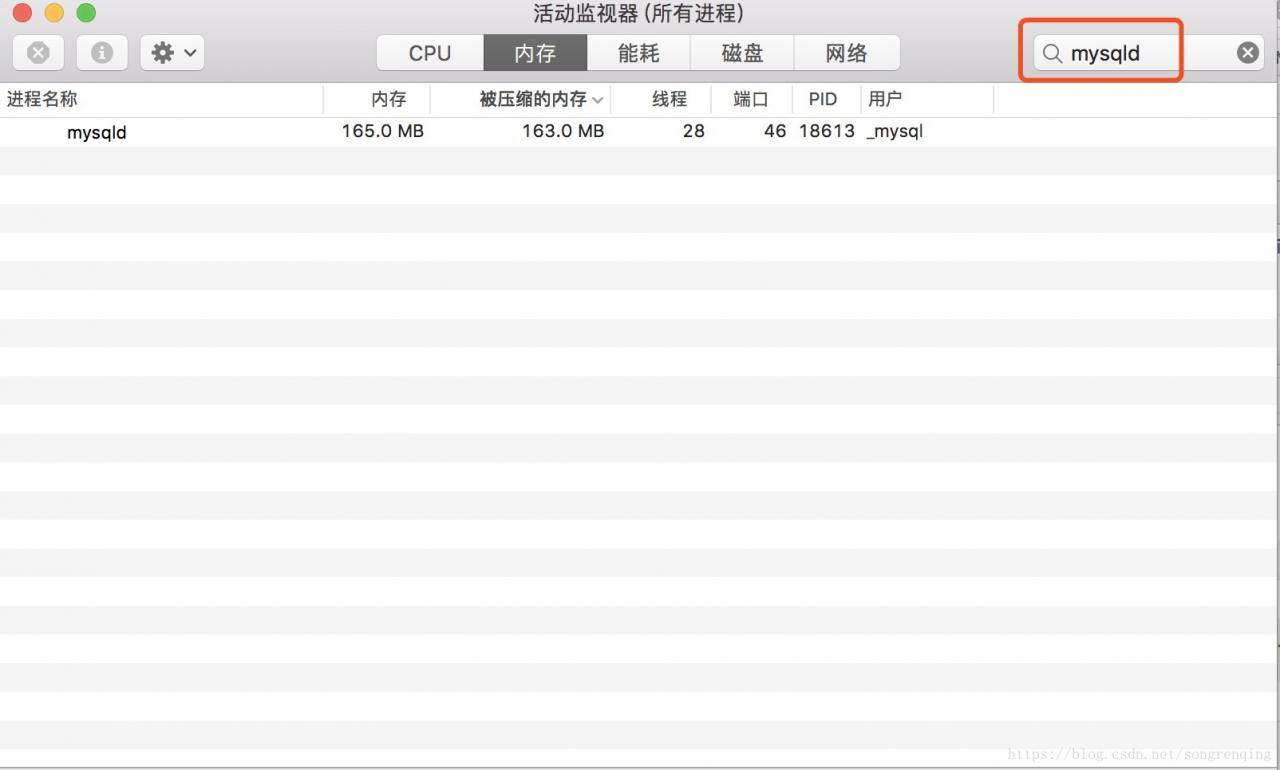
This error occurs because MySQL has not been started. To verify this guess, you can turn on the activity monitor and search mySQld, which cannot be found. Since I took the screenshot after fixing the problem myself, the mySQld process was already started when I searched.
Or type a command to view mysql.server Status
$ mysql.server status
/usr/local/mysql/support-files/mysql.server: line 365: pidof: command not found
 ERROR! MySQL is not running
As you can see, MySQL is not running. Since MySQL isn’t running, we definitely need to start MySQL.
Second, MySQL startup also reported an error
$mysql.server start
Starting MySQL
. ERROR! The server quit without updating PID file (/usr/local/var/mysql/XXXX.local.pid).
The boot report is wrong, is the permission not enough?So first change the permissions of /usr/local/var/mysql
sudo chown -R _mysql:mysql /usr/local/var/mysqlOnce the permissions are resolved, test it with SUdo and restart it
3. Start sudo
$ sudo mysql.server start
Password:
Starting MySQL
.. SUCCESS!
Surprisingly, MySQL started successfully, and then logged in again
$ mysql -u root -p
Enter password:
Welcome to the MySQL monitor.  Commands end with ; or \g.
Your MySQL connection id is 2
Server version: 5.7.21-log Homebrew

Copyright (c) 2000, 2018, Oracle and/or its affiliates. All rights reserved.

Oracle is a registered trademark of Oracle Corporation and/or its
affiliates. Other names may be trademarks of their respective
owners.

Type 'help;' or '\h' for help. Type '\c' to clear the current input statement.
Summary: The problem of Can’t connect to local MySQL Server through socket is caused by MySQL not being started. The Server Quit without updating The PID file is due to permissions problem, which is solved and The first problem is solved accordingly.
Of course, due to different environment configuration and different installation methods, there will be some differences in the solution, but the cause of the problem should be the same. I am a Mac, homebrew installed mysql, through this method, successfully solved the problem.
Refer to the information on StackOverflow:
MySql server startup error ‘The server quit without updating PID file ‘
For a newbie: ERROR 2002 (HY000): Can’t connect to local MySQL server through socket ‘/tmp/mysql.sock’
[Android test] solution for error closed after the carriage return of the ADB shell
2019 Unicorn enterprise heavily recruited Python engineer standard & GT; > > 
Phenomenon 1: In the process of Monkey test by connecting USB with mobile phone, start a CMD window to input again, and error Closed appears after ADB shell returns. In some cases, this can happen with some cell phones.
Phenomenon 2: Unable to install ***. Apk on device ‘019417a3’: Unable to open Sync Connection!
Personally, I think the reasons for both phenomena are the same.
The solution is as follows:
One: Restart your computer, then look up your phone on your computer and start Eclipse
Second: Mobile phone – Settings – applications – development – USB debugging on and off again
Third: restart the phone, usb debugging on and off again.
Fourth: Try “adb kill-server” and then “adb start-Server “under CMD.
Personally, the second and third methods are more practical
Reproduced in: https://my.oschina.net/u/199776/blog/330604
ERROR: Could not find a version that satisfies the requirement pytest-runner (from versions: none)
Commands executed:
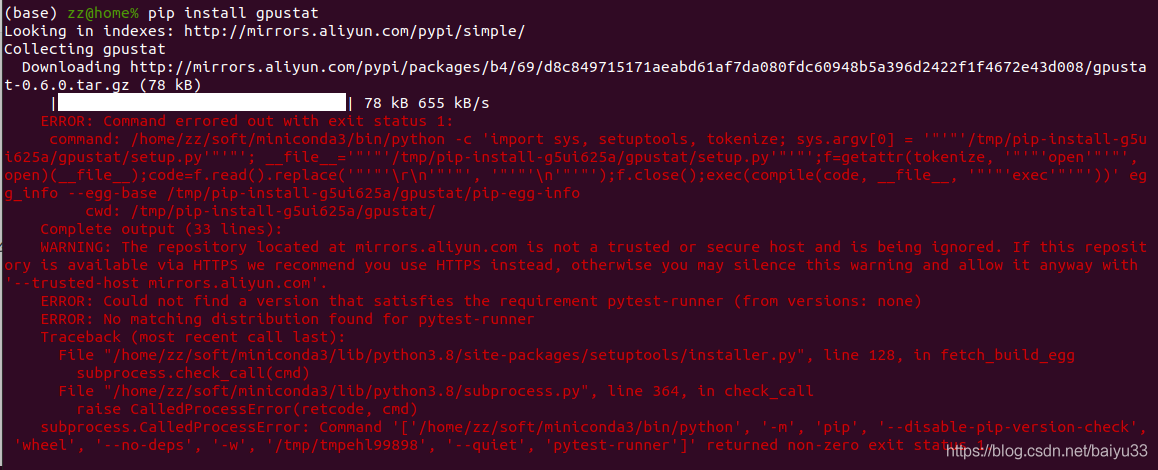
pip install gpustat
Key error of prompt:
ERROR: Could not find a version that satisfies the requirement pytest-runner (from versions: none)
Environmental Description:
PIP source: With the aliyunMiniconda environment configured in ~/.pip/pip.conf, Python 3.8.2 PIP is 20.0.2 (the latest PIP is 20.2.4, so it feels like it shouldn’t be a PIP version issue)
Tried:
rm-rf ~/. Cache/PIP , [invalid] to install other packages: PIP uninstall easybox; PIP install easybox, [no problem] other blogs on the network, referring to the switch source [not suitable]
The solution:
imagine that the PIP output means that pytest-runner is not installed (so why doesn’t PIP install pytest-runner instead of complaining here?Not clear). Then execute:
pip install pytest-runner
pip install gpustat
Command successfully executed, you can use gpustat to check the status of the video card:

Start flume agent and the solution of “a fatal error occurred while running” appears
The following error occurred when the log console was started after the installation of FluME
2020-11-13 18:10:23,564 ERROR [main] node.Application: A fatal error occurred while running. Exception follows.
java.lang.NullPointerException
	at java.io.File.<init>(File.java:277)
	at org.apache.flume.node.Application.main(Application.java:299)
I was also confused at that time. The steps were executed according to the tutorial in the book, including configuration and commands. I also checked that there was no problem
a1.sources = r1
a1.sinks = k1
a1.channels = c1
# Describe/configure the source
a1.sources.r1.type = avro
a1.sources.r1.channels = c1
a1.sources.r1.bind = 0.0.0.0
a1.sources.r1.port = 4141
# Describe the sink
a1.sinks.k1.type = logger
# Use a channel which buffers events in memory
a1.channels.c1.type = memory
a1.channels.c1.capacity = 1000
a1.channels.c1.transactionCapacity = 100
# Bind the source and sink to the channel
a1.sources.r1.channels = c1
a1.sinks.k1.channel = c1
(its path is/usr/local/flume/conf/avro. Conf, configuration file path to clear, need to use in the solution)
The command I used before is
/usr/local/flume/bin/flume-ng agent -c . -f /usr/local/flume/conf/avro.conf -n a1 -Dflume.root.logger=INFO,console
When the error occurs, search the web for a solution and find it on StackOverflow, changing the command
flume-ng agent --conf /usr/local/flume/conf --conf-file /usr/local/flume/conf/avro.conf --name a1 -Dflume.root.logger=INFO,console
Type this command to start again and resolve.
Django reads the txt file in view
Problem description:
In view, you want to load a TXT of block-words to block out dirty words.
but cannot find the file
Solutions:
Use the full path, put TXT under the same path as view.py, and add the first two lines
module_dir = os.path.dirname(__file__)
file_path = os.path.join(module_dir, 'block-words.txt')  # full path to text.
block_words = pd.read_csv(file_path,header=None)
Subsequent operation:
Use find to match, replacing all matched words with asterisks
for word inblock_words[0]:
    if info.find(word) != -1:
        info = info.replace(word, '*' * len(word))
Invalid vs modification project properties
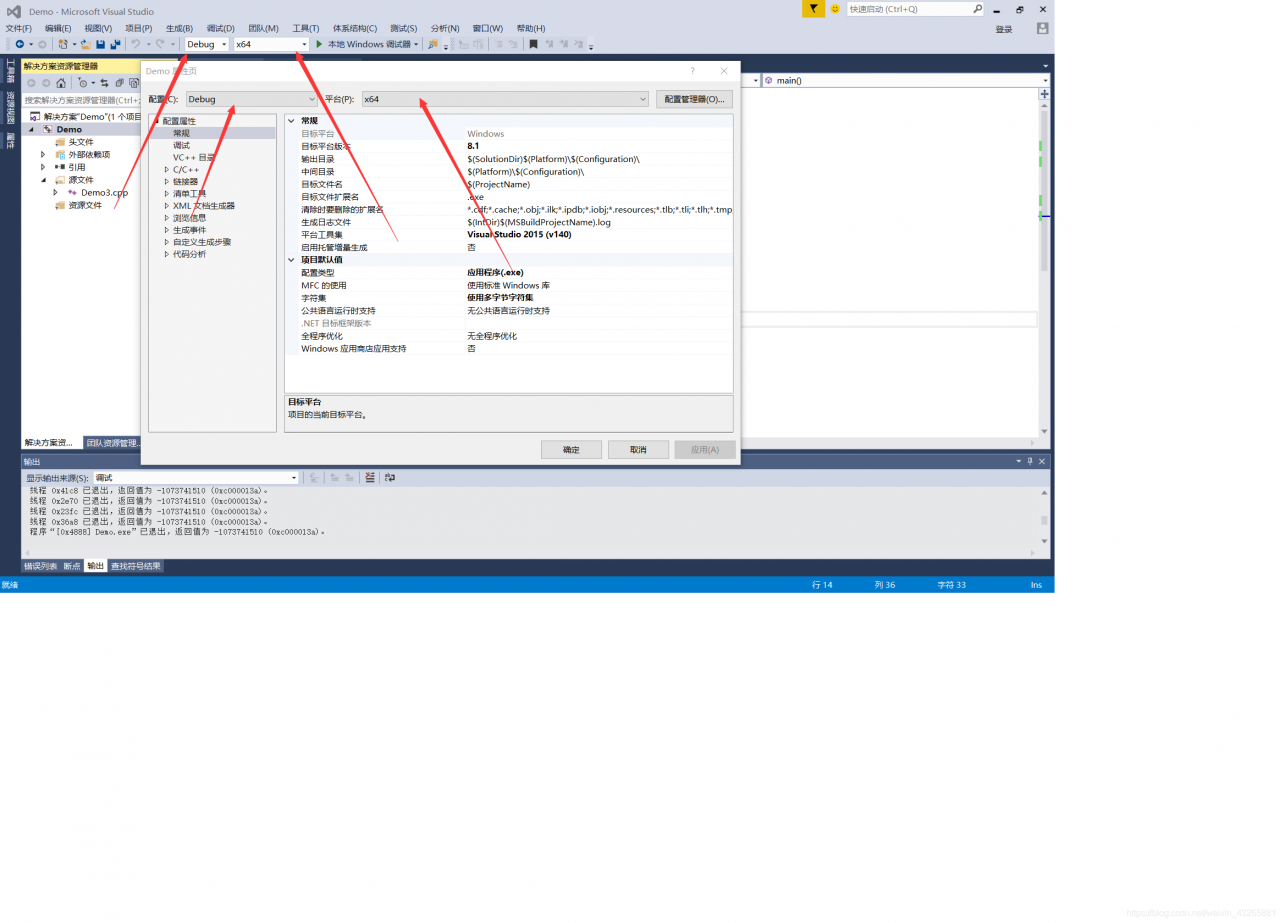
The last few days I have been puzzled by how my VS2015 always changes project attributes or file attributes. If I want to change from ANSCII to UNICODE, turn off GS protection, SDL check, or change a CPP attribute (excluded from generation), it doesn’t work, and I have reinstalled VS2015 again.
It had been torturing me for days, and then I didn’t do much about it, until I suddenly found out why, alas.
For this reason, the 32-bit and 64-bit platforms must be matched with Debug and Release versions!!
It had been torturing me for days, and then I didn’t do much about it, until I suddenly found out why, alas.
For this reason, the 32-bit and 64-bit platforms must be matched with Debug and Release versions!!
Spring failed to commit the transaction
In the project, Spring JPA and Spring JDBC were used, but in the actual use, it was found that transactions in Spring JDBC were not committed, and the handling methods were mainly as follows
- ensure that transactions are enabled in the project
@EnableTransactionManagement
- ensure that the transaction annotation
is added on the method
@Transactional
These two points have been added in the system, but still not effective, see the spring jpa document found is, indeed, support for jpa transactions and JDBC transaction https://docs.spring.io/spring-framework/docs/current/javadoc-api/org/springframework/orm/jpa/JpaTransactionManager.html , On the debug the Jpa's transaction processing mainly in the JpaTransactionManager. DoBegin , the execution will determine whether using JDBC transaction;
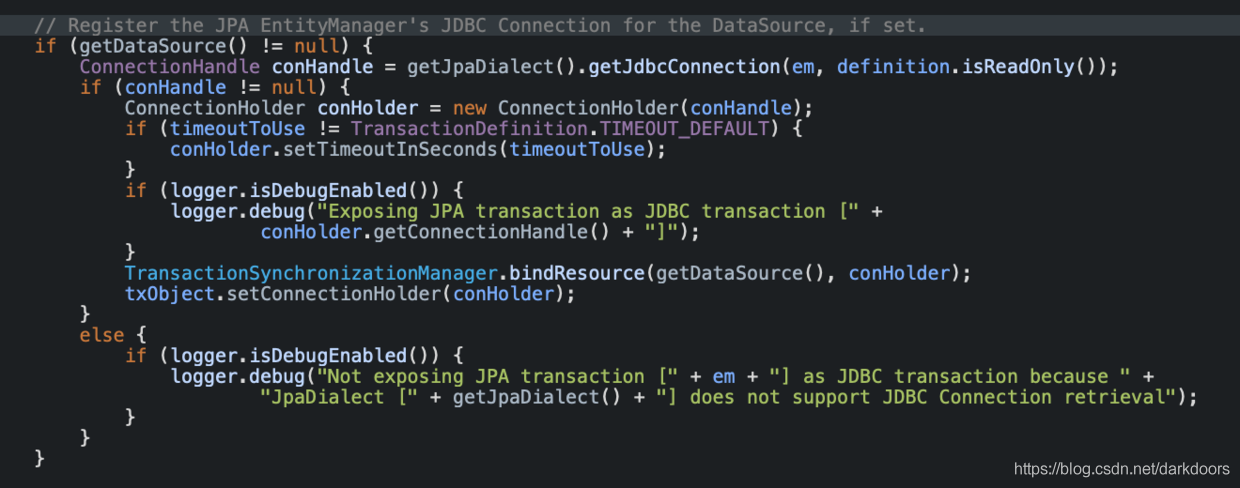
the system specifies JpaTransactionManager but does not specify jpaDialect. If not specified, it defaults to DefaultJpaDialect, while DefaultJpaDialect does not handle 0 JdbcConnection1. Therefore, the JDBC transaction could not be committed, and the solution was relatively simple. Manually specify jpaDialect as HibernateJpaDialect;
<bean id="transactionManager" class="org.springframework.orm.jpa.JpaTransactionManager" primary="true">
  <property name="entityManagerFactory" ref="entityManagerFactory"/>
  <property name="jpaDialect">
    <bean class="org.springframework.orm.jpa.vendor.HibernateJpaDialect"></bean>
  </property>
 </bean>
The function and usage of argc and argv in C language
In C programming, you often see the following main function declaration:
int main(int argc, char *argv[])
So what are argc and Argv [] for?
Where argc is the number of arguments entered externally and argv[] is the string array of arguments. This may not be obvious to you, but let’s take a look at an example of the C file argtest.c shown below
#include <stdio.h>

int main(int argc, char *argv[])
{
	printf("argc is %d\n",argc);
	for(int i=0;i<argc;i++)
	{
		printf("argv[%d] is: %s\n",i,argv[i]);
	}

	return 0;
}
These lines of code are simple, first printing the value of argc, then printing out the string of all argv[] arrays.
Use the following command to compile the C file
gcc argtest.c -o argtest
After compiling to produce the executable file argtest, execute the following command
./argtest
The output result of the program is
argc is 1
argv[0] is: ./argtest
This indicates that when the program is executed, only one parameter is entered, and this parameter is the command executing the program.
Execute the following command
./argtest 1234 abcd
The output result of the program is
argc is 3
argv[0] is: ./argtest
argv[1] is: 1234
argv[2] is: abcd
This indicates that the program entered three arguments, and that the last two space-separated strings of the command were passed to the main function.
Through argc and Argv [] we can pass arguments to the program by command.