Enter hbuliderx in the lower left corner of the syntax prompts assistant download failure, that is, the input code does not prompt
reason: hbuilderx software permissions are not enough
solution: as an administrator to run
Category Archives: How to Fix
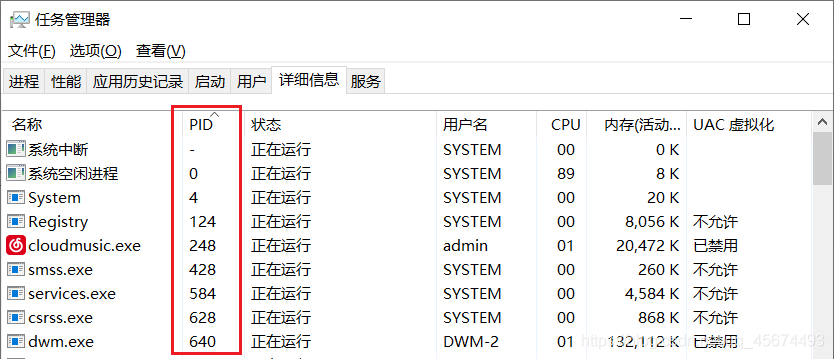
Through PID (process identification) to find the port (port) occupied applications, to solve the problem of port occupied
Step 1: Query the applied PID value occupying the port (Process Identification Process ID)
Enter the command in the DOS window:
netstat -aon|findstr "port number "
to get the PID of the occupied port application, the port number is determined according to its own occupied port number
Step 2: Query the process for the specified PID value
In the DOS window, enter the command:
tasklist|findstr "PID value "
to view the specified PID process. The PID value is obtained according to the port number occupied by itself
Step 3: End the process occupying the port
In the DOS window, enter the command:
taskkill /T /F /PID PID value
to end the process command, the PID value should be changed to the PID value of the process you want to end
It is also possible to find the corresponding PID value of the process in the task manager manually right-click to end
Java compareto() method
The compareTo() method is used to compare the two approaches:
String is compared to an object.
compares two strings in dictionary order.
syntax
int compareTo(Object o)
or
Int compareTo(String anotherString)
parameter
o – object to compare.
AnotherString – The string to compare.
Return value
the return value is the integer, it is first to compare the size of the corresponding character (ASCII), if the first character and the parameters of the first character, end of comparison, return the difference between them, if the first character is equal to the parameters of the first character, with the second character and parameter of the second character, and so on, until the comparison of character or character one end are being compared.
If the parameter string is equal to this string, the value 0 is returned;
returns a value less than 0 if the string is smaller than the string argument;
returns a value greater than 0 if the string is greater than the string argument.
instance
public class Test {
public static void main(String args[]) {
    String str1 = "Strings";
    String str2 = "Strings";
    String str3 = "Strings123";

    int result = str1.compareTo( str2 );
    System.out.println(result);

    result = str2.compareTo( str3 );
    System.out.println(result);

    result = str3.compareTo( str1 );
    System.out.println(result);
}
}
above program execution result is:
0
-3
3
Ngif of module in ionic 5 + angular
Use ionic5 pop-up box with the following code:
const modal = await this.modalController.create({
      component: MyComponent,
      componentProps: {
        title: option.title || '',
      },
      cssClass: 'my-custom-class'
    });
    await modal.present();
    const { data } = await modal.onDidDismiss();
    return data;
Then there is an ngIf directive in MyComponent, run the error:
Can't bind to 'ngIf' since it isn't a known propertyThe reason:
Angular routes are not loaded into MyComponent’s Module
Solutions:
1. Import the module of MyComponent in app.module.ts
2. Import the module where the MyComponent resides in the module.ts of the page that uses the pop-up box
RPC principle and related technologies used
RPC: Remote process call:
Several more typical RPC implementation and invocation frameworks (note: not a development framework) :
1: RMI: Implemented using the Java.RMI package, based on Java remote Method protocol and native Java serialization implementation.
2: hession: altogether lightweight remoting onhttp tool that provides RMI functionality with a simple approach based onhttp protocol.
3: Thrift: Thrift is a framework for scalable cross-language services.
Implementation principle of RPC framework:
There are three main roles in the framework, provider, Consumer, and Registry.
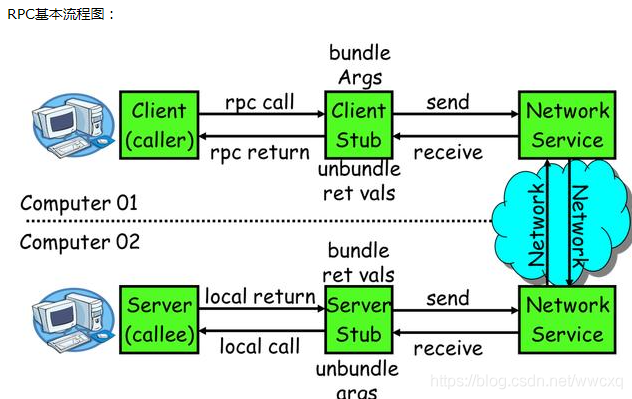
The techniques used in RPC:
1: Dynamic proxy: Java dynamic proxy technology is required to generate Client stub and Server stub. You can use the JDK’s native dynamic proxy mechanism. You can also use open source bytecode tools such as Cglib, Javassist.
2: Serialization: To be able to transfer and receive Java objects over the network, serialization and deserialization operations are required. Serialization is the process of converting Java objects to Byte [], and thus encoding. Deserialization is the process of converting a Byte [] into a Java object, or decoding. Java’s native serialization mechanism is available but inefficient, and it is recommended to use open source mature serialization technologies such as Protobuf, Thrift, and Hessian.
Nio: Many RPC frameworks use netty directly.
Service Registry: Redis, ZK, Elling, EtCD
Several more typical RPC implementation and invocation frameworks (note: not a development framework) :
1: RMI: Implemented using the Java.RMI package, based on Java remote Method protocol and native Java serialization implementation.
2: hession: altogether lightweight remoting onhttp tool that provides RMI functionality with a simple approach based onhttp protocol.
3: Thrift: Thrift is a framework for scalable cross-language services.
Implementation principle of RPC framework:
There are three main roles in the framework, provider, Consumer, and Registry.
The techniques used in RPC:
1: Dynamic proxy: Java dynamic proxy technology is required to generate Client stub and Server stub. You can use the JDK’s native dynamic proxy mechanism. You can also use open source bytecode tools such as Cglib, Javassist.
2: Serialization: To be able to transfer and receive Java objects over the network, serialization and deserialization operations are required. Serialization is the process of converting Java objects to Byte [], and thus encoding. Deserialization is the process of converting a Byte [] into a Java object, or decoding. Java’s native serialization mechanism is available but inefficient, and it is recommended to use open source mature serialization technologies such as Protobuf, Thrift, and Hessian.
Nio: Many RPC frameworks use netty directly.
Service Registry: Redis, ZK, Elling, EtCD
About content type ‘multipart / form data…’ not support
Project Scenario:
on using springcloud, the gateway jump specifies that the service displays an error message
Problem description:
Content type 'multipart/form-data;boundary=----WebKitFormBoundaryek7Ljn5odm2QALlC;charset=UTF-8' not supported
Reason analysis:
this is because the requested parameter is content-type:multipart/form-data, which is submitted as a form. Therefore, the problem occurs on the parameter, and the annotation on the parameter can be removed (it only needs to be in the parameter form of springmvc)
Using jmh in eclipse
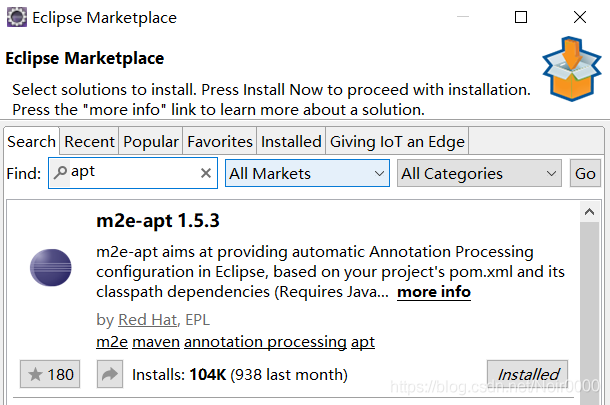
1.Eclipse installs the M2E-APT tool
2. Import projects and add dependencies to POM files
2. Import projects and add dependencies to POM files
<!-- https://mvnrepository.com/artifact/org.openjdk.jmh/jmh-core -->
<dependency>
    <groupId>org.openjdk.jmh</groupId>
    <artifactId>jmh-core</artifactId>
    <version>1.23</version>
</dependency>
<!-- https://mvnrepository.com/artifact/org.openjdk.jmh/jmh-generator-annprocess -->
<dependency>
    <groupId>org.openjdk.jmh</groupId>
	<artifactId>jmh-generator-annprocess</artifactId>
	<version>1.23</version>
	<!-- <scope>test</scope> -->
	<scope>provided</scope>
</dependency>
3. Before execution, the project needs to run MVn-clean-install before running the benchmark test
java.lang.IllegalStateException: Unable to find a @SpringBootConfiguration, you need to use @Context
issue the following error when unit testing
java.lang.IllegalStateException: Unable to find a @SpringBootConfiguration, you need to use @Context
There are two reasons for this problem
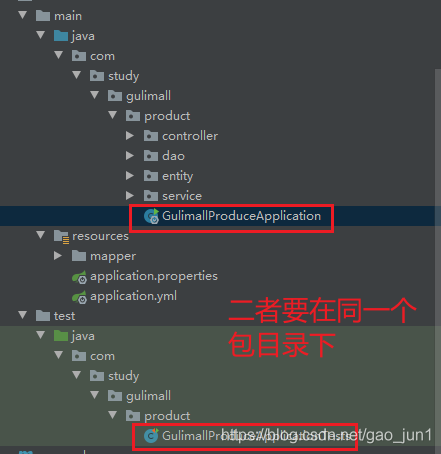
1. See if there is a primary startup class
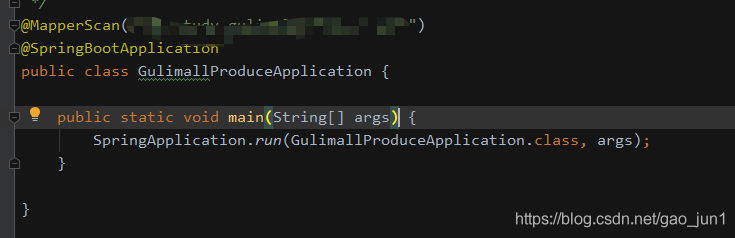
2. As shown in the figure above, if the main boot class already exists, the error may be in the test directory and will be reported if they are not in the same directory.
Put it in the same directory and the problem is solved.
Python conversion hex to string, high and low data processing
Python converts HEX to String, String to HEX high-low data processing
def Hex_Str16(data):
    hex_str = '{:04X}'.format(data*100)
    data_h, data_l = hex_str[0:2], hex_str[2:4]
    return  int(data_h, base=16), int(data_l, base=16)

def Hex_Str32(data):
    hex_str = '{:08X}'.format(data*100)
    data_1, data_2, data_3, data_4 = hex_str[:2], hex_str[2:4], hex_str[-4:-2], hex_str[-2:]
    return  int(data_1, base=16), int(data_2, base=16), int(data_3, base=16), int(data_4, base=16)

def Hex_Str64(data):
    hex_str = '{:016X}'.format(data*100)
    data_1, data_2, data_3, data_4, data_5, data_6, data_7, data_8 =hex_str[:2], hex_str[2:4], hex_str[4:6], hex_str[6:8],\
        hex_str[-8:-6], hex_str[-6:-4], hex_str[-4:-2], hex_str[-2:]
    return  int(data_1, base=16), int(data_2, base=16), int(data_3, base=16), int(data_4, base=16),\
        int(data_5, base=16), int(data_6, base=16), int(data_7, base=16), int(data_8, base=16)

def Str_Hex16(data):
    Str= data[0]+data[1]
    return int(Str,16),Str

def Str_Hex32(data):
    Str = data[0] + data[1] + data[2] + data[3]
    return int(Str,16),Str

def Str_Hex64(data):
    Str = data[0] + data[1] + data[2] + data[3]+ data[4] + data[5] + data[6] + data[7]
    return int(Str,16),Str

print(Hex_Str16(255))
print(Hex_Str32(255))
print(Hex_Str64(255))

data = ['0f','ff']
data_1 = ['00','00','0f','ff']
data_2 = ['00','00','00','00','00','00','0f','ff']
print(Str_Hex16(data))
print(Str_Hex32(data_1))
print(Str_Hex64(data_2))
The results are as follows
(99, 156)
(0, 0, 99, 156)
(0, 0, 0, 0, 0, 0, 99, 156)
(4095, '0fff')
(4095, '00000fff')
(4095, '0000000000000fff')
The garbled problem of hot deployment in nginx
Nginx-style IK hot deployment and its messy code problems
1. Create dic file

2 under the sibling directory of nginx. Adds a remote participle to the ik participle configuration file
After 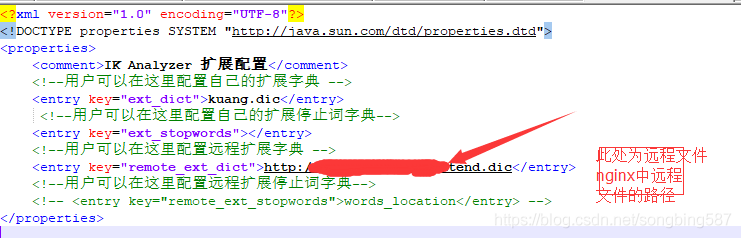
is configured, restart nginx and elastic search.
Linux system configuration is the same as window configuration
if there is a problem with messy code, please see the following messy code solution
Messy code problem solved, pro – test available
1. Add nginx to Server
default_type 'text/html'; charset utf-8;
Add the following code to Elastic
-Xms1g
-Xmx1g
-Dfile.encoding=GBK
Solve the problem of “wireless network activation failure” in Ubuntu 18, and repeatedly pop up the password input interface
When my ubuntu18 system connected to mobile hotspot, it always appeared that “wireless network activation failed” and the password entry interface popped up repeatedly
A relatively simple solution is:
open the terminal and execute:
$ sudo pppoeconf
If you have an option, choose Yes
Then change the wife password to 10 or more digits, preferably all in combination
Then see if the connection works, and if that doesn’t solve the problem, find another solution
Done!
Some mistakes and solutions in Django
Some of Django’s common mistakes and fixes
The CSS and JS files fail to model the existing tables the data table field names don’t match the model field URL match problem view function passes the data problem
CSS and JS files are invalid
When you load a view with CSS and JS files, the easiest way to do this is to say href= “absolute path to file”, but a lot of times you write relative paths because it’s easier. If relative paths are used, static files cannot be found when a page submits a form or redirects to a view function with arguments. So load static file {% load static %} and use reverse parsing to make the page look for static files.
Model existing tables
To create ORM on tables that have already been in the database, run Python manager.py InspectDB & GT; Model.py to generate the model for the existing table, make sure to comment db_manage =False or delete it directly, otherwise Django has no permission to operate on the table.
The data table field name does not match the model field
The corresponding column is not a field name. You can implement the ORM by setting db_column = “corresponding field name” in the model
Url matching problem
When your two url matching rules are written very closely, if load is written on the top without any initial restriction (^), the following url will match the first one, even if it resolves
, such as the following two urls:
  url(r'load/(?P<index>.*)/', views.load, name='load'),
  url(r'manage_load/(?P<index>.*)/', views.manage_load, name='manage_load'),
Since the LOAD URL is written above, when you parse the URL backwards, {% URL “load” %}, by default Django matches urls from top to bottom, matching the first one because there is no restriction on the beginning and end.
  url(r'^load/(?P<index>.*)/', views.load, name='load'),
  url(r'manage_load/(?P<index>.*)/', views.manage_load, name='manage_load'),
You can use ^,$as a starting and ending character limit and it won’t match any other URL.
View functions pass data problems
request.session["index"] = index
request.session.flush()
In many cases, passing values from view function to view function is the simplest way to record data except passing parameters to view function. The following sentence can be used to clear session in the login interface or some fixed page, otherwise the data will exist until it is destroyed automatically by Django.