Category Archives: How to Fix

Using greater than sign or less than sign to report error in mybatis

Problem Description: Using <; = will prompt an error Tag name Expecte

tee.F_EndDay <= dateadd(DAY,0,CONVERT (VARCHAR(100), GETDATE(), 23))

1, will be < Number or & gt; The number is escaped

tee.F_EndDay &lt;= dateadd(DAY,0,CONVERT (VARCHAR(100), GETDATE(), 23))

2. Use lt; ! [CDATA[ ]]> Symbol description

<![CDATA[ tee.F_EndDay &lt;= dateadd(DAY,0,CONVERT (VARCHAR(100), GETDATE(), 23)) ]]>  

Appendix escape comparison table

The

& amp; lt;

& lt; No.

<

& amp; gt;

& gt;

is greater than the number

& amp; amp;

& amp;

and

& amp; apos;

single quotes

& amp; quot;

double quotation marks

Xcode 12 compiles and reports errors on simulator

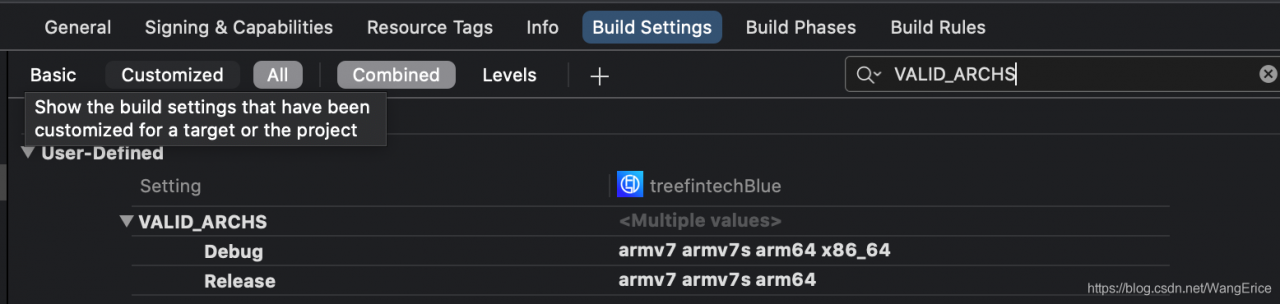
In the new version of Xcode12.0, using the old computer to compile the project will find that the previously compiled project will report an error on the emulator,
This is because Apple is about to release a new Mac using ARM instruction set. When using the new Mac, you will need to use instruction set like x86_64, but you can execute code using the same instruction set as the iPhone. So in the new version of Xcode 12, the default support for emulator instruction set is dropped, only the Build Setting is required –>; User-Defined–> The VALID_ARCHS manually add the instruction set for the simulator.

Error reporting when Lombok @ data and @ builder are used together

Lombok @data and @builder are used together
Lombok often uses annotations

error
Sometimes @Builder annotation is added to PO class in order to make the code more elegant when constructing PO class. However, because @Builder and @Data will be used together, the class’s no-argument constructor will be overwritten. As a result, some framework can not successfully assign Data to PO class when operating the database, such as MyBatis.
The solution
Override the no-argument constructor in the class to prevent conflict with Lombok’s annotation, and add the @tolerate annotation on the no-argument constructor
Such as:

@Data
@Builder
public class DataBuilder implements Serializable {

    @Tolerate
    public DataBuilder (){}

}

Lombok uses annotations
A lot of online lecture Here I think a good link
https://www.cnblogs.com/heyonggang/p/8638374.html

Cause of runtime error on OJ

Except for the five cliches
1. Array size is too small, resulting in access to the memory should not be accessed
2. A division by zero error occurred
3. A large array is defined inside a function, causing the program stack to run out
4, The pointer is used incorrectly, resulting in access to the memory should not be accessed
5. It is also possible that the program threw an unreceived exception
The author also found that sometimes open array on OJ is too large (global variables, can run normally in the local) will cause runtime error, we need to pay attention to.

JavaScript solves let statement error in code

directory
Question 2. Answer


Problem 1.
Why do we need var instead of let in JavaScript code?

2. Answer
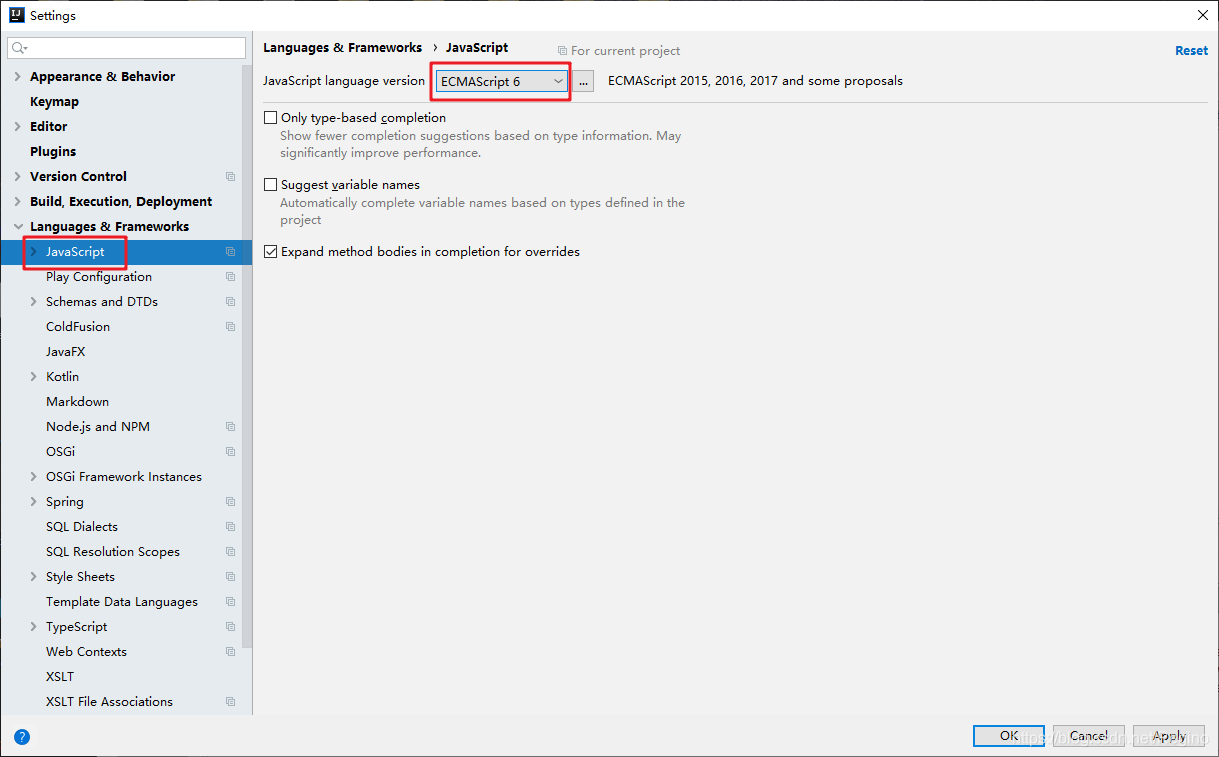
JS version compatibility issues, ECMAScript 6 can be changed.
ES 5; After ES 6, let is used for variable declarations, and const is used for constant declarations. They are used to replace the var declaration method in ES 5.

The original link: https://qwert.blog.csdn.net/article/details/106248417

Error in idea @ data entity class get / set

Recently, with idea new import of a Java Web project, the same code in Eclipse will not report error, but in idea there is a problem, the code does not compile through, red mark, start the error, finally find the reason in git: Lombok in idea is the need to install plug-ins……..
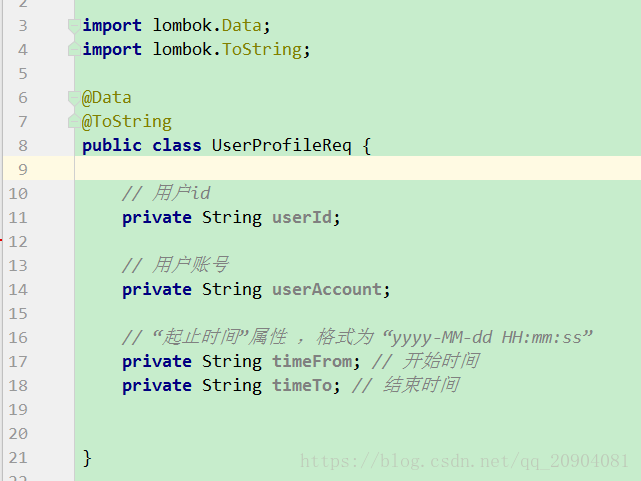
Part of the error code display:


After a long search on the Internet, I realized that the solution was to install Lombok plugin.
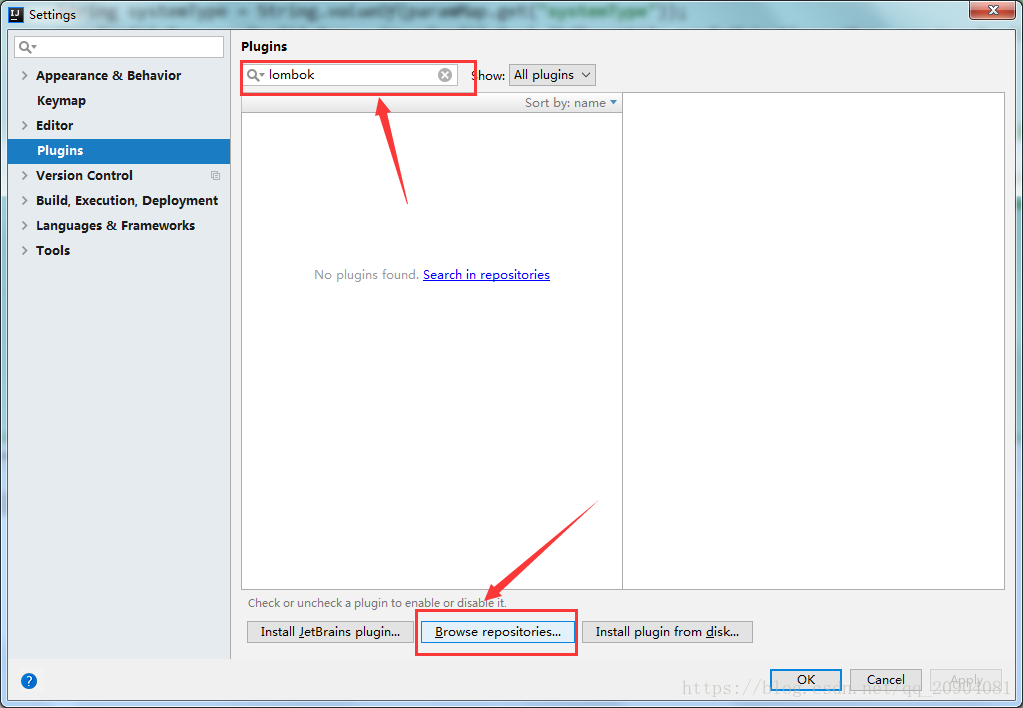
Without further ado, the specific plug-in installation steps are as follows:
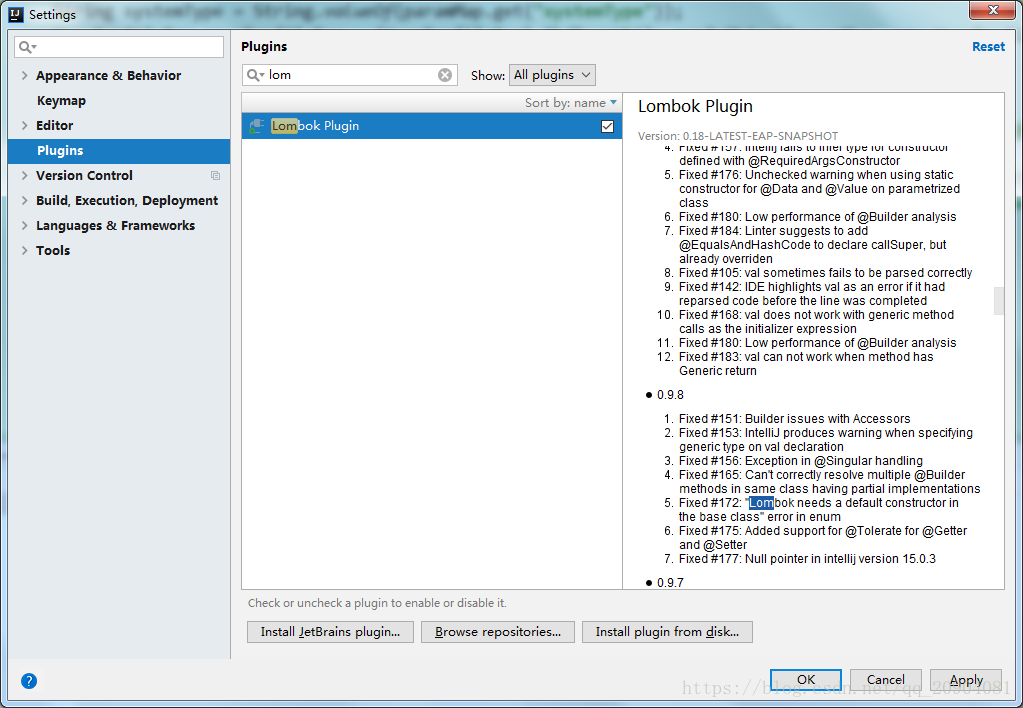
1. Enter the IDEA Settings interface and find the Plugins option
2. Type Lombok into the search box
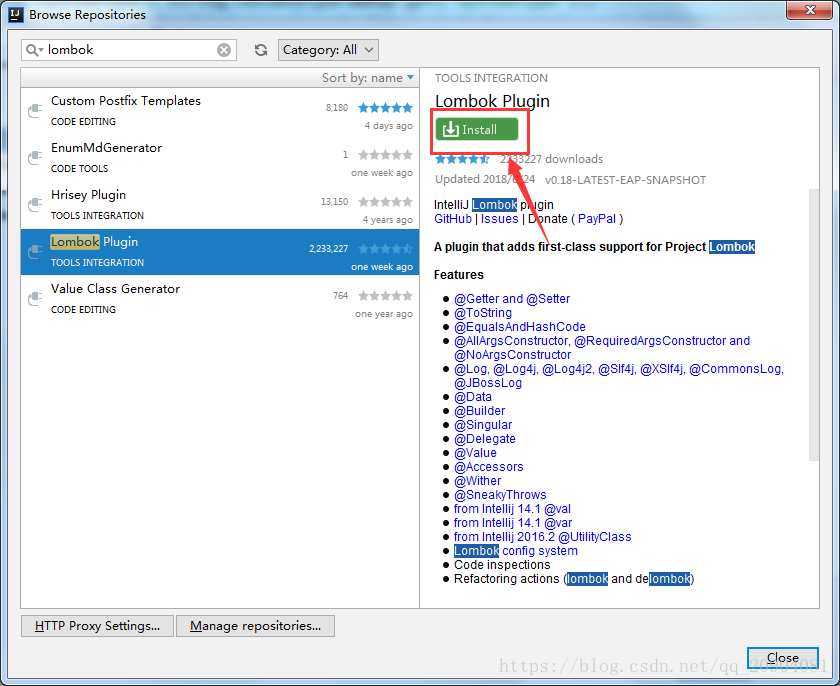
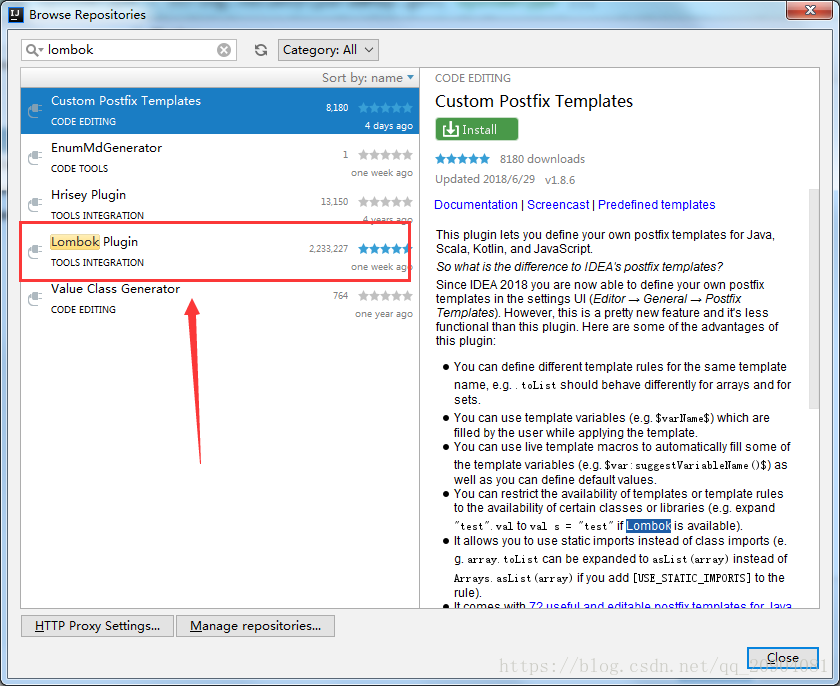
3. Click the Browse Repositories button

4. Select Lombok Plugin

5. Click the Install button on the right

6. After downloading and installing the Lombok Plugin, be sure to check the box behind it

7. Restart Idea, OK!

SQL Union, union all usage and common errors and Solutions

The SQL UNION operator
The UNION operator is used to combine the result sets of two or more SELECT statements.
Note that the SELECT statement within the UNION must have the same number of columns. Columns must also have similar data types. Also, the order of the columns in each SELECT statement must be the same.
The UNION SQL grammar

SELECT column_name(s) FROM table_name1
UNION
SELECT column_name(s) FROM table_name2

Note: By default, the UNION operator picks a different value. If duplicate values are allowed, use UNION ALL.
SQL UNION ALL syntax

SELECT column_name(s) FROM table_name1
UNION ALL
SELECT column_name(s) FROM table_name2

Also, the column name in the UNION result set is always equal to the column name in the first SELECT statement in the UNION.
Error reporting and resolution
When using the UNION operator, the following error can easily be reported:
Parse error: org. Apache. Hadoop. Hive. Ql. Parse. ParseException: line 5-0 always recognize input near “and” (” and “the UNION, ‘ ‘SELECT’ set in the operator
Simplify the code used as follows:

SELECT
    device_id
FROM
    tableA
UNION
(SELECT
    device_id
FROM
    tableB as a1
INNER JOIN tableC as a2
on a1.device_id = a2.device_id
)

This is mainly because the UNION operator can only join fields to fields, but not fields to tables or tables, even if the number of fields and their names and formats are the same.
Therefore, you can’t have parentheses around the UNION operator, because it’s easy for SQL to determine that this is a subquery/table and therefore to report an error when joining
The solution

    > SELECT FROM TABLE D> SELECT FROM TABLE D> SELECT FROM TABLE D> SELECT FROM TABLE D> SELECT FROM TABLE D> SELECT FROM TABLE D> SELECT FROM TABLE D> SELECT FROM TABLE D> SELECT FROM TABLE D> SELECT FROM TABLE D> SELECT FROM TABLE D> SELECT FROM TABLE D
    Matters needing attention

      > Multiple UNION operators can be used in SQL statements. SELECT statements that use the UNION operator cannot contain their own ORDER BY or COMPUTE clauses. You can only use an ORDER BY or COMPUTE clause on the final combined result set (that is, after the last SELECT statement). The GROUP BY and HAVING clauses can be used in SELECT statements that use the UNION operator. By default, SQL Server 2005 evaluates statements containing the UNION operator from left to right. You can specify the order of evaluation using parentheses (I haven’t tested this thoroughly on any other platform, so avoid parentheses altogether, so if you need to specify the order of evaluation, you can simply write that part of the evaluation at the beginning of your SQL statement).

Error report and solution of import panda in Windows 10

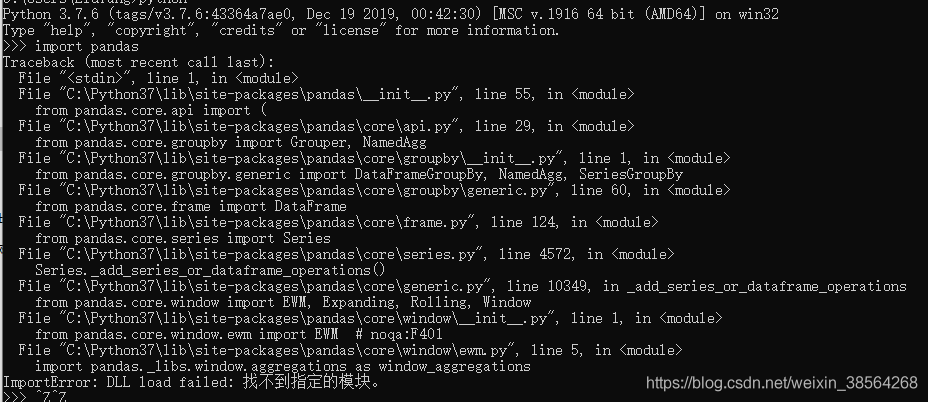
If you use PIP Install Pandas in Windows 10, you will be unable to use Pandas and will receive an error, as shown in the figure below

You will need to change the version of Pandas at this time
Uninstall the previous Pandas first

pip uninstall pandas

Then specify the PIP to download version 1.0.1 of Pandas

pip install pandas==1.0.1


NPM run build error solution

An error is as follows

checked online related:
.
because package json file does not have to configure the build script, so the above error!
Solutions:
1. Add build script to scripts in package.json:

{
  "scripts": {
    "build": "cross-env NODE_ENV=production webpack --config webpack.config.js"
  }
}


“NODE_ENV” : user-defined environment variable
webpack “: integrated packaging command
“>config” : config file
“webpa>onfig.js” : config file, which is a Node. js module that returns a JSIN-formatted configuration information object, or the –config option to specify the configuration file

It is possible that ‘cross-env’ is not an internal or external command and is not a executable program
can be resolved by NPM I –save-dev cross-env.
The results of
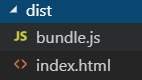
Execute NPM run build, and the results will appear in the dist folder. Successful packaging!

Reference: https://www.cnblogs.com/tugenhua0707/p/9780621.html

https://www.cnblogs.com/eyunhua/p/6507100.html

In Python, import XXX does not report an error, but in IPython (Jupiter notebook)

When importing Sklearn from Jupyter Notebook, the following error is reported

But I have installed it before; It does not report errors on the Python command line. Then Baidu checked the data, but did not find a similar situation. I print the path in Python and in IPython. I print the path in Python and I print the path in IPython.

'D:\\python\\Anaconda3\\envs\\v2\\python35.zip',

'D:\\python\\Anaconda3\\envs\\v2\\DLLs',

'D:\\python\\Anaconda3\\envs\\v2\\lib',

'D:\\python\\Anaconda3\\envs\\v2',

'C:\\Users\\mtl\\AppData\\Roaming\\Python\\Python35\\site-packages',

'D:\\python\\Anaconda3\\envs\\v2\\lib\\site-packages'

Print out the path in IPython as follows:

'D:\\python\\Anaconda3\\envs\\v2\\python35.zip', 
'D:\\python\\Anaconda3\\envs\\v2\\DLLs', 
'D:\\python\\Anaconda3\\envs\\v2\\lib', 
'D:\\python\\Anaconda3\\envs\\v2', 
'C:\\Users\\mtl\\AppData\\Roaming\\Python\\Python35\\site-packages', 
'D:\\python\\Anaconda3\\envs\\v2\\lib\\site-packages', 
'D:\\python\\Anaconda3\\envs\\v2\\lib\\site-packages\\IPython\\extensions', 
'C:\\Users\\mtl\\.ipython'

C:\\Users\ MTL \\.ipython: C:\\Users\ MTL \\.ipython: C:\\Users\\ MTL \\.ipython: C:\\Users\\ MTL \\
Summary: I think because the last folder is empty, the previous files will be flushed out, but I check the information: when looking for the module (model), it will follow the path to find, if found, it will jump out. This interpretation is in conflict here, but also hope to understand this part of the god together to resolve

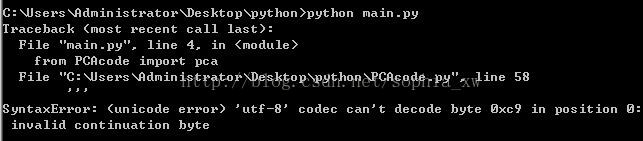
Solve Python error Unicode error ‘UTF-8’

The complete error message is shown below:

Not to read the error principle, but the solution is as follows:
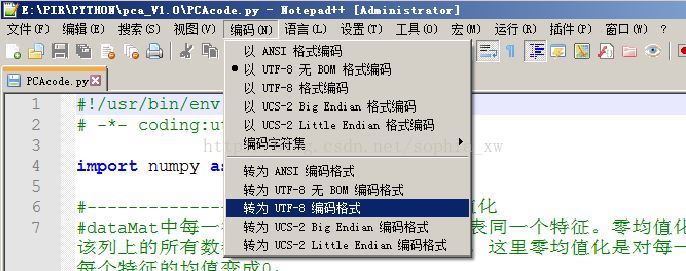
Open the error file (pcacode.py in this case) using Notepad ++ (which is the editor I always use), find the encoding option in the menu bar, select UTF-8, save it, and run the Python code again so it doesn’t report any errors.

Another solution, which I haven’t tried, is the following:

import codecs
codecs.open('filename',encoding='uft-8')