Category Archives: How to Fix

NPM err! Code enotfound (2020-07-03)

 
VUE project install dependency package, error as follows:

$ npm install
npm WARN registry Using stale data from https://registry.npmjs.org/ because the host is inaccessible -- are you offline?
npm WARN registry Using stale data from https://registry.npmjs.org/ due to a request error during revalidation.
npm WARN deprecated [email protected]: core-js@<3 is no longer maintained and not recommended for usage due to the number of issues. Please, upgrade your dependencies to the actual version of core-js@3.
npm WARN deprecated [email protected]: fsevents 1 will break on node v14+ and could be using insecure binaries. Upgrade to fsevents 2.
npm ERR! code ENOTFOUND
npm ERR! errno ENOTFOUND
npm ERR! network request to https://registry.npmjs.org/vue-router/-/vue-router-3.3.4.tgz failed, reason: getaddrinfo ENOTFOUND registry.npmjs.org registry.npmjs.org:443
npm ERR! network This is a problem related to network connectivity.
npm ERR! network In most cases you are behind a proxy or have bad network settings.
npm ERR! network 
npm ERR! network If you are behind a proxy, please make sure that the
npm ERR! network 'proxy' config is set properly.  See: 'npm help config'

npm ERR! A complete log of this run can be found in:
npm ERR!     /Users/luminal/.npm/_logs/2020-07-03T04_12_04_809Z-debug.log

Solution:

$ npm config get proxy
null
$ npm config get https-proxy
null

$ npm config set proxy null
$ npm config set https-proxy null
$ npm config set registry http://registry.cnpmjs.org/
$ npm install -g cnpm --registry=https://registry.npm.taobao.org
npm WARN deprecated [email protected]: request has been deprecated, see https://github.com/request/request/issues/3142
/Users/luminal/.nvm/versions/node/v10.16.0/bin/cnpm -> /Users/luminal/.nvm/versions/node/v10.16.0/lib/node_modules/cnpm/bin/cnpm
+ [email protected]
updated 5 packages in 12.316s

$ cnpm i
bash: cnpm: command not found
$ cnpm install
bash: cnpm: command not found
$ nvm use v10.16.0
Now using node v10.16.0 (npm v6.9.0)
$ cnpm i
⠧ [6/23] Installing uniqs@^2.0.0
WARN node unsupported "[email protected]" is incompatible with [email protected][email protected][email protected] › watchpack-chokidar2@^2.0.0, expected node@<8.10.0
✔ Installed 23 packages
✔ Linked 750 latest versions

Having previously managed the Node version using NVM, you need to specify the following version: NVM USE v10.16.0
Then use CNPM I or CNPM install
 
Reference link:
NPM installs an error solution for any package



Raspberry pie upgrade to Python 3.7.3

Install dependency packages

sudo apt-get install -y make build-essential libssl-dev zlib1g-dev   
sudo apt-get install -y libbz2-dev libreadline-dev libsqlite3-dev wget curl llvm 
sudo apt-get install -y libncurses5-dev  libncursesw5-dev xz-utils tk-dev

Find the corresponding version from the Python web page and click to download it.

sudo wget https://www.python.org/ftp/python/3.7.3/Python-3.7.3.tgz

Third, extract the

sudo tar -zxvf Python-3.7.3.tgz

Unzip it and enter the generated directory python-3.7.3

cd Python-3.7.3

Install and compile Python

sudo ./configure && sudo make && sudo make install

6. After installation, create/modify the existing soft connection.
create soft connection (first time)

sudo ln -f /usr/local/bin/python3.7 /usr/bin/python
sudo ln -f /usr/local/bin/pip3.7 /usr/bin/pip

Modify the soft connection (more than once)

sudo ln -sf /usr/local/bin/python3.7 /usr/bin/python
sudo ln -sf /usr/local/bin/pip3.7 /usr/bin/pip

Seven, print version test

python3 -V
pip3 -V


success

Implementation of screen cleaning in Python idle

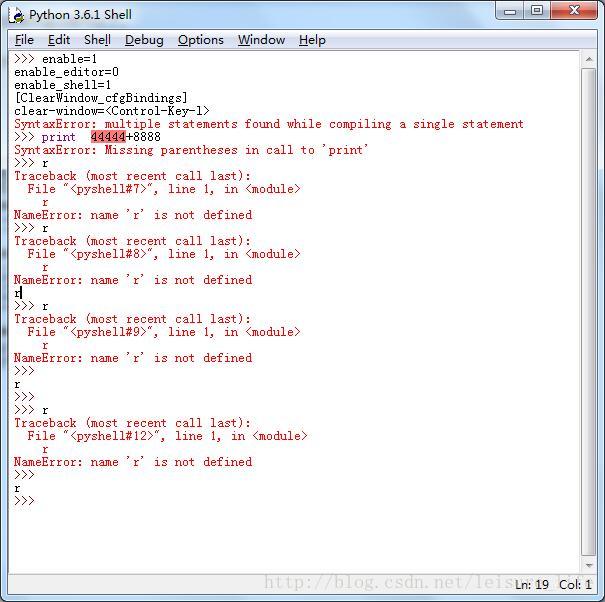
screen things too much, need clear screen, window screen clearing command in Windows is CLS, in Python IDLE is the shortcut Ctrl + L

but this shortcut is not the default, need to do some operation

> Copy and save the following code into your new ClearWindow.py

"""

Clear Window Extension
Version: 0.2

Author: Roger D. Serwy
        [email protected]

Date: 2009-06-14

It provides "Clear Shell Window" under "Options"
with ability to undo.

Add these lines to config-extensions.def

[ClearWindow]
enable=1
enable_editor=0
enable_shell=1
[ClearWindow_cfgBindings]
clear-window=<Control-Key-l>


"""

class ClearWindow:

    menudefs = [
        ('options', [None,
               ('Clear Shell Window', '<<clear-window>>'),
       ]),]

    def __init__(self, editwin):
        self.editwin = editwin
        self.text = self.editwin.text
        self.text.bind("<<clear-window>>", self.clear_window2)

        self.text.bind("<<undo>>", self.undo_event)  # add="+" doesn't work

    def undo_event(self, event):
        text = self.text

        text.mark_set("iomark2", "iomark")
        text.mark_set("insert2", "insert")
        self.editwin.undo.undo_event(event)

        # fix iomark and insert
        text.mark_set("iomark", "iomark2")
        text.mark_set("insert", "insert2")
        text.mark_unset("iomark2")
        text.mark_unset("insert2")


    def clear_window2(self, event): # Alternative method
        # work around the ModifiedUndoDelegator
        text = self.text
        text.undo_block_start()
        text.mark_set("iomark2", "iomark")
        text.mark_set("iomark", 1.0)
        text.delete(1.0, "iomark2 linestart")
        text.mark_set("iomark", "iomark2")
        text.mark_unset("iomark2")
        text.undo_block_stop()
        if self.text.compare('insert', '<', 'iomark'):
            self.text.mark_set('insert', 'end-1c')
        self.editwin.set_line_and_column()

    def clear_window(self, event):
        # remove undo delegator
        undo = self.editwin.undo
        self.editwin.per.removefilter(undo)

        # clear the window, but preserve current command
        self.text.delete(1.0, "iomark linestart")
        if self.text.compare('insert', '<', 'iomark'):
            self.text.mark_set('insert', 'end-1c')
        self.editwin.set_line_and_column()

        # restore undo delegator
        self.editwin.per.insertfilter(undo)

3, then find the config in this directory – extensions. Def this file (idle configuration file extensions), open it in notepad

[ClearWindow]
enable=1
enable_editor=0
enable_shell=1
[ClearWindow_cfgBindings]
clear-window=<Control-Key-l>

Clear shell window Ctrl +L

br>

Python idle add configuration shortcut (Ctrl + L)

Python Idle (Ctrl+L)
Copy the following source file ClearWindow.py into the idlelib directory.
Add configuration items to the config-extensions.def file:
 
The filename must be: clearwindow.py beware case! Save to directory \Python39\Lib\idlelib\.
Locate the configuration file in the \Python39\Lib\idlelib directory: config-extensions.def
Add at the end:
[ClearWindow]
enable=1
enable_editor=0
enable_shell=1
[ClearWindow_cfgBindings]
clear-window=< Control-Key-l>
 

"""
file name must be:
ClearWindow.py

Clear Window Extension
Version: 0.2

Author: Roger D. Serwy
        [email protected]

Date: 2009-06-14

It provides "Clear Shell Window" under "Options"
with ability to undo.

Add these lines to config-extensions.def

[ClearWindow]
enable=1
enable_editor=0
enable_shell=1
[ClearWindow_cfgBindings]
clear-window=<Control-Key-l>


"""

class ClearWindow:

    menudefs = [
        ('options', [None,
               ('Clear Shell Window', '<<clear-window>>'),
       ]),]
		 
    def __init__(self, editwin):
        self.editwin = editwin
        self.text = self.editwin.text
        self.text.bind("<<clear-window>>", self.clear_window2)

        self.text.bind("<<undo>>", self.undo_event)  # add="+" doesn't work

    def undo_event(self, event):
        text = self.text
        
        text.mark_set("iomark2", "iomark")
        text.mark_set("insert2", "insert")
        self.editwin.undo.undo_event(event)

        # fix iomark and insert
        text.mark_set("iomark", "iomark2")
        text.mark_set("insert", "insert2")
        text.mark_unset("iomark2")
        text.mark_unset("insert2")
        

    def clear_window2(self, event): # Alternative method
        # work around the ModifiedUndoDelegator
        text = self.text
        text.undo_block_start()
        text.mark_set("iomark2", "iomark")
        text.mark_set("iomark", 1.0)
        text.delete(1.0, "iomark2 linestart")
        text.mark_set("iomark", "iomark2")
        text.mark_unset("iomark2")
        text.undo_block_stop()
        if self.text.compare('insert', '<', 'iomark'):
            self.text.mark_set('insert', 'end-1c')
        self.editwin.set_line_and_column()

    def clear_window(self, event):
        # remove undo delegator
        undo = self.editwin.undo
        self.editwin.per.removefilter(undo)

        # clear the window, but preserve current command
        self.text.delete(1.0, "iomark linestart")
        if self.text.compare('insert', '<', 'iomark'):
            self.text.mark_set('insert', 'end-1c')
        self.editwin.set_line_and_column()
 
        # restore undo delegator
        self.editwin.per.insertfilter(undo)
 

The filename must be: clearwindow.py beware case!


Centos 7.2 failed to load SELinux policy freezing

Adjust the SELINUX = permissive; A very serious problem is that the server cannot boot. The main error was to modify SELinuxType =disabled. Instead of changing SELinuxType =disabled, you should have changed SELinux because you were in a hurry and you changed it incorrectly. Cause unnecessary trouble.

The error is shown in the figure
https://img-my.csdn.net/uploads/201709/03/1504438099_6968.png

Solutions:

1. When rebooting the system, select the kernel you want to enter from the following page, and press E, grub to edit the page.
https://img-my.csdn.net/uploads/201709/03/1504438099_7830.png
2. Find linux16 that line in LANG = zh_CN. Utf-8 Spaces with selinux = 0 or enforcing = 0 (I was the first to solve the problem)
3. After that, Ctrl+ X will launch, and you will see the familiar page in a moment. On the other hand, you might be stuck on the page below for a while, but you’ll be fine later
https://img-my.csdn.net/uploads/201709/03/1504438100_7681.png
4. After entering the system, remember to modify the configuration correctly.
5. Modify the “SELinux” parameter in /etc/selinux/config file
# SELINUX = enforcing the original configuration
SELINUX = disabled correctly
   
But I was looking at the wrong modification; Modified the selinuxType parameter by treating “selinuxType =target” as “SELINUX”

# selinuxType =targeted The original configuration is unchanged
SELINUXTYPE = disabled errors

Failed to load SELinux policy. Freezing due to modification of SELinux by centos7

The reason for the error
Configuration closed SELinux, as a result, wrong operation, should be modified in the configuration file/etc/SELinux/config “SELinux” the value of the parameter, SELinux = enforcing original configuration SELinux = disabled right
but mistakenly “SELINUXTYPE” as “SELinux”, set up SELINUXTYPE parameters:
# SELINUXTYPE = targeted the original configuration This don’t need to modify.
SELINUXTYPE = disabled errors
Error
Failed to load SELinux policy. Freezing error caused the machine to never start
Solutions:

    When rebooting, on the boot page, select the kernel you want to boot and press E to enter the GRUB editing page. Find the linux16 one line, behind the language Is LANG = zh_CN. Utf-8, the blank space with selinux = 0 or enforcing = 0 (note: I am join selinux = 0 effect.) Then Ctrl + X launches, and you see the familiar login screen. Modify the SELinux configuration file to properly close SELinux ~! 4. Modify SELinux configuration file to properly close SELinux ~!

    vim /etc/selinux/config
    #This file controls the state of SELinux on the system.
    #SELINUX= can take one of these three values:
    #enforcing – SELinux security policy is enforced.
    #permissive – SELinux prints warnings instead of enforcing.
    #disabled – No SELinux policy is loaded.
    SELINUX=disabled
    #SELINUXTYPE= can take one of three two values:
    #targeted – Targeted processes are protected,
    #minimum – Modification of targeted policy. Only selected processes are protected.
    #mls – Multi Level Security protection.
    SELINUXTYPE=targeted

After the modification is complete, restart. Check to see if an error is reported. Over.

After CentOS 7 starts, the login box cannot be displayed. Press Alt + F2 to display “failed to start authorization manager”

I can enter the CentOS selection screen, but then I can’t display the login box, which means I can’t log in to any account (my system is a graphical interface). If you press Alt +F2 or press the shutdown key, it will show “Failed to start Authorization Manager”.

I could not find a similar reason on the Internet. I considered that there might be a problem with a previous operation, so I entered Rescue mode
How (centos into rescue mode: https://www.youtube.com/watch?v=e-NauoY3m50& Feature = youtu. Be)

I previously put the /usr/lib64 folder below
/usr/lib64/libstdc++
/ home/zhexin/Software/GCC/GCC – 5.4.0 – build/x86_64 – unknown – – the gnu/Linux libstdc++ – v3/SRC/libs/libstdc++. So. 6.0.21,
In rescue mode, I copy libstdc++.so.6.0.21 to /usr/lib64/libstdc++.so.6 to libstdc++.
Be careful not to link files under root such as /usr/lib64 to a user directory.

Failed to execute goal org.apache.maven.plugins:maven-clean-plugin:3.0.0:clean (default-clean) on

Failed to execute goal org, apache maven. Plugins: maven – clean – plugin: 3.0.0: clean (default – the clean) on project springboot1: Failed to clean project: Failed to delete the F: \ springboot1 \ target – & gt;
To see the full stack trace of the errors, re-run Maven with the -e switch.
The cause of this problem is that the CMD command window to start Springboot1 is open under the target file path of the project Springboot1. This causes the package Springboot1 project to fail. To see the full stack trace of the errors, re-run Maven with the -e switch. You need to shut down a Maven and reopen it.
Solution: Close the CMD command window that starts Springboot1. Just pack it up again.

Failed to execute goal in Maven build org.apache.tomcat .maven:

Eclipse, deploying the project to Tomcat, reported the following error, meaning that Tomcat failed to start, the project is introduced such as the project. I checked my maven configuration, and the settings.xml pointing is fine. Baidu checked to see a lot of answers are not effective. And finally I see a similar problem which is the following. There are a lot of comments below his post and there are no effective answers. Finally, I saw that he himself, inspired by others, added the warehouse address of Ali Cloud in settings. XML and deleted the local library from the update project below. I think it is OK for me to re-download the warehouse, because I introduced some old dependencies that may conflict with the existing warehouse dependencies. Finally, the problem was effectively solved.
Remind yourself to change settings.xml. Be careful not to copy too much or delete a bit of the comment in the source file or Eclips will post a Code Not Read Settings error in the User Settings section. Remember to install maven first, love you mua, bye!

nexus-aliyun
*
Nexus aliyun
http://maven.aliyun.com/nexus/content/groups/public

[INFO] Scanning for projects...
[INFO] 
[INFO] --------------------------< com.lzh:TestSSM1 >--------------------------
[INFO] Building TestSSM1 Maven Webapp 0.0.1-SNAPSHOT
[INFO] --------------------------------[ war ]---------------------------------
[INFO] 
[INFO] >>> tomcat7-maven-plugin:2.2:run (default-cli) > process-classes @ TestSSM1 >>>
[INFO] 
[INFO] --- maven-resources-plugin:2.6:resources (default-resources) @ TestSSM1 ---
[INFO] Using 'utf-8' encoding to copy filtered resources.
[INFO] Copying 18 resources
[INFO] Copying 2 resources
[INFO] 
[INFO] --- maven-compiler-plugin:2.3.2:compile (default-compile) @ TestSSM1 ---
[INFO] Nothing to compile - all classes are up to date
[INFO] 
[INFO] <<< tomcat7-maven-plugin:2.2:run (default-cli) < process-classes @ TestSSM1 <<<
[INFO] 
[INFO] 
[INFO] --- tomcat7-maven-plugin:2.2:run (default-cli) @ TestSSM1 ---
[INFO] Downloading from central: https://repo.maven.apache.org/maven2/junit/junit/4.10/junit-4.10.pom
[INFO] ------------------------------------------------------------------------
[INFO] BUILD FAILURE
[INFO] ------------------------------------------------------------------------
[INFO] Total time: 3.198 s
[INFO] Finished at: 2018-07-10T14:57:35+08:00
[INFO] ------------------------------------------------------------------------
[ERROR] Failed to execute goal org.apache.tomcat.maven:tomcat7-maven-plugin:2.2:run (default-cli) on project TestSSM1: Execution default-cli of goal org.apache.tomcat.maven:tomcat7-maven-plugin:2.2:run failed: Plugin org.apache.tomcat.maven:tomcat7-maven-plugin:2.2 or one of its dependencies could not be resolved: Failed to collect dependencies at org.apache.tomcat.maven:tomcat7-maven-plugin?2.2  [Help 1]
[ERROR] 
[ERROR] To see the full stack trace of the errors, re-run Maven with the -e switch.
[ERROR] Re-run Maven using the -X switch to enable full debug logging.
[ERROR] 
[ERROR] For more information about the errors and possible solutions, please read the following articles:
[ERROR] [Help 1] http://cwiki.apache.org/confluence/display/MAVEN/PluginResolutionException

Failed to execute goal org.apache.tomcat . maven:tomcat7-maven-plugin : 2.2: run solution

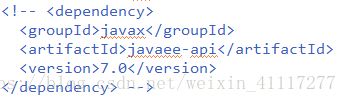
I had a problem these two days, and it was a disgusting problem. Wasted me two days time, maven starts, the Failed to execute goal. Org. Apache tomcat. Maven: tomcat7 — maven plugin: 2.2: run, or can’t find the tomcat plug-in, finally really is no way, to guide so the pom bag screening out, one at a time, found that two packages caused the error.


Hope I can help you.