Category Archives: How to Fix

Failed to execute goal org.apache.tomcat.maven:tomcat7-maven-plugin:2.2:run (default-cli) on project

Complete error message

Failed to execute goal org.apache.tomcat.maven:tomcat7-maven-plugin:2.2:run (default-cli) on project jurisdiction_controller: Could not start Tomcat


Start the Maven project wrong, use Tomcat embedded in it
The solution
The dependent use of servlets is introduced in the pom.xml file
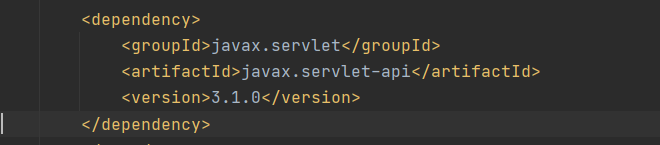

Change after
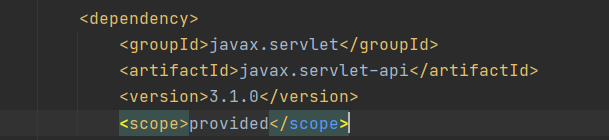
add scope tags, and the values is provided (only role in the compilation and testing, and at the same time not pass)
The scope label specifies the range of values
compile
The default scope, which means that all Dependencies can be used throughout the lifecycle. Furthermore, these dependencies are passed to the projects on which they depend. Applies to all phases and will be released along with the project
provided
Similar to compile, but indicating that dependency is provided by JDKs or containers, such as Servlet APs and some Java EE APIs. This scope can only be used during compilation and testing and has no transitivity.
runtime
Dependency does not apply at compile time, but does apply at run and test times, such as JDBC drivers, for the run and test phases.
test
Indicates that dependency is applied at test time, not at run time. Used only during testing, to compile and run test code. Will not be released with the project.
system
Similar to Provided, but provided in the system as an external JAR, Maven does not look for it in a repository.
RemoveError: ‘requests‘ is a dependency of conda and cannot be removed from conda‘s operating env

1. The question is:

removeError: ‘requests’ is a dependency of Conda and cannot be removed from Conda’s operating environment.
removeError: ‘setup_tools’ is a dependency of CONDA and cannot be removed from CONDA’s operating environment.
2. Solutions
Force Conda to be updated before installation

conda update --force conda

3. More related questions
https://github.com/conda/conda/issues/8149

RemoveError: ‘setuptools’ is a dependency of conda and cannot be removed from conda’s operatin

RemoveError: ‘setuptools’ is a dependency of conda and cannot be removed from
conda’s operating environment.

PIP uninstall install setuptools
c> update conda
conda u>e –force conda

PIP un>all install setuptools
conda install -c anaconda setuptools

Removeerror: ‘setuptools’ is a dependency of CONDA

At the wrong when update jupyterlab
RemoveError: 'setuptools' is a dependency of conda and always be removed from conda' s operating environment.
Try the first method:
PIP uninstall install setuptools
and conda install setuptools , useless, still an error
The second:
conda update conda
no, at the same error
The third:
conda update -- force conda
success, no error.
Conda install numpy, numpy, numpy, numpy, numpy, numpy, numpy. Looks like it worked out.

RemoveError: ‘requests’ is a dependency of conda and cannot be removed from conda’s operating enviro

An error occurred during installation of conda
RemoveError: ‘requests’ is a dependency of conda and cannot be removed from conda’s operating environment.
 
This error occurs because the ‘Requests’ package was installed with PIP and is triggered if you install other packages using CANDA.
Solutions:
1, Use PIP uninstall packagename to uninstall the package, it is not recommended to use this, it will cause other errors.
2. Use PIP packagename to install the package
Good luck
Reference:
https://blog.csdn.net/weixin_40405758/article/details/88094405

Removeerror: ‘requests’ is a dependency of CONDA and cannot be removed from CONDA’s o

Preparing transaction: done
Verifying transaction: failed

RemoveError: 'requests' is a dependency of conda and cannot be removed from
conda's operating environment.
RemoveError: 'setuptools' is a dependency of conda and cannot be removed from
conda's operating environment.

The solution
run

conda update conda

portal

Error record: this.requestWindowFeature ( Window.FEATURE_ NO_ Title) error or no effect

The requestWindowFeature method must be placed before the content view is initialized. I checked that this is the first one, but later I found that I changed the class inheritance. Before I inherited the Activity, I changed the class inheritance to AppCompatActivity.
At first I wondered if it was possible that AppCompatActivity had done something in its own super.onCreate. So the

this.requestWindowFeature(Window.FEATURE_NO_TITLE);

On the

super.onCreate(savedInstanceState);

Finally, in the manifests file, we add an attribute to the Activity:

android:theme="@style/Theme.AppCompat.Light.NoActionBar"

solves the problem.

The title bar is not an ordinary title bar. It is called ActionBar. Another solution is to call it after setContentView

getSupportActionBar().hide();

solves the problem.

Request window feature for Android Development( Window.FEATURE_ NO_ Title) does not take effect

What if you want to hide the ActionBar but the requestWindowFeature(window.feature_no_title) doesn’t work?
Reason: because they define the Activity of inherited android. Support. V7. App. AppCompatActivity, AppCompatActivity itself does not support requestWindowFeature (Window. FEATURE_NO_TITLE) cause, can change to inherit the Activity.

Android set request window feature( Window.FEATURE_ NO_ Title) invalid solution

Reprint please indicate the source: http://blog.csdn.net/java201159416/article/details/51940074

general app has a demand to hide the Android default Title bar, is usually used before setConvertView call requestWindowFeature (Window. FEATURE_NO_TITLE), after can sometimes find call this line of code has no effect, Very depressed.
through observation, before the Activity is to inherit the Activity, so is valid, and I am AppCompatActivity inherited, so can’t hide.
solution:
1. Let xxxActivity inherit the Activity
2. Inherit AppCompatActivity and call it in the onCreate method

if (getSupportActionBar() != null){
   getSupportActionBar().hide();
}

And then we’re done.

[Android] using request window feature( Window.FEATURE_ NO_ Title) method to remove the title invalid solution

I used to use Eclipse to write APP, but today I try to use Android Sutido to write APP. I need to hide the title bar in the APP and use a custom title bar. It turns out that using requestWindowFeature(window.feature_no_title) method has no effect, and the title is not hidden

public class TitlebarActivity extends AppCompatActivity

In Android Studio, activities inherit from AppCompatActivity by default, so the requestWindowFeature(window.feature_no_title) method fails.

There are two solutions

    > change AppCompatActivity to Activity, then requestWindowFeature(window.feature_no_title); Add the following code to the onCreate() method:
if (getSupportActionBar() != null){
   getSupportActionBar().hide();
}

Now you can hide the title bar.

Nginx can’t successfully reload

Nginx could not reload smoothly
A problem with Nginx being unable to dynamically hot reload was encountered
The daemon and master processes were shut down for debugging purposes before being discovered

daemon off;
master_process off; 

This causes the reload management to fail

#daemon off;
#master_process off; 

Comment out and it’s OK.