Category Archives: How to Fix

Tensorflow error: attributeerror: module ‘tensorflow’ has no attribute ‘unpack’ (‘pack ‘)

Tensorflow: attributeerror: module ‘tensorflow’ has no attribute ‘unpack’ (‘pack ‘)

As shown in the figure:

AttributeError: module ‘tensorflow’ has no attribute ‘unpack’

Analysis: after tensorflow version 1.0 + is updated, the method name changes

Solution:

error report

before update

after update

attributeerror: module ‘tensorflow’ has no attribute ‘unpack’

after update tf.unpack () tf.unstack ()
AttributeError: module ‘tensorflow’ has no attribute ‘pack’ tf.pack () tf.stack ()

Springboot startup error – classnotfound Exception:EnhancerBySpringCGLIB

Error classnotfound in springboot startup Exception:EnhancerBySpringCGLIB

Error information solution

Error information

Spring boot 2.4.1 project, start to report the following error, but start will be normal, although it does not affect the use, but look very boring.

java.lang.ClassNotFoundException: cn.demo.Application$$EnhancerBySpringCGLIB$$310af73e
	at java.net.URLClassLoader.findClass(URLClassLoader.java:382)
	at java.lang.ClassLoader.loadClass(ClassLoader.java:424)
	at sun.misc.Launcher$AppClassLoader.loadClass(Launcher.java:349)
	at java.lang.ClassLoader.loadClass(ClassLoader.java:357)
	at java.lang.Class.forName0(Native Method)
	at java.lang.Class.forName(Class.java:264)
	at cn.demo.ocean.common.prop.core.spring.SpringConfigPropertiesHandle.handleSpringConfig(SpringConfigPropertiesHandle.java:47)
	at cn.demo.ocean.common.prop.core.spring.ConfigServerPostProcessor.doProcessProperties(ConfigServerPostProcessor.java:305)
	at cn.demo.ocean.common.prop.core.spring.ConfigServerPostProcessor.processProperties(ConfigServerPostProcessor.java:122)
	at cn.demo.ocean.common.prop.core.spring.ConfigServerPostProcessor.postProcessBeanFactory(ConfigServerPostProcessor.java:102)
	at org.springframework.context.support.PostProcessorRegistrationDelegate.invokeBeanFactoryPostProcessors(PostProcessorRegistrationDelegate.java:299)
	at org.springframework.context.support.PostProcessorRegistrationDelegate.invokeBeanFactoryPostProcessors(PostProcessorRegistrationDelegate.java:170)
	at org.springframework.context.support.AbstractApplicationContext.invokeBeanFactoryPostProcessors(AbstractApplicationContext.java:751)
	at org.springframework.context.support.AbstractApplicationContext.refresh(AbstractApplicationContext.java:569)
	at org.springframework.boot.web.servlet.context.ServletWebServerApplicationContext.refresh(ServletWebServerApplicationContext.java:144)
	at org.springframework.boot.SpringApplication.refresh(SpringApplication.java:767)
	at org.springframework.boot.SpringApplication.refresh(SpringApplication.java:759)
	at org.springframework.boot.SpringApplication.refreshContext(SpringApplication.java:426)
	at org.springframework.boot.SpringApplication.run(SpringApplication.java:326)
	at org.springframework.boot.SpringApplication.run(SpringApplication.java:1309)
	at org.springframework.boot.SpringApplication.run(SpringApplication.java:1298)
	at cn.demo.Application.main(Application.java:19)
	at sun.reflect.NativeMethodAccessorImpl.invoke0(Native Method)
	at sun.reflect.NativeMethodAccessorImpl.invoke(NativeMethodAccessorImpl.java:62)
	at sun.reflect.DelegatingMethodAccessorImpl.invoke(DelegatingMethodAccessorImpl.java:43)
	at java.lang.reflect.Method.invoke(Method.java:498)
	at org.springframework.boot.devtools.restart.RestartLauncher.run(RestartLauncher.java:49)
java.lang.ClassNotFoundException: cn.demo.config.Swagger2Config$$EnhancerBySpringCGLIB$$589bf224
	at java.net.URLClassLoader.findClass(URLClassLoader.java:382)
	at java.lang.ClassLoader.loadClass(ClassLoader.java:424)
	at sun.misc.Launcher$AppClassLoader.loadClass(Launcher.java:349)
	at java.lang.ClassLoader.loadClass(ClassLoader.java:357)
	at java.lang.Class.forName0(Native Method)
	at java.lang.Class.forName(Class.java:264)
	at cn.demo.ocean.common.prop.core.spring.SpringConfigPropertiesHandle.handleSpringConfig(SpringConfigPropertiesHandle.java:47)
	at cn.demo.ocean.common.prop.core.spring.ConfigServerPostProcessor.doProcessProperties(ConfigServerPostProcessor.java:305)
	at cn.demo.ocean.common.prop.core.spring.ConfigServerPostProcessor.processProperties(ConfigServerPostProcessor.java:122)
	at cn.demo.ocean.common.prop.core.spring.ConfigServerPostProcessor.postProcessBeanFactory(ConfigServerPostProcessor.java:102)
	at org.springframework.context.support.PostProcessorRegistrationDelegate.invokeBeanFactoryPostProcessors(PostProcessorRegistrationDelegate.java:299)
	at org.springframework.context.support.PostProcessorRegistrationDelegate.invokeBeanFactoryPostProcessors(PostProcessorRegistrationDelegate.java:170)
	at org.springframework.context.support.AbstractApplicationContext.invokeBeanFactoryPostProcessors(AbstractApplicationContext.java:751)
	at org.springframework.context.support.AbstractApplicationContext.refresh(AbstractApplicationContext.java:569)
	at org.springframework.boot.web.servlet.context.ServletWebServerApplicationContext.refresh(ServletWebServerApplicationContext.java:144)
	at org.springframework.boot.SpringApplication.refresh(SpringApplication.java:767)
	at org.springframework.boot.SpringApplication.refresh(SpringApplication.java:759)
	at org.springframework.boot.SpringApplication.refreshContext(SpringApplication.java:426)
	at org.springframework.boot.SpringApplication.run(SpringApplication.java:326)
	at org.springframework.boot.SpringApplication.run(SpringApplication.java:1309)
	at org.springframework.boot.SpringApplication.run(SpringApplication.java:1298)
	at cn.demo.Application.main(Application.java:19)
	at sun.reflect.NativeMethodAccessorImpl.invoke0(Native Method)
	at sun.reflect.NativeMethodAccessorImpl.invoke(NativeMethodAccessorImpl.java:62)
	at sun.reflect.DelegatingMethodAccessorImpl.invoke(DelegatingMethodAccessorImpl.java:43)
	at java.lang.reflect.Method.invoke(Method.java:498)
	at org.springframework.boot.devtools.restart.RestartLauncher.run(RestartLauncher.java:49)

solve

Baidu has failed for many times, so we can only read the error report carefully. Last line found:

at org.springframework.boot.devtools.restart.RestartLauncher.run(RestartLauncher.java:49)

Doubt is the problem of devtools, and then pom.xml Devtools dependency removal in

<dependency>
    <groupId>org.springframework.boot</groupId>
    <artifactId>spring-boot-devtools</artifactId>
    <scope>runtime</scope>
    <optional>true</optional>
</dependency>

It’s solved (⊙ o ⊙)

CSS Failed to decode downloaded font, OTS parsing error: Failed to convert WOFF 2.0 font to SFNT

Recently, I’ve been looking at some information about the web front end, and the following error occurred in processing a CSS, so as to record it.

I compiled a project under webstorm and loaded the index page on it. I got the following warning on the chrome console:

Failed to decode downloaded font: http://localhost:4200/assets/fonts/Simple-Line-Icons.woff2?v=2.4.0
OTS parsing error: Failed to convert WOFF 2.0 font to SFNT
Failed to decode downloaded font: http://localhost:4200/assets/fonts/Simple-Line-Icons.woff2?v=2.4.0
OTS parsing error: Failed to convert WOFF 2.0 font to SFNT
Failed to decode downloaded font: http://localhost:4200/assets/fonts/Simple-Line-Icons.woff2?v=2.4.0
OTS parsing error: Failed to convert WOFF 2.0 font to SFNT

Custom font and code used:

@font-face {
  font-family: 'simple-line-icons';
  src: url('../fonts/Simple-Line-Icons.eot?v=2.4.0');
  src: url('../fonts/Simple-Line-Icons.eot?v=2.4.0#iefix') format('embedded-opentype'),
       url('../fonts/Simple-Line-Icons.woff2?v=2.4.0') format('woff2'),
       url('../fonts/Simple-Line-Icons.ttf?v=2.4.0') format('truetype'),
       url('../fonts/Simple-Line-Icons.woff?v=2.4.0') format('woff'),
       url('../fonts/Simple-Line-Icons.svg?v=2.4.0#simple-line-icons') format('svg');
  font-weight: normal;
  font-style: normal;
}

The styleext I use is SCSS, and the stylesheet file suffix is. CSS.

There are two solutions

1. Will xxxx.css Change to xxxx.css.scss .

2. Change the format in the font declaration. Change format (‘woff ‘) to format (‘font woff’)

@font-face {
  font-family: 'simple-line-icons';
  src: url('../fonts/Simple-Line-Icons.eot?v=2.4.0');
  src: url('../fonts/Simple-Line-Icons.eot?v=2.4.0#iefix') format('embedded-opentype'),
       url('../fonts/Simple-Line-Icons.woff2?v=2.4.0') format('font-woff2'),
       url('../fonts/Simple-Line-Icons.ttf?v=2.4.0') format('truetype'),
       url('../fonts/Simple-Line-Icons.woff?v=2.4.0') format('font-woff'),
       url('../fonts/Simple-Line-Icons.svg?v=2.4.0#simple-line-icons') format('svg');
  font-weight: normal;
  font-style: normal;
}

Failed to open stream: http request failed!


When using PHP5’s own file_ get_ Content method to get remote files (in my

There are similar call requirements in the automated test framework, and sometimes the file will appear_ get_ Contents(): failed to open stream: http request failed.


The solution is to modify php.ini Let_ url_ Fopen is enabled and changed to allow_ url_ fopen = On


This can solve some people’s problems. Some people say that in China php.ini In, there are two options: allow_ url_ Fopen = on (indicates that the remote file can be opened through URL), user_ Agent = “PHP” (which script is used to access the network. By default, there is a “;” in front of it.) Restart the server.

But some will still have this warning message. If you want to use the perfect solution, you still need to set it php.ini User in it_ Agent, PHP’s default user_ Agent is PHP. We can change it to Mozilla/4.0 (compatible; MSIE 6.0; windows NT 5.0) to simulate browser, user_ agent=”Mozilla/4.0 (compatible; MSIE 6.0; Windows NT 5.0)”

Linux boot prompt “failed to initialize Hal!” solution

My operating system is debian5. There are some directories under/etc/that are RC *. D. * stands for numbers, which are all the services loaded when the system starts. Find DBUS and Hal in them. Pay attention to the numbers in front, which represent the startup order. For example, I found k88dbus and k16hal in RC1. D directory. The problem is that the startup order of DBUS is behind Hal, So it causes this problem. Therefore, write the startup sequence of dubs between Hal serial numbers. For example, I change k88dbus to k15dbus, and use the following command:

#mv K88dbus K15dbus

Restart again and the problem is solved.

Failed to connect to ourself

Today, when the management node of MySQL Cluster was restarted, it could not be started. After several attempts, there was still a problem. Check the log and the following error was reported.

2011-04-01 23:49:03 [MgmtSrvr] INFO     — Got initial configuration from ‘/usr/local/mysql/mysql-cluster/ config.ini ‘, will try to set it when all ndb_ mgmd(s

) started

2011-04-01 23:49:03 [MgmtSrvr] INFO     — Mgmt server state: nodeid 1 reserved for ip 192.168.100.32, m_ reserved_ nodes 1.

2011-04-01 23:49:03 [MgmtSrvr] INFO     — Node 1: Node 1 Connected

2011-04-01 23:49:03 [MgmtSrvr] INFO     — Id: 1, Command port: *:1186

2011-04-01 23:49:03 [MgmtSrvr] WARNING  — 1011 Unable to connect with connect string: nodeid=0, localhost:1186

2011-04-01 23:49:03 [MgmtSrvr] ERROR    — Failed to connect to ourself!

It’s strange that the server has been in normal use for several days. As soon as it was restarted today, there was a problem. I asked my colleagues what changes the server had made in the past two days. The answer is:

Changed the hosts file. Go up and see: found changed to:

127.0.0.1               localhost.localdomain openldap

So change to the default value

127.0.0.1               localhost.localdomain localhost

Restart, OK. business as usual!

Reproduced in: https://www.cnblogs.com/feihongwuhen/archive/2011/04/01/7170052.html

Solve the problem of failed to create the Java virtual machine when eclipse is opened

For the above reasons, the Java virtual machine can not be opened. It may be that the virtual memory of the Java virtual machine is set incorrectly. Open the eclipse decompression directory and open it eclipse.ini Documents.


The contents of the original document are as follows:

-startup

plugins/ org.eclipse.equinox .launcher_ 1.2.0.v20110502.jar

— launcher.library

plugins/ org.eclipse.equinox . launcher.win32 .win32.x86_ 1.1.100.v20110502

-product

org.eclipse.epp . package.jee.product

— launcher.defaultAction

openFile

— launcher.XXMaxPermSize

256M

-showsplash

org.eclipse.platform

— launcher.XXMaxPermSize

256m

— launcher.defaultAction

openFile

-vmargs

– Dosgi.requiredJavaVersion=1 .5

-Xms40m

-Xmx512m


Revised eclipse.ini The documents are as follows:

-startup

plugins/ org.eclipse.equinox .launcher_ 1.2.0.v20110502.jar

— launcher.library

plugins/ org.eclipse.equinox . launcher.win32 .win32.x86_ 1.1.100.v20110502

-product

org.eclipse.epp . package.jee.product

— launcher.defaultAction

openFile

— launcher.XXMaxPermSize

128M

-showsplash

org.eclipse.platform

— launcher.XXMaxPermSize

128m

— launcher.defaultAction

openFile

-vmargs

– Dosgi.requiredJavaVersion=1 .6

-Xms40m

-Xmx256m


Note: the red part is the modified part.

After saving, restart eclipse.


The solution of “failed to load ldlinux. C32” in Linux system

Using the U disk made by UltraISO to start, F12 key appears when USB starts

Failed to load ldlinux.c32
Boot failed: please change disks and press a key to continue

terms of settlement:

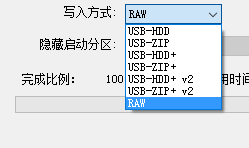
When UltraISO makes the boot disk, the write mode is changed to “raw”, and the system can start smoothly when it is installed.

reference material:

http://www.cnblogs.com/huadongw/p/6516637.html

Failed to clean project: Failed to delete

Failed to clean project: Failed to delete access_ Log. A log file

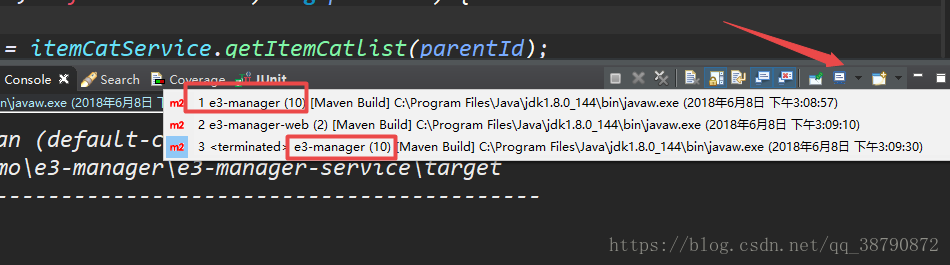
Before, when I started Tomcat plug-in to test whether Dubbo resource scheduling is normal in Maven distributed project construction, I encountered the following error

error message

[INFO] ------------------------------------------------------------------------
[ERROR] Failed to execute goal org.apache.maven.plugins:maven-clean-plugin:2.5:clean (default-clean) on project e3-manager-service: Failed to clean project: Failed to delete E:\ecplise18\qiu\e3demo\e3-manager\e3-manager-service\target\tomcat\logs\access_log.2018-06-08 -> [Help 1]
[ERROR] 
[ERROR] To see the full stack trace of the errors, re-run Maven with the -e switch.
[ERROR] Re-run Maven using the -X switch to enable full debug logging.
[ERROR] 

Cause of error

Because you’ve started the service before, just turn it off.

resolvent

Tns-03505: the ultimate solution to failed to resolve name

System environment: centos7

Oracle environment: 11g

Fault description: the server directly restarts after running data crash, and various errors are reported after restart,

Tns-03505: failed to resolve name,

The external PLSQL connection prompts ora-12170: TNS: connection timeout.

The specific solutions are as follows:

1. Check the file configuration information listener and tnsnames, and confirm that the following is correct. If the configuration of this file is wrong, the listening service will not be started normally.
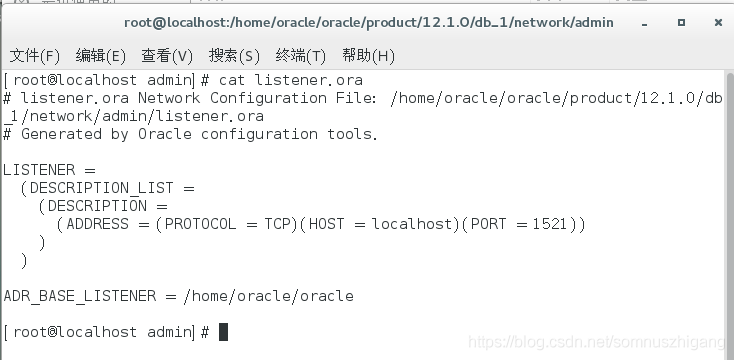
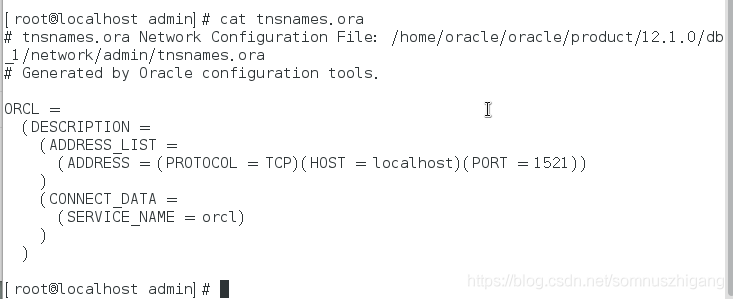
 

2. Start the monitoring service lsnrctl start and update the registration
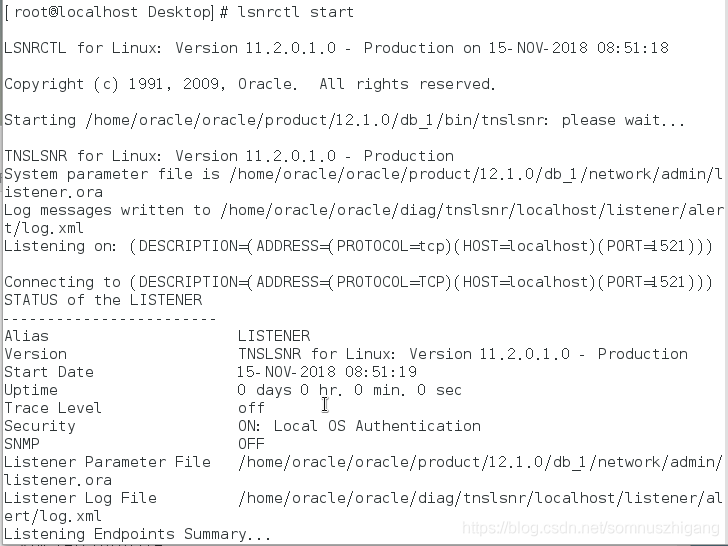
Services Summary…
Service “orcl” has 1 instance(s).
  Instance “orcl”, status UNKNOWN, has 1 handler(s) for this service…
The command completed successfully
 

“Unknown” is prompted here. Registration update is required,

3. Open orcl service and update the registration

sqlplus/as sysdba

startup

alter system register;

quit

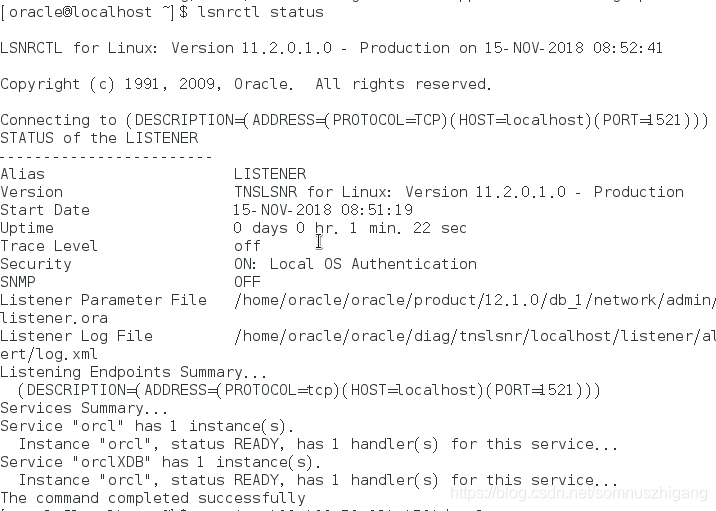
lsnrctl status
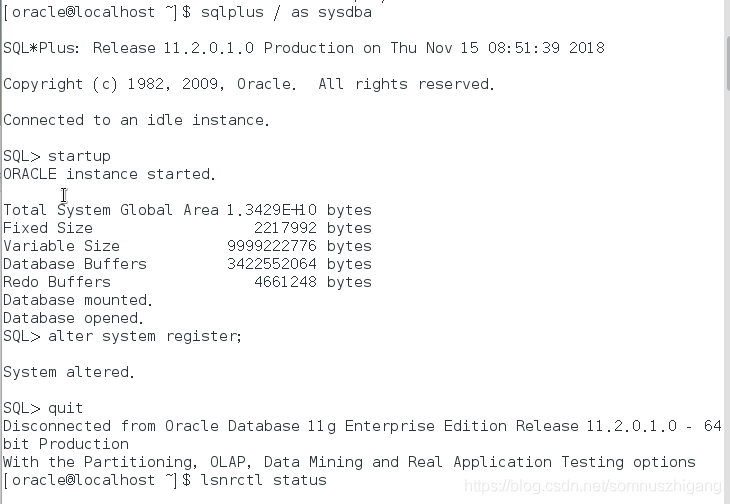
Service “orcl” has 1 instance(s).
  Instance “orcl”, status READY, has 1 handler(s) for this service…
Service “orclXDB” has 1 instance(s).
  Instance “orcl”, status READY, has 1 handler(s) for this service…
The command completed successfully

Confirm that the monitoring status is ready
then

4. Test results

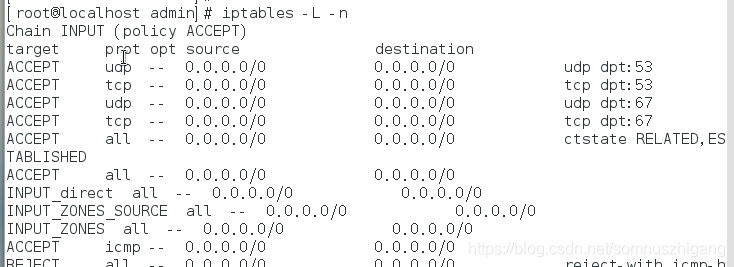
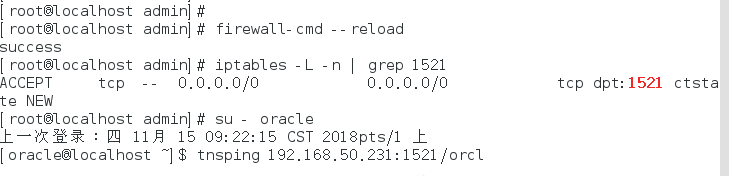
Tns-03505 failed to resolve name is displayed. After confirming that there is no problem in the previous steps, proceed to the last step to view the firewall and port information


5. Check the firewall information, view the specific port information, and add the corresponding port. After confirming that the port is added, test again, and you can access it normally