Category Archives: How to Fix

Error: command error out with exit status 1: Python when installing mysqlclient in django2.0 setup.py egg_ info

Environment: centos7 + django2.0 + Python 3.6

Django2.0 needs to install pymysql and mysqlclient to connect with MySQL

pip3 install PyMySQL

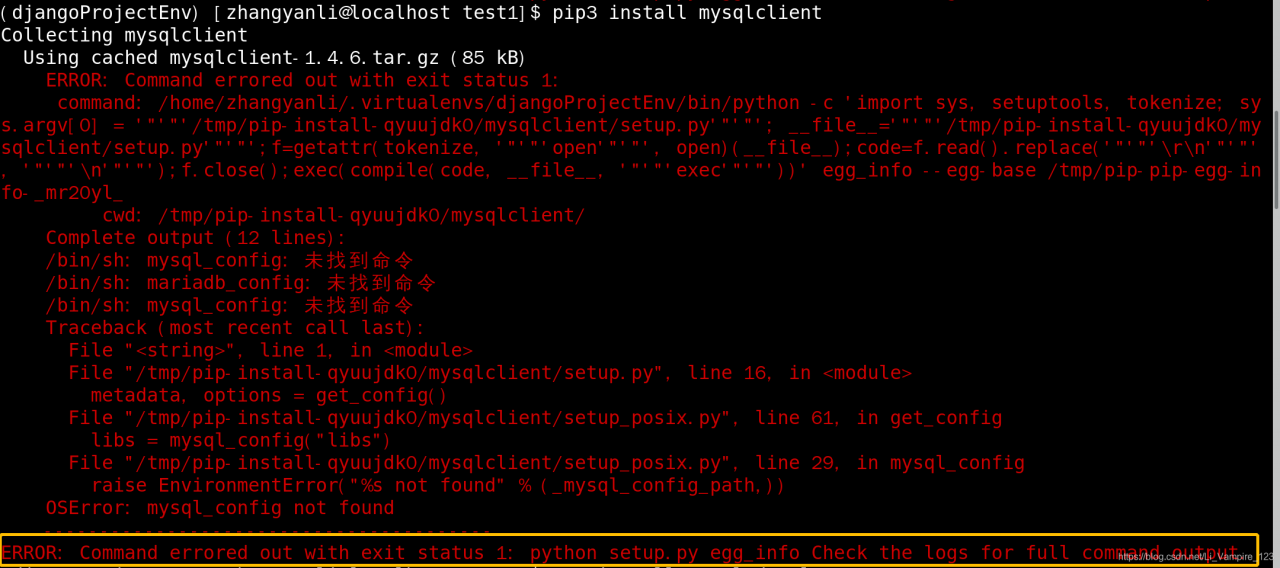
pip3  install  mysqlclient


Error in installing mysqlclient

Then install the dependency

yum install  mysql-devel

yum install python-devel

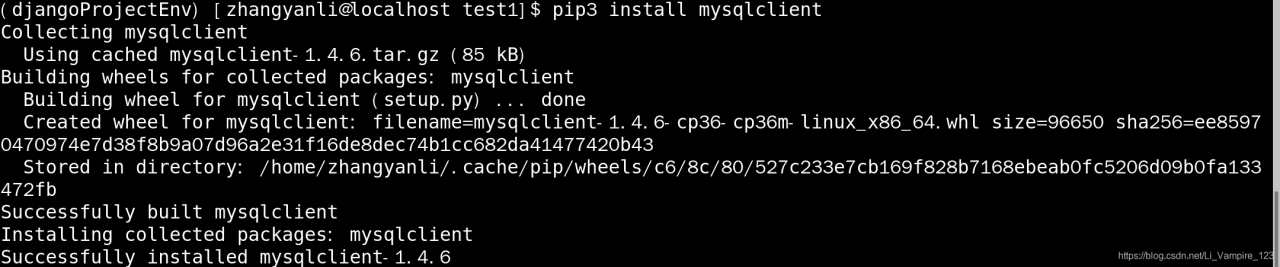
Install PIP3?Install?Mysqlclient?OK again!!!!!!!

Error creating bean with name ‘sqlsessionfactory’ defined in class path resource

Today, I made an error when integrating mybatis with spring, as follows:

Caused by: org.springframework.beans . factory.BeanCreationException :

Error creating bean with name ‘sqlSessionFactory’ defined in class path resource [config/ applicationContext.xml ]:

Cannot resolve reference to bean ‘config/ mybatis.xml ‘ while setting bean property ‘configLocation’;

nested exception is org.springframework.beans . factory.NoSuchBeanDefinitionException : No bean named ‘config/ mybatis.xml ‘ is defined

My English is not very good. I understand it in general applicationContext.xml There is an error registering configlocation in

<bean id=”sqlSessionFactory” class=” org.mybatis.spring .SqlSessionFactoryBean”>
<property name=”dataSource” ref=”dataSource”></property>
<property name=”configLocation” ref=”config/ mybatis.xml “></property>
</bean>

After a careful examination of the code, I found that there was something wrong. Alas, the correct code is as follows

<bean id=”sqlSessionFactory” class=” org.mybatis.spring .SqlSessionFactoryBean”>
<property name=”dataSource” ref=”dataSource”></property>
<property name=”configLocation” value=”config/ mybatis.xml “></property>
</bean>

Give me a fulcrum, I can pry the whole earth, give me a mistake, I can support the whole project

Flash + Vue uses Axios to obtain server data, and reports error: “request aborted”

Today, I’m studying the flash + Vue tutorial https://testdriven.io/blog/developing-a-single-page-app-with-flask-and-vuejs/

Go to the back-end flash to create a new books array. When the front-end Vue obtains the data from the back-end through Axios, it always reports an error: “request aborted”

After looking at the developer tools, I didn’t have any other tips. I couldn’t figure it out.

BOOKS = [
    {
        'title': 'On the Road',
        'author': 'Jack Kerouac',
        'read': True
    },
    {
        'title': 'Harry Potter and the Philosopher\'s Stone',
        'author': 'J. K. Rowling',
        'read': False
    },
    {
        'title': 'Green Eggs and Ham',
        'author': 'Dr. Seuss',
        'read': True
    }
]

This is the back-end books array. It’s strange that after the “]” after the meeting, a “;” is added. It’s easy to use. I really don’t understand.

After the operation is successful, it’s good to remove the “;”.

Strange, encounter this situation of prawns welcome message exchange.

Error code elifecycle errorno when NPM install command is executed in Vue project

Error code elifecycle errorno 1 when NPM install command is executed in Vue project

The complete error report is as follows

D:\workspace\dev\qorosauto-icv-ota-ui>npm install

> [email protected] install D:\workspace\dev\qorosauto-icv-ota-ui\node_m
odules\phantomjs-prebuilt
> node install.js

PhantomJS not found on PATH
Downloading https://github.com/Medium/phantomjs/releases/download/v2.1.1/phantom
js-2.1.1-windows.zip
Saving to C:\Users\xufeng.fu\AppData\Local\Temp\phantomjs\phantomjs-2.1.1-window
s.zip
Receiving...

Error making request.
Error: read ECONNRESET
    at TLSWrap.onStreamRead (internal/stream_base_commons.js:111:27)

Please report this full log at https://github.com/Medium/phantomjs
npm WARN [email protected] requires a peer of ajv@^5.0.0 but none is installed.
 You must install peer dependencies yourself.
npm WARN optional SKIPPING OPTIONAL DEPENDENCY: [email protected] (node_modules\fse
vents):
npm WARN notsup SKIPPING OPTIONAL DEPENDENCY: Unsupported platform for fsevents@
1.2.4: wanted {"os":"darwin","arch":"any"} (current: {"os":"win32","arch":"x64"}
)

npm ERR! code ELIFECYCLE
npm ERR! errno 1
npm ERR! [email protected] install: `node install.js`
npm ERR! Exit status 1
npm ERR!
npm ERR! Failed at the [email protected] install script.
npm ERR! This is probably not a problem with npm. There is likely additional log
ging output above.

npm ERR! A complete log of this run can be found in:
npm ERR!     C:\Users\xufeng.fu\AppData\Roaming\npm-cache\_logs\2019-02-26T02_31
_14_943Z-debug.log

Read the error message. It is suspected that there is a problem when installing phantomjs. Try to execute the command NPM cache clear – force to clear the cache, manually download the phantomjs package and extract it to node_ Then execute the NPM install command again, and the execution is successful
note: CSDN can be downloaded for one point

Error report of QT construction engineering makefile error 1

phenomenon

The project can be built and run normally. After modifying the project, the error makefile error 1 will be re built, and the shadow build has been canceled.

environment

Multi version vs and QT are installed in win7 system

VS2010VS2015QT 5.5.1QT 5.7.1

solve

Make a copy of the project, build the copy successfully and run normally.
PS: no specific cause was found. It is suspected that multiple versions of the same software are installed in the same system.

Error: listen eaddnotavail: address not available

preface:

Build a distributed project, find a front-end project of Vue framework to do interface test, use nodejs to report error: listen eaddnotavail: address not available.

Problem analysis:

After the above error, there are still some error statements below. Here I show that IP and port number cannot be monitored.

Problem solving:

Modify the conf file under the Vue project, that is, under the configuration file, connect the IP and port of the background and the IP and port of the host. Configure IP to cost machine or IP address needed by the project, and solve the problem.

Eclipse run main method error: a JNI error has occurred, please check your installation and try again

The magic question

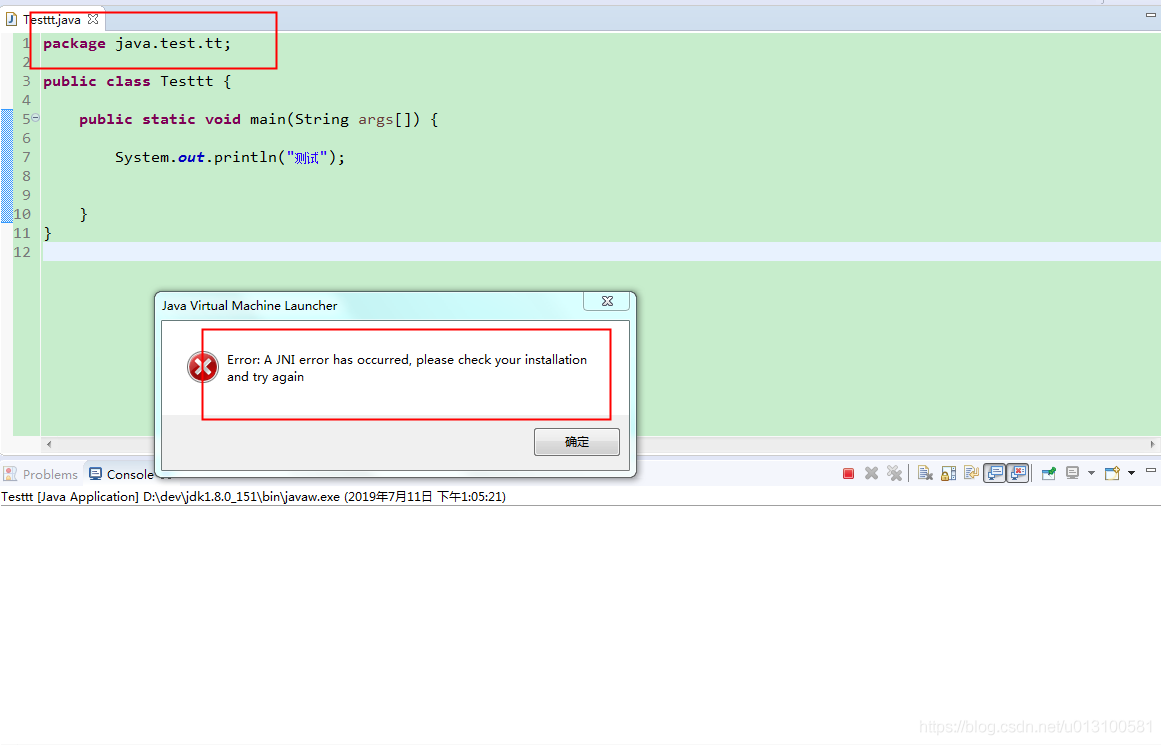
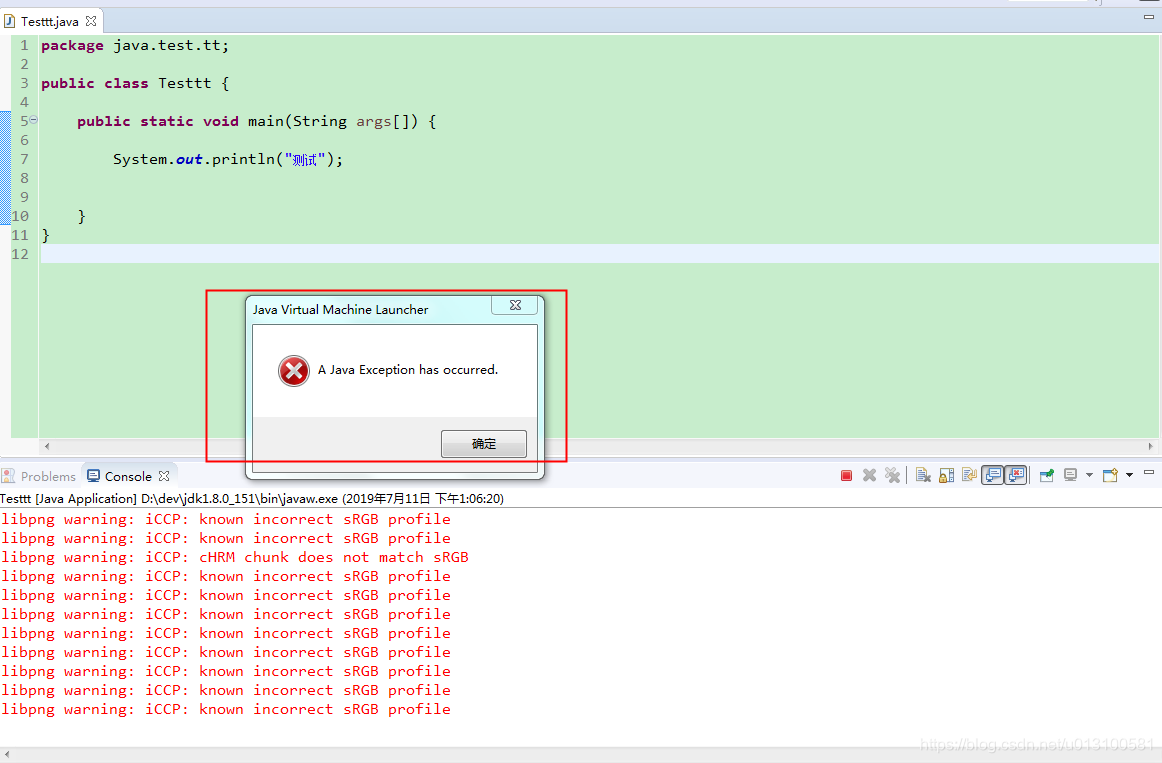
It’s the first time I’ve encountered this kind of error. When creating a new Java project, the test package is named java.test.tt , write the main method to run, and the error will be reported as follows:

First pop up window:

Second pop up window:

Detailed error information:

libpng warning: iCCP: known incorrect sRGB profile
libpng warning: iCCP: cHRM chunk does not match sRGB
libpng warning: iCCP: known incorrect sRGB profile
libpng warning: iCCP: cHRM chunk does not match sRGB
libpng warning: iCCP: known incorrect sRGB profile
Exception in thread "main" java.lang.SecurityException: Prohibited package name: java.test.tt
	at java.lang.ClassLoader.preDefineClass(ClassLoader.java:662)
	at java.lang.ClassLoader.defineClass(ClassLoader.java:761)
	at java.security.SecureClassLoader.defineClass(SecureClassLoader.java:142)
	at java.net.URLClassLoader.defineClass(URLClassLoader.java:467)
	at java.net.URLClassLoader.access$100(URLClassLoader.java:73)
	at java.net.URLClassLoader$1.run(URLClassLoader.java:368)
	at java.net.URLClassLoader$1.run(URLClassLoader.java:362)
	at java.security.AccessController.doPrivileged(Native Method)
	at java.net.URLClassLoader.findClass(URLClassLoader.java:361)
	at java.lang.ClassLoader.loadClass(ClassLoader.java:424)
	at sun.misc.Launcher$AppClassLoader.loadClass(Launcher.java:335)
	at java.lang.ClassLoader.loadClass(ClassLoader.java:357)
	at sun.launcher.LauncherHelper.checkAndLoadMain(LauncherHelper.java:495)

solve:

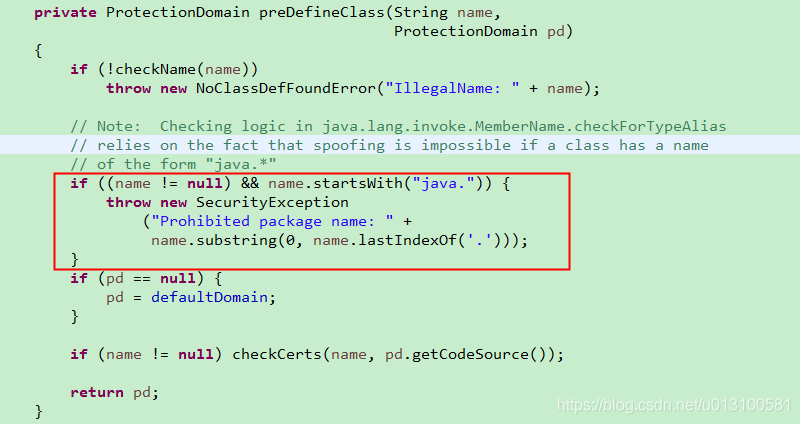
Do not use Java as the beginning of the package name, for example, error demonstration: java.test.tt

Why?

When loading a Java class, you are restricted to throwing an exception if the package name starts with Java. This should also be to ensure the security of classes in JDK when loading classes.

Error during connect when installing docker in Windows 10

The detailed error information is as follows:

C:\Users\zig>docker info
error during connect: Get http://%2F%2F.%2Fpipe%2Fdocker_engine/v1.39/info: open //./pipe/docker_engine: The system cannot find the file specified. In the default daemon configuration on Windows, the docker client must be run elevated to connect. This error may also indicate that the docker daemon is not running.

Modification method:

cd "C:\Program Files\Docker\Docker"
./DockerCli.exe -SwitchDaemon

Why: especially on windows machine when you see the above error after a docker update, try the above commands. It appears like the docker desktop UI may indicate that you are already using Linux containers, but the update may have messed up that setting. Running the above commands will set to Linux Containers and there after you can work happily.

By default, Linux containers is used. After using this command, just change it to windows containers.

Android error reporting: error inflating class android.webkit.WebView

The project reported an unexplained error. However, I met this error three months ago, and it was only today that I got away with it.

First of all, what happened to this error

The layout file writes a WebView control, loads it in the activity, and then crashes! Only some lower version mobile phones can work normally.

Looking puzzled, I know one thing, there is no problem without reason, and there is nothing that can not be solved. But in the face of this, I gave up, because sometimes the project time is very tight, even Baidu for a long time can not solve the problem, had to keep the problem. I rebuilt a project.

Solution summary:

1. If you encounter this WebView rendering exception on Android o, add it under the application of manifest:

<meta-data android:name="android.webkit.WebView.EnableSafeBrowsing"
           android:value="true"/>

2. Error in loading WebView:

reason:

Non native app stores will prompt you to update “Android system WebView”. Update is good, that part of the mobile phone brush machine, Google’s own WebView package lost.

3. A foreign brother said (the problem has been solved)

I had same problem and i solved this problem by changing its theme in manifest.

Modify the theme of Applaction.

I changed any attribute in the theme, that is, a color attribute. After completing this topic and modifying, the project can run normally, and the crash problem disappears. My heart is still full of doubts.
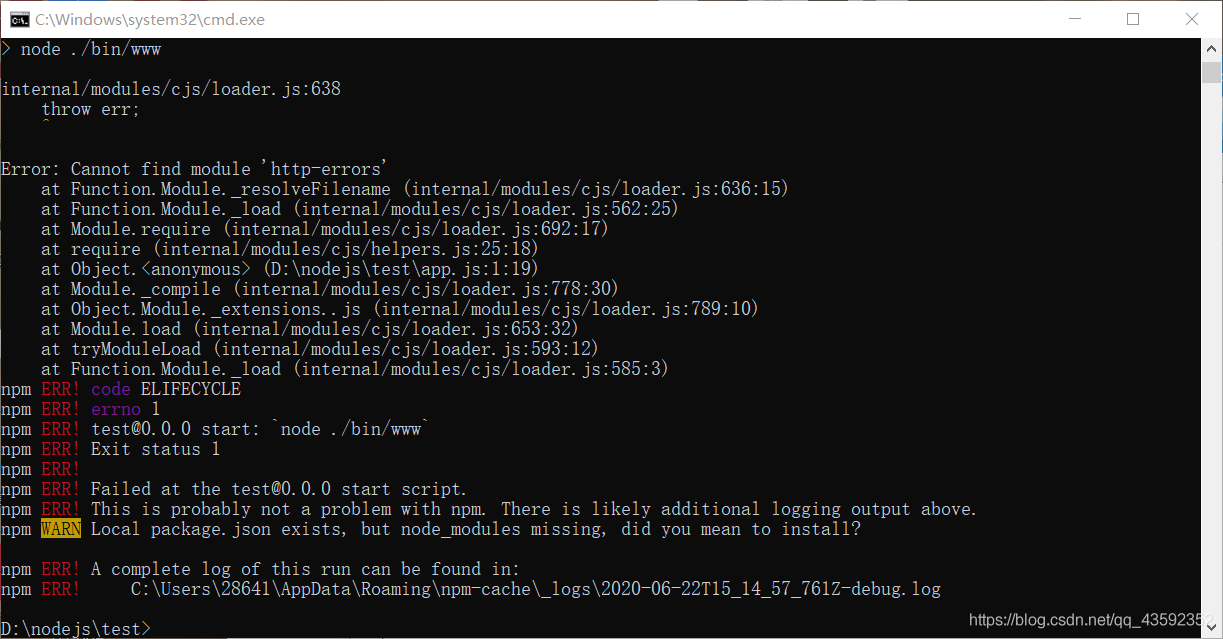
Error: cannot find module HTTP errors

Error description

After creating a new project with express in node, enter

npm start

The system reports an error, as shown in the figure:

Solution

After creating a new project, you should enter the following command:

npm install

Load other dependent modules. And then enter it

npm start

You can start the project normally.

Error reason

When express creates a project, for some libraries, such as HTTP errors , these libraries are not the core modules of node, but they must be used by express framework. So we have to use orders

npm install

Initialize and load these express dependent libraries.

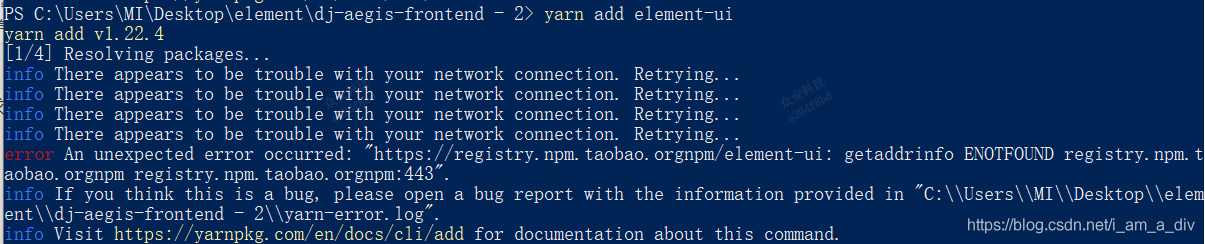
Error an unexpected error occurred:“ https://registry.npm.taobao.orgnpm/element-ui : get

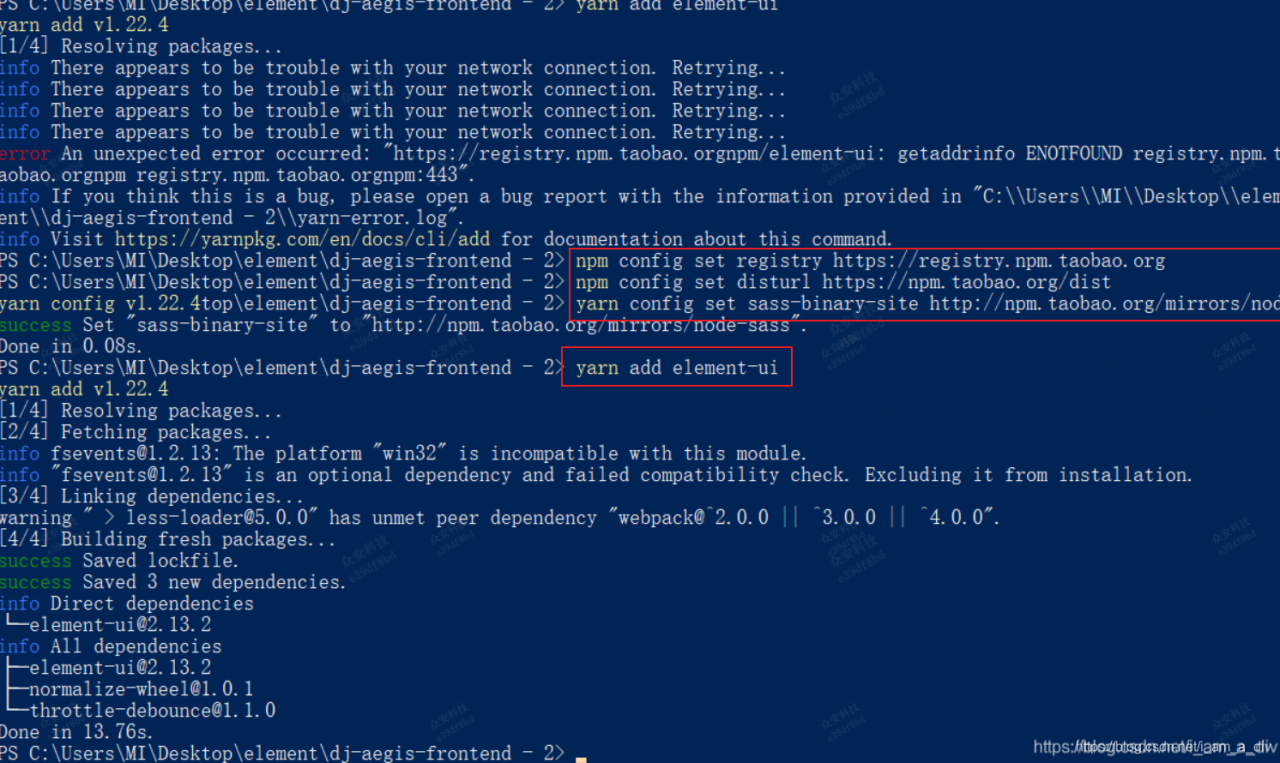
Error an unexpected error occurred:“ https://registry.npm.taobao.orgnpm/element-ui : getaddrinfo ENOTFOUND registry.npm.taobao .orgnpm registry.npm.taobao . orgnpm:443 ”.

This is because the network is not good, resulting in download dependent packet request overrun error, change the download address.

Solution: Step 1. Set the request address to Taobao source

npm config set registry https://registry.npm.taobao.org  
npm config set disturl https://npm.taobao.org/dist  

Step 2. Set the node sass image source

yarn config set sass-binary-site http://npm.taobao.org/mirrors/node-sass

Step 3. Download
again