Category Archives: How to Fix

Ora-01008: not all variables are bound

OPEN PO_EXPCUR FOR V_QUERY_SQL USING …

This code will throw ora-01008 when the parameter setting is wrong: not all variables are bound

Reason: when executing a dynamic SQL statement, the number of variables filled in the SQL string is inconsistent with the number of variables bound in the using keyword.

May cause (ora-01006: binding variable does not exist) problems

There are many times that all kinds of reasons can cause this problem. Now we will talk about a relatively small reason.

V_QUERY_SQL  =  ‘SELECT  COUNT(DISTINCT (B.BATCH_ID))  FROM T_DD_RES T
        JOIN T_DD_REQ Q
        ON T.ID_DD_REQ = Q.ID
        JOIN T_DD_BATCH B
        ON T.BATCH_ID = B.BATCH_ID  WHERE T.INSERT_TIME >= TRUNC(PI_DATE)
         AND T.INSERT_TIME < TRUNC(PI_DATE) + 1
         AND Q.REQUEST_DATE >= TRUNC(PI_DATE)
         AND Q.REQUEST_DATE < TRUNC(PI_DATE) + 1 
         AND B.CDATE >= TRUNC(PI_DATE)
         AND B.CDATE < TRUNC(PI_DATE) + 1’

OPEN PO_EXPCUR FOR V_QUERY_SQL USING …

The SQL in the stored procedure, such as the above code, throws the exception that ora-01006: bound variable does not exist when calling. When viewing the SQL statement, make sure that all variables exist. But why is this exception thrown?

Finally, we find out the reason, because the SQL statement returns an integer value, but here we give this value to the cursor, so we throw this exception. Change the cursor related statements to the following SQL, and everything will be OK.

EXECUTE IMMEDIATE V_QUERY_SQL INTO PO_AMOUNT USING…


The server has rejected the client credentials

Our WinForm program is isomorphic to WCF and is connected to the server deployed on the server. Today, many WinForm users report that they have encountered problems when using WinForm and thrown an exception. The server has rejected the client credentials

Now let’s talk about the security authentication of WCF. Generally, our LAN applications do not have any security configuration, so what is the default security configuration of WCF?If no security configuration is made, WCF adopts windows security authentication. The default configuration is as follows:

<netTcpBinding>

  <binding name="netTcp">

    <security mode="Transport">

      <transport clientCredentialType="Windows" />

    </security>

  </binding>

</netTcpBinding>

After checking, it is found that all computers that throw exceptions have been disabled in the ad domain. WCF in the server because it is windows authentication, so found that the user has a problem, it threw this exception. When the users in the ad domain are restored, WCF will be normal.


It should be pointed out that there are other possible reasons for this exception. For example, when the WCF server needs to impersonate the client identity, it needs the client to provide the user name and password. If it does not, it will throw this exception.


In addition, if the security requirements are not so high, we can disable all security related settings. The configuration is as follows:

<bindings>

  <netTcpBinding>

    <binding name="customTcpBinding" maxReceivedMessageSize="20480000" transferMode="Streamed" >

      <security mode="None"></security>

    </binding>

  </netTcpBinding>

</bindings>

In this way, you will no longer carry out identity authentication, and you will never throw an exception similar to identity authentication. As long as the corresponding server IP and port can be accessed, you can call it normally.


https://stackoverflow.com/questions/53098405/wcf-throws-exception-that-the-server-has-rejected-the-client-credentials-what-i

https://stackoverflow.com/questions/8577612/the-server-has-rejected-the-client-credentials

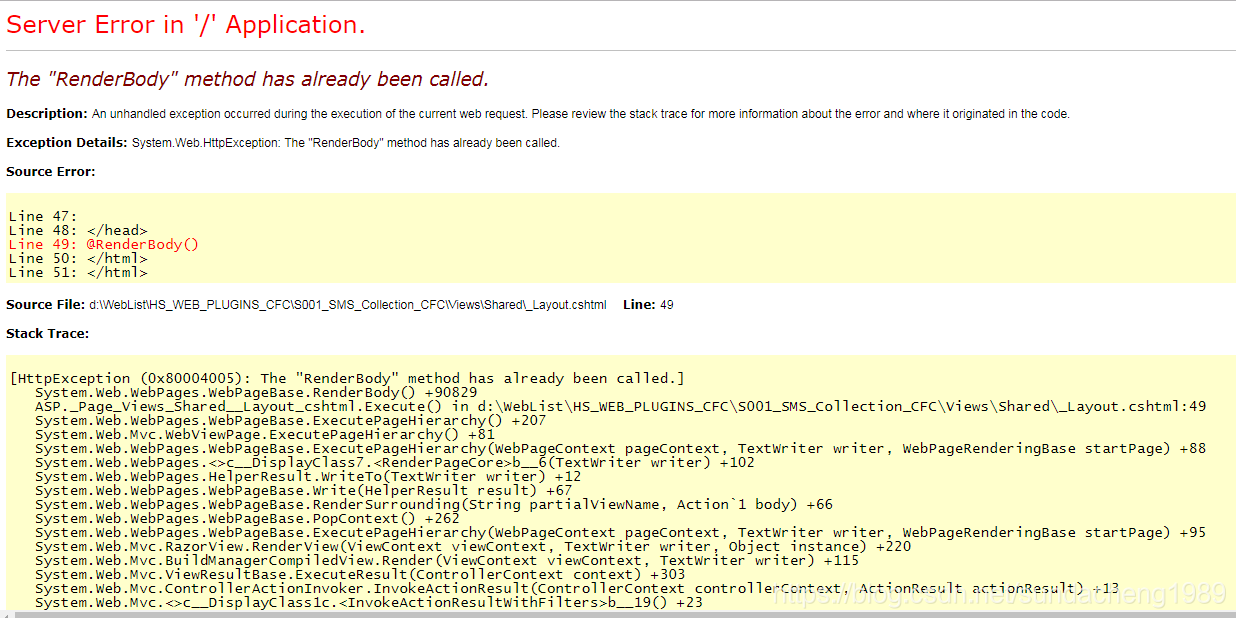
The RenderBody method has already been called

It’s used in the project ASP.NET MVC, deployed in the server’s IIS. When deploying the new version, the following exception was thrown.

Solution: 1. If you can log in to the server, restart the corresponding website in IIS. 2. If you can’t log in to the server and deploy through FTP, you need to delete the previous file first, and then upload a new file instead of directly uploading a new file to cover the original file.

The problems are analyzed as follows:

This website is deployed in the IIS site on the server. Developers have no permission to log in to this server, and can only deploy remotely through FTP. In the normal operation of the website, we uploaded the_ Layout.cshtml File to replace the original file, immediately threw an exception. The analysis may be due to the conflict between IIS and application worker process after loading the new cshtml file and the previous version of its cache. The solution is to delete the old one completely first_ Layout.cshtml At this time, an exception will be thrown to the page, and the new file will not be found_ Layout.cshtml File, and then re access, everything is normal.

Solve the problem that target code version of Maven project sub module in IntelliJ idea is always rolled back

Recently, I encountered the problem that the target code version of Maven sub module in IntelliJ idea has been rolled back. On the first day, in the idea setting, set the target code version of all sub modules to 1.8, and on the second day, roll back to 1.5, 1.6 and other versions.

The way to search online is to add the following plug-in information to Maven’s POM file:

<plugin>
		<groupId>org.apache.maven.plugins</groupId>
		<artifactId>maven-compiler-plugin</artifactId>
		<version>3.6.0</version>
		<configuration>
		    <encoding>UTF-8</encoding>
		    <source>1.8</source>
		<target>1.8</target>
		</configuration>
</plugin>

We did, but the problem still recurred. After several struggles, we finally found the existence of the problem.

In my project, the design of each sub module pom.xml In the file, either the parent information is not specified, or the parent of its own sub module pom.xml The target version is defined by myself, so the modification added in the parent POM can’t affect the setting of the sub module. The problem still exists.

Now, after sorting out the parent-child relationship of each module, this problem never appears again.

Solve the problem that the interface between C # WinForm program and Oracle doesn’t respond for a long time

Procedures:

WinForm program (user management system) written by C #, the back-end WCF service provides data for it, and Oracle related operations are completed in WCF server.

Problems encountered: Recently, a user reported an exception, describing that a certain search interface of WinForm (to call WCF service to find data in Oracle) has been waiting. Someone in the DBA also reported that some Oracle sessions that call the stored procedures related to the user management system have been running for three hours, which has affected the Oracle database, and these processes need to be terminated manually.

Finally, the reasons are found

A large amount of data is suddenly inserted into the table of Oracle database, which makes the query slow. Then the user clicks the search button when searching in the WinForm interface, and the WCF service will be called to retrieve the database. However, the retrieval is very slow. After waiting for 3 minutes, the user doesn’t want to wait any longer, so he closes the interface directly. Notice that in the process,

Although WinForm forced the client to shut down during the connection with WCF, the server code of WCF was running half way and waiting for the result returned by Oracle. The WCF was not shut down and was still running. The connection with oracle was always connected.

Let’s talk about Oracle first. If C # calls one of its stored procedures, a connection or session will be established. Oracle has a mechanism to automatically clean up inactive sessions. Although it is not real-time, it has this mechanism. If the session between c#and Oracle is continuous, the session will not be cleaned up. If C # calls a time-consuming stored procedure, but C # exits in the middle of the way, the session will become inactive and will be cleaned up by Oracle at the right time.

Now the problem is that the user exits in the WinForm interface, but it is still executing in WCF, so the connection between WCF server and Oracle is always active session, so the stored procedure has been executing for three hours. At this time, the user opens a new WinForm interface and tries to query again. WCF will open a new session with Oracle, Until the available connection pool is used up (or the maximum number of connections that the Oracle server can accept at the same time), the WCF server and the Oracle session will be in the state of waiting for available connections, and then the WinForm interface will naturally be in the state of waiting for no response.

Solution:

Add the timeout attribute to WCF’s code to connect to Oracle. When the code is executed for more than 5 minutes, the connection will be automatically disconnected. After that, the inactive session in Oracle will be cleared, and the connection pool of C # WCF server will be enough, and there will be no waiting state.

Reasons for slow stored procedures and queries in databases:

This table has a large amount of data, and a large amount of data has just come in. Oracle sometimes encounters this problem. The same query statement was executed very slowly last time, and it may be completed very soon next time (I don’t know much about this DBA category). If a statement occupies the table for three hours, then other people’s session is also very slow to execute the query statement (maybe other people’s session is lucky and should have been right soon). Now use timeout to end this session, and other sessions will execute query statements, which may be faster.

https://stackoverflow.com/questions/12660636/oraclecommand-timeout?utm_ medium=organic&utm_ source=google_ rich_ qa&utm_ campaign=google_ rich_ qa  comand tiem out

https://forums.devart.com/viewtopic.php?t=25872
The problem of [connection lost contact] after C # code connecting Oracle database for a period of time

Recently, we are using C # code to connect Oracle database, which is divided into two parts, client and server of WCF. There is no problem in the startup and running of the program, and there is no problem in the running after it is deployed to the server. But when you visit again the next day, you will throw the exception shown below. What’s going on?


Oracle.DataAccess.Client.OracleException ORA-03135: connection lost contact
	Process ID: 22574
	Session ID: 799 Serial number: 43225    Oracle.DataAccess.Client.OracleException.HandleErrorHelper(Int32 errCode, OracleConnection conn, IntPtr opsErrCtx, OpoSqlValCtx* pOpoSqlValCtx, Object src, String procedure, Boolean bCheck)
	   at Oracle.DataAccess.Client.OracleCommand.ExecuteReader(Boolean requery, Boolean fillRequest, CommandBehavior behavior)
	   at Oracle.DataAccess.Client.OracleDataAdapter.Fill(DataSet dataSet, Int32 startRecord, Int32 maxRecords, String srcTable, IDbCommand command, CommandBehavior behavior)
	   at System.Data.Common.DbDataAdapter.Fill(DataSet dataSet, String srcTable)
	

The relevant code used to connect Oracle database is also very typical, without any complexity.


public DataSet ExcuteDataSetForOralce(string sql, CommandType type, List<OracleParameter> paras)
        {
            DataSet ds = new DataSet();
            OracleCommand cmd = null;
            try
            {
                using (OracleConnection conn = new OracleConnection(ConnectionString))
                {
                    using (cmd = new OracleCommand(sql, conn))
                    {
                        if (paras != null)
                        {
                            foreach (OracleParameter p in paras)
                            {
                                cmd.Parameters.Add(p);
                            }
                        }
                        cmd.CommandType = type;
                        OracleDataAdapter oda = new OracleDataAdapter();
                        oda.SelectCommand = cmd;
                        conn.Open();
                        oda.Fill(ds, "tempTable");
                        conn.Close();
                    }
                }
            }
            catch (Exception ex)
            {
                log.Error("error", ex, LogType.Error);
            }
            return ds;
        }


Through multi-party search, it is found that this is not a code problem. Moreover, the problem of the connection between the provider and the database. In fact, when we create a new connection, we get the connection from the database connection pool. These connections are placed in the. Net provider. Conn.Close () does not close the connection, but returns it to the connection pool.


Now the problem is Oracle provider, not code. Your program hasn’t interacted with the database for a long time, and the database server turned off the open state of the connection, but the provider didn’t handle it in time, and still gave it to the C # code, so this exception was thrown.


The solution is to directly connect to the database without using the connection pool. Although this problem will not occur, there will be performance loss.


stay app.config In the configuration file of, in the string datasource = ((description…), add do not use connection pool.


Data Source=(DESCRIPTION=(ADDRESS_LIST=(ADDRESS=(PROTOCOL=TCP)(HOST=xxx)(PORT=1521)))(CONNECT_DATA =(SERVICE_NAME=xxx)(SERVER = DEDICATED)));User ID=xxx;password=xxxxx;Pooling=false;


http://www.csdn.net/topics/3920225524


The provider is not compatible with the version of Oracle client systems

In fact, this problem is very intuitive, which is what you use in the C # project Oracal.DataAcess.dll The version of the file is the same as the one installed on your computer ODAC.EXE ( ODP.NET )Version inconsistency, whether it’s 32-bit or 64 bit platform inconsistency, or version inconsistency, anyway, it’s the mismatch that causes the problem. There are many specific solutions on the Internet, so I won’t go into details here.


But this time I had a strange problem. I have many on my machine ODAC.EXE Version, including two 64 bit, a 32-bit, and clearly I use in C # Oracle.DataAccess.dll The version of is exactly the same as an ODAC, but the exception “the provider is not compatible with the version of Oracle client sometimes” is thrown, which makes me very puzzled. What’s more strange is that this exception is not thrown out every time. Sometimes it doesn’t exist. That is to say, the connection between my code and the database, which can or can’t be connected, all depends on luck.


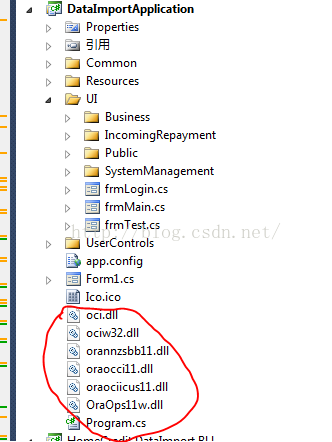
After a long search, we finally found the root of the problem. Because this is a legacy project, I downloaded it locally and saw the files circled in this project. Although I felt strange, I didn’t care too much. But it is these documents that cause the above problems. When I remove these files and recompile them, everything is OK and I can connect to the database normally. Therefore, the reason for this summary is that in the C # project of Oracle, you should not introduce OCI files casually. (at the moment, I don’t know why predecessors introduced these documents when they did this project.)


[failed to configure website XXXXXX to use ASP.NET 4.0。 For this site to work correctly, you must manually configure it to use ASP.NET 4.0] solutions to the problem

Recently, I was working on an MVC project using VS2010 (although it’s very old, but the company requires that there’s no way). When I opened this project with VS2010, I threw out a question:

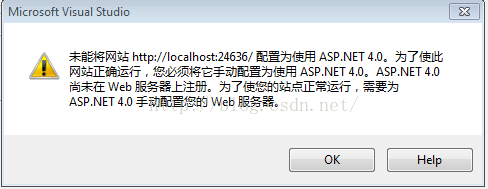
The site could not be downloaded http://localhost : 2609/configured to use ASP.NET 4.0。 For this site to work correctly, you must manually configure it to use ASP.NET 4.0。 ASP.NET Not yet registered on the web server. You need to focus on ASP.NET 4.0 manually configure your web server to make your website run correctly.


After a variety of searches, it is found that the general reason is that this project uses ASP.NET4 Related things, but these things are not registered on VS2010 and related web servers. So, we need to register. How to register?It needs to be done by installing a patch. This patch is: vs10sp1-kb3002340-x86.exe, search the official website of this patch in Baidu or Google, and restart VS2010 after installation.

[unable to calculate item metadata “% (fullpath)” unable to apply item metadata “% (fullpath)” to path] problem solving

Recently, I downloaded a project from SVN to local. I encountered a problem in the process of opening it with visual studio. The problems encountered are as follows:

Cannot evaluate item metadata ‘% (fullpath)’. Cannot apply item metadata “% (fullpath)” to path “obj/debug/xxx… \ Basic.DomainModel.Model .dll”。

After searching in many ways, it is found that the problem is that the folder of this project is too long from top to bottom. Vs identifies the problem. That is to say, vs limits the total length of the file path in the project.

Solution: shorten the name of the upper folder where the. SLN file is located, or reduce the number of depth layers of the folder to a certain range.

org.apache.jasper.JasperException: Unsupported encoding:

org.apache.jasper .JasperException: Unsupported encoding: 

org.apache.jasper . compiler.DefaultErrorHandler.jspError ( DefaultErrorHandler.java:51 )

org.apache.jasper . compiler.ErrorDispatcher.dispatch ( ErrorDispatcher.java:409 )

org.apache.jasper . compiler.ErrorDispatcher.jspError ( ErrorDispatcher.java:116 )

org.apache.jasper . compiler.JspUtil.getReader ( JspUtil.java:1093 )

org.apache.jasper . compiler.ParserController.doParse ( ParserController.java:250 )

The reason for throwing this exception is that there is a problem in the encoding settings of the JSP page

<%@ page language=”java” import=” java.util .*” pageEncoding=””%>

Here, the value of pageencoding is empty, which cannot be recognized by the server. Even if there is one more space, the server will not recognize it.

& lt;% @ page contenttype = “text/HTML; charset = GB2312″% & gt; the charset here has an extra space, so this exception should be thrown.

Android studio upgrade 4.1 plug-in error

reason

The plugins plug-in failed

terms of settlement

1. Delete plug-in
user directory

\AppData\Roaming\Google\Android studio4.1\plugins

Find the directory and delete the corresponding plug-in
uninstall butterknife zelezny and install Android butterknife injections (support kotlin)
uninstall gsonformat and install gsonformatplus

2. The code is not highlighted and the error is not red

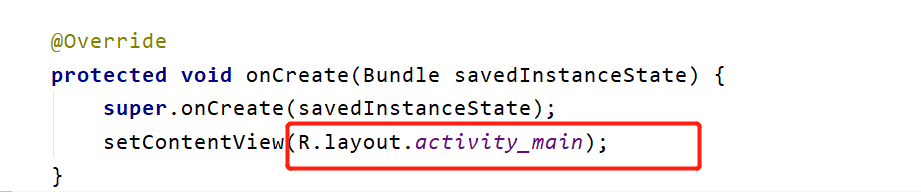
Errors don’t pop up, and they don’t pop up without this layout (I have already solved this problem)
don’t create an XML file according to the prompt

3. Code writing does not prompt

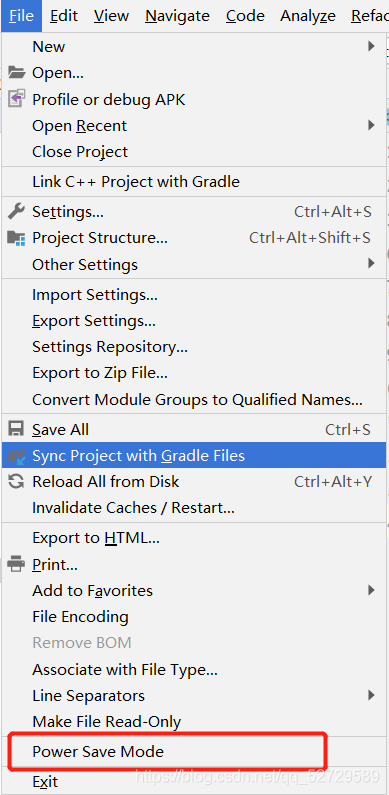
Click the file in the upper left corner to find the power save mode. If it is checked, you can cancel the check and restart studio.