Category Archives: How to Fix

[Solved] socket.gaierror: [Errno 8] nodename nor servname provided, or not known

How to Solve Error: socket.gaierror: [Errno 8] nodename nor servname provided, or not known

Situation 1:

Error content:
socket.gaierror: [Errno 8] nodename nor servname provided, or not known

Reason:
hostname is not written in /etc/hosts. For example, the MAC-20150101 in the abnormal information above is actually the host name of our Mac system. Some codes may need to find the corresponding IP address in the local DNS according to the host name, because the local DNS configuration is not specified What is the IP address of the host name, this error will also be prompted.

Solution:
Implement in python interpreter:

python
Call the gethostname() method provided by the Socket library to obtain the host name

>>>import socket
>>>socket.gethostname()
>>>>exit()

Get the host name, modify the hosts file, enter the command

vim /etc/hosts

Add the host name 127.0.0.1 hostname

Error resolution


Situation 2:

The solution to prompt nodename nor servname provided when the Java Web project is started on the Mac system

java.net.UnknownHostException: MAC-20150101: MAC-20150101: nodename nor servname provided, or not known
at java.net.InetAddress.getLocalHost(InetAddress.java:1473)
at org.eclipse.rse.core.RSECorePlugin.getLocalMachineName(RSECorePlugin.java:265)
at org.eclipse.rse.core.RSEPreferencesManager.getDefaultPrivateSystemProfileName(RSEPreferencesManager.java:358)
at org.eclipse.rse.core.RSEPreferencesManager.initDefaults(RSEPreferencesManager.java:337)
at org.eclipse.rse.internal.core.RSEPreferenceInitializer.initializeDefaultPreferences(RSEPreferenceInitializer.java:23)
at org.eclipse.core.internal.preferences.PreferenceServiceRegistryHelper$1.run(PreferenceServiceRegistryHelper.java:300)
at org.eclipse.core.runtime.SafeRunner.run(SafeRunner.java:42)
....
....
....
Caused by: java.net.UnknownHostException: MAC-20150101: nodename nor servname provided, or not known
at java.net.Inet6AddressImpl.lookupAllHostAddr(Native Method)
at java.net.InetAddress$1.lookupAllHostAddr(InetAddress.java:901)
at java.net.InetAddress.getAddressesFromNameService(InetAddress.java:1293)
at java.net.InetAddress.getLocalHost(InetAddress.java:1469)
... 28 more

Regarding the MAC-20150101 in the exception information, it is actually the host name of our Mac system. Some codes may need to find the corresponding IP address in the local DNS according to the host name, because the local DNS configuration does not specify the host What is the name of this IP address, this error will also be prompted.

The solution is very simple:

1) Open the terminal on the Mac system, check the current host DNS configuration, enter the command cat /private/etc/hosts, as shown in the figure:

2) Then edit the host configuration, add the mapping of the host name, enter the command sudo vi /private/etc/hosts, enter the VI editor, and add the following mapping

127.0.0.1 MAC-20150101

Just exit and save.

3) Finally, enter the refresh command dscacheutil -flushcache in the terminal

After three steps, when starting the Java Web project, the following error message will not appear.

The reason for this error is that the Internet says that there is a place in the project that calls the following code:

InetAddress.getLocalHost().getCanonicalHostName();

It is said that this method will return FQDN (Fully Qualified Domain Name), if the host name is not configured, then calling this code will throw an exception message, and this method depends on the underlying operating system, the configuration of the Mac system is somewhat different from that of Windows !

Situation 3:

Socket.gaierror: [Errno -2] Name or service not known error solution when configuring the remote server Jupyter notebook

Modify the jupyter_notebook_config.py configuration file and enter the command:

vim ~/.jupyter/jupyter_notebook_config.py

In the configuration file, search for c.NotebookApp.ip, find this sentence and modify it to c.NotebookApp.ip=’0.0.0.0′ (general tutorial will write and modify it to’*’), save and restart the notebook.

## The IP address the notebook server will listen on.
c.NotebookApp.ip = '*'
c.NotebookApp.allow_remote_access=True
Firefox: How to Solve “Network Protocol Error” (Two Methods)

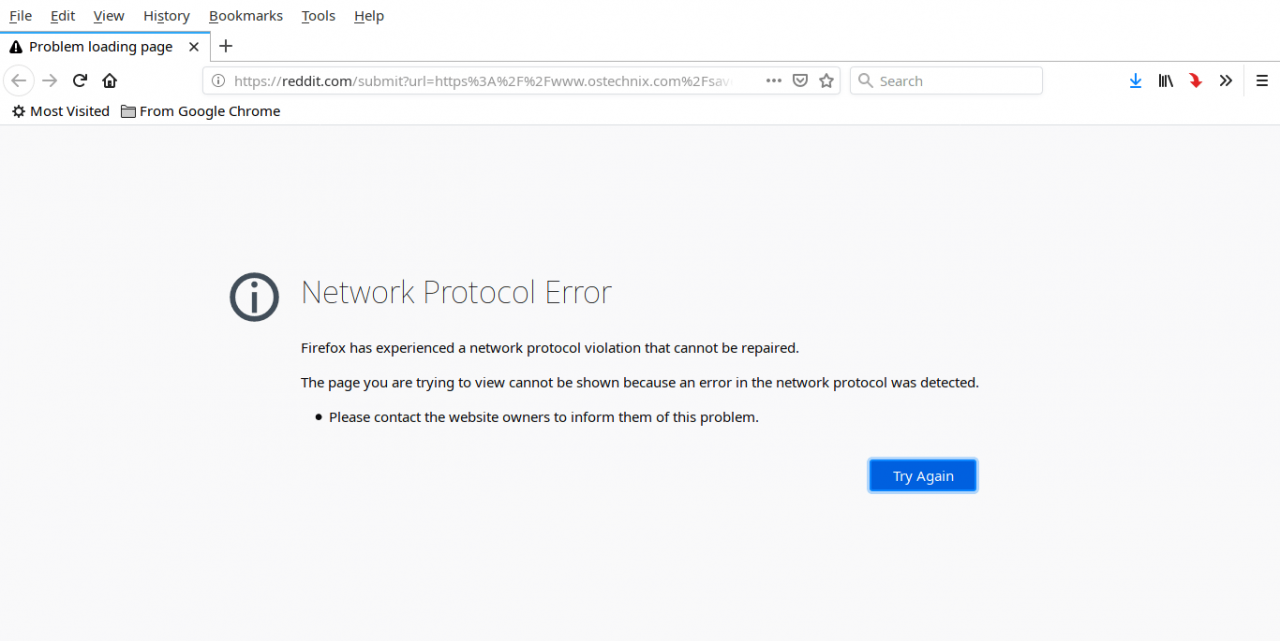
Error Message:

Network Protocol Error

Firefox has experienced a network protocol violation that cannot be repaired.

The page you are trying to view cannot be shown because an error in the network protocol was detected.

Please contact the website owners to inform them of this problem.

Firefox 中出现的 “Network Protocol Error”怎么办?Firefox 中出现的 “Network Protocol Error”怎么办?


Solution:

Method 1:
To fix “Network Protocol Error” or “Corrupted Content Error”, you need to bypass the cache when reloading the webpage. To do this, press the Ctrl + F5 or Ctrl + Shift + R shortcut key, and it will reload the page from the server instead of loading it from the Firefox cache. Then the web page should work normally.

Method 2:

If method 1 does not work, try the following methods.

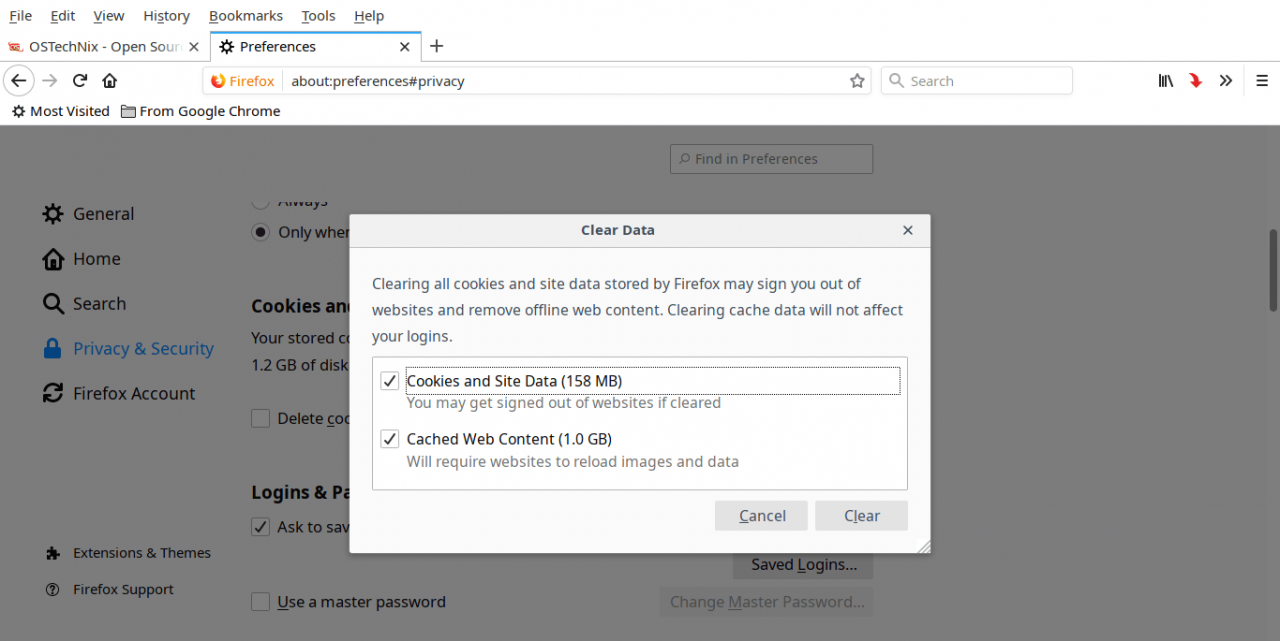
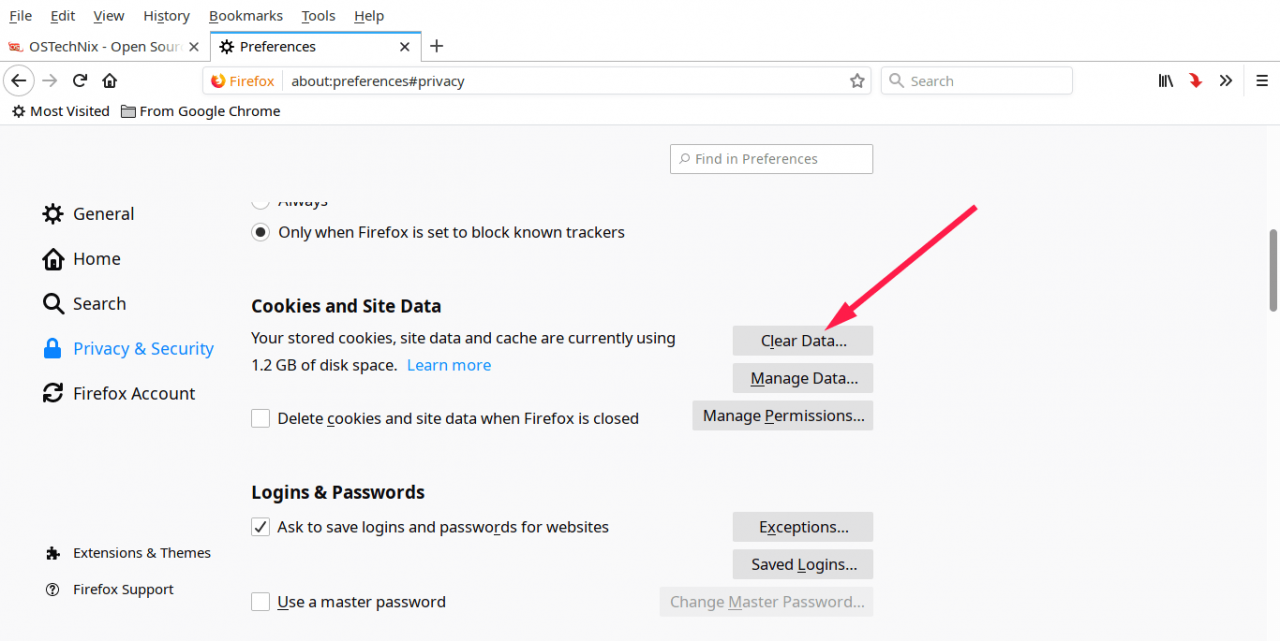
Open “Edit -> Preferences”, in the “Preferences” window, open the “Privacy & Security” tab in the left pane, and click the “Clear Data” option to clear the Firefox cache.

What should I do if the "Network Protocol Error" appears in Firefox?  What should I do if the "Network Protocol Error" appears in Firefox?

Make sure you check the “Cookies and Site Data” and “Cached Web Content” options, and then click “Clear”.

What should I do if the "Network Protocol Error" appears in Firefox?  What should I do if the "Network Protocol Error" appears in Firefox?

carry out! Now cookies and offline content will be deleted. Note that Firefox may log you out of the sites you are logged in to, and you can log in to these sites again later. Finally, close the Firefox browser and restart the system. Now the page loads without any problems.

[Solved] Access /oauth/token in SpringCloud OAuth2 and report server_error

The problem I encountered was solved by myself:
using grant in spring cloud oauth2 project_ The type is password/OAuth/token to access and obtain the token_ error。 In postman, as shown in the figure below:

{
    "error": "server_error",
    "error_description": "Internal Server Error"
}

Java background error is as follows:

endpoint.TokenEndpoint : Handling error: NestedServletException, Handler dispatch failed; nested exception is java.lang.StackOverflowError

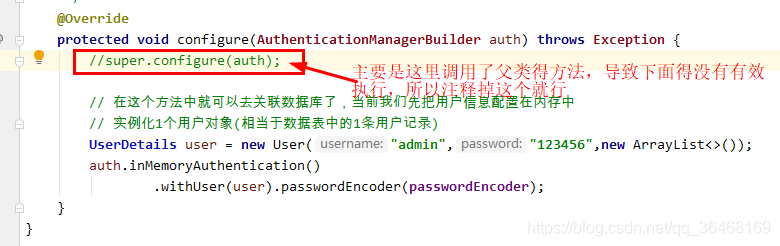
This problem is due to grant_ Type = password represents the user name and password authorization

/**
 * This configuration class, which mainly handles the verification of user names and passwords, etc.
 */
@Configuration
public class SecurityConfiger extends WebSecurityConfigurerAdapter {

    @Autowired
    private PasswordEncoder passwordEncoder;

    //register 1 authentication manager object to the container
    @Bean
    @Override
    public AuthenticationManager authenticationManagerBean() throws Exception {
        return super.authenticationManagerBean();
    }

    /**
     * Password encoding object (passwords are not encrypted)
     */
    @Bean
    public PasswordEncoder passwordEncoder() {
        return NoOpPasswordEncoder.getInstance();
    }

    /**
     * Handle username and password authentication
     * 1) The client passes username and password parameters to the authentication server
     * 2) Generally, username and password are stored in the database in the user table
     * 3) Verify the legitimacy of the currently passed user information based on the data in the user table
     */
    @Override
    protected void configure(AuthenticationManagerBuilder auth) throws Exception {
        super.configure(auth);

        // In this method you can go to the associated database, currently we first configure the user information in memory
        // instantiate 1 user object (equivalent to 1 user record in the data table)
        UserDetails user = new User("admin","123456",new ArrayList<>());
        auth.inMemoryAuthentication()
                .withUser(user).passwordEncoder(passwordEncoder);
    }
}

Problem solving: the following are purely personal views:

[Solved] Failed to resolve org.junit.platform:junit-platform-launcher:1.7.2

For springboot project, when using applicationtests to test, the following error will be prompted:

11:47 am  Error running ‘ShiroDemoApplicationTests.contextLoads’: Failed to resolve org.junit. platform:junit-platform-launcher :1.7.2

Reason: IntelliJ idea version and JUnit version do not match

solve:

1. Add the following dependencies to the pom.xml file of the project:

<dependency>
    <groupId>org.junit.platform</groupId>
    <artifactId>junit-platform-launcher</artifactId>
    <scope>test</scope>
</dependency>

2. It is more troublesome to adjust the two versions to match. The first method is recommended.

[Solved] nested exception is com.alibaba.dubbo.rpc.RpcException: Failed t o invoke the method findPage

When calling the background interface, the code reported the following error:

Warning: Servlet.service() for servlet [springmvc] in context with path [] threw exception [Request processing failed; nested exception is com.alibaba.dubbo.rpc.RpcException: Failed t
o invoke the method findPage in the service com.service.BrandService. Tried 3 times of the providers [172.16.94.115:20881] (1/1) from the registry 192.168.25.129:2181 on the consum
er 172.16.94.115 using the dubbo version 2.8.4. Last error is: Invoke remote method timeout. method: findPage, provider: dubbo://172.16.94.115:20881/com.service.BrandService?anyhos
t=true&application=tystore-manager-web&check=false&dubbo=2.8.4&generic=false&interface=com.service.BrandService&methods=add,findById,update,findPage,delete,findAll&pid=15116&revisi
on=1.0-SNAPSHOT&side=consumer&timestamp=1624929883885, cause: Waiting server-side response timeout. start time: 2021-06-29 09:25:49.385, end time: 2021-06-29 09:25:50.386, client e
lapsed: 0 ms, server elapsed: 1001 ms, timeout: 1000 ms, request: Request [id=17, version=2.0.0, twoway=true, event=false, broken=false, data=RpcInvocation [methodName=findPage, pa
rameterTypes=[class com.pojo.TbBrand, class java.lang.Integer, class java.lang.Integer], arguments=[com.pojo.TbBrand@7268b2f8, 1, 10], attachments={path=com.service.BrandService, i
nterface=com.service.BrandService, version=0.0.0}]], channel: /172.16.94.115:53263 -> /172.16.94.115:20881] with root cause
com.alibaba.dubbo.remoting.TimeoutException: Waiting server-side response timeout. start time: 2021-06-29 09:25:49.385, end time: 2021-06-29 09:25:50.386, client elapsed: 0 ms, ser
ver elapsed: 1001 ms, timeout: 1000 ms, request: Request [id=17, version=2.0.0, twoway=true, event=false, broken=false, data=RpcInvocation [methodName=findPage, parameterTypes=[cla
ss com.pojo.TbBrand, class java.lang.Integer, class java.lang.Integer], arguments=[com.pojo.TbBrand@7268b2f8, 1, 10], attachments={path=com.service.BrandService, interface=com.serv
ice.BrandService, version=0.0.0}]], channel: /172.16.94.115:53263 -> /172.16.94.115:20881

After checking the following:

    1. POJO serializes local IP and service ipdubbo running state, and closes firewall

The final reason is that the server performance is not enough, the response time is long, and the automatic timeout.

@Service(
        interfaceName = "com.service.BrandService",
        timeout = 600000)

After setting the timeout on the service, it will be normal.

[react+antd] Table Error: Unhandled Rejection (TypeError): data.slice is not a function

1、 Problem description

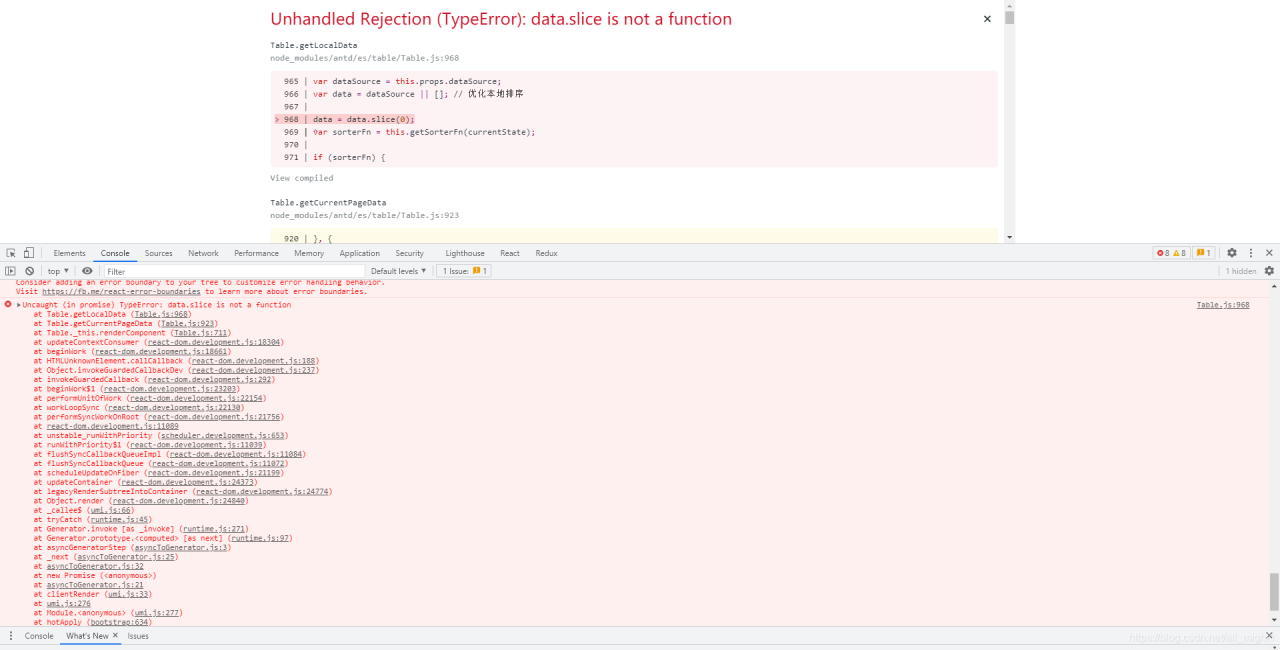
It is required to display the data from the back end in the table. Because there is no joint debugging, the front end and the back end are developing their own, so I wrote pseudo data to fill in as needed. Table.js: 968 uncaught (in promise) typeerror: data.slice is not a function. As shown in the figure below:

2、 Solutions

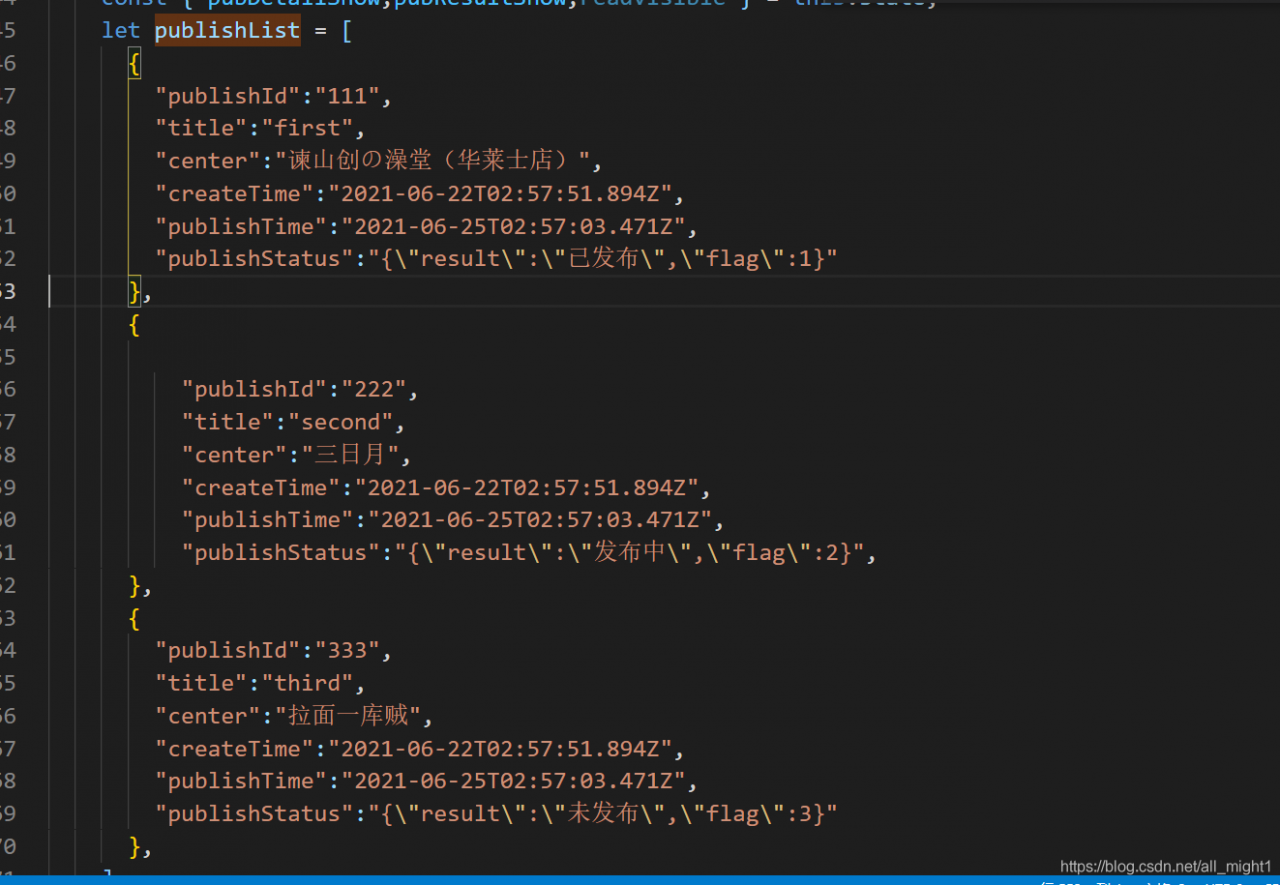
After reading the error report, in table.js, there is something wrong with the use of the table component. Then there must be something wrong with the value. The following is my pseudo data:

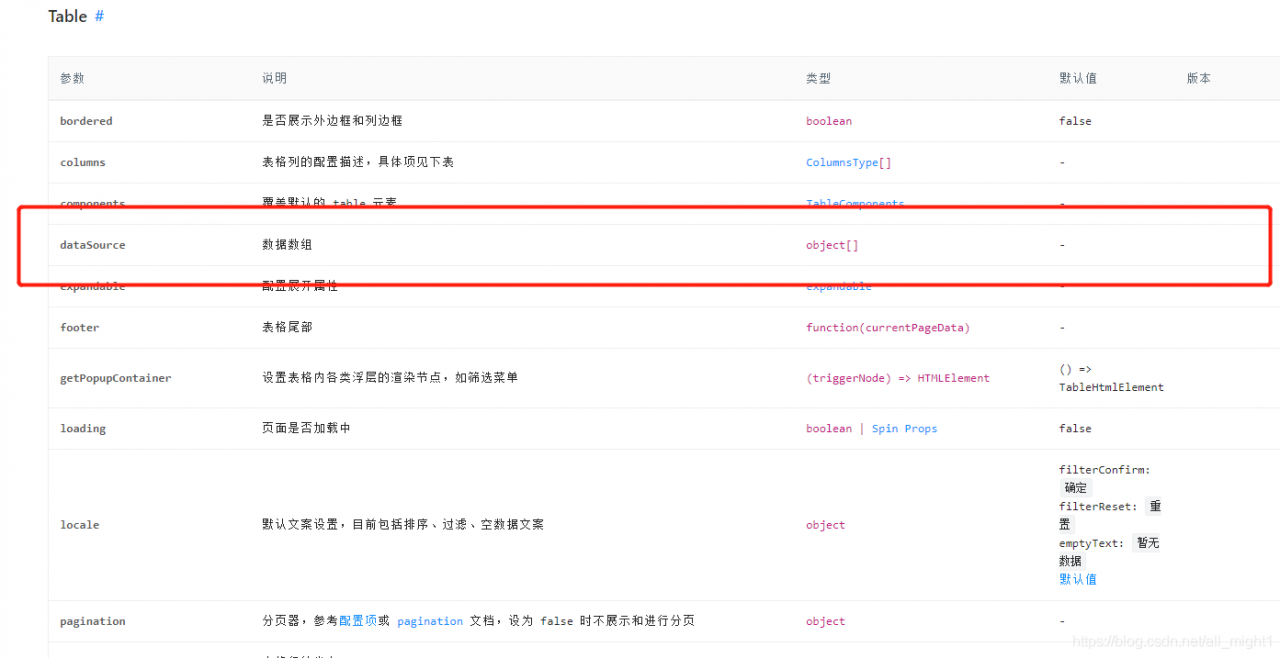
I wondered if there was a problem with the data type, so I went to see the official API, as shown in the following figure:

But it’s an array. It’s OK

I have no choice but to search the Internet and recommend Bing (in the case that the company doesn’t let it over the wall) here. It’s easy to use and the first solution is to find every time. It’s not like a certain degree of flying, either advertising or advertising.

The answer is that the parameter inserted into the datasource is a JSON object when it is initialized, and the JSON object does not support the. Slice (0) method.

3、 Solutions

I use the table component as follows:

<Table
   className="projecttable"
   bordered
   dataSource={publishList!=[]}
   columns={columns}
   loading={releaselistLoading}
   pagination={pagination}
   rowClassName={
      (_,index)=>{
          return index%2?"rowk":"rowt"
      }
   }
/>

There should be a problem in the datasource. The previously retrieved answer says that it can be written as null during initialization. So the code is rewritten as follows:

<Table
   className="projecttable"
   bordered
   dataSource={publishList!=[]?publishList:null}
   columns={columns}
   loading={releaselistLoading}
   pagination={pagination}
   rowClassName={
      (_,index)=>{
          return index%2?"rowk":"rowt"
      }
   }
/>

That’s it.

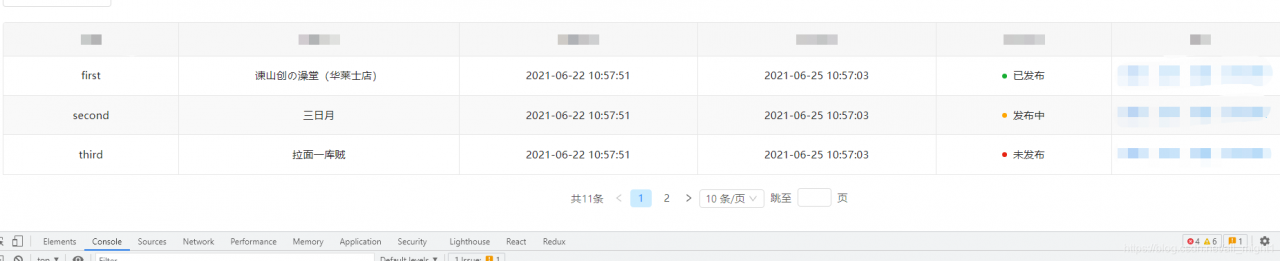
The effect picture is as follows:

All right, record’s over!

[Solved] SpringBoot Integrating Oracle reports errors: ORA-12504, TNS:listener was not given the SID in CONNECT_DATA

Obviously, an error is reported here, saying that Sid cannot be obtained. Obviously, the path is wrong. Check whether the path is completely written?

The error is as follows

java.sql.SQLException: Listener refused the connection with the following error:
ORA-12504, TNS:listener was not given the SID in CONNECT_DATA
 
	at oracle.jdbc.driver.SQLStateMapping.newSQLException(SQLStateMapping.java:70) ~[ojdbc-11.2.0.3.jar:Oracle JDBC Driver version - "11.1.0.7.0-Production"]
	at oracle.jdbc.driver.DatabaseError.newSQLException(DatabaseError.java:133) ~[ojdbc-11.2.0.3.jar:Oracle JDBC Driver version - "11.1.0.7.0-Production"]
	at oracle.jdbc.driver.DatabaseError.throwSqlException(DatabaseError.java:199) ~[ojdbc-11.2.0.3.jar:Oracle JDBC Driver version - "11.1.0.7.0-Production"]
	at oracle.jdbc.driver.DatabaseError.throwSqlException(DatabaseError.java:480) ~[ojdbc-11.2.0.3.jar:Oracle JDBC Driver version - "11.1.0.7.0-Production"]
	at oracle.jdbc.driver.T4CConnection.logon(T4CConnection.java:413) ~[ojdbc-11.2.0.3.jar:Oracle JDBC Driver version - "11.1.0.7.0-Production"]
	at oracle.jdbc.driver.PhysicalConnection.<init>(PhysicalConnection.java:508) ~[ojdbc-11.2.0.3.jar:Oracle JDBC Driver version - "11.1.0.7.0-Production"]
	at oracle.jdbc.driver.T4CConnection.<init>(T4CConnection.java:203) ~[ojdbc-11.2.0.3.jar:Oracle JDBC Driver version - "11.1.0.7.0-Production"]
	at oracle.jdbc.driver.T4CDriverExtension.getConnection(T4CDriverExtension.java:33) ~[ojdbc-11.2.0.3.jar:Oracle JDBC Driver version - "11.1.0.7.0-Production"]
	at oracle.jdbc.driver.OracleDriver.connect(OracleDriver.java:510) ~[ojdbc-11.2.0.3.jar:Oracle JDBC Driver version - "11.1.0.7.0-Production"]
	at com.zaxxer.hikari.util.DriverDataSource.getConnection(DriverDataSource.java:138) ~[HikariCP-4.0.3.jar:na]
	at com.zaxxer.hikari.pool.PoolBase.newConnection(PoolBase.java:364) ~[HikariCP-4.0.3.jar:na]
	at com.zaxxer.hikari.pool.PoolBase.newPoolEntry(PoolBase.java:206) ~[HikariCP-4.0.3.jar:na]
	at com.zaxxer.hikari.pool.HikariPool.createPoolEntry(HikariPool.java:476) [HikariCP-4.0.3.jar:na]
	at com.zaxxer.hikari.pool.HikariPool.checkFailFast(HikariPool.java:561) [HikariCP-4.0.3.jar:na]
	at com.zaxxer.hikari.pool.HikariPool.<init>(HikariPool.java:115) [HikariCP-4.0.3.jar:na]
	at com.zaxxer.hikari.HikariDataSource.getConnection(HikariDataSource.java:112) [HikariCP-4.0.3.jar:na]
	at org.springframework.jdbc.datasource.DataSourceUtils.fetchConnection(DataSourceUtils.java:158) [spring-jdbc-5.3.8.jar:5.3.8]
	at org.springframework.jdbc.datasource.DataSourceUtils.doGetConnection(DataSourceUtils.java:116) [spring-jdbc-5.3.8.jar:5.3.8]
	at org.springframework.jdbc.datasource.DataSourceUtils.getConnection(DataSourceUtils.java:79) [spring-jdbc-5.3.8.jar:5.3.8]
	at org.springframework.jdbc.core.JdbcTemplate.execute(JdbcTemplate.java:330) [spring-jdbc-5.3.8.jar:5.3.8]
	at org.springframework.boot.jdbc.EmbeddedDatabaseConnection.isEmbedded(EmbeddedDatabaseConnection.java:184) [spring-boot-2.5.1.jar:2.5.1]
	at org.springframework.boot.jdbc.init.DataSourceScriptDatabaseInitializer.isEmbeddedDatabase(DataSourceScriptDatabaseInitializer.java:64) [spring-boot-2.5.1.jar:2.5.1]
	at org.springframework.boot.sql.init.AbstractScriptDatabaseInitializer.isEnabled(AbstractScriptDatabaseInitializer.java:87) [spring-boot-2.5.1.jar:2.5.1]
	at org.springframework.boot.sql.init.AbstractScriptDatabaseInitializer.initializeDatabase(AbstractScriptDatabaseInitializer.java:74) [spring-boot-2.5.1.jar:2.5.1]
	at org.springframework.boot.sql.init.AbstractScriptDatabaseInitializer.afterPropertiesSet(AbstractScriptDatabaseInitializer.java:65) [spring-boot-2.5.1.jar:2.5.1]
	at org.springframework.beans.factory.support.AbstractAutowireCapableBeanFactory.invokeInitMethods(AbstractAutowireCapableBeanFactory.java:1845) [spring-beans-5.3.8.jar:5.3.8]
	at org.springframework.beans.factory.support.AbstractAutowireCapableBeanFactory.initializeBean(AbstractAutowireCapableBeanFactory.java:1782) [spring-beans-5.3.8.jar:5.3.8]
	at org.springframework.beans.factory.support.AbstractAutowireCapableBeanFactory.doCreateBean(AbstractAutowireCapableBeanFactory.java:602) [spring-beans-5.3.8.jar:5.3.8]
	at org.springframework.beans.factory.support.AbstractAutowireCapableBeanFactory.createBean(AbstractAutowireCapableBeanFactory.java:524) [spring-beans-5.3.8.jar:5.3.8]
	at org.springframework.beans.factory.support.AbstractBeanFactory.lambda$doGetBean$0(AbstractBeanFactory.java:335) [spring-beans-5.3.8.jar:5.3.8]
	at org.springframework.beans.factory.support.DefaultSingletonBeanRegistry.getSingleton(DefaultSingletonBeanRegistry.java:234) ~[spring-beans-5.3.8.jar:5.3.8]
	at org.springframework.beans.factory.support.AbstractBeanFactory.doGetBean(AbstractBeanFactory.java:333) [spring-beans-5.3.8.jar:5.3.8]
	at org.springframework.beans.factory.support.AbstractBeanFactory.getBean(AbstractBeanFactory.java:208) [spring-beans-5.3.8.jar:5.3.8]
	at org.springframework.beans.factory.support.AbstractBeanFactory.doGetBean(AbstractBeanFactory.java:322) [spring-beans-5.3.8.jar:5.3.8]
	at org.springframework.beans.factory.support.AbstractBeanFactory.getBean(AbstractBeanFactory.java:208) [spring-beans-5.3.8.jar:5.3.8]
	at org.springframework.beans.factory.support.DefaultListableBeanFactory.preInstantiateSingletons(DefaultListableBeanFactory.java:944) ~[spring-beans-5.3.8.jar:5.3.8]
	at org.springframework.context.support.AbstractApplicationContext.finishBeanFactoryInitialization(AbstractApplicationContext.java:918) ~[spring-context-5.3.8.jar:5.3.8]
	at org.springframework.context.support.AbstractApplicationContext.refresh(AbstractApplicationContext.java:583) ~[spring-context-5.3.8.jar:5.3.8]
	at org.springframework.boot.web.servlet.context.ServletWebServerApplicationContext.refresh(ServletWebServerApplicationContext.java:145) ~[spring-boot-2.5.1.jar:2.5.1]
	at org.springframework.boot.SpringApplication.refresh(SpringApplication.java:754) ~[spring-boot-2.5.1.jar:2.5.1]
	at org.springframework.boot.SpringApplication.refreshContext(SpringApplication.java:434) ~[spring-boot-2.5.1.jar:2.5.1]
	at org.springframework.boot.SpringApplication.run(SpringApplication.java:338) ~[spring-boot-2.5.1.jar:2.5.1]
	at org.springframework.boot.SpringApplication.run(SpringApplication.java:1343) ~[spring-boot-2.5.1.jar:2.5.1]
	at org.springframework.boot.SpringApplication.run(SpringApplication.java:1332) ~[spring-boot-2.5.1.jar:2.5.1]

solve

jdbc:oracle:thin:@xxx:1521:orcl/xe

[Solved] Echarts Error: There is a chart instance already initialized on the dom!

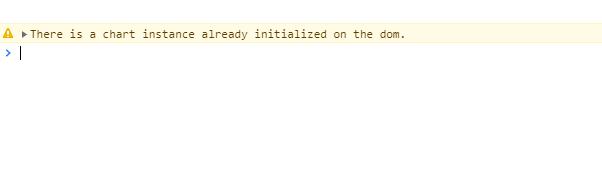
On the current page, when you execute charts drawing for many times, the console will give a warning “there is a chart instance already initialized on the DOM”, which means: “a chart instance has been initialized on the DOM”

Solution:

Add the method of drawing ecarts to judge whether it already exists. If it exists, it can be destroyed. The code example is as follows:

data() {
	return {
		myRingChart1:null
	}
}
drawRing1() {
      if (
        this.myRingChart1 != null &&
        this.myRingChart1 != '' &&
        this.myRingChart1 != undefined
      ) {
        this.myRingChart1.dispose() //Solve the error reported by echarts dom already loaded
      }
      // Initialize the echarts instance based on the prepared dom
      this.myRingChart1 = echarts.init(this.$refs['myRingChart1'])
}

Exception on start hive: caused by: java.net.noroutetohostexception: no route to host

When we start hive, we will encounter the problem that the router is unable to connect. At this time, the most likely problem is that the firewall is turned on. At this time, we just need to turn it off. Baidu is very simple.

  Another problem may be our IP address. Let’s start all Hadoop clusters: start-all.sh,

See if there are five processes showing that if it is missing, it may be that our I IP address has changed. At this time, we need to modify the hadoop-env.sh file, CD   ~/ hadoop/etc/hadoop

vi hadoop-env.sh

Just change our IP address.

error while loading shared libraries: libstdc++.so.6: cannot open shared object file: No such file o

Lack of shared library, with root permission:
1. Find the installation package:
Yum whatprovides libstdc + +. So. 6

2. Install: Yum – y install libstdc+ ± 4.8.5-44.el7.i686

If you don’t have root permission, you can only install it manually:
1. Download the corresponding RPM file libstdc+ ± 4.8.5-44. EL7. I686. RPM
Add Link description

2. Send it to the server and decompress it:
directly decompress it in the user’s root directory: rpm2cpio libstdc+ ± 4.8.5-44.el7.i686.rpm | CPIO – idvm
after decompressing, the usr directory will be generated in the root directory

3. Configure environment variables (some of them are not effective at the beginning, but they are effective as follows for reference):

Encountered a problem — Python — Python 3 uses Sqlalchemy to report an error‘

situation   follow the instructions in the flash Sqlalchemy document to configure the  
SQLALCHEMY_ DATABASE_ URI = ‘ mysql://username:password@server/db ‘  
1  
after operation, MySQL reports an error importerror: no module named ‘MySQL db’.  
why  
since there is no MySQL DB module, follow the normal idea  
pip install MySQLdb  
1  
it should be able to solve this problem, but no corresponding module can be found. After checking, this is because mysql-3.23 through 5.5 and python-2.4 through 2.7 are currently supported.  
solutions  
looking for alternatives  
in Python 3, we generally use pymysql.  
implementation  
pip install PyMySQL
1  
change the database connection to  
mysql+ pymysql://username:password@server/db
1  
the next operation is normal original link: https://blog.csdn.net/zzq900503/article/details/89096311