Category Archives: How to Fix

HTML method IE8 reports an error, IE8 jQuery Ajax obtains static resources reports an error, typeerror denies access

Problem code/* * * request static HTML template * @ param URL * @ param $jquerydiv: one of the four main div * @ param templatehandle: custom, used to use dot JS template function *@

1. Problem code

/***

*Request static HTML template

* @param url

*@ param $jquerydiv: one of the four major divs

*@ param templatehandle: custom, used to use dot JS template function

*@ param callback: used to bind events after template implementation

*@ param templatedata: return data of CIA

*/

ajaxHtml: function (url, $jqueryDiv, templateHandle, callback, templateData) {

xhr.ajaxHtmlCommon(url, $jqueryDiv, null, templateHandle, callback, templateData);

},

/***

*Ajax requests static HTML files

* @param url

* @param $jqueryDiv

* @param data

*@ param callback: the callback function is executed after the updatehtml method

*/

ajaxHtmlCommon: argument_ length = arguments.length;

var isHasCallback = (argument_ length > 4 && amp; callback && amp; typeof callback === ‘function’);

var options22 = {

url: url,

type: “GET”,

timeout: 18000,

dataType: ‘html’,

success: function (html) {

updateHtml($jqueryDiv, html, templateHandle, templateData);

/* var $formInput = jqueryObj.find(‘textarea:first’);// Focus the textarea in subcontent

if ($formInput.length != 0) {//judge whether the textarea can be obtained first

$formInput.get(0).focus();

}*/

if (isHasCallback) {

callback($jqueryDiv, html);

}

},

error: (er.statusText == ‘timeout’) {

updateHtml($jqueryDiv, ”

Connection to server timeout!

“);

} else {

var errorMessage2;

if (er.responseText) {

errorMessage2 = er.responseText;

} else {

errorMessage2 = er.statusText;

}

console.log(‘error:’ + errorMessage2);

updateHtml($jqueryDiv, errorMessage2, templateHandle, templateData);

}

if (isHasCallback) {

callback($jqueryDiv, er);

}

}

};

if (argument_ length > 2 && amp; requestData != null && amp; requestData != undefined) {

options22.data = requestData;

options22.type = “POST”;

}

$.ajax(options22);

}

Browser version: IE8

Error in getting HTML template:

var ajaxHtml4IE8 = function () {

xhr.ajaxHtml(‘cross_ domain.html’, $(‘#crossDiv’), null, null, null);

}

Error message: access denied by typeerror

2. Solutions:

(1) In the header of JS file, add:

jQuery.support.cors = true;

(2) Introduce jquery.xdomainrequest.js into HTML file

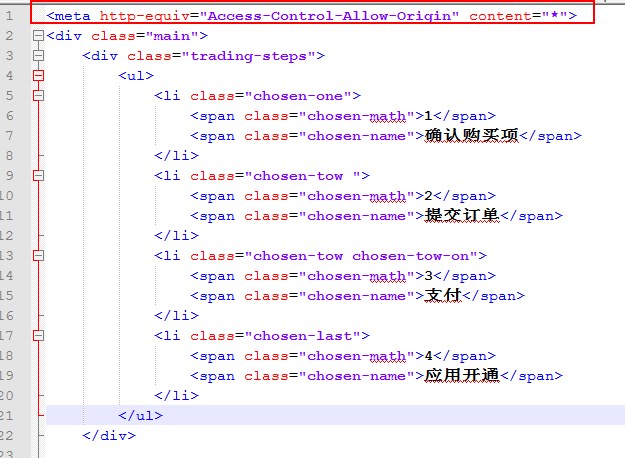
(3) Add in front of static HTML template:

< meta http-equiv=”Access-Control-Allow-Origin” content=”*”>
be careful:

(1) Static HTML template should be added before, indicating that the server supports cross domain

(2) Only IE8 has the problem of cross domain access denial, so when introducing a third-party JS file, you should use & lt;! –[ if IE 8]>

(3) Jquery-1.11.1.js and above does not support IE8

Jquery.xdomainrequest.js is attached

reference resources: https://github.com/MoonScript/jQuery-ajaxTransport-XDomainRequest ,
type of the byte recordError: webpackMerge is not a function

Error message:

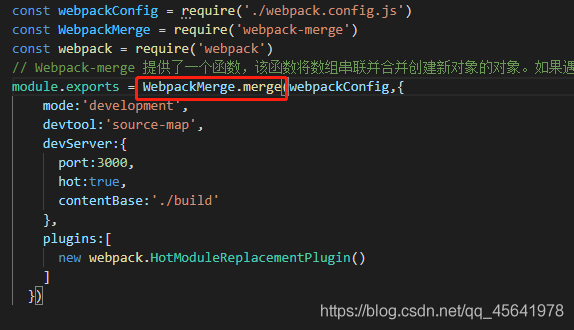
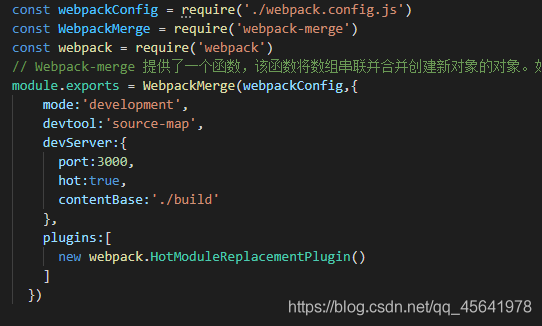
WebpackMerge is not a function


It is found that webpack merge cannot be used directly according to the error report

After viewing the document

Change it to webpackmerge. Merge and there will be no error

Webpack step on the road to record   If you want to see the actual combat article of webpack, please click

Errors encountered by elasticsearch in creating index and mapping

         According to station B black horse programmer’s es video tutorial operation, because the version used is the latest version, encountered in the video did not appear in the error.

Address:

http://127.0.0.1:9200/blog

  Request body:

{
  "settings": {
    "number_of_shards": 5,
    "number_of_replicas": 1
  },
  "mappings": {
    "hello": {
      "properties": {
		"id": {
			"type": "long",
			"store": true
		},
		"title": {
			"type": "text",
			"store": true,
			"index": true,
			"analyzer":"standard"
		},
		"content": {
			"type": "text",
			"store": true,
			"index": true,
			"analyzer":"standard"
		}
      }
    }
  }
}

Error message:

{
    "error": {
        "root_cause": [
            {
                "type": "mapper_parsing_exception",
                "reason": "Root mapping definition has unsupported parameters:  [hello : {properties={id={store=true, type=long}, title={analyzer=standard, index=true, store=true, type=text}, content={analyzer=standard, index=true, store=true, type=text}}}]"
            }
        ],
        "type": "mapper_parsing_exception",
        "reason": "Failed to parse mapping [_doc]: Root mapping definition has unsupported parameters:  [hello : {properties={id={store=true, type=long}, title={analyzer=standard, index=true, store=true, type=text}, content={analyzer=standard, index=true, store=true, type=text}}}]",
        "caused_by": {
            "type": "mapper_parsing_exception",
            "reason": "Root mapping definition has unsupported parameters:  [hello : {properties={id={store=true, type=long}, title={analyzer=standard, index=true, store=true, type=text}, content={analyzer=standard, index=true, store=true, type=text}}}]"
        }
    },
    "status": 400
}

Solution: after the request address, add?include_ type_ name=true

http://127.0.0.1:9200/blog?include_type_name=true

result:  

{
    "acknowledged": true,
    "shards_acknowledged": true,
    "index": "blog"
}

Solutions to the problem of using sudo caused by Ubuntu’s wrong modification of sudoers

Original address

When using Ubuntu, we often use the sudo command. However, when using Ubuntu users to log in and use the sudo command, we often need to enter a password. For convenience, we may modify the/etc/sudors file under the root user so that the sudo command does not need to enter a password. At this time, it is inevitable to enter an error, resulting in the sudo command not being used, An error similar to the following appears

	>>> /etc/sudoers: syntax error near line 31 <<<
	sudo: parse error in /etc/sudoers near line 31
	sudo: no valid sudoers sources found, quitting
	sudo: unable to initialize policy plugin

Sudo doesn’t work. Under Ubuntu, you usually don’t set the root password, so you can’t enter the root user at all.

At this time, the normal way is to restart the system, enter grub interface, then enter recovery mode, modify sudors file, and restart the system.

But sometimes, the host is not controlled by itself, and only has the permission of SSH login system.

At this time, the following method is the Savior:

Use the following command to edit the sudoers file

pkexec visudo

However, the following errors were reported:

==== AUTHENTICATING FOR org.freedesktop.policykit.exec ===
Authentication is needed to run `/usr/sbin/visudo' as the super user
Authenticating as: ceshi,,, (ceshi)
Password: 
polkit-agent-helper-1: error response to PolicyKit daemon: GDBus.Error:org.freedesktop.PolicyKit1.Error.Failed: No session for cookie
==== AUTHENTICATION FAILED ===
Error executing command as another user: Not authorized

This incident has been reported.

What should I do?What’s the problem?I don’t know. The correct opening mode is as follows:

1. Open the two SSH terminals and log in with the Ubuntu user

2. Enter the following command at the first terminal to get PID

echo $$

3. At the second terminal, enter:

pkttyagent --process {pid}

Here {PID} is the PID value obtained in the second part (PS: remember to remove {})

4. At this time, the second terminal will be stuck, and input the following at the first terminal:

pkexec visudo

5. Then, the second terminal is also the card owner. When you return to the first terminal, you will be prompted to enter the current user password and enter the

6. OK, after inputting the password, the first terminal card is owned. When you go back to the second terminal, you will find that the content of sudoers appears. If there is any editing error, just save it.

7. Complete the task, modify it, and find that you can continue to use the sudo command, over

PS: the editor used here is nano. Here is a simple way to save nano:

To exit in edit mode under Linux, press Ctrl + X, there are two situations:
① if the file is not modified, exit directly

ModuleNotFoundError: No module named ‘apt_pkg‘

reason

Upgrading to python3.6 will result in confusion of references to Python libraries

resolvent

Select Delete Python apt first

apt-get remove --purge python-apt 

Install Python apt

apt-get install -f -y python-apt

Copy the apt PKG *. So name of python3.5 and rename it apt PKG *. So of python3.6

cd /usr/lib/python3/dist-packages/
cp apt_pkg.cpython-35m-x86_64-linux-gnu.so apt_pkg.cpython-36m-x86_64-linux-gnu.so

Uncaught syntax error: unexpected token ‘< 0‘

Background

Vue and Vue cli versions for the project

“vue”: “^2.6.11”
“@vue/cli”: “~4.5.0”

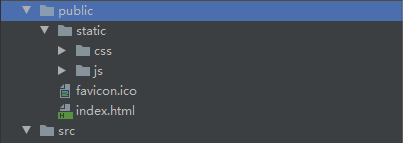
I created a static directory in SRC directory to store JS and CSS, and then call it in code.

c.href = '../static/css/he-standard.css';
s.src = '../static/js/he-standard.js';

An error was found after running the project

Uncaught SyntaxError: Unexpected token '<'

solve

Put the static folder under public

c.href = '/static/css/he-standard.css';
s.src = '/static/js/he-standard.js';

Reference:
https://blog.csdn.net/weixin_43742708/article/details/110594790

TypeError: unsupported operand type(s) for *: ‘range‘ and ‘int‘

This is an error caused by the python2 and python3 versions
in python2, range() returns a list, and you can directly operate range and int
in python3, range() becomes a class. You can’t directly operate on range. You need to add a list first, such as list (range (5))
in order to save memory, range() in python3 only stores the start, stop and step elements of range(), and the rest of the values are calculated one by one, which is actually an iterator. In addition, list() lets range() calculate all the values, and then it can be added.

Zend studio HTML error prompt close, PHP “error prompt” open and close the correct way

When we first developed the project, we needed error prompts very much, but after the project went online, we certainly didn’t want to display these error prompts, right?This is about to do some settings, often a lot of PHP novice, do not know how to set?Or the setting method is wrong.

1、 The setting method of the project under development:

1. Open php.ini

2. Set error_ reporting = E_ ALL

3. Set display_ errors = On

2、 The setting method after the project is really online:

1. Open php.ini

2. Set error_ reporting = E_ ALL & ~ E_ DEPRECATED & ~ E_ STRICT

3. Set display_ errors = Off

3、 If you don’t have permission to modify php.ini, you can add the following two lines of code directly to the PHP file:

1、ini_ set(“display_ errors”, “On”);

2、error_ reporting(E_ ALL | E_ STRICT);

be careful:

First, after modifying the configuration file php.ini, be sure to restart the service.

Second, error_ The value of reporting can be modified at will. It is suggested to modify it according to your project development situation: is it under development?Or is it online?error_ What are the specific values of reporting?I’ll talk about it in the following expanded knowledge.

Expand knowledge:

Maybe some of them don’t understand the above settings. Let’s talk about it in detail: error_ Reporting represents the error level, display_ Errors represents whether error prompts are displayed.

error_ Reporting error levels include the following:

E_ All – all errors and warnings (including E_ STRICT)

E_ Error – fatal runtime error

E_ RECOVERABLE_ Error – a nearly fatal runtime error

E_ Warning – runtime warning (non fatal error)

E_ Parse – compile time parsing error

E_ Note – runtime notifications (these are usually warnings from errors in your code, but it may be intentional (for example, using uninitialized variables and relying on it to automatically initialize to a fact empty string)

E_ Strict – runtime notification that allows PHP to suggest changes to your code will ensure optimal interoperability and forward code compatibility

E_ CORE_ Error – fatal error during initial PHP startup

E_ CORE_ Warning – a warning (non fatal error) that occurs during PHP, initial startup

E_ COMPILE_ Error – fatal compile time error

E_ COMPILE_ Warning – compile time warning (non fatal error)

E_ USER_ Error – user generated error message

E_ USER_ Warning – user generated warning message

E_ USER_ Note – user generated notification message

E_ Suppressed – warning code will not work in future versions of PHP

E_ USER_ Suppressed – user generated discard warning

error_ The most common settings of reporting are as follows:

E_ All (displays all errors, warnings and notifications, including coding standards.)

E_ ALL & ~ E_ Note (show all errors except notification)

E_ ALL & ~ E_ NOTICE & ~ E_ Strict displays all errors except notification and coding standard warnings.)

E_ COMPILE_ ERROR|E_ RECOVERABLE_ ERROR|E_ ERROR|E_ CORE_ Error (display error only)