Category Archives: How to Fix

Failure[INSTALL_FAILED_INCONSISTENT_BUNDLE_VERSION] Error while Deploying HAP

Hongmeng development exception handling:

Treatment method:  

  This is a reference. How can it run?Just change it to your own project entry

  I was troubled by this problem for a while, it seems that writing code is still a bit more detailed

Baidu did not have to deal with this problem, so the pen in the book, passed on later


In addition, if you see an exception that is very similar to this exception, you will have one more word of parse, and the processing methods are not the same. If you encounter an exception, try the following methods:

Failure[INSTALL_ PARSE_ FAILED_ USESDK_ ERROR],Error while Deploying HAP

Treatment method:

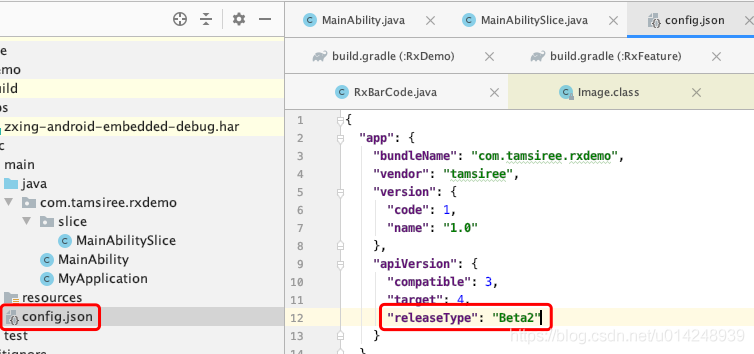
  Open the config. JSON file and delete the releasetype field

  ok,     You’re running it.

Repair connection: an internal error has occurred in windowsserver2016

Repair 01: remote desktop settings

Open the start menu and type remote desktop connection, and then open it. Click the display options button at the bottom. Then go to the experience tab. At the bottom of this tab, there is an option “if the connection is discarded, reconnect.”. Make sure it is checked.

Fix # 02: reestablish connection to domain

We have disconnected to fix this problem and can reconnect to the domain. To do this:

    open the start menu and go to settings. Go to the accounts tab and select the access to work or school tab. Select the domain that you are connected to, and then disconnect from it. Restart your PC and rejoin the domain. Check that the RDP still displays the error

    Fix # 03: change RDP settings in Group Policy Editor

    Step 1: open your start menu and type edit group policy to open it.

    Step 2: follow the following path:

    Computer configuration, management templates, windows components, remote desktop services, Remote Desktop Session host security

    Step 3: double click the “need to use a specific security layer for remote (RDP) connection” option, and then set it to enabled.

    Step 4: right below this option, you’ll see the “security layer.”. Select RDP for this option. Be sure to save your changes and restart your computer.

    Fix # 04: network level authentication

    If a computer is configured to access another computer on the remote desktop, network level authentication or NLA may be the cause of this problem as long as NLA is enabled on the other computer. Therefore, by disabling NLA, we can get rid of this problem:

      right click this PC on the desktop, and then click properties. Now go to the remote settings tab. Be sure to uncheck allow connections to remote desktop computers with network level authentication only. Save the changes

      Fix: Remote Desktop Connection Service

      Open the start menu and type run. Type “service. MSc” in the window and click “enter”. Find Remote Desktop Services, right-click it, and then stop it. Wait a few seconds and restart it.

      These are some proven ways to fix internal errors in Windows remote desktop. If you have any questions, please contact us.

User space operation GPIO error echo: write error: device or resource busy error resolution

Error when using echo 17 > /sys/class/gpio/export: -sh: echo: write error: Device or resource busy
-sh: echo: write error: Device or resource busy
Shows that gpio is occupied.

To check the occupancy status.

cat /sys/kernel/debug/gpio
If no such directory is available.
mount -t debugfs debugfs /sys/kernel/debug

Solution to the failure of ROS noetic initialization (rosdep init)

This method focuses on


ERROR: cannot download default sources list from:
https://raw.githubusercontent.com/ros/rosdistro/master/rosdep/sources.list.d/20-default.list

I. Download rosdistro files manually
rosdistro is downloaded to the home directory by default

git clone https://github.com/ros/rosdistro.git

2.Modify 20-default.list

The terminal enters the following command to get the path of the home directory

pwd

Enter rosdistro/rosdep/sourceslist. D, open the 20-default.list file, and

https://raw.githubusercontent.com/ros/rosdistro/master

Amend to read

file:///home/username/rosdistro

Where/home/username is the path obtained by PWD command

3. Modify py file

1. Modification__ init__. py

cd ~/usr/lib/python3/dist-packages/
sudo gedit ./rosdistro/__init__.py

Convert DEFAULT_INDEX_URLs to

DEFAULT_INDEX_URL=” file:///home/username/rosdistro/index-v.yaml “

2, correct3.py

sudo gedit ./rosdep2/rep3.py

Change REP3_TAGETS_URL to

REP3_TAGETS_URL=”file:///home/username/rosdistro/releases/targets.yaml”

3. Modify sources_list.py

sudo gedit ./rosdep2/sources_list.py

Change DEFAULT_SOURCES_LIST_URL to

DEFAULT_SOURCES_LIST_URL=”file:///home/username/rosdistro/rosdep/sources.list.d/20-default.list”

4. Modify gbpdistro_support.py

sudo gedit ./rosdep2/gbpdistro_support.py

Change FUTURE_GBPDISTRO_URL to

FUTURE_GBPDISTRO_URL=”file:///home/username/rosdistro/releases/future.yaml”

4. Reinitialization

sudo rosdep init
rosdep update

[Solved] Rabbitmq Warning: java.net.SocketException: socket closed

Abnormal log appears in the background:

java.net.SocketException: socket closed

crcimpl.ForgivingExceptionHandler An unexpected connection driver error occured

Note:

RabbitMQ will open 3 ports, 5672, 15672, 25672, of which 5672 is used to provide message queue service, 15672 is used to enable background http access,
and 15672 is not opened by default.

1. Open port 5672 on the server.

Open port 5672:
firewall-cmd –zone=public –add-port=5672/tcp –permanent
Reload:
firewall-cmd –reload

2. Modify the port in the project to 5672

spring:
application:
name: config-client
rabbitmq:
host: localhost
port: 5672
username: admin
password: 123456
virtual-host: /
3. The user has operation authority on the virtual host.

NoClassDefFoundError: org/codehaus/jackson/map/ObjectMapper

Problem solving:

o.s.b.w.s.support.ErrorPageFilter - Forwarding to error page from request 
[/marketing/fastRide] due to exception [org/codehaus/jackson/map/ObjectMapper] 
java.lang.NoClassDefFoundError: org/codehaus/jackson/map/ObjectMapper

Cause of the problem:
there is a conflict between the imported version of jeckson jar and the version of jeckson introduced by other jars
or there is no imported version of jeckson
solution:
introduce this version of jeckson jar

<dependency>
   <groupId>org.codehaus.jackson</groupId>
   <artifactId>jackson-mapper-asl</artifactId>
   <version>1.9.2</version>
</dependency>
<dependency>
   <groupId>org.codehaus.jackson</groupId>
   <artifactId>jackson-core-asl</artifactId>
   <version>1.9.2</version>
</dependency>

AttributeError: module ‘keras.backend‘ has no attribute ‘eager‘

Project scenario:

under Windows environment, python 3.6, the versions of each CONDA package are as follows 0

\# Name                    Version                   Build  Channel
absl-py                   0.13.0                    <pip>
astor                     0.8.1                     <pip>
cached-property           1.5.2                     <pip>
certifi                   2021.5.30        py36ha15d459_0    https://mirrors.tuna.tsinghua.edu.cn/anaconda/cloud/conda-forge
cycler                    0.10.0                    <pip>
dataclasses               0.8                       <pip>
gast                      0.2.2                     <pip>
google-pasta              0.2.0                     <pip>
grpcio                    1.38.1                    <pip>
h5py                      3.1.0                     <pip>
importlib-metadata        4.6.0                     <pip>
joblib                    1.0.1                     <pip>
Keras                     2.3.1                     <pip>
Keras-Applications        1.0.8                     <pip>
Keras-Preprocessing       1.1.2                     <pip>
kiwisolver                1.3.1                     <pip>
Markdown                  3.3.4                     <pip>
matplotlib                3.3.4                     <pip>
numpy                     1.19.5                    <pip>
opt-einsum                3.3.0                     <pip>
pandas                    1.1.5                     <pip>
Pillow                    8.2.0                     <pip>
pip                       21.1.3             pyhd8ed1ab_0    https://mirrors.tuna.tsinghua.edu.cn/anaconda/cloud/conda-forge
protobuf                  3.17.3                    <pip>
pyparsing                 2.4.7                     <pip>
python                    3.6.13          h39d44d4_0_cpython    https://mirrors.tuna.tsinghua.edu.cn/anaconda/cloud/conda-forge
python-dateutil           2.8.1                     <pip>
python_abi                3.6                     2_cp36m    https://mirrors.tuna.tsinghua.edu.cn/anaconda/cloud/conda-forge
pytz                      2021.1                    <pip>
PyYAML                    5.4.1                     <pip>
scikit-learn              0.24.2                    <pip>
scipy                     1.5.4                     <pip>
seaborn                   0.11.1                    <pip>
setuptools                49.6.0           py36ha15d459_3    https://mirrors.tuna.tsinghua.edu.cn/anaconda/cloud/conda-forge
six                       1.16.0                    <pip>
sklearn                   0.0                       <pip>
tensorboard               1.15.0                    <pip>
tensorflow                1.15.0                    <pip>
tensorflow-estimator      1.15.1                    <pip>
termcolor                 1.1.0                     <pip>
threadpoolctl             2.1.0                     <pip>
typing-extensions         3.10.0.0                  <pip>
ucrt                      10.0.20348.0         h57928b3_0    https://mirrors.tuna.tsinghua.edu.cn/anaconda/cloud/conda-forge
vc                        14.2                 hb210afc_5    https://mirrors.tuna.tsinghua.edu.cn/anaconda/cloud/conda-forge
vs2015_runtime            14.29.30037          h902a5da_5    https://mirrors.tuna.tsinghua.edu.cn/anaconda/cloud/conda-forge
Werkzeug                  2.0.1                     <pip>
wheel                     0.36.2             pyhd3deb0d_0    https://mirrors.tuna.tsinghua.edu.cn/anaconda/cloud/conda-forge
wincertstore              0.2             py36ha15d459_1006    https://mirrors.tuna.tsinghua.edu.cn/anaconda/cloud/conda-forge
wrapt                     1.12.1                    <pip>
zipp                      3.4.1                     <pip>

Problem Description:

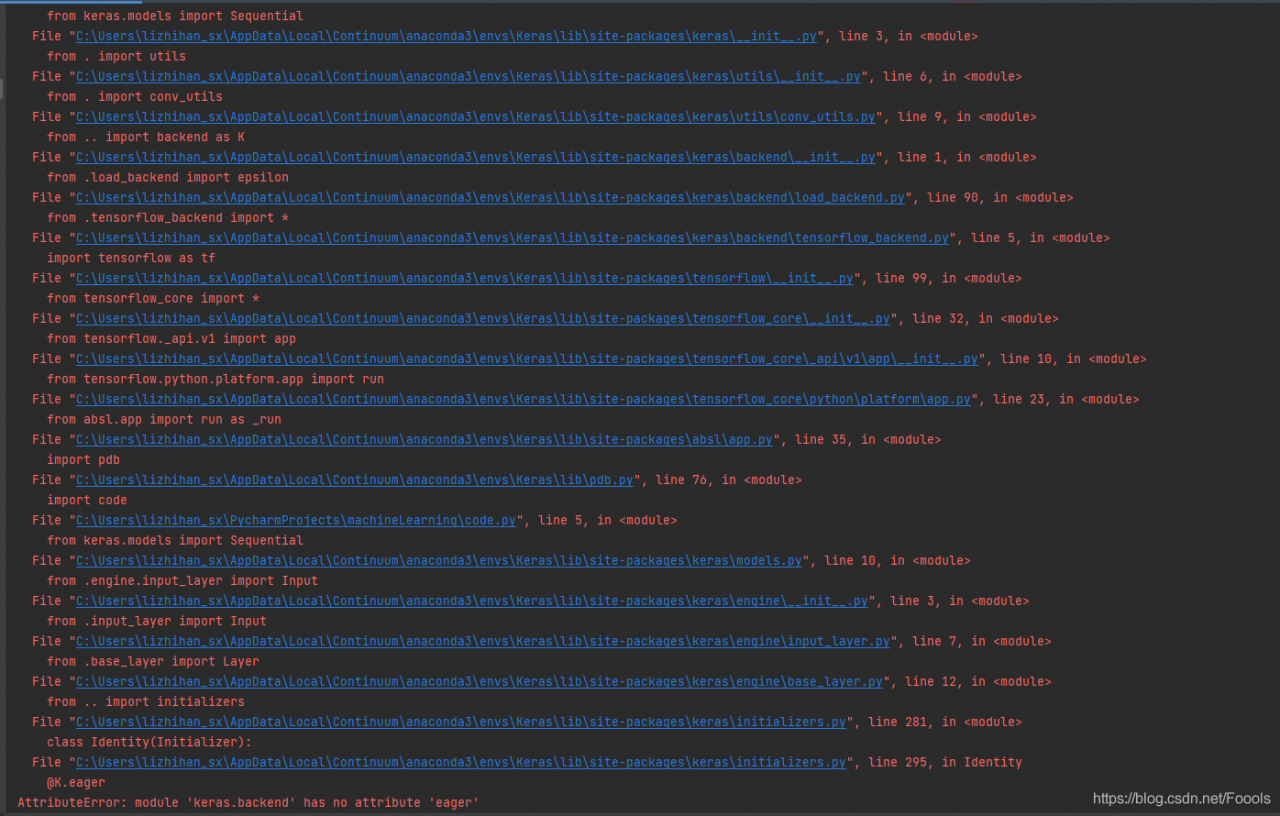
it seems that the version of the library that has been adjusted for a long time has finally run through a LSTM demo, but if you want to open a new test file for testing, the following problems appear


Solution:

the solution to stackoverflow is to use the current keras library and tensorflow Library of unitall, because the higher version of keras library may be used, but the running code is of lower version. Note that you need to install tensorflow before installing keras

The specific steps of stackoverflow with the most likes are as follows:
delete tenorflow delete tenorflow

pip uninstall tensorflow

Update PIP version

pip install --upgrade pip

install keras

pip install Keras

install tensorflow

pip install tensorflow

Apart from this method, I want to say that my final solution is: I found the import statement of the keras library

from keras.models import Sequential
from keras.layers import LSTM, Dense, Activation

Cannot appear in two. Py files!!! Even if you just don’t use import, you will still report this error. It’s too bad. I found this problem after reloading it, so when testing the code, you should either create a new project or write the import statement in a file.

Error running ‘** [install]‘: No valid Maven installation found. Either set the home director

Problem situation

In idea, Maven could not be packaged. This error was reported
error running ‘* * [install]’: no valid Maven installation found. Neither set the home director

Cause of the problem

1. The environment variables of mavden are not configured properly,
2. The Maven path is not configured correctly in idea

resolvent

The first solution is to configure the environment variable of mavden: m2_ Home = Maven installation path add% M2_ HOME%;
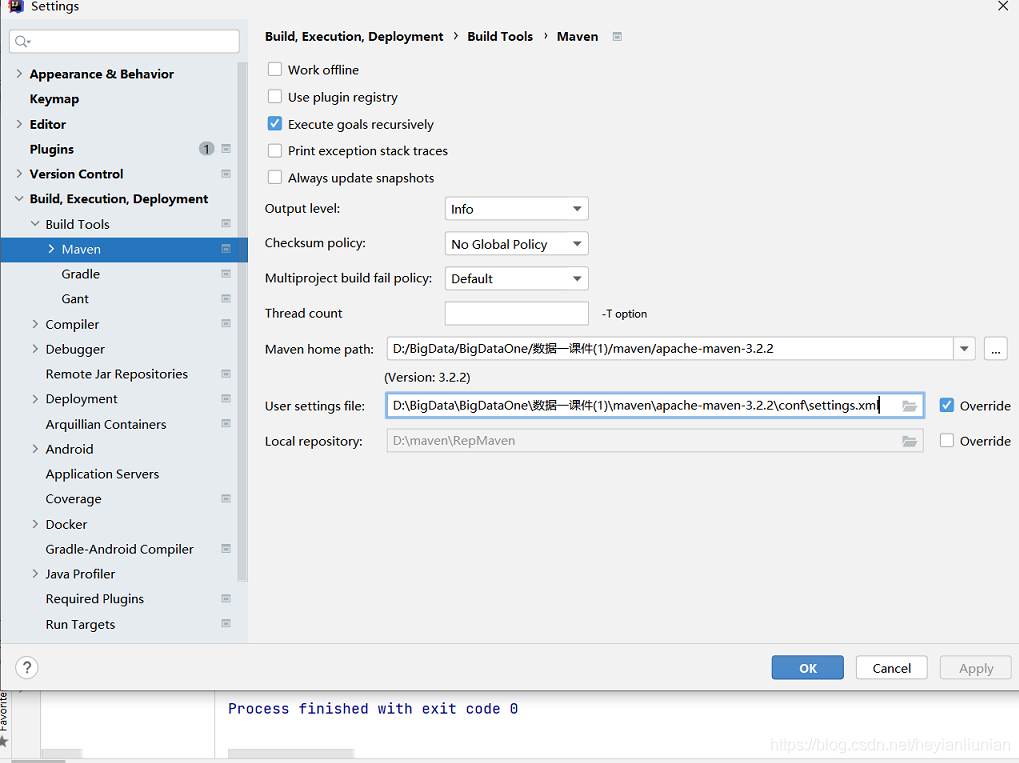
2 and enter Maven in the search box. For example, my Maven path is D: bigdata, bigdataone, datacourseware (1): maven, apache-maven-3.2.2

search my computer for Apache maven, get your file path, import it and click OK

In the HTML page request Ajax times 400 error, solve Yii submit post form 400 error, and Ajax post request 400 problem (example code)

Post form 400 error:

Right way:

Add this in the head section of your layout:

= Html::csrfMetaTags() ?& gt;

———————————

It is not recommended to cancel CSRF token verification as follows:

Add this in your controller:

public $enableCsrfValidation = false;

Other methods:

The original problem is CSRF verification, because the form is written by itself. In the framework of Yii, in order to prevent CSRF attacks, CSRF token verification is encapsulated in the form data of post.

Solution turn off CSRF verification

Method 1: close in the funding document

‘components‘=> array(

‘request‘=> array(

// Enable Yii Validate CSRF Token

‘enableCsrfValidation‘ => true,

),

),

When using the Yii form to generate a page, if the form is submitted by post, a hidden field will be added to the page, which is the CSRF token verification field

When users submit the form, they submit the field to the server. The Yii framework will send the hidden field submitted by the client and the Yii in the cookie submitted by the client_ CSRF_ The value of token was compared.

If it is the same, it will continue to execute. If it is not the same, it will throw a 400 exception: “the CSRF token could not be verified.”.

So the above problem appears. If you write your own form, you can add a hidden token verification field to the form on the view page

Method 2: add hidden verification fields in the form

If you don’t want CSRF verification, modify the true of method 1 to false, so that Yii won’t do post form verification.

Ajax post 400 error:

Ajax post is also used in movies recently. So I’m looking for answers on the Internet. Finally, I found the answer in Yii from unintentionally_ CSRF_ Token, because I have enabled enable csrfvalidation ‘= & gt; true  , So CSRF verification is added to the request. So when Ajax makes an Ajax post request, it can’t pass the verification.

Solution: just add Yii manually when you request_ CSRF_ Just token!

For example:

//Send Ajax $. Ajax ({type: “post”, datatype: “JSON”, URL: “index. PHP?R = movie/insertfavorite”, data: {movie_ id‘:‘<?php echo $_ GET[‘id‘]?& gt;‘,‘ YII_ CSRF_ TOKEN‘:‘<?php echo ii::app()-> request-> csrfToken>‘}, cache: false, error: function (XMLHttpRequest, textStatus, errorThrown) { alert(errorThrown); }, success:function(data){ var result=eval(“(“+data+”)”); alert(data) }, });


AttributeError: module ‘numpy‘ has no attribute ‘getbuffer‘

Numpy. Getbuffer (a) is written in python2, but not in python3. Where a is the numpy array
the following methods can be used instead: a.tobytes(), a.data.tobytes(), memoryview (a). Tobytes(), bytes (a.data), bytes (memoryview (a)) reference link:
https://stackoverflow.com/questions/21821045/numpy-getbuffer-causes-attributeerror-module-object-has-no-attribute-getbuff

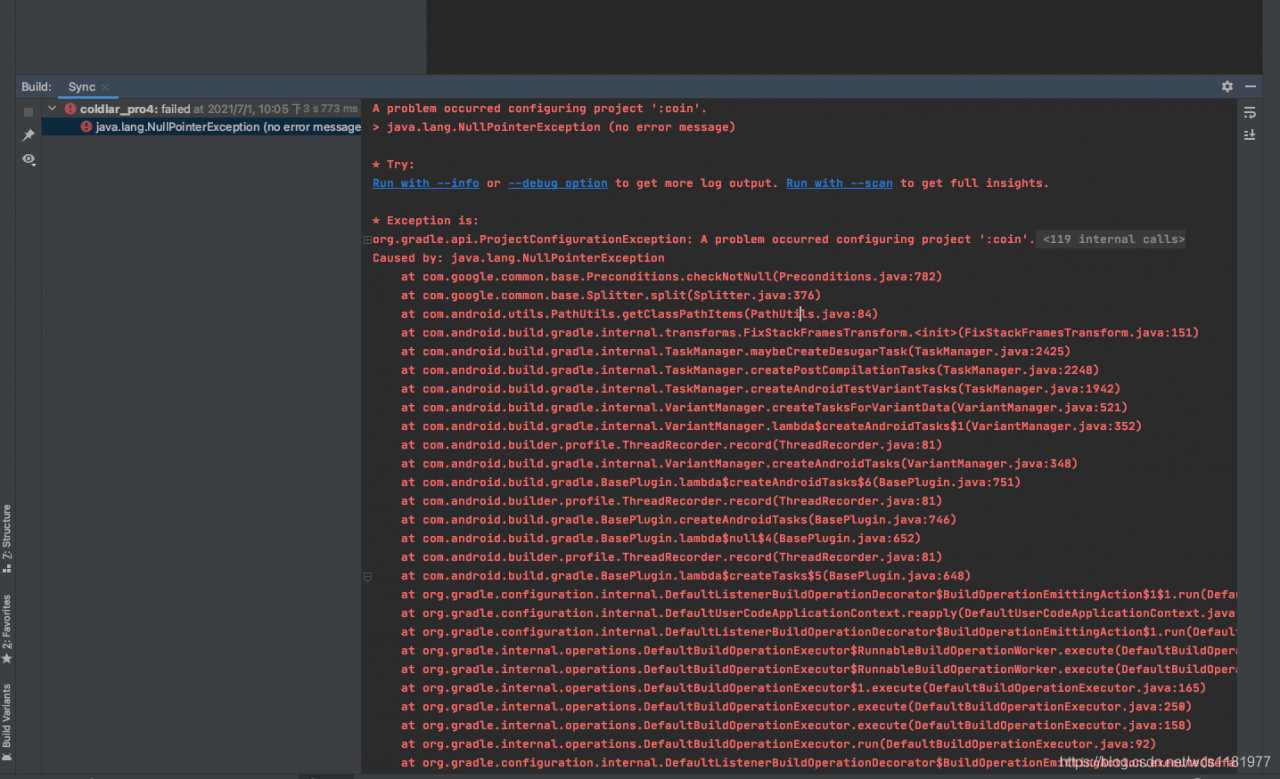
A problem occurred configuring project ‘:x x x‘. > java.lang.NullPointerException (no error message)

This error is reported after upgrading androidsudio4.2.2, my Mac is OK, and my colleagues report this error
after my colleagues demote androidsudio4.1.3, it may be because the imported project is old, and the gradle version is too old and does not match the new version. Other posts say that it is the problem of NDK path, and the gradle version does not match NDK, which may be quite big