Some compilers do not support itoa because it is not standard.
Solution
-
- c++11: std:: to_string
- sprintf
-
-
- stdio.h
char *c = new char;
sprintf(c,"%d",num);
-
-
- stringstream
-
-
- sstream.h
stringstream ss; int x = 1;
ss << x;
string str = ss.str();
-
Some compilers do not support itoa because it is not standard.
Solution
char *c = new char;sprintf(c,"%d",num);stringstream ss; int x = 1;ss << x;string str = ss.str();org.apache.ibatis.binding.BindingException: Invalid bound statement (not found) problem, that is, there is a problem when mapping and binding the dao interface and mapper configuration file in mybatis. Simply put, the interface and xml are either not found It is either
After the modification, the problem still exists. In the end, it took a lot of effort to find the source of my code problem. The file name of the dao interface is inconsistent with that of the xml.
Both the interface name and the interface file name are DepartmentDao, and the configuration file name is DeparmentDao.xml. It took a lot of effort to find a t letter in the names of both. After the modification, everything is normal.
This is a point that is easy to overlook. Remember: the interface name and the Mybatis mapping file name must be exactly the same.
This error appeared when I tried to use an ArrayList<ArrayList<Integer>>() new a List<List<Integer>> object
List<List<Integer>> = new ArrayList<ArrayList<Integer>>();Maybe we will find that if the second ArrayList is changed to List, the error is gone, so what is the principle?
After searching, it is found that this is a common pit of generic applications:
Generics, Inheritance, and Subtypes
https://docs.oracle.com/javase/tutorial/java/generics/inheritance.html
1. First, if A is a B, we can assign A to B
Object someObject = new Object();
Integer someInteger = new Integer(10);
someObject = someInteger; // OK
Integer inherits from Object and is a subtype of it, so there is no problem in assigning values in this way. This is a generic type.
2. Integer is also a kind of Number, and Double is also a kind of Number, so the following is also possible
public void someMethod(Number n) { /* … */ }
someMethod(new Integer(10)); // OK
someMethod(new Double(10.1)); // OK
You can also use generics:
Box<Number> box = new Box<Number>();
box.add(new Integer(10)); // OK
box.add(new Double(10.1)); // OK
3. Here comes the point
public void boxTest(Box<Number> n) { /* … */ }
If so, can we pass in Box<Integer> or Box<Double>
the answer is negative.
Integer is a subclass of Number, and Double is also a subclass of Number. However, Box<Integer> and Box<Double> are not subclasses of Box<Integer>. Their relationship is parallel, and both are subclasses of Object.
Open spyder today and say to debug a theano program, but import theano prompt
ImportError: cannot import name gof
Final solution
pip install --upgrade --no-deps git+git://github.com/Theano/Theano.gitHash_map is a C++ non-standard STL. Because of the advancement of standardization, hash_map is a non-standard container, and it will be replaced by unordered_map in the future. Suggest that we use unorder_map instead of hash_map, the solution
(1) Replace <hash_map> with <unorder_map> or
(2) Add macro definition to ignore this error
#define _SILENCE_STDEXT_HASH_DEPRECATION_WARNINGS //Adding this macro definition means that no error is reported
 #ifndef _SILENCE_STDEXT_HASH_DEPRECATION_WARNINGS
static_assert(false, " is deprecated and will be REMOVED. "
	"Please use . You can define "
	"_SILENCE_STDEXT_HASH_DEPRECATION_WARNINGS "
	"to acknowledge that you have received this warning.");
#endif /* _SILENCE_STDEXT_HASH_DEPRECATION_WARNINGS */1.the problem
ValueError: Floating point image RGB values must be in the 0..1 range.
2.the solution
The problem is that the data should be between 0-1 and need to be normalized
tf.clip_by_value(t, 0.0, 1.0)
Image normalization is OK/127.5-1
3.pay attention
Use this method to normalize the returned object Tensor, which needs to be converted back tondarray.eval(session=sess)
Problem Description:
When python is using a custom sigmoid function, input X as a matrix, there will be a situation where’Float’ object has no attribute’exp’.
def sigmoid(inp):
return 1.0/(1 + np.exp(-inp))
It is found that it is no problem to manually generate the matrix data into this function, and then find it by looking up the numpy.mat function
numpy.mat(data, dtype=None)[source]
Interpret the input as a matrix.
Unlike matrix, asmatrix does not make a copy if the input is already a matrix or an ndarray. Equivalent to matrix(data, copy=False).
Parameters:
data: array_like
Input data.
dtype: data-type
Data-type of the output matrix.
Returns:
mat: matrix
data interpreted as a matrix.
The default dtype is None, so when the matrix is generated, the dtype is added to the type to solve the problem. For example, Xmat = numpy.mat(_x, dtype=float), and then Xmat was brought into the sigmoid function, no problem was found.
AttributeError: 'Float' object has no attribute 'exp'
After downloading the Android SDK, I ran the Android SDK Manageer.exe update for a whole day, and then installed ADT in Eclipse. After almost finishing it, I started to write the first Android program: HelloWrold. After creating this project step by step, follow the textbook As mentioned, when you click on the activity_main.xml file, there should be an interface where you can drag the controls directly, but there is nothing in my interface, and then the following message appears:
Failed to find the style corresponding to the id 2130772026
Failed to find the style corresponding to the id 2130771996
java.lang.NullPointerException
Exception details are logged in Window> Show View> Error Log
The following classes could not be instantiated:
-android.support.v7.internal.app.WindowDecorActionBar (Open Class, Show Error Log)
See the Error Log (Window> Show View) for more details.
How to Solve this error:
The SDK version is too high, lower the API level, and restart Eclipse
For example, there is now a class:
class ImageListView: UIView {
    var moment: Moment!
    var tapSmallView: ((_ iamgeView: UIImageView) -> Void)?
    var imagesArray: [UIImageView]!
    //ImagePreviewView is another custom class, which has a scrollView
    var imagesPreview: ImagePreviwView!


    func setMoment(_ moment: Moment) {
        self.moment = moment
        let count = moment.ImageCount
        imagesPreview.scrollView.contentSize = CGSize(width: imagesPreview.frame.width*count, height: imagesPreview.frame.height)
    }
}
In this case, setting the contentSize of the scrollView will report an error, because count is of type Int. If we do any mathematical operations on screenBounds, please make sure to check the type matches.
You must change the type:
imagesPreview.scrollView.contentSize = CGSize(width: imagesPreview.frame.width*CGFloat(count), height: imagesPreview.frame.height)
This is the error message I encountered
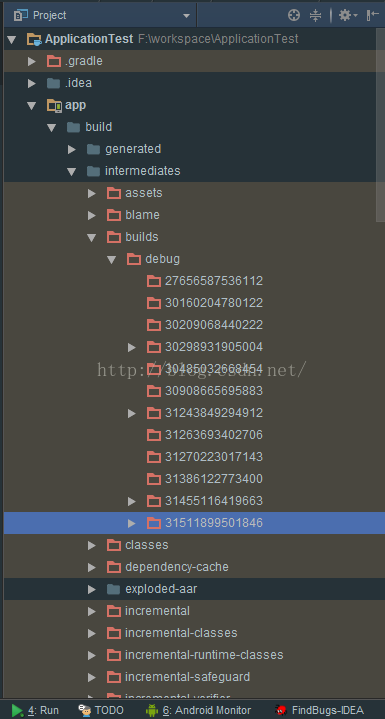
Error:Execution failed for task ':app:buildInfoDebugLoader'.
> Exception while doing past iteration backup : Source F:\workspace\ApplicationTest\app\build\intermediates\builds\debug\31511899501846\classes.dex and destination F:\workspace\ApplicationTest\app\build\intermediates\builds\debug\31511899501846\classes.dex must be different
This is because there is a file named classes.dex conflict under the build, you can find the specified file and delete it and run it again.
For my exception information, find the file as shown in the figure below, and right-click to delete it.
Problem Description
Floating box style is abnormal
 Caused by: android.view.InflateException: Binary XML file line #10 in com.example.administrator.myapplication:layout/activity_event_simple: Binary XML file line #10 in com.example.administrator.myapplication:layout/activity_event_simple: Error inflating class android.support.design.widget.FloatingActionButton
     Caused by: android.view.InflateException: Binary XML file line #10 in com.example.administrator.myapplication:layout/activity_event_simple: Error inflating class android.support.design.widget.FloatingActionButton
     Caused by: java.lang.ClassNotFoundException: android.support.design.widget.FloatingActionButton
        at java.lang.Class.classForName(Native Method)
        at java.lang.Class.forName(Class.java:454)
        at android.view.LayoutInflater.createView(LayoutInflater.java:813)
        at android.view.LayoutInflater.createViewFromTag(LayoutInflater.java:1004)
        at android.view.LayoutInflater.createViewFromTag(LayoutInflater.java:959)
        at android.view.LayoutInflater.rInflate(LayoutInflater.java:1121)
        at android.view.LayoutInflater.rInflateChildren(LayoutInflater.java:1082)
        at android.view.LayoutInflater.inflate(LayoutInflater.java:680)
        at android.view.LayoutInflater.inflate(LayoutInflater.java:532)
        at android.view.LayoutInflater.inflate(LayoutInflater.java:479)
        at android.support.v7.app.AppCompatDelegateImpl.setContentView(AppCompatDelegateImpl.java:469)
        at android.support.v7.app.AppCompatActivity.setContentView(AppCompatActivity.java:140)
        at com.example.administrator.myapplication.event.EventSimpleActivity.onCreate(EventSimpleActivity.java:16)
        at android.app.Activity.performCreate(Activity.java:8000)
        at android.app.Activity.performCreate(Activity.java:7984)
        at android.app.Instrumentation.callActivityOnCreate(Instrumentation.java:1309)
        at android.app.ActivityThread.performLaunchActivity(ActivityThread.java:3422)
        at android.app.ActivityThread.handleLaunchActivity(ActivityThread.java:3601)
        at android.app.servertransaction.LaunchActivityItem.execute(LaunchActivityItem.java:85)
        at android.app.servertransaction.TransactionExecutor.executeCallbacks(TransactionExecutor.java:135)
        at android.app.servertransaction.TransactionExecutor.execute(TransactionExecutor.java:95)
        at android.app.ActivityThread$H.handleMessage(ActivityThread.java:2066)
        at android.os.Handler.dispatchMessage(Handler.java:106)
        at android.os.Looper.loop(Looper.java:223)
        at android.app.ActivityThread.main(ActivityThread.java:7656)
        at java.lang.reflect.Method.invoke(Native Method)
        at com.android.internal.os.RuntimeInit$MethodAndArgsCaller.run(RuntimeInit.java:592)
E/AndroidRuntime:     at com.android.internal.os.ZygoteInit.main(ZygoteInit.java:947)
     Caused by: java.lang.ClassNotFoundException: Didn't find class "android.support.design.widget.FloatingActionButton" on path: DexPathList[[zip file "/data/app/~~ifhZZYKrV3-7IC9EpRYwtQ==/com.example.administrator.myapplication-dVeo5FiMTqcAMDRaRAmCew==/base.apk"],nativeLibraryDirectories=[/data/app/~~ifhZZYKrV3-7IC9EpRYwtQ==/com.example.administrator.myapplication-dVeo5FiMTqcAMDRaRAmCew==/lib/x86, /system/lib, /system_ext/lib]]
        at dalvik.system.BaseDexClassLoader.findClass(BaseDexClassLoader.java:207)
        at java.lang.ClassLoader.loadClass(ClassLoader.java:379)
        at java.lang.ClassLoader.loadClass(ClassLoader.java:312)
        	... 28 more
Solutions
Check whether to add the corresponding dependency
Specific code
Add
implementation’com.android.support: design:28.0.0 ‘ in build.gradle
dependencies {
    implementation 'com.android.support:design:28.0.0'
}
When calculating the AUC value, I encountered the error’ValueError: Data is not binary and pos_label is not specified’.
The solution is as follows:
Print out the label data and find it is [0, 255], normalize the label data to [0, 1] to solve the problem successfully