Category Archives: Error

Kill Tomcat process in windows and Linux environment (solve the problem of other ports being occupied)

Killing process in Windows

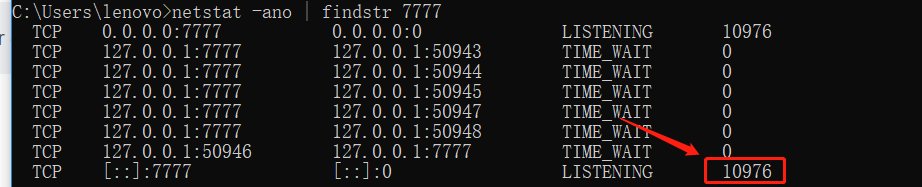
1. First of all, find out the PID of the process number that occupies port 8080 ( tomcat, the default is port 8080. If you modify the monitoring port of tomcat, please write in your Tomcat port number or other port numbers ) what I query is port 7777

​netstat -ano | findstr 8080

The last column of the command output indicates the number of the process occupying port 7777, assuming 10976
2. Kill the process, thus freeing the port

taskkill /f /pid 10976 



Closing Tomcat process under Linux operating system

1. See if Tomcat is already running

ps -ef |grep tomcat 

If Tomcat is running, the result will be similar to the following:

sun 5144 1 0 10:21 pts/1 00:00:06 /java/jdk/bin/java -Djava.util.logging.manager=org.apache.juli.ClassLoaderLogManager

-Djava.endorsed.dirs=/java/tomcat/common/endorsed -classpath :/java/tomcat/bin/bootstrap.jar:/java/tomcat/bin/commons-logging-api.jar

-Dcatalina.base=/java/tomcat -Dcatalina.home=/java/tomcat -Djava.io.tmpdir=/java/tomcat/temp org.apache.catalina.startup.Bootstrap start

From the above output information, we can know that the process number of Tomcat execution is 5144.

2. Execute the following command to kill the 5144 process

pid = 5144 kill -9 5144 

3. Get the occupancy of a certain port (for example, get the occupancy of port 5533 below)

sudo lsof -i :5533

The result is as follows: you can see that the process number is 2960, we just need to kill it.

COMMAND  PID        USER   FD   TYPE             DEVICE SIZE/OFF NODE NAME
java    2960 zhengcanrui   55u  IPv6 0xb866409b03202701      0t0  TCP *:5533 (LISTEN)

Kill process command:

kill -9 2960

The imported project “c:\Microsoft.Cpp.Default.props” was not found

npm is installed in this situation.

Theme:

Detection Method:

1, download Visual C++ 2015 Build Tools

Downloaded 38142142;: http://go.microsoft.com/fwlink/?LinkId=691126&_hstc=268264337.464d867a453cb3e0785b9f7f82b81bb9.1517626516073.1519263951770.1519269195452.4&_hssc=268264337.1.1519269195452&_hsfp=3527706607&fixForIE=.exe

2.download GTK, because you need to load some of it, download complete to C:\GTK immediately; download 3814214;(64 seconds): http://ftp.gnome.org/pub/GNOME/binaries/win64/gtk+/2.22/gtk+-bundle_2.22.1-20101229_win64.zip

3. This is a very dependent step, inspiring cmd command, input set VCTargetsPath=C:\Program Files (x86)\MSBuild\ Microsoft.Cpp \v4.0\v140;

net.sf.json .JSONObject maven20381;- 36182;

The last time you need to keep it, there are only two versions of jdk: json-lib-2.1-jdk13.jarand json-lib-2.1-jdk15.jar

: <   <dependency&>

: <� � � � � → <groupId&> net.sf.json -lib</groupId&>

: <     <artifactId&>json-lib</artifactId&>

: <     <version&>2.4</version&>

: <    <classifier&>jdk15</classifier&>

: <  </dependency&>

Rendering Problems The following classes could not be instantiated: xml layout file could not be loaded

Rendering Problems The following classes could not be instantiated:
- android.support.v7.app.WindowDecorActionBar (Open Class, Show Exception, Clear Cache)
 Tip: Use View.isInEditMode() in your custom views to skip code or show sample data when shown in the IDE.  If this is an unexpected error you can also try to build the project, then manually refresh the layout.
 
java.lang.NullPointerException
	at android.support.v7.app.WindowDecorActionBar.getDecorToolbar(WindowDecorActionBar.java:241)
	at android.support.v7.app.WindowDecorActionBar.init(WindowDecorActionBar.java:197)
	at android.support.v7.app.WindowDecorActionBar.(WindowDecorActionBar.java:189)
	at sun.reflect.NativeConstructorAccessorImpl.newInstance0(Native Method)
	at sun.reflect.NativeConstructorAccessorImpl.newInstance(NativeConstructorAccessorImpl.java:62)
	at sun.reflect.DelegatingConstructorAccessorImpl.newInstance(DelegatingConstructorAccessorImpl.java:45)
	at java.lang.reflect.Constructor.newInstance(Constructor.java:423)
	at org.jetbrains.android.uipreview.ViewLoader.createNewInstance(ViewLoader.java:465)
	at org.jetbrains.android.uipreview.ViewLoader.loadClass(ViewLoader.java:172)
	at org.jetbrains.android.uipreview.ViewLoader.loadView(ViewLoader.java:105)
	at com.android.tools.idea.rendering.LayoutlibCallbackImpl.loadView(LayoutlibCallbackImpl.java:186)
	at com.android.layoutlib.bridge.bars.AppCompatActionBar.(AppCompatActionBar.java:89)
	at com.android.layoutlib.bridge.impl.Layout.createActionBar(Layout.java:238)
	at com.android.layoutlib.bridge.impl.Layout.(Layout.java:150)
	at com.android.layoutlib.bridge.impl.RenderSessionImpl.inflate(RenderSessionImpl.java:301)
	at com.android.layoutlib.bridge.Bridge.createSession(Bridge.java:429)
	at com.android.ide.common.rendering.LayoutLibrary.createSession(LayoutLibrary.java:389)
	at com.android.tools.idea.rendering.RenderTask$2.compute(RenderTask.java:548)
	at com.android.tools.idea.rendering.RenderTask$2.compute(RenderTask.java:533)
	at com.intellij.openapi.application.impl.ApplicationImpl.runReadAction(ApplicationImpl.java:966)
	at com.android.tools.idea.rendering.RenderTask.createRenderSession(RenderTask.java:533)
	at com.android.tools.idea.rendering.RenderTask.lambda$inflate$72(RenderTask.java:659)
	at java.util.concurrent.FutureTask.run(FutureTask.java:266)
	at java.util.concurrent.ThreadPoolExecutor.runWorker(ThreadPoolExecutor.java:1142)
	at java.util.concurrent.ThreadPoolExecutor$Worker.run(ThreadPoolExecutor.java:617)
	at java.lang.Thread.run(Thread.java:745)

Modify the res/values/styles.xml directory:

style name="AppTheme" parent="Theme.AppCompat.Light.DarkActionBar">

for:

<style name="AppTheme" parent="Base.Theme.AppCompat.Light.DarkActionBar">

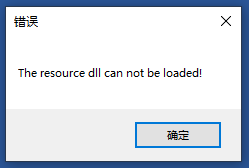
How to Fix Word Opening Error: the resource dll cannot be loaded

“The resource dll can not be loaded” always pops up when opening word


How to Fix:

  • Windows Key + R.
  • Type “winword /safe”.
  • Press Enter.
  • Check and make sure no error dialog appears.
  • Go to File > Options > Add-In.
  • At the very bottom of the settings page, there’s a dropdown menu. Select “COM Add-ins”.
  • Press “Go… “button.
  • Find any Add-ins that were enabled, and unclick the checkmarks next to them.
  • Press OK.
  • Close Word 2016.
  • Reopen Word 2016 normally.
  • That’s all

[Solved] Warning: using directive refers to implicitly-defined namespace ‘std’

Error: main.cpp: warning: using directive refers to implicitly-defined namespace ‘std’

If you see the following error when trying to compile a C++ application:


main.cpp: : : warning: using directive refers to implicitly-defined namespace 'std'

then that means you do not have any header file inclusion that uses std namespace.

You can fix this warning by including a C++ header file that uses a std namespace otherwise the compile will not know about std namespace.

How to Solve this Error:

Very simple, just include a c++ header file, as follows:

#include <iostream>

ERROR: JDWP Unable to get JNI 1.2 environment, jvm

How to solve this problem has been for a long time ERROR: JDWP Unable to get JNI 1.2 environment, jvm->GetEnv() return code = -2JDWP exit error AGENT_ERROR_NO_JNI_ENV(183): [../../../src/ share/back/util.c:820]

How to Solve This Error:

This problem is caused by the debug timeout, if you debug running fast, it seems that this problem will not occur, if the time process is caused by too many single step jumps, this problem will occur. Anyway, you can add

System.exit(0);

at the end of the main method to solve this problem.

Error in Tensorflow using variables: List of Tensors when single Tensor expected

1. Background:

import tensorflow as tf
a = tf.constant(tf.random_normal([2, 2]))    # Wrong
print(a)

An error occurred when passing tf.random_normal to tf.constant:
TypeError: List of Tensors when single Tensor expected


2. The cause of the problem:

See how tf.constant() and tf.random_normal() are used

2.1 tf.random_normal function definition:

def random_normal(shape,
                  mean=0.0,
                  stddev=1.0,
                  dtype=dtypes.float32,
                  seed=None,
                  name=None):
  • Returns: A tensor of the specified shape filled with random normal values.

2.2 tf.constant function definition:

def constant(value, dtype=None, shape=None, name="Const", verify_shape=False)
  • value: A constant value (or list) of output type dtype.
  • Returns: A Constant Tensor.

2.3 The cause of the problem:

Conclusion: Because the return value of tf.random_normal is a Tensor, but the parameter passed in by tf.constat is that the two types of the list do not match, an error occurs.

3. How to solve:

3.1 Method 1:

Use NumPy to generate the random value and put it in a tf.constant()

some_test = tf.constant(
    np.random.normal(loc=0.0, scale=1.0, size=(2, 2)).astype(np.float32))

3.2 Method 2:

Potentially faster, as it can use the GPU to generate the random numbers,Use TensorFlow to generate the random value and put it in a tf.Variable

some_test = tf.Variable(
    tf.random_normal([2, 2], mean=0.0, stddev=1.0, dtype=tf.float32)
sess.run(some_test.initializer)

View the definition of the tf.Variable function:

def __init__(self,
               initial_value=None,
               trainable=True,
               collections=None,
               validate_shape=True,
               caching_device=None,
               name=None,
               variable_def=None,
               dtype=None,
               expected_shape=None,
               import_scope=None,
               constraint=None):
               ...
               )

args: initial_value: A Tensor, or Python object convertible to a Tensor,which is the initial value for the Variable.
Next time you encounter this kind of function parameter problem, you must check how the function is used, and what the formal parameters and return values ​​are.

Browser error: Lazy require of app.binding did not set the binding field

While debugging the code, the browser reported several errors as follows:

Lazy require of app.binding did not set the binding field

After searching for the information for a long time, I found an interesting phenomenon. I canceled all the breakpoints that were being debugged, and these errors disappeared, and then the breakpoints will not report this error.