Category Archives: Error

Docker Build Error: Failed to get D-Bus connection: Operation not permitted [Solved]

After using CentOS 7 image to create a container, you may encounter such a problem that you use systemctl to start the service and report an error. For this error report, let’s analyze it next!

# docker run -itd –name centos7 centos:7

# docker attach centos7

# yum install vsftpd

# systemctl start vsftpd

Failed to get D-Bus connection: Operation not permitted

The reasons are as follows:

The design concept of docker is that there is no background service running in the container. The container itself is an independent main process on the host, which can also be indirectly understood as the application process running the service in the container. The life cycle of a container exists around the main process, so the correct way to use the container is to run the services in the foreground.

When it comes to SYSTEMd, this suite has become the default service management for mainstream Linux distributions (such as centos7 and Ubuntu 14 +), replacing the traditional Systemv style service management. SYSTEMd maintains system services, which require privileges to access the Linux kernel. The container is not a complete operating system, there is only one file system, and the default startup is only for ordinary users to access the Linux kernel, that is, there is no privilege, so it can’t be used naturally!

Therefore, please follow the container design principles and run a foreground service in one container!!!

Yes, run the container in privileged mode.


The solution is as follows:

Create container:

# docker run -d -name centos7 –privileged=true centos:7 /usr/sbin/init

Enter container:

# docker exec -it centos7 /bin/bash

This allows you to start the service using systemctl
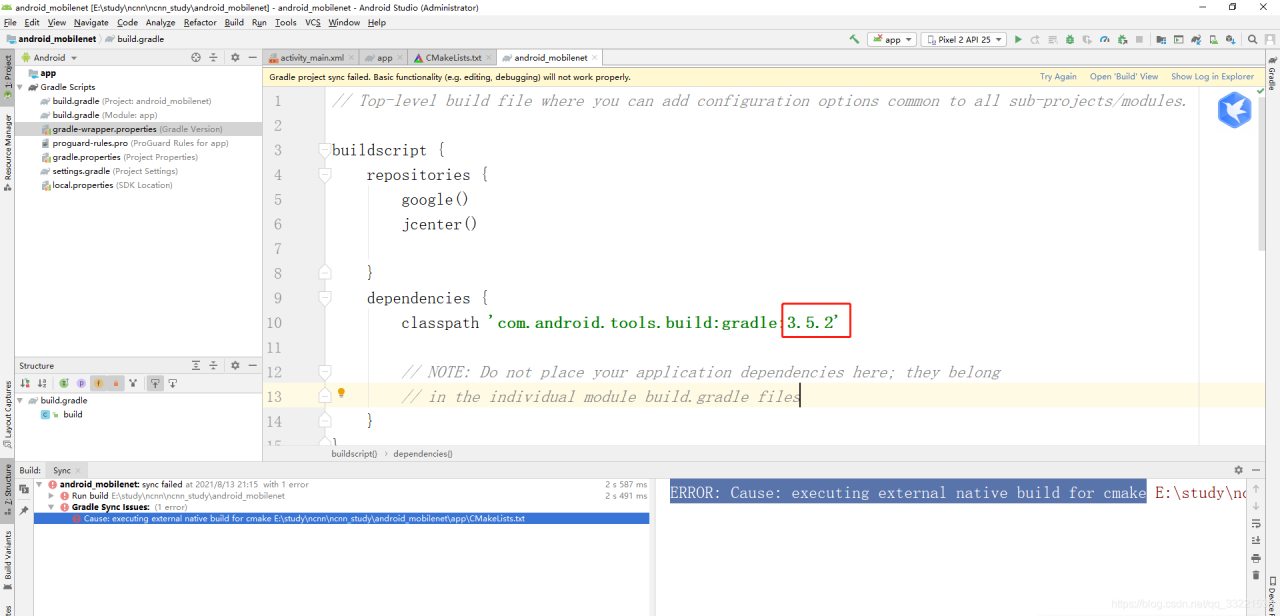
[Solved] Android Studio Error: ERROR: Cause: executing external native build for cmake

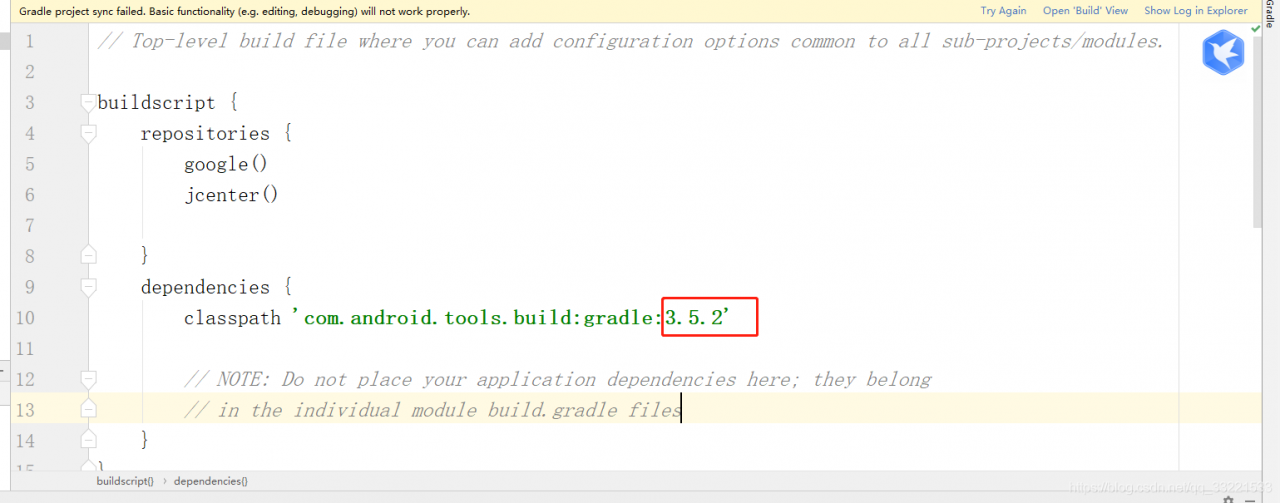
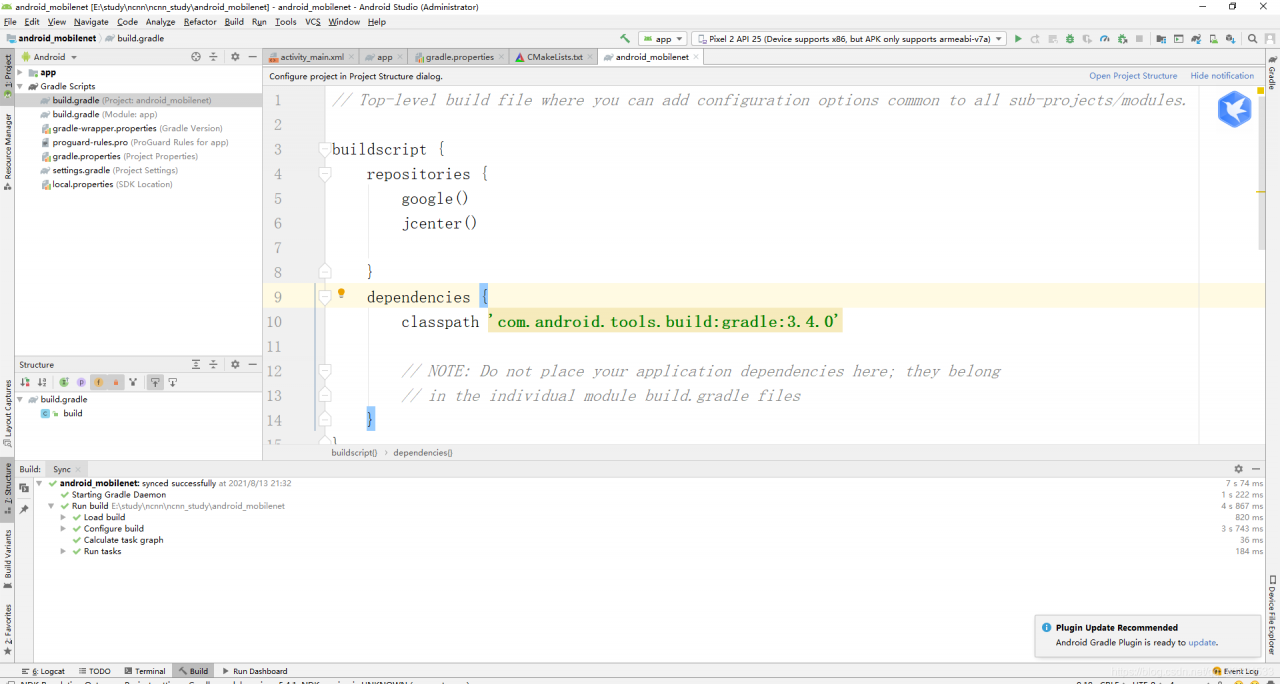
Recently, when editing a project using Android Studio, an error message “error: cause: executing external native build for cmake” appears. Therefore, open Gradle-wrapper.properties and find the following figure: because the as version of is 3.5.2

Open build.gradle

Solution:

I open file -> Project structure, change the plug-in version from 3.5.2. To 3.4.0, and then synchronize again.

[Solved] TFrecords Create Datas Error: Number of int64 values != expected. Values size: 1 but output shape: [3]

1. For fixed length label and feature

Generate tfrecord data:

Multiple label samples, where the label contains 5

import os
import tensorflow as tf
import numpy as np
output_flie = str(os.path.dirname(os.getcwd()))+"/train.tfrecords"
with tf.python_io.TFRecordWriter(output_flie) as writer:
    labels = np.array([[1,0,0,1,0],[0,1,0,0,1],[0,0,0,0,1],[1,0,0,0,0]])
    features = np.array([[0,0,0,0,0,0],[1,1,1,1,1,2],[1,1,1,0,0,2],[0,0,0,0,1,9]])
    for i in range(4):
        label = labels[i]
        feature = features[i]
        example = tf.train.Example(features=tf.train.Features(feature={
            "label": tf.train.Feature(int64_list=tf.train.Int64List(value=label)),
            'feature': tf.train.Feature(int64_list=tf.train.Int64List(value=feature))
        }))
        writer.write(example.SerializeToString())

Parse tfrecord data:

import os
import tensorflow as tf
import numpy as np


def read_tf(output_flie):
    filename_queue = tf.train.string_input_producer([output_flie])
    reader = tf.TFRecordReader()
    _, serialized_example = reader.read(filename_queue)
    result = tf.parse_single_example(serialized_example,
                                     features={
                                         'label': tf.FixedLenFeature([5], tf.int64),
                                         'feature': tf.FixedLenFeature([6], tf.int64),
                                     })
    feature = result['feature']
    label = result['label']
    return feature, label


output_flie = str(os.path.dirname(os.getcwd())) + "/train.tfrecords"
feature, label = read_tf(output_flie)
imageBatch, labelBatch = tf.train.batch([feature, label], batch_size=2, capacity=3)

with tf.Session() as sess:
    sess.run(tf.global_variables_initializer())
    coord = tf.train.Coordinator()
    threads = tf.train.start_queue_runners(sess=sess, coord=coord)
    print(1)
    images, labels = sess.run([imageBatch, labelBatch])
    print(images)
    print(labels)
    coord.request_stop()
    coord.join(threads)

Output:

1
('----images: ', array([[0, 0, 0, 0, 0, 0],
       [1, 1, 1, 1, 1, 2]]))
('----labels:', array([[1, 0, 0, 1, 0],
       [0, 1, 0, 0, 1]]))

2. For variable length label and feature

Generate tfrecord

It is the same as the fixed length data generation method

import os
import tensorflow as tf
import numpy as np
train_TFfile = str(os.path.dirname(os.getcwd()))+"/hh.tfrecords"
writer = tf.python_io.TFRecordWriter(train_TFfile)
labels = [[1,2,3],[3,4],[5,2,6],[6,4,9],[9]]
features = [[2,5],[3],[5,8],[1,4],[5,9]]
for i in range(5):
    label = labels[i]
    print(label)
    feature = features[i]
    example = tf.train.Example(
        features=tf.train.Features(
            feature={'label': tf.train.Feature(int64_list=tf.train.Int64List(value=label)),
                       'feature': tf.train.Feature(int64_list=tf.train.Int64List(value=feature))}))
    writer.write(example.SerializeToString())
writer.close()

Parsing tfrecord

The main changes are:

tf.VarLenFeature(tf.int64)

Unfinished to be continued

Common errors:

When the defined label dimension is different from the dimension during parsing, an error will be reported as follows:

Details of error reporting:

tensorflow.python.framework.errors_impl.InvalidArgumentError: Name: <unknown>, Key: label, Index: 0.  Number of int64 values != expected.  Values size: 1 but output shape: [3]

The size of the label is 1, but when used, it exceeds 1

Solution: when generating tfrecord, the length of label should be the same as that during parsing.

[Solved] K8s cluster build error: error: kubectl get csr No resources found.

K8s cluster setup error: error: kubectl get CSR no resources found

Problem cause and solution test successful

problem

kubectl get csr
No resources found.

reason

because the original SSL certificate is invalid after restart, if it is not deleted, kubelet cannot communicate with the master even after restart 

Solution:

cd /opt/kubernetes/ssl
ls
kubelet-client-2021-04-14-08-41-36.pem  kubelet-client-current.pem  kubelet.crt  kubelet.key
# Delete all certificates 
rm -rf *
# close or open the kubelet
systemctl stop kubelet

master01

kubectl delete clusterrolebinding kubelet-bootstrap
clusterrolebinding.rbac.authorization.k8s.io "kubelet-bootstrap" deleted

kubectl create clusterrolebinding kubelet-bootstrap --clusterrole=system:node-bootstrapper --user=kubelet-bootstrap
clusterrolebinding.rbac.authorization.k8s.io/kubelet-bootstrap created

node 

#open kubelet
#node01
bash kubelet.sh 192.168.238.82
#node02
bash kubelet.sh 192.168.238.83

Test successful

master01

kubectl get csr
NAME                                                   AGE   REQUESTOR           CONDITION
node-csr-mJwuqA7DAf4UmB1InN_WEYhFWbQKOqUVXg9Bvc7Intk   4s    kubelet-bootstrap   Pending
node-csr-ydhzi9EG9M_Ozmbvep0ledwhTCanppStZoq7vuooTq8   11s   kubelet-bootstrap   Pending

Done!!!

[Gradle is Stucked in Building Runing] log Error: Timeout waiting to lock journal cache

Recently, gradle often uses the card build running
the Mac computer can see similar errors printed on the console. The win10 system doesn’t tell you and gets stuck silently.

* What went wrong:
Gradle could not start your build.
> Cannot create service of type BuildTreeActionExecutor using method LauncherServices$ToolingBuildTreeScopeServices.createActionExecutor() as there is a problem with parameter #1 of type List<BuildActionRunner>.
   > Could not create service of type FileAccessTimeJournal using GradleUserHomeScopeServices.createFileAccessTimeJournal().
      > Timeout waiting to lock journal cache (C:\Users\XXX\.gradle\caches\journal-1). It is currently in use by another Gradle instance.
        Owner PID: 8128
        Our PID: 14108
        Owner Operation: 
        Our operation: 
        Lock file: C:\Users\XXX\.gradle\caches\journal-1\journal-1.lock

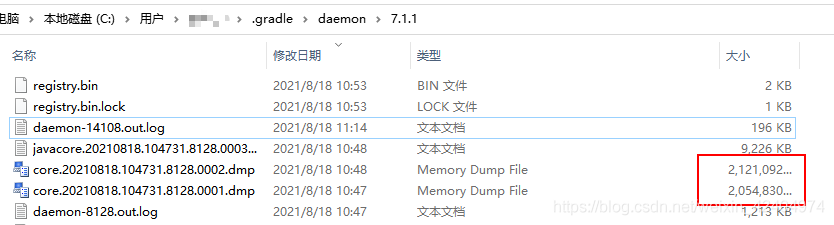
The log can be seen under the. Gradle/daemon directory of win10. By the way, gradle also dumps the memory. The MAC is not very large. It is estimated that the C disk will be full in a few days

check the 8128 process and find that it is a java program

reset gradle JDK version 11.0.11 in project structure
no jamming exception is found after reset.

DM Install Error: error while loading shared libraries: libdmnsort.so:

An error is reported when installing DM to initialize the database
error while loading shared libraries: libdmnsort.so: cannot open shared object file: no such file or directory

[root@localhost tmp]/opt/dmdbms/bin/dminit PATH=/opt/dmdbms/data
/opt/dmdbms/bin/dminit: error while loading shared libraries: libdmnsort.so: cannot open shared object file: No such file or directory
##but in /opt/dmdbms/bin there is libdmnsort.so
[dmdba@localhost ~]$ ll /opt/dmdbms/bin/libdmnsort.so
-rwxr-xr-x 1 dmdba dinstall 269865 8月  17 11:07 /opt/dmdbms/bin/libdmnsort.so

I’m impressed that I met you once before. The solution seems to be to go to the/opt/dmdbms/bin directory and find out the reason this time

After installing DM, these two lines will be automatically added to the environment variable of the home directory

[dmdba@localhost ~]$ cat .bash_profile
export LD_LIBRARY_PATH="$LD_LIBRARY_PATH:/opt/dmdbms/bin"
export DM_HOME="/opt/dmdbms"

I don’t know the reason this time. I didn’t read it after adding it, which led to

[dmdba@localhost ~]$ echo $LD_LIBRARY_PATH

Read. Bash again_Just a profile

[dmdba@localhost ~]$ source ~/.bash_profile 
[dmdba@localhost ~]$ echo $LD_LIBRARY_PATH
:/opt/dmdbms/bin
[dmdba@localhost ~]$ /opt/dmdbms/bin/dminit
initdb V8
db version: 0x7000c
file dm.key not found, use default license!
License will expire on 2022-08-04
input system dir: ^C

[Solved] Gulp-sass Install Error: error: cannot find module ‘sass‘

The following errors are reported:

View the official gulp-sass Download document:

The following solutions are given:

To use gulp-sass, you have to download node-sass or dart sass, and then download gulp-sass;

Download node-sass using the following command:

npm   install   node-sass

Use the following command to download the Gup sass protest without error

npm install sass gulp-sass --save-dev

To use gulp-sass, you must install both gulp-sass itself and a Sass compiler. gulp-sasssupports both Dart Sass and Node Sass, but Node Sass is deprecated. We recommend that you use Dart Sass for new projects, and migrate Node Sass projects to Dart Sass when possible.
Whichever compiler you choose, it’s best to install these as dev dependencies:
Then the sass module is introduced in gulpfile.js at
var sass = require(‘gulp-sass’)(require(‘sass’);

[Solved] Git submits locally to the remote warehouse Error: failed to push some refs to…

Today, a new project was created locally and a warehouse was built on the code cloud. You want to push it to the code cloud locally, but git push - U origin master , an error is reported:

 ! [rejected]        master -> master (fetch first)
error: failed to push some refs to 'https://gitee.com/xxx/app.git'
hint: Updates were rejected because the remote contains work that you do
hint: not have locally. This is usually caused by another repository pushing
hint: to the same ref. You may want to first integrate the remote changes
hint: (e.g., 'git pull ...') before pushing again.
hint: See the 'Note about fast-forwards' in 'git push --help' for details.

After searching, use: git pull -- rebase origin master to solve the difference between
rebase and merge:

rebase puts the commit from your current branch at the end of the public branch, so it's called a rebase.
merge merges the public branch with your current commit to form a new commit

[Solved] ESP32 Error: error: expected initializer before ‘__result_use_check‘

report errors:

A higher version of esp-idf was used before, but now a lower version of esp-idf should be used. There is an error in compiling after switching versions.

Execute make or make all

/home/pjw/.espressif/tools/xtensa-esp32-elf/esp-2020r3-8.4.0/xtensa-esp32-elf/xtensa-esp32-elf/sys-include/stdlib.h:155:44: error: expected initializer before '__result_use_check'
 void *reallocarray(void *, size_t, size_t) __result_use_check __alloc_size(2)
                                            ^~~~~~~~~~~~~~~~~~
/home/pjw/.espressif/tools/xtensa-esp32-elf/esp-2020r3-8.4.0/xtensa-esp32-elf/xtensa-esp32-elf/sys-include/stdlib.h:340:52: error: expected initializer before '__alloc_align'
 void * aligned_alloc(size_t, size_t) __malloc_like __alloc_align(1)

Run make -j16

/home/pjw/ESP32/esp-mdf/esp-idf/components/newlib/include/stdio.h:282:12: error: 'vfiprintf' was not declared in this scope
 int _EXFUN(vfiprintf, (FILE *, const char *, __VALIST)
            ^~~~~~~~~
/home/pjw/ESP32/esp-mdf/esp-idf/components/newlib/include/stdio.h:282:29: error: expected primary-expression before '*' token
 int _EXFUN(vfiprintf, (FILE *, const char *, __VALIST)

....

a lot of errors


analysis:

ESP idf expected initializer before ‘__ result_ use_ Check ‘error repair
the first part of the compilation information is as follows:

App "get-started" version: 237cc099-dirty
WARNING: Toolchain version is not supported: esp-2020r3
Expected to see version: crosstool-ng-1.22.0-97-gc752ad5
Please check ESP-IDF setup instructions and update the toolchain, or proceed at your own risk.
WARNING: Compiler version is not supported: 8.2.0
Expected to see version(s): 5.2.0
Please check ESP-IDF setup instructions and update the toolchain, or proceed at your own risk.

From the information point of view, the version of the compiled tool chain is incorrect
the esp-2020r3 version of tool chain is not supported. Use the crosstool-ng-1.22.0-97-gc752ad5 version
the 8.2.0 compiler is not supported. Use the 5.2.0 version.


solve:

After executing . Install. Sh in ESP IDF , the tool chain and compiler have been downloaded to ~ /. Espressif/tools/xtensa-esp32-elf .

So just modify the environment variables
the original export path = ~ /. Espressif/tools/xtensa-esp32-elf/esp-2020r3-8.4.0/xtensa-esp32-elf/bin: $path
modification:

vim ~/.bashrc

# Delete the previous compilation chain environment variables
#export PATH=~/.espressif/tools/xtensa-esp32-elf/esp-2020r3-8.4.0/xtensa-esp32-elf/bin:$PATH

# Add environment variables
export PATH=~/.espressif/tools/xtensa-esp32-elf/1.22.0-97-gc752ad5-5.2.0/xtensa-esp32-elf/bin:$PATH
source ~/.bashrc

P.S.
ESP-IDF release/v3.3 use 1.22.0-97-gc752ad5-5.2.0 version
ESP-IDF release/v4.0 use esp-2019r2-8.2.0 version
ESP-IDF release/v4.2 use esp-2020r3-8.4.0 version
ESP-IDF release/v4.3 use esp-2021r1-8.4.0 version

[Solved] Consul Error: github.com/boltdb/bolt github.com/boltdb/bolt github.com/hashicorp/raft-boltdb

Consumer startup error:

BootstrapExpect is set to 1; this is the same as Bootstrap mode.
bootstrap = true: do not enable unless necessary
==> Starting Consul agent...
           Version: 'v1.5.3'
           Node ID: '63816065-24d9-8715-0986-cb25587fb459'
         Node name: 'node0'
        Datacenter: 'dc1' (Segment: '<all>')
            Server: true (Bootstrap: true)
       Client Addr: [192.168.8.136] (HTTP: 8500, HTTPS: -1, gRPC: -1, DNS: 8600)
      Cluster Addr: 192.168.8.136 (LAN: 8301, WAN: 8302)
           Encrypt: Gossip: false, TLS-Outgoing: false, TLS-Incoming: false, Auto-Encrypt-TLS: false

==> Log data will now stream in as it occurs:

panic: cannot free page 0 or 1: 0

goroutine 1 [running]:
github.com/boltdb/bolt.(*freelist).free(0xc00080f950, 0xbbdd, 0x7f9cd5354000)
	/go/pkg/mod/github.com/boltdb/[email protected]/freelist.go:113 +0x336
github.com/boltdb/bolt.(*Tx).Commit(0xc0001ea7e0, 0x4f2d0f4, 0x4)
	/go/pkg/mod/github.com/boltdb/[email protected]/tx.go:176 +0x1b7
github.com/hashicorp/raft-boltdb.(*BoltStore).initialize(0xc000248660, 0x0, 0x0)
	/go/pkg/mod/github.com/hashicorp/[email protected]/bolt_store.go:105 +0x137
github.com/hashicorp/raft-boltdb.New(0xc00017fc80, 0x17, 0x0, 0xc00017fc00, 0x17, 0x0, 0x10e7fb3900)
	/go/pkg/mod/github.com/hashicorp/[email protected]/bolt_store.go:81 +0xfe
github.com/hashicorp/raft-boltdb.NewBoltStore(...)
	/go/pkg/mod/github.com/hashicorp/[email protected]/bolt_store.go:60
github.com/hashicorp/consul/agent/consul.(*Server).setupRaft(0xc0006a2380, 0x0, 0x0)
	/home/circleci/project/consul/agent/consul/server.go:627 +0xa36
github.com/hashicorp/consul/agent/consul.NewServerLogger(0xc0006a2000, 0xc0000a0a50, 0xc0006b0680, 0xc0000a0c30, 0x0, 0x0, 0x0)
	/home/circleci/project/consul/agent/consul/server.go:428 +0xafe
github.com/hashicorp/consul/agent.(*Agent).Start(0xc0000b5680, 0x0, 0x0)
	/home/circleci/project/consul/agent/agent.go:411 +0x56e
github.com/hashicorp/consul/command/agent.(*cmd).run(0xc0004e9500, 0xc00004c0e0, 0xa, 0xa, 0x0)
	/home/circleci/project/consul/command/agent/agent.go:280 +0xf5b
github.com/hashicorp/consul/command/agent.(*cmd).Run(0xc0004e9500, 0xc00004c0e0, 0xa, 0xa, 0xc0004e4ca0)
	/home/circleci/project/consul/command/agent/agent.go:75 +0x4d
github.com/mitchellh/cli.(*CLI).Run(0xc0003b3cc0, 0xc0003b3cc0, 0x80, 0xc0004e51e0)
	/go/pkg/mod/github.com/mitchellh/[email protected]/cli.go:255 +0x1f1
main.realMain(0xc000094058)
	/home/circleci/project/consul/main.go:53 +0x393
main.main()
	/home/circleci/project/consul/main.go:20 +0x22

Solution reference: https://github.com/hashicorp/consul/issues/2933

Solution:
find raft. DB on the server where consumer is deployed; Use RM - f to delete all raft. DB ; Restart consumer

Mac Error: sh: vue-cli-service: command not found

# Clear buffer NPM cache clean — force

#Reinstall NPM/cnpm install

Another online article, roughly said three solutions

1. Reinstall the
Folder node_ Modules are deleted and reinstalled by executing NPM/cnpm install

2. Specify path

./node_ modules/.bin/vue-cli-service build

3. Global installation

npm install @vue/cli-service -g

4. Environment variable node_ ENV=production

Try a few more times. You can refer to it for other reasons https://stackoverflow.com/questions/51172064/command-not-found-with-vue-cli