Category Archives: Error

[Solved] Error response from daemon: Get “*“: x509: certificate signed by unknown authority

Environmental description

The harbor repository I built requires a domain name and https access

Error 1 is reported. When other docker environments log in to harbor

[root@k8s0001 ~]# docker login www.harbor.wuhan.cn
Username: admin
Password: 
Error response from daemon: Get "https://www.harbor.wuhan.cn/v2/": x509: certificate signed by unknown authority

Error 2: when other docker environments pull self built harbor warehouse images

[root@k8s0001 ~]# docker pull www.harbor.wuhan.cn/22202/helloworld@sha256:0d9ce49958ea82a48c40a397ccc785674ec3ce1dfd4f749c3c7c7a63790a54cd
Error response from daemon: Get "https://www.harbor.wuhan.cn/v2/": x509: certificate signed by unknown authority

For these two errors, you need to transfer the generated key CP to the configuration file directory of the corresponding machine docker. The operations are as follows:

Configure HTTPS links

##harbor
[root@harbor opt]# cd /etc/docker/
[root@harbor docker]# ls
certs.d  key.json
[root@harbor docker]# cd certs.d/
[root@harbor certs.d]# ls
www.harbor.wuhan.cn
[root@harbor certs.d]# cd www.harbor.wuhan.cn/
[root@harbor www.harbor.wuhan.cn]# ls
ca.crt  www.harbor.wuhan.cn.cert  www.harbor.wuhan.cn.key
[root@harbor certs.d]# cd ..
[root@harbor certs.d]# scp -r www.harbor.wuhan.cn [email protected]:/etc/docker/certs.d/ 
[email protected]'s password: 
www.harbor.wuhan.cn.cert                                                                          100% 2126   914.9KB/s   00:00    
www.harbor.wuhan.cn.key                                                                           100% 3243     1.5MB/s   00:00    
ca.crt                                                                                             100% 2033   839.2KB/s   00:00    
[root@harbor certs.d]# 
[root@harbor certs.d]# scp -r www.harbor.wuhan.cn [email protected]:/etc/docker/certs.d/
[email protected]'s password: 
www.harbor.wuhan.cn.cert                                                                          100% 2126   845.3KB/s   00:00    
www.harbor.wuhan.cn.key                                                                           100% 3243     1.9MB/s   00:00    
ca.crt                                                                                             100% 2033     1.8MB/s   00:00    
[root@harbor certs.d]# 
[root@harbor certs.d]# 
[root@harbor certs.d]# scp -r www.harbor.wuhan.cn [email protected]:/etc/docker/certs.d/
[email protected]'s password: 
www.harbor.wuhan.cn.cert                                                                          100% 2126   227.8KB/s   00:00    
www.harbor.wuhan.cn.key                                                                           100% 3243     2.5MB/s   00:00    
ca.crt                                                                                             100% 2033     1.2MB/s   00:00 

Then restart the docker

[root@k8s0001 opt]# systemctl restart docker
[root@k8s0002 opt]# systemctl restart docker
[root@k8s0003 opt]# systemctl restart docker


[Solved] Redis Error: Error creating bean with name stringRedisTemplate defined in class path resource

  1. Error Message

org.springframework.beans.factory.UnsatisfiedDependencyException: Error creating bean with name ‘redissonController’: Unsatisfied dependency expressed through field ‘stringRedisTemplate’; nested exception is org.springframework.beans.factory.UnsatisfiedDependencyException: Error creating bean with name ‘stringRedisTemplate’ defined in class path resource [org/springframework/boot/autoconfigure/data/redis/RedisAutoConfiguration.class]: Unsatisfied dependency expressed through method ‘stringRedisTemplate’ parameter 0; nested exception is org.springframework.beans.factory.BeanCreationException: Error creating bean with name ‘redisConnectionFactory’ defined in class path resource [org/springframework/boot/autoconfigure/data/redis/JedisConnectionConfiguration.class]: Bean instantiation via factory method failed; nested exception is org.springframework.beans.BeanInstantiationException: Failed to instantiate [org.springframework.data.redis.connection.jedis.JedisConnectionFactory]: Factory method ‘redisConnectionFactory’ threw exception; nested exception is java.lang.NoClassDefFoundError: redis/clients/util/SafeEncoder

2. Solution

springboot2.1.5 jedis3.3.0 The main reason is that jedis and spring-boot-starter-data-redis are not compatible with the version of the maven dependency, which is a frequent problem. The same is true for JedisConnectionFactory, which cannot be created. Changing to the following version will solve the problem

    <parent>
        <groupId>org.springframework.boot</groupId>
        <artifactId>spring-boot-starter-parent</artifactId>
        <version>2.1.5.RELEASE</version>
        <relativePath/> <!-- lookup parent from repository -->
    </parent>
		<dependency>
            <groupId>org.springframework.boot</groupId>
            <artifactId>spring-boot-starter-data-redis</artifactId>
            <exclusions>
                <exclusion>
                    <groupId>io.lettuce</groupId>
                    <artifactId>lettuce-core</artifactId>
                </exclusion>
            </exclusions>
        </dependency>
        <dependency>
            <groupId>redis.clients</groupId>
            <artifactId>jedis</artifactId>
            <version>2.9.1</version>
        </dependency>

[Solved] Redis—-(error) MISCONF Redis is configured to save RDB snapshots

Error

Just after installing redis, I saw that the error reporting people below were stupid

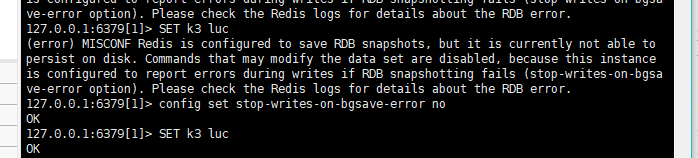
(error) MISCONF Redis is configured to save RDB snapshots, but it is currently not able to persist on disk. Commands that may modify the data set are disabled, because this instance is configured to report errors during writes if RDB snapshotting fails (stop-writes-on-bgsave-error option). Please check the Redis logs for details about the RDB error.
127.0.0.1:6379[1]> config set stop-writes-on-bgsave-error no

A very simple set operation

127.0.0.1:6379[1]> Configure the stop writing error number on bgsave

I checked some related solutions on the Internet
this problem can be avoided by setting the stop writes on bgsave error value to No
solution 1:
one is to modify through the redis command line. This method is convenient and direct. The change takes effect directly to solve the problem.

Example of command line modification method:

127.0.0.1:6379[1]> config set stop-writes-on-bgsave-error no

Solution 2:
modify the redis.conf configuration file directly, but restart redis after the change
modify the redis.conf file:
(1) VIM opens the redis.conf file configured for redis server,
(2) use the quick matching mode:
/stop writes on bgsave error to locate the stop writes on bgsave error string,
(3) set the following yes to No.

Keytool: How to solve javax.net.ssl.SSLHandshakeException Error?

A java microservice function exception in the environment, look at the logs reporting errors.
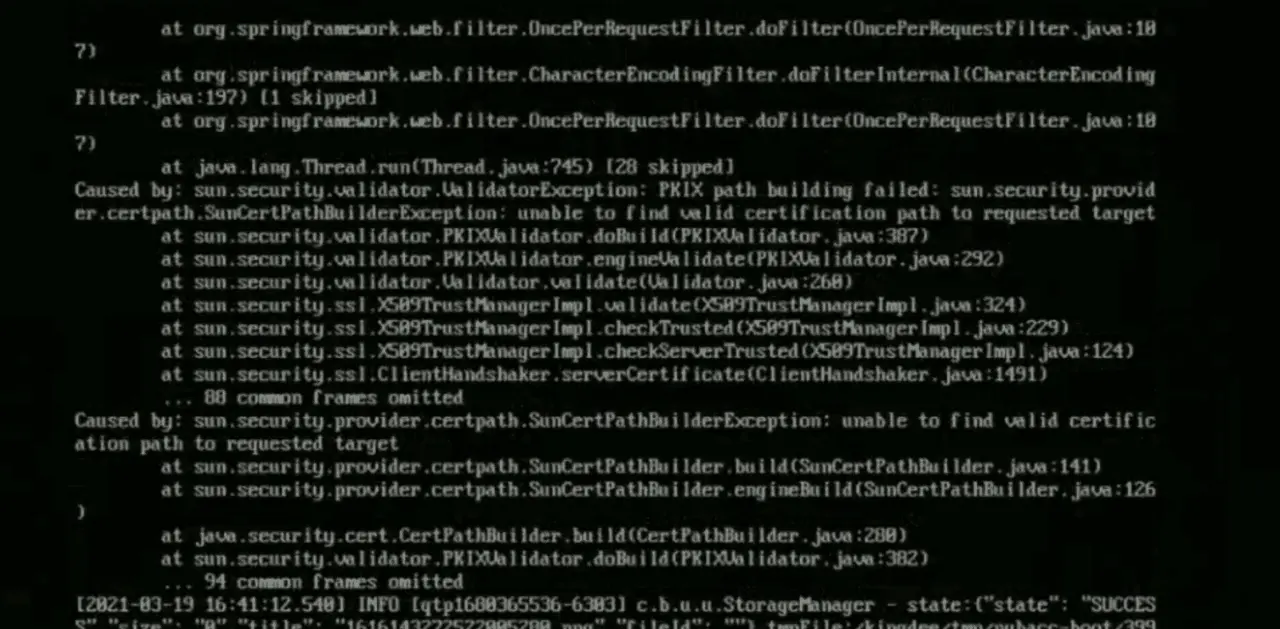
javax.net.ssl.SSLHandshakeException: sun.security.validator.ValidatorException: PKIX path building failed: sun.security.provider.certpath.SunCertPathBuilderException: unable to find valid certification path to requested target

Reason: The self-signed certificate used by the customer is not trusted by jdk.

Import the customer domain SSL certificate into jdk library.

# export LANG=”en_US.UTF-8″
# openssl s_client -connect www.example.com:443 < /dev/null | sed -ne ‘/-BEGIN CERTIFICATE-/,/-END CERTIFICATE-/p’ > www.example.com.crt
# keytool -import  -file  www.example.com.crt  -alias  www.example.com  -keystore $JAVA_HOME/jre/lib/security/cacerts  –storepass “changeit” –noprompt   -trustcacerts

Restart the relevant java application and solve it.

Vue-element-admin Use npm install Error: npm ERR! Error while executing:

This post is about solving the error when installing dependencies on vue-element-admin.
When using npm install to download dependencies, the first problem I encountered was as follows.

npm ERR! Error while executing:
npm ERR! D:\git\Git\cmd\git.EXE ls-remote -h -t https://github.com/nhn/raphael.git
npm ERR!
npm ERR! fatal: unable to access ‘https://github.com/nhn/raphael.git/’: OpenSSL SSL_read: Connection was reset, errno 10054
npm ERR!
npm ERR! exited with error code: 128
npm ERR! A complete log of this run can be found in:
npm ERR! C:\Users\new\AppData\Roaming\npm-cache_logs\2021-09-08T01_40_03_853Z-debug.log

This is a bad network, you can change a network and then re-download the dependency, I re-downloaded after changing the network, and encountered another kind of error, as follows.

npm ERR! Error while executing:
npm ERR! D:\git\Git\cmd\git.EXE ls-remote -h -t https://github.com/nhn/raphael.git
npm ERR!
npm ERR! fatal: unable to access ‘https://github.com/nhn/raphael.git/’: Failed to connect to github.com port 443: Timed out
npm ERR!
npm ERR! exited with error code: 128
npm ERR! A complete log of this run can be found in:
npm ERR! C:\Users\new\AppData\Roaming\npm-cache_logs\2021-09-08T01_23_18_405Z-debug.log

This problem can be solved by executing directly from the terminal.

git config –global url.“https://”.insteadOf git://

After execution, download the dependency again, and it will download normally

Error from server (BadRequest): a container name must be specified for pod

report errors

Previously, I used kubectl logs -f <POD-name> -n <nameSpace> to view the logs of a pod. One day when I used this command to check the status of a pod that was runnning, I got an error.

Error from server (BadRequest): a container name must be specified for pod xxx ,choose one of:[xxx  xxx]


Causes and treatment of error reporting

Reason: originally, a pod used a container. When you use the command to view the pod log, the log of the pod’s container will be output…
but one day, the architect adjusted the structure of the pod and enabled multiple containers in a pod. From then on, you need to specify which container to view the pod when viewing the log. You can use the command – C < container_ name> Specify that the name of the container that can be viewed is listed in the choose one of error message

 kubectl logs -f  <POD-name> -n <nameSpace> -c  <container_name> 


[Solved] Appium Install Error: Original error: Neither ANDROID_HOME nor ANDROID_SDK_ROOT environment variab

Operating environment.
Appium-windows-1.21.0,手机vivo s7/Android 10
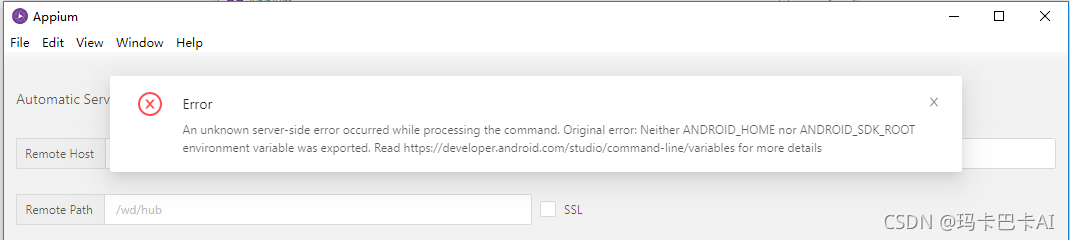
appium startup error: An unknown server-side error occurred while processing the command. Original error: Neither ANDROID_HOME nor ANDROID_SDK_ROOT environment variable was exported. Read https://developer.android.com/studio/command-line/variables for more details
The general idea is that the SDK environment variables are not configured correctly and cannot be read, so you can use manual configuration.

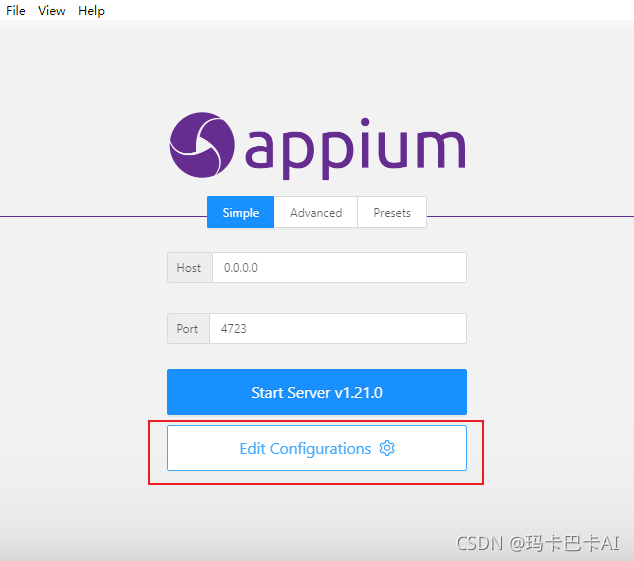
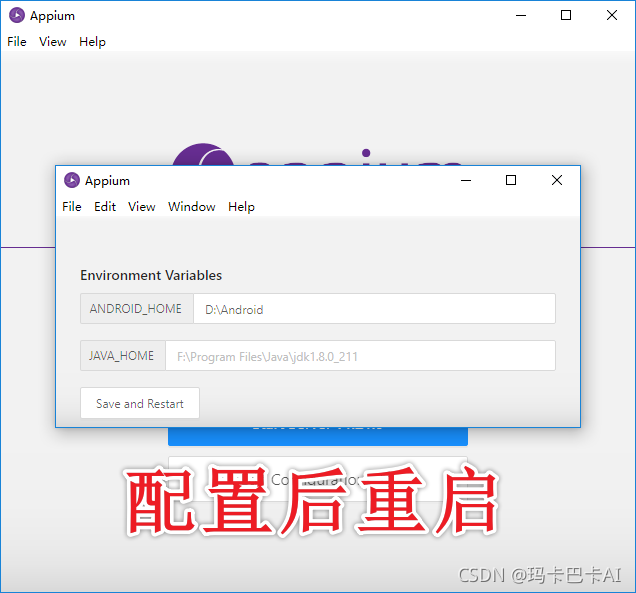
Solution, manually select the android SDK


I thought this would be solved, I did not expect that there are new mishaps
An unknown server-side error occurred while processing the command. Original error: Error executing adbExec. Original error: ‘Command ‘D:\Android\platform-tools\adb.exe -P 5037 -s 2591584f install -g ‘C:\Program Files\Appium\resources\app\node_modules\appium\node_modules\io.appium.settings\apks\settings_apk-debug.apk’’ exited with code 1’; Stderr: ‘adb: failed to install C:\Program Files\Appium\resources\app\node_modules\appium\node_modules\io.appium.settings\apks\settings_apk-debug.apk: Failure [INSTALL_FAILED_ABORTED: User rejected permissions]’; Code: ‘1’

Solution: Because the Vivo phone I used did not give permission to open the developer mode to connect to debug after a one-time installation of several appium-related apk, just keep agreeing, you can enter.

[Solved] ELK Log System Error: “statusCode“:429,“error“:“Too Many Requests“,“message“ Data too large

Elk log system error

The error information is as follows:

{"statusCode":429,"error":"Too Many Requests","message":"[circuit_breaking_exception] [parent] Data too large, data for [indices:data/write/bulk[s]] would be [2087165840/1.9gb], which is larger than the limit of [2040109465/1.8gb], real usage: [2087165392/1.9gb], new bytes reserved: [448/448b], usages [request=0/0b, fielddata=182738/178.4kb, in_flight_requests=448/448b, model_inference=0/0b, accounting=89449992/85.3mb], with { bytes_wanted=2087165840 & bytes_limit=2040109465 & durability=\"PERMANENT\" }"}

Du Niang said something, which probably means that the memory given to ES is not enough. However, there is no timely recovery of memory
too much data leads to insufficient memory. You can set the memory limit of fielddata, which is 60% by default

Solution 1: modify the configuration file

Modify the ES configuration file and add the following configuration
[ root@sjyt -node-1 ~]# vim /etc/elasticsearch/elasticsearch.yml

# Avoid OOM, which can have a significant impact on the cluster, by combining request and fielddata breakers to ensure that the combination of the two does not use more than 70% of the heap memory.
indices.breaker.total.limit: 80%

# With this setting, the longest unused (LRU) fielddata will be reclaimed to make room for new data   
indices.fielddata.cache.size: 10%

# fielddata breaker defaults to set the heap as the upper limit of fielddata size.
indices.breaker.fielddata.limit: 60%

The #request breaker estimates the size of structures that need to complete other request parts, such as creating an aggregation bucket, with a default limit of 40% of the heap memory.
indices.breaker.request.limit: 40%

#Longest unused (LRU) fielddata will be reclaimed to make room for new data Must add configuration
indices.breaker.total.use_real_memory: false

After removing the note:

indices.breaker.total.limit: 80%  
indices.fielddata.cache.size: 10%
indices.breaker.fielddata.limit: 60%
indices.breaker.request.limit: 40%
indices.breaker.total.use_real_memory: false

Solution 2: dynamic setting

Reference connection: https://blog.csdn.net/sdlyjzh/article/details/48035723

PUT /_cluster/settings
{
"persistent" : {
"indices.breaker.fielddata.limit" : "40%"
}
}

When the size of the fielddata circuit breaker exceeds the set value, the data too large mentioned at the beginning will appear.

ASIC VCS Error: Error-[VCS_COM_UNE] Cannot find VCS compiler [Solved]

[xxxx@localhost ~]$ vcs -h

Error-[VCS_COM_UNE] Cannot find VCS compiler
  VCS compiler not found. Environment variable VCS_HOME 
  (/opt/eda/synopsys/vcs-mx/N-2017.12-SP2/linux) is selecting a directory in 
  which there isn't a compiler 
  '/opt/eda/synopsys/vcs-mx/N-2017.12-SP2/linux/bin/vcs1' for a machine of 
  this type 'linux'.
  Please check whether 'VCS_HOME' is incorrect; if not, see below.

 Perhaps vcs hasn't been installed for machine of type "linux".
 Or the installation has been damaged.
 To verify whether vcsN-2017.12 supports machine of type "Linux 3.10.0-1160.31.1.el7.x86_64",
 please look at ReleaseNotes for more details .
 We determine the machine type from uname; maybe uname is incorrect.
 You can fix installation problems by reinstalling from CDROM 
 or downloading it from the Synopsys ftp server. 
 For assistance, please contact vcs technical support
 at [email protected] or call 1-800-VERILOG 

Two solutions:

1. Specify VCs as 64 bit mode through the – full64 parameter

alias vcs ='vcs -full64'

2. Set VCS_ TARGET_ Arch is linux64

export VCS_TARGET_ARCH=linux64