Category Archives: Error

[SSL: CERTIFICATE_VERIFY_FAILED] certificate verify failed [Solved]

1. Problem phenomenon

Error reported by Ubuntu machine or docker container

Traceback (most recent call last):
  File "main.py", line 200, in <module>
  File "attribute_extract/extract_attribute.py", line 37, in __init__
  File "attribute_extract/models.py", line 25, in __init__
  File "torchvision/models/resnet.py", line 199, in resnet50
  File "torch/hub.py", line 433, in load_state_dict_from_url
  File "torch/hub.py", line 349, in _download_url_to_file
  File "urllib/request.py", line 162, in urlopen
  File "urllib/request.py", line 465, in open
  File "urllib/request.py", line 483, in _open
  File "urllib/request.py", line 443, in _call_chain
  File "urllib/request.py", line 1286, in https_open
  File "urllib/request.py", line 1245, in do_open
urllib.error.URLError: <urlopen error [SSL: CERTIFICATE_VERIFY_FAILED] certificate verify failed (_ssl.c:645)>

2. Solutions

sudo apt-get update 
sudo apt-get install ca-certificates
sudo update-ca-certificates --fresh
export SSL_CERT_DIR=/etc/ssl/certs

How to Solve Docker failed to initialize Error

In this case, there is no need to reinstall the docker
rename the docker directory under C:\users\administrator\appdata\roaming (this directory depends on where docker is installed on everyone’s computer. My directory is: C:\users\ZK\appdata\roaming) to docker_Backup (actually delete and backup)
reason: start docker for windows.exe , which prompts that docker is not started. Click to start docker, and everything is restored as before. The original container reason is that my previous docker image installation directory is on disk e, and the application is automatically installed on the default Disk C after upgrading


Solution: docker generates a file dockerdesktop.vhdx , move this file to the newly installed directory or set {setting ---- > resources ---- > advanced ---- > disk image location} in the dockerdesktop.vhdx application (Note: a new directory will be generated. I change the permission, delete and replace it) remember to back up

Result: both the original vhdx file and the image are.

How to Solve NPM update check failed Error

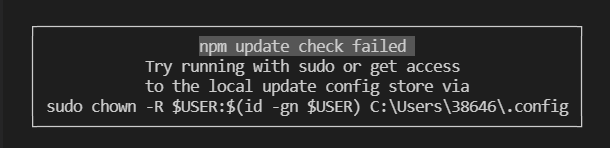
npm update check failed

When using NPM, the following suddenly appears: although it doesn’t seem to affect the use, it’s annoying to come out every time

Solution:
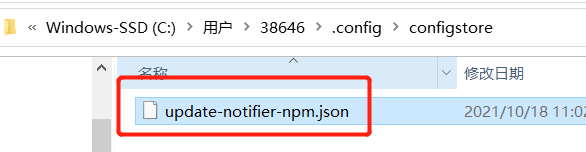
first, enter the corresponding folder. According to the above figure, my folder is C:\users\38646.config

you can find another folder. After entering a JSON

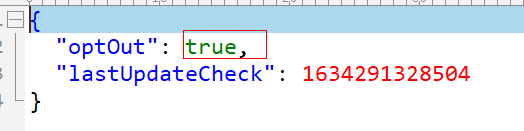
use the editing tool to open the JSON file and change the value of optoute to true

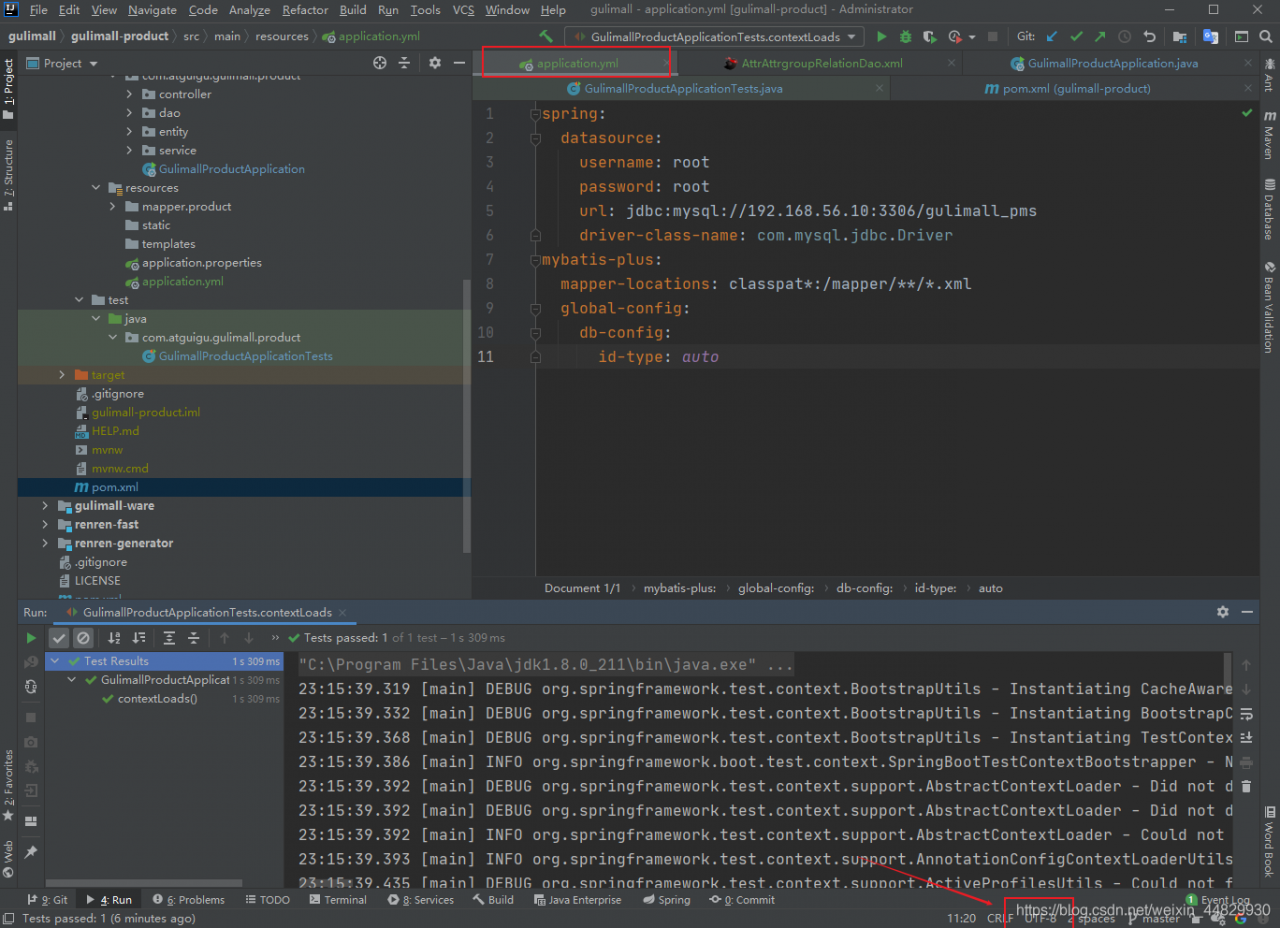
How to Solve Error: Failed to load ApplicationContext

Solution: failed to load ApplicationContext

Generally, it can be solved according to the following steps
Step 1: check the annotation
check whether there are the following annotations

@RunWith(SpringRunner.class)
@SpringBootTest

If not, add dependencies and add comments

<dependency>
    <groupId>junit</groupId>
    <artifactId>junit</artifactId>
    <version>4.13</version>
    <scope>test</scope>
</dependency>

Step 2: check the package name
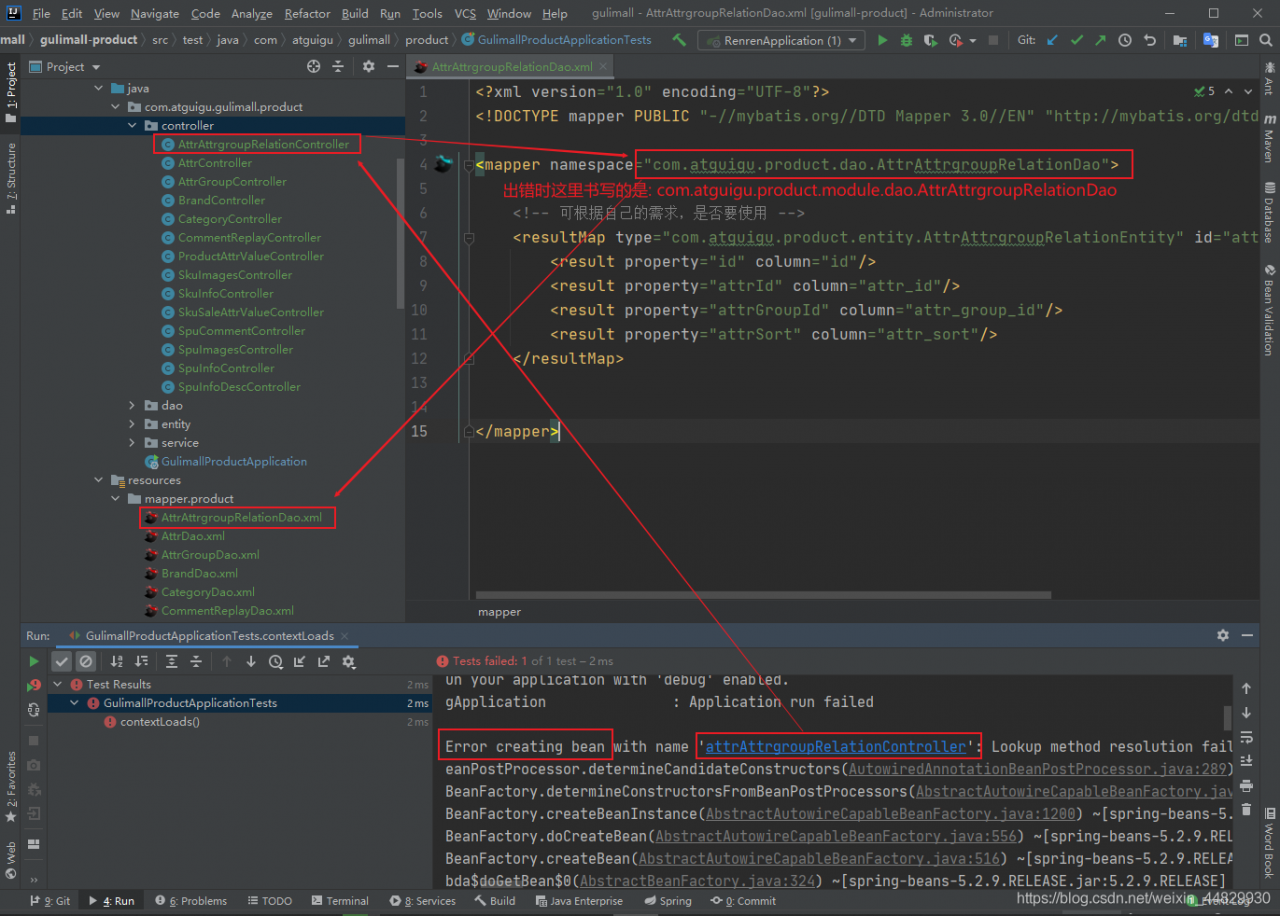
check whether the package name or package path in the XML file is correct, because beans are configured through XML. If they cannot be loaded, they are usually injected into the XML file in the container.

Example:

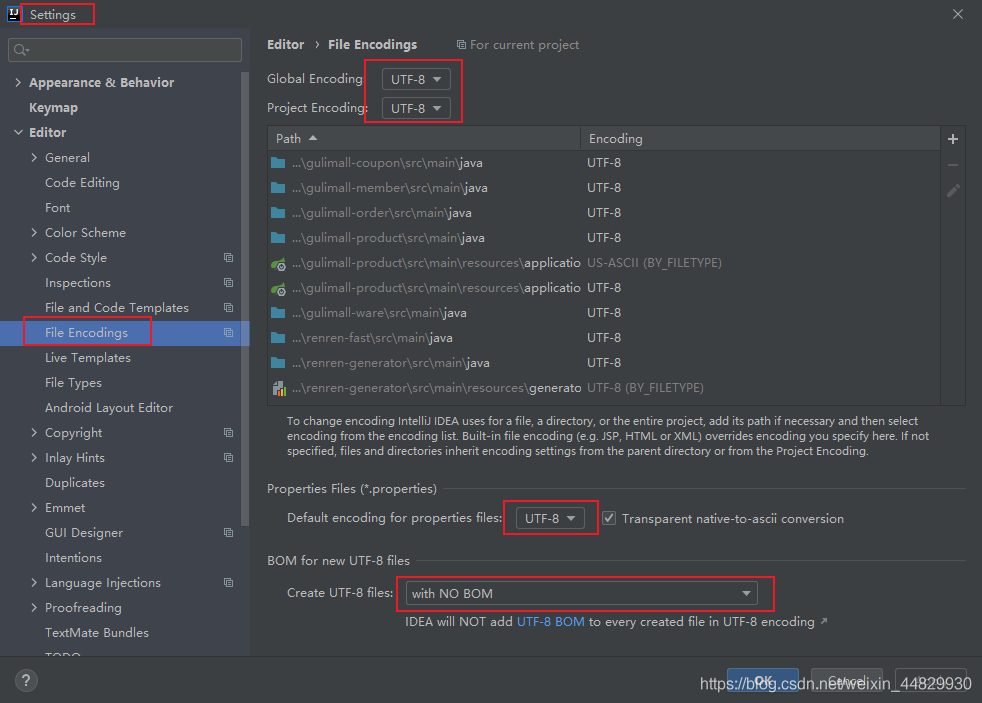
Step 3: check the encoding format
setting

application.yml

application.yml

[Solved] Qt UpdateLayeredWindowIndirect failed for ptDst Error

Error encountered when setting QT window transparent shaded border:

The widget used in the code implementation is embedded with a frame, and the white background and fillet style settings are set for the frame

Then directly call the setgraphicseffect method on the widget to add the shadow effect, and the above error occurs.

Solution:

Remove the shadow setting of the widget and directly set the shadow on the frame, UI -> frame-> Setgraphicseffect calls shadow.

After testing, the above error printing will not appear again.

[Solved] Maven Error: parent.relativePath points at wrong local POM

Maven Project Error Messages:

Project build error: Non-resolvable parent POM for com.sap.cloud.sample:connectivity:[unknown-version]: Failure to find com.sap.cloud.sample:sdk-samples-parent:pom:1.0.0 in https://repo.maven.apache.org/maven2 was cached in the local repository, resolution will not be reattempted until the update interval of central has elapsed or updates are forced and ‘parent.relativePath’ points at wrong local POM


Analyze
A parent dependency is defined in the pom.xml of my Maven project named connectivity:

But there is no local pom.xml in the upper-level folder dis of connectivity, so Maven will report the above error message.


Solution
Create a new pom.xml in the upper-level folder dis of the current project, and define the content of sdk-samples-parent.

After the problem is solved.

Clickhouse error: XXXX.XXXX_local20211009 (8fdb18e9-bb4c-42d8-8fdb-18e9bb4c02d8): auto…

Code: 49, e.displayText() = DB::Exception: Part 20211009_67706_67706_0 is covered by 20211009_67118_67714_12 but should be merged into 20211009_67706_67715_1. This shouldn’t happen often., Stack trace (when copying this message, always include the lines below):
Error Messages:
XXXX.XXXX_local20211009 (8fdb18e9-bb4c-42d8-8fdb-18e9bb4c02d8): auto DB::StorageReplicatedMergeTree::processQueueEntry(ReplicatedMergeTreeQueue::SelectedEntryPtr)::(anonymous class)::operator()(DB::StorageReplicatedMergeTree::LogEntryPtr &) const: Code: 49, e.displayText() = DB::Exception: Part 20211009_67706_67706_0 is covered by 20211009_67118_67714_12 but should be merged into 20211009_67706_67715_1. This shouldn’t happen often., Stack trace (when copying this message, always include the lines below):
Solution 1.
1. Try to delete the local table and the distributed table XXXX.XXXX_local20211009

Tez Execute MR Task Error [How to Solve]

Question

I’m executing the DWS Layer command DWS_load_member_When start.sh 2020-07-21 , an error is reported. This is all the error information

which: no hbase in (:/opt/install/jdk1.8.0_231/bin:/usr/local/sbin:/usr/local/bin:/usr/sbin:/usr/bin:/opt/install/hadoop-2.9.2/bin:/opt/install/hadoop-2.9.2/sbin:/opt/install/flume-1.9.0/bin:/opt/install/hive-2.3.7/bin:/opt/install/datax/bin:/opt/install/spark-2.4.5/bin:/opt/install/spark-2.4.5/sbin:/root/bin)
SLF4J: Class path contains multiple SLF4J bindings.
SLF4J: Found binding in [jar:file:/opt/install/hive-2.3.7/lib/log4j-slf4j-impl-2.6.2.jar!/org/slf4j/impl/StaticLoggerBinder.class]
SLF4J: Found binding in [jar:file:/opt/install/tez-0.9.2/lib/slf4j-log4j12-1.7.10.jar!/org/slf4j/impl/StaticLoggerBinder.class]
SLF4J: Found binding in [jar:file:/opt/install/hadoop-2.9.2/share/hadoop/common/lib/slf4j-log4j12-1.7.25.jar!/org/slf4j/impl/StaticLoggerBinder.class]
SLF4J: See http://www.slf4j.org/codes.html#multiple_bindings for an explanation.
SLF4J: Actual binding is of type [org.apache.logging.slf4j.Log4jLoggerFactory]

Logging initialized using configuration in jar:file:/opt/install/hive-2.3.7/lib/hive-common-2.3.7.jar!/hive-log4j2.properties Async: true
Query ID = root_20211014210413_76de217f-e97b-4435-adca-7e662260ab0b
Total jobs = 1
Launching Job 1 out of 1
Status: Running (Executing on YARN cluster with App id application_1634216554071_0002)

----------------------------------------------------------------------------------------------
        VERTICES      MODE        STATUS  TOTAL  COMPLETED  RUNNING  PENDING  FAILED  KILLED  
----------------------------------------------------------------------------------------------

----------------------------------------------------------------------------------------------
VERTICES: 00/00  [>>--------------------------] 0%    ELAPSED TIME: 8.05 s     
----------------------------------------------------------------------------------------------
Status: Failed--------------------------------------------------------------------------------
Application application_1634216554071_0002 failed 2 times due to AM Container for appattempt_1634216554071_0002_000002 exited with  exitCode: -103
Failing this attempt.Diagnostics: [2021-10-14 21:04:29.444]Container [pid=20544,containerID=container_1634216554071_0002_02_000001] is running beyond virtual memory limits. Current usage: 277.4 MB of 1 GB physical memory used; 2.7 GB of 2.1 GB virtual memory used. Killing container.
Dump of the process-tree for container_1634216554071_0002_02_000001 :
	|- PID PPID PGRPID SESSID CMD_NAME USER_MODE_TIME(MILLIS) SYSTEM_TIME(MILLIS) VMEM_USAGE(BYTES) RSSMEM_USAGE(PAGES) FULL_CMD_LINE
	|- 20544 20543 20544 20544 (bash) 0 0 115900416 304 /bin/bash -c /opt/install/jdk1.8.0_231/bin/java  -Xmx819m -Djava.io.tmpdir=/opt/install/hadoop-2.9.2/data/tmp/nm-local-dir/usercache/root/appcache/application_1634216554071_0002/container_1634216554071_0002_02_000001/tmp -server -Djava.net.preferIPv4Stack=true -Dhadoop.metrics.log.level=WARN -XX:+PrintGCDetails -verbose:gc -XX:+PrintGCTimeStamps -XX:+UseNUMA -XX:+UseParallelGC -Dlog4j.configuratorClass=org.apache.tez.common.TezLog4jConfigurator -Dlog4j.configuration=tez-container-log4j.properties -Dyarn.app.container.log.dir=/opt/install/hadoop-2.9.2/logs/userlogs/application_1634216554071_0002/container_1634216554071_0002_02_000001 -Dtez.root.logger=INFO,CLA -Dsun.nio.ch.bugLevel='' org.apache.tez.dag.app.DAGAppMaster --session 1>/opt/install/hadoop-2.9.2/logs/userlogs/application_1634216554071_0002/container_1634216554071_0002_02_000001/stdout 2>/opt/install/hadoop-2.9.2/logs/userlogs/application_1634216554071_0002/container_1634216554071_0002_02_000001/stderr  
	|- 20551 20544 20544 20544 (java) 367 99 2771484672 70721 /opt/install/jdk1.8.0_231/bin/java -Xmx819m -Djava.io.tmpdir=/opt/install/hadoop-2.9.2/data/tmp/nm-local-dir/usercache/root/appcache/application_1634216554071_0002/container_1634216554071_0002_02_000001/tmp -server -Djava.net.preferIPv4Stack=true -Dhadoop.metrics.log.level=WARN -XX:+PrintGCDetails -verbose:gc -XX:+PrintGCTimeStamps -XX:+UseNUMA -XX:+UseParallelGC -Dlog4j.configuratorClass=org.apache.tez.common.TezLog4jConfigurator -Dlog4j.configuration=tez-container-log4j.properties -Dyarn.app.container.log.dir=/opt/install/hadoop-2.9.2/logs/userlogs/application_1634216554071_0002/container_1634216554071_0002_02_000001 -Dtez.root.logger=INFO,CLA -Dsun.nio.ch.bugLevel= org.apache.tez.dag.app.DAGAppMaster --session 

[2021-10-14 21:04:29.458]Container killed on request. Exit code is 143
[2021-10-14 21:04:29.481]Container exited with a non-zero exit code 143. 
For more detailed output, check the application tracking page: http://hadoop1:8088/cluster/app/application_1634216554071_0002 Then click on links to logs of each attempt.
. Failing the application.
FAILED: Execution Error, return code 2 from org.apache.hadoop.hive.ql.exec.tez.TezTask. Application application_1634216554071_0002 failed 2 times due to AM Container for appattempt_1634216554071_0002_000002 exited with  exitCode: -103
Failing this attempt.Diagnostics: [2021-10-14 21:04:29.444]Container [pid=20544,containerID=container_1634216554071_0002_02_000001] is running beyond virtual memory limits. Current usage: 277.4 MB of 1 GB physical memory used; 2.7 GB of 2.1 GB virtual memory used. Killing container.
Dump of the process-tree for container_1634216554071_0002_02_000001 :
	|- PID PPID PGRPID SESSID CMD_NAME USER_MODE_TIME(MILLIS) SYSTEM_TIME(MILLIS) VMEM_USAGE(BYTES) RSSMEM_USAGE(PAGES) FULL_CMD_LINE
	|- 20544 20543 20544 20544 (bash) 0 0 115900416 304 /bin/bash -c /opt/install/jdk1.8.0_231/bin/java  -Xmx819m -Djava.io.tmpdir=/opt/install/hadoop-2.9.2/data/tmp/nm-local-dir/usercache/root/appcache/application_1634216554071_0002/container_1634216554071_0002_02_000001/tmp -server -Djava.net.preferIPv4Stack=true -Dhadoop.metrics.log.level=WARN -XX:+PrintGCDetails -verbose:gc -XX:+PrintGCTimeStamps -XX:+UseNUMA -XX:+UseParallelGC -Dlog4j.configuratorClass=org.apache.tez.common.TezLog4jConfigurator -Dlog4j.configuration=tez-container-log4j.properties -Dyarn.app.container.log.dir=/opt/install/hadoop-2.9.2/logs/userlogs/application_1634216554071_0002/container_1634216554071_0002_02_000001 -Dtez.root.logger=INFO,CLA -Dsun.nio.ch.bugLevel='' org.apache.tez.dag.app.DAGAppMaster --session 1>/opt/install/hadoop-2.9.2/logs/userlogs/application_1634216554071_0002/container_1634216554071_0002_02_000001/stdout 2>/opt/install/hadoop-2.9.2/logs/userlogs/application_1634216554071_0002/container_1634216554071_0002_02_000001/stderr  
	|- 20551 20544 20544 20544 (java) 367 99 2771484672 70721 /opt/install/jdk1.8.0_231/bin/java -Xmx819m -Djava.io.tmpdir=/opt/install/hadoop-2.9.2/data/tmp/nm-local-dir/usercache/root/appcache/application_1634216554071_0002/container_1634216554071_0002_02_000001/tmp -server -Djava.net.preferIPv4Stack=true -Dhadoop.metrics.log.level=WARN -XX:+PrintGCDetails -verbose:gc -XX:+PrintGCTimeStamps -XX:+UseNUMA -XX:+UseParallelGC -Dlog4j.configuratorClass=org.apache.tez.common.TezLog4jConfigurator -Dlog4j.configuration=tez-container-log4j.properties -Dyarn.app.container.log.dir=/opt/install/hadoop-2.9.2/logs/userlogs/application_1634216554071_0002/container_1634216554071_0002_02_000001 -Dtez.root.logger=INFO,CLA -Dsun.nio.ch.bugLevel= org.apache.tez.dag.app.DAGAppMaster --session 

[2021-10-14 21:04:29.458]Container killed on request. Exit code is 143
[2021-10-14 21:04:29.481]Container exited with a non-zero exit code 143. 
For more detailed output, check the application tracking page: http://hadoop1:8088/cluster/app/application_1634216554071_0002 Then click on links to logs of each attempt.
. Failing the application.

It’s taken off to interpret this error message.

The logs at the beginning of slf4j before line 9 do not need to be concerned, but only indicate that some unimpeded packages are missing;

Then is the implementation of the task I submitted this time

Logging initialized using configuration in jar:file:/opt/install/hive-2.3.7/lib/hive-common-2.3.7.jar!/hive-log4j2.properties Async: true
Query ID = root_20211014210413_76de217f-e97b-4435-adca-7e662260ab0b
Total jobs = 1
Launching Job 1 out of 1
Status: Running (Executing on YARN cluster with App id application_1634216554071_0002)

----------------------------------------------------------------------------------------------
        VERTICES      MODE        STATUS  TOTAL  COMPLETED  RUNNING  PENDING  FAILED  KILLED  
----------------------------------------------------------------------------------------------

----------------------------------------------------------------------------------------------
VERTICES: 00/00  [>>--------------------------] 0%    ELAPSED TIME: 8.05 s     
----------------------------------------------------------------------------------------------

Tell me again that the task execution failed, and the program exit number is - 103

Status: Failed--------------------------------------------------------------------------------
Application application_1634216554071_0002 failed 2 times due to AM Container for appattempt_1634216554071_0002_000002 exited with  exitCode: -103
Failing this attempt.Diagnostics: [2021-10-14 21:04:29.444]Container [pid=20544,containerID=container_1634216554071_0002_02_000001] is running beyond virtual memory limits. Current usage: 277.4 MB of 1 GB physical memory used; 2.7 GB of 2.1 GB virtual memory used. Killing container.

Followed by a list of reasons: container [attribute describing container] is running beyond virtual memory limits. Current usage: 277.4 MB of 1 GB physical memory used; 2.7 GB of 2.1 GB virtual memory used. Killing container ② means that my running task (actually container, which is easy to understand here) exceeds the limit of virtual memory. The usage is 1g of physical memory. My task uses 277.4m, which is OK. It’s not too much, but I use 2.7g of virtual memory, which is obviously unreasonable, So nodemanager killed it.

The last part of the log, which is also the most informative part, will tell us where the problem will be recorded

Dump of the process-tree for container_1634216554071_0002_02_000001 :
	|- PID PPID PGRPID SESSID CMD_NAME USER_MODE_TIME(MILLIS) SYSTEM_TIME(MILLIS) VMEM_USAGE(BYTES) RSSMEM_USAGE(PAGES) FULL_CMD_LINE
	|- ...
	|- ...

[2021-10-14 21:04:29.458]Container killed on request. Exit code is 143
[2021-10-14 21:04:29.481]Container exited with a non-zero exit code 143. 
For more detailed output, check the application tracking page: http://hadoop1:8088/cluster/app/application_1634216554071_0002 Then click on links to logs of each attempt.
. Failing the application.

Focus on the penultimate sentence: for more detailed output, check the application tracking page: http://hadoop1:8088/cluster/app/application_1634216554071_0002 then click on links to logs of each attempt. http://hadoop1:8088/cluster/app/application_1634216554071_0002 find it. ③

Solution:

The old idea is that there are problems in resources, and there are only two directions: 1. Too heavy tasks and 2. Too few resources. In this case, the task is not heavy. It can also be seen from the occupied physical memory that the memory I allocate is more than enough to complete the task. The problem lies in the virtual memory. Then I have two ideas about the “virtual memory”. First, what configuration can intervene? Which configuration is it?

Next time you encounter this kind of problem, you can think about these points:

Cancel the check of virtual memory

yarn-site.xmlSet in or program yarn.nodemanager.vmem-check-enabledasfalse

<property>
 	<name>yarn.nodemanager.vmem-check-enabled</name>
	 <value>false</value>
 	<description>Whether virtual memory limits will be enforced for containers.</description>
</property>

In addition to virtual memory super, there may be a super-physical memory, also can be set to check physical memory yarn.nodemanager.pmem-check-enabledis false, personally think that this approach is not very good, if a program has a memory leak and other issues, cancel the check, it could lead to cluster collapse.

Increase mapreduce.map.memory.mbormapreduce.reduce.memory.mb

This method should be given priority. This method can not only solve the virtual memory, perhaps most of the time the physical memory is not enough, this method is just suitable.

<property>    
    <name>mapreduce.map.memory.mb</name>    
    <value>2048</value>    
    <description>maps</description>
</property>
<property>    
    <name>mapreduce.reduce.memory.mb</name>    
    <value>2048</value>    
    <description>reduces</description>
</property>


Properly increase yarn.nodemanager.vmem-pmem-ratiothe size, one physical memory increases multiple virtual memory, but this parameter should not be too outrageous, the essence is to deal with mapreduce.reduce.memory.db* yarn.nodemanager.vmem-pmem-ratio.

If the memory occupied by the task is too ridiculous, more consideration should be whether the program has a memory leak, whether there is data skew, etc., and the program should be given priority to solve such problems.

Android: How to Solve libuv Compile Error

Libuv compiler error resolution libuv compiler Android version error resolution

Error reporting reference articles

report errors

error adding symbols: Archive has no index; run ranlib to add one

libuvcopy 1.42.0
Andro10 64 degrees
kali2021
cmake
ndk21

cmake -DCMAKE_TOOLCHAIN_FILE=/usr/lib/android-ndk/build/cmake/android.toolchain.cmake -DANDROID_ABI=armeabi-v7a .. -DCMAKE_SYSTEM_NAME=Android -DANDROID_NATIVE_API_LEVEL=21

Add-DANDROID_NATIVE_API_LEVEL=21will done, the current version of libuv版do not support thearmeabi-v7a

Eslint error “no undef” and eslint rule configuration in Vue cli3

1. The no undef error occurs because there cannot be undefined variables in the syntax detection of eslint. Add them to the rules {} of. Eslintrc.js in the root directory   ‘ no-undef’: 0

Then restart the editor.

2. Rule configuration of eslint

In. Eslintrc.js, the rules of rules are as follows:

rules: {
    "RuleName": [RuleValue, RuleConfig]
}
Rule value:
"off" or 0 // turn off detection rules
"warn" or 1 // turn on and treat the open detection rule as a warning (does not affect the exit code)
"error" or 2 // turn on and treat the detection rule as an error (1 when the exit code is triggered)

The eslint rules are as follows:

"no-alert": 0,//prohibit the use of alert confirm prompt
"no-array-constructor": 2,//prohibit the use of array constructors
"no-bitwise": 0,//prohibit the use of bitwise operators
"no-caller": 1,//prohibit the use of arguments.caller or arguments.callee
"no-catch-shadow": 2,//prohibit the use of catch clause arguments with the same name as external scope variables
"no-class-assign": 2,//forbid to assign a value to a class
"no-cond-assign": 2,//prohibit the use of assignment statements in conditional expressions
"no-console": 2,//Disable the use of consoles
"no-const-assign": 2,//forbid to modify variables declared by const
"no-constant-condition": 2,//prohibit the use of constant expressions in conditions if(true) if(1)
"no-continue": 0,//prohibit the use of continue
"no-control-regex": 2,//prohibit the use of control characters in regular expressions
"no-debugger": 2,//Debugger is forbidden
"no-delete-var": 2,//do not use the delete operator for variables declared by var
"no-div-regex": 1,//can't use regular expressions that look like division /=foo/
"no-dupe-keys": 2,// do not allow duplicate keys when creating object literals {a:1,a:1}
"no-dupe-args": 2,// function arguments cannot be duplicated
"no-duplicate-case": 2,//Switch case tags cannot be duplicated
"no-else-return": 2,//If there is a return in the if statement, it can't be followed by an else statement
"no-empty": 2,//Block statement can not be empty
"no-empty-character-class": 2,//the content of [] in a regular expression cannot be empty
"no-empty-label": 2,//prohibit the use of empty labels
"no-eq-null": 2,//Disable the use of == or ! = operator
"no-eval": 1,//forbid the use of eval
"no-ex-assign": 2,//forbid to assign values to exception parameters in catch statements
"no-extend-native": 2,//prohibit extending native objects
"no-extra-bind": 2,//Disable unnecessary function binding
"no-extra-boolean-cast": 2,//Disable unnecessary bool conversions
"no-extra-parens": 2,//prohibit unnecessary parentheses
"no-extra-semi": 2,//prohibit superfluous colons
"no-fallthrough": 1,//prohibit switch pass-through
"no-floating-decimal": 2,//Disable omitting 0 .5 in floating point numbers 3.
"no-func-assign": 2,//Disable duplicate function declarations
"no-implicit-coercion": 1,//prohibit implicit conversions
"no-implied-eval": 2,//prohibit the use of implicit eval
"no-inline-comments": 0,//prohibit inline comments
"no-inline-declarations": [2, "functions"],//prohibit the use of declarations (variables or functions) in block statements
"no-invalid-regexp": 2,//Disable invalid regular expressions
"no-invalid-this": 2,//prohibit invalid this, only for constructors, classes, object literals
"no-irregular-whitespace": 2,//no irregular spaces
"no-iterator": 2,//prohibit the use of __iterator__ attribute
"no-label-var": 2,// the name of a label cannot be the same as the name of a variable declared by var
"no-labels": 2,//prohibit label declarations
"no-lone-blocks": 2,//Disable unnecessary nested blocks
"no-lonely-if": 2,//prohibit only if statements inside an else statement
"no-loop-func": 1,//prohibit the use of functions in loops (if they do not refer to external variables and do not form closures)
"no-mixed-requires": [0, false],//No mixed declaration types when declaring
"no-mixed-spaces-and-tabs": [2, false],//prohibit mixing tabs and spaces
"linebreak-style": [0, "windows"],//line break style
"no-multi-spaces": 1,//no extra spaces
"no-multi-str": 2,//Strings can't use \ newlines
"no-multiple-empty-lines": [1, {"max": 2}],//no more than 2 empty lines
"no-native-reassign": 2,//no native objects can be rewritten
"no-negated-in-lhs": 2,// the left side of the in operator cannot have !
"no-nested-ternary": 0,//Nested trinomials are forbidden
"no-new": 1,//forbid to construct an instance using new without assigning a value
"no-new-func": 1,//Disable the use of new Function
"no-new-object": 2,//Disable the use of new Object()
"no-new-require": 2,//prohibit the use of new require
"no-new-wrappers": 2,//prohibit the use of new to create wrapper instances, new String new Boolean new Number
"no-obj-calls": 2,//can't call built-in global objects, such as Math() JSON()
"no-octal": 2,//forbid the use of octal numbers
"no-octal-escape": 2,//forbid the use of octal escape sequences
"no-param-reassign": 2,//Disable reassigning parameters
"no-path-concat": 0,//do not use __dirname or __filename for path concatenation in node
"no-plusplus": 0,//Prohibit the use of ++, --
"no-process-env": 0,//prohibit the use of process.env
"no-process-exit": 0,//prohibit the use of process.exit()
"no-proto": 2,//prohibit the use of __proto__ attribute
"no-redeclare": 2,//prohibit repeated declaration of variables
"no-regex-spaces": 2,//prohibit the use of multiple spaces in regular expression literals /foo bar/
"no-restricted-modules": 0,//If the specified module is disabled, an error will be reported if it is used
"no-return-assign": 1,//return statements cannot have assignment expressions in them
"no-script-url": 0,//prohibit the use of javascript:void(0)
"no-self-compare": 2,//can't compare itself
"no-sequences": 0,//forbid the use of comma operators
"no-shadow": 2,//Variables in external scopes cannot have the same name as variables or arguments in the scope they are contained in
"no-shadow-restricted-names": 2,//restricted identifiers specified in strict mode cannot be used as variable names at declaration time
"no-spaced-func": 2,//Function call with no spaces between function name and ()
"no-sparse-arrays": 2,//Sparse arrays are forbidden, [1,,2]
"no-sync": 0,//nodejs disables sync methods
"no-ternary": 0,//prohibit the trinomial operator
"no-tiling-spaces": 1,//don't have spaces after the end of a line
"no-this-before-super": 0,//no use of this or super before calling super()
"no-throw-literal": 2,//Disable throwing literal errors throw "error";
"no-undef": 1,//no undefined variables
"no-undef-init": 2,//variables can't be assigned to undefined when initialized
"no-undefined": 2,//can't use undefined
"no-unexpected-multiline": 2,//Avoid multi-line expressions
"no-underscore-dangle": 1,//Identifiers cannot start or end with _
"no-unneeded-ternary": 2,//prohibit unnecessary nesting var isYes = answer === 1 ?true : false;
"no-unreachable": 2,//no unexecutable code
"no-unused-expressions": 2,//prohibit unused expressions
"no-unused-vars": [2, {"vars": "all", "args": "after-used"}],//no variables or arguments that are declared and not used
"no-use-before-define": 2,//no-use-before-define
"no-useless-call": 2,//prohibit unnecessary calls and applies
"no-void": 2,//Disable void operator
"no-var": 0,//disable var and replace it with let and const
"no-warning-comments": [1, { "terms": ["todo", "fixme", "xxx"], "location": "start" }],//can't have warning comments
"no-with": 2,//disable with

"array-bracket-spacing": [2, "never"],//Whether to allow non-empty arrays with extra spaces inside
"arrow-parens": 0,//arrow function enclosed in parentheses
"arrow-spacing": 0,//=>s pre/post brackets
"accessor-pairs": 0,//use getter/setter in objects
"block-scoped-var": 0,//use var in block statements
"brace-style": [1, "1tbs"],//brace style
"callback-return": 1,//avoid multiple calls to callbacks and stuff
"camelcase": 2,//force camelcase naming
"comma-dangle": [2, "never"],//no comma at the end of object literals
"comma-spacing": 0,//space before and after the comma
"comma-style": [2, "last"],//comma style, at the beginning or at the end of a line when a line break occurs
"complexity": [0, 11],//complexity of the loop
"computed-property-spacing": [0, "never"],//whether to allow computed key names or whatever
"consistent-return": 0,//whether to allow omission after return
"consistent-this": [2, "that"],//this alias
"constructor-super": 0,//non-derived class cannot call super, derived class must call super
"curly": [2, "all"],//must use {} in if(){}
"default-case": 2,//switch statement must have default at the end
"dot-location": 0,//the location of the object accessor, whether it is at the beginning or the end of the line when a line break occurs
"dot-notation": [0, { "allowKeywords": true }],//avoid unnecessary square brackets
"eol-last": 0,//file ends with a single newline character
"eqeqeq": 2,//must use all-equal
"func-names": 0,//Function expressions must have names
"func-style": [0, "declaration"],//function style, specifying that only function declarations/function expressions can be used
"generator-star-spacing": 0,// the space before and after the generator function*
"guard-for-in": 0,//for in loop to be filtered with if statement
"handle-callback-err": 0,//nodejs handles errors
"id-length": 0,//the length of the variable name
"indent": [2, 4],//indent style
"init-declarations": 0,//must assign initial values when declaring
"key-spacing": [0, { "beforeColon": false, "afterColon": true }],//space before and after the colon in the object literal
"lines-around-comment": 0, // before/ after line comment
"max-depth": [0, 4],// depth of nested blocks
"max-len": [0, 80, 4],//maximum length of string
"max-nested-callbacks": [0, 2],//Nesting depth of callbacks
"max-params": [0, 3],//the maximum number of parameters a function can have is 3
"max-statements": [0, 10],//the maximum number of statements within the function
"new-cap": 2,//the first line of the function name must be called in upper case using new, the first line must be called in lower case without new
"new-parens": 2,//new must be called with parentheses
"newline-after-var": 2,//whether a blank line is required after variable declaration
"object-curly-spacing": [0, "never"],//whether unnecessary spaces are allowed inside curly brackets
"object-shorthand": 0,// force object literal abbreviation syntax
"one-var": 1,//continuous declaration
"operator-assignment": [0, "always"],//assignment operator += -= or something
"operator-linebreak": [2, "after"],//whether the operator is at the end or the beginning of a line when a line break occurs
"padded-blocks": 0,//whether to have empty lines at the beginning and end of a block statement
"prefer-const": 0,//prefer-const
"prefer-spread": 0,//prefer spread
"prefer-reflect": 0,//prefer the method of reflect
"quotes": [1, "single"],//quote type `` "" ''
"quote-props":[2, "always"],// whether to force double quotes for property names in object literals
"radix": 2,//parseInt must specify the second parameter
"id-match": 0,//name detection
"require-yield": 0,//generator function must have yield
"semi": [2, "always"],//statement forced to end with a semicolon
"semi-spacing": [0, {"before": false, "after": true}],//spaces before and after the semicolon
"sort-vars": 0,//variable declaration sorting
"space-after-keywords": [0, "always"],//whether to leave a space after the keyword
"space-before-blocks": [0, "always"],//whether to have a space before blocks that do not start with a new line
"space-before-function-parents": [0, "always"],//space before parentheses for function definitions
"space-in-parents": [0, "never"],//space inside parentheses
"space-infix-ops": 0,//whether there should be spaces around the midfix operator
"space-return-throw-case": 2,//would you like a space after the return throw case
"space-unary-ops": [0, { "words": true, "nonwords": false }],//spaces before/after unary operators
"spaced-comment": 0,//comment style should have spaces or something
"strict": 2,//use strict mode
"use-isnan": 2,//forbid to use NaN when comparing, only use isNaN()
"valid-jsdoc": 0,//jsdoc rule
"valid-typeof": 2,//must use legal typeof value
"vars-on-top": 2,//var must be placed at the top of the scope
"wrap-iife": [2, "inside"],//immediately execute the parenthesis style of the function expression
"wrap-regex": 0,// regular expression literals wrapped in parentheses
"yoda": [2, "never"]//prohibit yoda conditions
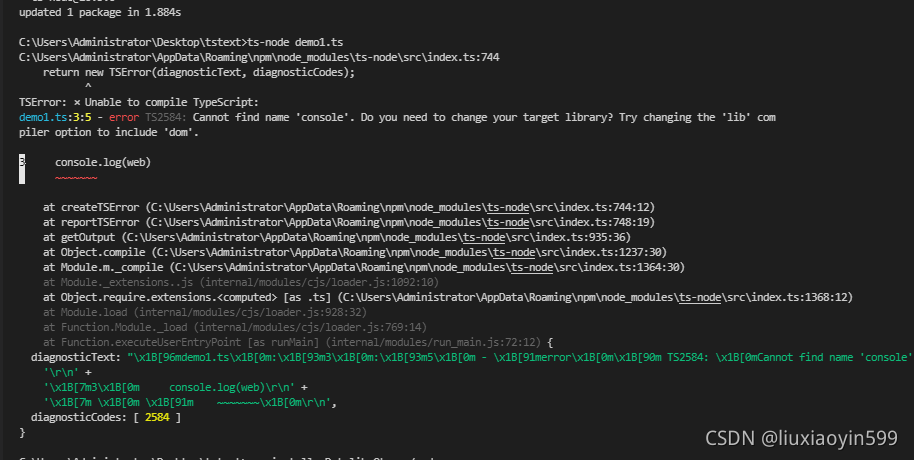
[Solved] Typescript installation TS node execution error

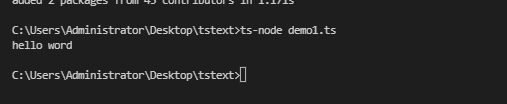
1.First time using ts Install ts-node compile error
1.1 Installing typescript
npm install typescript -g || yarn global add typescript
1.2 Install ts-node to execute code
npm install -g ts-node

2. Install it again at this point
npm install -D tslib @types/node
3. Then execute the ts-node file name and you’re done