Enter the project root directory and open the command line for execution
git config --unset credential.helper
git config credential.helper store
Then pull the code in the command line mode and re-enter the account and password
Enter the project root directory and open the command line for execution
git config --unset credential.helper
git config credential.helper store
Then pull the code in the command line mode and re-enter the account and password
There is no problem in direct operation, but the architecture/IPA/upload Appstore reports the error “unsupported architecture. Your executable contains unsupported architecture ‘[x86_64, i386]
Solution:
remove the supporting simulators i386 and x86_64 architecture in Baidu’s aipbase.framework and aipocrsdk.framework
# Use lipo -info to see what architecture is included
lipo -info AipBase.framework/AipBase  # Architectures in the fat file: AipBase are: i386 x86_64 armv7 armv7s arm64
# remove x86_64, i386
lipo -remove x86_64 AipBase.framework/AipBase -o AipBase.framework/AipBase
lipo -remove i386 AipBase.framework/AipBase -o AipBase.framework/AipBase
lipo -remove x86_64 AipOcrSdk.framework/AipOcrSdk -o AipOcrSdk.framework/AipOcrSdk
lipo -remove i386 AipOcrSdk.framework/AipOcrSdk -o AipOcrSdk.framework/AipOcrSdk
# re-check
lipo -info AipBase.framework/AipBase # Architectures in the fat file: AipBase are: armv7 armv7s arm64
1. After installing hive, it can’t start and reports the following error
[ERROR] Terminal initialization failed; falling back to unsupported java.lang.IncompatibleClassChangeError: Found class jline
The reason is the presence of an old version of jline in the hadoop directory.
/hadoop-2.6.5/share/hadoop/yarn/lib:
-rw-r–r– 1 wkz wkz 87325 Mar 10 18:10 jline-0.9.94.jar
Solution:
Copy the JAR package of the new version of jline under hive to hadoop at.
cp /hive/lib/jline-2.12.jar ./
/hadoop-2.6.5/share/hadoop/yarn/lib:
-rw-r–r– 1 wkz wkz 87325 Mar 10 18:10 jline-0.9.94.jar
-rw-r–r– 1 wkz wkz 213854 Mar 11 22:22 jline-2.12.jar
Then delete the old jline-0.9.94.jar package, or rename it and start successfully.
————————————————
Android studio gives the following error after clicking “run app”
Installation did not succeed.
The application could not be installed: INSTALL_FAILED_USER_RESTRICTED

List of apks:
[0] 'E:\MyProject\xxx\app\build\outputs\apk\debug\xxxxx_.apk'
Installation via USB is disabled.
Troubleshooting steps:
1. It may be that the USB installation is not enabled in the developer option. Check whether it is enabled and try again
2. It is possible that the application tag of androidmanifest.xml has been added
android:appComponentFactory=""
tools:replace="android:appComponentFactory"
Delete this attribute and try again.
Generally, it is a version problem. When installing the webpack module with NPM install, specify the version, for example:
npm install [email protected] --save-dev
1. The questions are as follows:
echigh@huangchenggong:/mnt/e/work/workspace/withdraw_validdata_from_file/withdraw$ git push -u origin main
Username for 'https://github.com': echigh
Password for 'https://[email protected]':
To https://github.com/echigh/withdraw_frontbytes_of_file.git
 ! [rejected]        main -> main (fetch first)
error: failed to push some refs to 'https://github.com/echigh/withdraw_frontbytes_of_file.git'
hint: Updates were rejected because the remote contains work that you do
hint: not have locally. This is usually caused by another repository pushing
hint: to the same ref. You may want to first integrate the remote changes
hint: (e.g., 'git pull ...') before pushing again.
hint: See the 'Note about fast-forwards' in 'git push --help' for details.
2. The reason is that the remote warehouse has been changed and does not match any local commit version
Reference: [status question] why can’t you push it up sometimes… – learn git for yourself
3. Solution:
1) Merge remote changes with git pull before git push
2) Directly use git push – F to forcibly overwrite the remote warehouse. Anyway, I dare not
4. So I did this:
echigh@huangchenggong:/mnt/e/work/workspace/withdraw_validdata_from_file/withdraw$ git pull
remote: Enumerating objects: 22, done.
remote: Counting objects: 100% (22/22), done.
remote: Compressing objects: 100% (21/21), done.
remote: Total 21 (delta 13), reused 0 (delta 0), pack-reused 0
Unpacking objects: 100% (21/21), 5.03 KiB | 66.00 KiB/s, done.
From https://github.com/echigh/withdraw_frontbytes_of_file
   c6d3d5e..e50b1bc  main       -> origin/main
Merge made by the 'recursive' strategy.
 README.md | 22 ++++++++++++++++++++++
 1 file changed, 22 insertions(+)
 create mode 100644 README.md
Then push:
echigh@huangchenggong:/mnt/e/work/workspace/withdraw_validdata_from_file/withdraw$ git push
Username for 'https://github.com': echigh
Password for 'https://[email protected]':
Enumerating objects: 44, done.
Counting objects: 100% (42/42), done.
Delta compression using up to 8 threads
Compressing objects: 100% (38/38), done.
Writing objects: 100% (38/38), 3.16 MiB | 994.00 KiB/s, done.
Total 38 (delta 19), reused 0 (delta 0)
remote: Resolving deltas: 100% (19/19), completed with 2 local objects.
To https://github.com/echigh/withdraw_frontbytes_of_file.git
e50b1bc..b7684a5 main -> mainFirst, Ping github.com to test whether it can connect. Then modify the host.
Step 1: open ipaddress.com, query the following two domain names and record their corresponding IP addresses:
1.github.com
2.github.global.ssl.fastly.net
Step 2: update the host file
140.82.114.3 github.com
199.232.69.194 github.global.ssl.fastly.net
Step 3: clean up DNS and try again.
ipconfig /flushdnsSolution:
master-wei@DESKTOP-HDUPJ4Q MINGW64 /g/browser/blog/myblog (main)
$ git push origin master
error: src refspec master does not match any
error: failed to push some refs to 'https://github.com/w13411965905/myblog.git'


master-wei@DESKTOP-HDUPJ4Q MINGW64 /g/browser/blog/myblog (main)
$ git config --global --unset http.proxy

master-wei@DESKTOP-HDUPJ4Q MINGW64 /g/browser/blog/myblog (main)
$ git config --global --unset https.proxy

master-wei@DESKTOP-HDUPJ4Q MINGW64 /g/browser/blog/myblog (main)
$ git push origin main
Enumerating objects: 4, done.
Counting objects: 100% (4/4), done.
Delta compression using up to 4 threads
Compressing objects: 100% (3/3), done.
Writing objects: 100% (3/3), 35.82 MiB | 1.62 MiB/s, done.
Total 3 (delta 1), reused 0 (delta 0), pack-reused 0
reason:
The default main branch name of GitHub is main
Therefore, the push command should be git push origin main
CMD opens the run window and executes the following command:
1.svn ls https://xxx
®eject, accept (t)emporarily or accept §ermanently?When installing a debug package, the prompt is as follows
C:\Users\test>adb install "C:\Users\test\Downloads\test.apk"
Performing Streamed Install
adb: failed to install C:\Users\test\Downloads\test.apk: Failure [INSTALL_FAILED_TEST_ONLY: installPackageLI]
Solution:
adb install -t "C:\Users\test\Downloads\test.apk"
ADB install has lrtsdg six options
-L lock the application
– R replace the existing application, that is, force installation
– t allow the test package
– s to install the application on the SD card
– D allow it to be installed, that is, the installed version is lower than that on the mobile phone
– G grant all runtime permissions to the application
After we solved the problem of could not resolve com.android.tools.build: gradle: 7.0.2, we reported this error in build output

The most direct solution is to download the version of Android SDK build tools in SDK tools. The path is file >settings> Appearance& Behavior> System Settings> Android SDK> SDK Tools. Unfortunately, I couldn’t download it, so I changed the buildtoolsversion in APP/build.gradle to “31.0.2” of all my current 31.0.2 versions
In the project structure, we have also changed everything, but after running, we still report such an error

After I changed the version to 30.0.2, I still have this problem. Obviously, I have this version, but why not? When I checked my SDK tools, I found that 31.0.0 and 30.0.2/28.0.3/27.0.0 are under Android SDK build tools 31
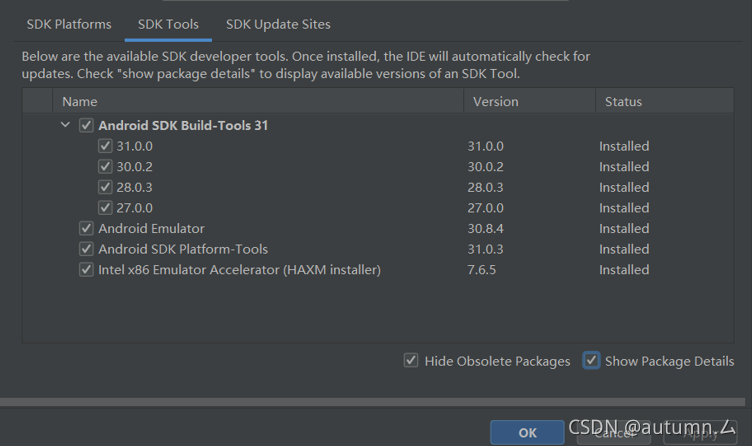
So I guessed whether it could not be found under the file, so I deleted all except the 30.0.2 version I currently use
Close Android studio and open it again. Success
Vs 2019 is installed, Microsoft Visual C + + 2015 is available, and GPU is not supported, so CUDA installation is skipped, and pip install tensorflow = = 2.1.0 is directly used. The result shows importerror: DLL load failed.
Solution: PIP uninstall tensorflow uninstall tensorflow
pip install tensorflow = = 2.0.0