reason
The settings.xml in the conf directory under the Maven installation directory is incorrectly configured
I forgot to complete <mirrors></mirrors>
Solution:
Check settings.xml for syntax errors
reason
The settings.xml in the conf directory under the Maven installation directory is incorrectly configured
I forgot to complete <mirrors></mirrors>
Solution:
Check settings.xml for syntax errors
K8s start Service Kube calico start reports the following error
Skipping datastore connection test
ERROR: Unable to access datastore to query node configuration
Terminating
Calico node failed to start
Solution:
The main reason for this problem is that the firewall of the primary node is turned on. Just turn off the firewall of the primary node (that is, the server where etcd is installed)
systemctl stop firewalld
Other possible errors
1. The address of etcd in calico configuration file is written incorrectly
2. Etcd service is not started
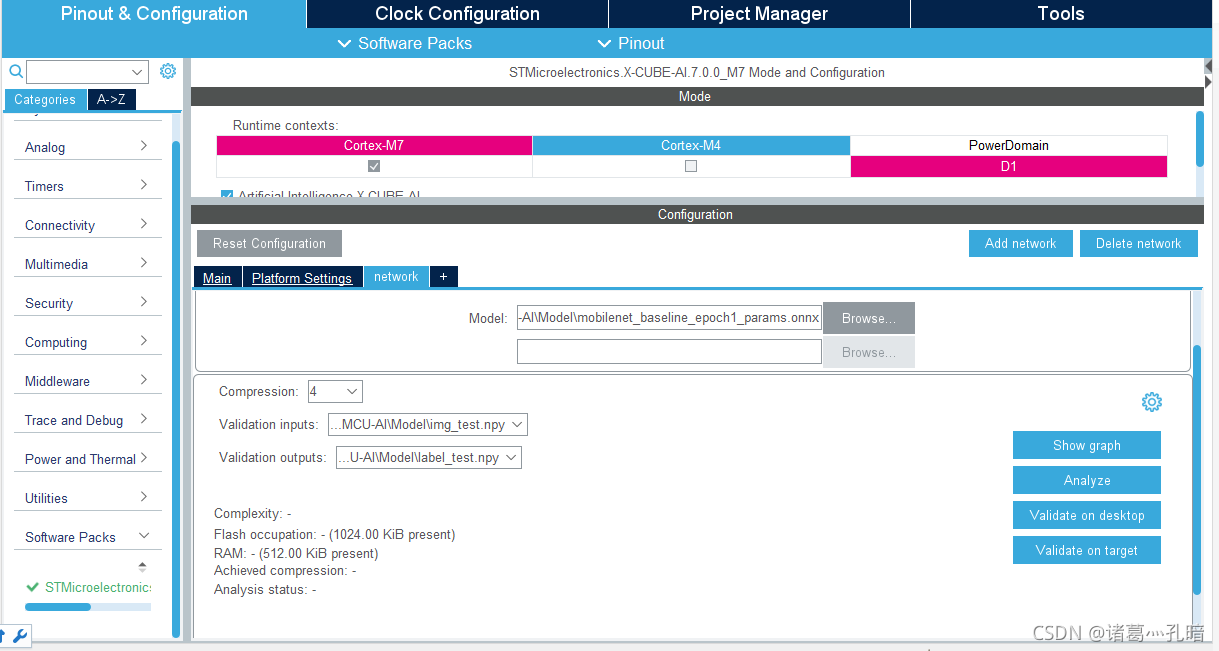
After clicking validation ontarget, the following error appears:
E200(ValidationError): stm32: Unable to bind the STM AI runtime with “network” c-model: []
connection to “serial:115200″/”115200” run-time fails
E801(HwIOError): Invalid firmware – COM5:115200
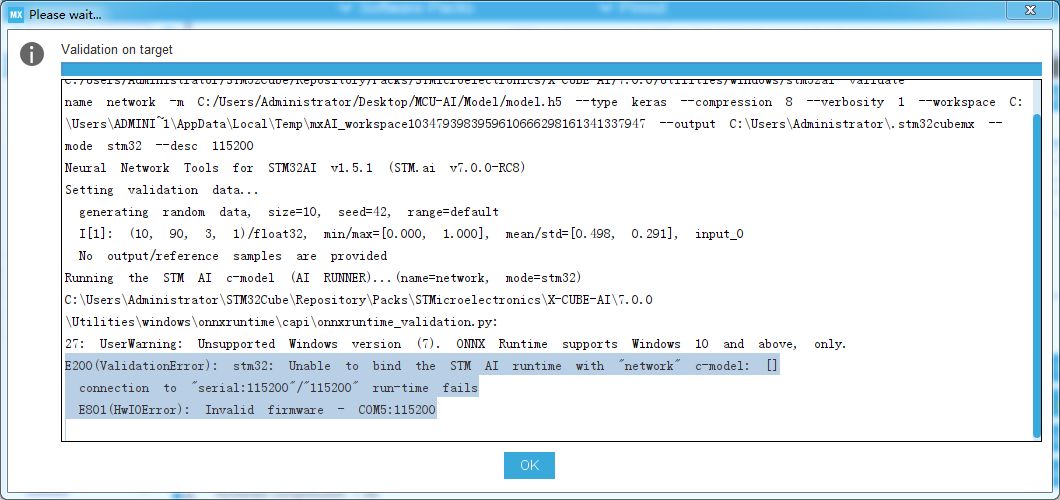
This is because the cube AI toolkit of STM32 currently only supports a single core. If you use the stm32h747 dual core board, you can switch to the M7 core.
Fatal error: stdatomic. H: no such file or directory
Under Linux, errors are reported when compiling the source code using gcc
fatal error: stdatomic.h: No such file or directory
 #include <stdatomic.h>
                       ^
compilation terminated.
The reason is that the version of GCC 4.8 is too low and requires a higher version of GCC. How to safely upgrade the GCC version?
The devtoolset package can be installed through CentOS release SCL source
yum install centos-release-scl
yum install devtoolset-8
Or add your own source to install it (I’ll take centos7 as an example)
vi /etc/yum.repos.d/CentOS-SCLo-scl.repo
[centos-sclo-sclo]
name=CentOS-7 - SCLo sclo
baseurl=http://mirror.centos.org/centos/7/sclo/$basearch/rh/
#mirrorlist=http://mirrorlist.centos.org?arch=$basearch&release=7&repo=sclo-sclo
gpgcheck=1
enabled=1
gpgkey=file:///etc/pki/rpm-gpg/RPM-GPG-KEY-CentOS-SIG-SCLo
Activate the GCC version to make it effective
scl enable devtoolset-8 bash
or
source /opt/rh/devtoolset-8/enable
At this time, you can see through the GCC — version command that the GCC version has changed to 8.X.x. it is worth noting that this only takes effect in the current bash. If it needs to take effect permanently, you can add environment variables yourself.
Solution:
Xcode options Setting
GPU Frame Capture : OpenGL ES
Metal API Vaildation: Disabled
Problem Description: if you want to restrict specific IP addresses from accessing the Clickhouse, use the following statement to create a user
drop user test;
CREATE USER test HOST IP '172.18.xxx.xxx'  IDENTIFIED WITH sha256_password BY 'test';
GRANT SHOW, SELECT, INSERT ON test.* TO test;
Client login:
ensure that the user name and password entered are correct
clickhouse-client --host 172.18.xxx.xxx --port 9000 --user test --password test -m
Error Messages:
Received from 172.18.xxx.xxx:9000. DB::Exception: test: Authentication failed:
password is incorrect or there is no user with such name.
ClickHouse client version 21.4.6.55 (official build).
Connecting to 172.18.52.122:9000 as user test.
Code: 516. DB::Exception:
     Received from 172.18.xxx.xxx:9000. DB::Exception: test: Authentication failed:
     password is incorrect or there is no user with such name.
Problem solving process:
1. Telnet database is accessible
telnet 172.18.xxx.xxx 9000
2. The database can be accessed normally when the user does not specify IP
drop user test;
CREATE USER test IDENTIFIED WITH sha256_ password BY ‘test’;
GRANT SHOW, SELECT, INSERT ON test.* TO test;
The user name and password are correct, and the network is connected. Why can’t you access normally after specifying the IP
the first thought is to look at the Clickhouse log, but no valuable information can be found by querying the Clickhouse log
where else can you provide useful information?Cilckhouse’s query_ The log appears
3. View query_ Log, initial_ Address is not the IP address of the client, but the address of the gateway
select initial_ address n from system.query_ Log QL where user = “test”
why is the address of the gateway?It turns out that the client and Clickhouse are not in the same network segment. Access across network segments must pass through the gateway.
4. After changing the authorized IP address to the gateway, it can be accessed normally
in this way, the meaning of restricting IP addresses from accessing Clickhouse is lost.
Solution:
Copy the following three files from other available scripts to the folder of error reporting scripts:
default.cfg
default.usp
*. PRM (change the position of * to the name of the error reporting script)
Reason: after the script is opened, the disk space is cleaned up, resulting in some script files being cleaned up as spam, so do not clean up the disk space after the script is opened
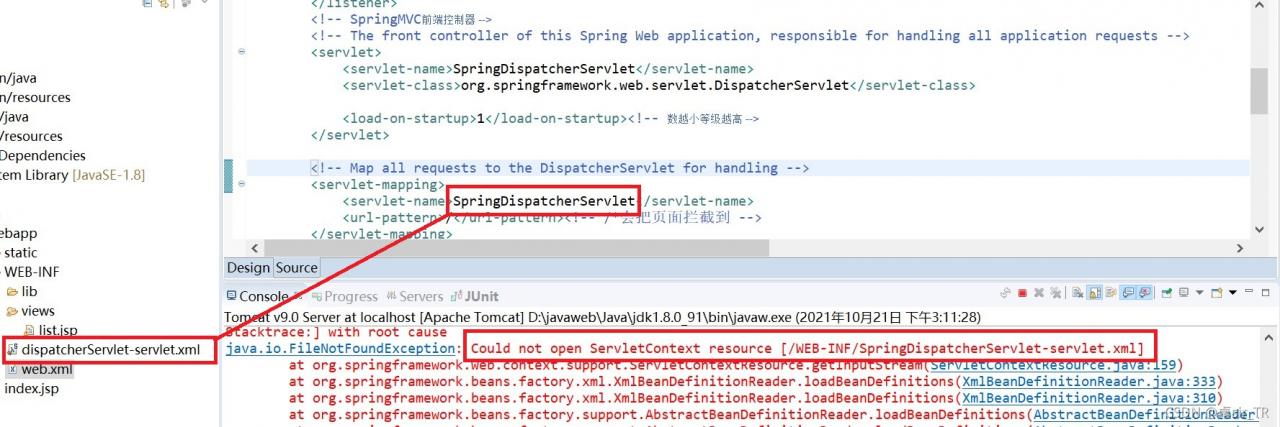
tomcat startup error:
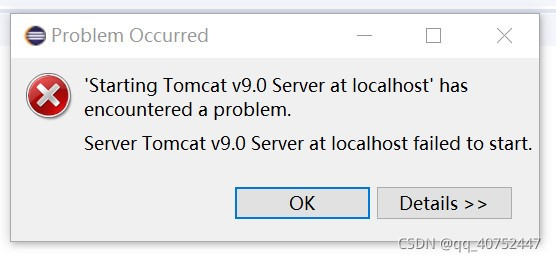
Error Messages:
Failed to start component [StandardEngine[Catalina].StandardHost[localhost].StandardContext[/ssm]]
Servlet mapping specifies an unknown servlet name [springDispatcherServlet]
error messages:
Severe: Subcontainer start failure
java.util.concurrent.ExecutionException: org.apache.catalina.LifecycleException: Failed to start component [StandardEngine[Catalina].StandardHost[localhost].StandardContext[/ssm]]
	at java.util.concurrent.FutureTask.report(FutureTask.java:122)
	at java.util.concurrent.FutureTask.get(FutureTask.java:192)
	at org.apache.catalina.core.ContainerBase.startInternal(ContainerBase.java:916)
	at org.apache.catalina.core.StandardHost.startInternal(StandardHost.java:841)
	at org.apache.catalina.util.LifecycleBase.start(LifecycleBase.java:183)
	at org.apache.catalina.core.ContainerBase$StartChild.call(ContainerBase.java:1384)
	at org.apache.catalina.core.ContainerBase$StartChild.call(ContainerBase.java:1374)
	at java.util.concurrent.FutureTask.run(FutureTask.java:266)
	at org.apache.tomcat.util.threads.InlineExecutorService.execute(InlineExecutorService.java:75)
	at java.util.concurrent.AbstractExecutorService.submit(AbstractExecutorService.java:134)
	at org.apache.catalina.core.ContainerBase.startInternal(ContainerBase.java:909)
	at org.apache.catalina.core.StandardEngine.startInternal(StandardEngine.java:262)
	at org.apache.catalina.util.LifecycleBase.start(LifecycleBase.java:183)
	at org.apache.catalina.core.StandardService.startInternal(StandardService.java:421)
	at org.apache.catalina.util.LifecycleBase.start(LifecycleBase.java:183)
	at org.apache.catalina.core.StandardServer.startInternal(StandardServer.java:930)
	at org.apache.catalina.util.LifecycleBase.start(LifecycleBase.java:183)
	at org.apache.catalina.startup.Catalina.start(Catalina.java:633)
	at sun.reflect.NativeMethodAccessorImpl.invoke0(Native Method)
	at sun.reflect.NativeMethodAccessorImpl.invoke(NativeMethodAccessorImpl.java:62)
	at sun.reflect.DelegatingMethodAccessorImpl.invoke(DelegatingMethodAccessorImpl.java:43)
	at java.lang.reflect.Method.invoke(Method.java:498)
	at org.apache.catalina.startup.Bootstrap.start(Bootstrap.java:343)
	at org.apache.catalina.startup.Bootstrap.main(Bootstrap.java:474)
Caused by: org.apache.catalina.LifecycleException: Failed to start component [StandardEngine[Catalina].StandardHost[localhost].StandardContext[/ssm]]
	at org.apache.catalina.util.LifecycleBase.handleSubClassException(LifecycleBase.java:440)
	at org.apache.catalina.util.LifecycleBase.start(LifecycleBase.java:198)
	at org.apache.catalina.core.ContainerBase$StartChild.call(ContainerBase.java:1384)
	at org.apache.catalina.core.ContainerBase$StartChild.call(ContainerBase.java:1374)
	at java.util.concurrent.FutureTask.run(FutureTask.java:266)
	at org.apache.tomcat.util.threads.InlineExecutorService.execute(InlineExecutorService.java:75)
	at java.util.concurrent.AbstractExecutorService.submit(AbstractExecutorService.java:134)
	at org.apache.catalina.core.ContainerBase.startInternal(ContainerBase.java:909)
	... 21 more
Caused by: java.lang.IllegalArgumentException: Servlet mapping specifies an unknown servlet name [springDispatcherServlet]
	at org.apache.catalina.core.StandardContext.addServletMappingDecoded(StandardContext.java:3179)
	at org.apache.catalina.Context.addServletMappingDecoded(Context.java:881)
	at org.apache.catalina.startup.ContextConfig.configureContext(ContextConfig.java:1391)
	at org.apache.catalina.startup.ContextConfig.webConfig(ContextConfig.java:1168)
	at org.apache.catalina.startup.ContextConfig.configureStart(ContextConfig.java:774)
	at org.apache.catalina.startup.ContextConfig.lifecycleEvent(ContextConfig.java:301)
	at org.apache.catalina.util.LifecycleBase.fireLifecycleEvent(LifecycleBase.java:123)
	at org.apache.catalina.core.StandardContext.startInternal(StandardContext.java:5056)
	at org.apache.catalina.util.LifecycleBase.start(LifecycleBase.java:183)
	... 27 more
	十月 21, 2021 1:52:20 下午 org.apache.catalina.startup.Catalina start
Severe: The required service component failed to start, so Tomcat could not be started
LifecycleException: child container failed to start
	at org.apache.catalina.core.ContainerBase.startInternal(ContainerBase.java:928)
	at org.apache.catalina.core.StandardEngine.startInternal(StandardEngine.java:262)
	at org.apache.catalina.util.LifecycleBase.start(LifecycleBase.java:183)
	at org.apache.catalina.core.StandardService.startInternal(StandardService.java:421)
	at org.apache.catalina.util.LifecycleBase.start(LifecycleBase.java:183)
	at org.apache.catalina.core.StandardServer.startInternal(StandardServer.java:930)
	at org.apache.catalina.util.LifecycleBase.start(LifecycleBase.java:183)
	at org.apache.catalina.startup.Catalina.start(Catalina.java:633)
	at sun.reflect.NativeMethodAccessorImpl.invoke0(Native Method)
	at sun.reflect.NativeMethodAccessorImpl.invoke(NativeMethodAccessorImpl.java:62)
	at sun.reflect.DelegatingMethodAccessorImpl.invoke(DelegatingMethodAccessorImpl.java:43)
	at java.lang.reflect.Method.invoke(Method.java:498)
	at org.apache.catalina.startup.Bootstrap.start(Bootstrap.java:343)
	at org.apache.catalina.startup.Bootstrap.main(Bootstrap.java:474)
Caused by: java.util.concurrent.ExecutionException: org.apache.catalina.LifecycleException: child container failed to start
	at java.util.concurrent.FutureTask.report(FutureTask.java:122)
	at java.util.concurrent.FutureTask.get(FutureTask.java:192)
	at org.apache.catalina.core.ContainerBase.startInternal(ContainerBase.java:916)
	... 13 more
	Caused by: java.lang.IllegalArgumentException: Servlet mapping specifies an unknown servlet name [springDispatcherServlet]
	at org.apache.catalina.core.StandardContext.addServletMappingDecoded(StandardContext.java:3179)
	at org.apache.catalina.Context.addServletMappingDecoded(Context.java:881)
	at org.apache.catalina.startup.ContextConfig.configureContext(ContextConfig.java:1391)
	at org.apache.catalina.startup.ContextConfig.webConfig(ContextConfig.java:1168)
	at org.apache.catalina.startup.ContextConfig.configureStart(ContextConfig.java:774)
	at org.apache.catalina.startup.ContextConfig.lifecycleEvent(ContextConfig.java:301)
	at org.apache.catalina.util.LifecycleBase.fireLifecycleEvent(LifecycleBase.java:123)
	at org.apache.catalina.core.StandardContext.startInternal(StandardContext.java:5056)
	at org.apache.catalina.util.LifecycleBase.start(LifecycleBase.java:183)
	... 27 more
Solution:
In the web.xml configuration, the names of servlet name and servlet mapping are inconsistent, resulting in changing the name in servlet mapping to dispatcher servlet
note:
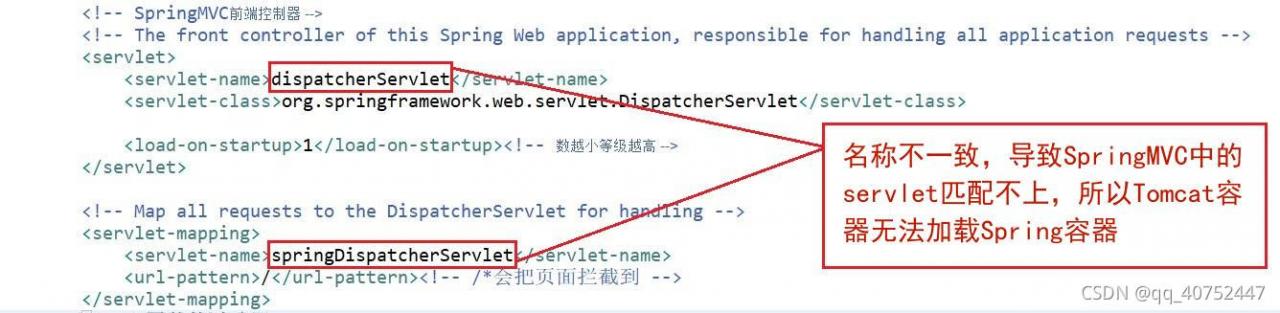
note: because I have a dispatcher servlet-servlet.xml file, the name should correspond!
After entering .\vcpkg.exe install brotli: x64 windows, you see the following prompt, so you go to log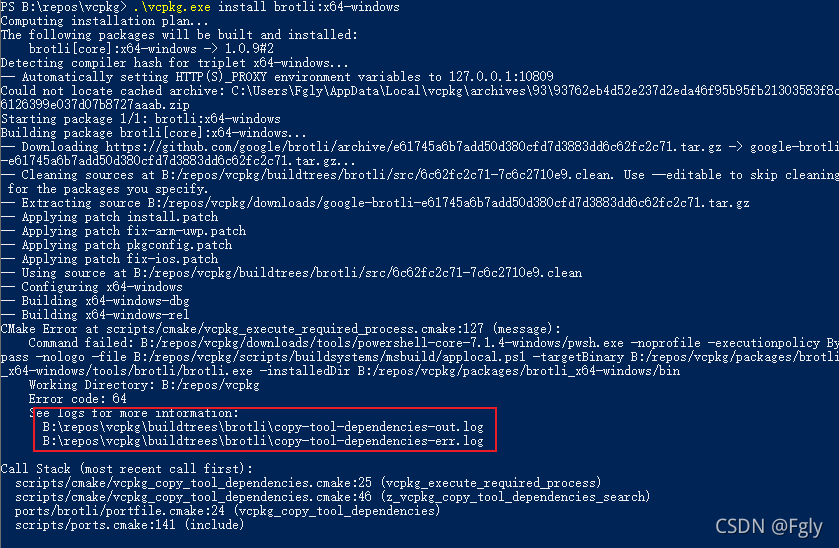
and find the prompt vcpkg/scripts/buildsystems/msbuild/applocal. PS1 'is not recognized as the name of a script file . It turns out that this file is missing, so you directly go to the vcpkg official website to supplement this file,
Question
I am a win10 system and installed the docker desktop version. One day after I uninstalled Lenovo housekeeper, docker could not be started normally. The error is as follows:
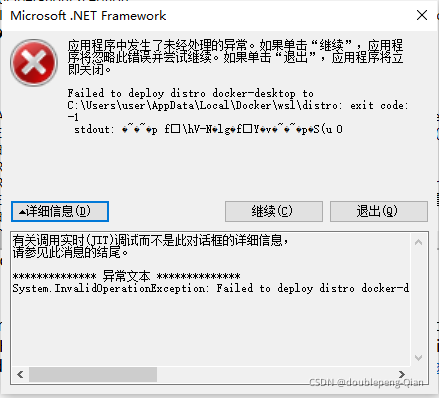
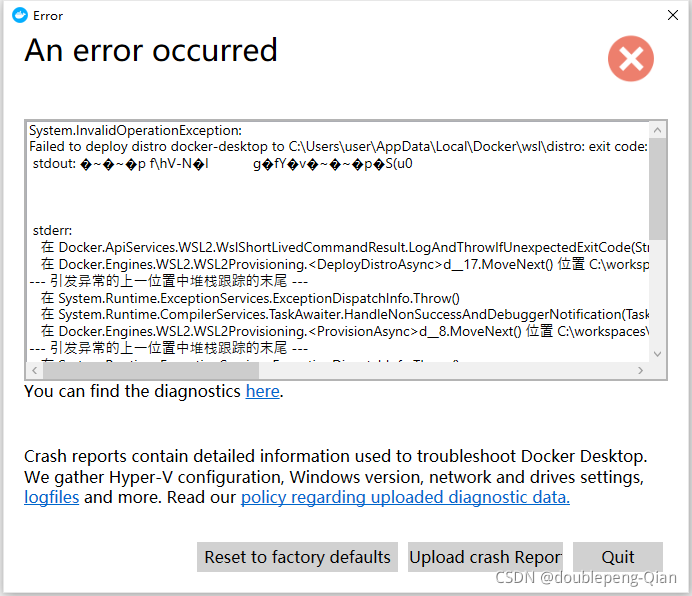
Error reporting details:
System.InvalidOperationException:
Failed to deploy distro docker-desktop to C:\Users\user\AppData\Local\Docker\wsl\distro: exit code: -1
 stdout: �~�~�p f\hV-N�l	g�fY�v�~�~�p�S(u0


 stderr:
   在 Docker.ApiServices.WSL2.WslShortLivedCommandResult.LogAndThrowIfUnexpectedExitCode(String prefix, ILogger log, Int32 expectedExitCode) 位置 C:\workspaces\master-merge\src\github.com\docker\pinata\win\src\Docker.ApiServices\WSL2\WslCommand.cs:行号 146
   在 Docker.Engines.WSL2.WSL2Provisioning.<DeployDistroAsync>d__17.MoveNext() 位置 C:\workspaces\master-merge\src\github.com\docker\pinata\win\src\Docker.Engines\WSL2\WSL2Provisioning.cs:行号 168
--- The end of the stack trace in the previous location where the exception was raised ---
   在 System.Runtime.ExceptionServices.ExceptionDispatchInfo.Throw()
   在 System.Runtime.CompilerServices.TaskAwaiter.HandleNonSuccessAndDebuggerNotification(Task task)
   在 Docker.Engines.WSL2.WSL2Provisioning.<ProvisionAsync>d__8.MoveNext() 位置 C:\workspaces\master-merge\src\github.com\docker\pinata\win\src\Docker.Engines\WSL2\WSL2Provisioning.cs:行号 77
--- The end of the stack trace in the previous location where the exception was raised ---
   在 System.Runtime.ExceptionServices.ExceptionDispatchInfo.Throw()
   在 System.Runtime.CompilerServices.TaskAwaiter.HandleNonSuccessAndDebuggerNotification(Task task)
   在 Docker.Engines.WSL2.LinuxWSL2Engine.<DoStartAsync>d__28.MoveNext() 位置 C:\workspaces\master-merge\src\github.com\docker\pinata\win\src\Docker.Engines\WSL2\LinuxWSL2Engine.cs:行号 180
--- The end of the stack trace in the previous location where the exception was raised ---
   在 System.Runtime.ExceptionServices.ExceptionDispatchInfo.Throw()
   在 System.Runtime.CompilerServices.TaskAwaiter.HandleNonSuccessAndDebuggerNotification(Task task)
   在 Docker.ApiServices.StateMachines.TaskExtensions.<WrapAsyncInCancellationException>d__0.MoveNext() 位置 C:\workspaces\master-merge\src\github.com\docker\pinata\win\src\Docker.ApiServices\StateMachines\TaskExtensions.cs:行号 29
--- The end of the stack trace in the previous location where the exception was raised ---
   在 System.Runtime.ExceptionServices.ExceptionDispatchInfo.Throw()
   在 System.Runtime.CompilerServices.TaskAwaiter.HandleNonSuccessAndDebuggerNotification(Task task)
   在 Docker.ApiServices.StateMachines.StartTransition.<DoRunAsync>d__5.MoveNext() 位置 C:\workspaces\master-merge\src\github.com\docker\pinata\win\src\Docker.ApiServices\StateMachines\StartTransition.cs:行号 67
--- The end of the stack trace in the previous location where the exception was raised ---
   在 System.Runtime.ExceptionServices.ExceptionDispatchInfo.Throw()
   在 Docker.ApiServices.StateMachines.StartTransition.<DoRunAsync>d__5.MoveNext() 位置 C:\workspaces\master-merge\src\github.com\docker\pinata\win\src\Docker.ApiServices\StateMachines\StartTransition.cs:行号 92
Solution
1. Attempt to uninstall and reinstall is invalid
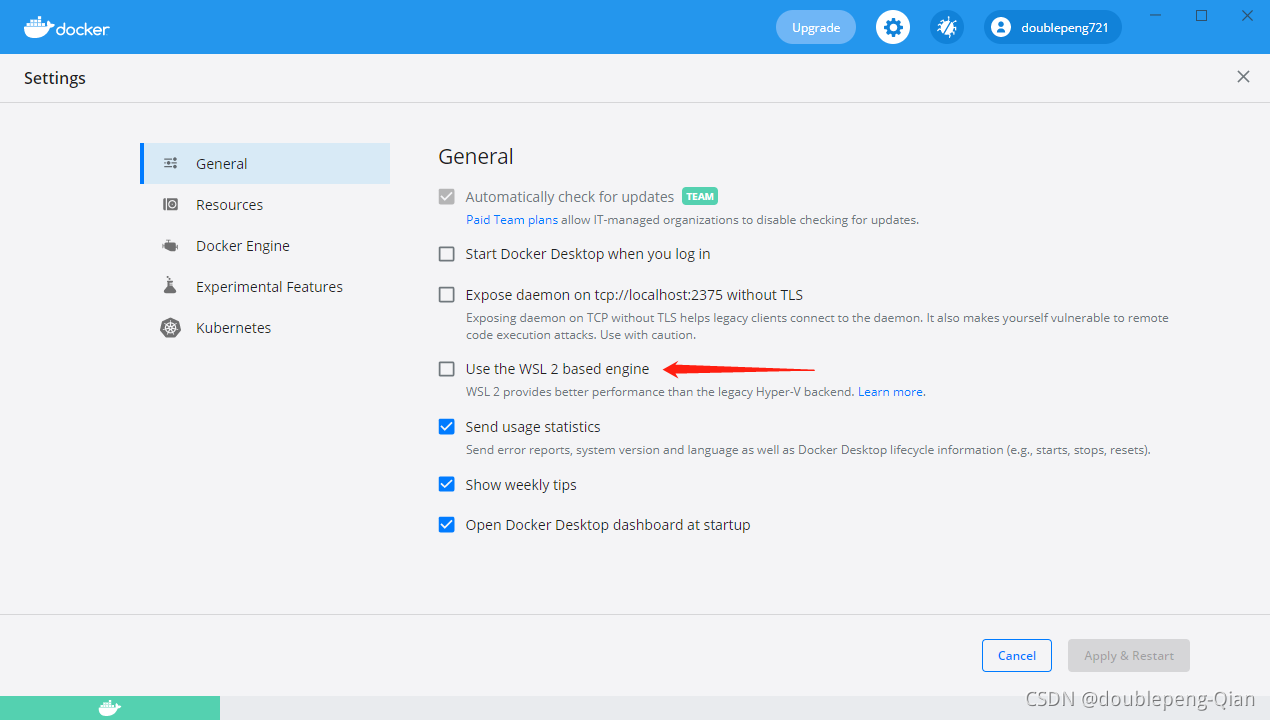
2. Close WSL 2-based engine, restart and restore to normal
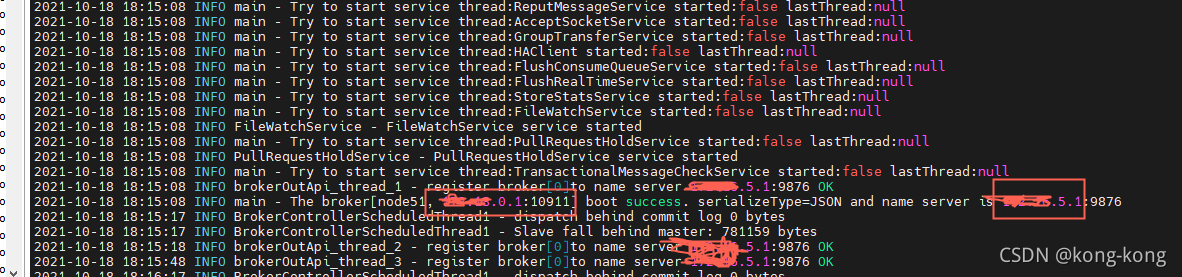
Borker start
When the broker starts, it is found that port 10911 is the IP address of the docker
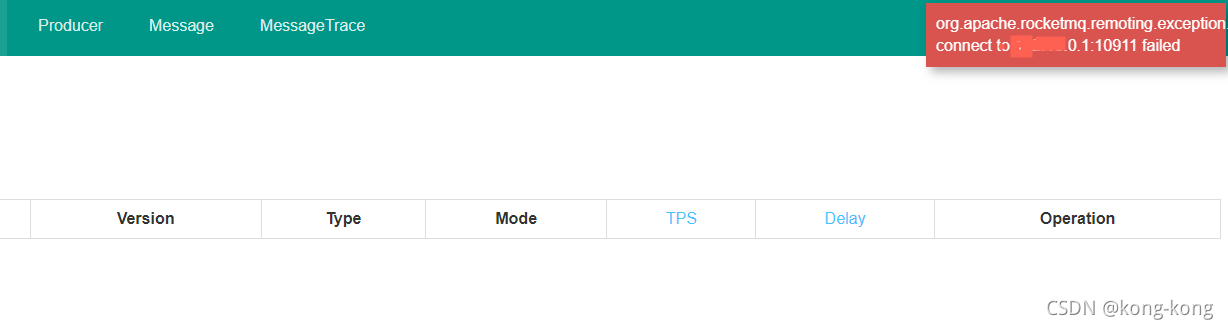
Then the rocketmq console also reports an error
Rocketmq console connection x.x.0.1:10911, connection error
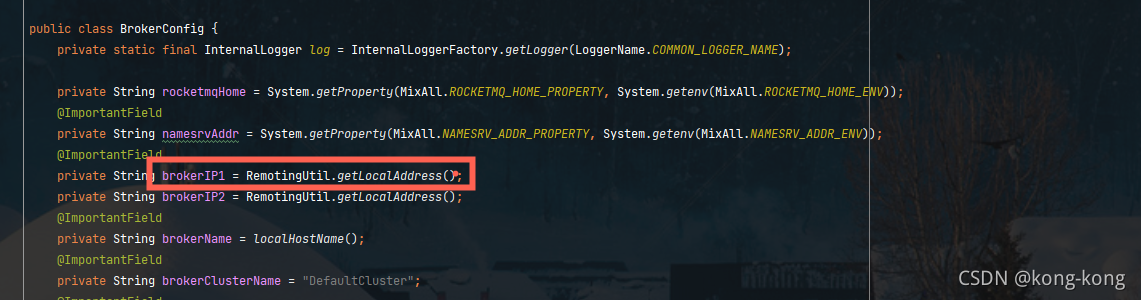
brokerIP1
# The ip of x.x.0.1 was retrieved through this
String brokerIP1 = RemotingUtil.getLocalAddress()
Solution:
New broker.properties
brokerIP1 = 192.168.5.1
start-up
nohup sh bin/mqbroker -n 192.168.5.1:9876 -c broker.properties & tail -f ~/logs/rocketmqlogs/broker.log
It took a long time today to find out the real problem.
There are two situations most likely to cause the whole exception:
1. No permission is given;
a. Permission application is not added in androidmanifest.xml;
<uses-permission android:name="android.permission.INTERNET"/>b. The format of permission application is incorrect
<!-- Mistake -->
<uses-permission android:name="android.permission.INTERNET"></uses-permission>
c. The permission is manually shielded by the user;
2. Port less than 1024; Set a larger one, not more than the largest one;